The most common problems with tablets that require repair:
- broken screen,
- tablet software freezes,
- touchscreen is damaged,
- WiFi or network is unavailable,
- power jack needs replacement,
- tablet won't turn on,
- SIM card is not detected
- tablet was dropped and something stopped working because of it
- tablet got water on it or fell into water and something also stopped working
- speakers are crackling
The troubleshooting algorithm directly depends on the nature of the fault. So, if the touch sensor or the tablet screen is broken, it needs to be replaced. However, in some models this is not possible, since the sensor and screen come as a single integrated part. In such cases, replacement of the tablet display is required.
If the tablet does not see Wi-Fi, the module needs to be replaced. A motherboard fault is possible due to overheating. In this case reflow soldering may be needed. The problem can also be caused by a software malfunction or a virus.
If the tablet won't turn on or freezes, there can be many causes: from overheating at the power connector to the main board. Board reflow soldering and chip replacement may be needed. In addition, the tablet freezes in case of a software malfunction. In this case a full system reinstall should be performed.
- Glass and sensor replacement: the top glass of the tablet is the touch screen that responds to touch. Loss of sensitivity, no response, cracks and chips – all of this indicates a fault in the touch glass. Failures mostly occur due to the tablet being dropped or exposed to moisture, less often due to software malfunctions. The touch glass is usually not repaired but replaced.
- Display replacement: the display is located under the touch glass and shows all the visual information. The display and the sensor are two completely different parts, each replaced separately from the other. While the sensor lets you control the device, the display shows information. A display fault shows up in symptoms such as: stripes or smudges on the screen, no backlight, distorted colors, image disappears or is absent.
- Tablet battery replacement: when the tablet's battery life decreases, the device turns off after an hour or even less of active use, or it simply only works when plugged into mains power – the battery is faulty and needs replacement.
- Tablet charging jack replacement: this connector handles tablet charging and its synchronization with a computer via a USB cable. If the tablet does not charge or does not sync – the charging jack needs to be replaced, if restoring its functionality is not possible.
- Power button replacement, lock button, volume control: on tablet devices, buttons are prone to dust and moisture getting under them. Also, any button may stop working due to physical impact – strong pressure, deformation as a result of a drop.
Going forward we will refer to:
“Tablet glass”, “touchscreen”, “sensor” — “sensor”,
“tablet display”, “tablet screen”, “tablet matrix” — “display”,
“display module” — display module.
Features of repairing and replacing tablet components:
Tablet sensor:
repair is possible only if the sensor itself is intact and the issue is with the flex cable — contacts came loose somewhere, a break occurred, etc.
The flex cable is resoldered, contact is restored — and everything works again.
If the sensor is broken — only replacement.
Tablet display:
repair is possible if water got inside it and white spots appeared. In that case the technician disassembles the display into its components (various films), processes and washes them, and restores functionality. Then reassembles both the display itself and the tablet.
The device can be repaired this way in 85% of cases.
This is 2-3 times cheaper than replacing the display.
Display module:
It doesn't matter — whether it's broken or delaminated, only replacement.
Repair is possible only if the flex cable came loose, something with the contacts.
If something happened to the tablet's screen: the panel is simply black, has frozen and does not respond to touch, is broken, spots or stripes appeared — bring it in for a free diagnostic.
After the check the technician will state the problem, options, timeframes and prices for the solution.
Disassembling the screen
Replacing the screen on a tablet starts with the user having to fully disassemble the failed screen.
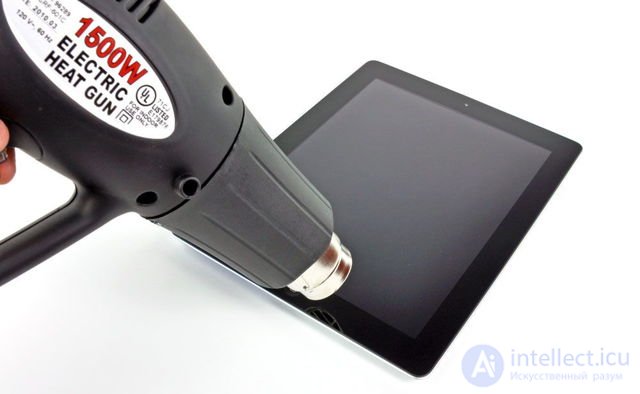
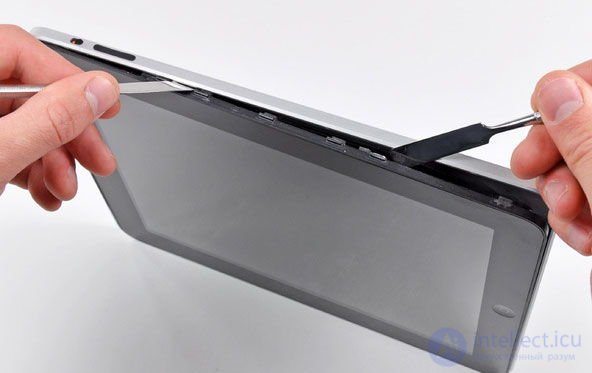
A heat gun is used to thoroughly heat the tablet's housing, which helps detach the screen without difficulty and without additional damage. After thorough heating, a utility knife is run along the entire perimeter to detach the glass, which is glued on with double-sided tape.
Once the glass has been successfully detached, tweezers are used to remove the remaining pieces of double-sided tape. Also, tiny fragments of glass may remain on the screen. These should also be carefully removed using a soft cloth or wipe.
Now everything is ready to install the new glass, from which the paper stickers must be removed. The glass is placed onto the frame and very carefully smoothed down with fingers.
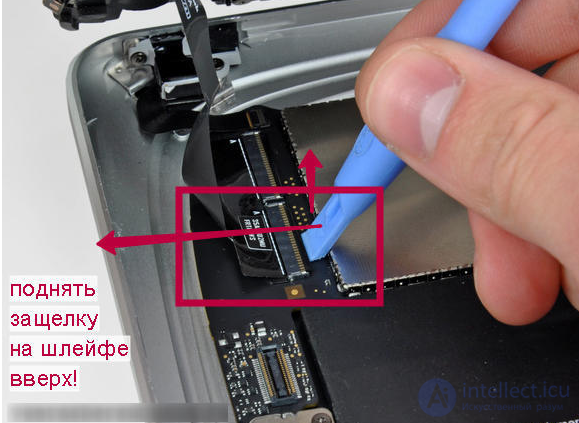
Disconnecting the screen flex cable
Next, the tablet is reassembled; the actions are absolutely identical to disassembly, but performed in reverse order. Once the work is complete, the tablet can be used right away.
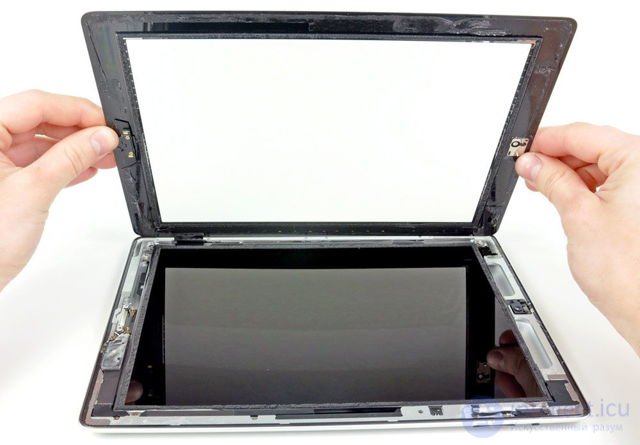
A technician who has completed a glass replacement can be proud of himself and his skills. However, it is very important to understand that preventing damage is much easier to achieve and leads to lower costs, so it should not be neglected.
A protective film on the tablet glass will protect the screen and matrix from damage, and consequently will save you from needing emergency repair work.
Example
I have a fairly rare tablet brand - Pixus. When I bought it, I of course understood there could be problems getting it repaired, but I didn't think it would be this bad.
Wherever I go, no one can repair it — either they can't diagnose the fault, or there are no spare parts. I no longer know where to turn.
Maybe someone knows of a service center that specializes in repairing this kind of tablet?

This isn't really a problem at all, you just don't know yet where to go. At the service center https://restore.com.ua/remont-planshetov your tablet will definitely be fixed and a warranty provided. They work quickly here, inexpensively and without days off, so go ahead and contact them. I've been repairing all my home electronics here for many years, and I'm very happy with the service.
Thank you so much for the advice. It's late now, but I'll definitely call them tomorrow.
This isn't really a problem at all, you just don't know yet where to go. At the service center your tablet will definitely be fixed and a warranty provided. They work quickly here, inexpensively and without days off, so go ahead and contact them. I've been repairing all my home electronics here for many years, and I'm very happy with the service.
And your advice really helped me. I didn't even spend time looking for a service center, went straight to ReStore, and the technicians handled the repair excellently.
I have a fairly rare tablet brand - Pixus. When I bought it, I of course understood there could be problems getting it repaired, but I didn't think it would be this bad.
Wherever I go, no one can repair it — either they can't diagnose the fault, or there are no spare parts. I no longer know where to turn.
Maybe someone knows of a service center that specializes in repairing this kind of tablet?
At least you know your brand, your model, and it actually exists, unlike cases where you need to repair some no-name Chinese device with no identifying markings whatsoever. As one option, try going to the "Tekhnari" service center where there are decent tablet specialists. I haven't personally had a tablet repaired there, only a laptop, but I'm sure they'll help you there. I wouldn't advise trying to fix the problem yourself, especially if you don't understand the subject and have never had this kind of experience.
See also
- [[b3296]]
- [[b9518]]
- [[b9101]]
See also


Comments