The main elements of the LCD monitor are:
LCD matrix
- Control device (CU)
- PC communication interface
- Power Supply (PSU)
- Video Processing Unit
- Backlight lamps
The operation of LCD monitors is based on the phenomenon of polarization of the light flux. Polaroid crystals are able to pass only that component of the light, the vector of electromagnetic induction of which lies in a plane parallel to the optical plane of the polaroid. For the rest of the luminous flux the polaroid will be opaque. Thus, the polaroid sort of “sifts” the light, this effect is called the polarization of light.
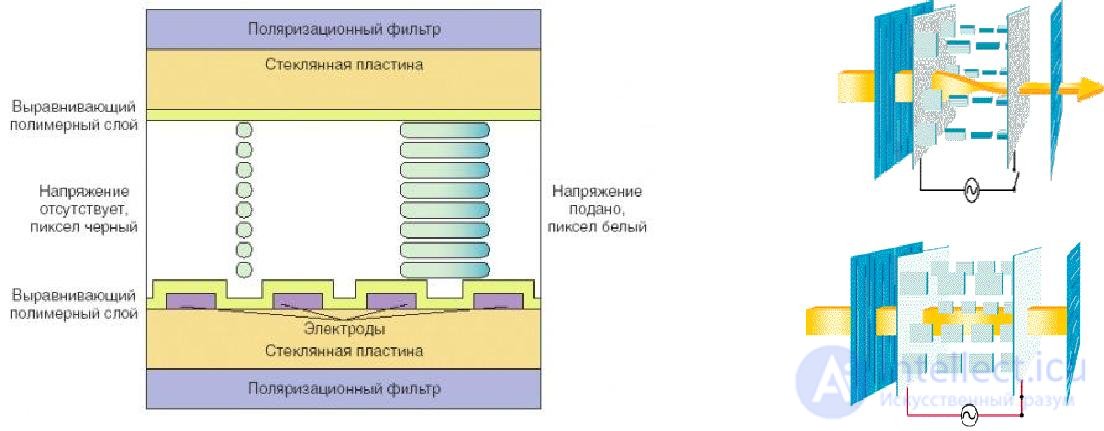
Figure 66 - Design and operation of the cell (TN) LCD monitor
Liquid crystal matrix device
The liquid crystal matrix consists of several layers - this is,
-
-
- three liquid crystal layer, which is suitable matrix of conductors;
- outer protective layer;
- internal reflective.
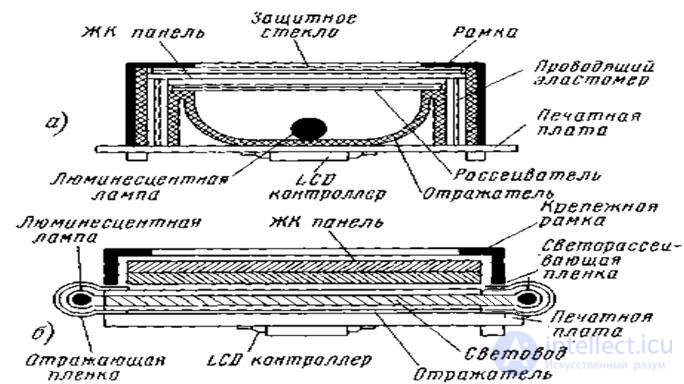
Figure 67 - Liquid crystal matrix device
At the edges of the reflective layer (usually above and below) there are two gas-discharge lamps like mercury daylight lamps, only with a “cold” cathode (Cold Cathode Lamp) instead of an incandescent spiral, and the glow in them is initiated by high-voltage gas ionization.
Power supply and DC / AC converter to power the backlight
The power supply unit provides the elements of the LCD monitor with a voltage of the desired value. BP is built according to the scheme of frequency conversion BP
A DC / AC converter (inverter), from a DC voltage of 12 V, supplied from the power supply through a connector, produces a 700 V alternating current with a load current of the order of 10 ... 12 mA and a frequency of about 50 kHz to supply two backlights of the LCD panel.
Control and synchronization system
The monitor control system is based on a microcontroller, non-volatile memory and front panel buttons. The microcontroller contains 1024 bytes of RAM and 64 Kbytes of ROM type Flash.
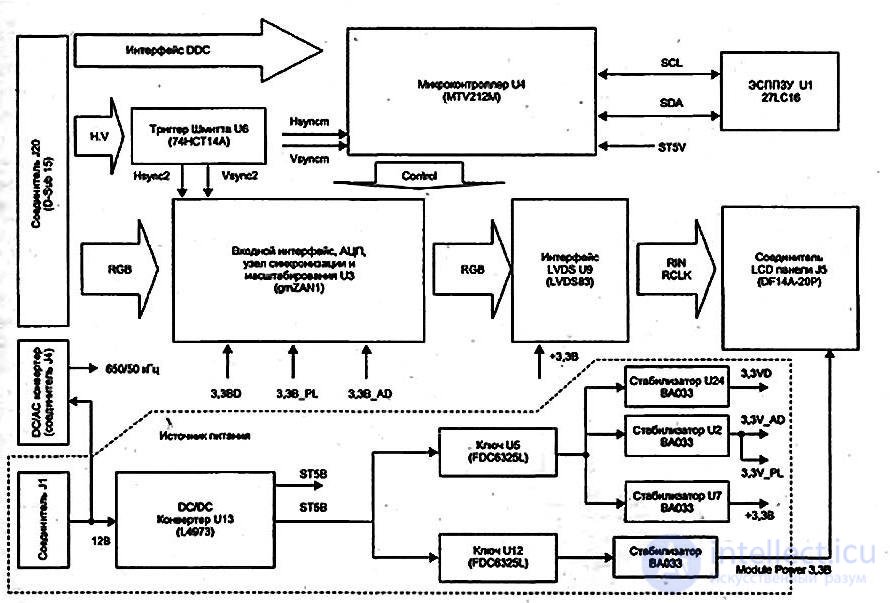
Figure 68 - Schematic diagram of the LCD monitor
The most common causes of faults are:
-
-
- Oxidation / contact failure,
Symptoms of oxidation / breakdown of contact are usually periodic flickering of the lamps, turning off one of them, or a reaction to vibration or light tapping on the body.
- Overheating of elements Usually, a fault appears on two lamps at the same time, since they have common elements: a high-voltage transformer and a transistor located on the inverter board.
- Poor soldering (microcracks, solder savings, not washed active flux).
If there are non-solder spots, microcracks, poor contact, when the board warms up during operation, some materials expand more, others weaker, and the contact either appears or disappears.
Typical malfunctions of modern TFT monitors and methods for their diagnostics:
-
-
- Failure of the inverter backlight lamp. The main symptom of a malfunction is a dark monitor screen. If you place the monitor under a desk lamp, then a faded image will be visible on the light.
- Failure of the backlight lamp. Externally manifested in the same way as when the inverter is faulty. The cause of the malfunction is a limited lamp life or the use of a monitor with a high brightness level set.
- Power Supply. The same faults and their causes as CRT monitors.
- The failure of the motherboard. This malfunction can have various manifestations: resizing of the image, its scale that cannot be adjusted, image shaking, etc.
- Mechanical damage to the matrix, ingestion of water or other liquids and foreign objects inside the device. The consequences of such effects can be very different, up to the complete nonrepairable equipment.
The peculiarity of the repair is determined by the presence in the LCD monitors:
-
-
- high voltage
- static sensitive elements
- the fragility of the design of the LCD panel, which is easily damaged.
When the monitor is turned on, the network indicator does not light up, the monitor does not work
Voltmeter check the presence of supply voltages. If the voltage is absent or it is significantly less than the norm, check the condition of the PSU. The power supply unit first checks the filter elements and fuse. If they are good, check the key elements of the inverter.
If one of the voltages is missing or its ripple exceeds 10%. check the external elements of the PWM microcircuits and the microcircuits themselves (by replacement).
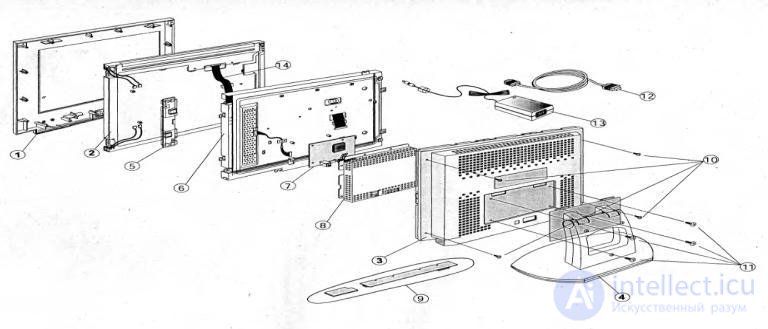
Figure 69 - The order of disassembling the disassembly of the LCD monitor
One or more vertical lines are missing in the image.
See also
- Fault-Finding Algorithm for TV Tuners, LCD Monitors, Televisions, TV Boxes, and Smart TVs
- Diagnostics and Fault-Finding Algorithms for RAM, Motherboard, and CPU
- Faulty ports on the motherboard (COM LPT USB)
- Performance Diagnostics of the Motherboard, CPU, and RAM
- Structural and Functional Diagram of an Ultrasound Device, Diagnostics and Repair of the Ultrasound Machine and Its Probes
- Malfunctions of active and passive radio radio elements
- Диагностика неисправностей видеокарты и ремонт
- Find, diagnose and troubleshoot an ATA disk
- 3.1.4. MAIN MALFUNCTIONS OF THE SYSTEMBOARD, THEIR SIGNS, CAUSES AND ELIMINATION METHODS
- Fault-Finding Algorithm for TV Tuners, LCD Monitors, Televisions, TV Boxes, and Smart TVs
- 3.1.7. MALFUNCTIONS OF THE HARDWARE PART OF HDD THEIR CHARACTER OF MANIFESTATION, TECHNIQUE OF THEIR ELIMINATION
- Troubleshooting. Methods of troubleshooting As well as the reasons for the inoperability of electronic devices.
- Fault finding algorithm
- 3.1.3. TROUBLESHOOTING ALGORITHMS FOR PC POWER SUPPLY
- TV malfunctions - causes and methods of elimination, block diagram and principle of TV operation
- 3.2.11. PRINCIPLE OF CONSTRUCTION AND BASIC TYPES OF LCD LCD MONITORS AND THEIR REPAIR METHODOLOGY
- 2.3. TYPES OF FAILURES, FEATURES OF THEIR APPEARANCE AND DETECTION
- Development of a diagnostic and troubleshooting algorithm.
- 3.5. NETWORK EQUIPMENT TROUBLESHOOTING


Comments