
Lecture
Video capture card — an electronic device (a PCI or PCI-E expansion card, or a USB-compatible board) for converting an analog video signal into a digital video stream.
As a rule, it consists of one or more ADCs and can process a signal from one or more analog sources (video cameras, video recorders, etc.).
A single card can convert the signal from one or several sources. The signal sources can be players, video recorders, camcorders.
These cards are used as the hardware component for video surveillance systems (their most frequent application), and for capturing video from an antenna or television input. For these purposes, video capture cards are equipped with a TV tuner and a radio-frequency demodulator. Modern cards are equipped with HDMI and DVI connectors, audio output ports, S-video output, and TV and FM antenna outputs.
They are most commonly used as the hardware component for video surveillance systems.
Cards used in closed-circuit television (CCTV) systems are divided by their video processing principle into:
Hardware-based ones have their own processors, allowing them to pack the video stream using one of the compression algorithms.
In software-based variants, the video packing is performed by the PC's central processor.
TV tuners can also be referred to as video capture cards.
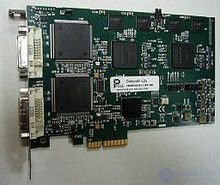
DataPath VisionRGB-E2s expansion card with two frame grabbers
Analog frame capture devices, which receive and process analog video signals, include the following circuits:
Digital frame capture devices, which receive and process digital video streams, include the following circuits:
Circuitry common to both analog and digital frame grabbers:
Capturing video from analog video sources requires a special electronic circuit. At the system level, this function is usually performed by a dedicated video capture device. Such devices typically use integrated-circuit video decoders to convert incoming video signals into a standard digital video format, plus additional circuitry to transfer the resulting digital video to local storage or to circuitry outside the video capture device, or both. Depending on the device, the resulting video stream may be transferred to external circuitry via a computer bus (e.g. PCI/104 or PCIe) or a communication interface such as USB, Ethernet or WiFi, or stored in a storage device within the device itself (e.g. a digital video recorder).
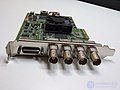
Dual-channel 3 Gbit/s SDI video capture card for PCIe (Blackmagic Design DeckLink HD Extreme 3D)
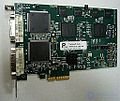
HDMI video capture card with 2 PCIe ports (Datapath VisionRGB-E2s)
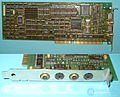
ISA analog video capture card
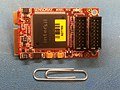
Mini PCIe card that simultaneously captures 8 video and 8 audio signals (Sensoray 1012)
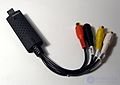
Inexpensive consumer-grade USB device for audio/video capture (Reddo Videosieppari)
Frame grabbers are used in medicine for many applications, including telenursing and remote guidance. In situations where it is necessary to consult an expert located elsewhere, frame capture devices capture an image or video from the relevant medical equipment so that it can be sent digitally to the remote expert.
"Pick and place" machines are often used to mount electronic components on printed circuit boards during PCB assembly. Such machines use one or more cameras to observe the robots that place the components. Each camera is connected to a frame capture device, which digitizes the analog video, thereby converting the video into a form that can be processed by the machine's software.
Frame grabbers can be used in security applications. For example, when a potential security breach is detected, the frame capture device captures an image or a sequence of images, and the images are then transmitted over a digital network, where they are recorded and viewed by security personnel.
In recent years, with the advent of personal video recorders such as camcorders, mobile phones, etc., video and photo applications have become increasingly widespread. Frame capture has become very popular on these devices. Video capture cameras can also be used for video streaming.
Amateur astronomers and astrophotographers use frame capture devices when using "low-light" analog cameras to display real-time images and stream video of celestial objects over the Internet. Frame capture devices are necessary to connect the analog cameras used in this application to the computers that store or process the images.
The main problem with video capture cards is connector damage. They may become loose from frequent connecting/disconnecting of the cable, or the connector can be torn off along with the contact traces if the cable is pulled forcefully or abruptly.
Thus, the main faults of video capture cards are:
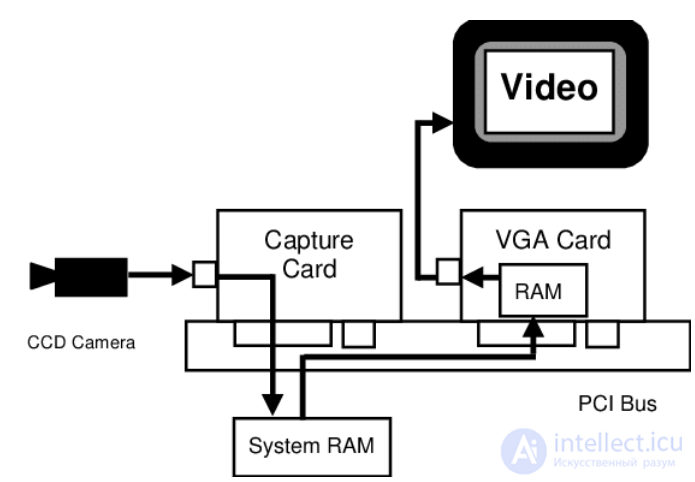
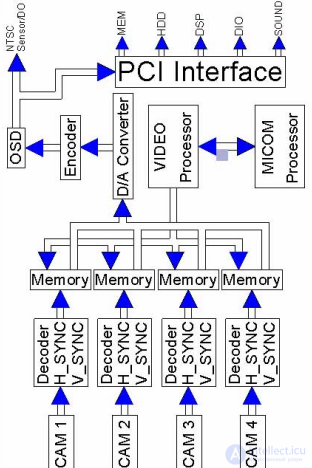
Off-screen capture, as shown in Figure 3. The ability to use off-screen capture mode provides fast image processing from the system's RAM. The image is transferred to VGA RAM only when a live image needs to be viewed on the screen, for example, during the setup and testing of color thresholds. After the color setup is completed, the image is transferred to VGA RAM turned off
After recording video or when connecting video surveillance cameras, you will probably need to save or view them on your computer, . However, you may encounter errors when trying to play the video. And sometimes you would get messages like: « Unable to play video. Sorry, this video cannot be played » or « Unable to play video. The file contains invalid data» or no image at all. If you recorded them and the process was not completed, they will not play. The reasons for this are that the videos were corrupted. So what causes video corruption or loss?
You should avoid recording video when the battery is low, as this will cause the camera or camcorder to shut down during recording, and an interruption during video recording will corrupt the video, and it will refuse to play on a media player.
You will lose access to the recorded video if it is connected to a system seriously infected with external threats such as spyware, malware, trojans, etc.
Videos recorded with your camera or camcorder may be corrupted if you abruptly remove the memory card without performing the proper procedure.
Shutting down the computer while a camera is connected to it can damage all video files recorded from the camera.
possible damage to circuits and components
possible damage to contacts and wires

Comments