
Lecture
Designing game levels and environments is one of the most important tasks in the game development process. Levels determine what the gameplay will be like, what tasks and challenges players will encounter, and how they will perceive the game world. This process involves not only visual elements, but also the integration of gameplay mechanics, objectives, and narrative components.
The task of a level designer is to create spaces that motivate players to explore, solve problems, and interact with the environment and characters. It is important to consider both the aesthetic and functional aspects of levels in order to create an immersive and engaging gaming experience.
A game level is a space in which the player interacts with the game world. A level consists of several elements:
Level design is the process of creating game spaces and interactions that players will explore and overcome. An important part of video game development, it involves many aspects: from visual styling to object placement, creating atmosphere, and thinking through game dynamics. Here are a few key fundamentals that will help you understand the level design process:
Before creating a level, it is important to define its purpose. What should the player achieve? What tasks and obstacles will stand before them? This includes:

The structure of the level's space should be thought out from the standpoint of the gameplay:
The difficulty of a level should increase gradually, so that the player can get comfortable with the mechanics and challenges:
A level should convey an atmosphere that matches the overall style of the game:
After creating a level, it is necessary to test it in order to identify:
Level design is a cyclical process. After testing, it is important to make changes in order to improve the gameplay. This process may be repeated several times until the perfect balance is achieved.
The level design process includes several key stages:
1. Conceptual development:
2. Creating a blueprint or prototype:
3. Grayboxing (or gray modeling)
Grayboxing (or gray modeling) is a method of level design in video games in which a rough version of a level is created using simple geometric shapes, usually gray boxes. This process allows you to quickly test and change the level's layout without being distracted by details and artistic elements.
Grayboxing is the process of blocking out (everything is blocks, primitives) a level without using any final artistic elements. This means that at this stage of level creation there are no detailed objects, architectural signatures, or any visual cues that could clearly indicate what the player is looking at, whether it is a house, a mountain, or some other environment. At this stage, instead of real objects, abstract shapes are used, such as simple cubes, cylinders, or planes, which leaves an enormous amount of room for further interpretation and creativity on the part of the art department.
Graybox is used in order to flexibly and quickly change the layout of a location as needed, and this makes it an indispensable tool in the early stages of level design. An example of this approach is the game Destiny 2, where the initial levels are created as abstractly as possible, without artistic details, with an emphasis on gameplay and movement logic.
The main steps of gray modeling include:
This method allows designers to focus on the gameplay and level layout before moving on to detailed elaboration and adding artistic elements.
At this stage, gameplay elements are checked, such as object positioning, interaction with the environment, and testing of visibility and sightlines.
4. Whiteboxing (or white modeling)
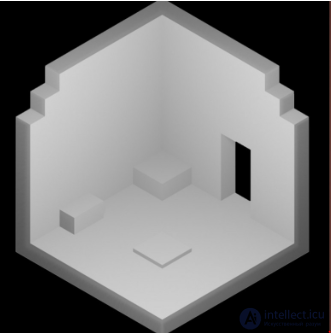
Whiteboxing in level design is the process of creating a basic version of a level using simple geometric shapes, such as white boxes. This method allows designers to focus on the gameplay and level layout before moving on to detailed elaboration and adding artistic elements.
Whiteboxing is a level blockout stage that often comes after the initial abstract planning, and differs in that it includes key elements that convey what the environment is. Unlike grayboxing, where completely abstract shapes are used, whiteboxing includes key shapes and silhouettes that already clearly make it apparent what a given object is: a tree, a tunnel, a waterfall, etc., even if the final artistic assets have not yet been added.
There are projects where developers are asked to start directly with whiteboxing, and there are projects where this stage follows preliminary grayboxing. The main difference is that at the whiteboxing stage, basic shapes are already used that convey the main ideas of the environment and the objects that are on the level. Even if there is no final detailing or textures, the structure and purpose of the space become obvious. An example from Uncharted: despite the absence of detailed art assets, on the level you can see the silhouette of a tree, a tunnel, railroad ties, and a waterfall. These elements are already elaborated enough to convey a clear sense of the place where the player is, and to help better understand the context of the game space. In such a whitebox it is easy to imagine what is happening on the level, and what the final result will be.
The main stages of whiteboxing include:
Whiteboxing helps quickly identify and fix problems with the level design before moving on to the more detailed and labor-intensive stage of development.
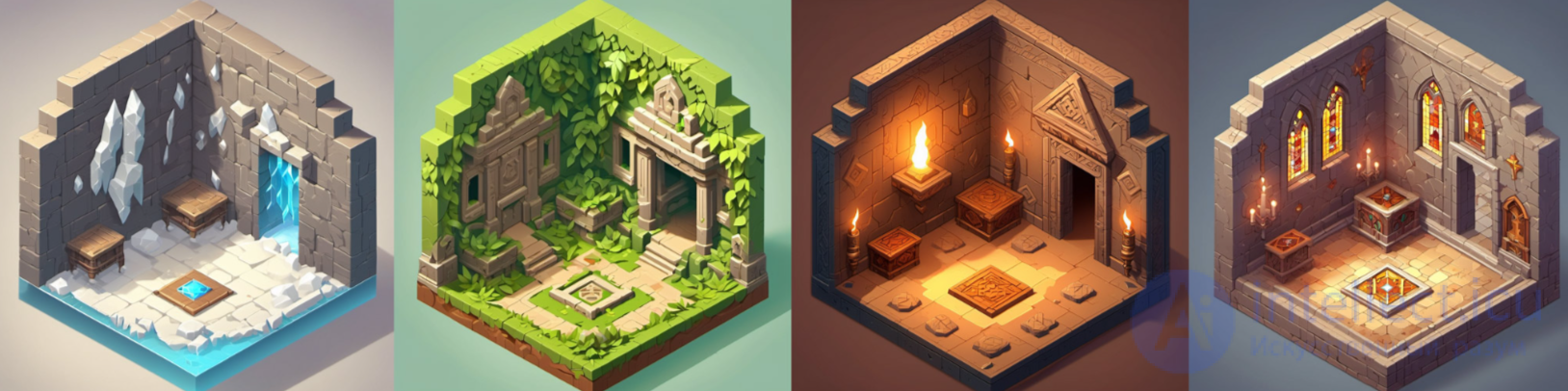
5. Detailing and art work:
6. Testing and refinement:
Game flow and difficulty balance:
Visual landmarks and navigation:
Progression and pacing:
Exploration and secrets:
Narrative interaction with the level:
Linear levels:
Open worlds:
Modular levels:
The environment plays a decisive role in creating atmosphere and conveying the emotional tone of the game. It is important to consider the following aspects:
Environment and atmosphere shape the player's mood and emotional response, immersing them in the game world. A properly created atmosphere enhances the experience, influences the perception of the plot, and makes the gameplay more captivating. Here are a few aspects that should be considered when creating the environment and atmosphere of a level:
Creating the right atmosphere in a game level is a synthesis of all these elements. The better the environment works in unison with the theme and mechanics of the game, the stronger the emotional response and the player's engagement will be.
In the context of level design, a pattern is a frequently used template or technique that helps create a certain gameplay experience or direct the player's attention. Patterns provide structure and logic to a level, making it clear, intuitive, and interesting. Below are described several common patterns that are often found in various games.
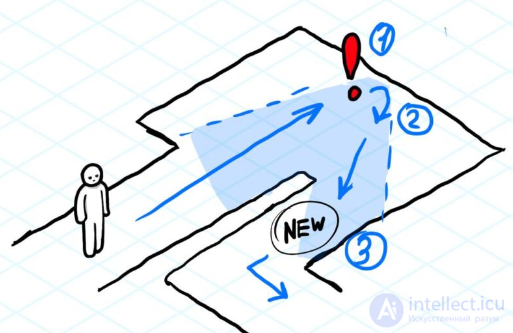
This pattern involves creating unexpected turns after dead ends. The player enters a room and sees an object of interest, but at first glance it is a dead end. They decide to turn around and go back, but notice a previously invisible passage. This technique creates a "wow effect" for the player, when they feel satisfaction from having found a hidden path, even though it was right in front of them. Such a pattern is often used in shooters or adventure games.
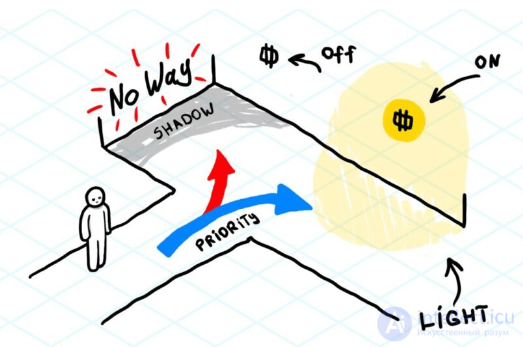
This pattern helps direct the player in the right direction with the help of light, especially in T-shaped corridors. When the player needs to make a choice, they usually look in both directions. Light is used to draw their attention to the correct path. The lighting can be either vertical or horizontal, indicating the path. This is a pattern that can be found in different genres of games. An example is a game where the lighting on the right side emphasizes the preferred direction.
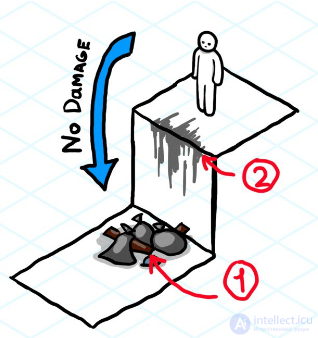
This pattern gives the player visual cues for safe descents and ascents in order to avoid taking damage. Objects such as garbage piles or worn surfaces show the player that here they can safely descend or climb. An example of use is patterns with garbage piles that indicate safe places for jumps, and worn corners that help better orient oneself in space. The goal of this pattern is to help players more quickly understand their character's capabilities and direct them onto the right path.
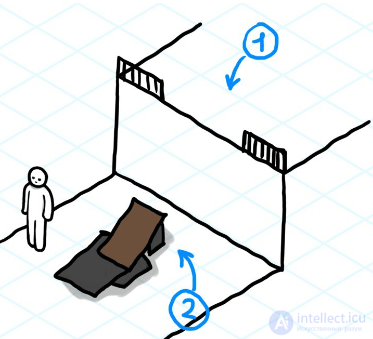
This pattern focuses on ensuring that the player can clearly understand where they can climb or interact with the environment. For example, gaps in a fence or specially placed boards can indicate an accessible path upward. These elements help visually indicate possible actions and correspond to the game metrics, which makes the gameplay more understandable. The goal of this pattern is to hint to players where they can climb, and to ensure a better correspondence between the character's capabilities and the environment.
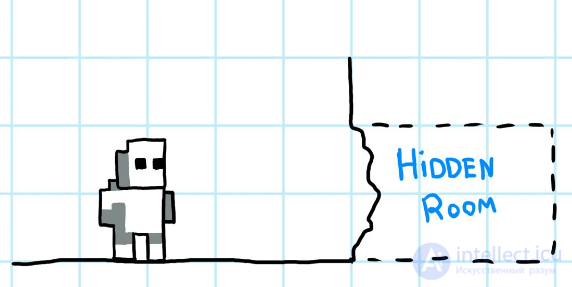
This pattern concerns hidden passages that can be found thanks to visual cues. For example, small niches or recesses can indicate the presence of a secret path. These cues help players consciously find secret passages, rather than accidentally stumbling upon them. The pattern is often applied in platformers, but it can also be used in other types of games. Without such cues, players would find secret passages randomly, which does not correspond to the idea of well-designed secrets.
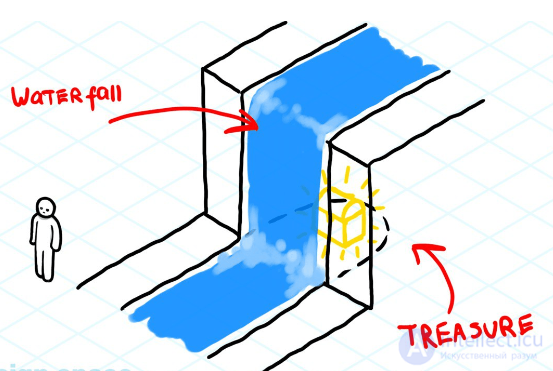
This pattern is found very often in games: behind a waterfall a treasure or a secret room is hidden. The waterfall serves as a natural cue for the player, hinting that there may be something interesting behind it. This technique works especially well in natural locations, adding elements of exploration and intrigue. Players always check waterfalls for hidden passages, which makes this pattern quite expected, but at the same time interesting.
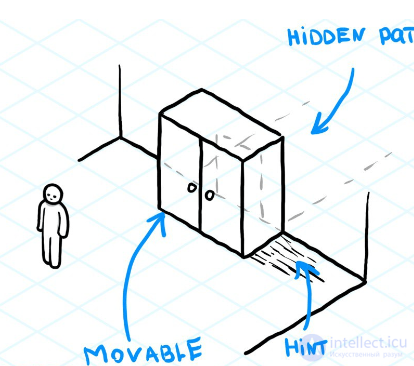
This pattern uses scratches on the floor as a visual cue that an object can be moved. Such scratches are usually located under cabinets or other objects and signal that the object can be shifted, opening a passage. The passage can be either mandatory for completing a quest or a regular secret. The goal of this pattern is to hide a passage "in plain sight," requiring attentiveness from the player. This approach can be used in different types of games.
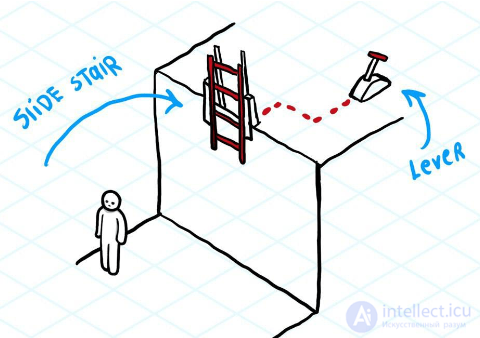
Shortcuts often appear in the form of obstacles that can be opened only from one side. This can be, for example, a door that opens only from one side, or a plank that can be crossed only from one side of a crossing. The goal of this pattern is to help the player logically fit the shortcut into the gameplay by hinting at its existence. Such patterns are often used in metroidvanias, but can also be applied in other genres.
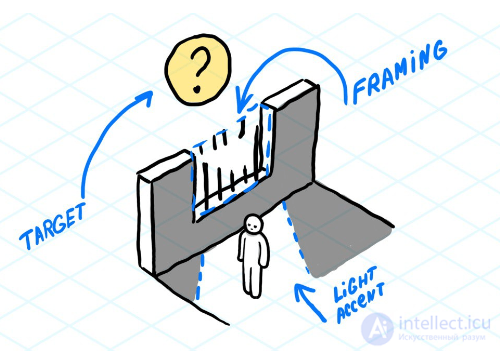
The framing and accent pattern is used in order to draw the player's attention to important objects or events on the level. The combination of light and a frame helps highlight the target object, scene, or task, guiding the player and reinforcing the game's narrative. This is a pattern that can often be found in shooters, where quick capture of attention is important, but it can be adapted for use in various genres.
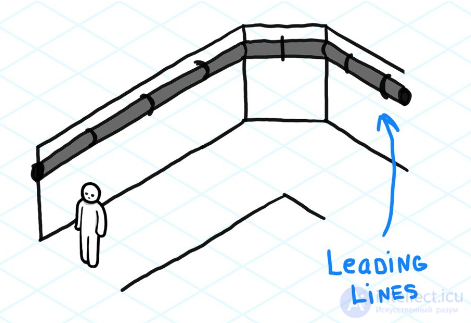
This pattern uses leading lines to indicate to the player the presence of a passage around a corner. For example, a pipe or another object can lead around a corner, letting the player know that the corridor continues. Often this technique is reinforced with lighting, so that the player intuitively understands that there is a continuation of the path around the corner. Such a pattern can be found in games with a first- or third-person view.
This pattern uses large and visible objects or landmarks in order to direct the player toward a goal or an important place. For example, in open-world games a mountain, tower, or lighthouse can serve as visual targets that the player uses for orientation while moving across the map. This helps the player not to get lost in a large game space.
Limiting the player's field of view with the help of the level can be used to create tension or intrigue. For example, narrow corridors or limited lighting force the player to move cautiously, expecting possible danger. This pattern is often found in horror games or shooters, such as Dead Space or Resident Evil.
These are places on a level where the player can rest, reload, or save the game. In such zones there are usually no enemies, and the atmosphere is calmer. Examples are the bonfires in Dark Souls or the save rooms in Resident Evil. These zones give the player a breather between tense moments and create a balance in the game's rhythm.
This pattern uses small but noticeable objects to hint at the player's path. Such elements can be scattered along the level (for example, lamps, signposts, road signs) and help the player move forward without losing their bearings. They can be more subtle than leading lines, but perform the same function.
The use of objects or environmental elements that block the path, forcing the player to look for workarounds. For example, ruined bridges, walls, or doors that require a key or another means of opening. This stimulates the player to explore the level and search for solutions.
This pattern involves the use of puzzles or mechanics to open access to the next area. This can be flipping levers, pressing buttons, or solving puzzles in order to activate doors, elevators, and other elements. Such a pattern is often used in adventure games and platformers.
This pattern forces the player to return to previously visited areas, which may now be changed or accessible with new abilities. It allows the exploration of the level to be expanded and is often found in metroidvanias, such as Hollow Knight or Metroid.
The inclusion of moments of lull or calm between more tense situations. This can be through the use of long corridors, empty rooms, or calm scenes before a dynamic battle or a difficult puzzle. The goal is to give the player a breather and improve the balance of tense moments.
Enemies can be placed in a level in such a way that their behavior or location hints to the player about the correct path or mechanic. For example, an enemy may stand on a platform that can be activated, or block a path that needs to be found. This helps the player understand the structure of the level through interaction with opponents.
A pattern of using water to create new obstacles or opportunities. For example, levels where the player needs to raise or lower the water level in order to open new passages or reach previously inaccessible places. This pattern is often found in puzzle games, such as The Legend of Zelda.
This pattern includes environmental elements that can change during the game, such as collapsing bridges, moving platforms, or changing weather conditions. This adds dynamism to the gameplay, forcing the player to adapt to changes in real time.
The use of sound to direct the player. For example, faint footsteps can indicate an approaching enemy, and the sound of running water can hint that there is a river or waterfall ahead. Sound effects are used for orientation and creating atmosphere, especially in games with a limited field of view.
Traps are level elements that are activated when passing through a certain area and can deal damage to the player. These can be falling rocks, spikes, or hidden enemies. Traps add tension and require attentiveness from the player.
This pattern involves the use of changes in gravity to create unusual movement mechanics. The player can flip the level upside down or change the direction of falling in order to solve puzzles and explore new areas. This adds originality to the gameplay.
This pattern includes the use of limited time to complete a task. For example, the player may be given a certain amount of time to finish a level or pass through a dangerous zone. Timers create additional stress and dynamism in the gameplay.
These patterns help designers create intuitive and captivating game levels, making it easier for players to explore and make decisions in the game space.
Molecular level design is an approach to creating game spaces that involves designing levels based on a set of small, interconnected components or "molecules." These molecules are game elements that can be combined to create more complex and cohesive game spaces. This method helps simplify the level creation process and make levels more logical and interconnected.
Modularity
Each molecule is relatively self-contained and can be used in different places on a level or even in different levels. These can be elements such as rooms, corridors, cover, enemies, puzzles, and even scripted events. These elements can be combined to create more complex and interesting spaces. This approach allows levels to be easily adapted by changing the location or functions of individual components.
Reuse
One of the key advantages of molecular design is the ability to reuse the same molecules multiple times. This saves time and resources during design, since the same element can be applied in various contexts and with small changes. For example, the same staircase can be used in different parts of a level, but with a different perspective or task for the player.
Connection between molecules
An important feature is the connection between molecules. Each molecule should logically interact with the others, creating a sense of the cohesion of the game space. These connections can be both visual and functional. For example, if one molecule is a puzzle with a lever, it can be connected to another molecule, a door, which opens after the puzzle is solved.
Flexibility and adaptability
Molecular design offers flexibility when creating levels. Depending on the game's tasks or the mood of a scene, molecules can be changed or adapted to achieve the desired effect. If it is necessary to create a more dynamic or tense scene, then one can change the placement of molecules or add new ones in order to enhance the action or create surprises for the player.
Stability and predictability
By using proven molecules, designers can confidently design levels, knowing how the elements interact with each other. This reduces the risk of errors or problems in the gameplay, since all the elements have already been tested and work as they should. For example, if an enemy in a certain molecule always provokes a certain reaction from the player, this is predictable and can be used to create certain moods or effects.
Evolution of difficulty
With the help of molecular design, one can gradually complicate the gameplay by adding new molecules or changing existing ones. This gives players the opportunity to adapt to the game mechanics before encountering more difficult tasks. For example, one can first present a simple corridor with a single obstacle, and later complicate it with additional enemies or puzzles.
Super Mario
Levels in the Super Mario games are often built from repeating elements, such as platforms, staircases, enemies, and traps. These components can repeat with small variations, creating varied challenges for the player, while maintaining the cohesion of the gameplay.
Portal
The game Portal excellently illustrates molecular design. It uses sets of puzzles (molecules) that the player must solve. These puzzles can be combined to create more complex tasks as the game progresses, gradually increasing the difficulty.
Dark Souls
In Dark Souls, levels are connected to each other by short paths and shortcuts, creating a unified and interconnected world. These paths and transitions can be viewed as molecules, which together form a more complex network of routes.
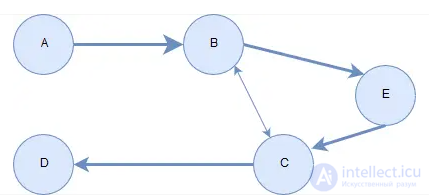
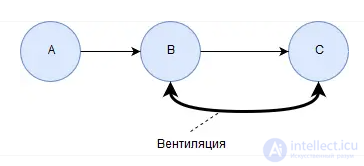
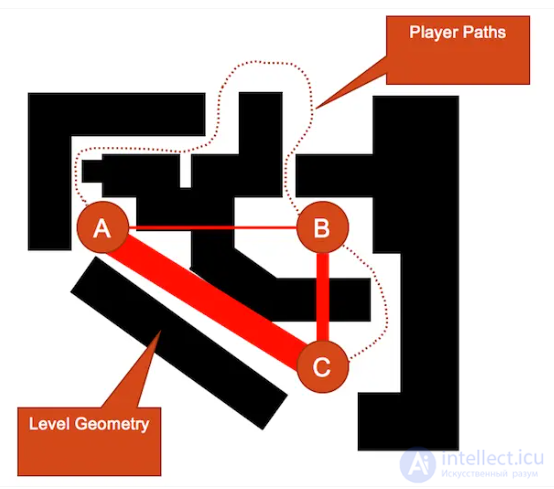
Each diagram can be considered as a directed graph, which includes two main elements: nodes (or vertices) and edges (or connections). These components form the foundation for creating and developing molecular level design. Nodes represent points, and edges represent the paths connecting them to each other. This basic representation of a diagram is used in the process of planning game levels, allowing the design of routes and interactions between various locations. The figure below shows an example of one such diagram.
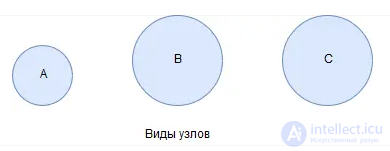
Nodes play the role of vertices, each of which represents a specific location on the game level.
Each node has its own characteristics, among which the key ones are:
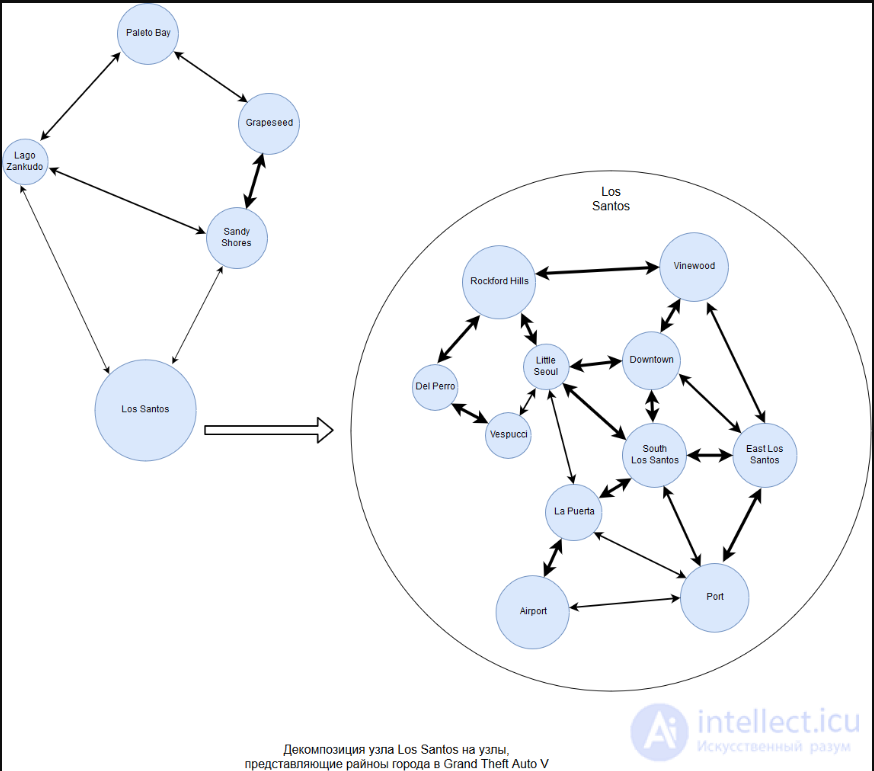
The name serves to uniquely identify each node, which facilitates discussion and coordination within the development team. This is especially important when creating complex game worlds, where it is necessary to clearly distinguish between various zones. The size of a node, in turn, demonstrates not only the relative dimensions of each location, but also the number of significant events or actions occurring in it. Larger nodes indicate more important or active zones, while smaller nodes represent less densely packed areas. These sizes can vary from node to node on the same diagram.
The edges connecting the nodes denote the player's possible transitions between various locations. Each edge has its own parameters:
The direction shows the path of the player moving from one location to another. On the diagram, this is usually depicted in the form of arrows. If the arrows are absent or they point in both directions, this implies that the player can move freely between locations without restrictions. A one-way arrow means that after moving into a new location, the player will not be able to return by the previous route. The direction of transitions plays a key role in creating the dynamics of the gameplay, influencing the way in which the player will explore the game world.
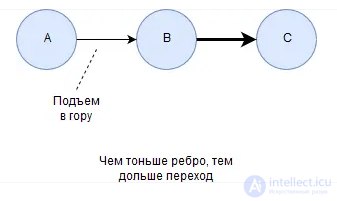
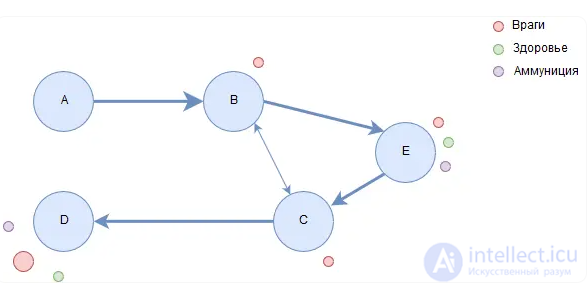
The thickness of the edges indicates the time required to transition between locations. The greater the thickness, the less time is spent on the transition. However, the duration of the journey can be influenced by various factors, such as enemies, puzzles, or other obstacles. These elements impede the player's progress and should be marked on the diagram with the help of special symbols or annotations, so that they can be taken into account during design.
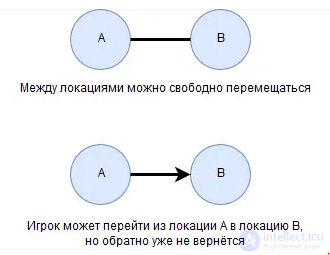
Between different locations there can be several different edges, which provides the player with various paths for movement. For example, between locations A and B there can be a one-way connection, allowing movement from A to B. However, if in location B there is a hidden passage, the player will be able to return back to A by an alternative path. Such hidden elements add additional depth to the gameplay and expand the possibilities for exploring the world.
Each diagram can be detailed and divided into smaller fragments, which is especially useful when developing large and complex open worlds. First, large nodes are created (for example, cities or important objects), after which each of these nodes is broken down into smaller zones or locations. These locations can be further divided into separate sections, each of which contains its own unique features and areas of interest for the player.
It is important to consider that the nodes and edges on the diagram should be positioned so as to reflect their actual geographical position in the game world. This will make it possible to create a more accurate and realistic level plan. The placement of nodes and connections on the map should help orient oneself in space and effectively design the gameplay. In addition to the main elements, additional objects can be added to the diagram, which provide more information about each location:
These additional elements are usually depicted in the form of small circles and are connected to the nodes through dashed lines or are designated by a special legend on the diagram. This helps developers better understand what is happening in each location and what important objects are located there.
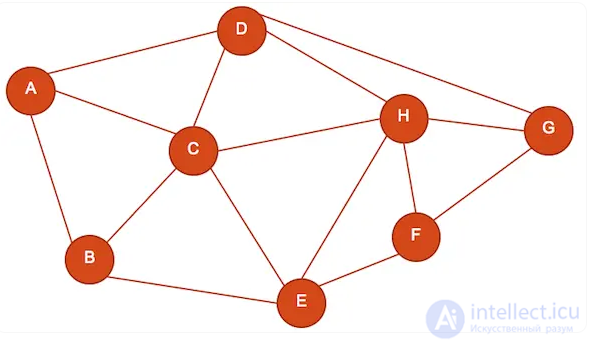
Creating a level diagram is useful not only for designing locations and the paths between them, but also for analyzing and optimizing the overall game map. Graphical analysis can show the number of possible transitions between locations and reveal the fastest or slowest routes. This makes it possible to identify unnecessary connections that can overload the map and create excessive difficulties for the player. Too many route options can cause the player a feeling of confusion and irritation, just as a lack of choice can lead to boredom.
After the graphical diagram of the level has been created and analyzed, one can move on to designing a more detailed plan of the game world, paying attention to each element and interaction on the level.
Procedural level generation is the automatic creation of game space using algorithms that generate elements dynamically, rather than manually developed by the designer. Procedural level generation can be implemented using various approaches: grid-based generation, noise (for example, Perlin), decision trees, or other algorithms.
Perlin noise for more natural generation: to make a level more organic, one can use Perlin noise to generate the base elements of a level (2D tiles, 3D blocks)
Generation of paths or corridors: one can implement algorithms such as random walks or maze generation (for example, Prim's algorithm or depth-first search).
Placing objects: after generating the level map, one can add items, enemies, or the player at certain positions.
For games with high game-design requirements (for example, mazes, puzzles), it is better to add additional checks so that the player can always reach the end of the level.
Designing game levels, locations, and environments is a complex process that includes both technical and creative aspects. A successful level should be not only visually appealing, but also functional, supporting the goals of the game and creating a captivating experience for the player. It is important that each element of the level be carefully designed, taking into account both the gameplay mechanics and the narrative needs of the game.
Level design patterns help diversify levels and make them more engaging for the player, offering new challenges and ways to interact with the game world.
Molecular level design is an effective approach to game design that makes it possible to create complex and interconnected spaces using a set of small components. This method not only makes the developers' work easier, but also makes levels more engaging and logical for players, offering a gradual increase in gameplay difficulty and adaptation to the game mechanics.
Levels can be created both manually and automatically with the help of procedural level generation, a powerful tool for creating unique game spaces, but it is always important to test levels for traversability and balance.
Level design is a cyclical process. After testing, it is important to make changes in order to improve the gameplay. This process may be repeated several times until the perfect balance is achieved. An important part of successful level design is the ability to understand the player's motivation and behavior in order to create interesting and engaging game spaces.

Comments