Game prototyping is a key stage in game development that allows you to test ideas and mechanics in the early stages. Prototypes help identify problems and improve the concept before full-scale development begins. Prototyping is an integral part of the game development process. It allows you to quickly test the game concept, evaluate gameplay mechanics, get feedback from players, and make necessary changes in the early stages of development. In this lecture, we will look at the basic principles and methods of creating game prototypes.
What is a game prototype? Why create prototypes?
A game prototype is a minimum viable version of a game that allows you to evaluate the core gameplay mechanics and concept. Prototypes can be very simple, consisting of a few elements, or more complex, approaching the final version of the game.
Purpose of a prototype:
- Quick validation of ideas: Prototyping allows you to quickly check whether your idea works and whether it is interesting to players.
- Identifying problems: In the early stages of development, it is easier to identify and fix problems in the game design.
- Saving time and resources: Making changes in the early stages of development is cheaper than in the later ones.
- Gathering feedback: Prototypes allow you to get valuable feedback from players and make the necessary adjustments to the game design.
- Demonstrating to investors: A prototype can serve as a compelling argument when seeking funding for a project.
- Saving resources: Prototypes allow you to identify errors and flaws in the early stages, which saves time and money.
- Testing ideas: Prototypes make it possible to check how interesting and playable an idea is.
- Communication: Prototypes help the team better understand the concept and goals of the project.
A prototype focuses on implementing the core mechanics, key features, and basic entities of the game, without adding extra elements that can distract from and complicate the development process. Its main goal is to test the central ideas and make sure they work before adding aspects such as graphics, sound, or additional features. It is important to avoid unnecessary details at this stage in order to maintain clarity and focus on the main elements of the game. This allows developers to more quickly identify and fix errors, as well as to assess how engaging the basic mechanics are.
Types of prototypes (Prototyping methods and tools)
- Pixel prototypes: Simple 2D prototypes created using pixel graphics.
- Card prototypes: Prototypes implemented using cards that describe game elements and rules.
- Paper prototypes: Prototypes created on paper using various graphic elements.
- Interactive prototypes: Prototypes created using game engines or specialized software.
- Paper prototypes: A quick and cheap way to visualize ideas. Used for board games and the initial stages of video game development.
- Digital prototypes: Created using software such as Unity, Unreal Engine, or specialized prototyping tools (for example, Figma, Sketch).
- Interactive prototypes: Allow users to interact with the game, which helps them better understand the mechanics and dynamics.
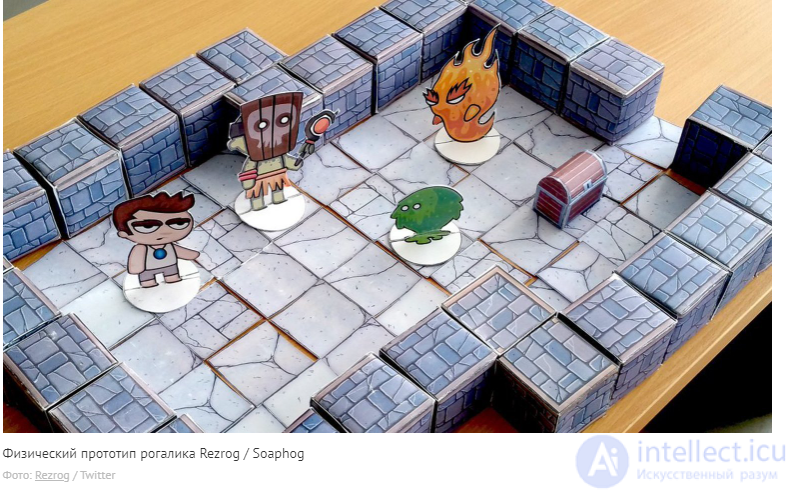
The process of creating a prototype
- Idea and concept: Define the main idea and goals of the prototype.
- Planning: Develop a plan for creating the prototype, including the choice of tools and methods.
- Defining the core mechanics: Clearly formulate which gameplay mechanics you want to implement in the prototype.
- Creating the prototype: Choose a suitable tool and create a minimum viable version of the game. Start with simple elements and gradually add complexity.
- Testing: Test the prototype yourself and show it to other people. Conduct testing with the team and the target audience.
- Analyzing the results: Gather feedback and analyze the testing results. Collect feedback, analyze the results, and make the necessary changes.
- Iterations: Make the necessary changes to the prototype and repeat the testing cycle.
. Examples of successful prototypes
- Braid: The game started as a simple prototype that allowed developer Jonathan Blow to test unique time mechanics.
- Celeste: It was originally created as a prototype for a game jam, and then turned into a full-fledged game.
Tools for creating prototypes
- Unity: A powerful game engine that allows you to create prototypes of varying complexity.
- Unreal Engine: Another popular game engine with extensive capabilities.
- GameMaker Studio: An easy-to-use tool for creating 2D games.
- Twine: A tool for creating text adventures.
- Balsamiq: A tool for creating interface mockups.
Tips for creating prototypes
- Start simple: Don't try to create the perfect prototype on the first try. Start with a minimal set of features and gradually add new elements.
- Focus on the core mechanics: A prototype should demonstrate the core gameplay mechanics, not all the details of the game.
- Use an iterative approach: Prototyping is an iterative process. Don't be afraid to make changes and experiment.
- Collaborate with the team: Involve other team members and players in testing the prototype.
- Document the process: Keep records of your decisions and changes so that you can return to them in the future.
Prototype, and vertical and horizontal slices
Beginning developers often face a problem where, instead of creating a prototype, they unconsciously make a vertical slice of the project. This leads to the emergence of complex and unmanageable tasks that can drive development into a dead end. Therefore, it is important to clearly understand the difference between a vertical slice and a prototype.
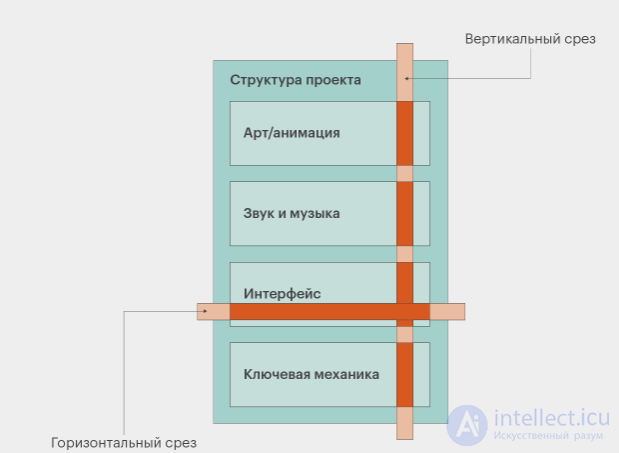
In the diagram from the book by Ernest Adams and Joris Dormans, "Game Mechanics: Advanced Game Design" (2012), it can be seen that if you structure the project by its components in the form of a table, then you can distinguish two types of slices: horizontal and vertical. A horizontal slice covers one aspect of the game, for example, the user interface, while a vertical slice covers all the elements of the game.
A vertical slice includes practically all the components of the project: code, graphics, sound, gameplay, and content. It is a kind of large-scale prototype that confirms that the game has the potential described in the documentation. It is specifically on the basis of the vertical slice that a project is most often demonstrated to publishers and investors.
Although in theory a prototype can become the basis for a vertical slice, this is rarely justified. Creating a prototype requires a different development approach, one aimed at testing the core mechanics of the game rather than creating a full-fledged representation of all aspects of the project.
Conclusion
Prototyping is an important tool in a game designer's arsenal. It allows you to quickly test ideas, gather feedback, and create a higher-quality game. Don't be afraid to experiment and create prototypes, even if they are far from perfect. Prototyping is an integral part of the game development process. It allows you to save resources, test ideas, and improve the final product. It is important to remember that prototypes do not have to be perfect - their goal is to test and improve concepts.
Assignments for independent work:
- Create a simple game prototype using any available tool.
- Analyze the prototype of a popular game and identify its strengths and weaknesses.
- Develop a plan for testing a prototype.
Self-assessment questions:
- What types of prototypes have you used in your projects?
- What difficulties have you experienced when creating prototypes?
- How do you gather feedback from players when testing prototypes?
See also
- [[b12576]]
- Prototyping the user interface.
- Prototyping levels.
- Using prototypes to present the game to investors.
- Tools for creating mobile game prototypes.
See also


Comments