
You get a bonus - 1 coin for daily activity. Now you have 1 coin

Video Editing Basics: Types, Best Practices, Mistakes and Tests

Lecture Tests


Other peoples correct answered (level of difficulty) 0% questions

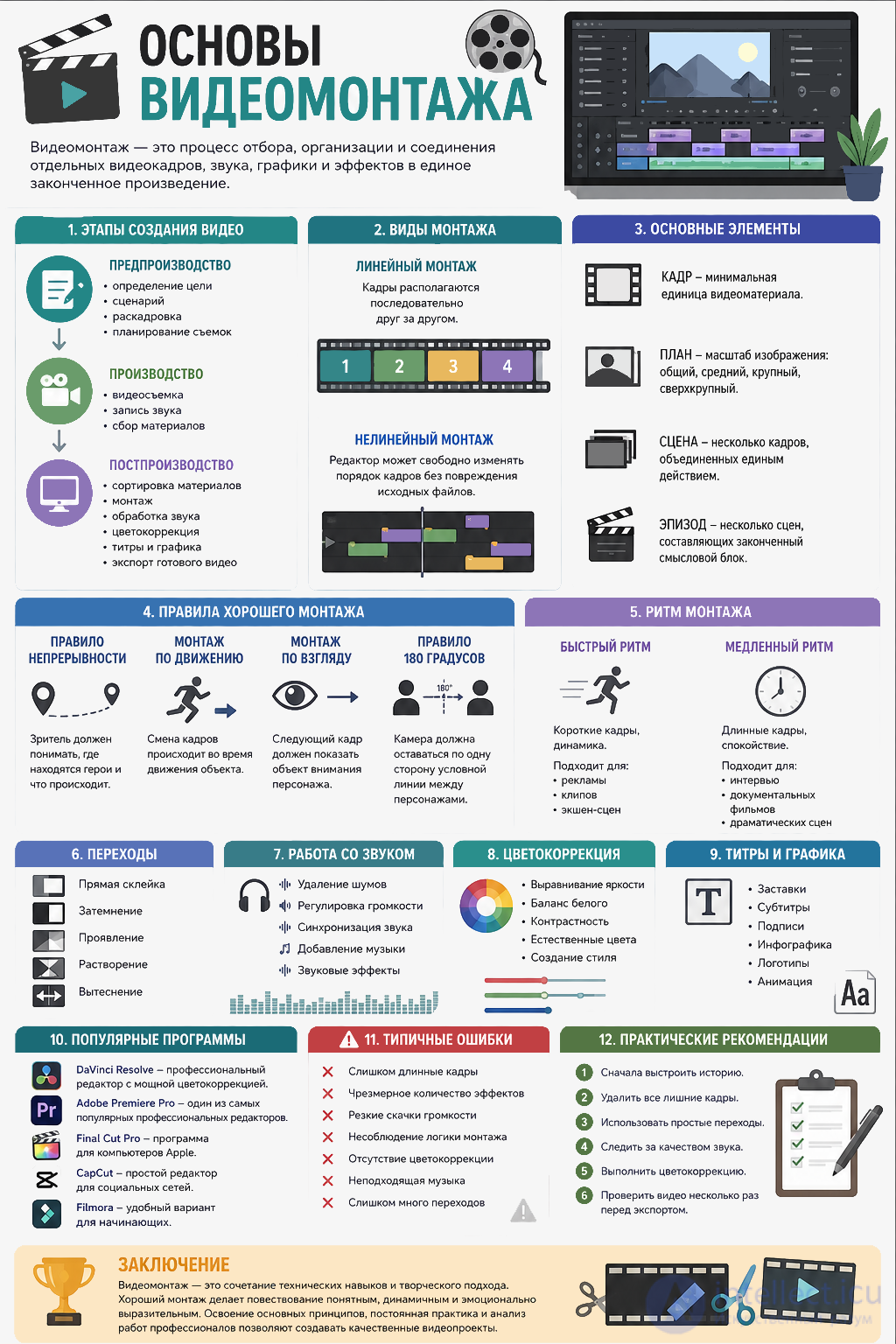
Video editing is the process of selecting, organizing, and combining individual video shots, sound, graphics, and effects into a single finished work. The quality of the editing determines how clear, dynamic, and emotional the story will be.

Today, video editing is used in film, television, advertising, social media, educational projects, and corporate presentations.
Video Editing Basics: Types, Best Practices, Mistakes and Tests

1. What is video editing

Editing is not just splicing shots together. Its main task is to tell a story, hold the viewer's attention, and convey certain emotions.

The main functions of editing:

  • creating a sequence of events;

  • controlling the rhythm of the narrative;

  • shaping the emotional impact;

  • removing unnecessary material;

  • directing the viewer's attention.

2. Stages of creating a video

The process of working on a video usually consists of several stages.

Pre-production

At this stage:

  • the goal of the video is defined;

  • the script is written;

  • a storyboard is created;

  • the shoot is planned.

Production

Filming takes place:

  • video is recorded;

  • sound is recorded;

  • additional materials are gathered.

Post-production

At this stage the following are performed:

  • sorting the material;

  • editing;

  • sound processing;

  • color correction;

  • adding titles and graphics;

  • exporting the finished video.

3. Types of editing

Linear editing

Shots are arranged sequentially one after another.

Used for simple storytelling.

Non-linear editing

The most common way of working.

The editor can freely change the order of shots without damaging the source files.

Practically all modern programs work this way.

4. Basic elements of editing

Shot - The minimal unit of video material.

The Timeline is the working area of an editing program, where video and audio tracks and effects are placed.

Shot type

A distinction is made between:

  • wide;

  • medium;

  • close-up;

  • extreme close-up.

Alternating shot types makes the video more interesting.

Scene

Several shots united by a single action.

Sequence

Several scenes that make up a complete meaningful block.

Types of video material

Types of video material that an editor works with:
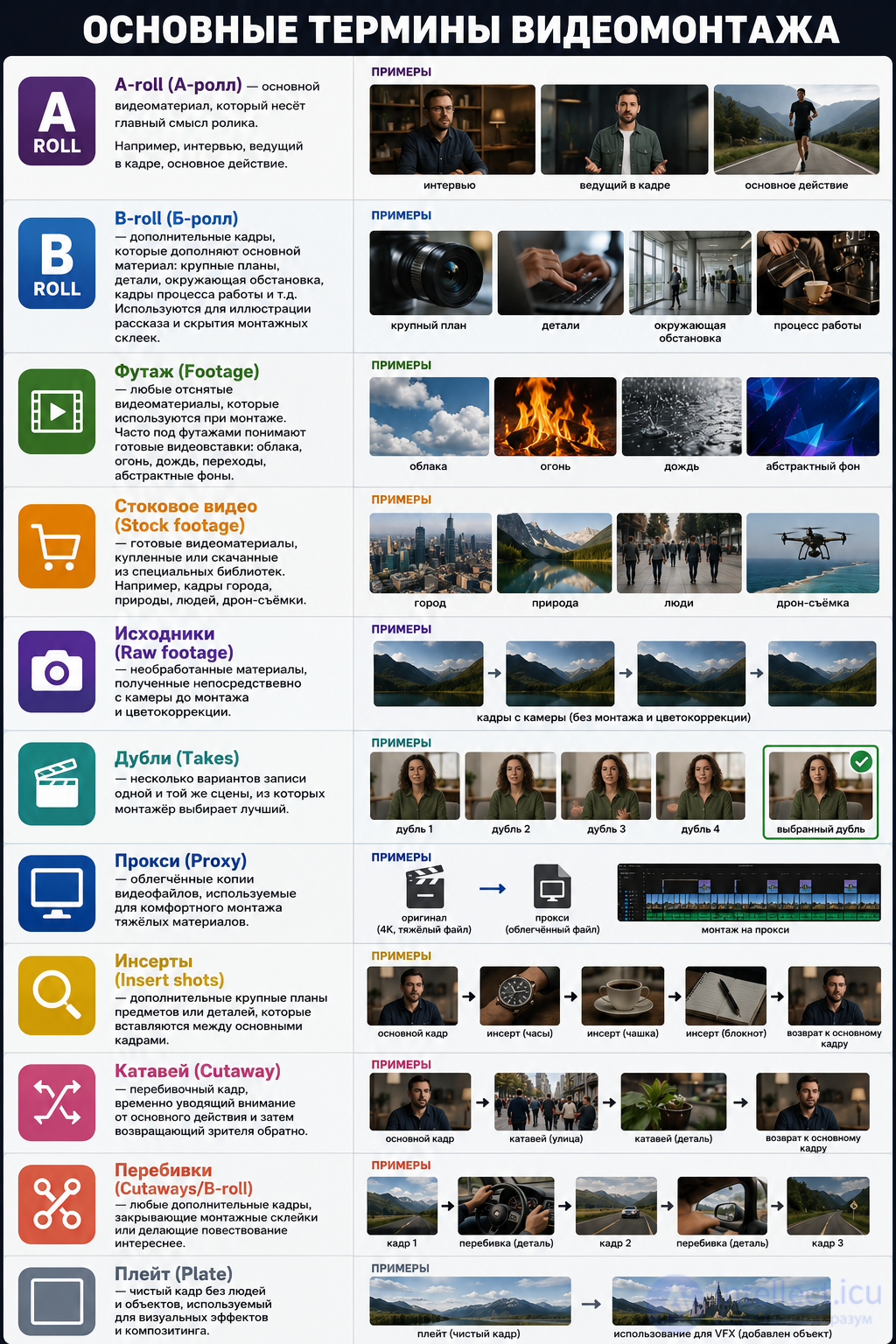
  • A-roll — the main video material that carries the core meaning of the clip. For example, an interview, a presenter on camera, the main action.
  • B-roll — supplementary footage that complements the main material: close-ups, details, the surrounding environment, shots of the work process, etc. Used to illustrate the story and hide editing cuts.
  • Footage — any filmed video material used in editing. Footage often refers to ready-made video inserts: clouds, fire, rain, transitions, abstract backgrounds.
  • Stock footage — ready-made video material purchased or downloaded from specialized libraries. For example, shots of a city, nature, people, drone footage.
  • Raw footage — unprocessed material obtained directly from the camera before editing and color correction.
  • Takes — several versions of a recording of the same scene, from which the editor selects the best.
  • Proxy — lightweight copies of video files, used for comfortable editing of heavy material.
  • Insert shots — additional close-ups of objects or details that are inserted between the main shots.
  • Cutaway — an interruption shot that temporarily draws attention away from the main action and then brings the viewer back.
  • Cutaways (Cutaways/B-roll) — any additional shots that cover editing cuts or make the narrative more interesting.
  • Plate — a clean shot without people or objects, used for visual effects and compositing.
  • Alpha channel — video with a transparent background that can be overlaid on top of other shots.
  • Overlay — an element laid over the image: flares, dust, film scratches, light effects, etc.
  • Motion graphics — animated titles, infographics, logos, and other graphic elements.

Video Editing Basics: Types, Best Practices, Mistakes and Tests

5. Rules of good editing

The continuity rule

The viewer should understand where the characters are and what is happening.

Editing on motion

Shots are changed during the movement of an object.

This way the transition looks natural.

Editing on the eyeline

If a character looks in a certain direction, the next shot should show the object of their attention.

The 180-degree rule

The camera should stay on one side of an imaginary line between the characters.

Violating this rule can disorient the viewer.

6. Editing rhythm

Rhythm is determined by the duration of the shots.

Fast editing is used in:

  • advertising;

  • music videos;

  • action scenes.

Slow editing is suitable for:

  • interviews;

  • documentaries;

  • dramatic scenes.

The right rhythm helps hold the viewer's attention.

7. Transitions between shots

The most common transitions:

  • a straight cut;

  • fade to black;

  • fade in;

  • dissolve;

  • wipe.

Professional editors more often use a plain cut and apply complex transitions only when they are justified by the story.

8. Working with sound

Good sound is often more important than a good picture.

During editing the following are performed:

  • noise removal;

  • volume adjustment;

  • audio synchronization;

  • adding music;

  • adding sound effects.

Music should reinforce the emotional perception of the video, not distract the viewer.

9. Color correction

After editing, the image is corrected.

The main tasks:

  • even out the brightness;

  • correct the white balance;

  • increase the contrast;

  • make the colors natural;

  • create an artistic style.

10. Titles and graphics

A video may use:

  • intros;

  • subtitles;

  • captions;

  • infographics;

  • logos;

  • animated elements.

Graphics should complement the content, not overload the screen.

11. Popular video editing programs

The best-known editors:

  • DaVinci Resolve — a professional free editor with powerful color correction.

  • Adobe Premiere Pro — one of the most popular professional video editors.

  • Final Cut Pro — a program for Apple computers.

  • CapCut — a simple editor for social media.

  • Filmora — a convenient option for beginners.

12. Common beginner mistakes

The most common mistakes:

  • shots that are too long;

  • an excessive number of effects;

  • abrupt jumps in volume;

  • failure to follow editing logic;

  • lack of color correction;

  • using unsuitable music;

  • too many transitions.

13. Practical recommendations

Beginning editors are advised to:

  1. First build the story.

  2. Remove all unnecessary shots.

  3. Use simple transitions.

  4. Keep an eye on sound quality.

  5. Perform color correction.

  6. Review the video several times before exporting.

Types of video clips.

An editor can work with different types of video clips. The main ones:

  1. Advertising clips — short videos to promote products, services, or brands.
  2. Image videos — create a positive image of a company, organization, or person.
  3. Corporate videos — tell about a company's activities, its employees, projects, and achievements.
  4. Presentation videos — present a product, service, event, or project.
  5. Music videos — visual material created for a piece of music.
  6. Documentary films and clips — based on real events and facts.
  7. Fiction (feature) films and short films — contain a plot and acting.
  8. Interviews — a recording of a conversation with one or more people.
  9. Reports — coverage of events, news, and functions.
  10. Educational (instructional) clips — explain material, teach skills, or demonstrate instructions.
  11. Informational clips — convey important information to the audience.
  12. Social clips — draw attention to social issues.
  13. Video blogs (vlogs) — original content for the internet and social media.
  14. Content for social media — short vertical videos for platforms such as TikTok, Instagram, and YouTube.
  15. Trailers and teasers — short announcements of films, series, games, or events.
  16. Wedding and celebration films — videos of festive occasions.
  17. Video reports of events — clips about concerts, conferences, competitions, and other events.
  18. Animated clips — created using 2D or 3D animation or motion design.
  19. Infographic clips (motion graphics) — explain information using graphics and animation.
  20. Promo clips and video ads for the internet — short, dynamic videos for online promotion.

Conclusion

Video editing is a combination of technical skills and a creative approach. Good editing makes the narrative clear, dynamic, and emotionally expressive. Mastering the basic principles, constant practice, and analyzing the work of professionals allow you to gradually develop your craft and create high-quality video projects for a wide variety of purposes.

Self-check tests

1. What is video editing?

  • A) The process of combining video shots, sound, and graphics into a single video clip *
  • B) The process of recording video on a camera
  • C) The process of setting up lighting during filming
  • D) The process of creating a script

Hint: Editing is done after filming and combines all the elements of the project.

2. What is the stage at which filming takes place called?

  • A) Post-production
  • B) Production *
  • C) Pre-production
  • D) Export

Hint: It is at this stage that the source video material is obtained.

3. What belongs to the pre-production stage?

  • A) Color correction
  • B) Adding titles
  • C) Writing the script *
  • D) Exporting the video

Hint: Preparation begins before filming starts.

4. What type of editing is used in modern video editors?

  • A) Analog
  • B) Sequential
  • C) Non-linear *
  • D) Streaming

Hint: It allows you to freely change the order of shots without altering the source files.

5. What is the minimal unit of video material?

  • A) Sequence
  • B) Scene
  • C) Shot *
  • D) Project

Hint: The entire video is built from these elements.

6. What is the name of the rule that forbids changing the side of filming relative to the line between the characters?

  • A) The rule of thirds
  • B) The 180-degree rule *
  • C) The golden ratio rule
  • D) The perspective rule

Hint: Following it helps the viewer avoid losing their orientation.

7. What is color correction used for?

  • A) To record sound
  • B) To change the script
  • C) To adjust the colors and brightness of the image *
  • D) To reduce the file size

Hint: It makes the image more natural or artistic.

8. Which transition do professional editors use most often?

  • A) A straight cut *
  • B) Rotation
  • C) Wave
  • D) Cube

Hint: The simplest transition often looks the most natural.

9. What needs to be done with the sound during editing?

  • A) Remove all the sound
  • B) Only increase the volume
  • C) Process it, synchronize it, and remove noise *
  • D) Add only music

Hint: Good sound is no less important than a good picture.

10. Which program is a professional video editor with powerful color correction?

  • A) Paint
  • B) DaVinci Resolve *
  • C) Notepad
  • D) PowerPoint

Hint: This program is widely used in the film industry.

11. What determines the rhythm of editing?

  • A) The number of actors
  • B) The duration of the shots *
  • C) The file size
  • D) The video resolution

Hint: The shorter the shots, the more dynamic the video feels.

12. For which videos is fast editing more often used?

  • A) Documentaries
  • B) Interviews
  • C) Action scenes and music videos *
  • D) Lectures

Hint: Quickly changing shots enhances the sense of dynamism.

13. What does editing on motion mean?

  • A) Changing the camera during an object's movement *
  • B) Constant camera movement
  • C) Adding animation
  • D) Using stabilization

Hint: This technique makes the transition between shots less noticeable.

14. What is editing on the eyeline used for?

  • A) To change the brightness
  • B) To show the object the character is looking at *
  • C) To create special effects
  • D) To speed up the video

Hint: This technique helps the viewer understand the direction of the character's attention.

15. What is a scene?

  • A) A single video shot
  • B) Several shots united by a single action *
  • C) A finished film
  • D) A music track

Hint: A scene consists of several interconnected shots.

16. What is a sequence?

  • A) A single shot
  • B) Several scenes forming a complete meaningful block *
  • C) Any transition between shots
  • D) The final export

Hint: A sequence unites several scenes under one storyline.

17. What is recommended to do first when editing?

  • A) Add effects
  • B) Perform color correction
  • C) Build a coherent story *
  • D) Add music

Hint: Editing always begins with building the logic of the narrative.

18. Which action helps reduce the size of a project without harming its logic?

  • A) Removing unnecessary shots *
  • B) Increasing the volume
  • C) Adding filters
  • D) Changing the frame rate

Hint: Good editing removes all unnecessary fragments.

19. What is considered one of the typical mistakes of beginning editors?

  • A) Using a straight cut
  • B) An excessive number of effects *
  • C) Color correction
  • D) Working with sound

Hint: A large number of effects distracts the viewer.

20. What are titles used for?

  • A) Only for decorating the video
  • B) For conveying text information to the viewer *
  • C) For changing the image quality
  • D) For speeding up editing

Hint: Titles help introduce participants, add explanations, or provide subtitles.

21. What does exporting the project allow you to do?

  • A) Record sound
  • B) Get a finished video file *
  • C) Change the script
  • D) Set up the camera

Hint: This is the final stage of creating a video clip.

22. What is color balance?

  • A) The ratio of the volume of the tracks
  • B) Adjustment for natural color rendering *
  • C) Choosing the file format
  • D) Adjusting the playback speed

Hint: It helps remove unwanted color casts in the image.

23. Why is it important to synchronize sound with video?

  • A) To reduce the file size
  • B) So that speech and image match *
  • C) To increase the brightness
  • D) To create transitions

Hint: A mismatch between sound and image is immediately noticeable to the viewer.

24. What is most often used to design the beginning of a video clip?

  • A) An intro *
  • B) Color correction
  • C) A mask
  • D) Cropping

Hint: It helps present the title of the project or the author.

25. Which editor is especially popular among beginners thanks to its simple interface?

  • A) CapCut *
  • B) AutoCAD
  • C) Excel
  • D) Blender

Hint: This program is widely used for creating clips for social media.

26. What is the processing of the image after editing called?

  • A) Encoding
  • B) Color correction *
  • C) Compilation
  • D) Indexing

Hint: It improves the appearance of the video material.

27. What helps hold the viewer's attention?

  • A) A properly chosen editing rhythm *
  • B) The maximum number of effects
  • C) Very long shots
  • D) A complete absence of music

Hint: The speed of changing shots affects the perception of the story.

28. What is recommended to check before exporting a video?

  • A) Only the file name
  • B) Only the number of shots
  • C) The entire video several times *
  • D) Only the volume of the music

Hint: A final review helps detect errors.

29. What is the main task of video editing?

  • A) To make the file as large as possible
  • B) To tell a story and convey emotions *
  • C) Only to add special effects
  • D) To increase the video resolution

Hint: Editing combines shots into a clear and expressive narrative.

30. What is the main condition for developing video editing skills?

  • A) Using an expensive computer
  • B) Constant practice and analysis of your own work *
  • C) Only studying theory
  • D) Using a large number of transitions

Hint: Regular practice lets you master professional techniques faster.

created: 2026-07-07
updated: 2026-07-15
1


Was this answer useful?
Choose a quick rating so we can improve the next answer for you.
How satisfied are you?


Comments

To leave a comment

If you have any suggestion, idea, thanks or comment, feel free to write. We really value feedback and are glad to hear your opinion.
To reply

Lectures and tutorial on "Computer games developming, game-design"

Terms: Computer games developming, game-design