
You get a bonus - 1 coin for daily activity. Now you have 1 coin

Multiplayer in Game Development: Types, Features, and Implementation

Lecture


Multiplayer game modes have long become an integral part of the modern gaming industry. They allow players to interact with each other in real time, competing or cooperating, creating new levels of engagement. For developers of multiplayer games, it is important to take into account many factors, ranging from network architecture to server support. In this article, we will look at the main types of multiplayer, their features, and the key points worth paying attention to during development.

A multiplayer game, or multiplayer (from the English «multiplayer»), is a computer game mode during which more than one person plays.

Types of multiplayer

1. Local multiplayer

Local multiplayer implies playing together on a single device or within a single local network (LAN). It is popular in console games, where several players can use one screen with split-screen. Examples of such games are the "Mortal Kombat" or "Mario Kart" series.

Features:

  • Support for a single device and multiple controllers.
  • Minimal network requirements, since interaction takes place directly through one device.
  • A limit on the number of players due to the physical capabilities of the device (screen, number of controllers, etc.).

2. Online multiplayer

This type allows players to participate in cooperative or competitive games over the internet while being located far apart from one another. Examples are games such as "Fortnite", "League of Legends", or "Call of Duty".

Features:

  • A stable internet connection is required.
  • Dependence on servers or other forms of network infrastructure.
  • Most often, a client-server model or a peer-to-peer network is used.

3. Massively multiplayer (MMO)

MMO (Massively Multiplayer Online) games involve the participation of thousands, and sometimes millions, of players on a single game server. These are games such as "World of Warcraft" and "EVE Online", where players interact in enormous virtual worlds.

Features:

  • Requires large-scale server infrastructure to support a large number of players.
  • In such games, there are usually complex mechanics of interaction between players (trading, social systems, PvP, clans).
  • Extremely high requirements for network architecture and load balancing.

4. Cooperative multiplayer

Cooperative mode involves several players completing the game together, usually against artificial intelligence. Examples include "Left 4 Dead" or "Portal 2".

Features:
  • Cooperation between players to achieve a common goal.
  • Players are most often on the same team.
  • The importance of game balance and synchronization of actions to maintain interest.

Multiplayer in Game Development: Types, Features, and Implementation

Features of multiplayer development

1. Network architecture

Multiplayer games require the correct choice of network interaction architecture. The main options are:

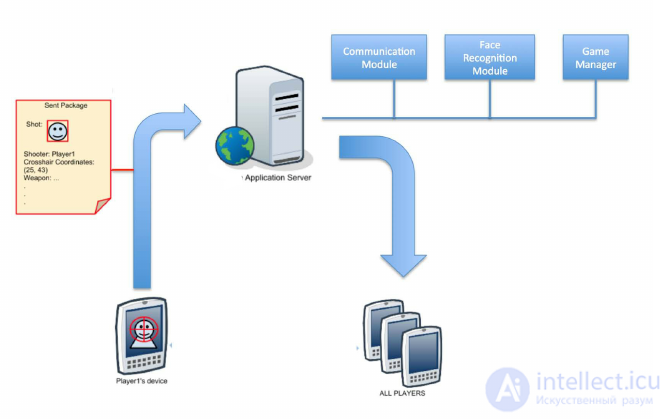
  • Client-server: A single server manages all game data and logic, and the clients (players) connect to it. This is the most reliable and widespread scheme, since the server controls the game logic, reducing the risk of cheating.
  • P2P (peer-to-peer network): Players interact directly with each other, exchanging data without using a central server. This method reduces the costs of server infrastructure, but is prone to problems with security and stability.

2. Synchronization and network code

For multiplayer games, it is important to ensure minimal delay between players' actions. The network code must be optimized to minimize latency and packet loss. One of the main tasks is synchronizing the state of the game world across all devices.

3. Handling errors and rollbacks

In conditions of network latency or packet loss, it is necessary to provide mechanisms for correctly restoring the game state. This can be either state prediction (client-side prediction) or the use of server rollbacks (rollback) to fix desynchronizations.

4. Security

One of the main threats to multiplayer games are cheaters. Protection mechanisms can include:

  • Server-side verification of all player actions.
  • Use of data encryption between the client and the server.
  • Use of anti-cheat systems, such as Easy Anti-Cheat or BattlEye.

Implementing multiplayer

1. Choice of technologies and platforms

When developing multiplayer, developers can use different engines and platforms. Some of the popular tools for creating network games:

  • Unity: provides built-in network libraries (Photon, Mirror) that simplify development.
  • Unreal Engine: supports both client-server architecture and P2P.
  • Photon: a popular network for multiplayer games, allowing quick integration of network functionality into a project.

2. Testing and scalability

A key aspect of developing multiplayer games is testing network stability under heavy loads. This requires:

  • Stress tests simulating a large number of connections.
  • Checking server performance under peak traffic conditions.
  • Configuring dynamic scaling of the server infrastructure.

3. Server support and updates

Even after the release of multiplayer games, developers are obligated to maintain the server infrastructure, release patches and updates to fix bugs, improve game balance, and protect against cheaters.

Client, server, and host in multiplayer programming

In the context of multiplayer programming, the terms client, server, and host refer to different roles and architectures of network interaction in a game. Let's take a closer look at them:

Client

A client is a device or program through which a player connects to the game. Clients receive information from the server (or host) and send back data about their actions (movement, attack, interaction with objects, etc.).

Main functions of a client:

  • Displaying the game world for the player.
  • Sending the player's actions to the server or host.
  • Receiving and processing data about the game state from the server/host.

A client usually does not have full information about the entire game world — only about the limited part with which a particular player interacts, which helps minimize data transfer and provides security against hacking.

Server

A server is the central controlling component that stores and controls the game state for all connected clients. A server can be either dedicated (dedicated server) or combined with a client (in small games).

Functions of a server:

  • Managing the game logic and the state of all clients (positions, actions, interaction of players and objects).
  • Verifying the correctness of data received from clients (for example, to prevent cheats).
  • Processing and synchronizing all changes in the game world and sending updates to all clients.

In the client-server model, the server fully controls the gameplay, which makes it important for preventing network attacks and cheating.

Host

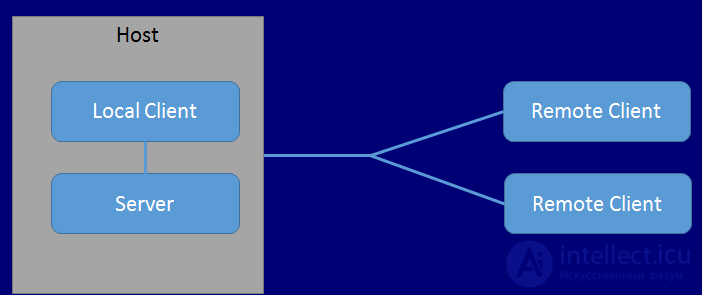
A host is a participant in a multiplayer game who simultaneously performs the functions of a client and a server. In other words, one of the players acts as the host: they play the game, but at the same time their device also processes data for other players, as a server does.
Multiplayer in Game Development: Types, Features, and Implementation

Main functions of a host:

  • Managing the game state for all connected players, as a server does.
  • The gameplay for the host itself (as a client).

Host-server architecture is often used in peer-to-peer networks (P2P). This is convenient for small games, since it does not require dedicated server infrastructure. However, there are downsides:

  • If the host leaves the game or their device stops working, all other players will also lose their connection.
  • The game logic may be less reliable, especially with a poor internet connection on the host's side.

Comparison of architectures

  1. Client-server:
    • A central server controls everything.
    • Better protection against cheats, since clients cannot directly control the game data.
    • Suitable for large-scale games with thousands of players.
  2. Host-server:
    • One of the players performs the role of the server.
    • Suitable for small games with friends.
    • Can be unstable and depend on the quality of the host's connection.

Each of these architectures has its own advantages and disadvantages, and the choice depends on the size of the game, the number of players, and the available infrastructure.

data that needs to be transmitted to organize multiplayer

Organizing multiplayer requires the transfer of various types of data between clients and the server (or between clients in a peer-to-peer network). This data must be structured in such a way as to ensure synchronization of players' actions and the state of the game world. Here are the main types of data that are usually transmitted to organize a multiplayer mode:

1. Data about the player's position and movement

One of the most important aspects of synchronization in multiplayer games is the transfer of information about the position and movement of players. This data includes:

  • Coordinates of the player's position in the game world (X, Y, Z).
  • Direction of movement or the player's orientation.
  • Speed of movement or acceleration vector.
  • Animation state (for example, running, jumping, flying).

This data must be updated with minimal delay so that players see each other's exact positions in real time.

2. Player actions

Game actions are all of a player's interactions with the world and other players. This includes:

  • Control commands: for example, pressing keys (shooting, jumping, switching weapons).
  • Use of items: information about which item the player is using and how (for example, firing a weapon or using a potion).
  • Attack events: when a player attacks another player, data about the attack (damage, attack type, point of impact) must be transmitted to synchronize the results.

The server verifies these commands for validity and distributes the results to other clients.

3. Player health and stats

Player characteristics that are important for the game, such as:

  • Health level.
  • Reserves of energy, mana, or other resources.
  • Armor and other defensive characteristics.

This data is transmitted so that the server can correctly process interactions between players (for example, subtracting health when taking damage).

4. Information about game objects

In addition to data about the players themselves, it is necessary to transmit information about elements of the game world:

  • The position of objects (for example, the position of a dropped weapon, crates, etc.).
  • The state of objects (whether a crate is open, whether a switch is activated, whether a door is destroyed, etc.).
  • Resources: if a player has picked up an item (for example, a weapon or a medkit), the server must synchronize the changes in the availability of these items for all players.

5. Events and triggers

Many games contain special game events that must be synchronized for all players. Examples:

  • Starting or completing a quest.
  • Opening a door or activating a trap.
  • The start or end of an animation/effects in the world (for example, an explosion, an object falling, etc.).

The server transmits this data to all clients so that they can update their display of the game world.

6. Chat and player interaction

To organize communication between players (especially in MMOs or cooperative games), the following is transmitted:

  • Chat messages.
  • Voice commands (if the game supports voice chat).
  • System notifications (for example, messages about one of the players leaving the game).

7. Information about connection and identification

In addition to game data, it is necessary to transmit technical information for managing the session:

  • Player IDs and their authentication on the server.
  • IP address and port for correctly connecting clients.
  • Connection status: information about which clients are connected and when they disconnect.

8. Physics and collisions

Some games also transmit data about object physics in order to synchronize interaction with the environment:

  • Collision points between players and objects.
  • The results of physical interactions (for example, how a character's body pushed another object).

This is especially important for games with realistic physics, where incorrectly synchronized behavior can ruin the gaming experience.

9. Prediction and interpolation systems

To hide network latency, a prediction mechanism is used. The server can predict a player's actions several milliseconds ahead based on the current data. For example:

  • Predicting the player's position over a small period of time.
  • Interpolation between two states if the data arrives with a delay.

These mechanisms allow players to see smoother animation, even if the connection is unstable.

10. System updates and pings

To control the quality of the connection, the following is transmitted:

  • Ping (the delay time between the client and the server).
  • Connection status (for example, packet loss or high latency).

Spawning objects in multiplayer

Spawning objects in multiplayer is the process of creating new objects (characters, weapons, items, etc.) in the game world, which must be synchronized for all players in the network. When developing multiplayer, it is important to implement spawning correctly so that all clients see the same picture and can correctly interact with the new objects.

In multiplayer, spawning can be performed both on the server side (server spawning) and on the client side (client spawning), depending on the chosen architecture.
Multiplayer in Game Development: Types, Features, and Implementation

Main aspects of spawning objects in multiplayer:

1. Server-side spawning of objects

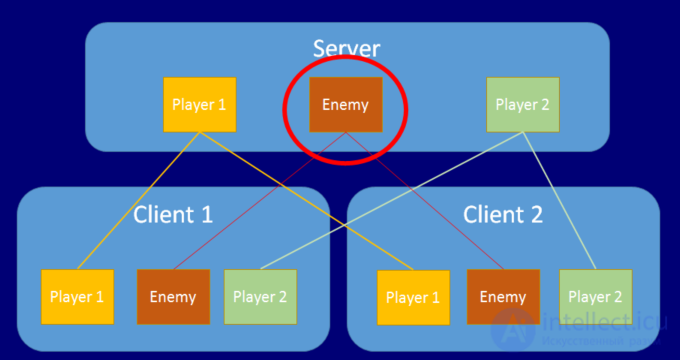
In most cases, objects in multiplayer are spawned on the server side, which manages all of the game's logic. After this, the server transmits information about the new object to all connected clients.

How server-side spawning works:

  • The server decides when and where a new object needs to be created (for example, based on an in-game event, a timer, or a player's actions).
  • The server creates the object in the game scene and assigns it a unique ID or index, which is used to track this object.
  • After creation, the server sends a message to all clients with information about the new object (object type, spawn position, orientation, initial parameters).
  • The clients receive the spawn message and create local copies of this object on their side, synchronizing its position and state with the server.

Advantages:

  • Centralized control: the server controls the entire spawning process, which eliminates inconsistency and errors between clients.
  • Security: since the server manages the creation of objects, this prevents cheating and the incorrect creation of objects on the client side.
  • Unified game logic: all clients receive the same data from the server and are synchronized.

Example:

A player picks up an item (for example, a weapon), and the server decides that a new item needs to be spawned in its place. The server creates the item, assigns it a unique ID, and sends information to all clients about its location.

2. Client-side spawning of objects

Client-side spawning is usually applied in less critical situations or for temporary objects, such as particle effects, that do not affect the gameplay. A client can also initiate spawning by sending a corresponding request to the server.

How client-side spawning works:

  • The client sends the server a request to create an object, if this is allowed by the game logic (for example, a player asks to create their character in the game).
  • The server verifies the request, and if it is valid, initiates the spawning of the object on the server, after which it notifies all clients about the new object.

Client-side spawning is used with caution, since directly creating objects on the client side can lead to desynchronization or vulnerabilities to cheaters.

Advantages:

  • Lower load on the server: clients can independently process minor effects (for example, visual or sound effects).
  • Instant response: since the client creates temporary objects, this can speed up the display of certain effects, such as flashes, explosions, or animations.

Example:

A player fires a weapon, and the client spawns temporary effects, such as a muzzle flash or smoke. These objects do not affect the gameplay and do not require server synchronization.

3. Object synchronization

When a new object is spawned, it is important to ensure its synchronization for all players. This is achieved by transmitting the object's state over the network.

The synchronization process:

  • After spawning, the server transmits to the clients:
    • The object type (for example, character, weapon, crate).
    • The position and orientation (where in the world the object was spawned).
    • The initial parameters (for example, the amount of health, ammunition, etc.).
  • Each client, based on this data, creates a copy of the object in its version of the game world.
  • In the case of further changes (movement, destruction, use), the server continues to transmit state updates of the object to the clients.

Example:

In a game of the «battle royale» type, the server may periodically spawn supply crates at various points on the map. This data (the spawn location and the type of crate) is transmitted to all clients, which then synchronize the positions of the crates on their devices.

4. Destroying objects (despawning)

Destroying objects (despawning) is the reverse process of spawning. When an object is no longer needed in the game (for example, it has been destroyed, picked up, or its lifetime has expired), the server initiates its despawn and notifies all clients about it.

  • Server-side despawn: the server removes the object from the game and sends a message to the clients that the object no longer exists.
  • Client-side despawn: the clients remove the objects on their side after receiving the command from the server.

5. Optimizing spawning

In order not to overload the network and the device's performance, it is necessary to optimize the process of spawning objects:

  • Spawning on demand: do not spawn objects until they have become visible or significant for the players (for example, items are spawned when a player approaches them).
  • Using object pools: instead of constantly creating and destroying objects, they can be «reused». For example, after being destroyed, an object is not deleted but moved into a hidden state and can be used again.
  • Local spawning of visual effects: effects, such as particles or fire, can be created locally on the client, without synchronization with the server, if they do not affect the gameplay.

Fraud and cheating in network games

Fraud, or «cheating» (from the English cheat — fraud), is a serious problem in networked computer games.

The very definition of the concept of «fraud» is murky. The classic definition of fraud as «gaining an unfair advantage» is not suitable, since the meaning of the word «unfair» remains unclear. The use of «aimbots» (from the English aimbot), which shoot quickly and without missing, is definitely fraud. Reconfiguring the controls is, of course, not fraud. But everything that lies in between is debatable. Even tuning drivers may turn out to be against the rules (for example, removing fog speeds up the game but increases visibility, so in some games this is regarded as fraud). Therefore, most leagues define which game modifications are allowed, and everything else is considered fraud.

The following are considered fraud:

  • Using server bugs to gain in-game benefits without reporting it to the administration. «Multi-accounting» is often considered fraud.
  • Using special programs that operate on the memory of the locally executed part of the game to gain additional advantages.

Some cheating programs are so well disguised that even a person assigned to watch a cheater's monitor may not notice the trick. For example, an aimbot program can be activated by simultaneously pressing the «Left» and «Right» buttons.

Conclusion

Developing multiplayer games is a complex process that requires developers to take into account many factors, ranging from network architecture to protection against cheaters. However, the success of such games can lead to enormous player engagement and long-term popularity for the project. Choosing the right strategy and technologies at the development stage is the key to creating a successful multiplayer product.

To organize multiplayer, it is necessary to transmit diverse data — from the player's position and actions to the state of the game world's objects and the characters' characteristics. For each game, the set of data may vary depending on the genre and the features of the gameplay. However, the timely and accurate transfer of this data with minimal delays remains key, in order to ensure smooth and synchronized gameplay for all participants.

Spawning objects in multiplayer is an important part of the gameplay that requires precise synchronization between all players. Server-side spawning is the main approach for critically important objects, such as characters and items, in order to guarantee the same gaming experience for everyone. Client-side spawning can be used to create temporary effects or at a player's request, but it must be controlled by the server to prevent errors and cheating.

See also

  • Dedicated server
  • [[b12601]]

Comments

To leave a comment

If you have any suggestion, idea, thanks or comment, feel free to write. We really value feedback and are glad to hear your opinion.
To reply

Lectures and tutorial on "Computer games developming, game-design"

Terms: Computer games developming, game-design