
Lecture
In modern computer games, graphics optimization is very important, because rendering a large number of complex three-dimensional objects can significantly increase the load on the graphics processor. This is especially relevant for scenes with a lot of vegetation, small objects and environment elements. One way to reduce computational costs is to use the billboard technique, in which, instead of a full three-dimensional model, a flat surface with a texture is displayed, oriented relative to the camera position.
Billboards are widely used in game engines to display vegetation, particles, decorations and objects located far from the player. The object's texture can be prepared in advance, while its position and orientation relative to the camera are calculated while the application is running. More advanced variants of this technique, such as impostor objects, use several images or special representations of the model to preserve visual quality at a lower performance cost.
This article examines how billboard technology works, the specifics of implementing it with shaders, and the use of this approach in modern game engines, in particular in Unity with the Universal Render Pipeline (URP). Special attention is paid to using billboards to display vegetation and their role in object level-of-detail systems.
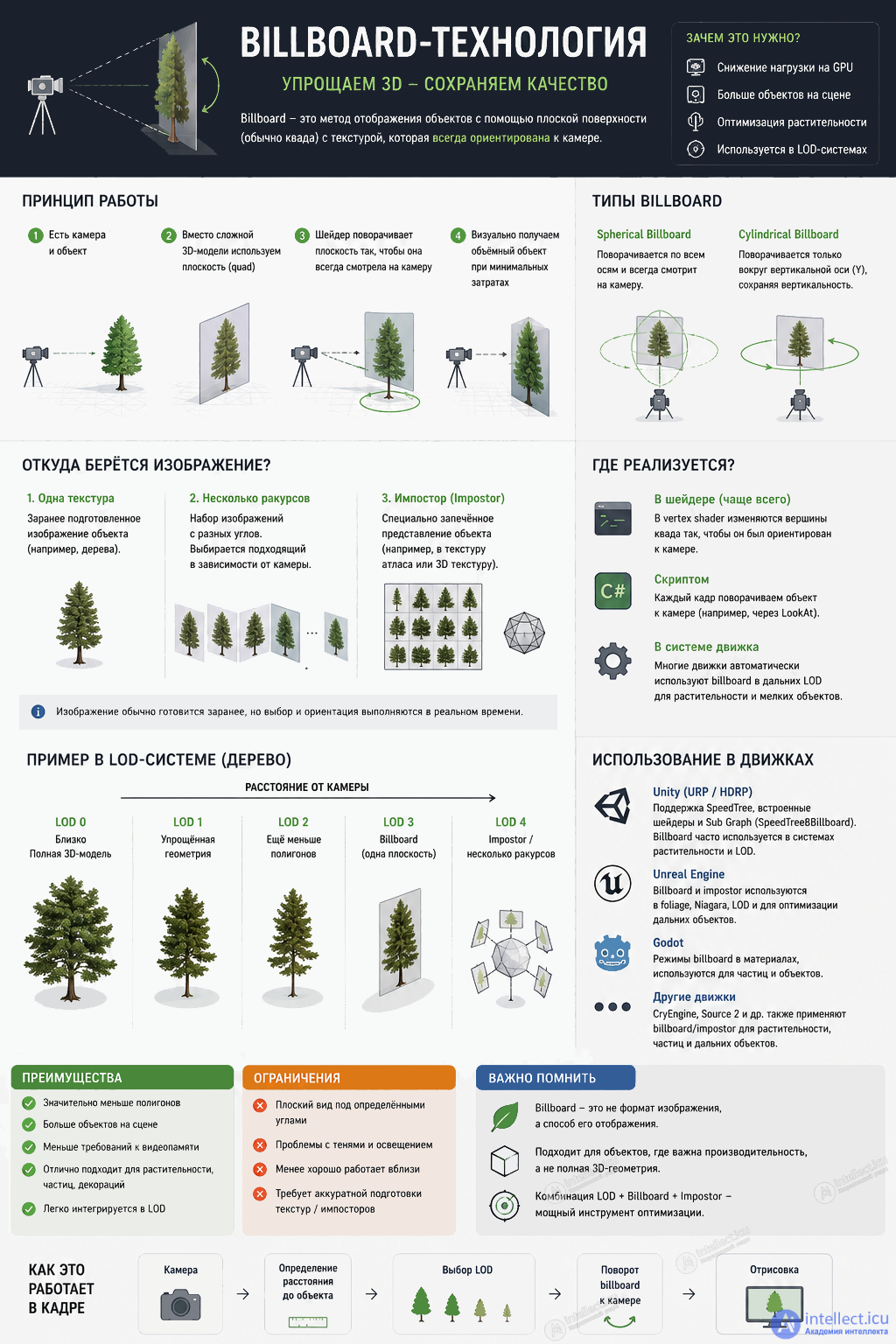
billboard is a fairly standard term in game engines and computer graphics.
For example:
But there is a nuance: the name of a specific mechanism may differ.
The following terms are often encountered:
That is, if you see impostor in the documentation of another engine, it is not necessarily literally called Billboard, but conceptually it is a related technology.
Another important distinction: a billboard is not an image format, but a way of displaying an image. So the same tree PNG can be used as a billboard in Unity, Unreal, Godot, etc., as long as the corresponding shader/renderer can orient it correctly.
In Unity, a billboard is not a separate mandatory component. It is rather a rendering technique/method in which a flat object (usually a quad) is rotated toward the camera.
For example, for a tree:
Quad with a tree texture;There are several options:
1. In a shader — the most typical option for a large amount of vegetation.
In the vertex shader, you can modify the vertices so that the quad always faces the camera:
 object position
↓
camera position
↓
compute the direction
↓
rotate the quad
In this case the billboard can be:
2. With a script — for example, doing this every frame:
transform.LookAt(camera.transform);
This is also a billboard, just not implemented in a shader.
3. With a ready-made Unity system — some vegetation/terrain systems use billboards on distant LODs themselves. That is, you may not see a separate Billboard component at all: the mechanism is hidden inside the render/LOD system.
Billboard ≠ "flat tree".
A flat tree is geometry: for example, a Quad with a picture of a tree.
Billboarding is the behavior of this geometry relative to the camera.
That is, you can have:
 Quad + tree texture
+
Billboard logic in the shader
↓
the tree always faces the camera
it is important to separate the image from the billboard geometry.
Usually the tree image itself really is prepared in advance — for example:
But the position and rotation of the billboard in the frame are calculated in real time.
For example:
 In advance:
PNG texture
↓
[ QUAD ]
During the game:
camera
↓
[ QUAD  ]
rotates
toward the camera
That is, the shader does not draw the tree itself from scratch. It takes an already existing texture and geometry and decides how to place the flat polygon relative to the camera.
You can prepare several images of the tree in advance:
 Tree
↑
8–16 views
around the tree
And during the game, choose the image depending on the camera direction. This is called something like an impostor / octahedral impostor and produces a much more convincing look.
There is also an option where the billboard image is generated entirely at runtime — for example, the tree is first rendered into a RenderTexture from the desired angle, and then this image is used as a billboard. But this is a more expensive approach.
So, in short:
Classic billboard: image in advance → quad + shader → rotation toward the camera in real time.
Impostor: several/specially encoded representations of the image in advance → the right view is selected.
Runtime-generated billboard: the image can be created during the game.
In Unity 6 / 6000 + URP, built-in support for trees with billboards exists, but it is tied primarily to SpeedTree, not to the regular URP/Lit.
Unity 6 introduced separate SpeedTree9 shaders for URP, built as Shader Graphs.
And Shader Graph has a built-in SpeedTree8Billboard Sub Graph, which implements the billboard part for URP/HDRP.
So, roughly, the architecture is this:
 SpeedTree tree
│
├── LOD 0 → full geometry
├── LOD 1 → simplified geometry
└── LOD N → billboard
│
↓
SpeedTree Billboard
│
↓
URP
Moreover, the billboard itself does not have to be a separate BillboardRenderer. For SpeedTree, the billboard logic can be part of the SpeedTree shader/Shader Graph. Unity even has SpeedTreeImporter.defaultBillboardShader, which selects the standard billboard shader for the active render pipeline.
That is a different matter.
A regular:
URP/Lit + Quad + tree PNG
does not automatically turn into a billboard.
You need either:
In other words, URP by itself does not mean "any Quad will be a billboard". A billboard is additional logic in the shader/renderer.
Billboard technology is one of the common ways to optimize the display of objects in computer graphics. Its main principle is to replace complex three-dimensional geometry with a flat representation oriented relative to the camera. This significantly reduces the number of processed vertices and polygons, which is especially important when displaying a large number of objects in a scene.
In game engines, a billboard is usually implemented at the rendering or shader level, so it is not necessarily represented by a separate component. In Unity, this approach can be used in vegetation systems and SpeedTree, and can also be implemented independently with Shader Graph or custom shaders. A billboard can also be part of an LOD system, switching to a flat representation of the object as the camera moves away.
Thus, a billboard is not an independent image format but a method of displaying one. Combined with LOD, impostor technologies and modern rendering tools, it can substantially reduce the load on the graphics system while maintaining acceptable visual quality. This is why the approach remains a relevant scene optimization tool in modern game engines.

Comments