Player interaction with the game world is a key aspect of game design. This interaction is defined by numerous systems that create a unique experience for each player. In this lecture, we will examine the main systems that influence a player's interaction with the game world and discuss how they can be used to create engaging gameplay.
1. Controls and Interface
- Controls: The ways players interact with the game through controllers, keyboard, mouse, or touchscreens. It is important to ensure intuitive and responsive controls.
- User Interface (UI): Visual elements such as menus, health indicators, and maps that help the player navigate the game world and make decisions.
2. Game Mechanics
- Core mechanics: Basic actions that the player can perform, such as movement, jumping, attacking, and interacting with objects.
- Advanced mechanics: More complex actions, such as combo attacks, using special abilities, and interacting with other players.
3. Progression Systems
- Levels and experience: Systems that allow players to develop their characters by gaining experience and leveling up.
- Equipment and upgrades: The ability to improve a character's gear and abilities to increase their effectiveness in the game.
4. Interaction with the Environment
- Physics and animation: Realistic behavior of objects and characters in the game world, which makes interaction more believable.
- Interactive objects: Objects the player can interact with, such as doors, levers, and treasure chests.
5. Social Systems
- Multiplayer: Interaction with other players through cooperative or competitive modes.
- Social features: Chats, guilds, and other systems that facilitate social interaction between players.
The Connection Between Gameplay and Player Physiology
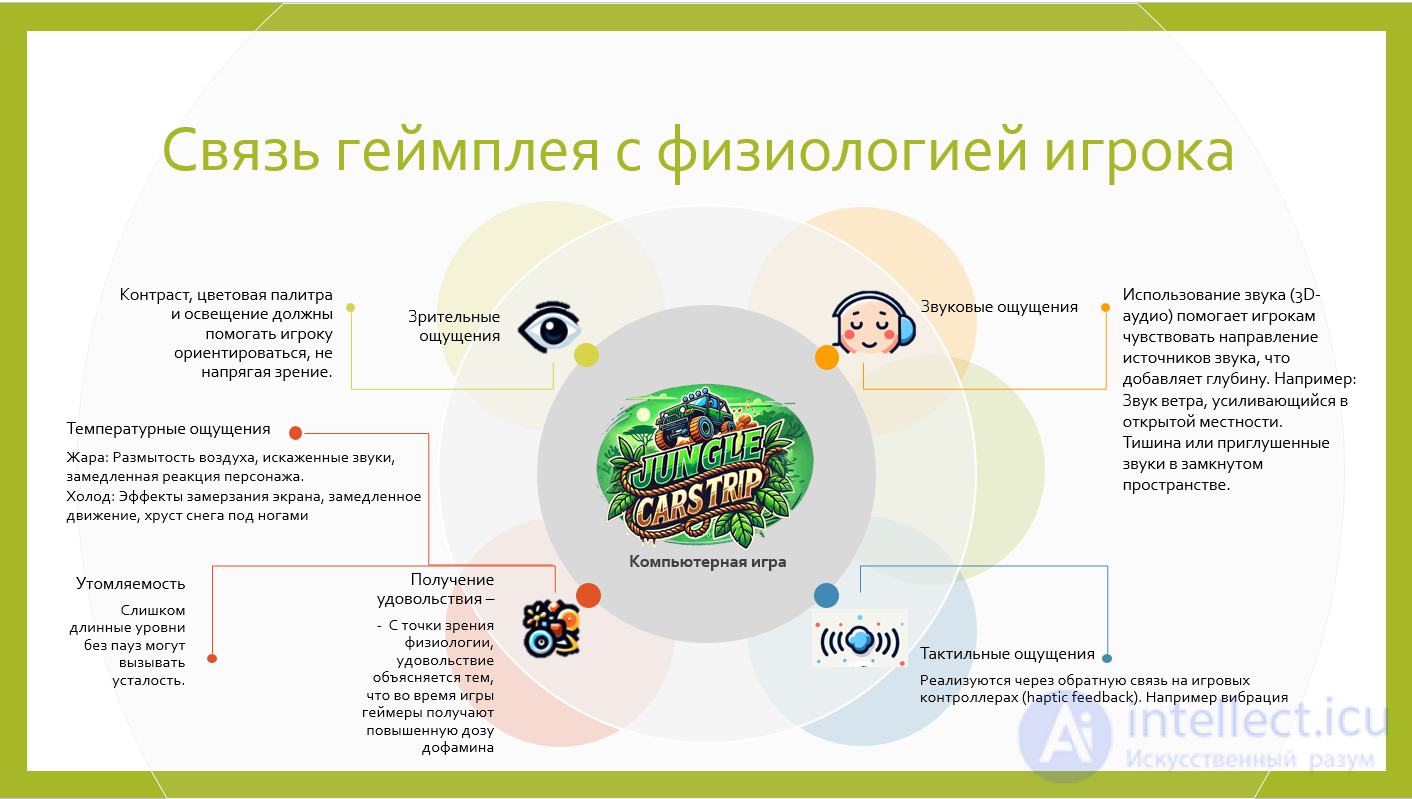
Physiology relates to how a player physically and sensorially interacts with the game:
- Visual sensations and perception: Contrast, color palette, and lighting should help the player navigate without straining their eyes.
- Reactions and coordination: Levels should take into account reaction time and control skills (for example, the difficulty of jumps or combat situations).
- Fatigue: Levels that are too long without pauses can cause tiredness. Dividing them into stages or providing places to rest helps maintain interest.
-
Tactile sensations:
Implemented through feedback on game controllers (haptic feedback). For example:
- A slight vibration when shooting or striking.
- A gradually intensifying vibration if the character is standing on an unstable platform.
- A tactile difference between surfaces (for example, sand, stone, water).
-
Temperature sensations:
Although it is impossible (or difficult) to convey temperature directly, game mechanics and visual effects can simulate it:
- Heat: Shimmering air, distorted sounds, slowed character reactions.
- Cold: Screen-freezing effects, slowed movement, snow crunching underfoot.
- Support for peripherals, such as devices that deliver heat or cold, can add realism.
-
Spatial perception:
The use of sound (3D audio) helps players sense the direction of sound sources, which adds depth. For example:
- The sound of wind growing stronger in open terrain.
- Silence or muffled sounds in an enclosed space.
-
Sensory impact through the environment:
Game locations can be designed to evoke bodily associations:
- Rough surfaces: Conveyed through visual textures and sounds (creaking floorboards or sand underfoot).
- Smooth and slippery surfaces: Glints of light and a crystalline sound.
-
Effects of fatigue and recovery:
- If the character runs for a long time, this may be accompanied by quickened breathing, an effect of "trembling" hands, and slowed movements.
- Rest areas can be represented through relaxing sounds, soft lighting, or even tactile vibration that conveys a sense of calm.
- Deriving enjoyment - From a physiological standpoint, enjoyment is explained by the fact that during play, gamers receive an increased dose of dopamine. This substance is involved in the system of motivation and the reinforcement of actions. Dopamine is produced when a person has achieved something and feels good. Enjoyment from computer games can also be explained by the state of «flow». It arises when there is a balance between skill and the difficulty of a task. During play, a person is constantly growing in skill, and the challenges they face also continually become more difficult. If these processes match in pace, then flow motivation is maintained and makes the gameplay engaging and appealing to the player. All these elements allow the player not only to see but also to feel the surrounding world, making the experience more realistic and captivating.
Conclusion
Understanding and properly applying the systems that define a player's interaction with the game world is the key to creating engaging and memorable games. Game designers must carefully think through each of these systems to ensure a harmonious and captivating gaming experience.
See also
- gameplay
- game mechanics
- sensations
- physiology


Comments