
Lecture
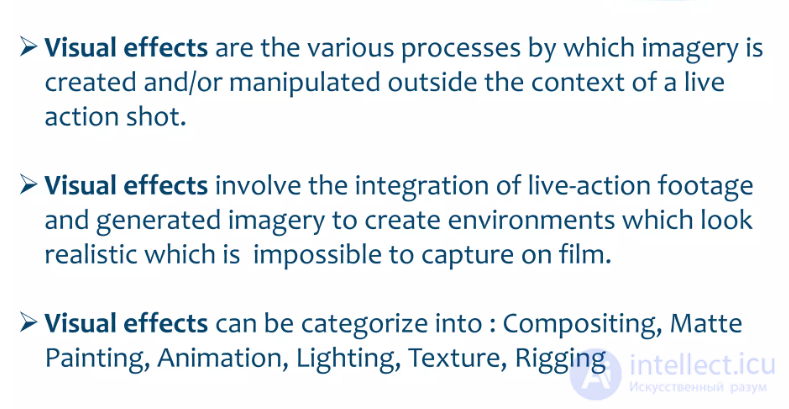
Visual effects (sometimes abbreviated as VFX from Visual effects) is the process by which imagery is created or manipulated outside the context of a live-action shot in film and video production and game design. The integration of live-action footage with other live-action footage or CGI elements to create realistic imagery is called VFX.
VFX today is actively used in nearly every game and film. In addition to films, VFX is known to be used by TV series and web series as well.
Special effects (often abbreviated as F/X or simply FX) are illusions or visual tricks used in theater, film, television, video games, amusement parks, and simulators to imitate fictional events in a story or virtual world. Sometimes they are shortened to SFX, but this can also refer to sound effects.
Special effects are traditionally divided into the categories of mechanical effects and optical effects. With the advent of digital filmmaking, the distinction between special effects and visual effects has grown, with the latter referring to digital post-production and optical effects, while «special effects» refer to mechanical effects.
Mechanical effects (also called practical or physical effects) are usually achieved during live-action filming. This includes the use of mechanized props, sets, scale models, animatronics, pyrotechnics, and atmospheric effects: creating physical wind, rain, fog, snow, clouds, making a car appear to move on its own, and blowing up a building, etc. Mechanical effects are also often incorporated into set design and makeup. For example, prosthetic makeup can be used to make an actor look like a non-human creature.
Optical effects (also called photographic effects) are techniques in which images or film frames are created photographically, either «in-camera» using multiple exposure, mattes, or the Schüfftan process, or in post-production using an optical printer. An optical effect can be used to place actors or sets against a different background.
Since the 1990s, computer-generated imagery (CGI) has come to the forefront of special-effects technology. It gives filmmakers greater control and allows many effects to be achieved more safely and convincingly and — as technology improves — at lower cost. As a result, many optical and mechanical effects techniques have been supplanted by CGI.
Visual effects play an important role in:
Particles:
Dynamic effects:
Post-Processing:
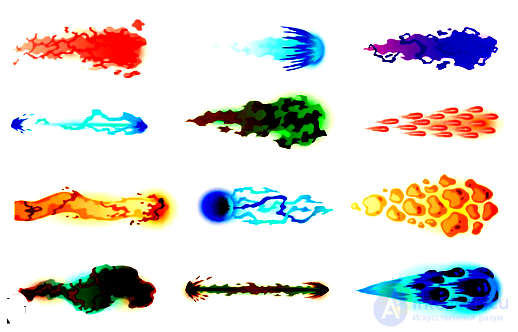
There are many visual effects that are used in graphics, film, games, and design. Here are some of the most popular and interesting effects that can be applied in various projects:
Physical plausibility: Effects must conform to the laws of physics. This includes the correct behavior of light, shadow, the trajectory of particle movement, and the interaction of objects.
Optimization: Effects must be not only beautiful but also optimized to run on various devices. Unoptimized VFX can greatly slow down a game's performance.
Synchronization with game events: It is important that visual effects match what is happening in the game. For example, an explosion should occur at the precise time and correspond to the destruction of objects on the screen.
The following programs and engines are used to create visual effects:
Here are the main categories of visual effects in games:
These effects enhance the sense of immersion in the game world and its atmosphere:
They signal changes in the gameplay or the results of the player's actions:
They create additional visual effects accompanying character animations:
Used to create small objects moving according to the laws of physics:
Creating realistic destruction of objects:
These effects improve the player's interaction with the interface:
Used to create a more cinematic feel to the game:
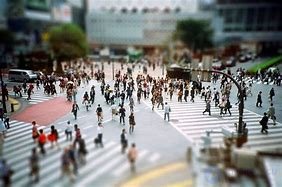
The "toy town" effect is called Tilt-Shift

The bokeh effect
Some game genres have unique visual effects:
Footage refers to video materials that are used to create films, clips, commercials, and other projects. These can be either original video recordings shot on camera or ready-made graphic elements, such as animations, special effects, text titles, or transitions. Footage can be used both as a foreground in front of a 3D image and as part of the game world.
There are several types of footage:
The effective use of visual effects can significantly enhance the perception of a game and make the gameplay more captivating. VFX designers in the gaming industry create visual elements that are closely integrated with the game's mechanics, creating a complete gaming experience where visual effects support the atmosphere, immersion, and gameplay.
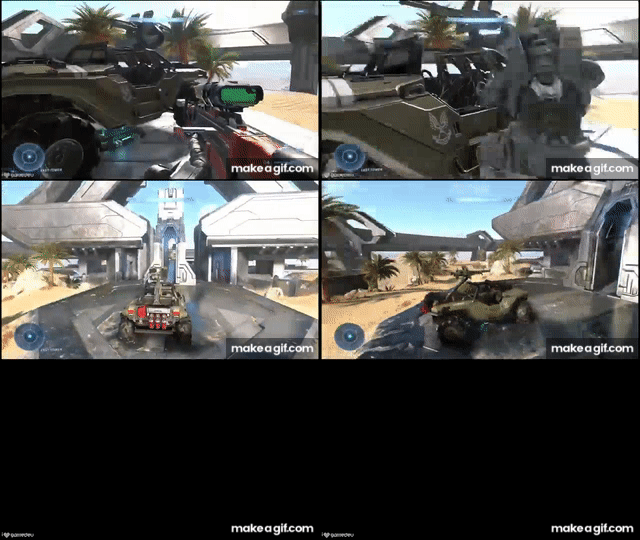
The visual effect of switching cameras using Cinemachine in Unity can be created by applying various effects and transitions to produce a smooth and cinematic result. Here are a few examples of visual solutions that can be used:
Description:
Visual effect:
Description:
Visual effect:
Description:
Visual effect:
Description:
Visual effect:
Description:
Visual effect:
Description:
Visual effect:
Description:
Visual effect:
Visual effects (VFX) play an important role in immersing the player in the game world; however, their implementation can cause various problems that affect gameplay, performance, and overall perception. Let us consider the main problems associated with the use of visual effects in games.
Problem: Complex visual effects often require significant computational resources. Effects such as smoke, fire, rain, destruction, and other dynamic elements can heavily load the processor and the graphics card, especially on devices with low specifications.
Solution: Optimizing VFX — reducing the number of particles, decreasing texture resolution, or using simpler shaders for weaker systems. Developers can also use LOD (Level of Detail) techniques, where simpler versions of effects are displayed at greater distances.
Problem: Sometimes visual effects can make it difficult to perceive important information in the game. For example:
Solution: Balancing the intensity of effects and their quantity, as well as the ability for the player to customize them. For example, games can offer players the option to turn off certain effects or reduce their intensity in the settings.
Problem: Visual effects can have a negative impact on players' perception of the game, especially if they suffer from certain medical conditions, such as epilepsy or photosensitivity. Rapidly flashing effects, bright flashes, or abruptly changing visual elements can trigger seizures in sensitive players.
Solution: Including modes for photosensitive players and the ability to disable potentially dangerous effects, such as rapidly flashing elements. The clarity and contrast of objects against the background of effects is also important.
Problem: A mismatch between visual effects and the overall style of the game can undermine coherent perception. For example, overly realistic effects in a stylized or cartoonish game may look out of place, disrupting the artistic direction of the project.
Solution: Following the game's overall artistic style when creating VFX. Effects should harmoniously fit into the visual environment and match the overall styling, whether it is minimalism, realism, or a cartoonish style.
Problem: Incorrectly implemented visual effects can undermine the player's immersion in the game world.
Solution: Improving realism through the use of correct physics for particles and proper animation, as well as synchronizing effects with the actions of characters and events.
Problems with visual effects in games can significantly affect the gameplay and the player's perception. Resolving them requires a balance between visual appeal, performance, and comfort for the player. The proper use of effects helps create a captivating game world without overloading the system or hampering gameplay.
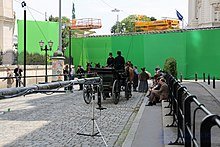
In a historical drama set in Vienna, a green screen is used as the background, allowing the background to be added during post-production.
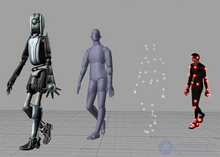
Motion capture: a unique high-resolution active-marker system of 3600 × 3600 at 960 Hz, providing real-time sub-millimeter position tracking.
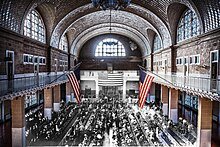
A composite of photographs of the same location taken more than a century apart
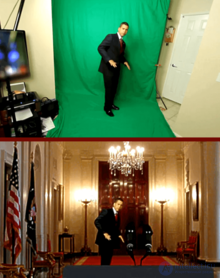
Actor Iman Crosson demonstrates compositing against a green screen in a self-produced video. Top panel: a frame from full-screen video shot in the actor's living room. [ 10 ] Bottom panel: the corresponding frame in the final version, in which the actor portrays Barack Obama «appearing» outside the East Room of the White House. [ 11 ]
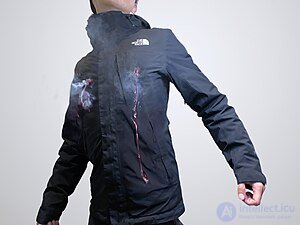
A demonstration of a bullet-hit special effect with built-in blood-explosion devices that burst through the actor's jacket, releasing smoke and fake blood. The holes are cut in advance so that they can be reused in additional takes.
Bullet time (also known as frozen moment, dead time, flow motion, or time slice) is a visual effect or visual impression of detaching the time and space of the camera (or viewer) from the time and space of its visible subject. It is an enhanced depth of simulation of action and performance at a variable speed, found in films, advertising, and real-time graphics in video games and other special media. It is characterized by an extreme transformation of both time (slow enough to show normally imperceptible and unfilmable events, such as flying bullets) and space (through the ability of the camera angle — the viewer's point of view — to move around the scene at a normal speed, while the events are slowed down).
Digital compositing is the process of digitally assembling multiple images to create a final image, usually for print, motion pictures, or on-screen display. It is the digital analog of optical film compositing. It is part of the VFX processing.
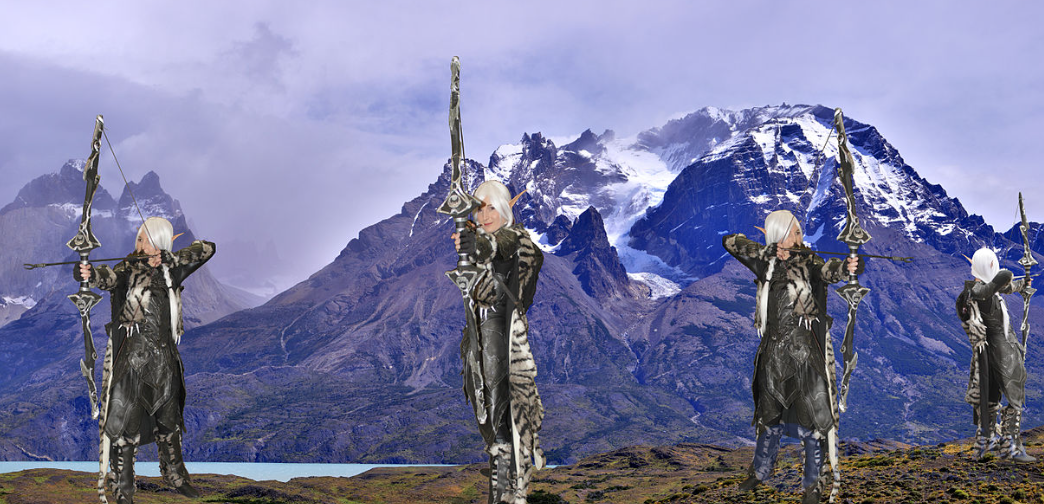
four images assembled into one final image
The basic operation used in digital compositing is known as alpha blending, where an opacity value «α» is used to control the proportions of two input pixel values that ultimately produce a single output pixel.
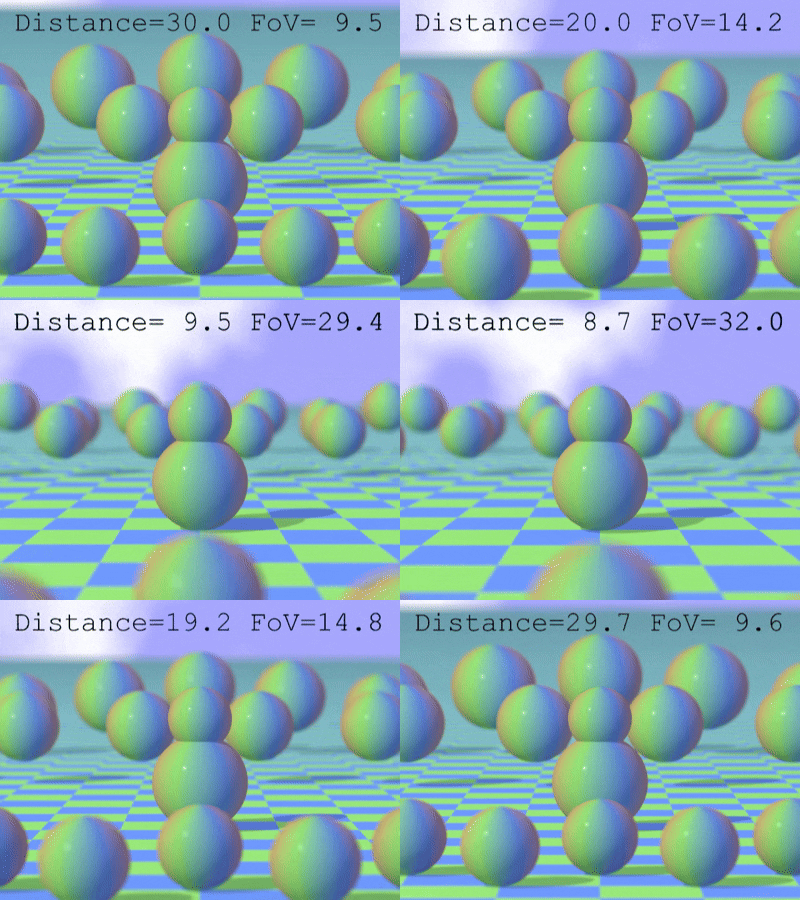
The dolly shot (also known as the Hitchcock shot, the «Vertigo» shot, the «Jaws» effect, or the «Zolly» shot) is a camera effect that appears to subvert normal visual perception.
The effect is achieved by zooming the zoom lens to adjust the angle of view (often called the field of view, or FOV) while the camera moves (dollies) toward or away from the subject in such a way as to keep the subject the same size in the frame throughout. The zoom transitions from a wide-angle view to a more tightly packed angle. In its classic form, the camera angle is pulled away from the subject while the lens zooms in, or vice versa. The dolly zoom switch in lenses can help viewers determine the visual difference between wide-angle lenses and telephoto lenses. Thus, during the zoom, there is a continuous distortion of perspective, the most noticeable feature of which is that the background appears to change size relative to the subject. Consequently, the dolly zoom effect can be broken down into three main components: the direction of the camera's movement, the speed of the dolly, and the focal length of the camera's lens.
The visual impression for the viewer is that either the background suddenly increases in size and detail and overwhelms the foreground, or the foreground becomes huge and dominates its previous setting, depending on how the dolly zoom is performed. Because the human visual system uses both size and perspective cues to estimate the relative sizes of objects, observing a change in perspective without a change in size is an extremely disturbing effect, often with a strong emotional impact.
An in-camera effect is any visual effect in a film or video that is created solely using techniques in and/or on the camera. An in-camera effect is defined by the fact that the effect exists on the original camera negative or video recording before it was sent to the lab or altered. Effects that alter the original negative in the lab, such as bleach bypass or flashing, are not included. Here are some examples of in-camera effects:
There are many ways to use an in-camera effect. An in-camera effect is something that often goes unnoticed but can play an important role in a scene or plot. A popular example of such an effect can be seen in «Star Trek», where the camera shakes to create the impression of movement occurring on the set. Another simple example would be the use of a wine glass to create an effect of «halos, flares, and refractions» in a homemade photograph.
Match moving and positional tracking
Positional tracking is one of the virtual reality technologies underlying human interaction with the virtual world. It is designed to determine the position and orientation of a real object (for example, a hand, head, or special device) in a virtual environment using several degrees of freedom. As a rule, three coordinates of its location (x, y, z) and three angles defining its orientation in space («roll», «pitch», «yaw», or Euler angles). The determination of the position and orientation of a real object in space is carried out using special sensors and markers. The sensors pick up a signal from the real object as it moves and transmit the obtained information to the computer.
In visual effects, match moving is a technique that allows the insertion of 2D elements, other live-action elements, or CG computer graphics into live-action footage with the correct position, scale, orientation, and movement relative to the photographed objects in the shot. It also allows the removal of live-action elements from a live-action shot. The term is used broadly to describe several different methods of extracting camera motion information from a motion picture. Also called motion tracking or camera solving, match moving is related to rotoscoping and photogrammetry. Match moving is sometimes confused with motion capture, which records the movement of objects, often human actors, rather than the camera. Motion capture usually requires special cameras and sensors, as well as a controlled environment (although recent developments, such as the Kinect camera and Apple's Face ID, have begun to change this). Match moving also differs from motion-control photography, which uses mechanical equipment to perform several identical camera movements. In contrast, match moving is usually a software technology applied after the fact to ordinary footage recorded in uncontrolled conditions with an ordinary camera.
Match moving is mainly used to track camera movement in a shot so that an identical virtual camera movement can be reproduced in a 3D animation program. When new animated elements are composited back into the original live-action shot, they will appear in a perfectly matched perspective and, consequently, will look seamless.
Since it is primarily software, match moving is becoming increasingly accessible as the cost of computing power decreases; it is now a recognized tool for creating visual effects, and it is even used in live television broadcasts as part of creating effects such as the yellow virtual line in American football.
There are two methods by which motion information can be extracted from an image. Interactive tracking, sometimes called «supervised tracking», relies on the user tracking features throughout the scene. Automatic tracking relies on computer algorithms to identify and track features throughout the shot. The tracked point movements are then used to calculate a «solve». This solve consists of all the camera information, such as movement, focal length, and lens distortion.
A matte is an opaque or semi-transparent shield used to limit or prevent light from reaching some part of the frame during filming, printing, or projecting an image. It is used in photography and cinematography as a compositing technique to combine different images, change the aspect ratio of the frame, or limit the field of view (for example, to simulate a view through binoculars or a keyhole). In the latter two cases, the term cache (Fr. Cacher «to hide, to shield») or cachet is more often used.
A matte is effective in multiple exposure: it shields part of the frame while filming takes place on an exposed area of the photographic emulsion. After rewinding the film to the beginning (or re-cocking the shutter with stationary film), a counter-matte (counter-cache) is installed in place of the matte, the shape of whose border repeats the configuration of the matte, but this time a different part of the frame is shielded, the one exposed the first time. Thus, during the second exposure, light reaches only those areas of the frame that were covered by the matte at the beginning. The most complex variety is the traveling matte, whose borders move in precise correspondence with the changes in the contours of the moving objects being filmed.
A matte can be used not only during filming but also during photographic printing or in a trick machine. In this case, two or more images from different negatives are combined on a single positive or dupe. In addition, a matte can be used to change the character of an image, softening its contrast or edge sharpness. For this, a halftone copy of the image printed on transparent film is used as a matte, which is placed over the photographic paper, regulating the access of light to its different areas.
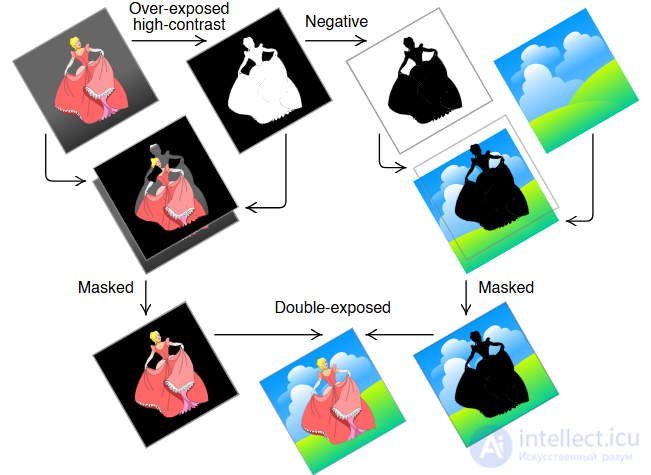
The principle of the traveling matte
Video matting is a method of separating video into two or more layers, usually foreground and background, and creating alpha mattes that define the blending of the layers. The method is very popular in video editing, since it allows the background to be replaced or the layers to be processed separately.

From left to right: input image, background, foreground, and alpha matte.
The miniature effect is a special effect created for motion pictures and television programs using scale models. Scale models are often combined with high-speed photography or matte shots to make gravitational and other effects convincing to the viewer. The use of miniatures has largely been supplanted by computer-generated imagery in modern cinema.
When a miniature appears in the foreground of a shot, it is often very close to the camera lens — for example, when matte backgrounds are used. Because the exposure is set for the subject being filmed so that the actors appear well lit, the miniature must be relit to balance the exposure and eliminate any differences in depth of field that would otherwise be visible. Such use of a miniature in the foreground is called forced perspective. Another form of the miniature effect uses stop-motion animation.
The use of scale models in creating visual effects in the entertainment industry dates back to the earliest days of cinema. Models and miniatures are copies of people, animals, buildings, settings, and objects. Miniatures or models are used to represent things that do not actually exist or that are too expensive or difficult to film in reality, such as explosions, floods, or fires.
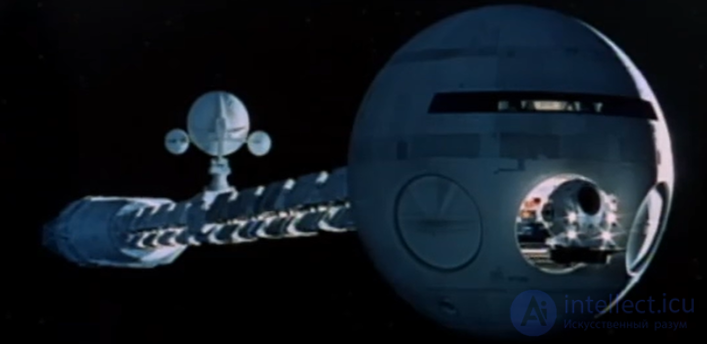
Miniature special effects from the film «2001: A Space Odyssey»: the spaceship USSC Discovery One launches an EVA pod into orbit.
Morphing is a special effect in motion pictures and animation that changes (or transforms) one image or shape into another through a smooth transition. Traditionally, such an image was achieved using dissolve techniques on film. Since the early 1990s, this has been replaced by computer software to create more realistic transitions. A similar method is applied to audio recordings, for example, by altering voices or vocal lines.
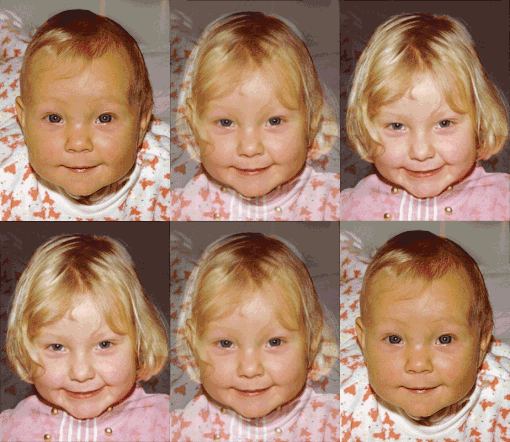
A morphing animation between two faces
Motion-control photography is a technique used in still and moving photography that allows precise control and, if necessary, also allows repetition of camera movements. It can be used to facilitate special-effects filming. The process can involve filming multiple elements using the same camera movement and then compositing the elements into a single image. Along with motion control, other effects are often used, such as chroma key, to assist in compositing. Motion-control camera setups are also used in still photography with or without compositing; for example, in long-exposure shots of moving vehicles. Modern computer technology allows programmed camera movement to be processed, for example, scaling the movement for elements of different sizes. Common applications of this process include filming with miniatures, either to composite multiple miniatures or to composite miniatures with full-scale elements.
Compositing is the process or method of combining visual elements from separate sources into individual images, often to create the illusion that all these elements are parts of the same scene. Live-action footage for compositing is variously called «chroma key», «blue screen», «green screen», and other names. Today, most compositing is achieved through digital image processing. However, pre-digital compositing methods date back to the trick films of Georges Méliès in the late 19th century, and some are still used today.
Combined filming, or the movie trick, is a set of cinematographic technologies that result in an image on the screen that did not exist in reality but that, for viewers, is indistinguishable from one shot in the studio or on location. In Soviet cinema, the term «combined filming» denoted the ability to combine in a single frame several images shot independently of one another.
Combined filming expands the expressive possibilities of cinema and, in some cases, allows film production to be made cheaper and the work of the film crew to be facilitated. It is often used when direct filming of a scene is too costly compared to combined filming. In this way, for example, one can avoid the expenses of costly filming of actors' scenes on location under expedition conditions, especially in hard-to-reach places. By sending a small camera crew, location backgrounds are captured on film, with which actors filmed in the studio pavilion are combined, or previously shot backgrounds are used, including those shot by other authors. In addition, combined filming makes it possible to film dangerous scenes without risk to the life and health of the actors and the rest of the personnel. In this way, battle scenes, scenes of driving in a car against the backdrop of nature, as well as episodes with fires, explosions, and natural cataclysms, are often created.
A film-copying machine is a device for producing positive copies of a film from its original negative on film stock. In the classic «optical» technology of film production, the film-copying machine serves to print release prints, as well as interpositives, dupe negatives, and intermediate dupes when making titles and special effects. In digital film production, film-copying machines are used to reproduce film prints from a master positive obtained using a film recorder from a digital master copy. Various types of film-copying machines can perform optical or contact printing.
An optical printer is a device consisting of one or more film projectors mechanically linked to a movie camera. It allows filmmakers to rephotograph one or more strips of film. The optical printer is used to create visual effects in motion pictures or to copy and restore film materials.
Common optical effects include fade-outs and fade-ins, dissolves, slow motion, fast motion, and matte work. More complex work can involve dozens of elements combined into a single scene.
A practical effect is a special effect created physically, without computer image processing or other post-production methods. In some contexts, «special effect» is used as a synonym for «practical effect», as opposed to «visual effects», which are created in post-production using photographic manipulation or computer generation. [
Many of the core elements of action films are practical effects. Gunfire, bullet wounds, rain, wind, fire, and explosions can all be reproduced on set by someone experienced in practical effects. Non-human characters and creatures created using makeup, prosthetics, masks, and puppets — as opposed to computer-generated images — are also examples of practical effects. Pyrotechnics for creating the illusions of fires and explosions. Weather effects, such as sprinkler systems to create rain, fog generators to create smoke, and artificial snow. Squibs to create the illusion of gunshot wounds.
A facial prosthesis is an artificial device used to alter or adapt the appearance of a person's face or head.
When used in the theatrical, film, or television industries, prosthetic facial makeup changes a person's ordinary face into something extraordinary. Facial prosthetics can be made from a wide range of materials, including gelatin, foam latex, silicone, and cold foam. The effects can be as subtle as changing the curve of a cheek or nose, or making someone look older or younger than they are. A facial prosthesis can also turn an actor into any creature, for example, into legendary creatures, animals, and others.
To attach facial prosthetics, Pros-Aide, Beta Bond, medical adhesive, or liquid latex is usually used. Pros-Aide is a water-based adhesive that has been the «industry standard» for more than 30 years. It is completely waterproof and designed for use on sensitive skin. It is easy to remove using Pros-Aide Remover. BetaBond is becoming increasingly popular among Hollywood artists, who say it is easier to remove. Medical adhesive has the advantage that it is specifically designed not to cause allergies or skin irritation. Liquid latex can only be used for a few hours, but it can be used to create realistic skin-to-prosthesis transitions.
After application, cosmetics and/or paint are used to color the prosthetics and skin to the desired colors and to achieve a realistic transition from skin to prosthesis. This can be done by the wearer, but it is often done by a separate trained artist.
Rotoscoping, the «photo-relay» method, or rotoscoping (a loan translation from the English rotoscoping) is an animation technique in which an animated or combined segment of a film is created by tracing, frame by frame, footage shot with real actors and sets. In the first decades of this technology, film frames were projected onto tracing paper by transmitted light using a special projector called a rotoscope. The image of each frame was traced by hand by an artist on separate sheets of tracing paper for subsequent transformation into an animated element.
In combined filming, photo-relay is used to create a traveling matte that covers areas of the original image intended for adding non-existent characters or background elements.
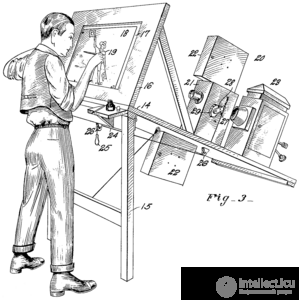
Performing photo-relay using a special projector — the rotoscope
Reverse motion (also known as reverse-motion photography or reverse action) is a visual effect in cinematography in which filmed action is shown on screen in reverse (i.e., reversed in time). This can be an effect created by the camera or an effect obtained using an optical printer. There are various reasons why this technique might be adopted, for example, to create a comedic effect (reverse destruction) or for safety reasons (a car stopping just in time can be filmed starting from the stopping point).
Stop-motion animation (also known as stop-frame animation) is a method of creating animated films and special effects in which objects are physically manipulated in small steps between individually photographed frames, so that when the series of frames is played back, they will appear to move independently or change. In this way, any object can be animated, but most often puppets with movable joints (puppet animation) or plasticine figures (clay animation or claymation) are used. Model animation uses puppets, models, or clay figures built around an armature. Stop-motion animation with live actors is often called pixilation. Stop-motion animation of flat materials, such as paper, fabrics, or photographs, is usually called cutout animation.
Go motion is a variety of stop-motion animation that incorporates motion blur into each frame involving movement. It was co-developed by Industrial Light & Magic and Phil Tippett. Stop-motion animation can create a distinctive and disorienting staccato effect because the animated object is perfectly sharp in each frame, since each frame is shot with a completely stationary object. Real moving objects in similar scenes have motion blur because they move while the camera's shutter is open. Filmmakers use various methods to simulate motion blur, for example, by slightly moving the model during the exposure of each frame of film or by placing a glass plate smeared with petroleum jelly in front of the camera lens to blur the moving areas.
The Schüfftan mirror-perspective combination is an optical technology of combined filming, named after the cinematographer Eugen Schüfftan, who developed it, and used in the cinema of the first half of the 20th century. It later gave way to more advanced traveling-matte and blue-screen methods.
The prototype of the Schüfftan technology can be considered the illusionist technique known as Pepper's ghost. The method is based on the perspective combination of filming objects of different scales using a semi-transparent mirror placed at a 45° angle in front of the movie camera's lens. In doing so, objects located directly in front of it and the reflection of those located to the side simultaneously fall within the camera's field of view. The accuracy of the combination and the correctness of the scale can be controlled through the movie camera's viewfinder with through-the-lens viewing. Different parts of the frontal and side scenes can be hidden by removing the corresponding fragments of the mirror's reflective layer. The main advantage of the technology was the ability to combine models with full-scale objects. For example, actors could be filmed against the backdrop of a building whose role was played by its reduced copy, while on screen the model looked proportionate to the rest of the scene. In this way, it was possible to do without costly construction of location sets, filming instead small models of structures that do not exist in reality.
The Schüfftan method was first used in 1924 in the film «Jealousy», but the best-known films are «Metropolis» and «Faust», in which the effect was widely applied.
In filmmaking, the term «color splash» refers to the effect of using a colored object in a monochrome image to draw additional attention to the object. It has often been used in films as a form of emphasis. Some commercials shoot part in black and white, except for the product, which appears in color.
A striking application of this technique occurred in Steven Spielberg's film «Schindler's List», where the entire film is done in black-and-white tones, except for the red coat of a little girl.
Virtual cinematography is a set of cinematographic techniques performed in a computer graphics environment. It includes a wide range of subjects, such as photographing real objects, often using a stereo or multi-camera setup, with the aim of recreating them as three-dimensional objects, and algorithms for the automated creation of real and simulated camera angles. Virtual cinematography can be used to film scenes from otherwise impossible camera angles, create photographs of animated films, and manipulate the appearance of computer-generated effects.
Wire removal is a visual-effects technique used to remove wires in films, where the wires are initially included as a safety measure or to simulate the flight of actors or miniatures. It uses a great deal of roto-matting, the process of using splines in a program like After Effects or Nuke to extract an object from video, tracking the movement and painting out the footage, which can be done in Photoshop, Boris Silhouette, or Nuke.
Wire removal can be partially automated using various forms of keying, or each frame can be edited manually. First, the live action of actors or models suspended on wires is filmed in front of a green screen. Then editors can erase the wires frame by frame without worrying about erasing the background, which will be added later. This can be done automatically using a computer. If the sequence is not filmed in front of a green screen or with a green wire, the digital editor must manually paint out the lines. This can be a labor-intensive and time-consuming task.
Effects of elements appearing, related to positioning in games, can be divided into several categories depending on the manner of their appearance. Here are the main ones:
It is important that sound effects be clearly synchronized with visual effects. For example:
An effective combination of sound accompaniment and visual effects can significantly enhance a game's atmosphere. It is important that sound and visuals work in tandem to create a unified atmosphere.
Creating visual effects in games is a complex and multifaceted process that requires a combination of artistic talent and technical knowledge. It is important not only to understand the basics of animation, lighting, and rendering, but also to take into account the engine's performance, the physics of objects, and the interaction of effects with the environment.
One of the key aspects of successful VFX is their integration with sound accompaniment. A skillful combination of visual and audio factors makes it possible to convey emotions, enhance the atmosphere, and make the gameplay more expressive. For example, the sound of an explosion synchronized with a bright flash and scattering fragments significantly enhances the impact.
In addition, visual effects play an important role in conveying information to the player. They help draw attention to important events, signal the actions of enemies, changes in the game world, and even set a certain rhythm to the game. The dynamics of the appearance, fading, and transformation of effects can influence the perception of space and the pace of gameplay.
Ultimately, the skillful use of VFX in combination with audio makes it possible to create truly living and captivating worlds. Thanks to these tools, developers are able not only to improve the visual component of a project but also to enhance player engagement, making every interaction with the game environment richer and more realistic.

Comments