
Lecture
Office automation is a way to increase the efficiency of a firm's activities through the introduction of new technologies from the field of information technology into the business processes used in the office.
Office automation systems (Office Automation Systems — 0/S) serve information needs at the tactical level of providing information, but, unlike knowledge work systems, they deal with almost completely formalized information. The decisions made with the help of such systems are highly structured, and the results obtained are easily traceable.
Historically, automation began in production and then spread to the office, initially aiming only at automating routine secretarial work. As communication technologies developed, the automation of office technologies attracted the interest of specialists and managers, who saw in it an opportunity to increase the productivity of their work.
The main functions of office automation systems — are to complement and monitor the work of operational-level transaction processing systems, as well as to support records management and document flow, which form the organization's documentation support subsystem. The users are middle managers, records clerks, secretaries, and technologists, for whom an advanced graphical interface allows them to work successfully even with minimal training in information technology.
Records management subsystems provide work with electronic versions of documents, templates, and details of accounting and control forms in accordance with the records management rules and standards adopted in the organization. Document flow subsystems ensure strictly regulated and controlled movement of documents within and outside the organization on the basis of information and communication technologies. The processes of records management and document flow are processes that document and ensure managerial functions.
The information technology of the automated office is the organization and support of communication processes both within the organization and with the external environment, based on computer networks and other modern means of transmitting and working with information.
Office automation is not intended to replace the existing traditional system of personnel communication (with its meetings, phone calls, and orders), but only to supplement it.
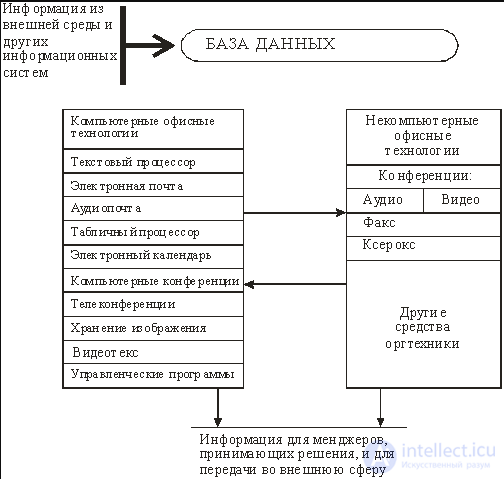
Fig. Main components of office automation
Office automation is intended to supplement the existing traditional system of personnel communication (with its meetings, phone calls, and orders). When used together, these two systems will ensure
rational automation of managerial work and the best possible provision of managers with information. The automated office:
Office automation technologies are especially attractive for group problem solving. They make it possible to increase the productivity of secretaries and clerical workers and give them the ability to cope with an increasing volume of work; however, this advantage is secondary compared to the possibility of using office automation as a tool for solving problems.
At present, several dozen software products are known for computers, as well as non-computer technical equipment, that provide office automation technology:
Database.A required component of any technology is a database. In the automated office, the database concentrates within itself data about the firm's production system, just as in data processing technology at the operational level. Information may also enter the database from the firm's external environment. Specialists must master the basic technological operations of working within a database environment.
A required component of any technology is a database. In the automated office, it concentrates within itself data about the firm's production system, just as in data processing technology at the operational level. Information may also enter the database from the firm's external environment.
Information from the database is fed into the input of computer Applications (programs), such as a word processor, a spreadsheet processor, electronic mail, computer conferencing, and so on.
A word processor is a type of application software designed for creating and processing text documents. It makes it possible to
add or delete words, move sentences and paragraphs, set the format, manipulate text elements and modes, and so on. Regularly receiving letters and reports prepared with the help of a word processor gives the manager the opportunity to continuously assess the situation at the firm.
Electronic mail (E-mail), based on the networked use of computers, enables the user to receive, store, and send messages to their partners on the network. Electronic mail can provide the user with various capabilities depending on the software used. For a sent message to become available to all users of electronic mail, it should be posted on a computer bulletin board. When a firm decides to implement electronic mail, it has two options:
Audio mail. This is mail for transmitting messages by voice. It resembles electronic mail, but instead of being typed on a keyboard, the message is transmitted over the telephone. Audio mail is also implemented over a network. Mail for transmitting audio messages can be used successfully for group problem solving. The main advantage of audio mail compared with electronic mail is that it is simpler – when using it there is no need to enter data from the keyboard.
The spreadsheet processor, just like the word processor, is a basic component of the information culture of any employee and of automated office technology. Without knowledge of the fundamentals of working in it, it is impossible to make full use of a personal computer in one's work. The functions of modern spreadsheet processor software environments
make it possible to perform numerous operations on data presented in tabular form. By combining these operations according to common features, one can single out
the most numerous and commonly used groups of technological operations:
Any modern spreadsheet processor environment has facilities for transmitting data over a network.
The electronic calendar provides another opportunity to use the networked version of the computer to store and manipulate the work schedules of managers and other employees of the organization. The hardware and software of the electronic calendar fully correspond to the analogous components of electronic mail; moreover, calendar software is often an integral part of electronic mail software.
Computer conferences use computer networks to exchange information among the members of a group solving a particular problem.
The circle of persons having access to this technology is limited. The number of participants in a computer conference can be many times greater than the number of participants in audio and video conferences.
Teleconferencing includes three types of conferences:
Videotext is based on the use of a computer for obtaining
a display of textual and graphical data on the monitor screen. For decision makers, there are three ways of obtaining information in the form of videotext:
The exchange of catalogs and price lists of their products between companies in the form of videotext is popular.
Image storage. Any firm needs to store a large number of documents for a long time. Storing them even in the form of files causes serious problems. Therefore the idea arose of storing not the document itself, but its image (representation), and moreover of storing it in digital form.
Image storage (imaging) – a promising office technology based on the use of a special device – an optical image recognizer, which makes it possible to convert the image of a document or film into digital form for further storage in the external memory of a computer. Optical disks, which have enormous capacities, are used for storing images.
The development of this technology was facilitated by the emergence of a new technical solution – the optical disk in combination with digital image recording.

Comments