
Lecture
In computer graphics, a triangle strip is a subset of triangles in a triangle mesh with shared vertices, and it is a more memory-efficient method of storing mesh information. Triangle strips are more efficient than non-indexed triangle lists, but are usually as fast as or slower than indexed triangle lists. The main reason for using triangle strips is to reduce the amount of data needed to create a series of triangles. The number of vertices stored in memory is reduced from 3N to N + 2, where N is the number of triangles to be drawn. This allows less disk space to be used, and also speeds up their loading into random access memory.
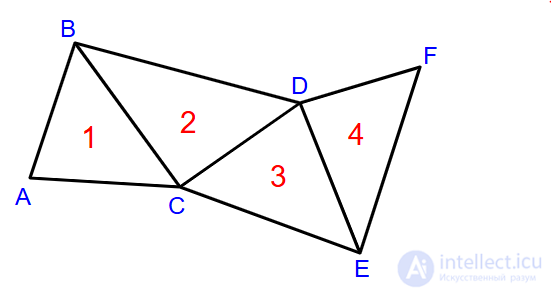
Diagram of four triangles 1, 2, 3, and 4 with vertices A, B, C, D, E, and F.
For example, the four triangles in the diagram, without using triangle strips, would have to be stored and interpreted as four separate triangles: ABC, CBD, CDE, and EDF. However, using a triangle strip, they can be stored simply as the sequence of vertices ABCDEF. This sequence will be decoded as a set of triangles with vertices at ABC, BCD, CDE, and DEF - although the exact order in which the vertices are read will not be left to right, since that would result in adjacent triangles facing in alternating directions.
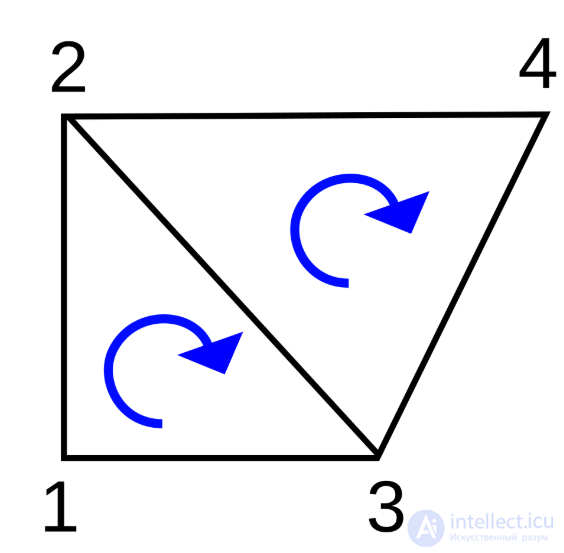
A model of two triangles drawn in OpenGL using triangle strips.
OpenGL has built-in support for triangle strips. The fixed-function OpenGL pipeline (deprecated in OpenGL 3.0) supports triangle strips using immediate mode and the functions glBegin() glVertex*() glEnd(). Newer versions support triangle strips using glDrawElements and glDrawArrays
To draw a triangle strip using OpenGL's immediate mode, an argument must be passed that notifies OpenGL that a triangle strip will be drawn. A family of functions defines the coordinates of each vertex in the triangle strip. For further information, refer to The OpenGL Redbook.
To draw the triangle strip in the diagram using OpenGL's immediate mode, the code looks as follows:
 //The vertices below have a clockwise orientation
//The default setting for glFrontFace is counter-clockwise
glFrontFace(GL_CW);
glBegin(GL_TRIANGLE_STRIP);
glVertex3f( 0.0f , 0.0f , 0.0f ); //vertex 1
glVertex3f ( 0.0f , 0.5f , 0.0f ); //vertex 2
glVertex3f ( 0.5f , 0.0f , 0.0f ); //vertex 3
glVertex3f ( 1.0f , 0.5f , 0.0f ); //vertex 4
glEnd ();
Note that only one additional vertex is needed to draw the second triangle. In OpenGL, the order in which vertices are specified is important so that surface normals are consistent.
A quote from the OpenGL Programming Guide:
GL_TRIANGLE_STRIP
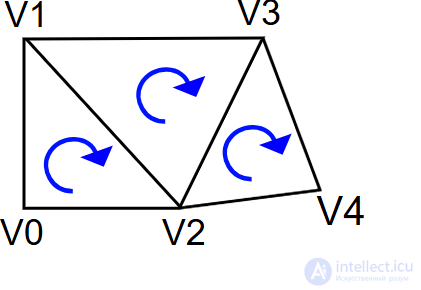
Draws a series of triangles (three-sided polygons) with vertices v0, v1, v2, then v2, v1, v3 (note the order), then v2, v3, v4, and so on. The order is needed so that all the triangles are drawn with the same orientation, so that the strip can correctly form part of a surface.
This is made even clearer from the manual pages:
Draws a connected group of triangles. For each vertex presented after the first two vertices, one triangle is defined. For odd n, vertices n, n + 1, and n + 2 define triangle n. For even n, vertices n + 1, n, and n + 2 define triangle n. n - 2 triangles are drawn.
Note that n starts at 1. The code example and diagram above demonstrate triangles drawn clockwise. For them to be considered front-facing, a preceding call to glFrontFace(GL_CW)GL_CCW is required, which otherwise has the initial value (meaning that triangles drawn counter-clockwise are front-facing by default).
This matters if glEnable(GL_CULL_FACE) and glCullFace(GL_BACK) are already active (GL_BACK by default), since back-facing triangles will be culled, and therefore will not be drawn and will not appear on screen at all.
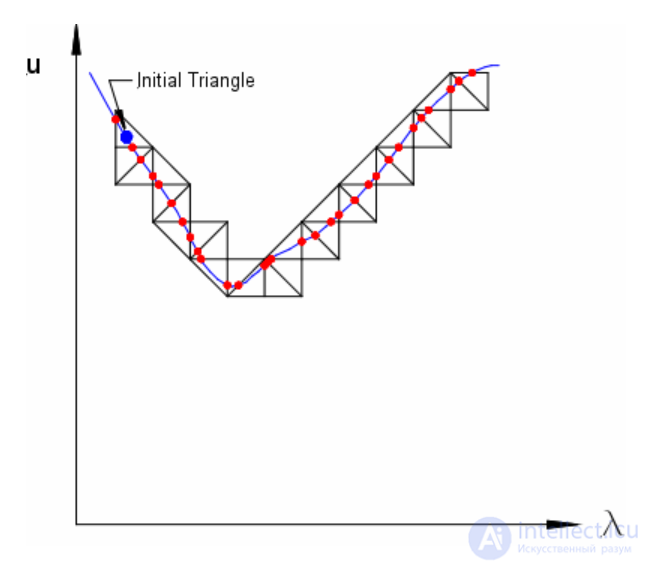
Tracing a curve using a triangle strip
It follows from the definition that a subsequence of the vertices of a triangle strip is also a triangle strip. However, if this substrip begins at an even-numbered (1-based) vertex, the resulting triangles will change orientation. For example, the substrip BCDEF will represent the triangles: BCD, CED, DEF.
Similarly, reversing the vertices of a strip will produce the same set of triangles if the strip has an even number of vertices. (for example, the strip FEDCBA will represent the same triangles FED, ECD, DCB, CAB, as the original strip). However, if the strip has an odd number of vertices, then the reversed strip will represent triangles with the opposite orientation. For example, reversing the strip ABCDE produces the strip EDCBA, which represents the triangles EDC, DBC, CBA).
Converting a general polygonal mesh into a single long strip was, until recently, generally impossible. Typically, triangle strips are similar to a set of boundary loops, and poles on the model are represented by triangle fans. Tools such as Stripe or FTSG represent a model as multiple strips. Optimal grouping of a set of triangles into consecutive strips has been proven to be NP-complete.
Alternatively, a complete object can be described as a degenerate strip, which contains zero-area triangles that the processing software or hardware will discard. Degenerate triangles effectively introduce breaks or "jumps" into the strip. For example, the mesh in the diagram can also be represented as ABCDDFFEDC, which will be interpreted as triangles ABC CBD CDD DDF DFF FFE FED DEC (degenerate triangles marked in italics). Note how this strip first builds the two triangles on the left, then restarts and builds the remaining two on the right.
Although breaks in triangle strips can always be implemented by resending vertices, APIs sometimes explicitly support this feature. IRIS GL supported swaps (flipping two consecutive vertices in a strip), a feature that early algorithms such as the SGI algorithm relied on. Recently, OpenGL/DirectX has been able to render multiple triangle strips without degenerate triangles using the Primitive Restart feature.

Comments