
Lecture
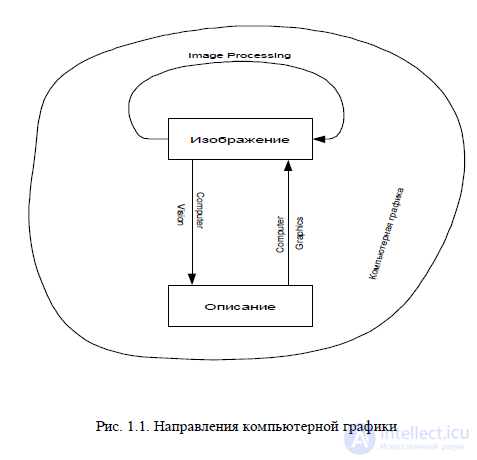
The most important function of a computer is information processing. Special attention can be given to information processing related to images. It is divided into three main
directions: computer graphics (CG), image processing, and image recognition. The task of computer graphics (Computer Graphics) is visualization, that is,
the creation of an image. Visualization is performed based on the description (model) of what needs to be displayed. There are many methods and algorithms of visualization, which
differ from one another depending on what and how is displayed. For example, displaying something that can exist only in a person's imagination — a function graph,
a diagram, a scheme, a map. Or, conversely, imitating three-dimensional reality — the depiction of scenes in computer games, feature films, simulators, and in
architectural design systems. Important and interrelated factors here include: the speed of frame change, the density of objects in a scene, the quality
of the image, and accounting for the specific features of the graphics device.
Image processing (Computer Vision) — this is the transformation of images. The input data is an image, and the result of processing is also an image.
Examples of image processing include: contrast enhancement, sharpening, color correction, color reduction, smoothing, noise reduction, and so on. As
material for processing, one can use satellite images, scanned images, radar images, infrared images, and so on.
The task of image processing can involve either improvement according to a certain criterion (restoration, reconstruction) or a special
transformation that radically changes the image. In the latter case, image processing can be an intermediate stage for further recognition
of the image. For example, before recognition it is often necessary to extract contours, create a binary image, and separate by colors. Image processing methods
can differ substantially depending on how the image was obtained — synthesized by a CG system, or the result of digitizing a black-and-white or color
photograph.
Let us dwell on certain characteristic features inherent to individual areas of computer graphics, touching along the way on the software tools used in them. Printing. Computer graphics began its spread with printing. Printing is a rather complex field, requiring the broadest range of knowledge from those working in it. Even at a superficial glance, work in printing is quite diverse: creating business cards, forms, advertising leaflets, booklets, and posters; work in periodicals (which often have their own specifics). Special layout programs are designed to accomplish these tasks. Layout programs make it possible to combine text and graphic information to create newsletters, magazines, brochures, and advertising materials. Among the most popular programs, one can single out Adobe PageMaker and QuarkXPress. Most page layout programs are used to arrange various elements on a page, rather than to create text or graphic files from scratch. The texts of lengthy documents are usually written (typed) in word processing systems (text editors such as MS Word), and then imported into layout programs.
Graphics are often created in drawing programs (business graphics) and image editors, and then imported into a page layout program. Although all the major page layout programs have roughly the same capabilities, they have gained their popularity for different reasons. For example, PageMaker is traditionally considered the easiest to use among page layout programs, primarily because it uses a visual metaphor familiar to most artists and designers. PageMaker's competitor and analogue – QuarkXPress – is usually used on Macintosh-platform computers. Computer graphics packages for printing make it possible to supplement text with illustrations of various origin, to design page layouts, and to output printed products with high quality. Multimedia. Multimedia is an area of computer graphics related to the creation of interactive encyclopedias, reference systems, training programs, and interfaces for them. Unlike printing, where a print designer collaborates with a printer, a multimedia designer collaborates with a programmer. Here the requirements for graphics are already different. Thus, in printing, for example, files had to have a fairly high resolution. As a result, file sizes could amount to tens or even hundreds of megabytes. In multimedia, the limiting factors are the resolution of the monitor screen and the requirement to minimize file sizes. Here quality control is simpler than in printing; a good monitor is sufficient for it. To work in this field, alongside graphic editors, one needs to know multimedia creation programs – for example, Macromedia Director or MS PowerPoint. In the creation of new versions of presentation packages, one can note a trend toward ever fuller use of multimedia capabilities and the Internet. These programs allow convenient import of video and audio files, and provide means for animating diagrams.
World Wide Web (WWW). An important event in the life of society was the emergence of the global Internet network. This network is now developing rapidly. The capacity of data transmission channels is increasing, and methods of exchanging and processing information are being improved. The Internet is used by more and more people in different countries. It is a means of communication among people, of exchanging information, of bringing languages closer together, of spreading ideas, a new space for business, and so on. Computer graphics occupies an important place on the Internet. Methods of transmitting visual information are increasingly being improved, more advanced graphic formats are being developed, and there is a tangible desire to use three-dimensional graphics, animation, and the whole spectrum of multimedia. The requirements for creating images for the WWW are quite contradictory. On the one hand, there are strict constraints on reducing file sizes to minimize their transmission time over the network; on the other hand, there is the need to preserve the quality of the "picture" transmitted over the network. Each graphic image format used on the WWW has its own peculiarities: JPEG, for example, is good for photographs, while GIF is good for vector images. Moreover, the WWW has its own color gamut, which must be taken into account when creating images. 3D graphics and computer animation. This is yet another broad and, in its own way, complex direction, a special world.
3D graphics is the creation of artificial objects and characters, their animation, and their combination with real objects and interiors. Today several promising directions of its use have taken shape.
● 3D graphics finds wide application in the computer game industry.
Animated intros, interfaces, and characters of computer games are created in 3D graphics programs.
● Another area of application of 3D graphics is television advertising and the design of television channels.
● Many architects and designers use 3D graphics to build models of buildings and three-dimensional models of architectural monuments that do not yet exist in reality.
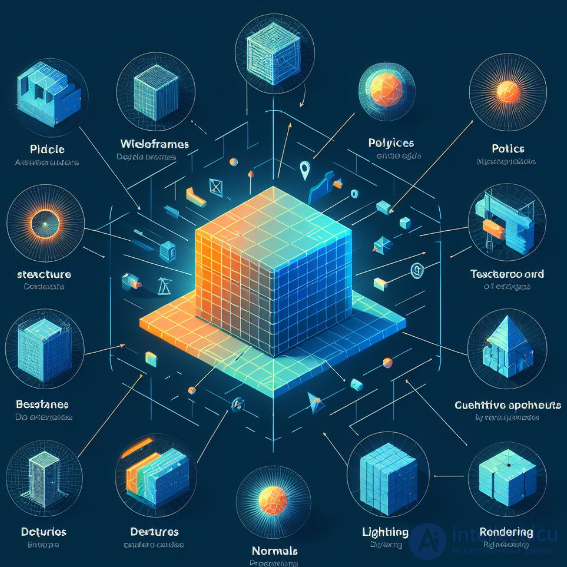
Mastering 3D graphics requires considerable time and powerful system resources. For the result to look photorealistic, one must master not only 3D modeling, but also be able to light a scene correctly, find a good camera angle, and choose the material and textures. All of this significantly affects the quality of the graphics. A three-dimensional model is a representation of an object or scene in three-dimensional space, which is created using mathematical models.
Basic concepts of three-dimensional modeling:
Vertex: This is a point in three-dimensional space that determines the position of an object. Vertices are combined to create polygons and other shapes.
Polygon: This is a geometric figure defined by three or more vertices connected by sides. Polygons are used to create the surfaces of objects.
Mesh: This is a collection of polygons combined together to create a three-dimensional model of an object.
Texture: An image applied to the surface of an object to give it a visual appearance. Textures can contain colors, images, patterns, and other visual data.
Geometric shapes and primitives: points, lines, surfaces, and simple volumetric figures that are used to represent objects
Material: This is a set of properties determining the visual behavior of an object, such as color, gloss, transparency, and so on. Materials can include textures and other parameters.
Lighting: The process of simulating light and its effect on objects in a three-dimensional scene. Lighting can be realistic or stylized depending on the requirements of the project.
Camera: This is the viewpoint from which the three-dimensional scene is observed. Camera parameters such as position, direction, field of view, and so on, determine how the scene will be displayed.
Transformation: The conversion of objects in three-dimensional space, such as translation, rotation, and scaling. Transformations are used to change the position, orientation, and size of objects.
(Voxel): A voxel is a volumetric element in a three-dimensional grid, analogous to a pixel in a two-dimensional grid.
Vertex and voxel are two different concepts used in three-dimensional graphics, and they have different purposes and representations:
Vertex:
Voxel:
These basic concepts play a key role in creating three-dimensional models and scenes used in various fields, such as computer games, animation, data visualization, architectural design, and industrial design.
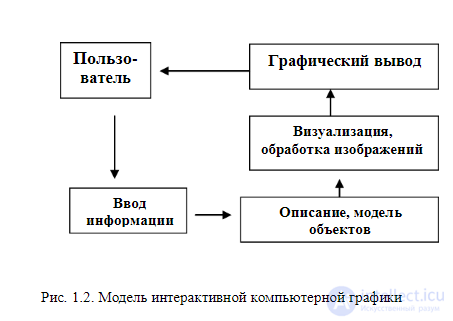
Computer-aided design systems were historically the first interactive systems (CAD – Computer Aided Design), which appeared in the 1960s. They represent a significant stage in the evolution of computers and software. In an interactive CG system, the user perceives on the display an image representing some COMPLEX object and can make changes to the description (model) of the object (fig. 1.2). Such changes can include both the entry and editing of individual elements and the setting of numerical values for any parameters, as well as other operations for entering information based on the perception of images.
CAD-type systems are actively used in many fields, for example, in mechanical engineering and electronics. Among the first to be created were CAD systems for designing aircraft, automobiles, systems for developing microelectronic integrated circuits, architectural systems, and so on. Such systems initially operated on fairly large computers. Then high-speed midrange computers with advanced graphics capabilities — graphics workstations — became widespread. As the power of personal computers increased, CAD systems increasingly began to be used on cheap mass-market computers, which now have sufficient speed and memory capacity to solve many tasks. This has led to the widespread adoption of CAD systems.
● One of the main applications is their use in various fields of engineering design activity – from designing microchips to creating aircraft.
● Another important area of CAD application is construction and architecture.
● CAD is also used in medicine. For example, the automated design of implants, especially for bones and joints, makes it possible to minimize the need to make changes during surgery, which reduces the time spent on the operating table (a positive result both from the patient's point of view and from the doctor's point of view).
Today they are becoming increasingly popular. This is a relatively new type of interactive computer graphics system for the general public. They integrate methods and technologies from a variety of fields — databases, geodesy, cartography, space technology, navigation, and, of course, computer graphics. Well-known systems include ArcGIS, AutoCAD Map, and MapInfo. An example of domestic systems is GIS "OKO," "Vizicom-Kiev." GIS-type systems can use significant computer system resources both for working with databases and for visualizing objects located on the Earth's surface. Moreover, visualization needs to be done with varying degrees of detail — both for the Earth as a whole and within the boundaries of individual areas.
Typical operations for any GIS include entering and editing objects taking into account their location on the Earth's surface, forming various digital models, recording in databases, and executing various queries to databases. An important function of GIS is the analysis of spatial and topological relations of a set of objects located in a given territory. Another function is satellite GPS navigation. 1.2. Principles of organizing graphics programs. Many PC users associate the concept of computer graphics with programs designed for editing two-dimensional digital images. This software can be divided, according to its principle of operation and functional purpose, into 3 groups:
The first 2 types of programs are most widely represented in computer graphics: raster and vector. It is important to understand the fundamental differences between these two types of software, since each has its own strengths and weaknesses. Fractal graphics deserve separate discussion. They occupy an intermediate position between raster and vector programs. In addition, fractal patterns are often used as beautiful decorative fills in raster and vector graphics editors. Two-dimensional, or 2D, graphics is the foundation of all computer graphics (including 3D graphics). No computer artist-designer can work productively on their projects without understanding the basic principles of two-dimensional graphics.
Most image editing programs – Adobe Photoshop, Corel PHOTO-PAINT, or MS Paint – are raster programs. In them, the image is formed from a grid of tiny squares called pixels. Since each pixel on a computer screen is displayed at a specific location on the screen, programs that create an image in this way are called bitwise, or bitmap programs. The grid (or matrix) formed by pixels is called a raster. That is why bitmap programs are also called raster programs. How is a digital image created? Many image processing programs, such as Adobe Photoshop, allow you to choose the desired electronic brush, color, and paint. Sometimes the final result is indistinguishable from traditional painting, but, in general, the capabilities of a computer are much broader than traditional ones. Most digital images first enter a computer via a scanner or digital camera. Using a scanner, one can digitize a slide or photograph by converting the image into digital data. The technique of scanning an image with subsequent color correction and retouching operations is most often used in printed computer products, primarily when creating advertisements and magazine covers. A computer can change the color of your hair or eyes, retouch a mole on your cheek, change the color or background of your photograph, and also remove all flaws and defects. To attract viewers' attention, computer artists often add special effects to photographs in magazines and advertisements, creating complex collages.
The process of digitizing an image using a digital camera is simple – a person simply points the camera at the subject and presses the shutter. The image is instantly digitized and recorded in the memory device inside the camera. You don't need to buy and develop film – it simply doesn't exist. Instead of outputting the image to slides or printing photographs, it is loaded into a computer via a cable connection. When the image appears on the computer screen, you can change its colors, retouch it, rotate, bend, and distort it to create special effects in image editing programs: Adobe Photoshop, Corel PHOTO-PAINT, or others more convenient for the user. Raster programs are designed mainly for editing images, providing the ability to color-correct, retouch, and create special effects based on digital images. Using image-creation software products such as Adobe Photoshop or Corel PHOTO-PAINT, you can create collages, vignettes, photomontages, and prepare color images for printing. Today, image editing programs are used in the production of almost all printed images that require a photograph. They are used to erase wrinkles from models' faces, to add bright colors to gloomy and overcast days, and to change the overall mood through special lighting effects. They are also widely used by multimedia producers to create text and background effects and to change the number of colors in an image. Vector programs. An image created in vector programs is based on mathematical formulas rather than pixel coordinates. The curves and straight lines that form the basis of such images are called vectors. Since mathematical formulas are used when defining objects on the screen, individual elements of images created in vector programs – for example, Adobe Illustrator, CorelDRAW, and Macromedia FreeHand – can be easily moved, enlarged, or reduced without the appearance of the "staircase effect." Thus, to move an object, it is enough to drag it with the mouse. The computer automatically recalculates its size and new location. Since in this case the image is created mathematically, vector programs are used when clear lines are needed. They are often used in creating logos, fonts for plotter output, and various drawings. When you see an image created in a vector program, its quality does not depend on the original image resolution, but on the resolution of the output device (monitor, printer, plotter…). Since image quality is not based on resolution, an image created in vector programs generally has a smaller file size than one built in bitmap programs. In vector programs there are also no problems with fonts – large font arrays do not create huge files. Fractal programs. A fractal is an object of a rather complex shape, obtained as a result of performing a simple iterative cycle over an initial, elementary shape. One of the main properties of fractals is self-similarity. An object is called self-similar when enlarged parts of the object resemble the object itself and one another.
Thus, in the simplest case, a small part of a fractal contains information about the entire fractal. For example, a snowflake carries information about a snowdrift, and a mountain rock has the same outlines as a mountain range. Thanks to this property, fractals can be used to generate a terrain surface that resembles itself, regardless of the scale at which it is displayed. Programs that have recently become widespread and are built on the principle of generating self-similar figures are an excellent tool in the hands of a designer, an artist, and a web application developer. A separate promising direction in the development of fractal programs is the creation of an algorithm for fractal compression of graphic information. Fractal graphics will be discussed in more detail in Chapter 5.

Comments