
Lecture
SMTP is a connection-oriented, text-based protocol in which a mail sender exchanges data with a mail receiver by issuing command strings and supplying the necessary data over a reliable, ordered data-stream channel, usually Transmission Control Protocol (TCP). SMTP (Simple Mail Transfer Protocol) — is a widely used network protocol designed for transferring electronic mail over TCP/IP networks.
SMTP was first described in RFC 821 (1982); the most recent update, RFC 5321 (2008), includes a scalable extension — ESMTP (Extended SMTP). Today, the term «SMTP protocol» usually refers to the protocol together with its extensions. The SMTP protocol is designed for transmitting outgoing mail using TCP port 25.
While email servers and other message transfer agents use SMTP to send and receive mail messages, client mail applications running at the user level usually use SMTP only to send messages to a mail server for relaying. To receive messages, client applications usually use either POP (Post Office Protocol), or IMAP (Internet Message Access Protocol), or proprietary systems (such as Microsoft Exchange and Lotus Notes/Domino) to access their mailbox account on the server.
In the 1960s, various types of electronic communication were in use. People communicated with one another using systems designed for specific mainframes. As more and more computers became connected, especially on the US Government's network, ARPANET, standards were developed so that users on different systems could write electronic messages to each other. These standards, developed in the 1970s, became the foundation for SMTP.
The roots of SMTP can be traced back to two implementations described in 1971 — the Mail Box Protocol and SNDMSG, which was «invented» by Ray Tomlinson of BBN Technologies for TOPS-20/TENEX computers sending messages over ARPANET (at that time fewer than 50 hosts were connected to it).
Further implementations included FTP Mail and Mail Protocol, developed in 1973. Development continued throughout the 1970s, until ARPANET transformed into the modern Internet around 1980. That same year, Jon Postel proposed the Mail Transport Protocol, thanks to which FTP stopped being the basis for mail transfer. SMTP was published in RFC 821 (also written by Postel) in August 1982.
The SMTP standard was developed around the same time as Usenet, a data transfer network that has some similarities to SMTP. SMTP became widely used in the early 1980s. At that time it was a complement to the Unix mail program Unix to Unix CoPy (UUCP), which was better suited for handling the transfer of electronic messages between periodically connected devices. On the other hand, SMTP works excellently when both the sending and receiving devices are connected to the network at all times. Both devices use a store-and-forward mechanism and are an example of push technology. Although Usenet newsgroups are still distributed between servers using UUCP, UUCP mail has effectively disappeared along with the «bang path» route (the sequence of host machines in the network through which a message had to travel to reach the addressee), which was used as routing headers. The article on sender rewriting contains technical background information on the history of early SMTP and source routing up to RFC 1123.
Sendmail was one of the first (if not the first) message transfer agents to implement SMTP. Other popular server programs supporting SMTP include Postfix, qmail, Novell GroupWise, Exim, Novell NetMail, Microsoft Exchange Server, and Sun Java System Messaging Server.
Message submission (RFC 2476) and SMTP-AUTH (RFC 2554) were introduced in 1998 and 1999 and described new trends in electronic message transfer. Originally, SMTP servers were typically internal to an organization, receiving messages from outside organizations and relaying the organization's messages out into the external environment. But over time, SMTP servers (message transfer agents) actually expanded their functions and eventually became message submission agents for user mail applications, some of which now relayed mail from outside the organization (for example, a company executive traveling and wanting to send an electronic message using the corporate SMTP server).
This issue, being a consequence of the rapid growth and popularity of the World Wide Web, means that SMTP had to include special rules and methods for message relaying and user authorization to prevent abuses such as relaying unsolicited mail (spam).
Because this protocol originally had a text-based (ASCII) interface, it worked poorly with binary files and characters of many non-English languages. Standards such as Multipurpose Internet Mail Extensions (MIME) were developed to encode binary files for transmission over SMTP. Message transfer agents developed after Sendmail generally also implemented a clean-8-bit option, so that the alternative «just send eight» strategy could be used to transmit arbitrary text data (in any eight-bit ASCII-like character encoding) over SMTP. However, there was still the problem of mojibake[en] caused by different character-set mappings among vendors, although email addresses themselves still allowed only ASCII. Today, message transfer agents that handle clean 8 bits generally support the 8BITMIME extension, which allows transmitting binary files almost as easily as plain text. Recently, the SMTPUTF8 extension was created to support UTF-8-encoded text, making it possible to include international content and addresses using alphabets such as Cyrillic or Chinese.
Many prominent people contributed to the core SMTP specification, among them Jon Postel, Eric Allman, Dave Crocker, Ned Freed, Randall Gellens, John Klensin, and Keith Moore.
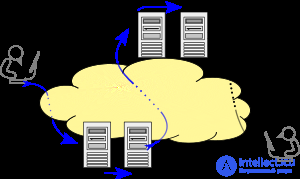
Email is submitted by a mail client (MUA, mail user agent) to a mail server (MSA, mail submission agent) using SMTP over TCP port 587. From there the MSA delivers the mail to its message transfer agents (MTA, mail transfer agent). Often these two agents are simply different instances of the same software running with different parameters on the same device. Local processing can be carried out either on a single machine or split between different devices; in the first case the processes involved share access to files, in the second case SMTP is used to forward the message internally, with each host configured to use the next device as an intermediate host. Each process is itself an MTA, that is — an SMTP server.
The boundary MTA must find the target host. It uses the Domain Name System (DNS) to look up the mail exchanger (MX) records of the recipient's domain (the part of the address to the right of the @ symbol). The returned MX record contains the name of the target host. The MTA then connects to the exchange server as an SMTP client.
Once the target MX accepts the incoming message, it passes it to a mail delivery agent (MDA) for local delivery of the message. The MDA provides the ability to save messages in the appropriate mailbox format. Mail reception, again, can be carried out by either several computers or a single one — the illustration shows two nearest mailboxes for each case. The MDA can deliver messages directly to storage or forward them over the network using SMTP or any other means, including the Local Mail Transfer Protocol (LMTP) — a derivative of SMTP designed for this purpose.
After delivery to the local mail server, the message is stored for batch retrieval by authenticated mail clients (MUA). The message is retrieved by end-user applications (mail clients) using the IMAP (Internet Message Access Protocol) protocol, which facilitates access to messages and manages stored mail, or using the POP (Post Office Protocol) protocol, which typically uses the traditional mbox file format, or proprietary systems such as Microsoft Exchange/Outlook or Lotus Notes/Domino. Web mail clients can use any method, but the retrieval protocol often does not conform to official standards.
SMTP defines the transmission of a message, not its content. Thus, it defines the message envelope and its parameters (such as the envelope sender), but not the header or body of the message itself. STD 10 and RFC 5321 define SMTP (the envelope), while STD 11 and RFC 5322 define the message (header and body), officially called the Internet Message Format.
SMTP — is a connection-requiring text protocol in which the message sender communicates with the receiver by issuing command strings and receiving the necessary data over a reliable channel, which is usually a TCP connection (Transmission Control Protocol). An SMTP session consists of commands sent by the SMTP client and corresponding responses from the SMTP server. When a session is opened, the server and client exchange its parameters. A session may include zero or more SMTP operations (transactions).
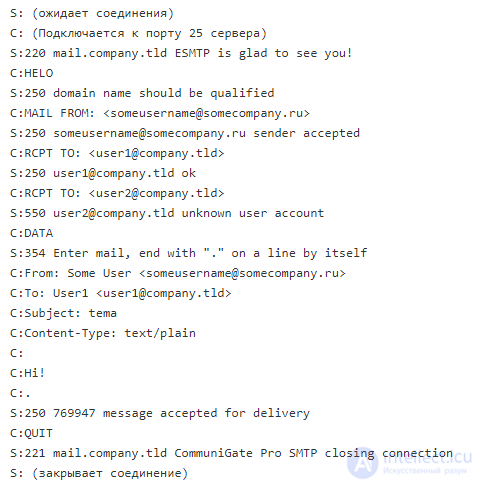
An SMTP operation consists of three command/response sequences (see example below). Description of the sequences:
In addition to intermediate responses for the DATA command, each server response can be positive (response code 2xx) or negative. The latter, in turn, can be permanent (code 5xx) or temporary (code 4xx). Refusal by the SMTP server to transmit a message is a permanent error; in this case the client should send a bounce message. After a reset — a positive response, the message will most likely be rejected. The server can also indicate that additional data is expected from the client (code 3xx).
The originating host (SMTP client) can be either the end user's mail client (functionally defined as a mail agent — MUA), or a message transfer agent (MTA) on a server, that is, the server acts as a client in the corresponding session to relay the message. Fully functional servers support message queues for retransmitting a message in the event of errors.
The MUA knows the SMTP server for outgoing mail from its settings. The SMTP server, acting as a client, that is, forwarding messages, determines which server to connect to by looking up the MX (Mail eXchange) resource records in DNS for each recipient's domain. If no MX record is found, compliant MTAs (not all) fall back to a simple A record. Forwarding servers can also be configured to use a smart host.
The SMTP server, acting as a client, establishes a TCP connection with the server on the port designed for SMTP, port 25. The MUA must use port 587 to connect to the message submission agent (MSA). The main difference between an MTA and an MSA is that SMTP authentication is mandatory only for the latter.
SMTP — is only a delivery protocol. It cannot fetch messages from a remote server on demand. Other protocols, such as POP and IMAP, have been developed for retrieving mail and managing a mailbox. Nevertheless, SMTP provides the ability to initiate processing of the message queue on a remote server, whereby the requesting system can receive all messages addressed to it (see Remote Message Queue Starting below). POP and IMAP are preferable when the user's computer is not permanently powered on, or is only temporarily connected to the Internet.
Remote Message Queue Starting — a feature of SMTP that allows a remote host to start processing the message queue on a server so that it can receive messages intended for it using the TURN command. However, this feature was considered insecure and was extended in RFC 1985 with the ETRN command, which works more reliably thanks to a DNS-information-based authentication method.
ODMR (On-Demand Mail Relay) — an SMTP extension standardized in RFC 2645 that allows a message to be relayed to an authenticated user.
Many users whose character set differs from the Latin alphabet face the requirement of having an email address in Latin script. To solve this problem, RFC 6531 was created, providing internationalization capabilities for SMTP — the SMTPUTF8 extension. RFC 6531 provides support for multibyte and non-ASCII characters in the mail address, for example: δοκιμή@παράδειγμα.δοκιμή or 测试@测试.测试. Current support is limited, but there is great interest in the wide adoption of RFC 6531 and its related RFCs in countries with a large user base for whom the Latin alphabet is not native.
A mail client must know the IP address of the SMTP server, which is specified as part of the configuration (usually in the form of a DNS name). The server will deliver outgoing messages on behalf of the user.
Server administrators need to control which clients can use the server. This allows them to combat abuses such as spam. Two solutions are typically used:
In this case, the internet provider's SMTP server will not allow access to users «outside» the provider's network. More precisely, the server may allow only those users whose IP address was assigned by that provider, which is equivalent to requiring an Internet connection through that provider. A mobile user may often find themselves on a network other than their provider's, and so messages will not be sent.
There are several variations of this system. For example, an organization's SMTP server might grant access only to users on the same network, blocking all other users. The server can also perform a series of checks on the client's IP address. These methods were typically used by organizations and institutions, such as universities, for internal use of the server. However, most of them now use the authentication methods described below.
By restricting access to specific addresses, server administrators can easily identify the address of any attacker. If a user can use different providers to connect to the Internet, this type of restriction becomes impractical, and changing the configured outgoing SMTP server address is inconvenient. It is highly desirable to be able to use client configuration information that does not need to change.
Instead of the location-based restriction described earlier, modern SMTP servers usually require user authentication before granting access. This system, being more flexible, supports mobile users and provides them with a fixed choice of configured outgoing mail server.
A server that is accessible to the broader network and does not provide these types of access restrictions is called an open relay. Such servers are now considered bad practice.
Server administrators choose which port clients will use to relay outgoing mail — 25 or 587. The specifications and many servers support both ports. Although some servers support port 465 for secure SMTP, it is preferable to use the standard ports and ESMTP commands if a secure session between client and server is required.
Some servers are configured to reject all relaying on port 25, but users authenticated on port 587 are allowed to forward messages to any valid address.
Some providers intercept port 25, redirecting traffic to their own SMTP server regardless of the destination address. Thus, their users cannot access a server outside the provider's network on port 25.
Some servers support authenticated access on an additional port other than 25, allowing users to connect to them even if port 25 is blocked.
C: — client, S: — server
As a result of this session, the letter will be delivered to the recipient user1@company.tld, but will not be delivered to the recipient user2@company.tld, because that address does not exist.
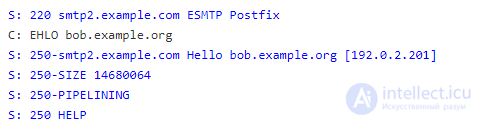
Many clients request the SMTP extensions supported by the server using the HELO command from the extended SMTP specification (RFC 1870). HELO is used only if the server did not respond to EHLO. Modern clients can use the SIZE keyword of the ESMTP extension to request the maximum message size that will be accepted. Older clients and servers may attempt to send excessively large messages, which will be rejected after consuming network resources, including connection time. Users can manually pre-determine the maximum size accepted by ESMTP servers. The client replaces the HELO command with EHLO.
smtp2.example.com announces that it will accept a message no larger than 14,680,064 octets (8-bit bytes). Depending on the server's actual usage, it may currently not accept a message of that size. In the simplest case, an ESMTP server will announce the maximum SIZE only when interacting with a user via HELO.
Extended SMTP (ESMTP) (sometimes called Enhanced SMTP) is a definition of protocol extensions for the SMTP standard. ESMTP was defined in November 1995 in the IETF publication RFC 1869, which established a general framework for all existing and future extensions. ESMTP defines a consistent and manageable means by which ESMTP clients and servers can be identified, and servers can indicate the extensions they support. The original SMTP protocol supported only unauthenticated, unencrypted ASCII text messages, susceptible to man-in-the-middle attacks, spoofing, and spam distribution, and required any binary data to be encoded as readable text before transmission. A number of additional extensions specify various mechanisms for solving these problems.
Clients learn the parameters supported by the server by using the EHLO greeting instead of the original HELO. Clients fall back to HELO only if the server does not support SMTP extensions. Modern clients can use the SIZE keyword of the ESMTP extension to ask the server for the maximum message size that will be accepted. Older clients and servers may attempt to send messages that are too large, which will be rejected after using network resources, including connection time to network links, which is billed per minute. Users can manually pre-determine the maximum size allowed by ESMTP servers. The client replaces the HELO command with the EHLO command.
The original SMTP supported only a single ASCII text body, so any binary data had to be encoded as text within that message body before transmission, and then decoded by the recipient. Binary-to-text encodings such as uuencode and BinHex were commonly used.
To address this problem, the 8BITMIME command was developed. It was standardized in 1994 as RFC 1652. It simplifies the transparent exchange of email messages containing octets outside the seven-bit ASCII character set by encoding them as MIME content parts, usually encoded using Base64.
On-Demand Mail Relay (ODMR) is an SMTP extension standardized in RFC 2645 that allows a periodically connected SMTP server to receive email queued for it when it is connected.
The original SMTP supports email addresses consisting only of ASCII characters, which is inconvenient for users whose native script is not Latin-based or who use diacritical marks outside the ASCII character set. This limitation was removed through extensions that allow the use of UTF-8 in address names. RFC 5336 introduced the experimental UTF8SMTP command, which was later superseded by RFC 6531, which introduced the SMTPUTF8 command. These extensions provide support for multibyte and non-ASCII characters in email addresses, for example with diacritical marks and other language characters such as Greek and Chinese. Current support is limited, but there is great interest in wide adoption of RFC 6531 and its related RFCs in countries such as China, with a large user base for which the Latin (ASCII) alphabet is foreign.
Like SMTP, ESMTP is a protocol used for transferring Internet mail. It is used both as an inter-server transport protocol and (with enforced limited behavior) as a mail submission protocol. The primary identification function for ESMTP clients is to open the transmission using the EHLO (Extended HELLO) command rather than HELO (Hello, the original RFC 821 standard). The server will respond with success (code 250), refusal (code 550), or an error (code 500, 501, 502, 504, or 421), depending on its configuration. An ESMTP server returns a 250 OK code in a multiline response with its domain and a list of keywords indicating supported extensions. A server compliant only with RFC 821 returns error code 500, allowing ESMTP clients to try either HELO or QUIT. Each service extension is defined in an approved format in subsequent RFCs and registered with the Internet Assigned Numbers Authority (IANA). The first definitions were the additional RFC 821 services: SEND, SOML (send or mail), SAML (send and mail), EXPN, HELP, and TURN. A format was established for additional SMTP verbs and for new parameters in MAIL and RCPT. Some relatively common keywords (not all of which correspond to commands) used today:
8BITMIME - 8-bit data transmission, RFC 6152ATRN - Authenticated TURN for on-demand mail relaying, RFC 2645AUTH - authenticated SMTP, RFC 4954CHUNKING - Chunking, RFC 3030DSN - delivery status notification, RFC 3461ETRN - Extended version of the TURN remote message queue starting command, RFC 1985HELP - Provide helpful information, RFC 821PIPELINING - command pipelining, RFC 2920SIZE - Message size declaration, RFC 1870STARTTLS - Transport Layer Security, RFC 3207 (2002)SMTPUTF8 - allow UTF-8 encoding in mailbox names and header fields, RFC 6531 The ESMTP format was reformulated in RFC 2821 (superseding RFC 821) and updated to its most recent definition in RFC 5321 in 2008. Support for the EHLO command on servers became mandatory, and HELO became a mandatory fallback. Non-standard, unregistered service extensions can be used by bilateral agreement; these services are indicated by an EHLO message keyword beginning with «X», with any additional parameters or verbs marked similarly. SMTP commands are case-insensitive. They are presented here in capital letters only for emphasis. An SMTP server that requires a particular method of capitalization is in violation of the standard.The original SMTP specification did not include any means for authenticating senders. Subsequently, an extension was introduced in RFC 2554. The SMTP extension (ESMTP) provides mail clients with the ability to specify a security mechanism for the server, authentication, and a SASL (Simple Authentication and Security Layer) security profile for subsequent message transmissions.
Microsoft products implement their own protocol — SPA (Secure Password Authentication) via the SMTP-AUTH extension.
However, the impracticality of widespread implementation and management of SMTP-AUTH means that the spam problem cannot be solved by it alone.
Extensively modifying SMTP, as well as fully replacing it, is considered impractical because of the enormous installed base of SMTP. Internet Mail 2000 was one of the contenders for such a replacement.
Spam works due to various factors, including non-standard-compliant MTA implementations and vulnerabilities in operating system security (aggravated by permanent broadband connections), which allow spammers to remotely control an end user's computer and send spam from it.
Several side-protocol proposals exist to assist SMTP's operation. The Anti-Spam Research Group (ASRG), a division of the Internet Research Task Force, works on mail authentication and other proposals to provide simple authentication that will be flexible, lightweight, and scalable. Recent activity by the Internet Engineering Task Force (IETF) includes MARID (2004), which led to two IETF-approved experiments in 2005, and DomainKeys Identified Mail in 2006.
STARTTLS in RFC 1869 requires starting the session not with the HELO command, but with the EHLO command. If the server does not support extensions, it will respond to EHLO with an error, in which case the client must send the HELO command and not use protocol extensions.
If the server does support ESMTP, then in addition to the greeting it will report a list of supported SMTP protocol extensions, for example:
ehlo office.company1.tld
250-mail.company2.tld is pleased to meet you
250-DSN
250-SIZE
250-STARTTLS
250-AUTH LOGIN PLAIN CRAM-MD5 DIGEST-MD5 GSSAPI MSN NTLM
250-ETRN
250-TURN
250-ATRN
250-NO-SOLICITING
250-HELP
250-PIPELINING
250 HELO

Comments