
You get a bonus - 1 coin for daily activity. Now you have 1 coin

Cisco Switches: Configuring Ports (access, trunk, hybrid) - Specifying VLAN and Port Type

Practice


So, our task today is to learn how to configure ports on Cisco switches in the modes:

  • Access (untagged packets)
  • Trunk (tagged packets)
  • Hybrid (untagged + tagged packets)

VLANs are virtual networks that exist at the second layer of the OSI model. That is, a VLAN can be configured on a layer-2 switch.
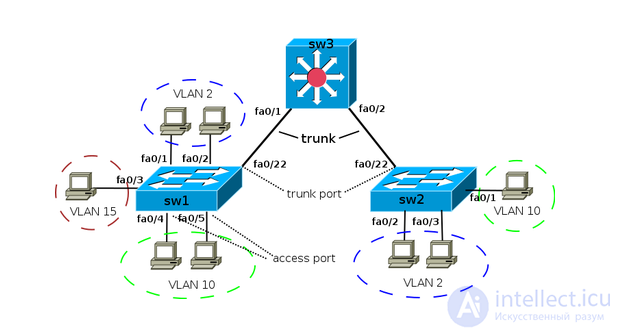
Cisco Switches: Configuring Ports (access, trunk, hybrid) - Specifying VLAN and Port Type
We log in to the required Cisco and go into configuration mode:

> enable
# config t
(config)#


Configuring a port for Access

(config)# interface fa 0/1
(config-if)# switchport mode access
(config-if)# switchport access vlan 20
(config-if)# end


In this example we specified that port FastEthernet 0/1 will operate in Access mode and packets passing through it will be assigned to VLAN 20.


Configuring a port for Trunk

(config)# interface fa 0/1
(config)# switchport trunk encapsulation dot1q
(config)# switchport mode trunk
(config)# switchport trunk allowed vlan 1,2,3,4


(The command "switchport trunk encapsulation dot1q" may not be present on some switch models, for example on the 2950).

In this example we specified that port FastEthernet 0/1 will operate in Trunk mode and accept VLANs with numbers 1, 2, 3 and 4.


Configuring a port for Hybrid

There is no Hybrid mode as such (like, for example, on 3Com) in Cisco. It's a workaround of Trunk mode.

(config)#interface fa 0/1
(config-if)#switchport mode trunk
(config-if)#switchport trunk native vlan 99
(config-if)#switchport trunk allowed vlan 1, 2, 3, 4, 99
(config-if)#end


In this example port FastEthernet 0/1 will operate in Trunk mode with the ability to accept Access packets and place them into the 99th VLAN. In addition, tagged packets from VLANs 1, 2, 3 and 4 will be both received and sent.


PS. It should be noted that Cisco has no Hybrid mode - it will still accept untagged packets and assign them to the VLAN specified as Native. This can only be prevented by not including the Native VLAN in the Allowed list (the switchport trunk allowed line).

Comments

Админ 05-06-2020
Если вам нужно разбить сети на под сети, то вероятно вы столкнетесь с тем что нужна фильтрация пакетов,
В Cisco используется такие порты:

access port — порт одного из VLAN’у и передающий нетегированный трафик. По спецификации cisco, access порт может принадлежать только одному VLAN’у, по умолчанию это первый (нетегированный) VLAN. Любой кадр, который проходит через access порт, помечается номером, принадлежащим этому VLAN’у.
trunk port — порт передающий тегированный трафик одного или нескольких VLAN’ов. Этот порт, наоборот, не изменяет тег, а лишь пропускает кадры с тегами, которые разрешены на этом порту.
Для того чтобы передать через порт трафик нескольких VLAN, порт переводится в режим транка.
Europe 05-06-2020
слишком уж кратко. Многие моменты даже не задеты. Хотя основная идея "что такое trunk" объясняется

To leave a comment

If you have any suggestion, idea, thanks or comment, feel free to write. We really value feedback and are glad to hear your opinion.
To reply

Lectures and tutorial on "Computer networks"

Terms: Computer networks