
You get a bonus - 1 coin for daily activity. Now you have 1 coin

Port forwarding in Linux Debian/CentOS/RedHat using iptables

Practice


So, the task: forward all traffic arriving on a specific port of our router's external, public IP address to a specific computer inside the local network on a private (internal) IP address - on the same port or a different one.

We'll solve this using iptables - the built-in firewall in Linux.


The following rules will let us forward all TCP traffic arriving on the external interface (public IP) on port 3389 to an internal machine on the same port, and route the traffic back out as well.

iptables -t nat -A PREROUTING -p tcp -m tcp -d 11.22.33.44 --dport 3389 -j DNAT to-destination 192.168.0.1:3389
iptables -t nat -A POSTROUTING -p tcp -m tcp s 192.168.0.1 --sport 3389 -j SNAT to-source 11.22.33.44:3389


Here:

  • tcp : We specify that we're forwarding TCP traffic specifically
  • 11.22.33.44 : This is the external, public IP address
  • 192.168.0.1 : This is the internal, private IP - to which we are forwarding
  • 3389 : This is the port that we're forwarding.


In the previous example, we forwarded the port one-to-one. However, we can do something more clever. For example, TCP traffic arriving on port 11111 of the public IP will be forwarded to port 3389 of the private IP (and back as well). Here's what this example looks like:
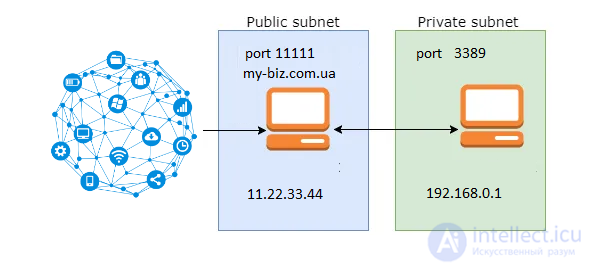
iptables -t nat -A PREROUTING -p tcp -m tcp -d 11.22.33.44 --dport 11111 -j DNAT to-destination 192.168.0.1:3389
iptables -t nat -A POSTROUTING -p tcp -m tcp s 192.168.0.1 --sport 3389 -j SNAT to-source 11.22.33.44:11111

Port forwarding in Linux DebianCentOSRedHat using iptables
The notations are the same.

By the same pattern, forwarding with other variations can be done.

Applicable to: Linux Debian 5, 6; CentOS 5, 6; RedHat 5, 6 and other similar systems

Comments

srgazh 04-06-2020
iptables -t nat -A PREROUTING -p tcp -m tcp -d 109.71.XX.XX --dport 6432 -j DNAT --to-destination 192.168.0.67:6432
iptables -t nat -A POSTROUTING -p tcp -m tcp -s 192.168.0.67 --sport 6432 -j SNAT --to-source 109.71.XX.XX:6432
Admin 08-04-2020
Are you welcome
Денис 08-04-2020
Спасибо друг! Твой способ мне помог, единственное что мешало это вносить исправления по твоим комментам))))
Алена 17-11-2019
конечно на роутере проброс легче делать))
Редактор 14-05-2019
Забыл добавить:
"to-source" изменить на "--to-source"
Редактор 14-05-2019
Ошибка в синтаксисе примеров:
"to-destination" нужно писать "--to-destination"
"tcp s 192.168.0.1" нужно заменить на "tcp -s 192.168.0.1"

To leave a comment

If you have any suggestion, idea, thanks or comment, feel free to write. We really value feedback and are glad to hear your opinion.
To reply

Lectures and tutorial on "Computer networks"

Terms: Computer networks