
Practice
Task: configure a hybrid port on a Cisco switch - that is, a port that can accept both tagged packets, sorting them into their corresponding VLANs, and untagged (regular) packets, treating them as packets from one more separate VLAN.
Unlike, for example, 3Com, Cisco switches have no such concept as a hybrid port. Any switch port can work either in Trunk mode or in Access mode.
It's clear that in Access mode the switch will only accept untagged packets and place them into the specified VLAN. And hybrid mode can be organized via Trunk. For this there is what's called a Native VLAN - it is specified separately for each port and serves as an indicator to the switch of which VLAN to place untagged packets into, whether arriving at the port or leaving the port.
So, let's demonstrate this in practice. We log in to the Cisco and go into configuration mode, then configure the port as a hybrid:
As indicated in the code, we are working with port FastEthernet 0/1 and specifying that untagged packets will be considered as packets from VLAN 99. At the same time, tagged packets are allowed from VLANs aa, bb, cc and dd (in place of these letters, of course, you need to substitute the actual VLAN numbers).
I'd like to specifically point out the fact that the VLAN for untagged packets needs to be specified in two places (mandatory): as the Native VLAN and as an Allowed Trunk VLAN. If the network is specified in Native VLAN but it's missing from Allowed - then untagged won't work.
A hybrid port is a special type of Layer 2 interface. Like a trunk-type interface, a hybrid interface can carry data from multiple VLANs and also determine the presence of a vlan tag inside a frame.
On the other hand, hybrid interfaces can also be used to deploy IP subnets based on VLANs. Below we'll look at configuring a hybrid interface for several usage scenarios.
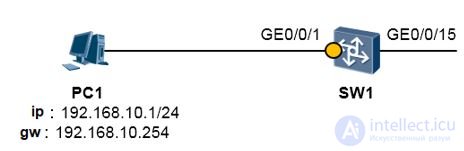
In the figure above, computer PC1 is connected to interface GE0/0/1 of switch SW1. Now let's configure interface GE0/0/1 of switch SW1 as follows:
[SW1] interface GigabitEthernet 0/0/1
[SW1-GigabitEthernet0/0/1] port link-type hybrid
The above command is used to configure the interface as hybrid. Let's take the S5300 switch as an example. By default the interface has hybrid type, and for VLAN 1 the PVID option (default VLAN) is selected and passthrough is allowed. (The parameter port hybrid untagged vlan 1 is configured by default.) Consequently, in this scenario computer PC1 and switch SW1 can exchange data if switch SW1 has IP address 192.168.10.0/24 set for Vlanif1. In this case, computer PC1 is considered to belong to VLAN 1.
If we want to assign computer PC1 to VLAN 10, the configuration changes as follows:
++++++++++++++++++++++++++++++++++++++++++++++++++++++++++++++++
[SW1] interface GigabitEthernet 0/0/1
[SW1-GigabitEthernet0/0/1] port link-type hybrid
[SW1-GigabitEthernet0/0/1] port hybrid pvid vlan 10
[SW1-GigabitEthernet0/0/1] port hybrid untagged vlan 10
[SW1] interface Vlanif 10
[SW1-Vlanif10] ip address 192.168.10.3 24
++++++++++++++++++++++++++++++++++++++++++++++++++++++++++++++++
In the configuration described above, the command port hybrid pvid vlan 10 changes the interface's PVID to 10, so that an untagged frame sent from computer PC1 and received by the interface is considered a frame from VLAN 10. The command port hybrid untagged vlan 10 adds the interface to VLAN 10, to allow a frame sent from computer PC1 to pass through GE0/0/1 to the switch. In addition, this command allows the switch to send VLAN 10 frames from port GE0/0/1 without tags. Consequently, after completing the above configuration, computer PC1 is considered to belong to VLAN 10 and can send ping requests to the IP address of interface vlanif10 of switch SW1: 192.168.10.3.
It's worth noting that after a frame sent from computer PC1 arrives at switch SW1, SW1 transparently forwards the data frame sent from GE0/0/15; whether it has a tag depends on the configuration of interface GE0/0/15.
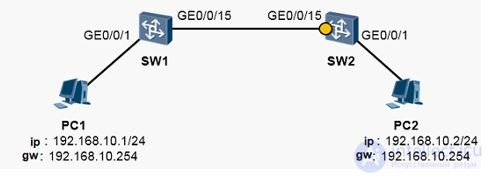
In the figure above, switches SW1 and SW2 are connected to computers PC1 and PC2 respectively. We configure GE0/0/1 on the two switches as access interfaces and add them to VLAN 10. We then configure GE0/0/15 on switch SW1 as the interface between the switches and allow VLAN 10 passthrough.
++++++++++++++++++++++++++++++++++++++++++++++++++++++++++++++++
[SW1-GigabitEthernet0/0/15] port link-type trunk
[SW1-GigabitEthernet0/0/15] port trunk allow-pass vlan 10
++++++++++++++++++++++++++++++++++++++++++++++++++++++++++++++++
Next let's move on to interface GE0/0/15 on switch SW2. Let's say hybrid type is used (the interface types on the switches at both ends of the link are usually the same). Since interface (GE0/0/15 on SW1) sends VLAN 10 frames in tagged mode, interface GE0/0/15 on SW2 must also handle VLAN 10 data in tagged mode:
++++++++++++++++++++++++++++++++++++++++++++++++++++++++++++++++
[SW2-GigabitEthernet0/0/15] port link-type hybrid
[SW2-GigabitEthernet0/0/15] port hybrid tagged vlan 10
++++++++++++++++++++++++++++++++++++++++++++++++++++++++++++++++
The command port hybrid tagged vlan 10 is used to add GE 0/0/15 to VLAN 10 and pass VLAN frames through in tagged mode.
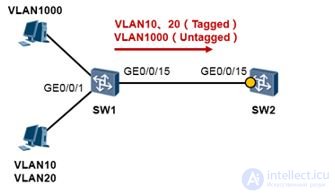
Switch SW1 is connected to VLANs 10, 20 and 1000. Now interface GE0/0/15 on switch SW1 is configured as follows:
++++++++++++++++++++++++++++++++++++++++++++++++++++++++++++++++
[SW1-GigabitEthernet0/0/15] port link-type trunk
[SW1-GigabitEthernet0/0/15] port trunk allow-pass vlan 10 20 1000
[SW1-GigabitEthernet0/0/15] port trunk pvid vlan 1000
++++++++++++++++++++++++++++++++++++++++++++++++++++++++++++++++
When switch SW1 sends a frame through GE0/0/15, it uses a tagged frame for VLAN 10 and VLAN 20, and untagged for VLAN 1000. Let's say switch SW2 is connected to SW1 with a hybrid interface. The configuration must be done like this:
++++++++++++++++++++++++++++++++++++++++++++++++++++++++++++++++
[SW2-GigabitEthernet0/0/15] port link-type hybrid
[SW2-GigabitEthernet0/0/15] port hybrid tagged vlan 10 20
[SW2-GigabitEthernet0/0/15] port hybrid pvid vlan 1000
[SW2-GigabitEthernet0/0/15] port hybrid untagged vlan 1000


Comments