
Practice 5 min.
I use SQUID from time to time as a proxy server, when I need to visit foreign sites but my IP doesn't let me in there. Like most users, I have a dynamic public IP assigned by my provider. That is, I "connect" to my proxy server from different addresses. In such a situation, setting up access by IP addresses, as described in my article How to provide access to foreign sites, is not possible. More precisely, everything will work until your IP address changes.
In this regard, I wanted to set up authorization for access to the proxy server without binding to an IP address, but by login and password, so that the browser would prompt for a login and password to be entered.
I will carry out all the experiments on CentOS 6.4 x86_64. For details on how to install and configure Squid on your server, read here.
To accomplish this, let's transform the necessary part of the configuration file "/etc/squid/squid.conf":
# And finally deny all other access to this proxy

auth_param basic program /usr/lib64/squid/ncsa_auth /etc/squid/internet_users
auth_param basic children 5
auth_param basic realm =My PROXY serveR=
auth_param basic credentialsttl 2 hours
acl internet_users proxy_auth REQUIRED
http_access allow internet_users

http_access deny all
Where,
/usr/lib64/squid/ncsa_auth — the path to the NCSA authentication program, may differ depending on the operating system's bitness.
/etc/squid/internet_users — a file with user logins and passwords (we'll create it later).
children 5 — the number of simultaneous connections.
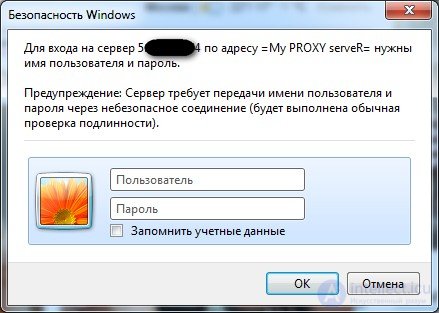
realm =My PROXY serveR= — the message for the login prompt window.
credentialsttl 2 hours — the lifetime of connected users' sessions.
acl internet_users proxy_auth REQUIRED — enables the login/password prompt for users of the "internet_users" group.
http_access allow internet_users — grants full access to users of the group.
http_access deny all — denies everyone else.
We create a file with passwords. To do this, run the following command
# htpasswd -c /etc/squid/internet_users test New password: ******* Re-type new password: ******* Adding password for user test
The -c flag only needs to be specified once, when creating the password file. Afterwards, you should add users without this flag. So, we now have a file with roughly this content. Let's check:
# cat /etc/squid/internet_users
test:YVcmD1sGsHmeY
Where test is the username, and YVcmD1sGsHmeY is the hash of their password.
Similarly, if needed, we add other users:
# htpasswd /etc/squid/internet_users test2
New password: *******
Re-type new password: *******
Adding password for user test2
And check the entries:
# cat /etc/squid/internet_users
test:YVcmD1sGsHmeY
test2:vFAMkdtorWfLw
After we've set up the users, we need to set the appropriate permissions on the "/etc/squid/internet_users" file.
# chmod 440 /etc/squid/internet_users
# chown squid:squid /etc/squid/internet_users
Restart squid:
#service squid restart
Checking Squid authenticationEnjoy the result. When connecting through the proxy server, the browser will display a login/password authorization prompt window:

Comments