
To:— The name and address of the recipient. May be present several times (if the letter is addressed to several recipients). May not match the SMTPRCPT TOfield.cc:— (from carbon copy). Contains the names and addresses of secondary recipients of the email, to whom a copy is sent.bcc:— (from blind carbon copy). Contains the names and addresses of recipients of the email whose addresses should not be shown to other recipients. This field is usually processed by the mail server (and results in several different messages being generated, in each of which the bcc field contains only the recipient the message is actually addressed to). None of the recipients will see the other recipients from the bcc field.
The concept of a "blind copy", learning not to do anything foolish
Surprisingly, many people, when they need to send an email to several people at once, simply list the addresses in the "To" field. This is fine when the email is addressed to your colleagues or friends, but when sending emails to a group of clients, you are thereby showing everyone the addresses of the other recipients, effectively exposing your address base.
Any one of the clients only needs to forward this email to your competitor and your contacts will leak immediately.
Oddly enough, many far-from-foolish people are surprised to learn that if you need to send an email to multiple recipients so that they don't know about each other, there is a "Blind copy" field for this.
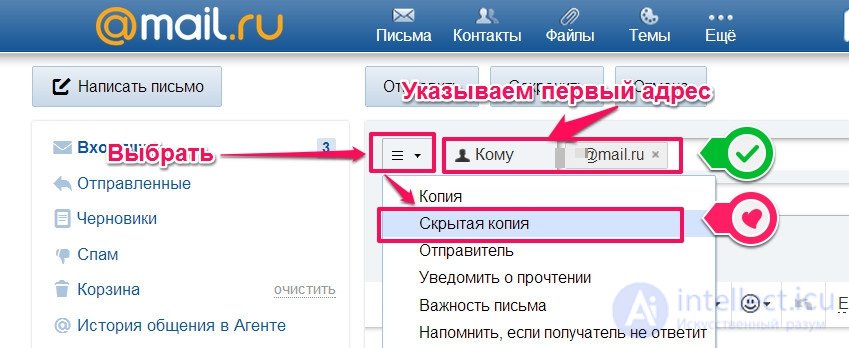
For example, for mail.ru it looks like this:
Any one of the clients only needs to forward this email to your competitor and your contacts will leak immediately.
Oddly enough, many far-from-foolish people are surprised to learn that if you need to send an email to multiple recipients so that they don't know about each other, there is a "Blind copy" field for this.
For example, for mail.ru it looks like this:
So once again, briefly: put the addresses in "to" - everyone can see who you sent the letters to; put them in "blind copy" - each recipient thinks the letter was sent only to them.
And each recipient will get an email where the "to" field contains only their own address. For other programs, if you can't find where to specify a blind copy, ask someone to show you. One more small point: you must specify at least one address in the "to" field - most programs or mail servers won't let you send an email without this parameter.
So, when it comes to sending an offer or newsletter to a group of your clients - the practice of using a blind copy here is unambiguous, you must hide your address base. There's an interesting point regarding mailing letters to your colleagues - here it's recommended to act depending on the situation. For example, sending a letter asking for proposals (say, on improving customer service), if each colleague sees that other people received the same letter, they most likely won't respond - they'll rely on the others, so you should use a blind copy. But if this is a task to be carried out, then, for example, putting your colleague's boss in the "to" field will simply work wonders, and your task will get done.
A separate question concerns suppliers. On the one hand, listing all the recipients in the copy should show the supplier that you have a choice and that they need to offer you good prices. On the other hand, a manager who receives your letter, seeing that it wasn't sent to them alone, will most likely treat your request "coolly". Personally, in my opinion, I believe that in the case of suppliers too you should use a blind copy, if only to protect trade secrets, but more likely for the sake of good relations with the supplier's manager.
You can read about a recent case of a specialist's mistake, when all recipients saw the other addressees: everyone got smooched in that chat - though granted, the people there were fairly senior, directors, but still many received spam in reply.
And as always, discussion in the comments is welcome.
And each recipient will get an email where the "to" field contains only their own address. For other programs, if you can't find where to specify a blind copy, ask someone to show you. One more small point: you must specify at least one address in the "to" field - most programs or mail servers won't let you send an email without this parameter.
So, when it comes to sending an offer or newsletter to a group of your clients - the practice of using a blind copy here is unambiguous, you must hide your address base. There's an interesting point regarding mailing letters to your colleagues - here it's recommended to act depending on the situation. For example, sending a letter asking for proposals (say, on improving customer service), if each colleague sees that other people received the same letter, they most likely won't respond - they'll rely on the others, so you should use a blind copy. But if this is a task to be carried out, then, for example, putting your colleague's boss in the "to" field will simply work wonders, and your task will get done.
A separate question concerns suppliers. On the one hand, listing all the recipients in the copy should show the supplier that you have a choice and that they need to offer you good prices. On the other hand, a manager who receives your letter, seeing that it wasn't sent to them alone, will most likely treat your request "coolly". Personally, in my opinion, I believe that in the case of suppliers too you should use a blind copy, if only to protect trade secrets, but more likely for the sake of good relations with the supplier's manager.
You can read about a recent case of a specialist's mistake, when all recipients saw the other addressees: everyone got smooched in that chat - though granted, the people there were fairly senior, directors, but still many received spam in reply.
And as always, discussion in the comments is welcome.

Comments