
Lecture
HTTP is a protocol that allows you to obtain various resources, such as HTML documents. The HTTP protocol underlies data exchange on the Internet. HTTP is a client-server interaction protocol, which means that requests to the server are initiated by the recipient itself, usually a web browser. The resulting final document will (may) consist of various sub-documents that are part of the final document: for example, separately retrieved text, a description of the document's structure, images, video files, scripts, and much more.
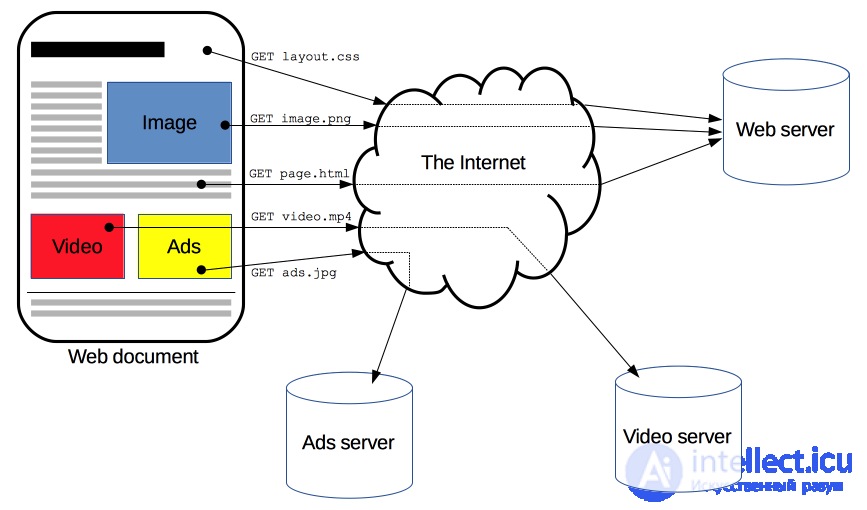
Clients and servers communicate by exchanging individual messages (rather than a stream of data). Messages sent by the client, usually a web browser, are called requests, and messages sent by the server are called responses.
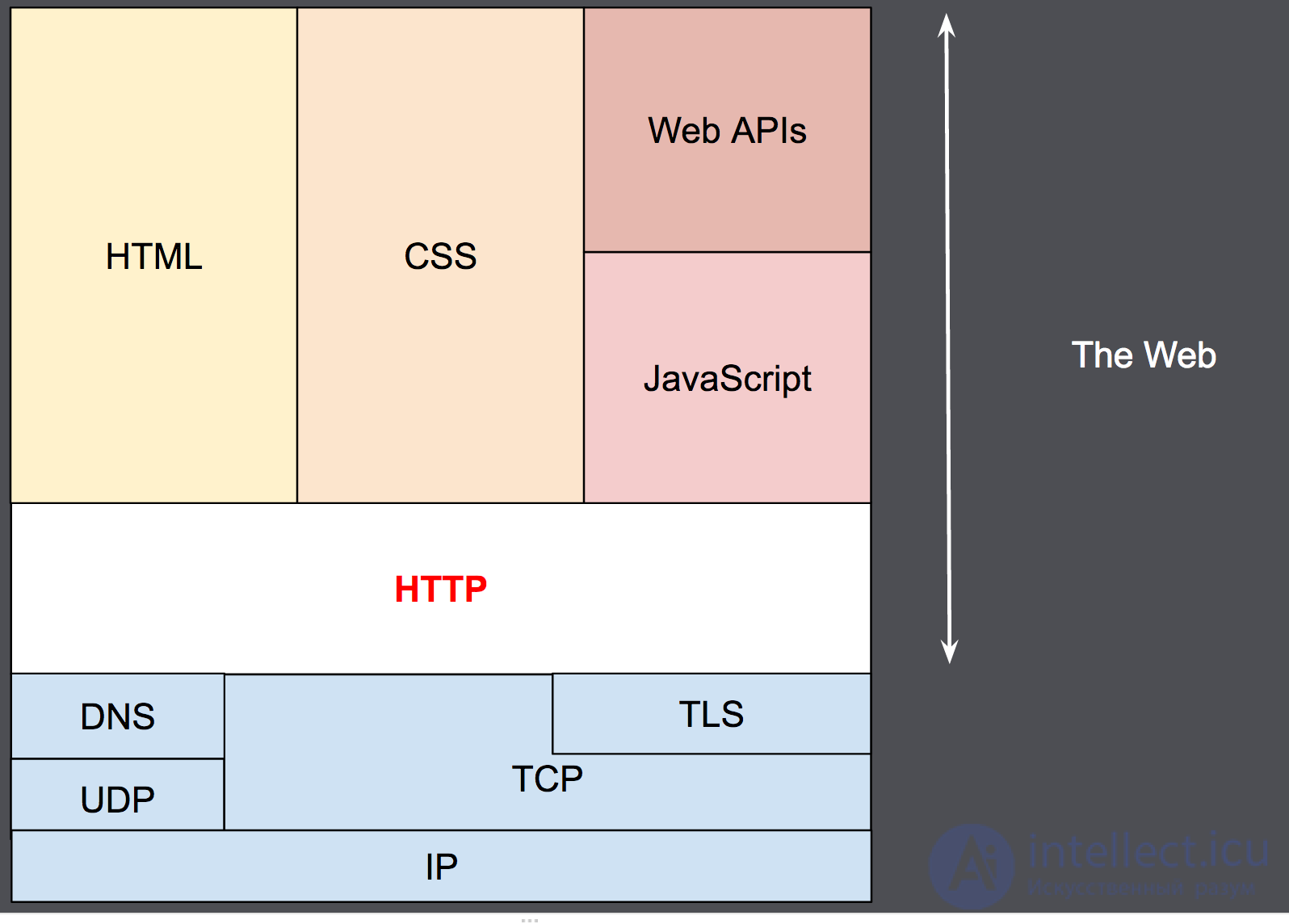
Although HTTP was developed back in the early 1990s, thanks to its extensibility it has been continuously improved ever since. HTTP is an application-layer protocol that most often uses the capabilities of another protocol - TCP (or TLS - secured TCP) - to transmit its messages, although in theory any other reliable transport protocol could be used to deliver such messages. Thanks to its extensibility, it is used not only for the client to obtain hypertext documents, images and video, but also for sending content to servers, for example, via HTML forms. HTTP can also be used to fetch only parts of a document in order to update a web page on demand (for example, via an AJAX request).
HTTP is a client-server protocol, meaning requests are sent by one side of the exchange, a participant (user-agent) (or a proxy on its behalf). Most often the participant is a web browser, but it can be anyone, for example, a robot crawling the Web to populate and update search engine page-indexing data.
Each request is sent to the server, which processes it and returns a response. Between these requests and responses there are usually numerous intermediaries, called proxies, which perform various operations and act as gateways or caches, for example.

Usually, there are many more different intermediary devices between the browser and the server that play some role in processing the request: routers, modems, and so on. Thanks to the fact that the Network is built on a system of interaction layers, these intermediaries are "hidden" at the network and transport layers. In this system of layers HTTP occupies the topmost layer, called the "application" layer (or "application layer"). Knowledge of network layers, such as the presentation, session, transport, network, data link, and physical layers, is important for understanding how the network works and for diagnosing possible problems, but is not required to describe and understand HTTP.
A user agent is any tool or device that acts on behalf of the user. This task is mostly performed by a web browser; in some cases the participants are programs used by engineers and web developers to debug their applications.
The browser is always the entity that creates the request. The server usually does not do this, although over the many years of the network's existence ways have been devised that can allow requests to be made from the server side.
To display a web page, the browser sends an initial request to retrieve the HTML document of that page. After that, the browser examines this document, and requests additional files needed to render the content of the web page (executable scripts, page layout information - CSS stylesheets, additional resources such as images and video files), which are directly part of the original document but located elsewhere on the network. The browser then combines all these resources to display them to the user as a single document - a web page. Scripts executed by the browser itself may fetch additional resources over the network at later stages of processing the web page, and the browser updates the display of that page for the user accordingly.
A web page is a hypertext document. This means that some parts of the displayed text are links that can be activated (usually by a mouse click) to retrieve and accordingly display a new web page (following the link). This allows the user to "navigate" across the pages of the network (Internet). The browser converts these hyperlinks into HTTP requests and subsequently displays the received HTTP responses in a form understandable to the user.
On the other side of the communication channel is the server, which serves the user by providing documents on request. From the end user's point of view, the server is always some single virtual machine, fully or partially generating the document, although in fact it may be a group of servers among which the load is balanced, that is, requests from various users are redistributed, or complex software polling other computers (such as caching servers, database servers, e-commerce application servers, and others).
A server is not necessarily located on a single machine, and conversely - several servers may be located (hosted) on the same machine. Under HTTP/1.1 and with a Host header, they can even share the same IP address.
Between the web browser and the server there are a large number of network nodes relaying HTTP messages. Due to the layered structure, most of them also operate at the transport, network, or physical layers, becoming transparent at the HTTP layer and potentially reducing performance. These operations at the application layer are called proxies. They can be transparent, or not (modifying requests won't pass through them unchanged), and are capable of performing many functions:
Even with the greater complexity introduced in HTTP/2 by encapsulating HTTP messages in frames, HTTP is generally simple and easy for humans to perceive. HTTP messages can be read and understood by people, providing easier testing for developers and reduced complexity for newcomers.
HTTP headers, introduced in HTTP/1.0, made this protocol easy to extend and experiment with. New functionality can even be introduced by a simple agreement between the client and server about the semantics of a new header.
HTTP has no state: there is no connection between two requests successively made over the same connection. This immediately creates the potential for problems for a user trying to interact with a particular page consistently, for example, when using a shopping cart in an online store. But although the core of HTTP is stateless, cookies allow the use of stateful sessions. Using the extensibility of headers, cookies are added to the workflow, allowing a session on each HTTP request to share some context, or state.
A connection is managed at the transport layer, and is therefore fundamentally outside the scope of HTTP. Although HTTP does not require the underlying transport protocol to be connection-based, it does require only reliability, that is, no lost messages (i.e. at minimum a representation of the error). Among the two most common Internet transport protocols, TCP is reliable, while UDP is not. HTTP therefore relies on the TCP standard, which is connection-based, even though a connection is not always required.
HTTP/1.0 opened a TCP connection for each request/response exchange, which had two important drawbacks: opening a connection requires several message exchanges, and is therefore slow, although it becomes more efficient when sending several messages, or when sending messages regularly: warm connections are more efficient than cold ones.
To mitigate these drawbacks, HTTP/1.1 introduced pipelining (which turned out to be difficult to implement) and persistent connections: the underlying TCP connection can be partially controlled via the Connection header. HTTP/2 took the next step by adding message multiplexing over a single connection, helping to keep the connection warm and more efficient.
Experiments are underway to develop a better transport protocol more suitable for HTTP. For example, Google is experimenting with QUIC, which is based on UDP, to provide a more reliable and efficient transport protocol.
| Characteristic | HTTP/1.1 | HTTP/2 | HTTP/3 |
|---|---|---|---|
| Transport protocol | TCP | TCP | QUIC (UDP) |
| Multiplexing | No (each request is a separate connection or keep-alive) | Yes, multiple streams over a single TCP connection | Yes, multiple streams without blocking |
| Head-of-line blocking | High (each request waits for the previous one) | Present, due to TCP | None, thanks to QUIC |
| Connection establishment | TCP + separate TLS handshake | TCP + TLS (usually 1–2 RTT) | QUIC combines transport and TLS → faster |
| Encryption | Optional (HTTP/1.1 can be without TLS) | TLS 1.2/1.3 on top of TCP | TLS 1.3 built into QUIC |
| Header compression | None | HPACK | QPACK |
| Resilience to packet loss |
Very low. Each request goes over a separate stream, and the loss of a packet blocks loading until it is retransmitted. With a large number of files (images, CSS, JS) this greatly slows things down. |
The loss of a single packet blocks the entire stream — causing head-of-line blocking |
Packet loss affects only the specific stream |
| Browser/server support | Universal, but becoming outdated | Broad | Growing rapidly (Chrome, Firefox, Edge, Cloudflare, etc.) |
| Performance | Limited, especially with a large number of requests | Better, but suffers from packet loss | Maximum speed and resilience to loss |
| Typical scenarios | Old sites, simple applications | Most modern websites | CDN, mobile networks, high-load services |
HTTP/1.1 is basic and becoming outdated, but still encountered.
HTTP/2 is the de facto standard for most websites.It remains the standard for most sites, since it is stable and supported by all browsers and servers.
HTTP/3 is a new stage, especially useful for mobile and unstable networks.HTTP/3 is especially useful for mobile users and under unstable internet conditions (Wi-Fi, 4G/5G), where packets are often lost HTTP/3 is not yet supported by all browsers and CDNs, so it is better to enable it in parallel with HTTP/2. A valid SSL certificate is needed (for example, Let’s Encrypt). When enabling HTTP/3 it is important to check client-side support (curl, browsers). If a single server hosts many domains, make sure each has its own certificate.
Example nginx configuration
HTTP/3 cannot be enabled without TLS 1.3 — this is a mandatory requirement. In 2025–2026 it is better to enable HTTP/2 and HTTP/3 in parallel, so that clients without QUIC support can work via HTTP/2.
server {
    server_name example.com;

    # HTTP/2
    listen 443 ssl http2;

    # HTTP/3 (QUIC)
    listen 443 quic reuseport;

    # SSL/TLS
    ssl_certificate     /etc/ssl/example.crt;
    ssl_certificate_key /etc/ssl/example.key;
    ssl_protocols       TLSv1.2 TLSv1.3;

    # Header announcing HTTP/3
    add_header Alt-Svc 'h3=":443"; ma=86400';

    location / {
        root /var/www/example;
    }
}
The natural extensibility of HTTP has over time allowed for greater control and functionality of the Network. Caching and authentication methods were early features in the history of HTTP. The ability to relax the original restrictions, by contrast, was added in the 2010s.
Below are common features controlled via HTTP.
When a client wants to interact with a server, whether it is the final server or an intermediate proxy, it performs the following steps:
GET / HTTP/1.1
Host: intellect.icu
Accept-Language: us
HTTP/1.1 200 OK
Date: Sat, 09 Oct 2030 14:21:02 GMT
Server: Apache
Last-Modified: Tue, 01 Dec 2039 20:18:11 GMT
ETag: "51142bc1-7123-479b075b2891b"
Accept-Ranges: bytes
Content-Length: 1111
Content-Type: text/html
If HTTP pipelining is activated, several requests can be sent without waiting for the first response to be received in full. HTTP pipelining is difficult to deploy in existing networks, where older pieces of software coexist with modern versions. HTTP pipelining was replaced in HTTP/2 by more reliable multiplexed requests within a frame.
HTTP/1.1 and earlier HTTP messages are human-readable. In the HTTP/2 version, these messages are embedded in a new binary structure, the frame, allowing optimizations such as header compression and multiplexing. Even though part of the original HTTP message is sent in this version of HTTP, the semantics of each message do not change and the client (virtually) recreates the original HTTP request. This is also useful for understanding HTTP/2 messages in HTTP/1.1 format.
There are two types of HTTP messages, requests and responses, each with its own format.
Examples of HTTP requests:
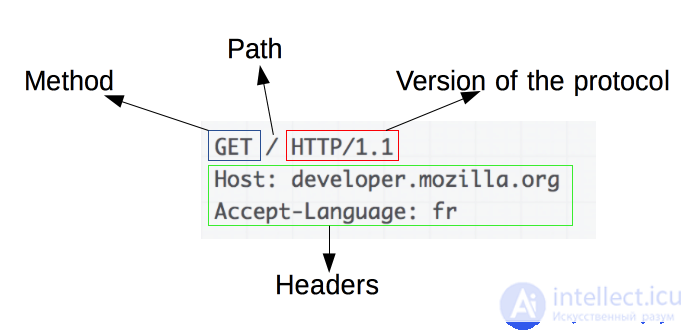
Requests contain the following elements:
Examples of responses:
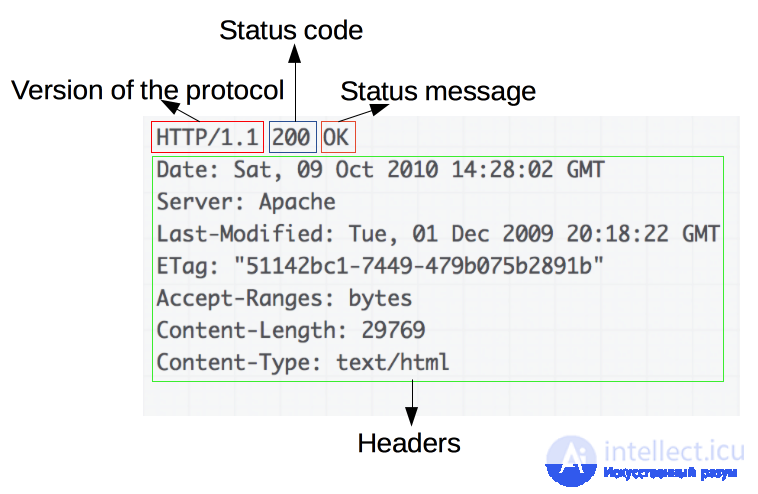
Responses contain the following elements:
HTTP today
HTTP 1.1 has become the protocol used for truly everything on the Internet. Enormous investments have been made in the protocols and infrastructure that now profit from this. It has reached the point where today it is often simpler to run something on top of HTTP than to build something new instead of it.
HTTP 1.1 is huge
When HTTP was created and released into the world, it was probably perceived as a rather simple and straightforward protocol, but time has shown that this is not so. HTTP 1.0 in RFC 1945 is a 60-page specification released in 1996. RFC 2616, which described HTTP 1.1, was released only three years later in 1999 and had grown considerably to 176 pages. Moreover, when we at the IETF worked on updating the specification, it was split into six documents with an even larger total number of pages. Without doubt, HTTP 1.1 is large and includes myriad details, subtleties, and no fewer optional sections.
A world of options
The nature of HTTP 1.1, embodied in the presence of a large number of small details and options available for later modification, has grown an ecosystem of programs where there is not a single implementation that embodies everything - and, in fact, it is impossible to say exactly what this «everything» consists of. This has led to situations where features that were initially rarely used appeared in only a small number of implementations, and those who implemented them later observed insignificant usage of them.
Later this caused compatibility problems, when clients and servers began to make more active use of such features. HTTP pipelining is one telling example of such features.
Incomplete use of TCP
HTTP 1.1 has had a hard time truly taking advantage of all the power and performance that TCP provides. HTTP clients and browsers have had to be genuinely inventive to find ways to reduce page load time.
Other experiments carried out in parallel over many years have also confirmed that TCP is not so easy to replace, and so we continue to work on improving both TCP and the protocols that run on top of it.
TCP can easily be used to its full potential to avoid pauses or periods of time that could have been used to send or receive more data. The following sections will highlight some of these usage shortcomings.
Transfer size and number of objects
When you look at the development trends of some of today's most popular sites and compare how long it takes to load their home page, the trends become obvious. Over the past several years the amount of data that needs to be transferred has gradually grown to the mark of 1.5MB and above, but what is most important for us in this context is the number of objects, which is now on average close to a hundred. A hundred objects need to be loaded to display the entire page.
As the graph shows, the trend has been growing, and there are no signs later that it will change further.

Latency kills
HTTP 1.1 is very sensitive to latency, partly because HTTP pipelining still has enough problems and is disabled for the overwhelming majority of users.
While all of us have observed a significant increase in user bandwidth over the last several years, we have not seen a similar degree of reduction in latency. High-latency channels, such as those on many modern mobile technologies, significantly reduce the feeling of good and fast web browsing, even if you have a truly high-speed connection.
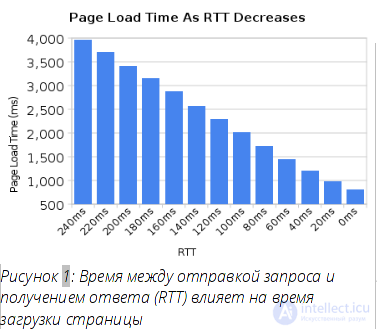
Another example where low latency is really required is certain kinds of video, such as video conferencing, gaming, and similar, where not just a pre-recorded stream needs to be delivered.
Head-of-line blocking
HTTP pipelining is a way of sending the next request while already waiting for a response to the previous request. It's like a queue for a cashier in a supermarket or a bank. You don't know what kind of people are in front of you: fast customers or annoying people who will take an endless amount of time to finish being served - head-of-line blocking.
Of course you can carefully choose the queue and end up choosing the one you consider correct, and sometimes you can create your own queue, but ultimately you cannot avoid making a decision, and once you've chosen a queue, you cannot change it.
Creating a new queue involves a performance cost and a resource penalty, and cannot scale beyond a small number of queues. There is no ideal solution to this problem.
Even today, in 2014, most desktop web browsers ship with HTTP pipelining disabled by default.
Additional information on this issue can be found in the Firefox bug tracker under number 264354.
Steps taken to overcome latency
As usual, when people run into flaws, they band together to find workarounds. Some workarounds are clever and useful, some are simply appalling hacks.
Spriting
Spriting is a term often used to describe the action of gathering many small images into one large image. Then you use javascript or CSS to «slice» parts of the large image to display the small pictures.

The site uses this trick for speed. Getting one large request is significantly faster in HTTP 1.1 than getting a hundred separate small pictures.
Of course, this has its drawbacks for those pages of the site that need only one or two small pictures. It also evicts all the pictures from the cache at once, instead of, perhaps, leaving some of the most used ones.
Embedding
Embedding is another trick to avoid sending separate images, using instead a data URL embedded in a CSS file. This has the same advantages and disadvantages as the sprite case.
.icon1 {
    background: url(data:image/png;base64,) no-repeat;
}
.icon2 {
    background: url(data:image/png;base64,) no-repeat;
}
Concatenation
As with the two previous cases, today large sites can have a multitude of javascript files. Developer utilities allow all these files to be merged into one huge lump, so that the browser receives one file instead of many small ones. A large amount of data is sent, when in fact only a small fragment is really needed. An excessively large amount of data needs to be reloaded whenever a change is required.
The irritation of developers and being forced to comply with these requirements is, of course, «merely» a pain for those involved and is not reflected on any performance graphs.
Sharding
The final trick I'll mention, used by site owners to improve loading in browsers, is often called «sharding». This basically means spreading your service across as many different hosts as possible. At first glance this sounds crazy, but there's a simple reason for it!
Originally HTTP allowed the client to use a maximum of two TCP connections per host. So, in order not to violate the specification, advanced sites simply came up with new hostnames, and voila, you can get a larger number of connections for your site and reduce page load time.
Over time, this restriction was removed from the specification and today clients use 6-8 connections per host, but they still have a limit, so sites continue the technique of increasing the number of connections. As the number of objects increases, as I already showed earlier, a large number of connections came to be used simply to make sure that HTTP copes well and makes the site faster. It is not unusual for sites to use more than 50 or even 100 connections using this technique.
Another reason for sharding is placing images and similar resources on separate hosts that don't use cookies, since cookies today can be of significant size. By using cookie-free image hosts you can increase performance simply by having significantly smaller HTTP requests!
The figure below shows what a packet capture looks like when browsing one of Sweden's top websites and how requests are distributed across several hosts.

Updating HTTP
Wouldn't it be better to make an improved protocol? One that would include the following…
IETF and the HTTPbis working group
The Internet Engineering Task Force (IETF) is an organization that develops and promotes internet standards. Mostly at the protocol level. They are well known for the series of RFC documents, documenting everything: from TCP, DNS, FTP to best practices, HTTP and numerous protocol variants that were never applied anywhere.
Within the IETF there are dedicated «working groups», formed around a narrow set of tasks to achieve a goal. They draw up a «charter» of a set of principles and constraints to achieve the stated goal. Anyone and everyone can join the discussion and development. Everyone who participates and expresses any opinion has equal opportunities and chances to influence the outcome, and everyone is treated as people and individuals, regardless of which company the person works for.
The HTTPbis working group was formed during the summer of 2007 and was supposed to update the HTTP 1.1 specification - hence the suffix «bis». Discussion within the group of a new version of the HTTP protocol really began at the end of 2012. Work on updating HTTP 1.1 was completed at the beginning of 2014.
The final meeting of the HTTPbis working group before the expected final release of the http2 specification version will take place in New York in early June 2014.
Some of the big players in the HTTP field were missing from the working group's discussions and meetings. I don't want to name any specific company or product name here, but it is clear that today some players on the Internet apparently are confident that the IETF will do everything well without involving these companies…
The «bis» suffix
The group is named HTTPbis, where the suffix «bis» comes from the Latin adverb meaning «twice». Bis is often used as a suffix or part of a name within the IETF for an update or a second attempt at working on a specification. As is the case with HTTP 1.1.
http2 started with SPDY
SPDY is a protocol that was developed and initiated at Google. They definitely developed it openly and invited everyone to participate, but it was obvious that they gained enormous advantages by having control over two implementations: a popular web browser and a significant population of servers with actively used services.
When the HTTPbis group decided to start working on http2, SPDY had already been proven as a working concept. It showed that it could be deployed on the Internet, and there were published figures showing how well it performed. Work on http2 subsequently began with the SPDY/3 draft, which largely became the http2 draft-00 draft after a couple of search-and-replace operations.
The http2 concept
So what was http2 created for? Where are the boundaries that limit the scope of the HTTPbis group's work?
They are, in fact, quite clear, and place noticeable constraints on the team's ability to innovate.
http2 for existing URI schemes
As noted earlier, existing URI schemes cannot be changed, so http2 must use only them. Since they are used today for HTTP 1.x, we need an explicit way to upgrade the protocol to http2 or otherwise ask the server to use http2 instead of the old protocols.
HTTP 1.1 already has a predefined way to do this, the so-called Upgrade header, which allows the server to send a response using the new protocol upon receiving such a request over the old protocol. At the cost of one request-response round trip.
The cost of the request-response round trip was not something the SPDY team could agree to, and since they were also developing SPDY on top of TLS, they created a new TLS extension that was applied to significantly reduce the negotiation. Using this extension, called NPN, from Next Protocol Negotiation, the client tells the server which protocols it would like to communicate over and the server can respond with the most preferred of the ones it knows.
http2 for https://
A great deal of attention in http2 was given to making it work correctly on top of TLS. SPDY only worked over TLS and there was a strong desire to make TLS mandatory for http2 as well, but consensus was not reached and http2 will be released with optional TLS. However, two prominent specification developers clearly stated that they will only implement http2 over TLS: the lead of Mozilla Firefox and the lead of Google Chrome. These are the two leading browsers today.
The reasons for choosing TLS-only mode lie in concern for user privacy, and early studies showed a high success rate for new protocols when using TLS. This is related to the widespread assumption that everything arriving on port 80 is HTTP 1.1, and some intermediate network devices interfere with and destroy traffic from other protocols running on that port.
The topic of mandatory TLS causes a lot of arm-waving and rallying calls on mailing lists and meetings - is it good or bad? It's a touchy subject - keep that in mind if you decide to ask this question directly to an HTTPbis participant's face!
Next Protocol Negotiation (NPN) is a protocol that was used by SPDY to negotiate with TLS servers. Since it was not an actual standard, it was reworked in the IETF and ALPN appeared instead: Application Level Protocol Negotiation. ALPN is promoted for use in http2, while SPDY clients and servers still use NPN.
The fact that NPN appeared first, and that ALPN took time to pass standardization, led to early implementations of http2 clients and http2 servers using both of these extensions when negotiating http2.
As briefly noted earlier, for plain-text HTTP 1.1, negotiating http2 requires sending a request to the server with an Upgrade header. If the server understands http2, it will respond with a «101 Switching» status and then begin using http2 on the connection. You of course understand that this upgrade procedure costs the time of one full network request-response, but on the other hand an http2 connection can be kept alive and reused for much longer than an HTTP1 connection is typically used.
Despite the fact that some browser representatives insist that they will not implement this way of negotiating http2, the Internet Explorer team expressed willingness to implement it.
Enough has been said about the background, history and politics, and now we're here. Let's dive into the specifics of the protocol. Those parts and concepts that make up http2.
Binary protocol
http2 is a binary protocol.
Let's try to take that in for a moment. If you were familiar with internet protocols before this, there's a good chance that instinctively you will strongly resist this fact and prepare arguments about how useful it is to have protocols that use text/ascii, and that you've written HTTP 1.1 requests by hand hundreds of times just by connecting to a server via telnet.
http2 is binary in order to make packet formation simpler. Determining the beginning and end of a packet is one of the most difficult tasks in HTTP 1.1 and in all text protocols in principle. By moving away from optional whitespace and all sorts of ways of writing the same things, we make implementation simpler.
In addition, this allows much easier separation of parts related to the protocol itself and the data packet, which in HTTP1 are messily intermixed.
The fact that the protocol allows compression to be used and often works over TLS also reduces the value of text, since you no longer see plain text on the wire anyway. We simply have to come to understand that we need to use a Wireshark analyzer or something similar to find out what is happening at the protocol level in http2.
Debugging this protocol will more likely be done with utilities like curl, or by analyzing the network stream with the http2 Wireshark dissector or something similar.
http2 sends frames. There are many different frames, but they all have the same structure:
Type, length, flags, stream identifier, and frame payload.
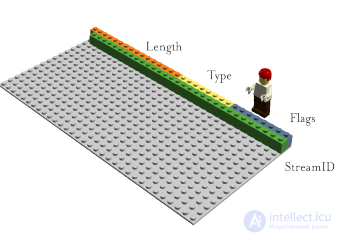
There are twelve different frame types in the current http2 draft, including, possibly the two most important ones, which relate to HTTP 1.1: DATA and HEADERS. I'll describe some of the frames in more detail further on.
Stream multiplexing
The stream identifier, mentioned in the previous section describing the frame format, ties each frame transmitted over http2 to a so-called «stream». A stream is a logical association. An independent bidirectional sequence of frames exchanged between the client and server within an http2 connection.
A single http2 connection can contain many simultaneously open streams from either side, exchanging frames across multiple streams. Streams can be established and used one-sidedly or shared by both the client and the server, and can be closed by either side. The order in which frames are sent matters. The receiver processes frames in the order they were received.
Stream multiplexing means that packets from multiple streams are mixed within one connection. Two (or more) separate trains of data are assembled into one train, then separated on the other side. Here are two trains:

They are assembled together over one connection in a mixed mode:

In http2 we will see dozens and hundreds of simultaneous streams. The cost of creating a stream is very low.
Priorities and dependencies
Each stream has a priority, used to show the other party in the exchange which streams to consider more important.
The exact details of how priorities work in the protocol have changed several times and are still being discussed. The idea is that the client can indicate which of the streams is most important, and there is a dependency parameter that allows one stream to be made dependent on another.
Priorities can change dynamically during the exchange, allowing the browser to be sure that when the user scrolls through a page full of pictures, it can indicate which images are most important, or when you switch tabs, it can raise the priority of streams that have unexpectedly come into focus.
Header compression
HTTP is a stateless protocol. In short, this means that each request must contain the maximum amount of detail the server needs to fulfill the request without having to store a lot of metadata from the previous request. Since http2 does not change any of these paradigms, it must do the same.
This makes HTTP repetitive. When a client requests many resources from one server, for example, the images of a web page, this turns into a large series of requests that look almost identical. For a series of something almost identical, compression naturally suggests itself.
As I already mentioned, as the number of objects on a page increases, cookie usage and request size also continue to grow. Cookies must also be included in all requests, practically always the same across a multitude of requests.
The size of HTTP 1.1 requests has grown so large over time that sometimes it became larger than the original TCP window size, which made it extremely slow to send, requiring a full send-receive cycle to get an ACK acknowledgment from the server before the full request could be sent. Another argument for compression.
Compression is not a simple topic
HTTPS and SPDY compression turned out to be vulnerable to BREACH and CRIME attacks. By inserting known text into the stream and observing how the encrypted output changes, an attacker could figure out what was sent.
Performing compression for dynamic content in the protocol without the risk of being exposed to one of the known attacks requires serious thought and care. That's what the HTTPbis team is trying to do.
This is how HPACK came about, Header Compression for HTTP/2, which, as the name suggests, is a compression format designed specifically for http2 headers and, strictly speaking, is a separate internet draft specification. The new format, together with other countermeasures, such as special flags that ask intermediaries not to compress certain headers and optionally add extra padding data to frames, make it harder to attack the compression.
Just before the release of draft 12, support for gzip-compressed DATA frames was added. Each frame is compressed individually, so there is no shared context between them, but this slightly lowers the compression ratio. This feature corresponds to the use of gzip in Transfer-Encoding in HTTP 1.1. A feature that is rarely used, but often discussed as something of a failure in the protocol, at least for browsers.
One of the drawbacks of HTTP 1.1 is that when an HTTP message is sent with a Content-Length header of a certain length, you cannot simply stop it. Of course, quite often you can (but not always - I'll skip the long explanation of why here) terminate the TCP connection, but at the cost of renegotiating a new TCP connection.
Now you can simply cancel the sending and start a new message. This can be achieved by sending an http2 RST_STREAM frame, which will thereby prevent the waste of bandwidth and the need to break the connection.
This feature is also known as «push into the cache». The idea is that if a client requests resource X, and the server assumes that the client will then surely request resource Z, it sends this resource to the client without a request from it. This helps the client place Z in its cache, and it will be there when needed.
Server push is something the client must explicitly allow the server to do, and even if it has allowed it, it can, at its discretion, quickly cancel the pushed stream using RST_STREAM if it turns out not to be needed.
After the adoption of http2 there are reasons to expect that TCP connections will be more long-lived and stay in working order longer than was the case with HTTP 1.x connections. The client will be able to do much of what it wants within one connection to each host/site, and this connection will likely stay open for a very long time.
This will affect the operation of HTTP load balancers, and situations may arise where a site wants to offer the client to connect to another host. This may be for performance reasons, but also for the need to shut down for maintenance or similar purposes.
The server sends an Alt-Svc header (or an ALTSVC frame in http2), informing the client about the availability of an alternative service. An additional route to the same content, using a different service, host, and port number.
The client is expected to try to connect asynchronously to the service and start using the alternative service if it works properly.
The Alt-Svc header allows a server that serves content over http:// to inform the client of the availability of the same content available over a TLS connection.
This is a somewhat controversial feature. Such a connection performs unauthenticated TLS and will not be marked «secure» anywhere: it won't show a lock icon in the program's interface and won't in any way inform the user that this is not ordinary plain old HTTP. But this will be opportunistic TLS, and some people are very confidently opposed to this concept.
Flow control
Each individual stream in http2 has its own advertised stream window, which the other party has allowed for data transmission. If you imagine how SSH works, it's very similar and done in the same spirit and style.
For each stream both ends tell each other that they still have room to accept incoming data, and the opposite end is allowed to send only the specified amount of data until the window is expanded.
Blocking
In draft-12, after a long discussion, a frame called BLOCKED was added. It can be sent once by an http2 participant when it has data to send, but flow control forbids it from sending any data. The idea is that if your implementation receives such a frame, you should understand that your implementation is missing something and/or you cannot achieve high transfer speeds because of this.
Quote from draft-12:
The BLOCKED frame is included in this draft version for the convenience of experimentation. If the outcome of the experiment does not produce positive results it will be removed.
The world of http2
What will everything look like when http2 is adopted? Will it be adopted?
How will http2 affect ordinary people?
http2 is not yet widely deployed or used. We cannot say exactly how things will turn out. We have seen how SPDY was used, and we can make some assumptions and calculations based on that and on other past and current experiments.
http2 reduces the number of network round trips needed, completely avoids the head-of-line blocking dilemma through multiplexing and quick rejection of unwanted streams.
It allows many parallel streams to work, the number of which can exceed the number of connections even of the most actively sharding modern sites…
With priorities correctly used on streams, the chances of getting important data earlier than less important data are significantly higher.
Putting all this together, I'll say that there is a very high chance that this will lead to faster page loading and improve the responsiveness of websites. In short: a better web browsing experience.
How much faster and how much better we will see. I don't think we are ready to say yet. Firstly the technology is still young, and secondly, we haven't yet seen polished implementations of clients and servers that truly use all the power that the new protocol provides.
How will http2 affect web development?
For years, web developers and web development environments have accumulated a full set of tricks and utilities for working around HTTP 1.1 problems, some of which are noted at the beginning of this document.
Most of these workarounds, which tools and developers now use by default without thinking, will probably hurt http2 performance, or at least not take advantage of all the benefits of http2's new superpower. Sprites and embedding should not be used together with http2. Sharding will probably be harmful for http2, since http2 benefits from using fewer connections.
The problem here of course is that web developers will have to design and deploy websites in a world where, at best for a short period of time, there will be both HTTP 1.1 and http2 clients, and, to get maximum performance for all users, it will be costly to offer two different variants of a site.
For this reason alone, I suspect, it will take some time before we see the full potential of http2 unlocked.
http2 implementations
Of course trying to document specific implementations in a document like this is a completely futile effort, doomed to fail and become outdated in a very short period of time. Instead I will explain the situation in broad terms and direct readers to the list of implementations on the http2 website.
Already there is a large number of implementations, and their number is growing day by day as work on http2 progresses. At the same time, at the time of writing, there are 19 implementations, and some of them implement the very latest draft of the specification.
Firefox has always been the browser at the forefront of the newest draft versions, Twitter continues to provide services over http2. Google launched support for draft-10 on some of its services in April.

Support in curl and libcurl is built on a separate http2 library implementation called nghttp2, which supports both plain http2 and over TLS. curl can apply TLS for http2 using one of the TLS libraries: OpenSSL, NSS or GnuTLS.
Typical criticism of http2
During the development of the protocol, debates arose again and again, and, of course, there is some number of people who believe that the protocol turned out completely wrong. I would like to note some of the most typical complaints and arguments against it:
There are also variations implying that the world is becoming even more dependent on and controlled by Google. This is not true. The protocol was developed inside the IETF the same way protocols have been developed for the last 30 years. However, we are all grateful to Google for the outstanding work on SPDY, which not only proved that it's possible to deploy a new protocol in this way, but also helped obtain estimates of what we could gain.
“The protocol is only useful for browsers and large services”
To some extent this is true. One of the main reasons behind the development of http2 is fixing HTTP pipelining. If in your case pipelining wasn't required, then http2 won't be particularly useful for you.
This is of course not the only achievement of the protocol, but it's the most significant one.
Once services start to understand the full power and possibilities of multiplexed streams over one connection, I expect that we will see an increase in the number of applications using http2.
Small REST APIs and simple software applications of HTTP 1.x won't get much benefit from switching to http2. But nevertheless, there will be very few downsides for most users.
“Using TLS makes it slow”
To some degree this is true. TLS negotiation adds a small overhead, but efforts are already underway to further reduce the number of round trips for TLS. The cost of performing TLS encryption, compared to sending plain text, is not insignificant and is clearly noticeable, so more CPU time and electricity will be spent on the same traffic than in an insecure protocol. How much and what consequences this will have is a topic for discussion and measurement. See, for example, istlsfastyet.com as one source on the topic.
http2 does not require the use of TLS, so we should not conflate the terms.
Most users on the Internet today want TLS to be used more widely, and we should help protect users' privacy.
“A non-ASCII protocol ruins everything”
Yes, we like the idea of being able to see the protocol openly, since this simplifies debugging. But text protocols are much more prone to errors and susceptible to correct-parsing issues.
If you really cannot accept a binary protocol, then you also cannot accept TLS and compression in HTTP 1.x, which have existed for quite a long time already.
It's still quite early to say for sure, but I can make a guess and give an assessment, and that's what I'm going to do here.
Skeptics will say «look how well IPv6 was done», as an example of a new protocol that took decades just to start being widely adopted at all. http2 is not IPv6 at all. It's a protocol that runs over TCP, using the usual HTTP upgrade mechanism, port number, TLS, etc. It will not require replacing most routers and firewalls at all.
Google proved to the world through its work on SPDY that such a new protocol can be deployed and used by browsers and services with several implementations over a fairly short period of time. Despite the fact that the number of servers on the Internet that offer SPDY today is around 1%, the amount of data they handle is significantly larger. Some of the most popular websites today offer SPDY.
http2, based on the same underlying paradigms as SPDY, I'm confident, will likely be adopted even more actively, since it's the official IETF protocol. Adoption of SPDY was always held back by the stigma of «it's Google's protocol».
Several well-known browsers are behind the release. At least representatives of Firefox, Chrome and Internet Explorer have expressed willingness to ship a browser with http2 support.
There are also several server providers that will likely soon offer http2, including Google, Twitter and Facebook, and we expect to see http2 support in popular web server implementations, such as Apache HTTP Server and nginx.
Firefox tracks the draft specification very closely and has provided support for a test http2 implementation for many months already. Over the course of developing the http2 protocol, clients and servers must agree on which version of the draft protocol they have implemented, which makes running tests somewhat annoying, so just be prepared for that.
First enable this
Type «about:config» in the address bar and look for an option called «network.http.spdy.enabled.http2draft». Make sure it is set to true.
TLS only
Remember that Firefox only implements http2 over TLS. You will see http2 working in Firefox only when you go to https:// sites that support http2.
Transparent!
No element anywhere in the interface will tell you that you're working over http2. You can't easily tell. There's only one way to find out, by turning on «Web Developer -> Network», checking the response headers and seeing what you got from the server… The response contains something about «HTTP/2.0» and Firefox inserts its own header called «X-Firefox-Spdy», as shown in this already outdated screenshot.
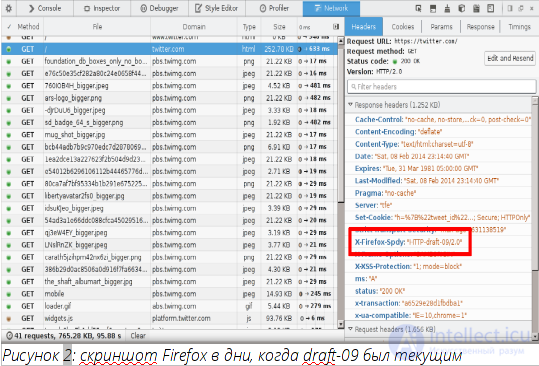
The headers you'll see in the network tools when communicating over http2 are converted from http2 into headers resembling old HTTP1.x headers.
The curl project started experimenting with http2 support starting in September 2013.
In the spirit of curl, we intend to support all aspects of http2 that we can. curl is often used as a test utility and a simple way to check a website, and we intend to preserve this capability when http2 arrives.
Looks like HTTP 1.x
Internally curl will convert incoming http2 headers into HTTP 1.x-style headers and pass them to the user so that they'll look very similar to existing HTTP. This will simplify the transition for whatever curl and HTTP are used for today. Likewise curl converts outgoing headers. Pass curl HTTP 1.x-style headers and it will convert them on the fly when passing them to an http2 server. This also allows users not to worry much or care about exactly which version of HTTP is being used in the network exchange.
Plain text
curl supports unencrypted http2 using the Upgrade header. If you make an HTTP request and request HTTP 2, curl will ask the server to upgrade the connection to http2, if possible.
curl supports a wide range of different TLS libraries as its TLS backend, and this remains true for http2 support as well. The problem with TLS for http2 is the availability of ALPN support and, to some extent, NPN support.
Build curl with modern versions of OpenSSL or NSS to get ALPN and NPN support. When using GnuTLS you'll get ALPN support, but not NPN.
Command line usage
To tell curl to start using http2, both in plain text and over TLS, you can use the --http2 option («dash dash http2»).
Your application uses https:// or http:// URLs as usual, but you can set the curl_easy_setopt option CURLOPT_HTTP_VERSION to the value CURL_HTTP_VERSION_2, so that libcurl tries to use http2. It will try to do everything possible to work with http2 if it can, but will still be able to operate with HTTP 1.1.
A large number of hard decisions and compromises were made in http2. After http2 is deployed there is a path for upgrading to other working versions of the protocol, which opens up the possibility for creating more protocol revisions later on. This also brings a representation and infrastructure that can support multiple different protocol versions simultaneously. Perhaps we don't need to completely remove the old when we create the new?
http2 still carries much of the legacy of HTTP 1, carried over into it because of the desire to preserve the ability to proxy traffic in both directions between HTTP 1 and http2. Some of this legacy makes further development and innovation more difficult. Maybe http3 will be able to drop some of it?
What do you think is still missing in http?
Let me remind you of a bit of theory: how HTTP/2 and HTTP/3 differ and what QUIC is.
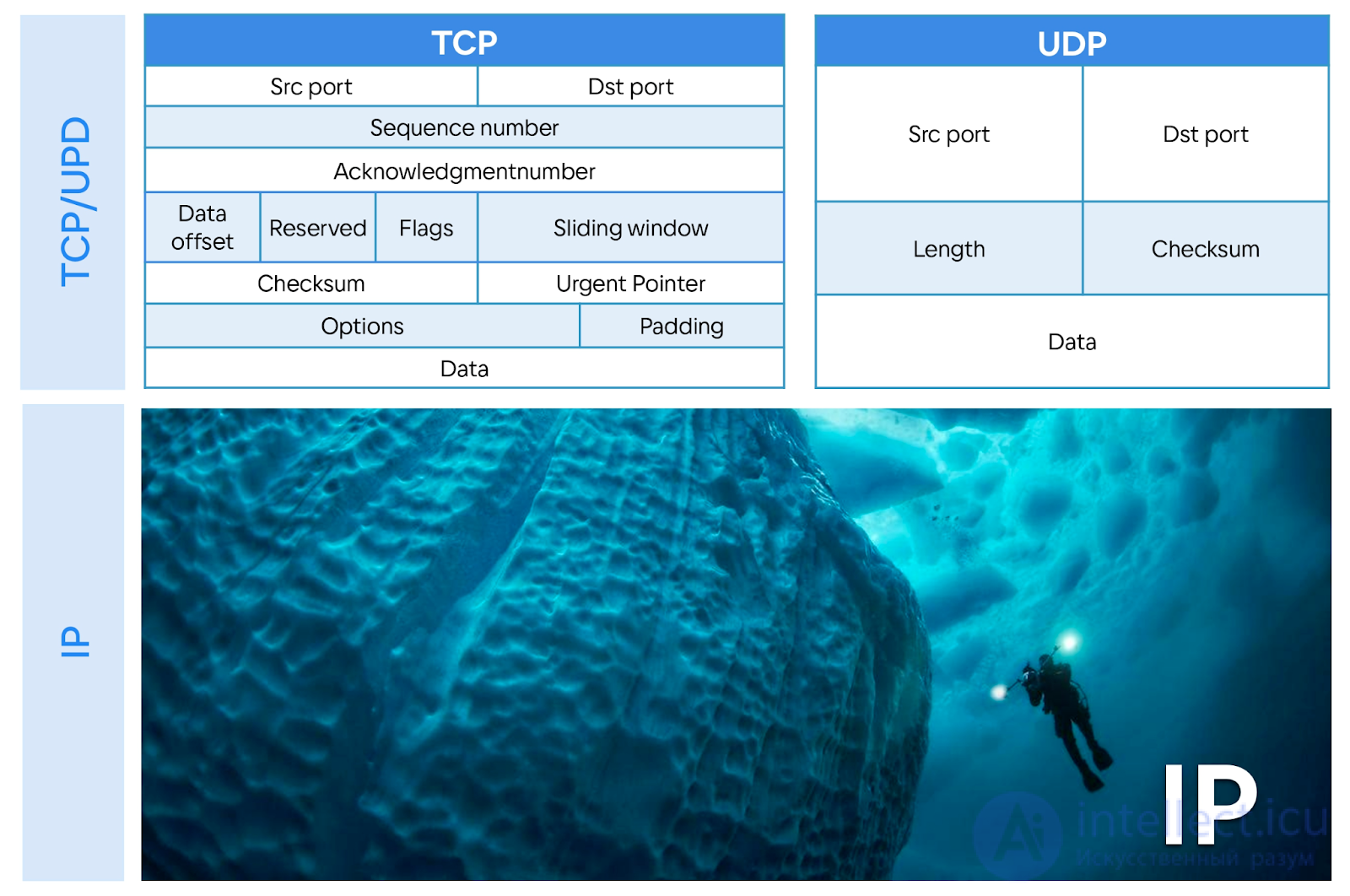
The classic stack is HTTP/2, TLS, TCP, IP. At least half of Saint HighLoad++ attendees use exactly this in their applications.
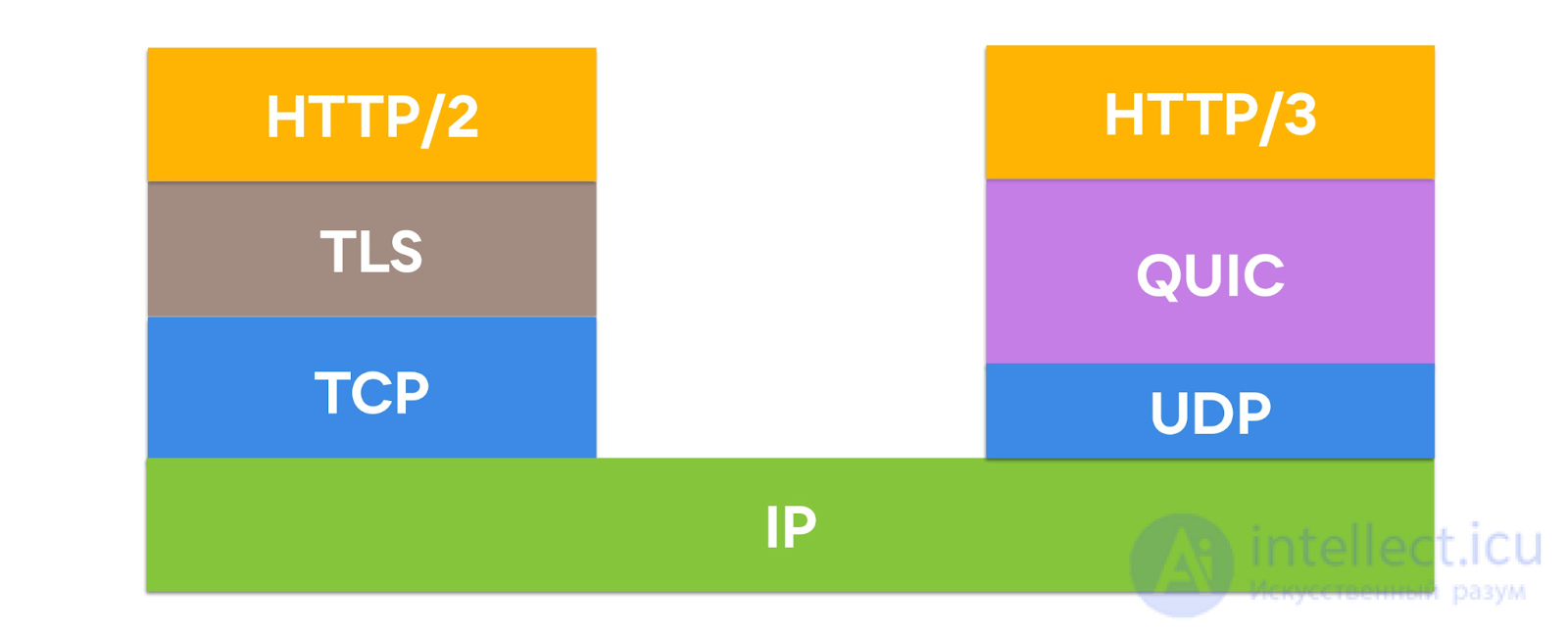
An alternative solution is HTTP/3. QUIC is a protocol on top of UDP, which implements everything that was in TCP, encapsulates TLS within itself, but better. If you run HTTP/2 on top of QUIC, you get HTTP/3.
Data over QUIC is transmitted faster, especially on a poor network, because QUIC has:
Zero-RTT - the ability to send a request immediately, without a long handshake and acknowledgement;
Multiplexing - transmission of multiple streams within one connection;
IP Migration - changing the IP address, for example, when switching from mobile internet to Wi-Fi, happens transparently (on TCP this can take about 30 seconds);
User Space implementation - this means that the protocol is not built into the operating system, each application can have its own implementation on the client;
Congestion control - to understand what this is and how it affects data transfer speed, let's dive deeper into the workings of the network layer.
Let's go from the bottom up and figure out what happens in the routers. How this is implemented from the network stack's point of view, we'll look at in a separate article.
To stop thinking of the network as a black box, and understand how it actually works, let's imagine: a data center, in which servers are connected to the outside world with 100 Gbit/s interfaces; a home provider with 1 Gbit/s fiber; and a user who paid for 30 Mbit/s.
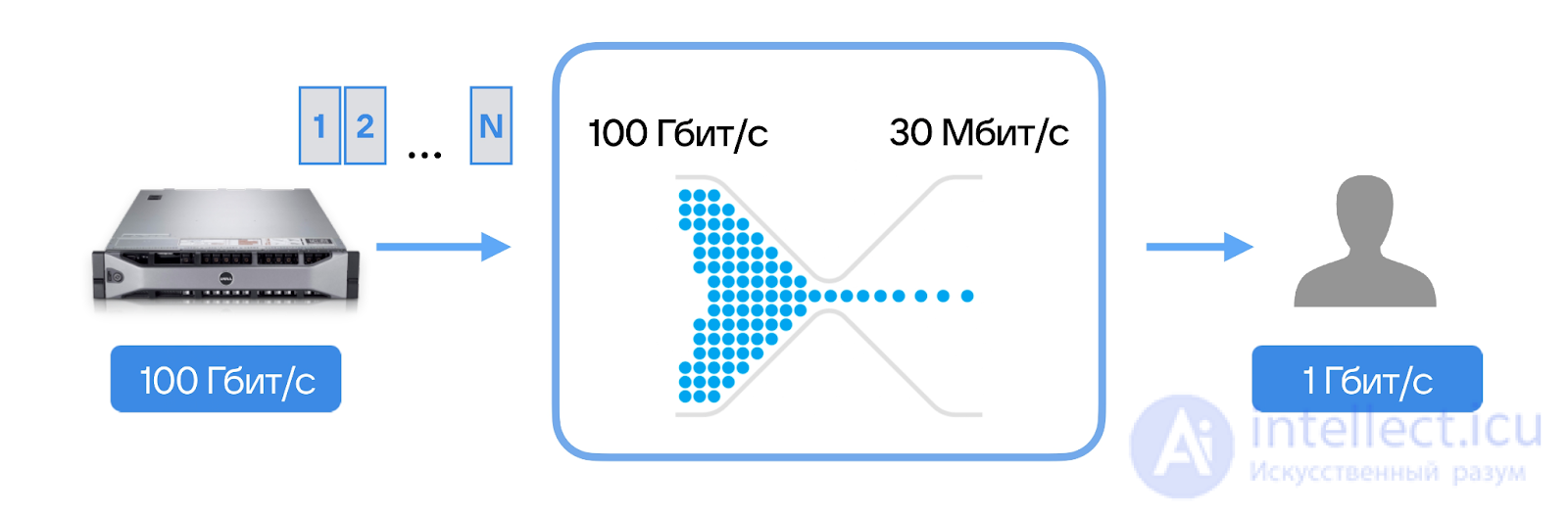
First of all, of course, the server doesn't send 100 Gbit/s at the user. Secondly, it needs to somehow find out that the user has a 30 Mbit/s internet connection. How can our server do that?
HTTP is an easy-to-use, extensible protocol. The client-server structure, together with the ability to easily add headers, allows HTTP to keep pace with the expanding capabilities of the Network.
Although HTTP/2 adds some complexity by embedding HTTP messages into frames to improve performance, the basic message structure has remained the same since HTTP/1.0. The session flow remains simple, allowing exploration and debugging with a simple HTTP message monitor.
HTTP/3 is a new stage, especially useful for mobile and unstable networks.

Comments