how do I make opencart send order notification emails with full data (including the invoice) both to the administrator and to the customer?
in the file c
atalog/model/checkout/order.php find
around line 497
$mail->setSubject(html_entity_decode($subject, ENT_QUOTES, 'UTF-8'));
$mail->setHtml($html);
$html2=$html;
$mail->setText(html_entity_decode($text, ENT_QUOTES, 'UTF-8'));
$mail->send();
add
$html2=$html;
and below add at line 558
$mail->setSender($order_info['store_name']);
$mail->setSubject(html_entity_decode($subject, ENT_QUOTES, 'UTF-8'));
$mail->setText(html_entity_decode($text2, ENT_QUOTES, 'UTF-8'));
$mail->setHtml($html2);
$mail->send();
$mail->setHtml($html2);edit the file
/model/checkout/order.php
1. $order_product_query = $this->db->query("SELECT * , o.quantity AS quantity FROM " . DB_PREFIX . "order_product ".
" o LEFT JOIN " . DB_PREFIX . "product p ON (p.product_id = o.product_id) ".
"WHERE o.order_id = '" . (int)$order_id . "'");
add the JOIN and aliases to the queries
2. $this->load->model('tool/image'); load the model that provides the image-resizing method
3. add a variable holding the image $template->data['products'][] = array(
'name' => $product['name'],
'model' => $product['model'],
'option' => $option_data,
'image' => $this->model_tool_image->resize($product['image'], 190, 190),
4. in the file
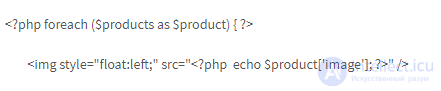
/catalog/view/theme/yourtheme/template/mail/order.tpl add
the image output to the email
after
in the file /catalog/model/tool/image.php of opencart
at the very end add
urlencode
if (isset($this->request->server['HTTPS']) && (($this->request->server['HTTPS'] == 'on') || ($this->request->server['HTTPS'] == '1'))) {
return HTTPS_IMAGE . urlencode($new_image);
} else {
return HTTP_IMAGE . urlencode($new_image);
}
if the folders have Russian letters in their names, the images still don't show — it seems there's a problem with the
slash / being replaced by urlencode with
%2F, and it's better to leave it as
/
and the
space being replaced by urlencode with
+, and it's better to use
%20
so it's better to do it like this
return HTTP_IMAGE . str_replace('+', '%20', str_replace('%2F', '/', urlencode($new_image)));


Comments