
Lecture
The WebSocket protocol (RFC 6455 standard) is designed to solve any task and remove the restrictions on data exchange between a browser and a server.
It allows you to send any data, to any domain, securely and with almost no extra network traffic.
To open a connection it is enough to create a WebSocket object, specifying in it the special ws: protocol:
var socket = new WebSocket("ws://javascript.ru/ws");
The socket object has four callbacks: one for receiving data and three for changes in the connection state:
                           socket.onopen = function() {
  alert("Соединение установлено.");
};

socket.onclose = function(event) {
  if (event.wasClean) {
    alert('Соединение закрыто чисто');
  } else {
    alert('Обрыв соединения'); // например, "убит" процесс сервера
  }
  alert('Код: ' + event.code + ' причина: ' + event.reason);
};

socket.onmessage = function(event) {
  alert("Получены данные " + event.data);
};

socket.onerror = function(error) {
  alert("Ошибка " + error.message);
};
The socket.send(data) method is used to send data. Any data can be sent.
For example, a string:
socket.send("Привет");
…Or a file selected in a form:
socket.send(form.elements .file);
Simple, isn't it? We choose what to send, and call socket.send().
For the communication to succeed, the server must support the WebSocket protocol.
To better understand what's going on, let's look at how it works.
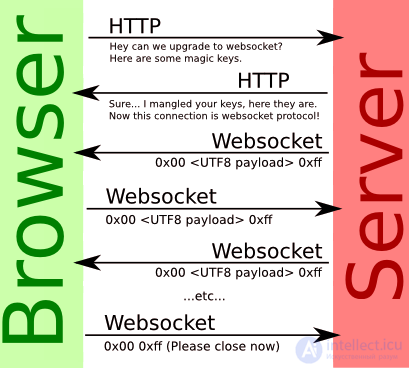
The WebSocket protocol works on top of TCP.
This means that when connecting, the browser sends special headers over HTTP, asking: «does the server support WebSocket?».
If the server responds «yes, I support it» in its response headers, then HTTP stops being used from that point on, and communication proceeds over the special WebSocket protocol, which no longer has anything in common with HTTP.
Example of a request from the browser when creating a new object new WebSocket("ws://server.example.com/chat"):
GET /chat HTTP/1.1
Host: server.example.com
Upgrade: websocket
Connection: Upgrade
Origin: http://javascript.ru
Sec-WebSocket-Key: Iv8io/9s+lYFgZWcXczP8Q==
Sec-WebSocket-Version: 13
Description of the headers:
GET, Host
Standard HTTP headers from the request URL
Upgrade, Connection
Indicate that the browser wants to switch to websocket.
Origin
The protocol, domain, and port the request was sent from.
Sec-WebSocket-Key
A random key generated by the browser: 16 bytes encoded in Base64.
Sec-WebSocket-Version
The protocol version. Current version: 13.
All headers except GET and Host are generated by the browser itself, without any possibility of JavaScript interference.
Such an XMLHttpRequest cannot be created
It is impossible to create a similar XMLHttpRequest request (to forge WebSocket) for one simple reason: the headers listed above are forbidden from being set via the setRequestHeader method.
The server can analyze these headers and decide whether it allows WebSocket connections from the given Origin domain.
The server's response, if it understands and allows the WebSocket connection:
HTTP/1.1 101 Switching Protocols
Upgrade: websocket
Connection: Upgrade
Sec-WebSocket-Accept: hsBlbuDTkk24srzEOTBUlZAlC2g=
Here, the Sec-WebSocket-Accept line is the Sec-WebSocket-Key key re-encoded using a special algorithm. The browser uses it to verify that the response is indeed intended for it.
After that, data is transmitted over a special protocol, whose structure («frames») is described further below. And this is no longer HTTP at all.
Additional Sec-WebSocket-Extensions and Sec-WebSocket-Protocol headers are also possible, describing the extensions and subprotocols that the given client supports.
Let's look at the difference between them using two examples:
The header Sec-WebSocket-Extensions: deflate-frame means that the browser supports a modification of the protocol that provides data compression.
This says nothing about the data itself, only about improving the way it is transmitted. The browser forms this header itself.
The header Sec-WebSocket-Protocol: soap, wamp indicates that over WebSocket the browser is going to transmit not just some data, but data in the SOAP or WAMP («The WebSocket Application Messaging Protocol») protocols. Standard subprotocols are registered in a special IANA registry.
The browser will set this header if the second, optional, WebSocket parameter is specified:
var socket = new WebSocket("ws://javascript.ru/ws", ["soap", "wamp"]);
When such headers are present, the server can choose the extensions and subprotocols that it supports and respond with them.
For example, the request:
GET /chat HTTP/1.1
Host: server.example.com
Upgrade: websocket
Connection: Upgrade
Origin: http://javascript.ru
Sec-WebSocket-Key: Iv8io/9s+lYFgZWcXczP8Q==
Sec-WebSocket-Version: 13
Sec-WebSocket-Extensions: deflate-frame
Sec-WebSocket-Protocol: soap, wamp
Response:
HTTP/1.1 101 Switching Protocols
Upgrade: websocket
Connection: Upgrade
Sec-WebSocket-Accept: hsBlbuDTkk24srzEOTBUlZAlC2g=
Sec-WebSocket-Extensions: deflate-frame
Sec-WebSocket-Protocol: soap
In the response above, the server indicates that it supports the deflate-frame extension, and out of the requested subprotocols – only SOAP.
A WebSocket connection can be opened either as WS:// or as WSS://. The WSS protocol is WebSocket over HTTPS.
Besides greater security, WSS has an important advantage over plain WS – a higher probability of the connection succeeding.
The reason is that HTTPS encrypts traffic from client to server, while HTTP does not.
If there is a proxy between the client and the server, then in the case of HTTP all WebSocket headers and data pass through it. The proxy has access to them, since they are not encrypted in any way, and it may interpret what's happening as a violation of the HTTP protocol, strip headers, or terminate the transmission.
With WSS, on the other hand, all traffic is encrypted right away and passes through the proxy already encoded. Therefore the headers are guaranteed to get through, and the overall probability of a successful connection via WSS is higher than via WS.
The full description of the protocol is contained in RFC 6455.
Here a partial description with comments on its most important parts is presented. If you want to understand the standard, it is recommended to read this description first.
The WebSocket protocol provides for several kinds of packets («frames»).
They are divided into two large types: data frames («data frames») and control frames («control frames»), intended for checking the connection (PING) and closing the connection.
According to the standard, a frame looks like this:
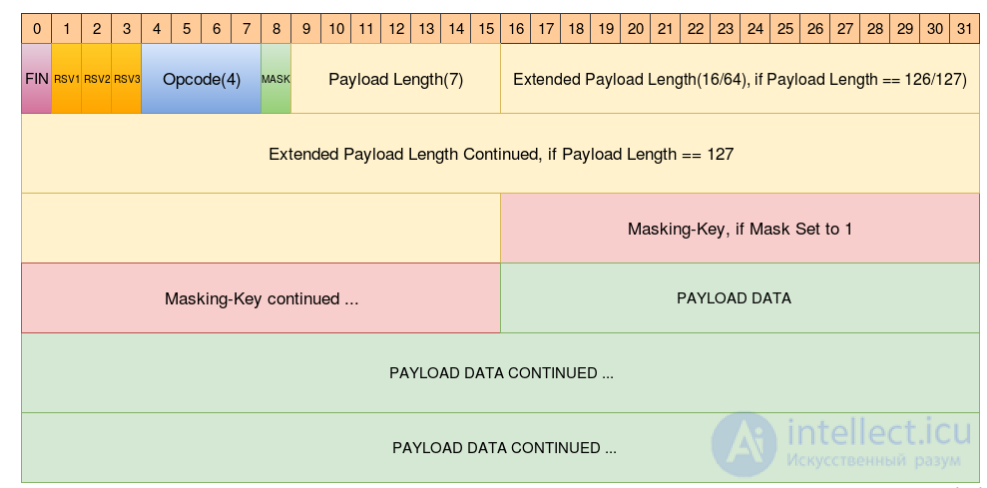
At first glance it's not very clear, at least for most people.
Let me explain: it should be read left-to-right, top-to-bottom, each horizontal strip is 32 bits.
That is, here are the first 32 bits:
    0                   1                   2                   3
    0 1 2 3 4 5 6 7 8 9 0 1 2 3 4 5 6 7 8 9 0 1 2 3 4 5 6 7 8 9 0 1
   +-+-+-+-+-------+-+-------------+-------------------------------+
   |F|R|R|R| опкод |М| Длина тела  |    Расширенная длина тела     |
   |I|S|S|S|(4бита)|А|   (7бит)    |            (1 байт)           |
   |N|V|V|V|       |С|             |(если длина тела==126 или 127) |
   | |1|2|3|       |К|             |                               |
   | | | | |       |А|             |                               |
   +-+-+-+-+-------+-+-------------+ - - - - - - - - - - - - - - - +
First comes the FIN bit (the vertical label in the figure), then the RSV1, RSV2, RSV3 bits (their meaning is explained below), then the «opcode», the «MASK» and, finally, the «payload length», which occupies 7 bits. Then, if the «payload length» equals 126 or 127, the «extended payload length» follows, then (on the next line, i.e. after the first 32 bits) comes its continuation, the mask key, and then the data.
And now – a detailed description of the frame's parts, i.e. exactly how messages are transmitted:
FIN: 1 bit
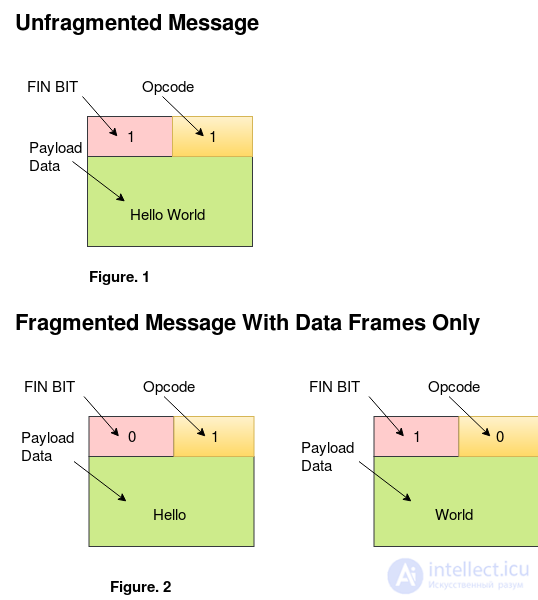
A single message, if it is very long (a call to send can transmit even an entire file), may consist of multiple frames («be fragmented»).
For all frames except the last one, this bit is set to 0, for the last one – to 1.
If a message consists of a single, standalone frame, then FIN in it equals 1.
RSV1, RSV2, RSV3: 1 bit each
In plain WebSocket they equal 0, intended for protocol extensions. An extension can write its own values into these bits.
Opcode: 4 bits
Sets the frame type, which allows interpreting the data contained in it. Possible values:
Mask: 1 bit
If this bit is set, the frame's data is masked. We'll look at the mask and masking in more detail further below.
Payload length: 7 bits, 7+16 bits, or 7+64 bits
If the value of the «payload length» field lies in the range 0-125, it denotes the payload length (used further on). If 126, then the next 2 bytes are interpreted as a 16-bit unsigned integer containing the payload length. If 127, then the next 8 bytes are interpreted as a 64-bit unsigned integer containing the length.
Such an elaborate scheme is needed in order to minimize overhead. For messages of 125 bytes or less, storing the length requires only 7 bits, for larger ones (up to 65536) – 7 bits + 2 bytes, and for even larger ones – 7 bits and 8 bytes. This is enough to store the length of a message a gigabyte in size or more.
Masking key: 4 bytes.
If the Mask bit is set to 0, this field is absent. If it is 1, these bytes contain the mask that is applied to the payload (see below).
Frame data (payload)
Consists of «extension data» and «application data» that follows it. Extension data is defined by specific protocol extensions and is absent by default. The payload length must equal the one specified in the header.
Some message examples:
An unfragmented text message Hello without a mask:
0x81 0x05 0x48 0x65 0x6c 0x6c 0x6f (содержит "Hello")
In the header, the first byte contains FIN=1 and opcode=0x1 (this gives 10000001 in binary, i.e. 0x81 in hex), then comes the length 0x5, then the text.
A fragmented text message Hello World in three parts, without a mask, might look like this:
0x01 0x05 0x48 0x65 0x6c 0x6c 0x6f (содержит "Hello")
0x00 0x01 0x20 (содержит " ")
0x80 0x05 0x57 0x6f 0x72 0x6c 0x64 (содержит "World")
Now let's look at all the wonderful capabilities that this frame format provides.
Allows sending messages in cases where, at the time transmission begins, the full size is not yet known.
For example, a database search is underway, and something has already been found, while something else may turn up later.
A connection check is built into the protocol using control frames of the PING and PONG types.
Whoever wants to check the connection sends a PING frame with an arbitrary body. Its recipient must respond within a reasonable time with a PONG frame containing the same body.
This functionality is built into the browser implementation, so the browser will respond to the server's PING, but it cannot be controlled from JavaScript.
In other words, the server always knows whether the visitor is alive or is having network trouble.
When closing the connection, the side that wants to do so (both sides in WebSocket are equal) sends a closing frame (opcode 0x8), whose body specifies the reason for closing.
In the browser implementation, this reason will be contained in the reason property of the onclose event.
The presence of such a frame makes it possible to distinguish a «clean close» from a connection drop.
In the browser implementation, the onclose event on a clean close has event.wasClean = true.
WebSocket close codes, event.code, so as not to confuse them with HTTP codes, consist of 4 digits:
1000
Normal closure.
1001
The remote side has «gone away». For example, the server process was killed, or the browser navigated to another page.
1002
The remote side terminated the connection due to a protocol error.
1003
The remote side terminated the connection because it received data it could not accept. For example, a side that only understands text data may close the connection with this code if it received a binary message.
In early WebSocket implementations there was a vulnerability called «cache poisoning».
It made it possible to attack caching proxy servers, corporate ones in particular.
The attack was carried out as follows:
The hacker lures a trusting visitor (hereafter the Victim) to their page.
The page opens a WebSocket connection to the hacker's site. It is assumed that the Victim is behind a proxy. This attack is specifically aimed at the proxy.
The page forms a specially crafted WebSocket request which (and this is the crucial part!) a number of proxy servers do not understand.
They pass the initial request (which contains Connection: upgrade) through themselves and assume that what follows is already the next HTTP request.
…But in reality that's data going through the websocket! And both sides of the websocket (the page and the server) are controlled by the Hacker. So the hacker can send through them something resembling a GET request to a well-known resource, for example http://code.jquery.com/jquery.js, and the server will respond with «supposed jQuery code» along with caching headers.
The proxy will obediently swallow this response and cache the «fake jQuery».
As a result, when subsequent pages load, any user using the same proxy as the Victim will get the hacker's code instead of http://code.jquery.com/jquery.js.
That is why this attack is called «cache poisoning».
Such an attack is not possible for all proxies, but analysis of the vulnerability showed that it is not merely theoretical, and vulnerable proxies do indeed exist.
Therefore a protection method was devised – the «mask».
The mask was devised specifically to protect against this attack.
The masking key is a random 32-bit value that varies from packet to packet. The message body is passed through XOR ^ with the mask, and the recipient restores it by XOR-ing again with it (it can easily be shown that (x ^ a) ^ a == x).
The mask serves two purposes:
Applying the mask requires additional resources, which is why the WebSocket protocol does not require it in every direction.
If two clients (not necessarily browsers) that trust each other and any intermediaries communicate over this protocol, the Mask bit can be set to 0, in which case the masking key is not specified.
Let's look at a chat prototype on WebSocket and Node.JS.
HTML: the visitor sends messages from a form and receives them in a div
Client-side code:
// создать подключение
var socket = new WebSocket("ws://localhost:8081");

// отправить сообщение из формы publish
document.forms.publish.onsubmit = function() {
  var outgoingMessage = this.message.value;

  socket.send(outgoingMessage);
  return false;
};

// обработчик входящих сообщений
socket.onmessage = function(event) {
  var incomingMessage = event.data;
  showMessage(incomingMessage);
};

// показать сообщение в div#subscribe
function showMessage(message) {
  var messageElem = document.createElement('div');
  messageElem.appendChild(document.createTextNode(message));
  document.getElementById('subscribe').appendChild(messageElem);
}
The server-side code can be written on any platform. In our case it will be Node.JS, using the ws module:
var WebSocketServer = new require('ws');

// подключённые клиенты
var clients = {};

// WebSocket-сервер на порту 8081
var webSocketServer = new WebSocketServer.Server({
  port: 8081
});
webSocketServer.on('connection', function(ws) {

  var id = Math.random();
  clients[id] = ws;
  console.log("новое соединение " + id);

  ws.on('message', function(message) {
    console.log('получено сообщение ' + message);

    for (var key in clients) {
      clients[key].send(message);
    }
  });

  ws.on('close', function() {
    console.log('соединение закрыто ' + id);
    delete clients[id];
  });

});
. You will need to install two modules: npm install node-static && npm install ws.
Socket is indeed a programming interface. It is an abstract concept that, in most cases, is used for communication between programs over a network (but not only that).
WebSocket is a protocol (some predetermined order) for exchanging data (like, for example, http, ftp, ssl, etc.). This protocol runs on top of (is transmitted by means of) the TCP protocol.
Socket and WebSocket are, in principle, different concepts. When working over the WebSocket protocol you will use regular sockets for the connection. Just as sockets are used when working with other protocols (for http, for ftp, and others).
For example, consider a string of the form ws://127.0.0.1:15000. In it, ws is exactly what indicates that the WebSocket protocol will be used for the data exchange. 127.0.0.1 is the computer's IP address, 15000 is the port to which the connection is made. So 127.0.0.1:15000 – this pair, so to speak, is the socket.
The WebSocket protocol was created so that long-lived, unbroken connections could be maintained between a browser (which is the client) and a website (which is the server).
The WebSocket protocol does not resemble HTTP. The only way it resembles HTTP is in that very first connection request (the so-called handshake). This was done because the protocol was originally designed to work in a browser and it was necessary to be able to determine whether it was supported. Once the connection is established, there is nothing even close to the HTTP protocol left in the WebSocket protocol.
The WebSocket protocol itself guarantees no security whatsoever for the transmitted data. The minimal encoding it provides for is a simple XOR. In this case, the mask for the XOR is transmitted together with the message. And this XOR is intended for passing data through proxy servers that know nothing about the WebSocket protocol. It is not protection for your data – it is protection for the proxy server. And in the reverse direction (from the site to the browser) data is not XOR-encoded, since there is no need for it.
It is precisely the absence of any bells and whistles in the WebSocket protocol that gives it the ability to work quickly.
Socket.IO — a JavaScript library for web applications and real-time data exchange. It consists of two parts: a client part, which runs in the browser, and a server part for node.js. Both components have a similar API. Like node.js, Socket.IO is event-driven.
Socket.IO primarily uses the WebSocket protocol, but if needed it uses other technologies, for example Flash Socket, AJAX Long Polling, AJAX Multipart Stream, providing the same interface. Besides the fact that Socket.IO can be used as a wrapper for WebSocket, it contains many other features, including broadcasting to multiple sockets, storing data associated with each client, and asynchronous I/O.
It can be installed via npm (node package manager).
With Socket.IO you can implement real-time analytics, multiplayer games, instant messaging, and real-time collaborative document editing.
Socket.IO is quite popular; it is used by Microsoft, Yammer, Zendesk, Trello, and many other organizations to build real-time systems.
Socket.IO operates based on events. There are several reserved events for the socket object on the client side:
Events for the socket object on the server side:
Events for the socket.io object on the server side:
Laravel's event broadcasting allows you to broadcast your server-side Laravel events to a client-side JavaScript application, using a driver-based approach to WebSockets. Currently, Laravel ships with Pusher Channels and Ably drivers. Events can be easily handled on the client side using the Laravel Echo JavaScript package. Events are broadcast over «channels», which can be either public or private. Any visitor to your application can subscribe to a public channel without any authentication or authorization; however, to subscribe to a private channel, a user must be authenticated and authorized to listen on that channel. \The WebSockets implementation provides three types of channels: public — anyone can subscribe; private — the frontend must authenticate the user to the backend and make sure the user has the right to subscribe to this channel; presence — presence channels — which do not allow sending messages, only notify whether a user is present on the channel.
1) WebSockets for Laravel.
Laravel WebSockets is a package for Laravel 5.7 and above that will instantly get your application running with WebSockets! It has a drop-in replaceable Pusher API, a debug dashboard, real-time statistics, and even lets you build your own WebSocket controllers.
After installation you can start it with a single simple command:
php artisan websockets:serve
2) Laravel Echo
With the Laravel Echo tool you can easily harness the power of WebSockets in your Laravel applications. It simplifies the most essential and most difficult aspects of building complex WebSocket interactions.
Echo consists of two parts: a set of enhancements to Laravel's event broadcasting system, and a new JavaScript package.
Echo's backend components are already built into Laravel core, starting with version 5.3, and don't need to be imported (this is where they differ from components like Cashier). You can use these backend enhancements with any JavaScript frontend, not only with the Echo JavaScript library, and you'll still get a significant simplification when working with WebSockets. But with the Echo JavaScript library they work even better.
The Echo JavaScript library can be imported via NPM, and then imported into your application's JavaScript. It is a layer of «sugar» on top of Pusher JS (the JavaScript SDK for Pusher), or on top of Socket.io (many use this JavaScript SDK on top of a Redis WebSockets architecture).
3) By default Laravel includes two server-side broadcasting drivers to choose from: Pusher Channels and Ably. However, community-maintained packages such as laravel-websockets provide additional broadcasting drivers that do not require commercial broadcasting providers. You will also need to configure and run a queue worker. All event broadcasts are performed using queued jobs, so your application's response time is not heavily affected by broadcast events.
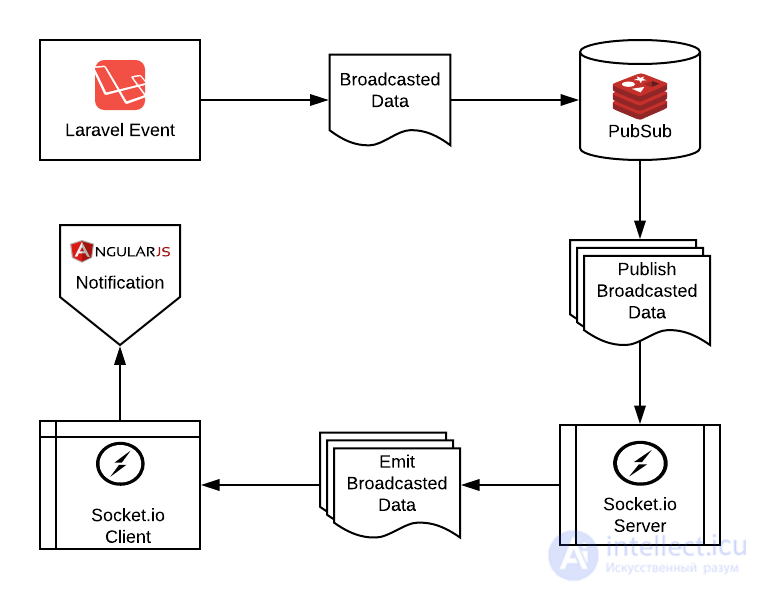
Laravel broadcasting flow using Socket.io and Redis PubSub
WebSocket is a modern means of communication. Cross-domain, universal, secure.
At the moment it works in the browsers IE10+, FF11+, Chrome 16+, Safari 6+, Opera 12.5+. Older versions of FF, Chrome, Safari, Opera have support for draft revisions of the protocol.
Where websockets don't work, other transports are usually used instead, for example IFRAME. You'll find them in other articles in this section.
There are also ready-made libraries that implement COMET-style functionality using several transports at once, among which websocket has priority. As a rule, the libraries consist of two parts: a client part and a server part.
For example, for Node.JS one of the best-known libraries is Socket.IO.
Among the drawbacks of these libraries is the fact that some advanced WebSocket capabilities, such as two-way exchange of binary data, are not available in them. On the other hand, in most cases standard text exchange is quite sufficient.

Comments