
Lecture 96 min.
Software product development knows many worthy methodologies — in other words, established best practices. The choice depends on the specifics of the project, the budgeting system, subjective preferences, and even the temperament of the manager.
Like other traditional engineering disciplines, software development deals with issues of quality, cost, and reliability. Some programs contain millions of lines of source code that are expected to execute correctly under changing conditions. The complexity of software is comparable to the complexity of the most complex modern machines, such as aircraft.
The term «software development life cycle» dates back to the 1950s .
At that time no other methods or frameworks were available.
There was only one method, described as the life cycle of software development - « the development of large-scale functional business systems in the era of large-scale business conglomerates. The activity of information systems was focused on processing large volumes of data and crunching numbers. »
Today the definition of the software development life cycle is as follows:
Build high-quality software in the shortest possible time by completing 7 stages of the software development life cycle.
Today there are various SDLC methodologies, with waterfall being the oldest and most popular, dating from the 1960s.
Every software development life cycle model differs from the others.
To choose the right one, you need to carefully analyze your development processes. You need to understand whether it is better for you to stick to a rigid SDLC model or to adopt something more flexible. And I will help you with that.
SDLC (Software Development Life Cycle) — the software development life cycle. SDLC covers the activities and tasks carried out during software development. SDLC includes no security analysis of the product being developed. In SSDLC, however, this is taken into account, and a Secure level is added.
At present, only some software development companies can proactively address security already at the planning stage. Most often, security is considered only when the software development life cycle reaches the system testing stage, or even after release, which significantly affects the cost of detection and remediation. Sometimes, of course, security is not considered at all.
When developing secure software, it is recommended to follow Microsoft SDL (Security Development Life cycle) or Cisco SDL (Secure Development Life cycle). For risk analysis, the general risk assessment methodologies ISO 27 005 and NIST should be used, and the CWE catalog of common software errors and weaknesses can also be used in the assessment.
The SSDLC software development process must ensure that security activities, such as design review, architecture analysis, code review, and penetration testing, are an integral part of the development life cycle. SSDLC helps integrate these stages into the product life cycle. This achieves:
SSDLC consists of stages, each of which can include several processes:
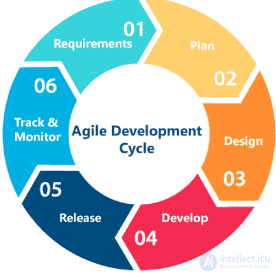
Figure: SDLC model
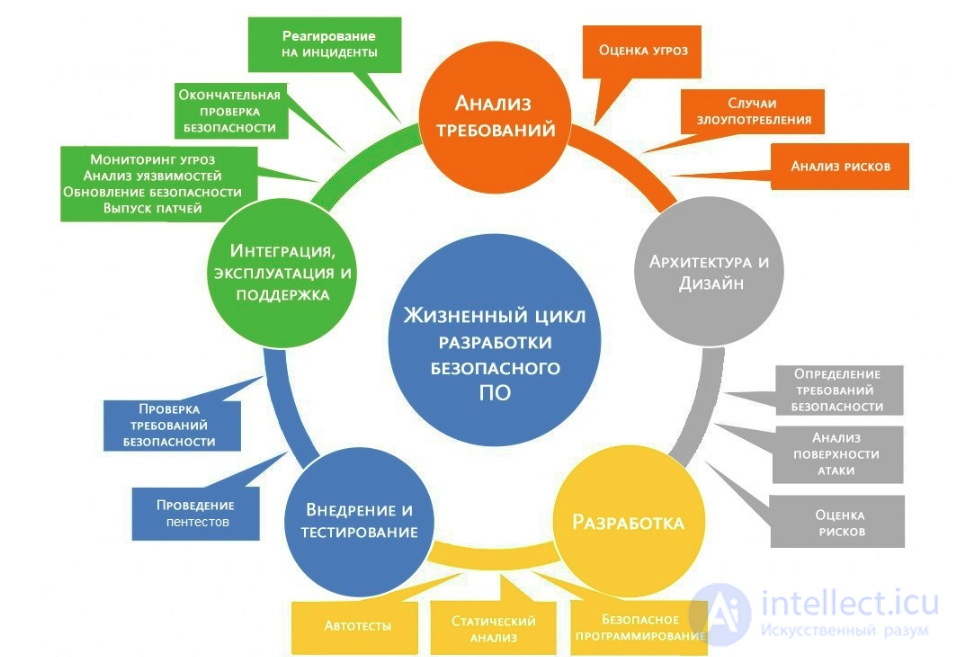
Figure: SSDLC model
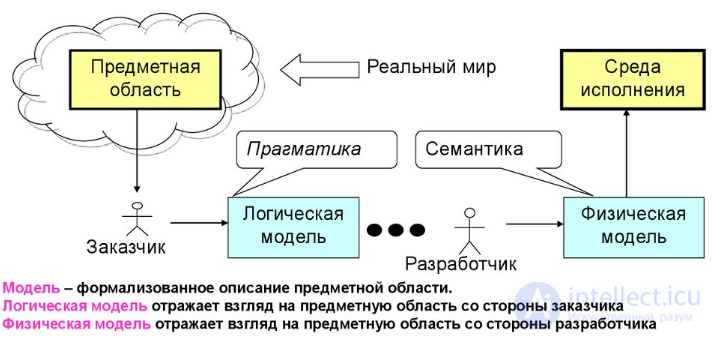
Figure: Moving from the subject domain to programming, or how to communicate with the client
A model is a formalized description of the subject domain.
A logical model reflects the view of the subject domain from the client's side
A physical model reflects the view of the subject domain from the developer's side
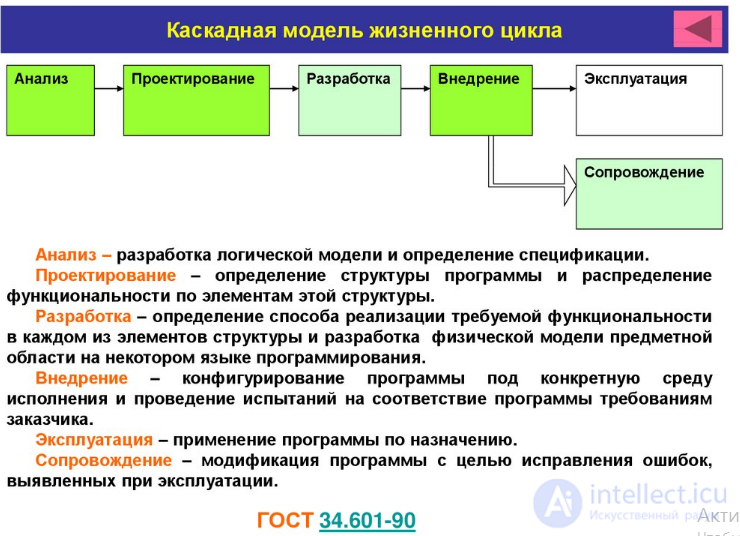
Program life cycle - a set of interrelated, chronologically ordered stages, starting from the development of program requirements and ending with
the complete discontinuation of its use
Program life cycle can formally be viewed as a transition from a logical model of the subject domain to a physical model of the subject domain through intermediate models. Each of the models reflects the point of view of a particular participant in the development process on the program being developed.
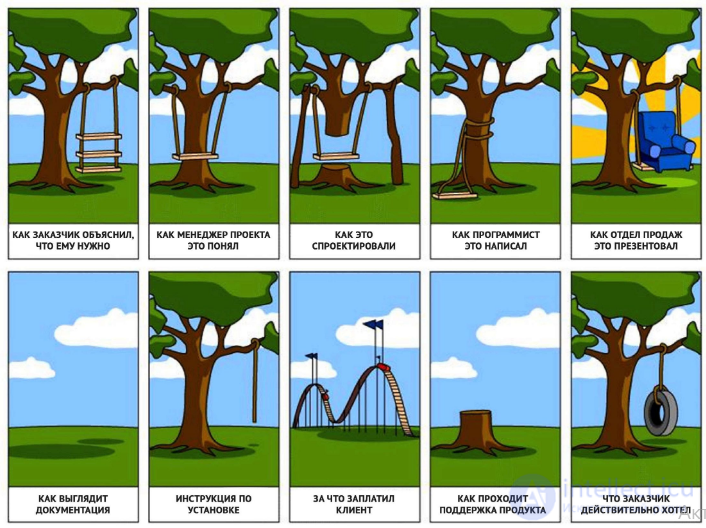
Figure: What the client wanted and how it was understood, or how to communicate with the client?
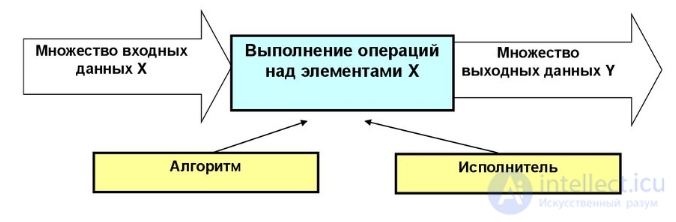
Figure: The information process from the programmer's point of view
Information process - the process of obtaining, storing, processing, and transmitting information using computer and other technical means
Data - information of any nature recorded in one way or another
Algorithm executor - an abstract or real (technical, biological, or biotechnical) system capable of performing the actions prescribed by an algorithm. A computer (an operating system with a programming language and a framework) is often a universal executor of algorithms.
Algorithm – a precise description of a sequence of actions on input data, the execution of which by an executor leads to
obtaining the output data.
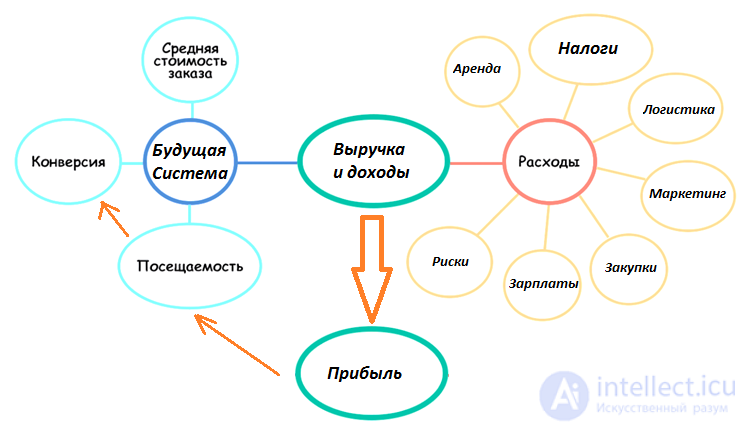
Figure: The information process (future system) from the clients' point of view
The software development life cycle begins with the analysis stage, during which the process participants discuss the requirements for the final product. The goal of this stage is to define detailed system requirements. In addition, it is necessary to make sure that all participants correctly understood the tasks set and how exactly each requirement will be implemented in practice.
Testing specialists are often also involved in the discussion; already at the requirements development stage they can contribute their own suggestions and, if necessary, adjust the process.
Depending on the development model chosen, the approaches to determining the moment of transition from one stage to another may differ. For example, in the waterfall or V-model, the requirements analysis stage is fixed in a document – the Software Requirement Specification (SRS), the preparation of which must be completed before moving on to the next stage.
Thus, this stage involves gathering the requirements for the software being developed, their systematization, documentation, analysis, as well as identifying and resolving contradictions.
At the design stage (also called the design and architecture stage), programmers and system architects, guided by the requirements, develop a high-level system design.
Various technical issues arising during the design process are discussed with all stakeholders, including the client. The technologies to be used in the project, team workload, constraints, timeframes, and budget are determined. The most suitable design decisions are chosen in accordance with the refined requirements.
The approved system design determines the list of software components to be developed, interaction with third parties, functional characteristics of the program, the databases used, and much more. The design is usually fixed in a separate document – the Design Specification Document (DSD).
At this stage, so-called notations – schematic representations of the characteristics of the system being developed – are used to simplify visualization of the design process. The main notations used are:
– Flowcharts;
– ER diagrams;
– UML diagrams;
– Mockups – for example, a site prototype drawn in Photoshop.
Once the requirements and product design have been approved, the transition to the next stage of the life cycle takes place – the actual development. This is where programmers begin writing the program code in accordance with the previously defined requirements.
System administrators configure the software environment, while front-end programmers develop the program's user interface and the logic of its interaction with the server.
In addition, programmers write unit tests to verify the correct operation of each system component's code, conduct code reviews, create builds, and deploy the finished software in the software environment. This cycle is repeated until all requirements have been implemented.
Programming involves four main stages:
1) Algorithm development – essentially, creating the logic of how the program works;
2) Writing the source code;
3) Compilation – converting it into machine code;
4) Testing and debugging – mainly referring to unit testing.
4. Documentation
This stage is singled out rather conditionally, since, as we have seen, various documents are created at all stages of the program life cycle. Nevertheless, in addition to design documentation and records accompanying development, there are also other text documents describing, for example, the functions of the program and how to use it.
There are a total of four levels of documentation:
– Architectural (design) – for example, the design specification. These are documents describing the models, methodologies, tools, and development resources chosen for the given project.
– Technical – all documentation accompanying the development. This includes various documents explaining how the system works at the level of individual modules. It is usually written as comments in the source code, which are later structured into HTML documents.
– User – includes reference and explanatory materials needed by the end user to work with the system. This includes, for example, the Readme and User Guide, and the help section of the program.
– Marketing – includes promotional materials accompanying the product release. Its purpose is to present the product's functionality and competitive advantages in an appealing form.
Some teams shorten this and use special types of documentation - Requirements, Brief, Statement of Work, Specification - and work from those
5. Testing
We already covered the main testing stages earlier, in the section on the Fundamental Test Process
Testers look for defects in the software and compare the behavior described in the requirements with the actual behavior of the system.
During the testing phase, bugs missed during development are discovered. When a defect is found, the tester creates a bug report, which is passed on to the developers. The developers fix it, after which testing is repeated – but this time to verify that the problem has been fixed and that the fix itself has not caused new defects to appear in the product.
Testing is repeated until the exit criteria are met.
We will look at the types, methods, and techniques of testing in more detail further on .
6. Deployment and maintenance
When the program has been tested and no longer has any serious defects, it is time for release and delivery to the end users.
After a new version of the program is released, the technical support department gets involved. Its staff provide feedback to users, along with consultation and support.
If users discover any post-release bugs, information about them is passed on in the form of bug reports to the development team, which, depending on the severity of the problem, either immediately releases a fix (a so-called hot-fix) or postpones it until the next version of the program.
In addition, the technical support team helps collect and systematize various metrics – indicators of how the program performs under real conditions.
If you seriously go through the stages of the software development life cycle, you will most likely get an outstanding product. Your developers will create software that your users will be happy to talk about and recommend.
That's because the programmers on your team will have comprehensive documentation to work from (the DDS and SRS documents). They will also receive feedback from product managers and stakeholders. Everyone will be on the same page. This way, you will be able to develop a product that outperforms competitors in most cases.
However, if feedback from the end user is not collected properly, don't expect to get much return on the resources spent.
So make sure your research process is done right. If you're able to understand what your users really want, you can:
Too much documentation can complicate the SDLC process and slow it down.
So you need to find a balance between too little documentation and too much documentation to keep your team as productive as possible.
there are many software development life cycle methodologies.
Depending on the project's needs and preferences, some SDLC methodologies will suit you better than others.
Today we'll focus on the most popular SDLC methods. And we'll also help you choose the right option for your team.
Software development methods:
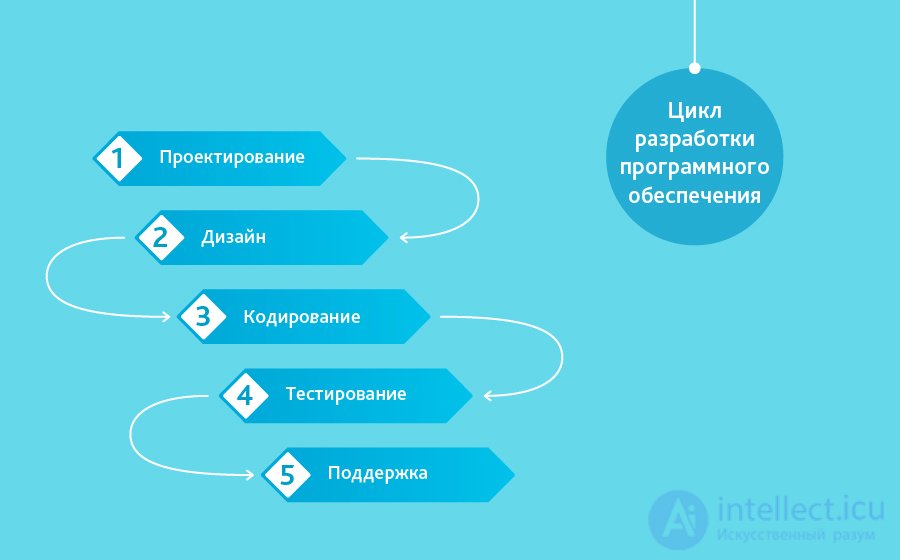
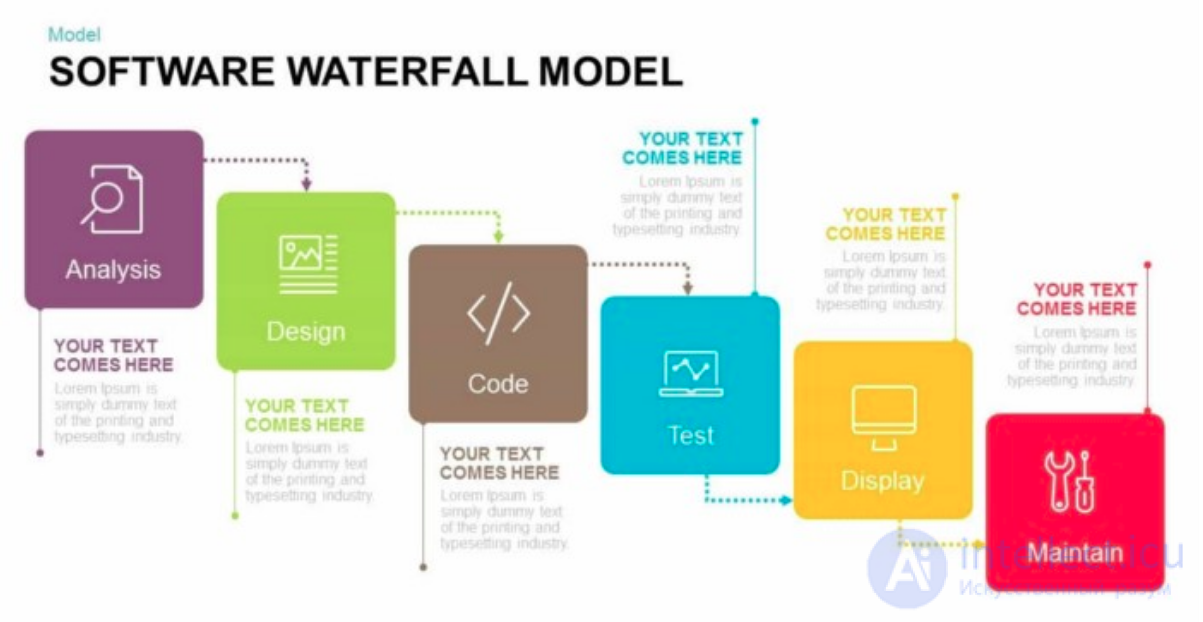
One of the oldest models, it involves moving sequentially through stages, each of which must be fully completed before the next one begins. The Waterfall model is easy to manage as a project. Thanks to its rigidity, development moves quickly, and cost and timeline are fixed in advance. But this is a double-edged sword. The Waterfall model delivers excellent results only in projects with clearly and firmly defined requirements and implementation approaches. There is no way to step back, and testing begins only after development is finished or nearly finished. Products built on this model without a well-reasoned choice of it can end up with flaws (the requirements list cannot be adjusted at any point along the way) that only come to light at the very end, because of the strict sequencing of the work. The cost of making changes is high, since starting a change means waiting for the whole project to finish. Even so, the fixed cost often outweighs the drawbacks of the approach. Fixing shortcomings that come to light during development is possible and, in our experience, requires one to three additional agreements to the contract covering a small scope of work.
Using the Waterfall model we've built many projects «from scratch,» including cases where we developed only the scope-of-work document. Projects that we've already written about: a mid-sized one — an X-ray micro-CT scanner, and a small one — automatic updates for a Windows service on AWS.
Being the oldest and most popular model, Waterfall deserves first place on our list.
It dates back to the 1960s, and people still use it today.
The name «Waterfall» comes from the sequential order in which tasks are carried out. The output of the first stage serves as the input for the second (an incremental approach). And this process repeats until the entire product has been fully developed.
What's good about the Waterfall SDLC model is that it's relatively simple to use.
Relying on a large amount of planning and documentation, the Waterfall model lets you map out every step of the development process.
Team communication is also very effective, since there aren't many obstacles along the way.
The Waterfall SDLC model has the same 7 stages of the software development life cycle - planning, requirements, design, implementation, testing, deployment, and maintenance .
Using the «Waterfall» method usually requires a lot of planning, since you need to draw up an accurate picture of the final product.
Developing the SRS and DDS documents is practically the same process. You work out all the features that need to be built, then describe them in detail and provide the documents to stakeholders for approval.
The implementation stage takes from 3 to 12 months, sometimes even longer.
This is actually considered a drawback, because the end user cannot see a working product until a late stage of development.
Think about Windows . They release a new version every couple of years. This means they use the waterfall model.
Once the product has been developed, it must be tested. If bugs show up, they should be removed. And then you're ready for deployment.
After deployment, you need to watch how the market reacts to your product. Then make changes to improve the software and delight your end users. This way, you easily learn more about your product.
Overall, with waterfall everything is simple and clear.
The drawback of the Waterfall methodology is that changes can be extremely costly or even impossible. That's because each step must be completed sequentially. So if you forgot to record some feature in your backlog, you'll have a hard and expensive time undoing the entire process.
We've already mentioned Windows and how they use the Waterfall model.
This methodology is built on long-term projects that can take you more than a year, like Windows 7, 8, 10, etc.
Otherwise you can turn to other SDLC models, such as Agile, Scrum, and XP, which will be discussed below.
Seven main types of life cycles are used in the process of building software. The typical software development cycle is called «cascade» and looks as follows.
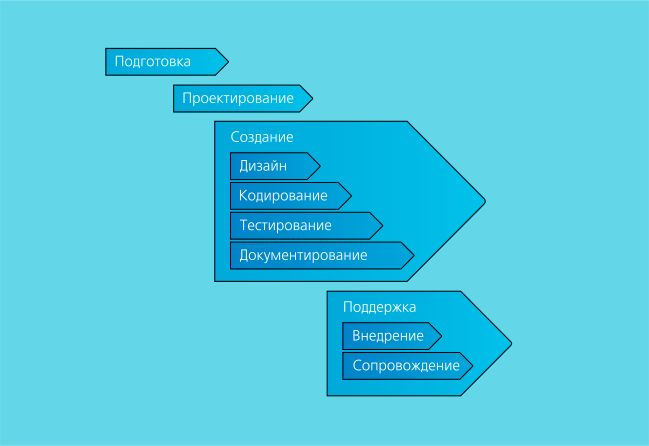
| 01 |  |
Preparation | Gathering and processing requirements. Preliminary planning of work stages, timelines, resources, and cost. |
| 02 |  |
Design | Obtaining technical specifications, developing specs. The partner receives a documented statement of their requirements and plans for carrying out the work. |
| 03 |  |
Build |
|
| 04 |  |
Support |
|
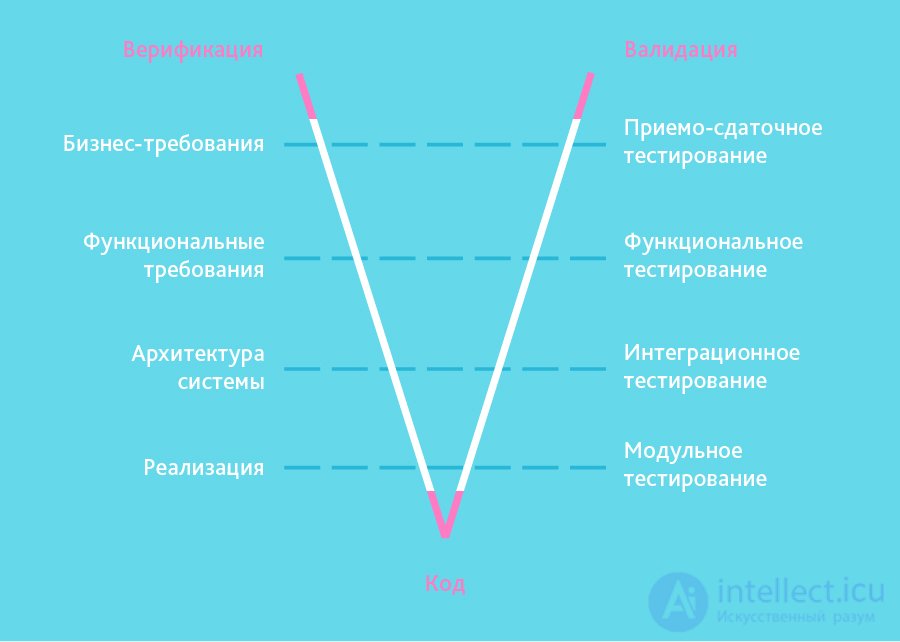
It inherited the «step by step» structure from the cascade model. The V-shaped model is applicable to systems where uninterrupted operation is especially important. For example, applications in clinics for patient monitoring, integrated software for airbag control mechanisms in vehicles, and so on. A distinguishing feature of the model is that it is aimed at thorough verification and testing of the product starting already at the earliest design stages. The testing stage is carried out in parallel with the corresponding development stage, for example unit tests are written during coding.
An example of our work built on the V methodology is a mobile app for a European mobile carrier that cuts roaming costs during travel. The project is carried out to a precise scope-of-work document, but it includes a substantial testing stage: interface usability, functional, load, and also integration testing, which must confirm that several components from different vendors work together reliably, and that money and credits cannot be stolen.
The SDLC V method is essentially an improved version of the Waterfall model. You work on one phase at a time. And only once you finish a task can you move on to the next.
The name comes from the parallel V-shaped structure that this model follows.
Software development life cycle testing is carried out at every stage - and this is the main difference between this method and the Waterfall model.
The V methodology consists of 9 different SDLC phases - requirements analysis, system design, architecture design, module design, coding, unit testing, integration testing, system testing, and acceptance testing .
It's worth noting that there are two parts to the equation here - Verification (planning and building) and Validation (testing and improving).
The stages from requirements analysis to module design fall within the verification stage. Whereas the stages from unit testing to acceptance testing fall within the validation phase.
Only the coding phase is neutral - it takes part in both.
Let's start with ...
This is where the magic happens.
Your developers need to maintain constant communication between product managers and stakeholders. This will help them build an outstanding product .
Developers choose the ideal coding language depending on the type of product you're building. Developers constantly revise the code and make sure everything comes down to a science.
The unit testing stage - at this stage the code is tested and optimized. All bugs and errors that come up along the way are removed. Developers make every effort to guarantee that they ship flawless code.
The V-Model is very similar to the Waterfall method. Consequently, the V-Model is also suitable for larger projects that require a lot of planning.
As a rule, large projects require a specific picture of the final product, and every stage must be clearly defined. Your developers will be able to work without much friction.
It's easy for newcomers to understand at first. However, inexperienced developers need to gain a deep understanding of how the development process works at your company in order to work effectively with the V-Model.
Overall, if you want to go through additional testing, we recommend choosing the V-Model instead of the Waterfall method.
In the incremental model, the complete system requirements are divided across different builds. The terminology is often used to describe building software in stages. Several development cycles take place, and together they form a «multi-waterfall» life cycle. The cycle is split into smaller, easily built modules. Each module goes through the phases of requirements definition, design, coding, implementation, and testing. The incremental model's development procedure involves releasing the product with basic functionality at the first major stage, and then sequentially adding new features, so-called «increments.» The process continues until the complete system has been built.
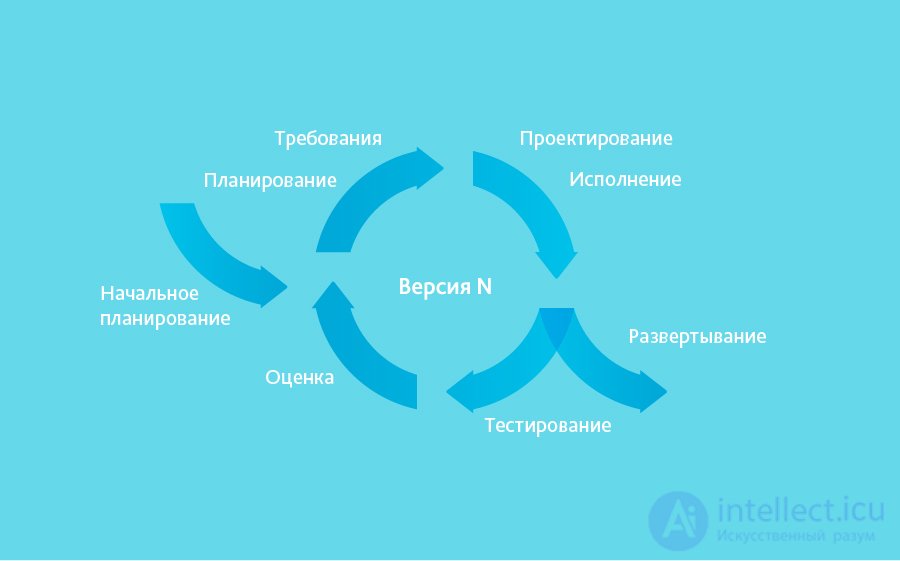
Incremental models are used where individual change requests are clear and can be easily formalized and implemented. In our own projects we applied it to build the DefView reader, and later the Vivaldi network of digital libraries.
As an example, let's describe the essence of one increment. The Vivaldi network of digital libraries replaced DefView. DefView connected to a single document server, and now it can connect to many. A storage server is installed at the site of an institution that wants to stream its content to a specific audience; it accesses the documents directly and converts them into the required format. A root element of the architecture appeared — the central Vivaldi server, acting as a unified search engine across all the storage servers installed at various institutions.
When should you use the incremental model?
The RAD model is a variant of the incremental model. In the RAD model, components or features are developed by several highly skilled teams in parallel, as if they were several mini-projects. The timeframe for a single cycle is tightly constrained. The modules that are built are then integrated into a single working prototype. This synergy makes it possible to show the client something working very quickly, in order to gather feedback and make changes.
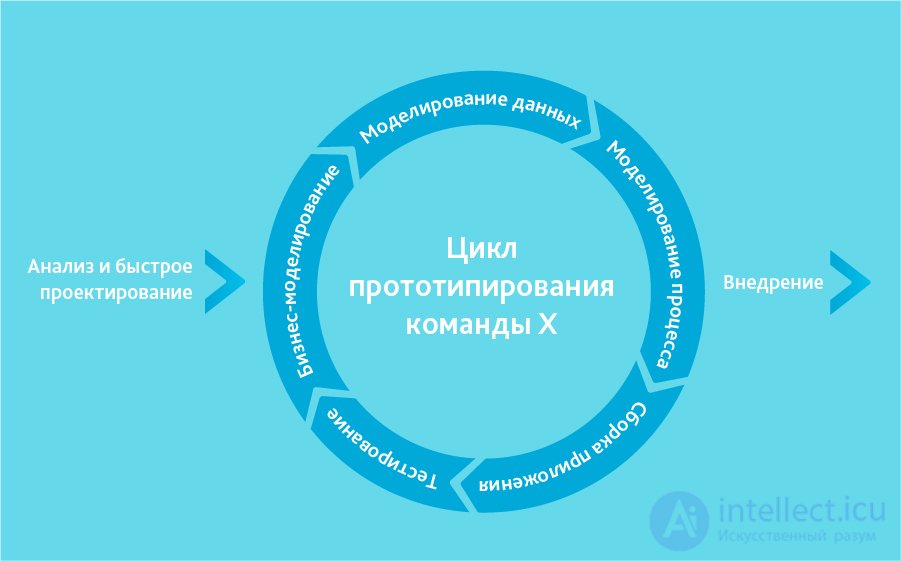
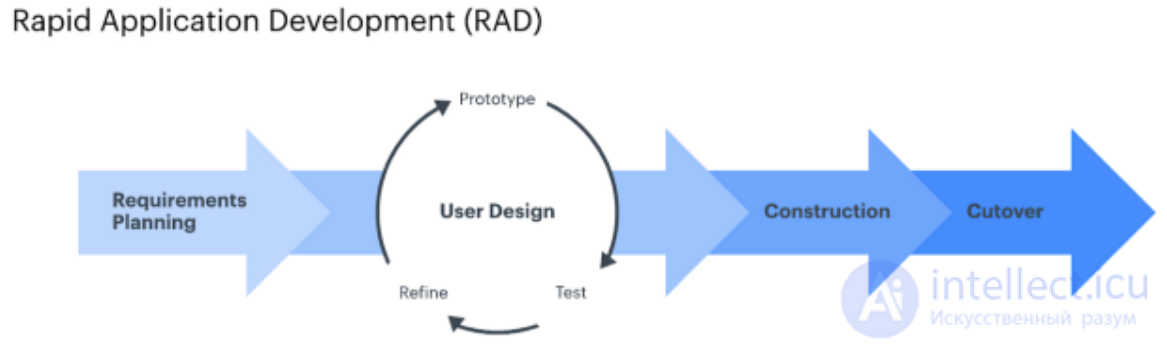
The rapid application development model includes the following phases:
Also known as the rapid application development model, it is very similar to the iterative approach.
The RAD methodology consists of iterations known as prototypes. Each prototype is a functional part of the overall software.
What's good about the RAD process is that it lets you deploy each prototype separately. This way, you can gather valuable market feedback throughout the development process.
Moreover, each prototype is designed so that it can be reused in future projects. This saves time and money.
Also, with the RAD model you don't need to produce labor-intensive documents to get your team started.
The RAD approach embraces change and lets you adapt to a changing environment.
It consists of five SDLC phases, and each prototype goes through these phases separately.
The first is business modeling . At this stage, thorough business analysis is carried out to define your product's features.
The second stage is data modeling . Here all the data gathered at the previous stage is carefully analyzed. Further specifications are developed to make the development process clearer.
The third stage is process modeling . At this stage, the information defined during the data modeling stage is broken down further. Additional product requirements are listed. This way, the team can arrive at precise product goals that need to be met. In addition, refinements and improvements can be made at this stage.
The fourth stage is coding . This is where actual development happens. The team makes an overall assessment of the development process and chooses the programming language to be used.
And finally, there's the testing stage. Once the prototype has gone through all of this and all the flaws have been fixed, it is deployed. After that, you gather valuable feedback to use in the next prototype.
The RAD method is ideal for projects where you can break the product down into prototypes. And then reuse those prototypes for future software releases.
The RAD model also encourages change and iteration. So if you expect your team to adopt new technologies, use the RAD method.
Otherwise, you won't want to choose the RAD method for projects where you need clearly defined requirements, since it lacks documentation.
When is the RAD model used?
It can only be used when highly skilled, narrowly specialized architects are available. The project budget is large enough to pay for these specialists along with the cost of ready-made automated build tools. The RAD model can be chosen when there is confident knowledge of the target business and a need to urgently produce a system within 2-3 months.
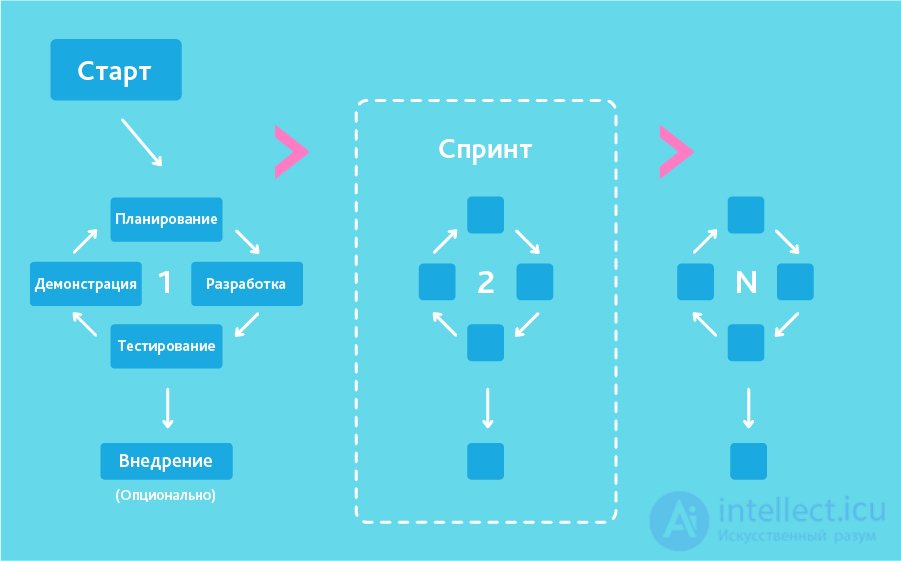
In the «agile» development methodology, after each iteration the customer can observe the result and understand whether it satisfies them or not. This is one of the advantages of the agile model. Its drawbacks include the fact that, because there are no specific formulations of the results, it's hard to estimate the effort and cost required for development. Extreme Programming (XP) is one of the best-known practical applications of the agile model.
At the core of this type are short daily meetings — «Scrum» — and regularly repeating meetings (once a week, once every two weeks, or once a month), which are called a «Sprint». At the daily meetings, team members discuss:
This methodology suits large projects, or ones aimed at a long life cycle, that are constantly adapting to market conditions. Accordingly, requirements change during implementation. It's worth remembering the class of creative people who tend to generate, put forward, and try out new ideas weekly or even daily. Agile development is best suited to this psychological type of leader. We build the company's internal startups using Agile. An example of a client project is the Electronic Medical Examination System, built to carry out mass medical examinations in a matter of minutes. In the second paragraph of this review, our American partners described something very important, something fundamental to succeeding with Agile.
When should you use Agile?
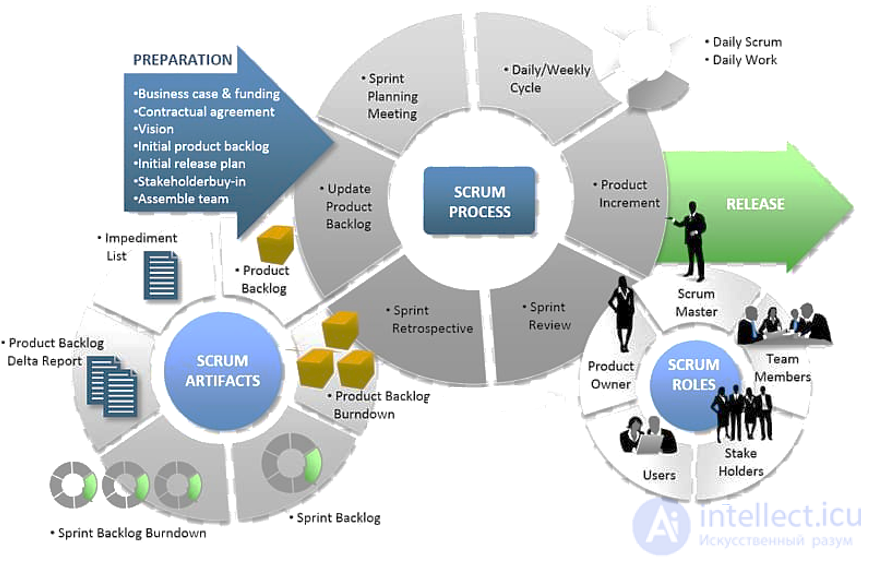
Scrum Agile software development, software development process, software development life cycle
Building software with Agile consists of small iterations — short cycles — sprints, which are essentially small projects lasting from one to four weeks. At the end of each productive period, an analysis is carried out and the team reorients itself toward the next cycle's new tasks. The number of sprints can be any number. The stages are illustrated below.
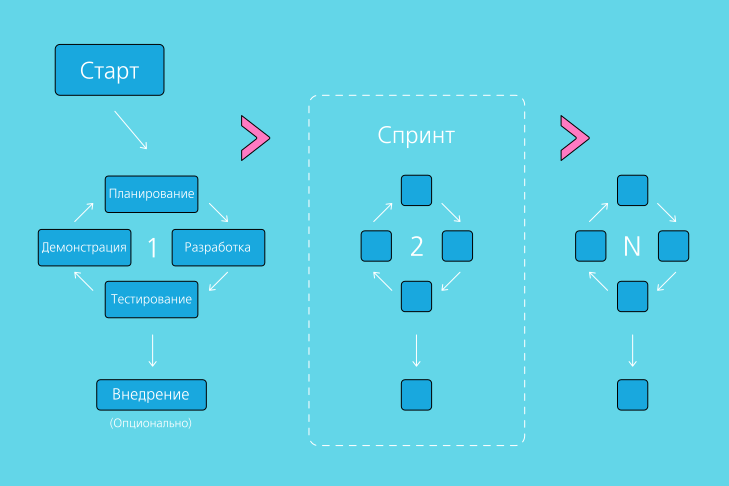
| 01 |  |
Planning | Setting sprint goals and choosing the actions to achieve them, allocating available resources. |
| 02 | |
Development | Practical work on the tasks needed to achieve the sprint goals. |
| 03 |  |
Testing | Gathering summary information to track completion of the sprint's tasks. Analyzing errors and the causes of deviations from the plan. Looking for ways to fix mistakes. |
| 04 |  |
Demonstration | Presenting the finished piece of software to the customer. |
| 05 |  |
Deployment | On request, the software can be used as a standalone product. |
The Agile SDLC model is in fact one of the most popular SDLC methods today.
It was originally developed by 17 programmers in the state of Utah back in 2001.
The Agile principle is more of a philosophy. It consists of 12 core components, known as the Agile Manifesto:
It can be said that the Agile SDLC model is the complete opposite of the Waterfall model.
The Waterfall model does not release any software until a late stage of development. Whereas the Agile process focuses on continuously releasing working software.
With the Waterfall approach, you have to carry out in-depth research. Whereas with the Agile SDLC model you are not required to do any of that — you can jump straight into the fray and adapt as you go.
With Agile, large projects are broken down into smaller pieces — iterations.
Each iteration goes through the typical stages of the Agile SDLC process — planning, design, implementation, testing, deployment, and maintenance.
In addition, each iteration takes from two to four weeks. After that it is deployed to the market. And you gather feedback.
Communication between you and your customers is very important here. You need to know exactly what your end users are telling you and adjust the product accordingly.
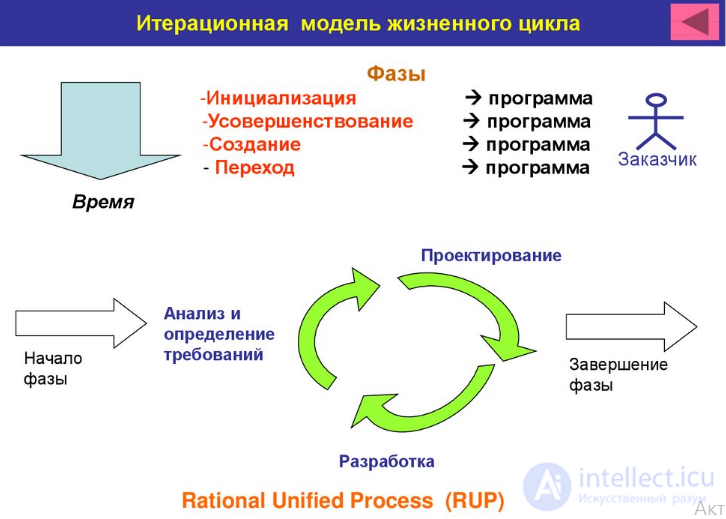
There are many methodologies that fall under the Agile software development life cycle model. Here are a few of them — XP (Extreme Programming), Scrum, Kanban, Lean, Crystal Clear, Feature-Driven Development (FDD), Adaptive Software Development, Rational Unified Process (RUP), Agile Modeling, and many more.
That said, it is not preferable for long-term projects, where you need to know every little detail. For larger projects you need a clear picture of what you are trying to build. And with the Agile model that is unlikely.
But overall, if you are interested in flexibility and would like to see how the market reacts to the product you are trying to develop, use the Agile model.
The iterative life cycle model does not require a full requirements specification to get started. Instead, development begins by implementing part of the functionality, which becomes the basis for defining further requirements. This process is then repeated. A version does not need to be perfect, the main thing is that it works. Understanding the end goal, we work toward it so that every step is productive and every version — functional.
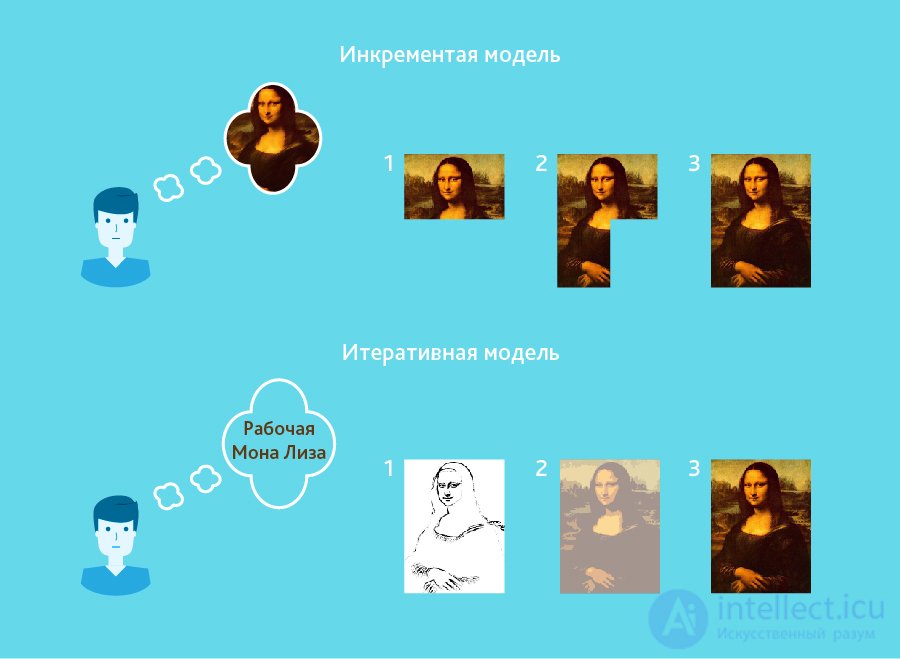
The diagram shows the iterative «development» of the Mona Lisa. As you can see, the first iteration is just a sketch of the Gioconda, the second one adds colors, and the third iteration adds detail, richness, and completes the process. In the incremental model, on the other hand, the product's functionality is built up piece by piece, and the product is assembled from parts. Unlike the iterative model, each piece is a complete, self-contained element.
Speech recognition can serve as an example of iterative development. The first studies and the groundwork for the scientific apparatus began long ago, at first — as ideas, then — on paper. With each new iteration, recognition quality improved. Nevertheless, perfect recognition has not yet been achieved, and so the task is not yet fully solved.
Compared to the traditional software development life cycle models — the Waterfall and V models — the iterative approach is somewhat different.
Usually, not much planning is required at the initial stages of building the product.
Using the iterative approach, you break the whole project down into smaller pieces — product builds known as iterations.
Each iteration goes through the typical stages of the software development life cycle — planning, design, implementation, testing, and deployment. And each cycle builds on the others.
The cool thing is that once a product build is finished, you can deploy it right away. This way, your customers can immediately see working software. This lets them actively participate in the development process.
Also, with the Iterative framework, you can work on a couple of iterations at the same time. However, you must keep your team organized, since this can confuse them and slow things down.
The iterative method also allows small changes to be made along the way. It lets you tailor the software to market needs.
But keep in mind that the Iterative model is not meant for complete changes. Although the cost of making adjustments is lower compared to the «Waterfall» model, it still has a rigid structure within which your final product is developed.
So, you must be careful with a changing environment. Gather enough data so that your team gets off to a good start at the coding stage. But don't rush, because it can be very difficult for you to adapt to major changes.
You can use this method if you believe your team is experienced enough to adapt to new technologies.
Keep in mind that the Iterative model is also somewhat rigid and follows strict rules. Consequently, you won't be able to withstand a strongly changing environment.
In general, it is better suited to large teams and projects.
When is it best to use the iterative model?
продолжение следует...
Часть 1 All Types of Software Development Methodologies and the Software Development Life Cycle
Часть 2 7. «Spiral Model» (spiral model) - All Types of Software

Comments