
Lecture 20 min.
Information about game architecture design is fairly hard to find. Most of it is unsystematic, and finding what you actually need means wading through a thick layer of “filler”. To make life easier for beginning developers, this publication gathers a body of information that will most likely prove useful to you.
For our study we will use the very popular Unity3D engine.
In this article we will cover the following topics:
Most developers who lack sufficient experience with COP make a similar mistake when designing complex class systems, both for units and for items.
To keep the text from growing too long, units here may be both characters and buildings.
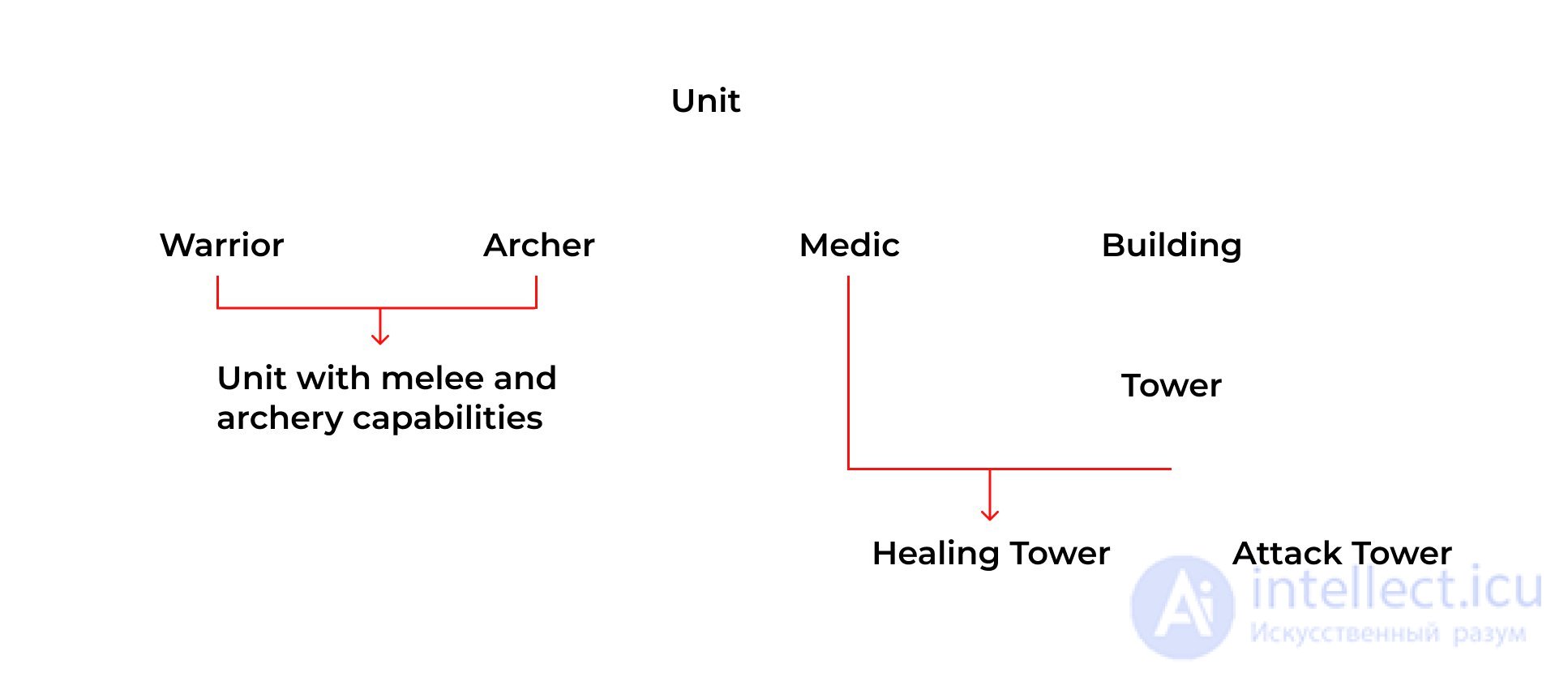
In this example, the red lines mark the places where problems can arise. The reason is that the inheriting type has to possess the properties and behaviour of different types. Such a case is unsolvable, because every class in this hierarchy will require constant changes.
In the example below we show what part of this scheme might look like in COP.
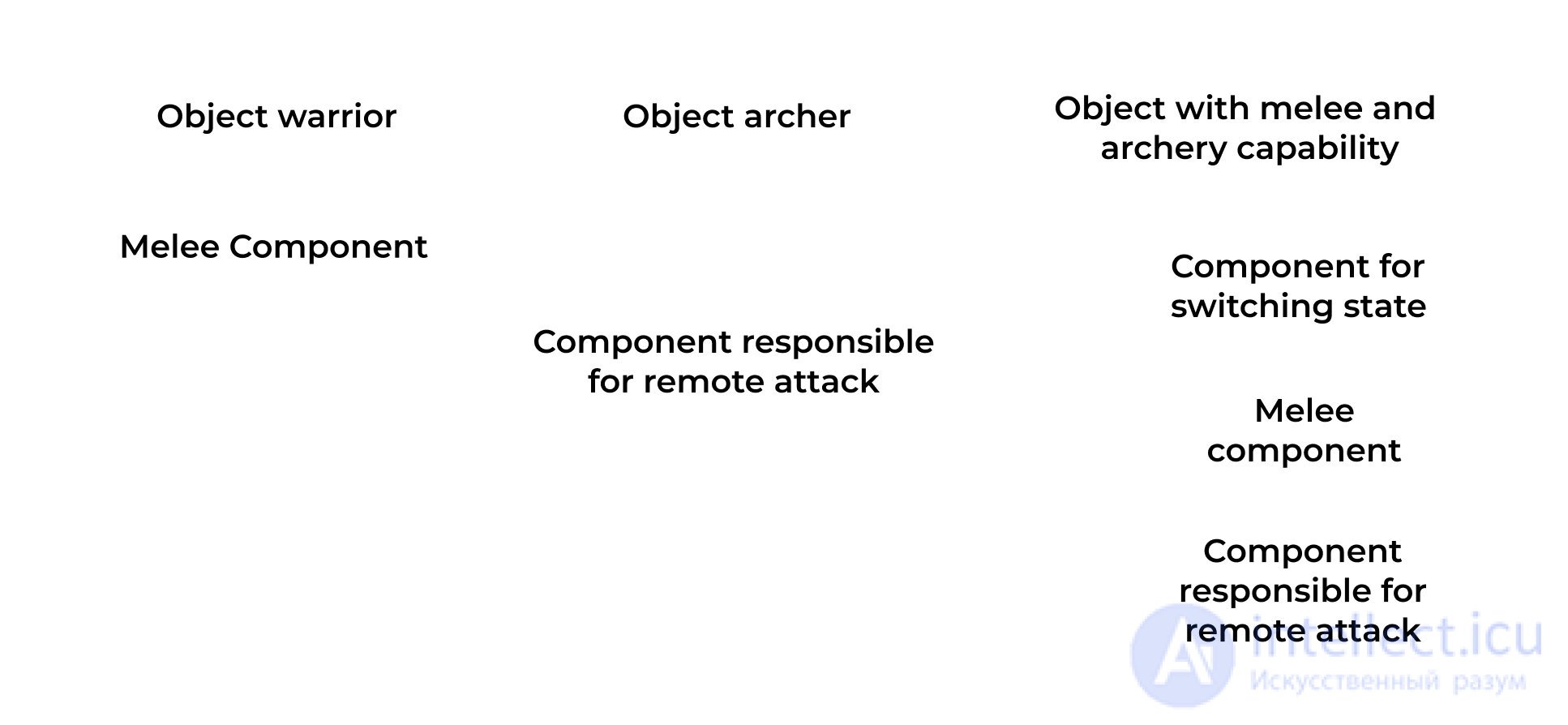
In this variant, every object is assembled from components, and thanks to that you do not have to change other objects when you change one. On top of that, you no longer have to spend your time building a class hierarchy that suits every object you create.
It is no secret that large games have a rather complex architecture: complex entities and complex interactions between classes. Using the standard OOP approach leads to constant code rewrites, and as a result development time increases significantly.
The problem is hidden in inheritance. More precisely, it is the fragile base class problem, when you cannot change the implementation of the original type without breaking the correct behaviour of the derived types.
COP (component-oriented programming) was created precisely as a solution to this problem. In short, the principle of COP is as follows: «There is a container class and a component class that can be added to the container class. An object consists of a container and the components inside that container.»
Components are somewhat similar to interfaces. However, interfaces only let you extract a common signature of functions and properties from classes, whereas components let you factor out a shared implementation separately.
In the OOP approach an object is defined by the class assigned to it.
In the COP approach an object is defined by the components it is made of. It does not matter what kind of object it is; what matters is which components it consists of and what it is able to do. Working with COP, you can make reusing already written code far easier, because you simply drop a ready-made component into different objects. Thanks to this, by combining different components you can assemble a new type of object.
Take, for example, a “Character” object. Creating it through OOP, you would end up with one large class, possibly inheriting from something. In COP it is a combination of the components that make up the “Character” object.
For example:
Character control “CharacterController”, collision handler – «CharacterCollisionHandler», character stats – the «Stats» component, character animation – “CharacterAnimationController”.
You do not need to stop using inheritance in games entirely. It is a perfectly normal practice. There are situations where it is more justified, but if you see that there will be several levels of class inheritance — use components.
Since you may not know exactly what changes your game's gameplay may undergo, you should not treat the Player object as the character controlled by the player. It is also worth considering that this character may be controlled not only by a human, and not only by a computer.
Player (this may be either a human or a computer, but you should not mix them in one class) — a separate object.
A unit, or a character — a separate object that any player can control. In games of the “Strategy” genre you can factor out one more separate object — the “Squad”.
Following this kind of logic and separating various game objects is not difficult. Moreover, such a division can be used in games of completely different genres.
If an object consists of many components, a problem may appear when you need to access them. The reason is the need to create fields in every component to store references to other components, or to access them through GetComponent().
This can be fixed by implementing the mediator pattern; that is, our task is to create something similar, an intermediary component. With its help, components could reach one another. In addition, this lets you move the check for the existence of other components into that single component, so the code only has to be written once. It is better to make such a component different for different object types, since they use different sets of components.
In that case, we simply cache the references in one class for convenient access to the object's other components.
public class CharacterLinks : MonoBehaviour
{

   public Stats stats;
   public CharacterAnimationController animationController;
   public CharacterController charactercontroller;


   void Awake()
   {
       stats = GetComponent‹Stats>();
       animationController = GetComponent‹CharacterAnimationController›();
       characterController = GetComponent();
   }

   void Update()
   {

        if (_links.characterController.isGrounded)
            ...
   }
}
The situation with scenes is the same. In some singleton object you can keep references to frequently used components, so that you do not constantly have to set references to other objects in the inspector of each specific component.
public class GameSceneUILinks: MonoSingleton
{
    public MainMenu MainMenu;
    public SettingsMenu SettingsMenu;
    public Tooltip Tooltip;
}
Usage:
Because components only have to be assigned in a single object, the amount of work in the editor decreases, as does the amount of code.
You should definitely work out the hierarchy of objects such as UI elements, characters and some others, since they consist of a fairly large number of script components, and this can greatly complicate development.
We can offer you 2 cases where it really is worth thinking the object's hierarchy through:
Let us look at the first case first.
Replacing an object entirely is not a problem, but the task becomes noticeably harder if the replacement object must hold the same data and be in the same state as the original. To make this easier, the required part of the object has to be structured. For example, it can be done like this:
Thanks to this organization it becomes easier to change the animation controller or the object's appearance, and it will not greatly affect the remaining components.
In the second case we take some object with data and a sprite. When it is clicked in the upgrade scene, this object must be upgraded. And when it is clicked in the game scene, a certain game action must be performed.
To begin with, you could make 2 prefabs, but if there are many objects, the number of prefabs will grow as well. Then we can take a different route and structure everything like this:
The targetGraphic field in the buttons must reference the image in ObjectView. This approach was tested in uGUI.
In many games, items, skills, characters and so on are given stats. These may be health, durability, stamina, power. At the same time, the set of stats depends on the type. For convenience, we can advise you to move stats into separate components. That is, functionality and data should be kept apart. To avoid getting lost in this complex system, it is best to store these classes in a dictionary, which in turn will live in a class that controls work with that dictionary.
You may also need to introduce an additional class that will hold the values themselves in the dictionary. This way the dictionary will store not the values themselves, but instances of a wrapper class for those values. Such a class may contain:
Since the stat sets of skills, characters and items are different, achieving universality will not be easy. In addition, to prevent confusion you need to rule out any overlap between these sets. For that we advise storing them in different enums. Another problem that appears is setting the stats in the inspector, since dictionaries and the “object” type are not serialized in Unity3D.
In general, we do not advise chasing universality, since often a single data type (float or int) is quite enough to make your work simpler. In addition, you can factor out unique stats separately from the dictionary.
To simplify work with units and characters (that is, objects with complex behaviour), behaviour trees and state machines are used.
Let us start with the state machine. To use it, the object's logic must be broken down into transitions, events and states; you may also need to break it down into actions. The ways of implementing these elements can differ greatly.
An object's state can act as a class that holds no game logic and stores certain data, for example the name of the object's state: block, throw. In another variant, the “state” class can describe the object's behaviour in a particular state.
An action — a function that is available for execution in the current state.
A transition — a link between several states that indicates the possibility of moving from one to another.
An event — used to signal the need to perform a transition to some other state, provided that this transition is possible from the current state.
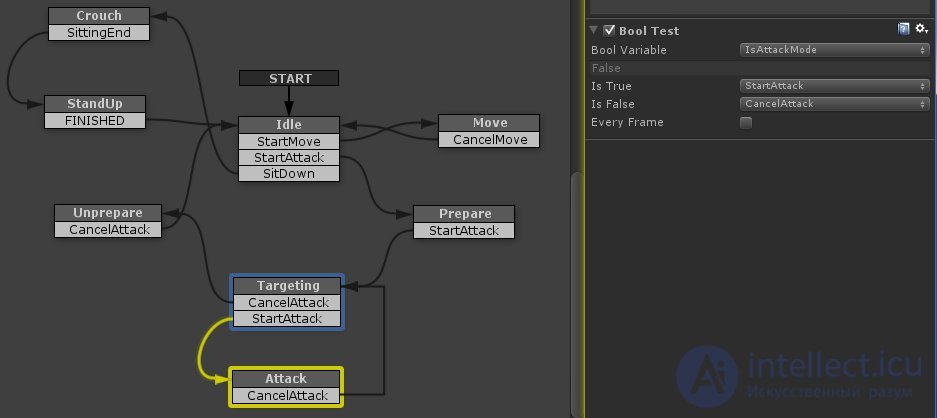
In the screenshot you can see a state machine graph built in the PlayMaker program.
The state machine in the Behaviour Machine plugin works in an interesting way. There, a MonoBehaviour component is a state that is responsible for the logic of work in that state. A behaviour tree can also be a state. Now let us look at the hierarchical state machine. A hierarchical state machine is used to simplify work when there are many states, since that increases the number of links between them.
The main difference of a hierarchical state machine is that it uses a nested state machine as a state, which produces a tree-like hierarchy of states.
To make writing artificial intelligence in games easier, behaviour trees (Behavior Tree) are used.
A behaviour tree — a tree-like structure that uses certain blocks of game logic as nodes. Using these blocks in a visual editor, the developer creates a branching structure and then configures the tree's nodes. It is precisely through this structure that a character will interact with the game world and make decisions when anything changes.
Every node that is visited returns a result, which lets you determine how the tree's other nodes will be processed. The returned result usually comes in three kinds: “Success”, “Failure” and “Running”.
Now we will quickly go over the main node types in a behaviour tree:
Condition — a function that lets you determine whether the nodes following it should be executed. On false you get “Fail” as the result, and on “True” — “Success”.
Iterator (replaces the “for” loop) — a function that lets you loop a series of actions a certain number of times.
Action Node — a specific function that is executed when this node is visited.
Sequencer — executes all nodes nested in it in order. If one of the nodes ends in failure, you get “Fail”; if all nodes finish successfully, you are returned the result “Success”
Selector — unlike Sequencer, processing stops as soon as any of the nested nodes returns “Success”.
Parallel Node — creates the illusion that all secondary nodes are executed “simultaneously”. In reality this is not the case; the process is analogous to coroutines in Unity 3d.
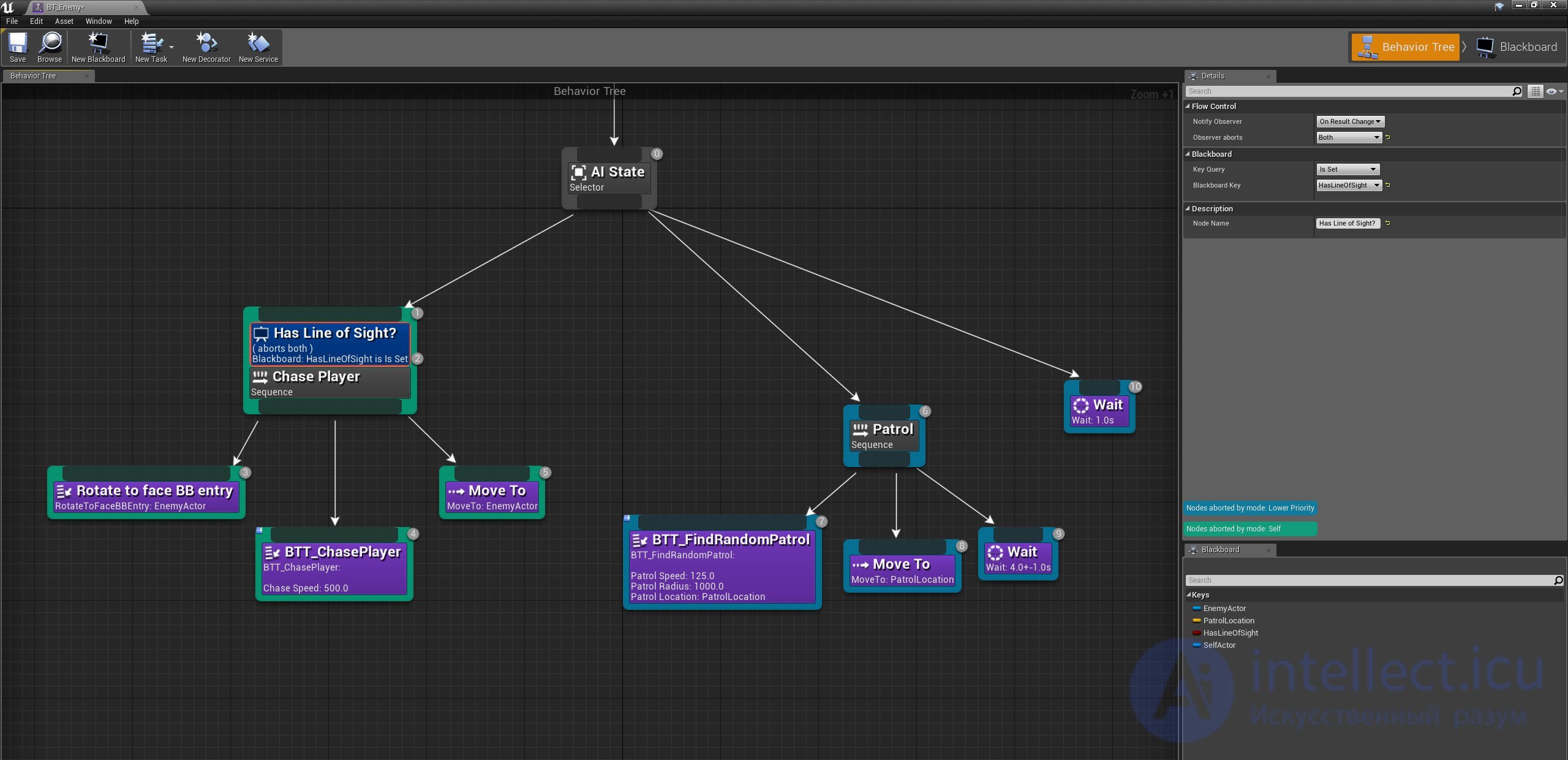
The screenshot shows you a behaviour tree that was created on the basis of the Behaviour Machine plugin.
So when is it worth using a behaviour tree, and when a state machine?
There is a book called «Artificial Intelligence for Games II». It says that behaviour trees are hard to implement if they have to respond to external changes. That same book offers two solutions you can use:
First: introducing the notion of a “task” into the behaviour tree. The idea is that in order to change behaviour, the behaviour tree controller will switch to a different task node.
Second: use what is already implemented in the Behaviour Machine plugin, i.e. combine a state machine and a behaviour tree.
With the first solution, the work becomes noticeably harder, since you need to create not only the switching of tasks, but also work out the “resetting” of the variables of a task (completed or cancelled).
Our advice is to follow this logic — if the AI obtains information from the game world on its own, then it is better to use a Behavior Tree. If the “AI” is controlled by something, by a player or by another AI (for example, a unit in strategy games, where it is controlled by the “player” — the computer), then it is more advantageous to use a state machine.
Despite a mass of convenient alternatives (JSON, SQLite), developers still often use XML. Naturally, the choice depends not only on convenience, but also on the tasks at hand.
Unfortunately, many computer game creators who use JSON or XML do so in an unoptimized way.
A pile of code is written that serves only to create/read/write structures of that format, and you must always specify in string form the names of the elements you need to access.
To avoid this, it is better to use serialization. In that case the structure will be generated from code (the Code first approach). To make use of XML serialization in Unity 3D, you can use the tools built into .NET.
For JSON there is an excellent plugin, JSONFx.
We tested these solutions on Android, but they should work on any other platform, since the API used has also been applied in third-party cross-platform plugins.
Thanks to certain effects, the stats of any game object can change. In this context, the entity that changes these stats can be called a modifier.
A modifier — a certain value, a component, in which the stats it can affect are recorded. That is, when a character is subjected to some effect, a modifier (component) is applied to it. After that, this modifier uses the function “apply myself to such-and-such object”. In our case, this is the “Character” object. After that the “Character” stats that this modifier can change are recalculated.
After the modifier is removed (for example, the effect had a certain duration), the stats are recalculated again.
You may need to keep two dictionaries of stats: one with the current (calculated) stats, and the second with the original ones.

Comments