
Lecture
AI agents are increasingly used not merely as generators of isolated code snippets, but as full-fledged programming assistants capable of analysing a project, reading files, proposing an architectural plan, modifying code and running checks. The effectiveness of this approach, however, depends not only on the model’s capabilities, but also on how well the working process is organised.
If you give an agent an overly general command such as “implement payments” or “rewrite the module”, the result may turn out to be unpredictable: the agent will modify files it shouldn’t, miss important requirements, break the architecture or forget about tests. That is why work with AI agents increasingly relies on a structured workflow: first a specification is drawn up, then the requirements are clarified, a plan is built, the task is broken down into subtasks, and only after that does implementation begin.
This article looks at an approach to writing code using AI-agent skills and commands such as $specify, $clarify, $plan, $decompose-task, $implement-task and $implement-phase. Such a workflow helps the programmer stay in control of the process, reduce the number of errors and turn the AI agent from a chaotic code generator into a manageable engineering assistant.
Coding agents are not a “magic programmer” but a system in which an LLM works in a loop: understand the task → plan → write code → check → fix → repeat.
In simplified terms, a coding agent works like this:
User
   ↓
Task description
   ↓
Agent analyses the project context
   ↓
Builds a plan of changes
   ↓
Finds the relevant files
   ↓
Modifies the code
   ↓
Runs tests / linter / build
   ↓
Fixes errors
   ↓
Shows the result
In other words, an agent is an LLM plus a set of tools.
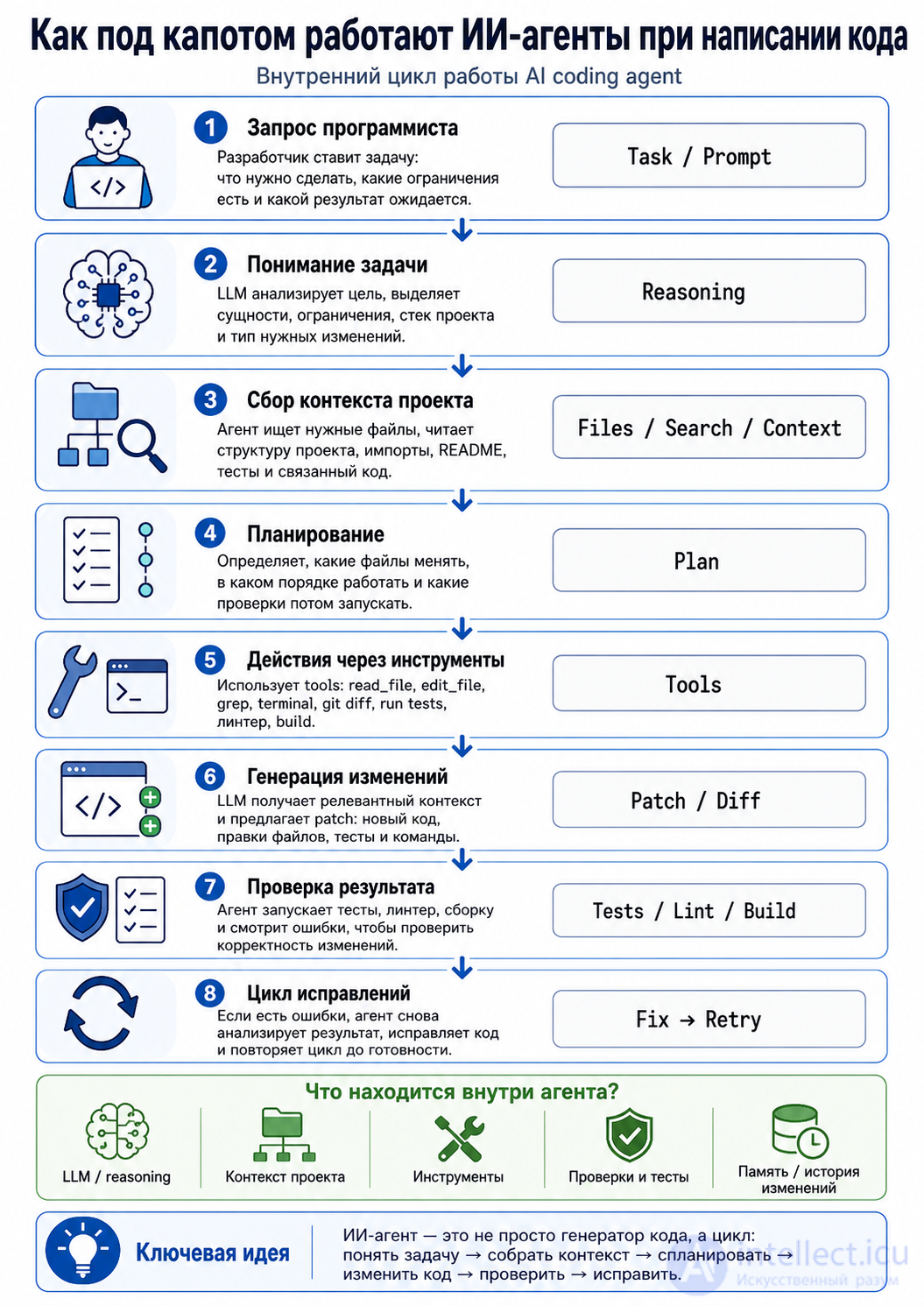
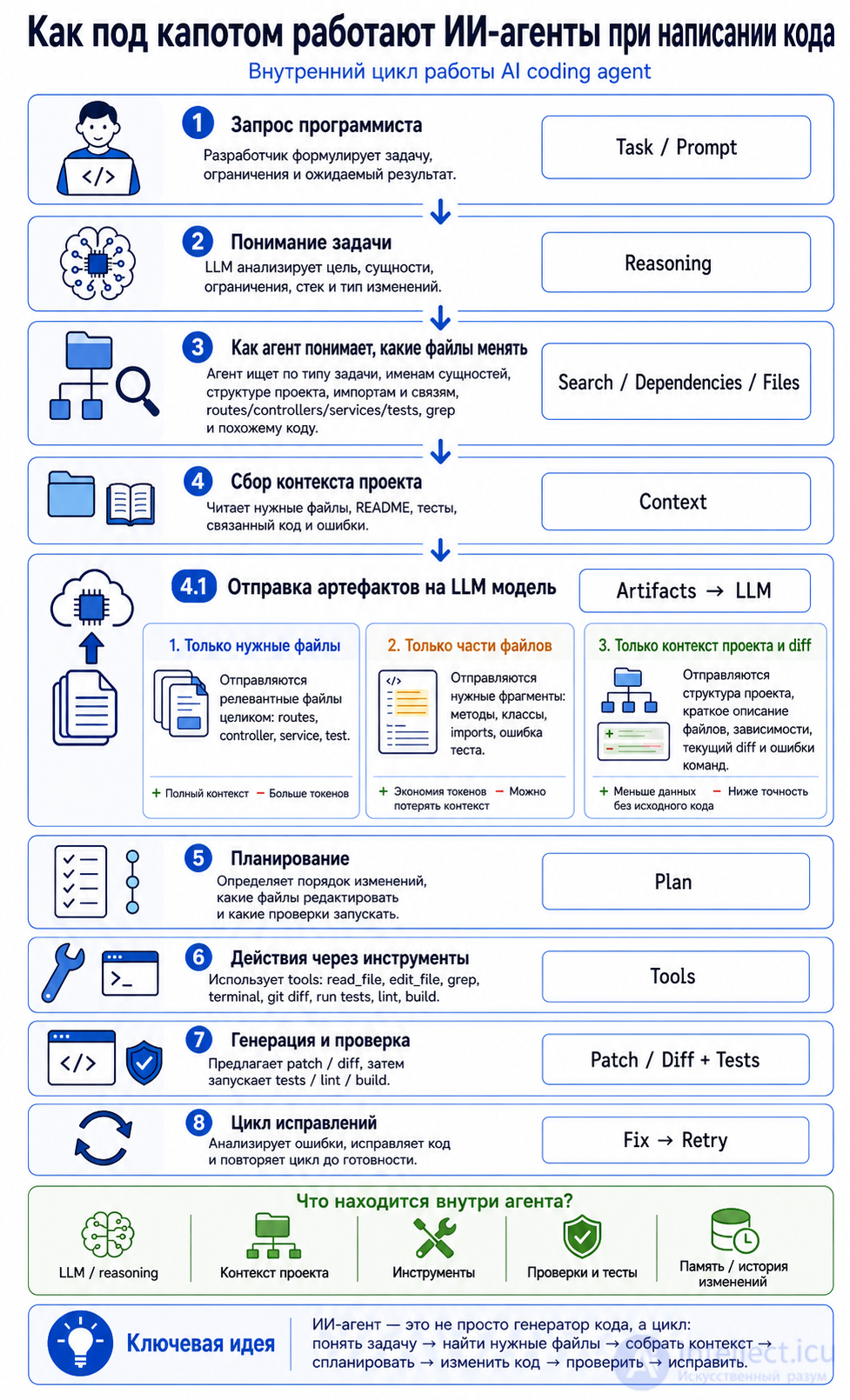
There are usually several core components inside:
┌──────────────────────────────┐
│        User Request           │
│ "Add card payments"           │
└──────────────┬───────────────┘
               ↓
┌──────────────────────────────┐
│        LLM / Reasoning        │
│ Understands task, builds plan │
└──────────────┬───────────────┘
               ↓
┌──────────────────────────────┐
│       Project Context         │
│ Files, structure, README, API │
└──────────────┬───────────────┘
               ↓
┌──────────────────────────────┐
│          Tools                │
│ read_file, edit_file, grep,   │
│ terminal, tests, git diff     │
└──────────────┬───────────────┘
               ↓
┌──────────────────────────────┐
│       Code Changes            │
│ Modifying the project files   │
└──────────────┬───────────────┘
               ↓
┌──────────────────────────────┐
│      Validation Loop          │
│ Tests, errors, fixes          │
└──────────────────────────────┘
A coding agent normally works in a loop:
1. Observe  — look at the current state
2. Think    — work out what needs doing
3. Act      — perform the action
4. Check    — verify the result
5. Fix      — correct the errors
6. Repeat   — repeat until done
For example:
Task: "Add a Laravel API endpoint for creating an order"

Observe:
- find routes/api.php
- find OrderController
- find the Order model

Think:
- POST /orders is needed
- validation is needed
- a service or action class is needed

Act:
- add the route
- create request validation
- update the controller
- add a test

Check:
- run php artisan test

Fix:
- if the test fails, correct the error
An ordinary chat:
User: Write some code
ChatGPT: Here is the code
An agent:
User: Add a function to the project
Agent:
- reads the project files
- understands the architecture
- decides for itself which files to change
- makes the changes
- runs the tests
- fixes the errors
- shows the diff
The key difference: an agent does not simply generate text, it acts within the project environment.
A typical coding agent has tools such as these:
read_file        — read a file
write_file       — write a file
edit_file        — modify part of a file
search/grep      — find classes, functions, strings
terminal         — run a command
run_tests        — run the tests
git_diff         — show the changes
package_manager  — install dependencies
browser/docs     — read documentation
For example, an agent may invoke:
grep -R "class OrderController" app/
php artisan test
npm run build
composer dump-autoload
It does not load the entire project at once, because the project may be large.
It usually proceeds like this:
1. Reads the folder structure
2. Looks for the key files
3. Reads only the relevant files
4. Builds an internal map of the project
5. Makes targeted changes
For Laravel, for instance:
routes/web.php
routes/api.php
app/Http/Controllers
app/Models
app/Services
database/migrations
tests/Feature
composer.json
.env.example
For the frontend:
package.json
src/
components/
pages/
services/api.js
vite.config.js
It usually does not write everything in one go. A good agent makes changes step by step:
1. Locate the place to change
2. Understand the project's style
3. Write the minimal code
4. Add a test
5. Run the check
6. Fix the errors
For example:
Route::post('/orders', [OrderController::class, 'store']);
Then the controller:
public function store(StoreOrderRequest $request)
{
    $order = $this->orderService->create($request->validated());

    return response()->json([
        'data' => $order,
    ], 201);
}
Then the test:
public function test_user_can_create_order(): void
{
    $response = $this->postJson('/api/orders', [
        'amount' => 1000,
        'currency' => 'USD',
    ]);

    $response->assertCreated();
}
Sometimes the system consists not of a single agent but of several “roles”:
Planner Agent     — plans the task
Coder Agent       — writes the code
Reviewer Agent    — checks the quality
Tester Agent      — runs the tests
Debugger Agent    — fixes the errors
Docs Agent        — updates the documentation
Physically, however, this may be one and the same LLM that is simply given different instructions.
┌─────────────┐
│   Planner   │
│  Task plan  │
└──────┬──────┘
       ↓
┌─────────────┐
│   Coder     │
│ Writes code │
└──────┬──────┘
       ↓
┌─────────────┐
│   Tester    │
│    Tests    │
└──────┬──────┘
       ↓
┌─────────────┐
│   Reviewer  │
│   Reviews   │
└──────┬──────┘
       ↓
┌─────────────┐
│   Fixer     │
│    Fixes    │
└─────────────┘
An agent normally uses a reasoning-based approach:
Goal:
- What has to be achieved?

Context:
- What files are there?
- What is the stack?
- What are the constraints?

Plan:
- Which files should be changed?
- Which tests should be added?

Action:
- Change the code

Check:
- Does it work?
- Has anything existing been broken?
For example:
Goal: add Checkout.com payments
Context: Laravel backend + JS frontend
Plan:
1. Add a backend endpoint for the Payment Session
2. Add the frontend CheckoutWebComponents
3. Handle the payment_captured webhook
4. Add tests
The agent needs the right context. Without context it may write beautiful but unsuitable code.
Poor context:
"Add payments"
Better context:
"In a Laravel 10 project, add a Checkout.com integration.
We already have Order, Payment and CheckoutComService.
We need to create a Payment Session and return payment_session_secret to the frontend."
The more precise the context, the fewer the errors.
The main reasons:
1. They do not see the whole project
2. They misunderstood the architecture
3. They used the wrong version of a library
4. They did not run the tests
5. They changed too many files
6. They invented a non-existent API
7. They did not account for edge cases
For example, an agent may write:
PaymentSession::create()
even though no such method exists in the real SDK.
That is why the following matter:
- tests
- documentation
- strict instructions
- code review
- limits on what may be changed
A good coding agent should not immediately rewrite the entire project.
Correct behaviour:
- study the project first
- change the minimum set of files needed
- preserve the code style
- explain the diff
- do not delete important code without reason
- run the checks
Bad behaviour:
- rewriting the architecture without asking
- creating unnecessary abstractions
- deleting the old logic
- adding dependencies that are not needed
- not verifying the result
The task:
Add a check that the token starts with st_ and is 16 or 32 characters long after the prefix.
The agent might do this:
const MASK = /^st_[a-zA-Z0-9]{16}$|^st_[a-zA-Z0-9]{32}$/;
But this is better:
const MASK = /^st_[a-zA-Z0-9]{16}([a-zA-Z0-9]{16})?$/;
Or, more simply:
const MASK = /^st_[a-zA-Z0-9]{16}$|^st_[a-zA-Z0-9]{32}$/;
The most readable option:
const MASK = /^st_[a-zA-Z0-9]{16}([a-zA-Z0-9]{16})?$/;
In other words, the agent not only writes code but also chooses the more maintainable option.
while (!taskCompleted) {
    const context = readRelevantFiles(task);
    const plan = createPlan(task, context);

    const changes = editFiles(plan);
    const result = runTests();

    if (result.success) {
        taskCompleted = true;
    } else {
        const errorAnalysis = analyzeErrors(result.errors);
        fixCode(errorAnalysis);
    }
}

return finalSummary();
A coding agent is like a junior/mid-level developer with access to an IDE:
LLM             = the brain
Tools           = the hands
Project files   = the working folder
Terminal        = the console
Tests           = the verification
Git diff        = the report on work done
Prompt          = the technical specification
A coding agent works on this principle:
understand the task
→ analyse the project
→ plan
→ change the code
→ run the checks
→ fix the errors
→ deliver the result
So it is not just a code generator but an automated executor that can read the project, modify files, run commands and improve the result through a feedback loop.
The agent does not “know” this in advance. It infers it from the task and the project structure.
The logic is usually as follows:
User's task
   ↓
Determine the type of change
   ↓
Find the entry points
   ↓
Find the related classes / functions / tests
   ↓
Read the necessary files
   ↓
Compile a list of files to change
Take this task, for example:
Add an endpoint for creating an order
The agent reasons roughly like this:
This is a backend/API task.
It needs to look for:
- routes/api.php
- OrderController
- Order model
- Request validation
- OrderService
- Feature tests
For Laravel it might search like this:
grep -R "OrderController" app routes tests
grep -R "Route::post" routes
grep -R "class Order" app
And then conclude:
routes/api.php              — add the route
app/Http/Controllers/...    — add the method
app/Http/Requests/...       — add validation
app/Services/...            — business logic
tests/Feature/...           — the test
For a frontend task:
Add a payment button to the checkout page
The agent will look for:
CheckoutPage
PaymentButton
checkout.ts
api/payment
components/Checkout
So it uses several signals:
1. The name of the task
2. Entity names: Order, Payment, User, Checkout
3. The project's folder structure
4. Imports and dependencies between files
5. Keyword searches
6. Tests
7. Compilation / test errors
8. Git diff after the changes
For example:
If validation needs changing:
→ look for Request classes, FormRequest, validation rules

If the API needs changing:
→ look for routes, controller, service, tests

If the UI needs changing:
→ look for component, page, template, store, api-client

If the database needs changing:
→ look for migrations, models, repositories
Yes — usually, if the agent works through a cloud LLM, the contents of the relevant files, or fragments of them, are sent to the model as context.
But an important point: normally it is not the whole project that gets sent, only the relevant parts.
Roughly like this:
The user's task
+
A list of files
+
The contents of the selected files
+
Fragments of the code found
+
Test / compilation errors
+
Instructions for the change
→ sent to the LLM
For example, a request to the LLM might include:
Task:
Add validation for token length 16 or 32.

Relevant file:
resources/js/payment.js

Current content:
const MASK = /^st_[a-zA-Z0-9]{32}$/;

Please propose a patch.
So yes, a file or a chunk of a file is passed to the model so that it can understand the code and propose a change.
If you use a cloud agent, for example an IDE plugin or a web service, the scheme is usually as follows:
Your computer / IDE
   ↓
the selected code context
   ↓
LLM server
   ↓
response containing the change
   ↓
the IDE applies the patch
Schematically:
┌──────────────────────┐
│ Your project locally  │
└──────────┬───────────┘
           │
           │ selected files / fragments
           ↓
┌──────────────────────┐
│ LLM server            │
│ analyses the code     │
└──────────┬───────────┘
           │
           │ patch / diff
           ↓
┌──────────────────────┐
│ Your project locally  │
│ changes are applied   │
└──────────────────────┘
Yes. There are several options.
For example:
Send the whole of OrderController.php
Advantages:
- the model sees the full context
- less risk of breaking the style
Disadvantages:
- more tokens
- more data leaves your machine
For example:
Send only the store() method and the imports
Advantages:
- less data
- cheaper and faster
Disadvantages:
- the model may miss an important connection
For example:
routes/api.php:
Route::post('/orders', ...)

OrderController:
the index() and show() methods

OrderService:
the create() method
This is often the most practical option.
An agent may typically send:
- file contents
- parts of files
- a list of files
- the project tree
- grep search results
- errors from the terminal
- package.json / composer.json
- README
- tests
- git diff
For example:
Project tree:
app/
  Http/
    Controllers/
      OrderController.php
  Services/
    OrderService.php
routes/
  api.php

Relevant snippets:
routes/api.php line 20...
OrderController.php line 10...
A good agent should avoid sending:
- .env
- secret keys
- tokens
- private certificates
- passwords
- large database dumps
- vendor/
- node_modules/
- storage/logs containing sensitive data
But this depends on the particular tool. It is therefore better to configure the exclusions yourself.
For example, via ignore files:
.env
.env.*
storage/logs/*
vendor/
node_modules/
*.pem
*.key
secrets/
If you use a local model, for example via Ollama, the scheme is different:
Your project
   ↓
a local LLM on your own computer
   ↓
patch
   ↓
your project
In that case the file contents do not leave for an external server, provided everything really does run locally.
┌──────────────────────┐
│ Your project          │
└──────────┬───────────┘
           ↓
┌──────────────────────┐
│ Local LLM             │
│ Ollama / LM Studio    │
└──────────┬───────────┘
           ↓
┌──────────────────────┐
│ The modified project  │
└──────────────────────┘
1. How does the agent work out the files?
It analyses the task, searches for keywords, looks at the project structure, dependencies, routes, controllers, services, tests and errors.
2. Are file contents sent to the LLM server?
Yes, if a cloud LLM is used. Usually the selected files or fragments are sent, not the whole project. If the model is local, for example Ollama, the code can stay on your own computer.
Below is a practical order of steps for how a programmer should properly use an AI agent to write code.
First you need to describe not just “build the feature”, but a proper mini technical specification.
Bad:
Add payments
Better:
In the Laravel project we need to add the endpoint POST /api/payments/session.
It must accept order_id, find the order, create a Payment Session in Checkout.com
and return payment_session_secret for the frontend.
A good task description contains:
- what needs to be done
- roughly where it is located
- what constraints apply
- what result is expected
- what must not be changed
- which tests must pass
The agent needs to understand the structure of the project.
For example:
This is Laravel 10 + MySQL.
Payments live in app/Services/Payments.
API controllers live in app/Http/Controllers/Api.
We write tests in tests/Feature.
Do not change the old payment logic.
You can add:
Before making changes, study:
- routes/api.php
- PaymentController
- CheckoutComService
- Order model
- the existing payment tests
It is good practice to ask the agent first to explain which files it intends to change.
An example request:
First study the project and propose a plan.
Do not change any files yet.
Show:
1. which files need to be read
2. which files need to be changed
3. which tests should be added or run
This protects you from the situation where the agent immediately rewrites half the project.
At this stage the agent usually does the following:
1. Looks at the project tree
2. Searches for the required classes and functions
3. Reads the related files
4. Finds a similar implementation
5. Checks the code style
For Laravel, for instance:
grep -R "CheckoutCom" app/
grep -R "PaymentController" app/ routes/
grep -R "payment_session" .
After that the agent should report something like this:
I found:
- routes/api.php — the route needs adding here
- app/Http/Controllers/Api/PaymentController.php — add the method here
- app/Services/CheckoutComService.php — the Checkout.com client already exists here
- tests/Feature/PaymentSessionTest.php — add the test here
It is better to give the agent the work in small steps.
Bad:
Rewrite the whole payment system
Better:
Implement only the creation of the Payment Session.
Leave the webhook and the frontend alone for now.
A good order:
Step 1 — backend endpoint
Step 2 — backend tests
Step 3 — frontend integration
Step 4 — webhook handling
Step 5 — refactoring
At this stage the agent modifies the files.
A good agent should:
- change only the files that are needed
- leave unrelated code alone
- preserve the project's style
- not add unnecessary dependencies
- not delete the old logic without reason
An example of a programmer’s instruction to the agent:
Implement only the backend part.
Do not change the frontend.
Do not add new composer packages.
Follow the existing style of the services.
After the changes, the programmer must always look at the diff.
git diff
You should check:
- which files have been changed
- whether there are any superfluous changes
- whether any important code has been deleted
- whether there are any secrets in the code
- whether the class and method names are clear
- whether the architecture has been over-engineered
If the agent has changed too much:
Roll back the unnecessary changes.
Keep only the changes in routes/api.php, PaymentController and CheckoutComService.
After the code has been changed, the agent or the programmer runs the checks.
For Laravel:
php artisan test
Or a specific test:
php artisan test --filter=PaymentSessionTest
For the frontend:
npm test
npm run build
npm run lint
For PHP:
composer test
vendor/bin/phpunit
vendor/bin/phpstan analyse
vendor/bin/pint --test
If the tests fail, the agent is given the error.
For example:
The test failed with the error:
Class "CheckoutComService" not found.

Fix only this error. Do not rewrite the architecture.
It is important to give the agent the specific error, not just “it doesn’t work”.
A good loop:
test failure
→ the agent analyses it
→ fixes it
→ test again
→ check again
Once the code works, you can ask the agent to do a review.
For example:
Review your own diff as a code reviewer.
Find:
1. possible bugs
2. security problems
3. architectural violations
4. edge cases
5. anything that can be simplified
Important: do not immediately ask it to “improve everything”, or the agent may start refactoring unnecessarily.
Better:
Just list the problems. Do not change the code yet.
If the agent has written code without tests, that is a risk.
The request:
Add a feature test for the successful creation of a Payment Session
and a test for the case where order_id is not found.
Good tests should cover:
- the successful scenario
- a validation error
- a missing entity
- access rights
- an invalid state
For example:
POST /api/payments/session
- 201/200 if the order exists
- 422 if order_id is not supplied
- 404 if the order is not found
- 403 if the user does not own the order
The AI agent helps, but the responsibility still lies with the programmer.
Before committing you need to check:
- the code compiles
- the tests pass
- there are no stray files
- there are no secrets
- there is no debug code
- there is no console.log / dump / dd
- there are no accidental formatting changes
- the names are clear
- errors are handled
For Laravel it is especially worth checking:
- no dd()
- no dump()
- correct validation
- correct status codes
- no direct access to other users' data
- transactions where they are needed
- logging contains no secrets
Once everything has been checked:
git status
git diff
git add .
git commit -m "Add payment session endpoint"
You can ask the agent to suggest a commit message:
Suggest a short commit message for this diff.
1. Describe the task
2. Give the project context
3. Ask for a plan
4. Check the list of files
5. Authorise a small change
6. Look at git diff
7. Run the tests
8. Fix the errors
9. Do a review
10. Add tests
11. Do the final check
12. Make the commit
┌──────────────────────────────┐
│ 1. Programmer sets the task   │
└──────────────┬───────────────┘
               ↓
┌──────────────────────────────┐
│ 2. Agent studies the project  │
└──────────────┬───────────────┘
               ↓
┌──────────────────────────────┐
│ 3. Agent proposes a plan      │
└──────────────┬───────────────┘
               ↓
┌──────────────────────────────┐
│ 4. Programmer checks the plan │
└──────────────┬───────────────┘
               ↓
┌──────────────────────────────┐
│ 5. Agent changes the code     │
└──────────────┬───────────────┘
               ↓
┌──────────────────────────────┐
│ 6. Programmer reviews diff    │
└──────────────┬───────────────┘
               ↓
┌──────────────────────────────┐
│ 7. Running the tests          │
└──────────────┬───────────────┘
               ↓
┌──────────────────────────────┐
│ 8. Fixing the errors          │
└──────────────┬───────────────┘
               ↓
┌──────────────────────────────┐
│ 9. Code review                │
└──────────────┬───────────────┘
               ↓
┌──────────────────────────────┐
│ 10. Commit                    │
└──────────────────────────────┘
You are working as a coding agent in a Laravel project.

Task:
Add the endpoint POST /api/payments/session for creating a Checkout.com Payment Session.

Constraints:
- Do not change the frontend.
- Do not add new composer dependencies.
- Do not rewrite the existing payment architecture.
- Do not touch the webhook logic.
- First show the plan and the list of files.
- Only change code after the plan.

What is required:
1. Find the existing payment services.
2. Add the route.
3. Add the controller method.
4. Use the existing CheckoutComService.
5. Add validation.
6. Add feature tests.
7. Run the tests, or state which tests need to be run.
An AI agent is best used not as a “do everything for me” machine, but as an assistant within the development loop:
the programmer sets the direction
→ the agent does the rough work
→ the tests verify it
→ the programmer controls the quality
The safest approach: small tasks, a plan before any changes, a mandatory diff, and tests after every step.
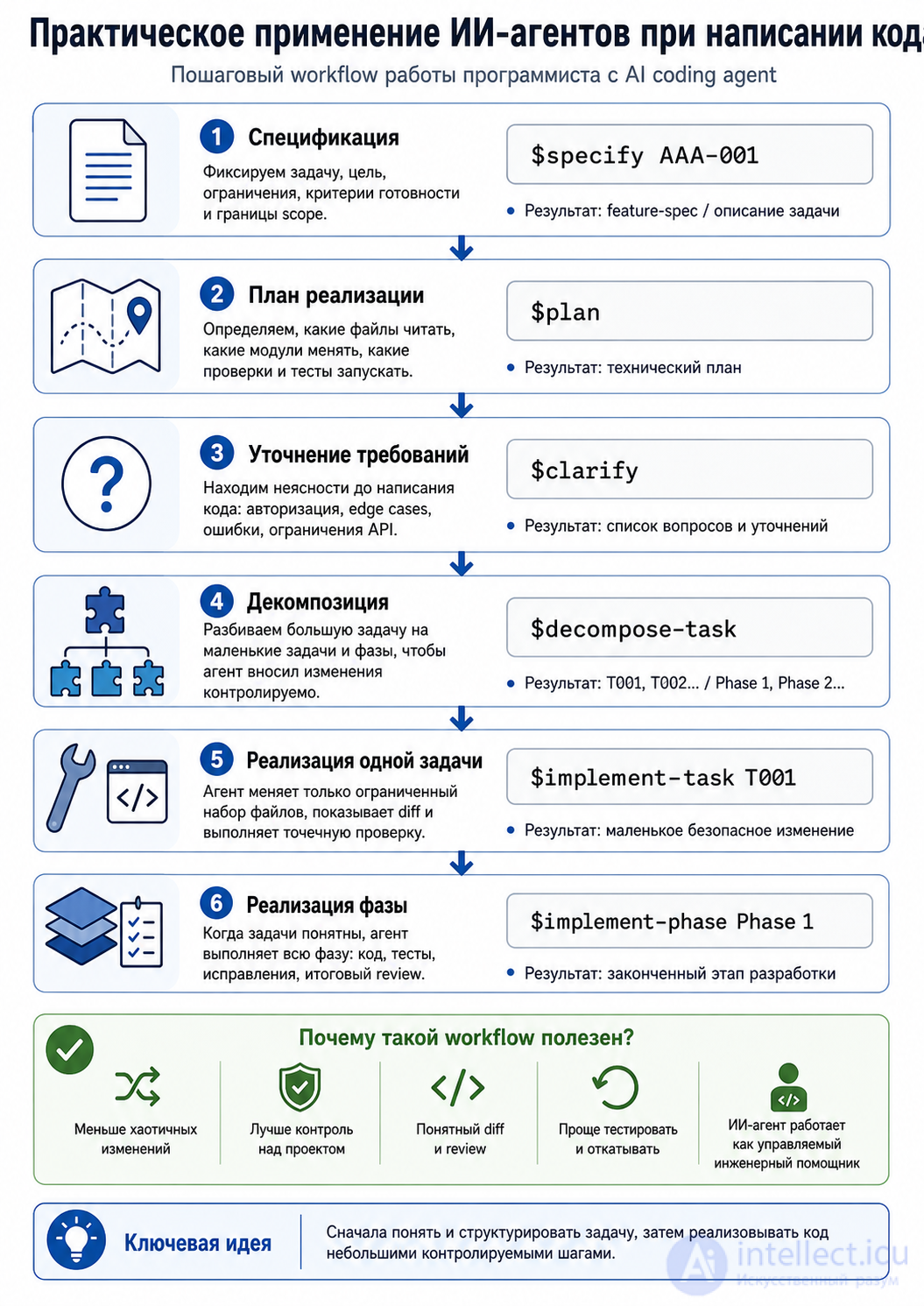
I could not find a public, commonly accepted standard bearing the name BBN-001, so below I treat BBN-001 as your own specification / task / feature-request ID. The idea of skills itself matches the modern approach: skills capture repeatable engineering workflows, quality gates and practices for coding agents.
$specify BBN-001
    ↓
$clarify
    ↓
$plan
    ↓
$decompose-task
    ↓
$implement-task T001
    ↓
$implement-task T002
    ↓
$implement-phase Phase 1
    ↓
tests / review / diff / commit
The core idea: the agent does not write code straight away, but first turns the task into a manageable engineering structure.
The $specify command means:
create or open the task specification.
For example:
$specify BBN-001
The agent should create a feature-spec level document:
BBN-001: Add Checkout.com Payment Session endpoint
The specification usually records:
1. The goal of the task
2. The business context
3. What must work
4. What is out of scope
5. Constraints
6. Acceptance criteria
7. Risks
8. Affected modules
For example:
Spec ID: BBN-001

Goal:
Add a backend endpoint for creating a Checkout.com Payment Session.

Scope:
- POST /api/payments/session
- Validation of order_id
- Use of the existing CheckoutComService
- Returning payment_session_secret

Out of scope:
- Frontend Checkout Web Components
- The payment_captured webhook
- Refunds
- Admin panel

Acceptance criteria:
- If order_id is valid, the API returns payment_session_secret
- If order_id is missing, the API returns 422
- If the order is not found, the API returns 404
- The tests pass
So $specify is not code. It is the contract for the task.
The $clarify command means:
find the ambiguities before implementation starts.
The agent looks at the specification and asks questions.
For example:
$clarify
The agent might reply:
Points to clarify:

1. Should the endpoint be available only to authenticated users?
2. May a Payment Session be created for an order that has already been paid?
3. Is the currency taken from the order or supplied in the request?
4. Should Checkout.com errors be logged?
5. Which HTTP status should be used when the payment provider fails?
This is an important step, because a poor specification leads to poor code.
For example, if authorisation is not clarified, the agent may build an endpoint with no check that the user owns the order. For payments, that is dangerous.
The $plan command means:
create a technical implementation plan.
The plan answers the question:
Which files should be read, which changed, which tests written?
For example:
$plan
The agent should produce:
Implementation plan for BBN-001:

Read:
- routes/api.php
- app/Http/Controllers/Api/PaymentController.php
- app/Services/CheckoutComService.php
- app/Models/Order.php
- tests/Feature/PaymentTest.php

Change:
- routes/api.php
- app/Http/Controllers/Api/PaymentController.php
- app/Http/Requests/CreatePaymentSessionRequest.php
- app/Services/CheckoutComService.php
- tests/Feature/CreatePaymentSessionTest.php

Validation:
- php artisan test --filter=CreatePaymentSessionTest
- php artisan test
A good $plan should contain:
- the list of files
- the order of actions
- the dependencies between steps
- which checks to run
- what must not be touched
The $decompose-task command means:
break the large task down into small ones.
This is one of the key principles of AI coding agents. Decomposition is needed so that the agent does not try to hold too much code in context and does not break the architecture. The task-decomposition approach is widely used in agentic systems: a large goal is split into subtasks that can be carried out sequentially or in parallel.
For example:
$decompose-task
The result:
T001 — Add request validation
T002 — Add API route
T003 — Add controller method
T004 — Add CheckoutComService method
T005 — Add feature tests
T006 — Run tests and fix issues
You can go into even more detail:
Phase 1 — Backend API
  T001 — Create CreatePaymentSessionRequest
  T002 — Add POST /api/payments/session route
  T003 — Add PaymentController::createSession()
  T004 — Add CheckoutComService::createPaymentSession()
  T005 — Add feature tests

Phase 2 — Frontend integration
  T006 — Add payment session API client
  T007 — Initialize CheckoutWebComponents
  T008 — Handle payment success/failure

Phase 3 — Webhook
  T009 — Handle payment_captured
  T010 — Handle payment_declined
  T011 — Add webhook tests
The point: the agent receives not one enormous task, “implement payments”, but the small task T001, then T002, then T003.
The command $implement-task T001 means:
implement one specific task only.
For example:
$implement-task T001
If T001 is the validation request, the agent should change only the relevant file:
app/Http/Requests/CreatePaymentSessionRequest.php
An example of the result:
 ['required', 'integer', 'exists:orders,id'],
        ];
    }
}
And the agent should report:
Implemented T001:
- Created CreatePaymentSessionRequest
- Added validation for order_id
- No controller logic changed
Important: with $implement-task T001 the agent must not do T002, T003 and T004 as well, even if it thinks that would be quicker.
The command $implement-phase Phase 1 means:
carry out a group of tasks within a single phase.
For example:
$implement-phase Phase 1
If Phase 1 is the backend API, the agent may carry out:
T001 — validation
T002 — route
T003 — controller
T004 — service method
T005 — feature tests
But it must still proceed in a controlled way:
1. Read the relevant files
2. Change the minimum set of files
3. Show the diff
4. Run the tests
5. Fix the errors
$implement-phase is riskier than $implement-task, because it changes more files. It is best used once the specification and the decomposition are already clear.
I would recommend this order:
$specify BBN-001
$clarify
$plan
$decompose-task
$implement-task T001
$implement-task T002
$implement-task T003
$implement-task T004
$implement-task T005
And only if the tasks are small and well described:
$implement-phase Phase 1
Suppose the task is:
We need to add a Checkout.com Payment Session backend endpoint.
Then working with the agent might look like this:
$specify BBN-001
The result:
BBN-001 — Checkout.com Payment Session Backend

Goal:
Create a backend API for generating a Payment Session.

Scope:
- POST /api/payments/session
- order_id validation
- CheckoutComService integration
- JSON response with payment_session_secret

Out of scope:
- frontend
- webhooks
- refunds
$clarify
The result:
Open questions:
1. Is auth middleware required?
2. May a session be created for an order that has been paid?
3. Is a check of the order owner required?
4. How should Checkout.com errors be handled?
$plan
The result:
Plan:
1. Read existing payment routes
2. Read CheckoutComService
3. Add CreatePaymentSessionRequest
4. Add route
5. Add controller method
6. Add service method
7. Add feature tests
8. Run tests
$decompose-task
The result:
Phase 1 — Backend API

T001 — Create request validation
T002 — Add route
T003 — Add controller method
T004 — Add service method
T005 — Add feature tests
T006 — Run tests and fix issues
$implement-task T001
The agent does the validation only.
$implement-task T002
The agent adds the route.
$implement-task T003
The agent adds the controller method.
$implement-task T004
The agent adds the service logic.
$implement-task T005
The agent adds the tests.
$implement-task T006
The agent runs the tests and fixes the errors.
The bad option:
Implement Checkout.com payments
The risk:
- the agent will change too many files
- it will add unnecessary architecture
- it will forget the tests
- it will not take authorisation into account
- it will mix up backend, frontend and webhook
The good option:
$specify BBN-001
$clarify
$plan
$decompose-task
$implement-task T001
The advantages:
- there is a specification
- there is a list of questions
- there is a plan
- there are small tasks
- the diff is easier to review
- there are fewer errors
- changes are easier to roll back
Task decomposition is especially useful for large coding tasks, because the agent works with less context and with clearer task boundaries. Descriptions of skill-based approaches for coding agents state outright that decomposition helps to split large programming tasks into subtasks, manage dependencies and reduce context overload.
A skill is a predefined scenario of agent behaviour.
For example, the $decompose-task skill might contain the instruction:
When invoked:
1. Read current spec
2. Identify phases
3. Split work into tasks
4. Assign IDs: T001, T002, T003
5. Define dependencies
6. Define expected files
7. Define validation commands
8. Do not modify code
So a skill is not merely a command. It is a template of professional behaviour.
An example of a skill:
Skill: decompose-task

Input:
- Spec ID
- Plan
- Project context

Output:
- Phases
- Tasks
- Dependencies
- Acceptance criteria per task
- Validation command per task

Rules:
- Tasks must be small
- Each task should touch limited files
- Every task must have a test/check
- Do not implement code
BBN-001
│
├── Phase 1: Backend API
│   ├── T001: Add request validation
│   ├── T002: Add API route
│   ├── T003: Add controller method
│   ├── T004: Add service method
│   └── T005: Add feature tests
│
├── Phase 2: Frontend integration
│   ├── T006: Add API client method
│   ├── T007: Initialize Checkout Web Components
│   ├── T008: Handle submit event
│   └── T009: Handle success/failure state
│
└── Phase 3: Webhook processing
    ├── T010: Add webhook endpoint
    ├── T011: Verify webhook signature
    ├── T012: Handle payment_captured
    └── T013: Add webhook tests
It only describes the task.
It only looks for gaps in the requirements.
It only lays out the technical route.
It only splits up the work.
T001, for example, means T001 and nothing else.
Better once the tasks are already clear.
You can give the agent a system instruction like this:
You work as a coding agent with a skills workflow. Available commands: $specifyCreates the task specification. Do not change code. $clarify Finds ambiguities, risks and questions. Do not change code. $plan Creates a technical implementation plan. Do not change code. $decompose-task Splits the task into phases and tasks. Do not change code. $implement-task Implements only the specified task. Do not do neighbouring tasks. $implement-phase Implements only the tasks within the specified phase. Mandatory rules: - Show the list of files before making changes. - Change the minimum set of files. - After the changes, show a summary and the test commands. - Do not touch .env, secrets, vendor or node_modules. - Do not carry out large refactorings without a separate task.
The best working cycle:
1. Create the spec
2. Clarify the open questions
3. Get the plan
4. Break it down into tasks
5. Implement T001
6. Look at the diff
7. Run the test
8. Implement T002
9. Diff/test again
10. After the phase — an overall review
In other words, the programmer controls the agent through small steps.
Developer:
$specify BBN-001

Agent:
Created the specification BBN-001...

Developer:
$clarify

Agent:
There are 5 questions about authorisation, currency and order statuses...

Developer:
Answers:
1. Yes, auth required.
2. A session may not be created for a paid order.
3. Currency comes from the order.
4. Log errors without the secret.
5. Provider error = 502.

Developer:
$plan

Agent:
Plan: change routes/api.php, PaymentController, CheckoutComService...

Developer:
$decompose-task

Agent:
T001 validation, T002 route, T003 controller...

Developer:
$implement-task T001

Agent:
Created the validation request. 1 file changed. Tests: ...
This workflow exists so that the AI agent works not chaotically but as an engineering executor:
$specify        → what we are doing
$clarify        → what is unclear
$plan           → how we will do it
$decompose-task → what parts we split it into
$implement-task → we do one small part
$implement-phase→ we do a whole phase
The most important rule: the larger the task, the smaller the implementation step should be. On a real project it is better to use $implement-task T001 more often than to jump straight to $implement-phase Phase 1.
Using AI agents to write code becomes far more effective when the work is built not around a single enormous “do everything” command, but around a sequential engineering process. The commands $specify, $clarify, $plan, $decompose-task, $implement-task and $implement-phase let you divide development into clear stages: first define exactly what needs doing, then remove the ambiguities, draw up a technical plan, split the work into small tasks, and only then move on to changing the code.
The main value of such a workflow lies in control. The programmer remains responsible for architecture, security and quality, while the AI agent takes on the routine part: finding files, preparing code, writing tests, analysing errors and fixing small problems. The smaller and more precise the task the agent receives, the greater the chance of a quality result without needless refactoring and accidental changes.
The skills-based approach thus turns work with an AI agent into a manageable development process. This is especially useful on real projects, where what matters is not only the speed of writing code, but also predictability, testability, security and the preservation of the existing architecture.

Comments