
Lecture
Software piracy remains one of the most significant problems in the modern digital economy. The illegal copying and distribution of software products leads to substantial financial losses for developers, reduces incentives to innovate and increases information security risks. This article examines the principal technical, legal and organisational methods of preventing software piracy. Particular attention is paid to modern protection technologies such as digital rights management (DRM) systems, code obfuscation, server-side licence validation and the shift towards cloud-based software distribution models.
With the advance of information technology and the global spread of the Internet, the problem of illegal software copying has become especially pressing. Software piracy takes various forms: unauthorised copying, distribution of cracked versions of programs, use of a single licence on multiple devices, and modification of programs in order to bypass protection mechanisms.
According to various studies in the field of the digital economy, the level of unlicensed software use in some regions of the world may exceed 50%. This creates serious economic and technological consequences for developers, software vendors and users alike.
The aim of this work is to systematise and analyse methods of preventing software piracy, and to assess the effectiveness of modern protection technologies.
Software piracy can take several forms:
The most widespread type of copyright infringement is the copying of software without the rights holder's permission.
Cracked software is distributed through online resources and makes it possible to bypass licensing mechanisms.
The use of software within organisations without purchasing the required number of licences.
Distribution of programs via file-sharing networks, torrents and specialised websites.
One of the most common means of protection is the use of licensing systems. The software requires activation with a unique licence key.
The main types of licence are:
Single-user licences
Corporate licences
Subscription
Hardware-bound licences
Licensing makes it possible to control the number of installations and the use of the software product.
This method ties the program's licence to unique characteristics of the computer's hardware:
the MAC address of the network adapter
the processor serial number
the hard drive identifier
motherboard parameters
This makes it considerably harder to transfer a licence to another device.
DRM is a set of digital rights management technologies designed to restrict the unauthorised copying and distribution of software.
The main functions of DRM are:
controlling the use of programs
licence verification
limiting the number of installations
protection against program modification
However, DRM is often criticised for restricting the rights of legitimate users.
Obfuscation is the process of complicating the structure of program code in order to hinder its analysis and modification.
Obfuscation methods include:
renaming variables
complicating program logic
inserting dummy computations
string encryption
Although obfuscation does not prevent cracking entirely, it increases the time required to analyse a program.
Many protection systems use technologies that counteract program analysis:
debugger detection
integrity checks on the executable file
monitoring of memory modification
protection against disassembly
These methods make it possible to detect attempts to analyse and modify a program.
Modern software products often use online licence verification. On launch, the program contacts the developer's server to confirm that its use is legitimate.
Advantages:
the ability to remotely block unlicensed copies
control over the use of the program
collection of usage statistics
The drawback is dependence on an Internet connection.
In this model the key computations are performed on the developer's server, while the client program acts merely as a user interface.
This means that:
the core logic of the program is inaccessible to the user;
the code cannot be copied or modified;
all computations take place on protected infrastructure.
This architecture is widely used in:
cloud services;
online editors;
data processing systems;
AI services.
virtually complete protection against piracy;
centralised control over the software.
dependence on an Internet connection;
high server infrastructure costs.
One modern method of protection is the personalisation of software copies, also known as watermark licensing.
The essence of the method is that each copy of the program contains unique user identifiers, for example:
the buyer's name;
email address;
licence number;
order identifier;
a hidden digital watermark in the code.
Such information can be embedded:
in the program's executable file;
in configuration files;
in documents created by the program;
in hidden metadata.
If a copy of the program is distributed illegally, the developer can identify the specific user who violated the licence agreement.
the psychological factor of user accountability;
the ability to trace the source of a leak;
no restrictions for legitimate users.
it does not prevent copying itself;
it requires infrastructure for generating personalised builds.
The feature locking method involves dividing a program's functionality into several access tiers.
Each licence unlocks only certain capabilities of the program.
For example:
| Licence type | Available features |
|---|---|
| Free | basic functionality |
| Standard | advanced tools |
| Professional | full feature set |
Technically this is implemented through:
licence verification at launch;
dynamically enabling or disabling modules;
loading features from the server.
a flexible monetisation model;
encouraging users to purchase more expensive licences.
the need for a complex program architecture.
The progressive licensing model involves gradually unlocking a program's features as it is used or paid for.
For example:
The user receives the basic version.
After registering, additional features are unlocked.
After purchasing an extended licence, professional tools are activated.
Sometimes features may be unlocked:
as certain usage levels are reached;
after completing training;
when individual modules are purchased.
gradual user engagement;
an increased likelihood of purchase.
implementation complexity.
Modern programs can collect telemetry data about how the software is used.
The system can analyse:
the number of installations under a single licence;
the geography of usage;
how frequently the program is launched;
matching hardware identifiers.
If the system detects suspicious activity, it can:
request re-activation;
temporarily block the licence;
notify the developer.
detection of large-scale illegal use;
analysis of user behaviour.
potential privacy concerns;
the need to comply with data protection legislation.
In modern software products the licence is often tied not to a device but to a user account.
The user must:
create an account;
sign in to the program;
confirm the licence via the developer's server.
This model is used in:
gaming platforms;
professional software;
cloud services.
centralised licence management;
the ability to deactivate remotely.
the need for constant authorisation.
3.11 Cloud-based software distribution models
One of the most effective methods of combating piracy is the shift to cloud models (SaaS — Software as a Service).
In this model:
the software runs on the developer's server
the user gains access over the Internet
the program's code is never transferred to the client
This all but eliminates the possibility of pirated copying.
Legal methods include:
copyright
licence agreements (EULA)
patents
legal action against infringers
Many countries have specific laws governing the protection of intellectual property in the software field.
Sometimes a reduction in piracy is achieved not only through technical measures but also through economic decisions:
Lowering the price of software can reduce the incentive to use pirated copies.
The basic version of the program is distributed free of charge, while advanced features are available by subscription.
Users of licensed versions receive updates, support and additional features.
One effective organisational and technical method of reducing software piracy is the distribution of demonstration (demo) or trial versions of software products. This approach allows users to explore the software's functionality legally before purchasing a full licence. At the same time, the developer retains control over the level of functionality and the terms of use of the product.
Demonstration versions can be implemented in various forms, the most common being versions with a limited usage period and versions with an unlimited usage period but limited functionality.
In this model the software product is provided to the user for a defined trial period, after which the program cannot be used without purchasing a licence.
The most common implementations are:
a limit on usage time (for example, 7, 14 or 30 days);
a limit on the number of program launches;
a combined limit on time and launches;
disabling part of the functionality once the trial period ends.
The technical implementation of such a method may include:
storing the date of first installation;
checking the system time;
server-side verification of the activation date;
use of secure storage for licence data.
The advantages of this approach are:
the user can fully evaluate the software product;
an increased likelihood of a licence purchase after evaluation;
reduced motivation to download pirated copies.
However, this method may be vulnerable to certain kinds of circumvention, for example:
changing the system time;
reinstalling the program;
modifying licence files.
To improve effectiveness, developers often combine local verification with server-side licence activation.
An alternative approach is to distribute software that may be used indefinitely but has a limited set of features.
This model is often applied within the freemium approach and involves dividing the software product into:
a basic free version;
an extended paid (premium) version.
The limitations of a demonstration version may include:
a limit on the number of available features;
performance limits;
watermarks in the output;
limits on data volume;
restrictions on commercial use.
The advantages of this approach:
the user can use the program legally for a long time;
the motivation to seek out a pirated version is reduced;
the software product becomes more widely recognised;
user loyalty is built.
This method is widely used in modern software products, including graphics editors, project management systems, cloud services and mobile applications.
| Characteristic | Limited period | Unlimited period |
|---|---|---|
| Usage period | limited | unlimited |
| Feature restrictions | usually none | present |
| Purchase motivation | expiry of the trial period | need for additional features |
| Level of protection against piracy | moderate | relatively high |
In practice, developers often use a combined model in which the program first provides full functionality for a limited period and then automatically switches to a limited-functionality mode.
Nagware is a software distribution model in which the program is fully or almost fully functional, but on every launch it displays a window reminding the user to register or purchase a licence.
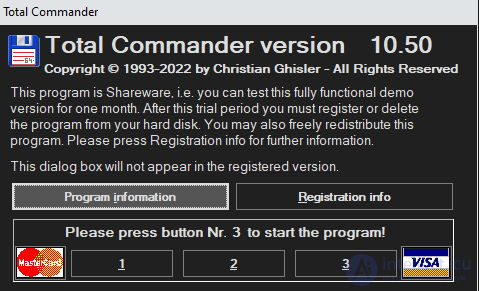
The name comes from the English verb to nag — «to remind persistently and annoyingly».
The program works without restrictions
The user can use the full functionality.
A reminder appears on launch
The window asks the user to register the program or buy a licence.
After payment the window disappears
Once the user registers or enters a licence, the reminder is no longer shown.
Psychological pressure on the user
The developer does not limit functionality but regularly reminds the user of the need to pay.
WinRAR
Total Commander
WinZip (in early versions)
many classic shareware programs of the 1990s–2000s
Nagware is a variety of the shareware model, in which:
the program is distributed free of charge;
the user may use it for some time;
after that, payment for a licence is requested.
However, unlike trial versions, the program is not blocked and does not restrict features; it merely displays a reminder.
simple implementation;
high user loyalty;
the absence of strict restrictions;
wide distribution of the program.
users may use the program for years without paying;
the method relies on the user's voluntary honesty;
a low level of technical protection.
Practice shows that absolute protection against piracy does not exist. Any protection system can be broken given sufficient resources and time.
The most effective approach is a combined one, comprising:
technical means of protection
server-side checks
legal measures
convenient licensing models
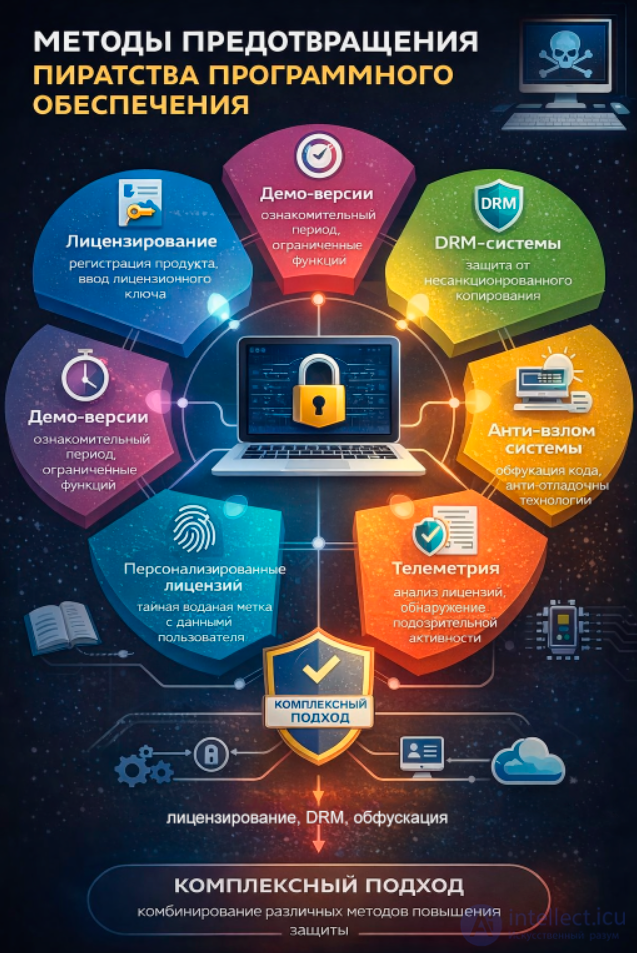
Software piracy remains a complex and multifaceted problem. Modern protection methods include technical mechanisms as well as organisational and economic approaches.
Modern methods of preventing software piracy increasingly rely on combined protection strategies that include:
technical methods (licensing, DRM, obfuscation);
architectural solutions (cloud services, server-side processing);
organisational mechanisms (accounts, subscriptions);
analytical tools (telemetry).
Practice shows that hybrid protection models, in which several methods are applied simultaneously, demonstrate the greatest effectiveness. Such an approach makes it considerably harder to bypass protection mechanisms and reduces the level of unlicensed software use.
The development of cloud technologies, server-side data processing and new software distribution models makes it possible to significantly reduce the level of unlicensed use. However, effectively combating piracy requires the comprehensive application of a variety of protection methods, as well as the improvement of international intellectual property legislation.

Comments