
Lecture
System software — a set of programs that manage the components of a computer system, such as the processor, main memory, input/output devices, and networking hardware, acting as an «interlayer interface» with hardware on one side and user applications on the other. Unlike application software, system software does not solve specific practical problems; it merely enables other programs to run by providing them with service functions that abstract away the details of the hardware and firmware implementation of the computing system, and it manages the computing system's hardware resources.
System programming — the creation of system software.
System programmer — a programmer who specializes in system programming.
The main distinctive feature of System Software is that it is common to everyone who shares the computer's technical resources. System programs are used by everyone both for developing and creating their own application programs and for organizing the execution of existing programs.
Classifying a given piece of software as system software is a convention and depends on the agreements used in a specific context. As a rule, system software includes operating systems , utilities programming systems , database management systems[⇨], and a broad class of middleware.
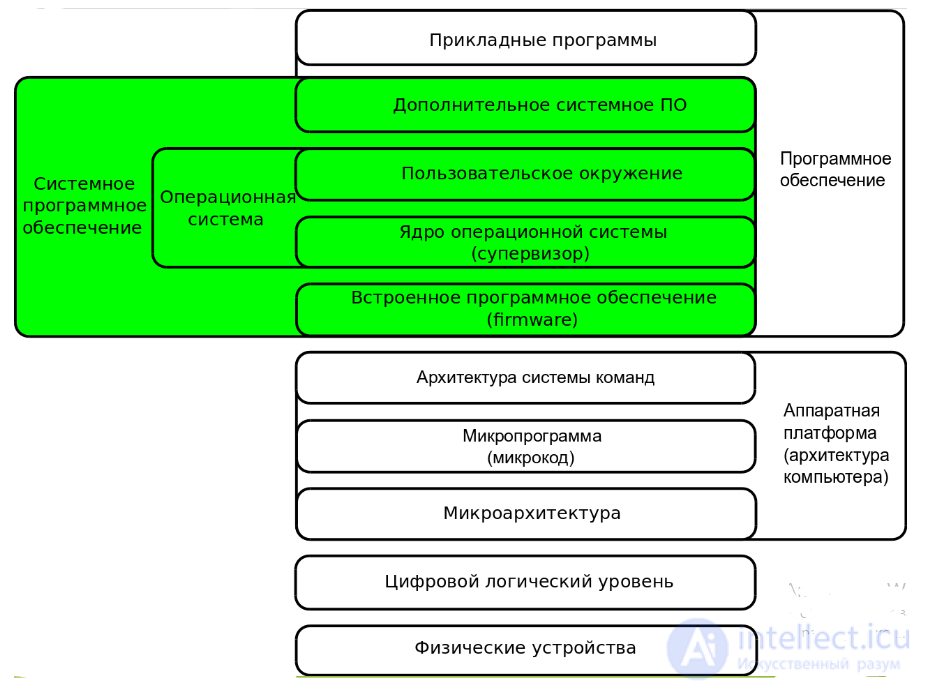
System programming (or systems programming) — a subfield of programming that consists of working on system software.
The term «system» emphasizes the fact that the results of this kind of programming substantially change the properties and capabilities of the computing system. At the same time, it remains indisputable that, to a certain extent, this result occurs with the use of any programs executed on a computing system. Therefore, there is no clear boundary between «system» and «non-system» (application programming") programming.
A computing system has a hierarchical structure that can be represented as a set of nested layers, with application programs on the outermost layer and the computer hardware on the innermost. The conventional degree of system-ness increases with programming that affects ever more internal levels of the system.
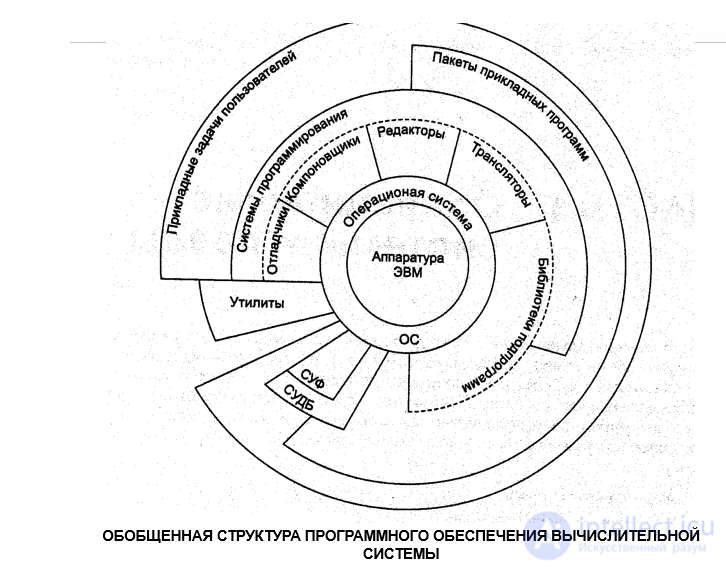
The goals of studying the "System Programming" course are: to study the general principles of building and operating system programs, as well as methods of programming in machine-oriented languages. To gain skills in assembly language programming through the example of constructing typical elements of system programs. The course is regarded as an introduction to the study of computational processes at the level of the machine codes of a von Neumann architecture computer.
Purpose of the course: to provide specialized training for computer engineering specialists in the field of developing system software tools and analyzing the interaction of software with computer hardware, and a knowledge base for mastering the specialized courses of the "Computer Engineering" professional field, along with sufficient depth of mastery of the core engineering disciplines across all specializations of the professional field.
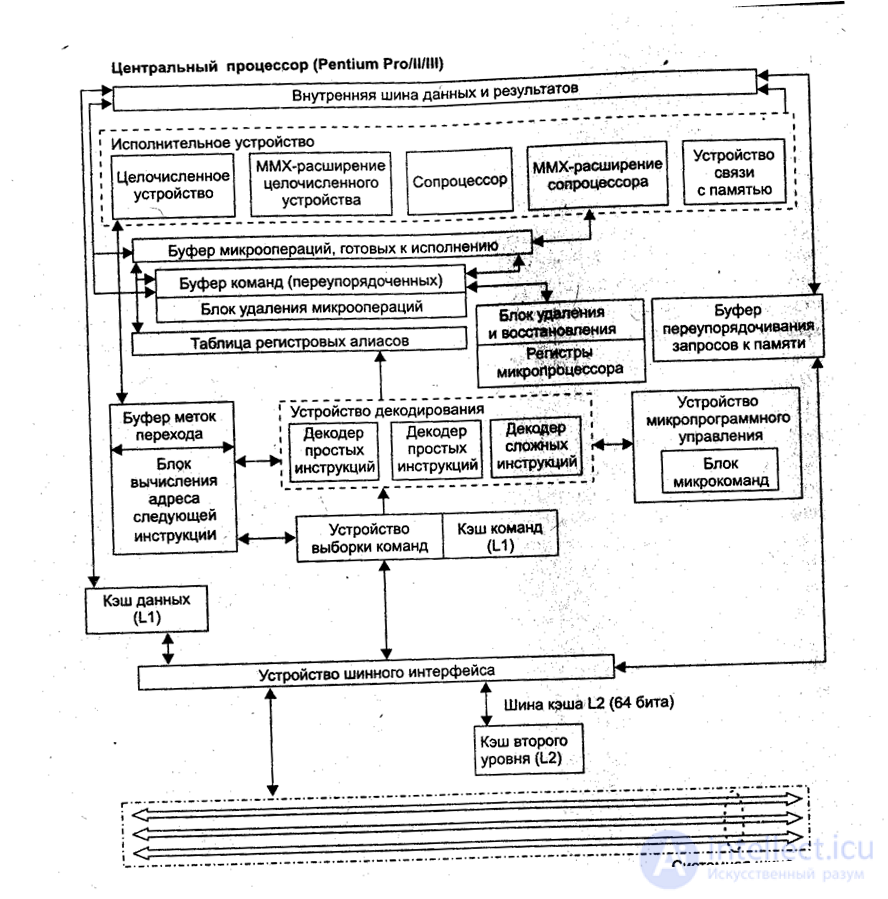
Fig. BLOCK DIAGRAM OF AN INTEL MICROPROCESSOR
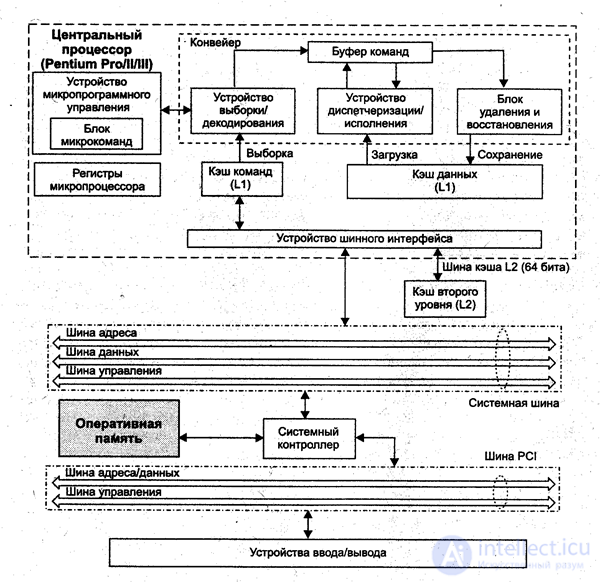
Fig. BLOCK DIAGRAM OF A PERSONAL COMPUTER
Computer architecture is an abstract representation of a computer that reflects its structure, circuit design, and logical organization. Knowledge and understanding of it (in addition to knowledge of operating systems) is also necessary for mastering system programming skills
The concept of architecture includes:
An operating system — a set of system programs that extends the capabilities of a computing system, manages its resources, loads and executes application programs, and handles interaction with users. In most computing systems, the operating system is the main, most important (and sometimes the only) part of the system software.
Basic functions (of the simplest operating systems):
There are two groups of definitions of operating systems: «a collection of programs that manage the hardware» and «a collection of programs that manage other programs». Both have their own precise technical meaning, which, however, becomes clear only upon a more detailed examination of the question of why operating systems are needed at all.
There are applications of computing technology for which operating systems are superfluous. For example, embedded microcomputers are found today in many household appliances, cars (sometimes a dozen in each), cell phones, and so on. Often such a computer continuously runs only a single program that starts up when powered on. And simple game consoles — which are also specialized microcomputers — can do without an operating system, launching upon power-on a program recorded on a «cartridge» or compact disc inserted into the device. Nevertheless, some microcomputers and game consoles still run under their own special operating systems. In most cases, these are UNIX-like systems (the latter being especially true of programmable switching equipment: firewalls, routers).
The predecessors of operating systems should be considered utility programs (loaders and monitors), as well as libraries of frequently used subroutines, which began to be developed with the advent of general-purpose first-generation computers (late 1940s). Utility programs minimized the operator's physical manipulation of the equipment, while libraries made it possible to avoid repeatedly programming the same actions (performing input/output operations, computing mathematical functions, etc.).
In the 1950s—1960s, the basic ideas defining the functional capabilities of operating systems were formed and implemented: batch mode, time-sharing and multitasking, separation of privileges, real time, file structures, and file systems.
Embedded programs, or firmware — are programs «hardwired» into digital electronic devices. In some cases (for example, the BIOS of IBM-PC compatible computers) they are essentially part of the operating system stored in read-only memory. In sufficiently simple devices, the entire operating system can be embedded. Many devices in modern computers have their own «firmware» that manages these devices and simplifies interaction with them.
Utilities (English utility or tool) — programs designed to solve a narrow range of auxiliary tasks. Sometimes utilities are classified as service software.
Utilities are used to monitor sensor readings and hardware performance (for example, monitoring the temperature of the processor or video adapter), to control hardware parameters (limiting the maximum rotation speed of a CD drive; changing fan rotation speed), to verify metrics (checking referential integrity; the correctness of data recording), and to extend capabilities (formatting or repartitioning a disk while preserving data, irrecoverable deletion).
This category includes system programs designed for software development:
A database management system (DBMS) — a specialized program (more often a set of programs) designed to organize and maintain a database.
Since database management systems are not a mandatory component of a computing system, they are often not classified as system software. DBMSs often perform only a service function in the operation of other kinds of programs (web servers, application servers), so they cannot always be classified as application software. Therefore, DBMSs are sometimes classified as middleware.

Comments