
Lecture
Multi-tenant software architecture is an approach in which a single instance of an application serves many customers, while each customer's data and settings remain isolated from one another.
In this kind of architecture, a customer is often called a tenant. For example, if a single SaaS platform is used by companies A, B and C, then each company is a separate tenant.
Picture an apartment building:
Multi-tenant software works the same way:
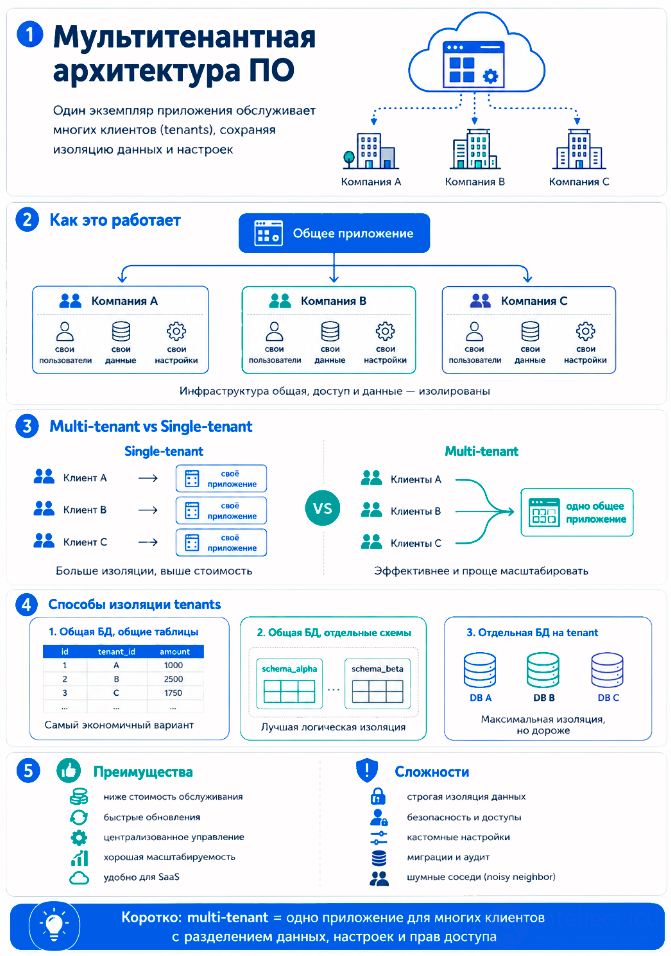
Suppose there is a CRM system in the cloud.
Company Alpha stores its customers and deals there.
Company Beta uses the same CRM, but cannot see Alpha's data.
Meanwhile, both companies work with one and the same application, hosted on shared infrastructure.
There are several options:
1. Shared database, shared tables
Every table has a field such as tenant_id.
orders
- id
- tenant_id
- amount
- created_at
The application always filters data by tenant_id.
This is a cheap and widespread option, but it requires a very careful security implementation.
2. Shared database, separate schemas
Each customer has its own schema within a single database:
tenant_alpha.orders
tenant_beta.orders
Isolation is better, but maintenance is harder.
3. A separate database for each tenant
Each customer has its own database.
This provides strong isolation and is more convenient for large customers, but it is more expensive and harder to operate.
The main reason is efficiency.
Multi-tenant architecture makes it possible to:
The biggest problem is data isolation. One customer must never accidentally gain access to another customer's data.
Difficulties also arise with:
In a single-tenant architecture, each customer has its own separate instance of the application and often its own infrastructure.
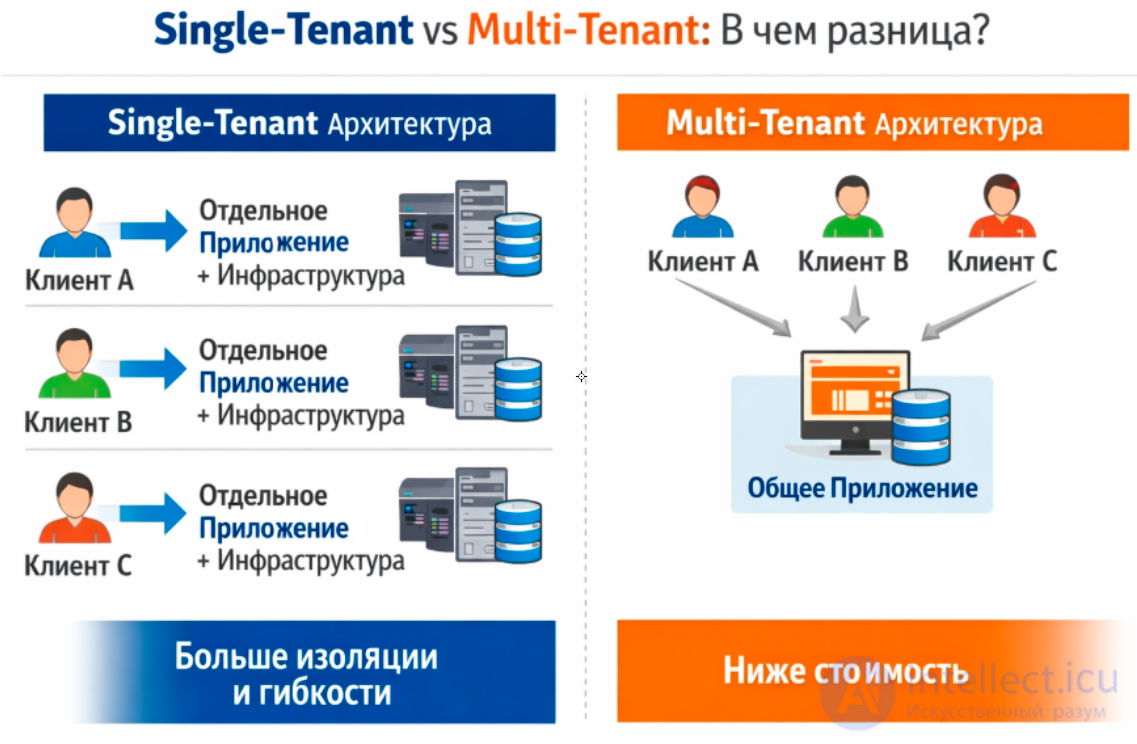
Single-tenant usually offers more isolation and flexibility, but it costs more.
The following concepts are often associated with multi-tenant architecture:
Tenant — an individual customer or organization within a shared system.
For example:
Company A = tenant A
Company B = tenant B
Company C = tenant C
Each tenant usually has its own users, data, settings, plans and access rights.
SaaS — Software as a Service.
Most SaaS products use multi-tenancy: CRMs, task trackers, cloud accounting systems, HR systems, marketing platforms.
Tenant isolation — the guarantee that one customer will not see another customer's data.
This is one of the key requirements:
tenant A must not see tenant B's data
tenant B must not change tenant C's settings
tenant_idThe field by which the system determines which customer a record belongs to.
For example:
SELECT * FROM orders
WHERE tenant_id = 'company_a';
In many multi-tenant systems, almost every business table contains a tenant_id.
Shared database — when all tenants are stored in a single database.
A common variant is:
one database → shared tables → separation via tenant_id
This is cheap and convenient, but it requires strict access checks.
An approach in which each tenant has a separate schema within a shared database:
schema_company_a.orders
schema_company_b.orders
This isolates customers better logically, but it complicates migrations and support.
An approach in which each tenant has its own separate database:
company_a_db
company_b_db
company_c_db
This provides strong isolation, but it is usually more expensive and harder to operate.
RBAC — Role-Based Access Control.
For example:
Admin
Manager
Viewer
In a multi-tenant system, roles often apply within a specific tenant.
The same user can be an administrator in one company and an ordinary user in another.
ABAC — Attribute-Based Access Control.
For example, access is checked not only by role, but also by conditions:
the user's tenant_id matches the document's tenant_id
the user's region = EU
the customer's plan = Enterprise
ABAC is more flexible than RBAC, but more complex.
Provisioning — the process of creating and configuring a new tenant.
For example:
create the organization
create the administrator
assign the plan
create the default settings
prepare the schema or database
Onboarding — connecting a new customer to the system.
This is broader than provisioning: it includes registration, configuration, data import, training and inviting users.
Noisy neighbor — a situation where one tenant consumes too many resources and interferes with the others.
For example, company A runs a heavy report, and because of that the system starts running more slowly for company B.
Limiting the rate of requests.
It is needed so that one tenant does not overload the shared system:
tenant A: maximum 1000 requests per minute
tenant B: maximum 5000 requests per minute
Quotas — restrictions on usage:
number of users
storage volume
number of projects
number of API requests
They usually depend on the customer's plan.
Usage tracking — collecting data on how many resources a tenant has consumed.
For example:
how many API requests the customer made
how many GB of data it stores
how many users are active
This is needed for billing, analytics and limit enforcement.
Billing — calculating the charges for each tenant.
In multi-tenant SaaS there is often a chain:
tenant → plan → limits → usage → invoice
Customization — individual settings for a tenant.
For example:
company logo
interface colors
form fields
business rules
integrations
It is important to implement customization through configuration rather than through separate code for each customer.
Feature flags — switches for features.
They allow capabilities to be turned on or off for individual tenants:
the new analytics is enabled only for tenant A
the beta feature is available only to Enterprise customers
Data residency — the requirement to store a customer's data in a specific country or region.
For example:
data of EU customers is stored in the EU region
data of US customers — in the US region
Compliance — GDPR, SOC 2, ISO 27001, HIPAA and other standards.
In a multi-tenant architecture this is especially important, because many customers share the same infrastructure.
Audit log — a record of important actions:
who logged in to the system
who changed the settings
who deleted a document
who granted access
Auditing is usually kept separately for each tenant.
Data partitioning — splitting data for performance and manageability.
For example, a table can be split by tenant_id, region or date.
Sharding — distributing data or tenants across different servers/databases.
For example:
tenants A–M → shard 1
tenants N–Z → shard 2
This helps scale the system.
Horizontal scaling — adding new servers/application instances.
In multi-tenant SaaS this is usually the main way to handle growing load.
Backup and restore per tenant.
The difficulty is that sometimes you need to restore the data of just one customer without affecting the others.
Multi-tenant architecture is when a single system serves many customers while keeping separate data, settings and access rights for each one. It is the foundation of most modern SaaS services: CRMs, task trackers, cloud accounting systems, marketing platforms and enterprise applications.

Comments