
Lecture
To smooth out camera shake caused by sudden changes in movement speed in Unity, you can interpolate the camera position and/or apply a smoothing filter to make the camera motion gentler. Here are several approaches that can help:
Use Vector3.Lerp or Vector3.SmoothDamp to change the camera position smoothly when the player's position changes abruptly. For example:
using UnityEngine;
 public class SmoothCameraFollow : MonoBehaviour
 {
 public Transform player; // The player object public float smoothSpeed = 0.125f;
// The higher the value, the faster the camera reacts
 public Vector3 offset; // Offset from the player
 void LateUpdate()
{
Vector3 desiredPosition = player.position + offset;
 Vector3 smoothedPosition = Vector3.Lerp(transform.position, desiredPosition, smoothSpeed);
 transform.position = smoothedPosition;
}
}
Here smoothSpeed determines how smoothly the camera follows the player. Values between 0.1 and 0.2 usually give good results.
If your player is controlled with a Rigidbody, make sure Interpolate is enabled for the camera and/or for the player's Rigidbody. This helps smooth out camera motion, especially during sudden changes of direction or speed.
Rigidbody component and set the Interpolate property to Interpolate.Rigidbody to the camera and enable Interpolate for it.
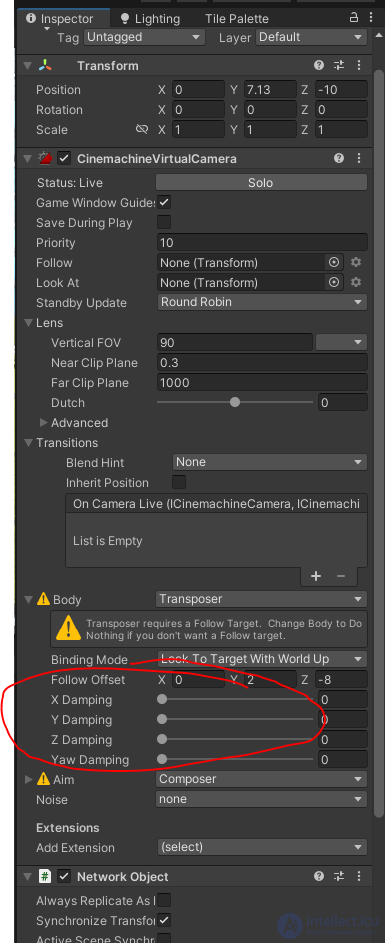
The Cinemachine plugin (available in the Unity Asset Store) offers excellent features for smooth camera following. It provides options such as soft zone, dead zone, and rotation smoothing, which help avoid jerky motion.
An example Cinemachine setup:
For finer control over camera speed, you can use exponential smoothing:
void LateUpdate()
{
Vector3 targetPosition = player.position + offset;
float t = 1 - Mathf.Exp(-smoothSpeed * Time.deltaTime); // Exponential coefficient
transform.position = Vector3.Lerp(transform.position, targetPosition, t);
 }
This smoothing is stronger for large speed changes and weaker for small ones.
Try combining these methods to find the degree of smoothness that suits your game.

Comments