
Lecture
Software testing — the process of investigating, testing a software product, whose purpose is to check the correspondence between the actual behavior of the program and its expected behavior on a finite set of tests, chosen in a certain way.
Software testing = the process of investigating/testing software, whose purpose is to check the correspondence between the actual and expected behavior of the software on a finite set of tests, chosen in a certain way (ISO/IEC TR 19759:2005).
The purpose of testing or the purpose of developing and executing tests:
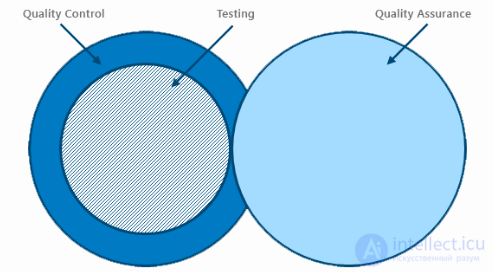
fig. 1 TESTING: QC AND QA
The task of QC (Quality Control) -- controlling and recording the quality of the artifacts produced, intermediate and final results of the work. Its purpose is to look for defects and ensure they are fixed. Thus testing is an integral part of quality control.
The term Verification fits very well here, with the question "Are we building the product right?" - are we building the product correctly, checking compliance with plans, specifications, design, coding standards, passing test cases. We check CORRECTNESS.
QA (Quality Assurance) = the part of quality management focused on creating and configuring processes, the goal of which is to provide assurance that the quality requirements will be met (the product will meet the customer's quality expectations).
It consists of processes/activities aimed at ensuring the quality of product development at each of its stages. These activities generally precede product development and continue while the process is in a state of development. QA itself is responsible for developing and implementing processes and standards to improve the software development life cycle (SDLC), and for providing confidence that these processes are being followed. The focus of QA is preventing defects at every stage of its implementation and continuously improving it.
It deals with questions such as "what kinds and methods of testing will we use?", "how will we measure quality?" and so on.
The term Validation fits very well here, with the question "Are we building the right product?" - is the product we are building the right one, does the product satisfy the needs of the user. We check COMPLETENESS.
For the services provided to have value, testing needs to be aimed at checking functions that:
At different times and in various sources, testing has been given various definitions, including:
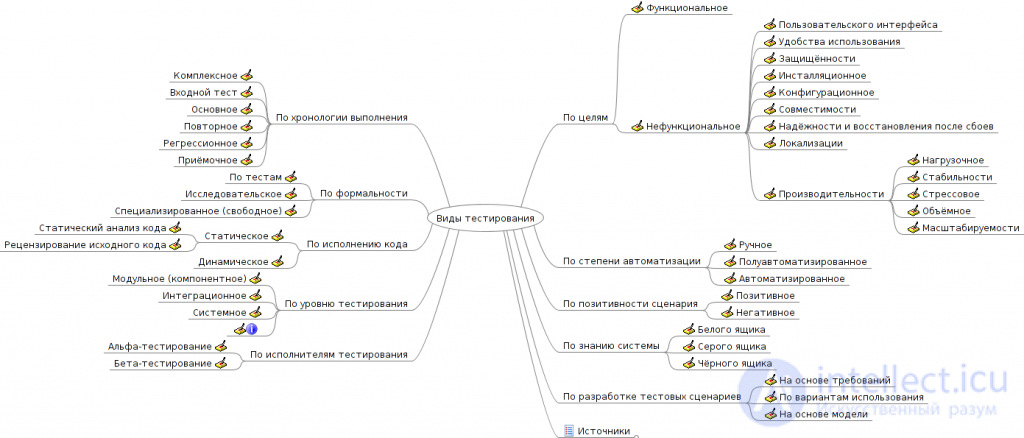

There are several criteria by which testing types are usually classified. The following are typically distinguished:
By test object
By knowledge of the system's internal structure
By degree of automation
By degree of isolation
By the timing of testing
By whether the scenarios are positive
By the degree of preparedness for testing
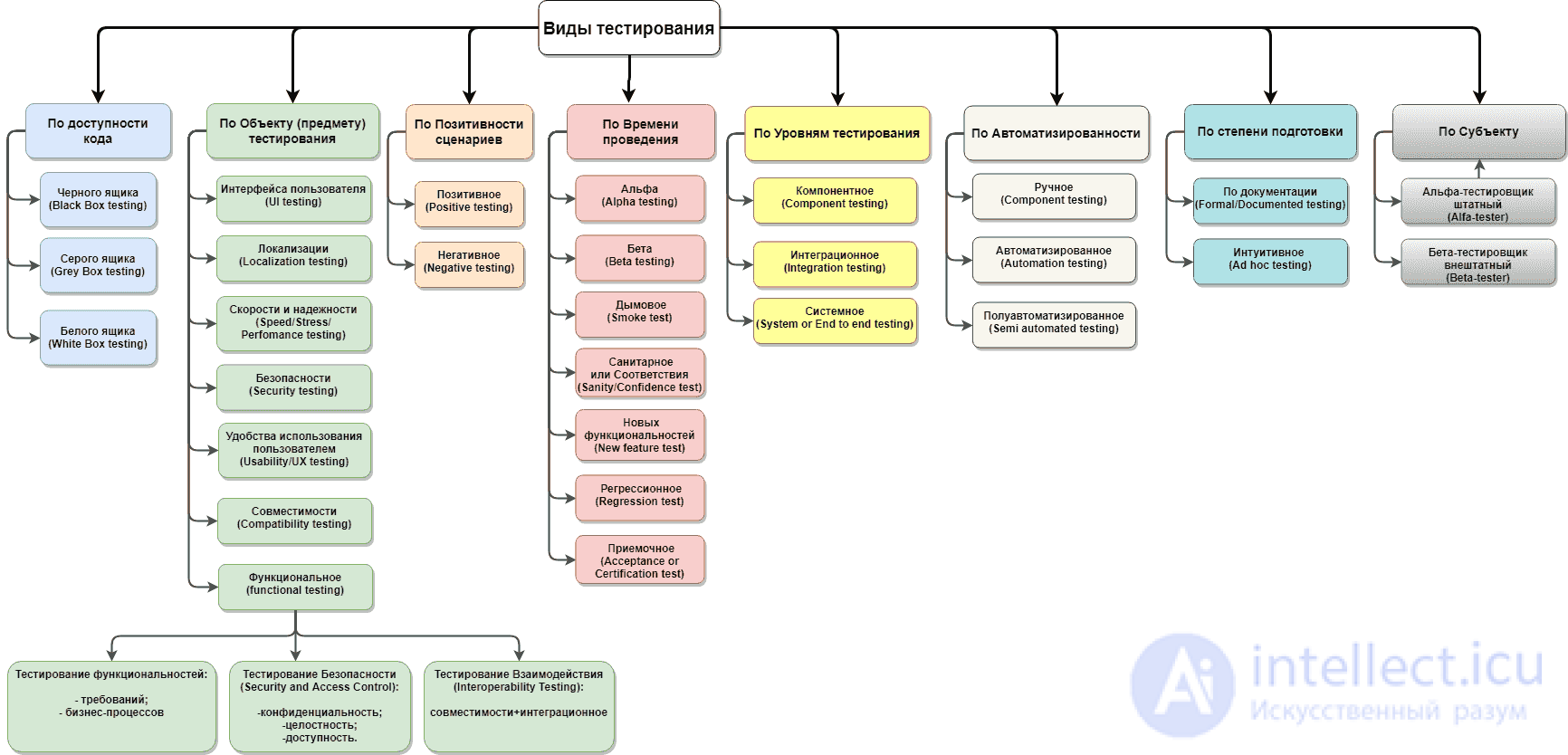
The testing cycle (Testing Cycle) resembles a typical production cycle, usually going through several stages:
All types of software testing, depending on the goals pursued, can be conventionally divided into the following groups:
Next, we will try to describe in more detail each individual type of testing, its purpose and use in software testing.
Functional tests are based on functions and features, as well as interaction with other systems, and can be presented at all levels of testing: component or unit (Component/Unit testing), integration (Integration testing), system (System testing) and acceptance (Acceptance testing). Functional types of testing examine the external behavior of the system. Below are listed some of the most common types of functional tests:
Non-functional testing describes the tests needed to determine software characteristics that can be measured by various quantities. In general, this is testing of "How" the system works. Below are listed the main types of non-functional tests:
As a rule, this type of testing is carried out by the system's end users, however involving experienced testers will reduce the time needed to prepare for testing and will improve the quality and reliability of the tests performed.
User UAT testing is carried out by the system's end users, with the aim of determining the system's suitability for deployment. This testing takes place at the final stage of the tests.
The task of conducting user testing is to help the system's end users prepare for and carry out the tests.
To this end, the following work is carried out:
By ordering the service from IBS AppLine you reduce the labor costs of conducting testing, since, firstly, we take the organizational work upon ourselves, and secondly, incoming defects are filtered, clarified and passed on to developers with a detailed description, which significantly reduces the time and effort developers spend finding the cause of a defect and fixing it.
As part of alpha testing, our company solves the following tasks:
Beta testing is carried out after alpha testing and can be used as acceptance testing by external users. The beta version of the system is given to a group of users outside the development team, in order to reduce the number of defects. Sometimes the version is given to several teams, in order to get feedback from as many future users as possible.
Key advantages
Main tasks
After the necessary changes have been made, such as fixing a bug/defect, the software must be re-tested to confirm that the problem has actually been resolved. Listed below are the types of testing that need to be carried out after installing the software, to confirm that the application works or that the defect fix has been made correctly:
Testing at different levels is carried out throughout the entire life cycle of software development and maintenance. The testing level determines what the tests are performed on: an individual module, a group of modules, or the system as a whole. Carrying out testing at all levels of the system is the key to the successful implementation and delivery of the project.
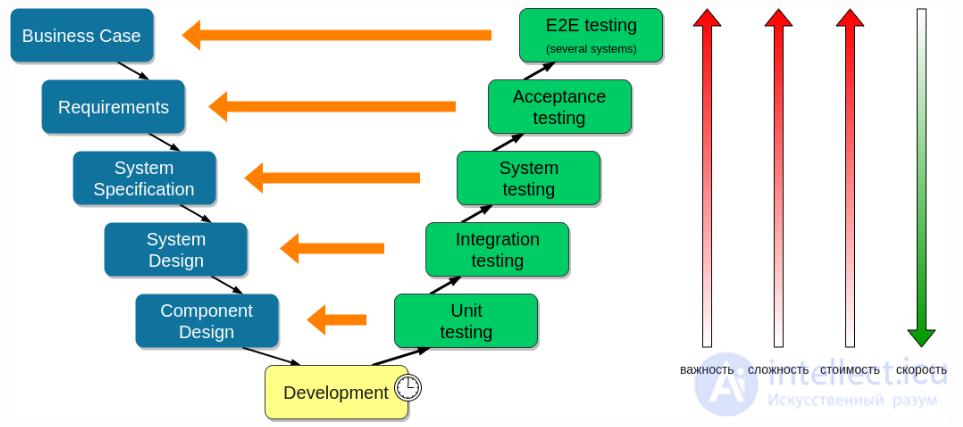
Testing cup
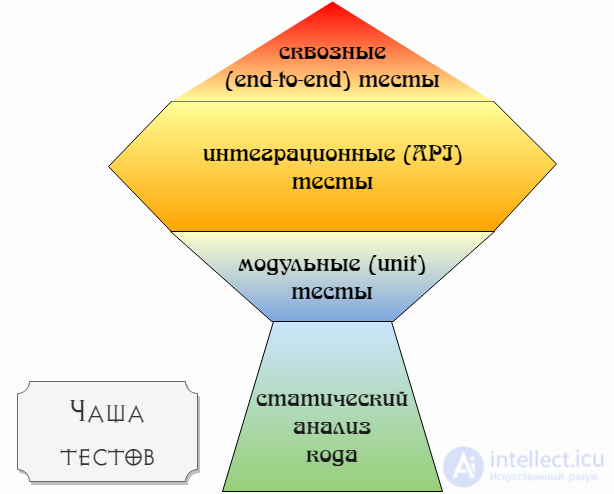
Unit testing (Unit testing) = testing a single unit of code (usually a single function or a single class in the case of OOP code) in an isolated environment. This means that:
Usually a unit test passes various input data to a function and checks that it returns the expected result. For example, if we have a function that checks whether a phone number is valid, we give it pre-prepared numbers and check that it identifies them correctly. If we have a function that solves a quadratic equation, we check that it returns the correct roots (for this we prepare in advance a list of equations with answers).
It is performed by developers, often using automated testing methods.
Integration testing = checking the connection between the modules (components) of the code, as well as the interaction with different parts of the system (the operating system, hardware, or connections between different systems). If we draw an analogy, for example with the testing of an aircraft engine, then unit tests are the testing of individual parts, valves, flaps, while integration testing is running the assembled engine on a test stand.
It is performed by developers, often using automated testing methods.
System testing (System testing) = the process of testing the system as a whole in order to verify that it meets the established Software Requirements Specification (SRS).
Make sure that the System is able to accept certain data from suppliers, process it, and pass the data on to consumers, all in the correct sequence and format. We are not concerned with the further fate of the data. The main thing is that our system works correctly in the correct environment.
In doing so, defects are identified such as: incorrect use of system resources, unforeseen combinations of user-level data, incompatibility with the environment, unforeseen use cases, missing or incorrect functionality, inconvenient usability, etc.
To minimize the risks associated with the specifics of the system's behavior in one environment or another, during testing it is recommended to use an environment as close as possible to the one the product will be installed in after release.
It is performed by testers using manual and automated methods.
API testing (API testing) = the process of testing the application's API in order to verify that the implementation of the external interfaces meets the established requirements.
API testing can be attributed to either integration testing or system testing, depending on what we consider to be the system under test (SUT, system under testing) within the scope of our task -- a separate service or some platform as a collection of services.
It may include testing of:
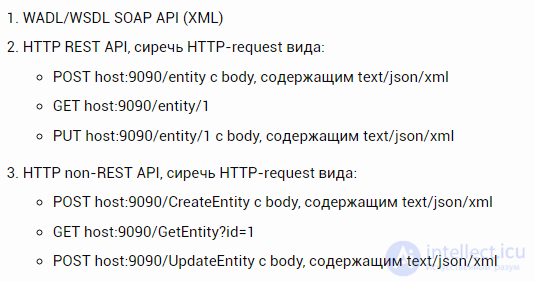
RPC interaction with the server, for example in the form of a java-call from the client library, see gRPC
CDC (consumer driven contract) testing for all the above-mentioned kinds of API, in the form of:
Tests of the clients of provider services. Usually a stub is used, which is automatically generated from the contract. This makes it possible to avoid deploying an environment consisting of Provider Services.
Tests for the API of provider services. They can also be generated from the contract.
It is performed by testers using manual and automated methods.
Postman = a GUI tool for testing REST/SOAP. Supports creating scripts for auto-tests (Javascript).
SoapUI = a GUI tool for testing REST/SOAP. Supports creating test suites with scripts for automating testing (various programming languages).
cURL = a CLI tool for interacting with servers over protocols using URL syntax.
behat tests Behat is a testing framework for behavior-driven development, written in the PHP programming language.
Acceptance testing (Acceptance testing) or Acceptance and Handover Trials (AHT) - a formal testing process that verifies the system's compliance with Business/User requirements and is carried out for the purpose of: determining whether the system satisfies the acceptance criteria, and having a decision made by the customer or another authorized person on whether the application is accepted or not. It is performed on the basis of a set of typical test cases and scenarios developed from the requirements for the given application.
It is performed by testers using manual and automated methods.
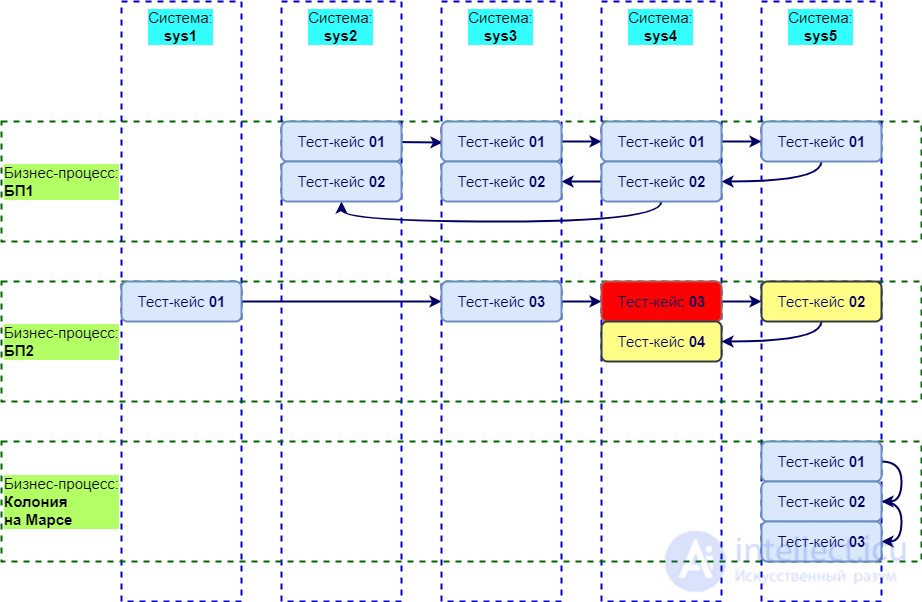
End-to-End testing (End-To-End, E2E or Chain testing) = checking not only our own environment, but all the interconnected systems through which the data received or sent by our system passes. This, in turn, means that we will need to combine several such "testing pyramids" with each other. E2E testing is not simply acceptance (user testing) that the customer will perform, it is building a bridge, taking into account all possible situations, along which the customer will walk and lead the users along in step.
It is performed by testers using manual and automated methods.
For end-to-end scenarios, the tests already developed earlier for each of the systems included in the chain (scenario) of the business process are, in all likelihood, used. All of a company's complete test suites can be represented as a sparse matrix, where the columns hold the tests for each system (for simplicity -- system-level ones), and the rows hold the business processes. That is, for one business process or another, tests covering the business process need to be selected/created, and the relationships need to be established. If there is no coverage, this is a reason to fill in the gaps in the test model, or to make sure that quality is ensured by other levels of testing (integration testing, unit testing, code review, and running it through analyzers).
Martin Fowler warns that writing and maintaining E2E tests is quite expensive, which means that:
| Main testing groups | |
|---|---|
| functional group | non-functional group |
|
|
| change-related testing (includes both functional and non-functional tests) | |
|
Functional tests are based on the functions and features, as well as the interaction with other systems, and can be presented at all levels of testing: component or unit (Component/Unit testing), integration (Integration testing), system (System testing) and acceptance (Acceptance testing). Functional types of testing examine the external behavior of the system.
Non-functional testing describes the tests needed to determine software characteristics that can be measured by various quantities. In general, this is testing of "How" the system works.
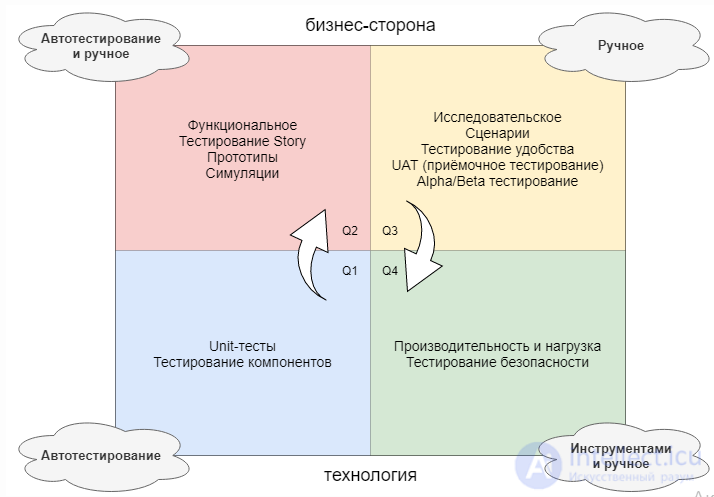
Functional tests are based on the functions performed by the system, and can be carried out at all levels of testing (component, integration, system, acceptance). As a rule, these functions are described in the requirements, functional specifications, or in the form of system use cases (use cases).
Functional testing can be:
Positive testing is far more important, but this does not mean that "negative" tests can be neglected.
Scanning for the presence of vulnerabilities (Vulnerability Scanning): Performed using special vulnerability-scanner programs.
Security Scanning: Includes identifying network and system flaws (weaknesses), and then provides solutions for reducing such risks. Scanning can be performed both manually and automatically.
Penetration Testing: simulates an attack by a malicious actor. This testing involves analyzing a specific system in order to check its potential vulnerability to external hacking attempts.
Risk Assessment: includes analysis of the security risks observed in the organization. Risks are classified as low, medium and high. This type of testing recommends methods for controlling and reducing risks.
Stress testing = testing the application under extreme loads, determining its ability to handle a high level of traffic or data processing. The goal is to determine the application's breaking point.
The task of stability testing (stability) / reliability testing (reliability) - is to check the operability of the application during long (multi-hour) testing with an average level of load. The execution time of operations may play a secondary role in this type of testing. Here, what comes to the forefront is the absence of memory leaks, server restarts under load, and other aspects that specifically affect the stability of operation.
Endurance testing = making sure that the application can safely remain under high loads for a long period of time.
Volume testing = obtaining a performance assessment as the volume of data in the application's database increases.
Failover and Recovery Testing checks the product under test in terms of its ability to withstand and successfully recover from possible failures arising from software errors, hardware failures, or communication problems (for example, a network failure). The goal of this type of testing is to check the recovery systems (or systems duplicating the main functions), which, in the event of failures, will ensure the safety and integrity of the data of the product under test.
Failover and recovery testing is very important for systems operating on a "24x7" basis, for example online stores, ERP systems.
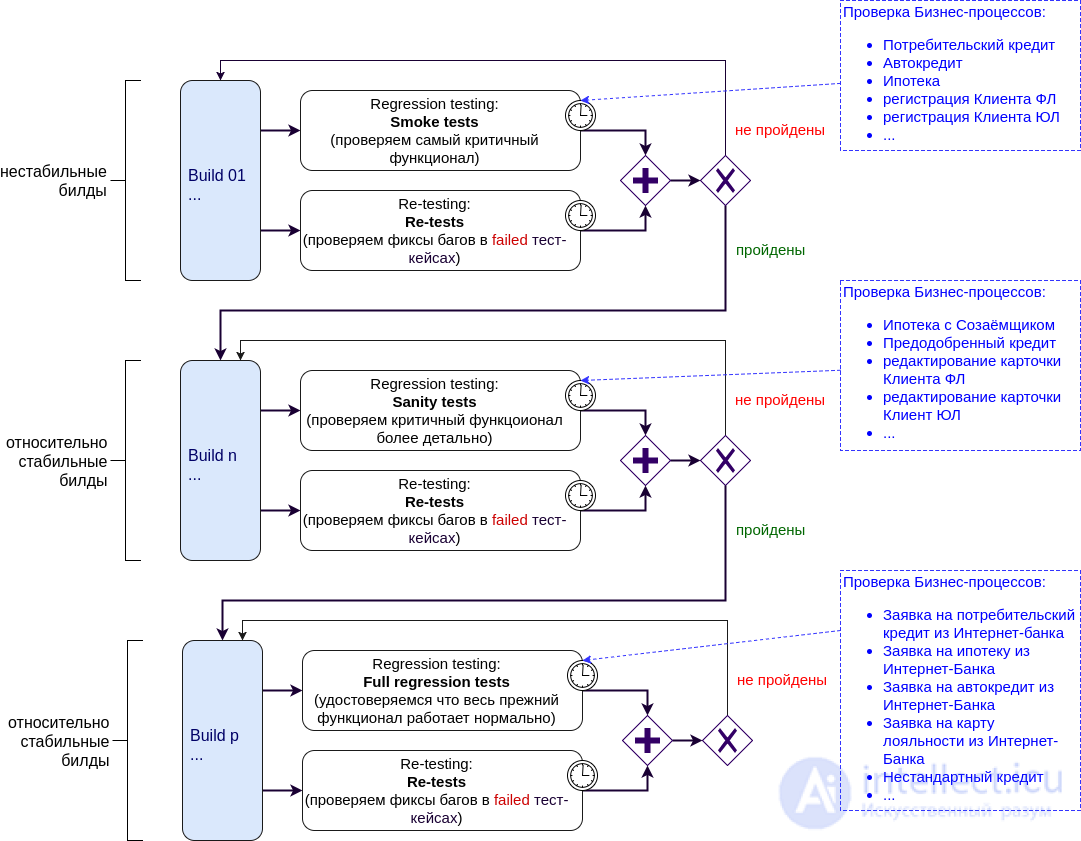
Smoke tests are run every time we receive a new build (version) of the project (system) for testing, considering it to be relatively unstable. We need to make sure that the critical functions of the Application/System work as expected. The idea of this type of testing is to identify serious problems as early as possible, and to reject this build (send it back for rework) at an early stage of testing, so as not to get bogged down in long and complex tests, thereby not wasting time on software that is already known to be defective.
Checking that a defect previously found during testing has been successfully fixed.
It is used every time we get a relatively stable software build, to determine its operability in detail. In other words, this is where validation happens that the important parts of the system's functionality work according to the requirements at a low level.
Carried out to make sure that added/changed application functions and fixed defects have not had a negative effect on functionality that is already working successfully in Prod.
RT takes up the lion's share of the time, and it is exactly to reduce these costs that test automation exists.
We have a web service with a user interface and a RESTful API. Being testers, we know:
Then a number of statements can be made about which types of tests need to be used at which point in time:
Manual (manual testing) = the tester performing test scenarios and test cases by hand.
For test automation (automation testing) there are the following main approaches:A bug report (bug report) = a document describing a situation or a sequence of actions that led to incorrect behavior of the object under test, indicating the causes and the expected result.
You should strive to compose it so that from the title or short description of the bug (summary) the developer understands what the crux of the problem is, and having read the detailed description of the bug (description) they roughly imagine in which component, or even which part of it, they need to look for the error.
| Significance/severity (severity) of errors | |||
|---|---|---|---|
| 0 | system down | server down | the system stops working |
| 1 | Data loss | data loss | Loss of user, operator, or system data |
| 2 | Loss of functionality | functional loss | Blocking of core functionality. May include non-functional problems, for example related to performance, that cause unacceptable delays in using functions |
| 3 | Security hole | security loss | |
| 4 | Loss of functionality with a workaround present | functional loss but alternate path exists | Blocking of core functionality, but a reasonable workaround exists for the user |
| 5 | Partial loss of functionality | partial functionality loss | Blocking of the use of some non-essential functionality |
| 6 | Cosmetic error | cosmetic error | Significant shortcomings in the user interface or in the system's ability to respond to user requests |
Testers must protect the quality of the system and the opinion users have of it. But they should not do this by acting as rivals of the programmers, raising complaints of a personal nature or in an unconstructive manner. It is preferable if we do this in a way that unites business realities with system development and maintenance.
The structure of a clear task title:
<Where (page name)> : <Which element/function of the page> - <the essence of the error/task>
Catalog Editor: Copy - not all existing catalogs shown in "select catalog" combobox
or Catalog Library -> Duplicate Catalog - If 'Use audience' option is marked, 'Shared with' data must be copied to the new catalog>
these are good titles. Just to understand how big and urgent a problem is -- there is no need to open the issue itself.
"Organizer", "Catalog properties page" - for such task titles, a mere 400 years ago people were sent to the stake. Because you can't tell from it what the point is, "well, page, so what, what's the problem??".
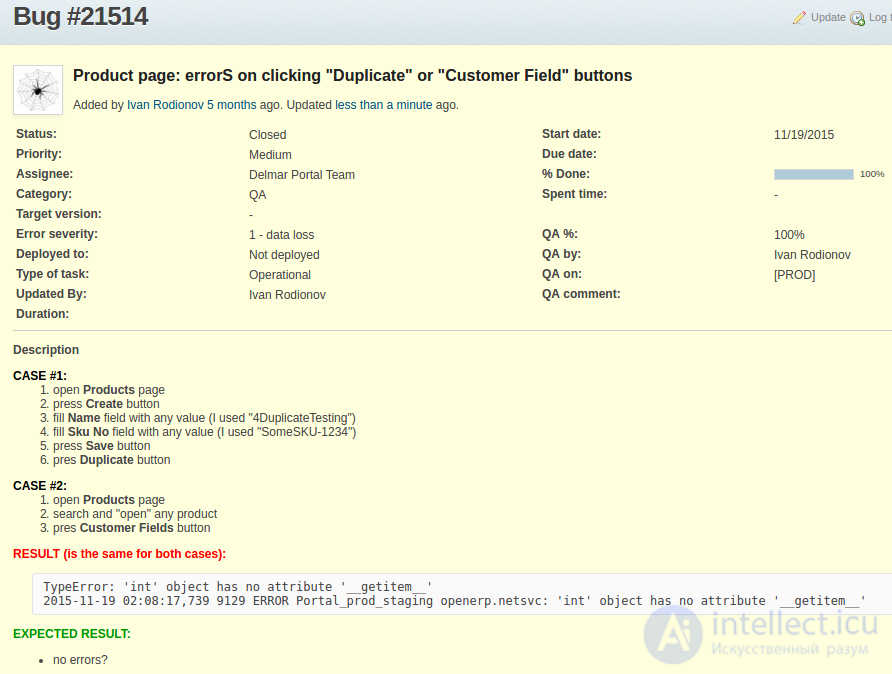
DO: ("ACTIONS", "STEPS TO REPRODUCE")
Indicate the sequence of actions, tell us exactly what you did to reach the state of the system in which you encountered the error
RESULT: ("RESULT:")
Describe the consequences of your actions, tell us what happened when the "point of no return" was reached and how the bug manifests itself
EXPECTED RESULT: ("EXPECTED RESULT:")
A description of the expected behavior of the system when the user goes through the steps indicated in "DO". The expected result must correspond to the customer's requirements described in the documentation, or to common sense. The developer must know what they need to do.
ADDITIONAL INFO: ("ADDITIONAL INFO:")
To make a good bug report excellent - use any opportunity to supplement it, such as:
in the JIRA project:
in Test Adaptavist, linked to this project:

Comments