
Lecture
To put it simply, virtually any modern AI coding agent (for example, an agent built into an IDE, an autonomous coding agent, or a system with subagents) works as a "plan → execute → verify → fix" loop.
Here is a rough architecture.
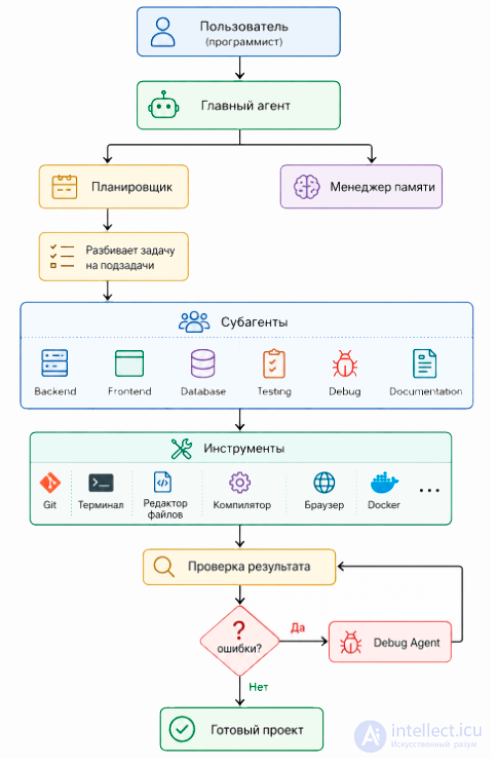
This is the "conductor".
It:
For example:
Build an online store using FastAPI with React.
The main agent does not write all the code itself.
It may decide on:
It breaks the task down.
For example:
Create the API
↓
Create the models
↓
Create the migrations
↓
Create the routes
↓
Add JWT
↓
Write tests
This can be a task tree.
Backend
├── auth
├── users
├── products
├── orders
└── payments
These are separate LLM instances, each with its own role.
For example.
It receives only the task:
It knows nothing at all about React.
It receives:
It receives:
It receives:
It receives:
Imagine a single agent.
Its context:
The LLM starts forgetting details.
But if you split things up:
Backend Agent
Frontend Agent
Each one uses less context.
Practically no modern coding agent is limited to generating text alone.
When it comes to modern agentic systems, Skills, MCP servers and Tools are three different levels of abstraction, although in practice they work together.
You can picture it like this:
User request
        │
        ▼
    Main agent
        │
        ├─────────────┬──────────────┐
        ▼             ▼              ▼
     Skills        MCP Servers      Tools
        │             │              │
        └─────────────┴──────────────┘
                    │
                    ▼
                Execution
A tool performs one specific action.
Typically it can:
In other words:
read_file(path)
write_file(path)
run_terminal(cmd)
search_web(query)
A tool usually has no logic of its own.
It simply runs the command.
So the loop looks like this:
LLM
↓
create a file
↓
run the test
↓
see the error
↓
fix the file
↓
repeat
A skill is already a mini-process consisting of several steps.
For example:
Skill "Create a REST API"
↓
read the project structure
↓
create the models
↓
create the controllers
↓
create the tests
↓
update the README
It can use dozens of tools internally.
That is
Skill
↓
Tool
↓
Tool
↓
Tool
↓
Tool
A skill answers the question:
How do you carry out a typical task?
For example:
Skill: Add a new page
↓
create the file
↓
add the route
↓
update the menu
↓
write a test
MCP (Model Context Protocol) is a protocol, not a tool and not a skill.
It is responsible for the connection between the agent and an external system.
For example:
IDE
↓
MCP
↓
GitHub
or
LLM
↓
MCP
↓
PostgreSQL
or
LLM
↓
MCP
↓
Docker
or
LLM
↓
MCP
↓
Figma
MCP itself does nothing.
It says:
"Here is the list of functions this system provides."
For example:
GitHub MCP
↓
list_repositories()
↓
create_issue()
↓
merge_pull_request()
↓
create_branch()
To the agent, this looks like a set of new tools.
Another example:
Postgres MCP
↓
execute_sql()
↓
list_tables()
↓
describe_table()
Say there is a skill
Fix a bug
It can do the following:
1 Read the issue
2 Find the code
3 Fix it
4 Run the tests
5 Create a PR
Internally it uses:
GitHub MCP
↓
get_issue()
Filesystem Tool
↓
read_file()
Terminal Tool
↓
pytest
GitHub MCP
↓
create_pull_request()
So a single skill can simultaneously use:
Agent
↓
Skill
↓
Tool
↓
MCP Server
↓
The real system
For example:
Skill Create a Pull Request
↓
git diff
↓
git commit
↓
GitHub MCP
↓
create_pull_request()
Sometimes MCP itself provides a ready-made skill.
For example, a CI server may have:
deploy_application()
rollback()
create_release()
For the agent these are already close to skills, even though technically they arrive as tools via MCP.
Are they used at the same time?
Yes.
For example, the agent receives the task:
"Fix the bug and create a Pull Request."
It might do roughly the following:
Skill "Fix a bug"
↓
Filesystem Tool
↓
Terminal Tool
↓
Git Tool
↓
GitHub MCP
↓
Browser MCP
↓
Skill "Code Review"
↓
GitHub MCP
All of this works within a single loop.
A brief comparison
| Component | What it is | Main role |
|---|---|---|
| Tool | A single action | «Read the file», «run the command», «execute SQL» |
| Skill | A scenario made up of several steps | «Add an API», «Fix a bug», «Prepare a release» |
| MCP | A connection protocol | Gives the agent access to the capabilities of external systems (GitHub, IDEs, databases, Docker, etc.) |
The key distinction is that MCP does not compete with Tools. On the contrary, MCP is most often a way of giving the agent new tools. And Skills sit one level higher: they coordinate the use of those tools (both local ones and ones obtained via MCP) to solve a complete task.
This is the most important part.
Almost all agents work roughly like this.
Until the task is complete:
For example:
Step 1

Create app.py
↓
Step 2
Run pytest
↓
Error
↓
Fix
↓
Run again
↓
Error
↓
Fix
↓
All tests green
There are several levels of memory.
The context of the current conversation.
For example:
We are using FastAPI.
The task plan.
✔ Backend
✔ Database
 Tests
 Docs
It can store:
code style
preferences
architecture
previous decisions
Very often a separate agent is used.
It writes nothing.
It only looks for errors.
For example:
The Backend Agent wrote the code.
↓
Reviewer Agent
↓
Found a bug
↓
Returned comments
↓
The Backend Agent fixed it
This is similar to the Code Review process.
A separate agent can deal exclusively with errors.
For example.
pytest
↓
FAIL
↓
Debug Agent
↓
reads the stacktrace
↓
fixes it
↓
repeats
In the end, it can all be represented like this:
User
↓
Main agent
↓
Plan
↓
Subagents
↓
Code
↓
Compilation
↓
Tests
↓
Errors
↓
Fixes
↓
Tests
↓
Errors
↓
Fixes
↓
Done
Usually subagents do not talk to each other directly. Instead, they exchange information through the main agent.
Example:
Frontend Agent
        │
        ▼
   Main agent
        ▲
        │
Backend Agent
Or through shared project artifacts:
The main agent can pass one subagent's results to another, for example: "The backend has finished the API, now use this OpenAPI specification to generate the client".
In practice, modern systems (for example, agents in IDEs or autonomous coding agents) often add a few more components:
while not task.completed():
    plan = planner.next_step()
    agent = orchestrator.select_agent(plan)
    result = agent.execute(plan)
    repository.apply(result)
    report = tester.run()
    if report.failed:
        debugger.fix(report)
    else:
        planner.mark_done()
It is precisely this loop — plan → execute → verify → fix — that underpins most modern AI coding agents. The differences between systems mainly come down to the quality of planning, the efficiency of context selection, the set of available tools, how subagents are organised, and the depth of automation.

Comments