
Lecture
In programming, variable shadowing occurs when a variable declared in a certain scope (a decision block, a method or an inner class) has the same name as a variable declared in an outer scope. At the level of identifiers (names rather than variables) this is known as name masking. The outer variable is said to be shadowed by the inner variable, while the inner identifier masks the outer identifier. This can cause confusion, since it may be unclear which variable subsequent uses of the shadowed variable name refer to, which depends on the language's name resolution rules.
One of the first languages to introduce variable shadowing was ALGOL, which was also the first to introduce blocks for establishing scopes. It was likewise permitted by many derived programming languages, including C, C++ and Java.
The C# language breaks with this tradition by allowing variable shadowing between an inner and an outer class, and between a method and its containing class, but not between an if block and its containing method, or between case statements within a switch block.
Some languages allow variable shadowing in more cases than others. For example, Kotlin lets an inner variable in a function shadow a passed argument, and a variable in an inner block shadow another variable in an outer block, whereas Java does not (see the example below). Both languages allow an argument passed into a function/method to shadow a class field.
Some languages forbid variable shadowing entirely, for example CoffeeScript and V (Vlang).
The Lua code below demonstrates an example of variable shadowing across several blocks.
v = 1 -- a global variable

do
  local v = v + 1 -- a new local that shadows global v
  print(v) -- prints 2

  do
    local v = v * 2 -- another local that shadows outer local v
    print(v) -- prints 4
  end

  print(v) -- prints 2
end

print(v) -- prints 1
The following Python code demonstrates another example of variable shadowing:
x = 0

def outer():
    x = 1

    def inner():
        x = 2
        print("inner:", x)

    inner()
    print("outer:", x)

outer()
print("global:", x)

# prints
# inner: 2
# outer: 1
# global: 0
Since Python has no variable declarations, only assignment, the nonlocal keyword introduced in Python 3 is used to prevent variable shadowing and to assign values to non-local variables:
x = 0

def outer():
    x = 1

    def inner():
        nonlocal x
        x = 2
        print("inner:", x)

    inner()
    print("outer:", x)

outer()
print("global:", x)

# prints
# inner: 2
# outer: 2
# global: 0
The global keyword is used to prevent variable shadowing and to assign values to global variables:
x = 0

def outer():
    x = 1

    def inner():
        global x
        x = 2
        print("inner:", x)

    inner()
    print("outer:", x)

outer()
print("global:", x)

# prints
# inner: 2
# outer: 1
# global: 2
fn main() {
    let x = 0;

    {
        // Shadow
        let x = 1;
        println!("Inner x: {}", x); // prints 1
    }

    println!("Outer x: {}", x); // prints 0

    let x = "Rust";
    println!("Outer x: {}", x);  // prints 'Rust'
}

//# Inner x: 1
//# Outer x: 0
//# Outer x: Rust
#includeint main() { int x = 42; int sum = 0; for (int i = 0; i < 10; i++) { int x = i; std::cout << "x: " << x << '\n'; // prints values of i from 0 to 9 sum += x; } std::cout << "sum: " << sum << '\n'; // prints 45 std::cout << "x: " << x << '\n'; // prints 42 return 0; }
public class Shadow {
    private int myIntVar = 0;

    public void shadowTheVar() {
        // Since it has the same name as above object instance field, it shadows above
        // field inside this method.
        int myIntVar = 5;

        // If we simply refer to 'myIntVar' the one of this method is found
        // (shadowing a second one with the same name)
        System.out.println(myIntVar); // prints 5

        // If we want to refer to the shadowed myIntVar from this class we need to
        // refer to it like this:
        System.out.println(this.myIntVar); // prints 0
    }

    public static void main(String[] args){
        new Shadow().shadowTheVar();
    }
}
However, the following code will not compile:
public class Shadow {
    public static void main(String[] args){
        int a = 1;

        for(int i = 0; i < 10; i++) {
            // This causes a compilation error since redefining a variable
            // inside a nested block in the same function is not allowed.
            int a = i;
            System.out.println(a);
        }
    }
}
ECMAScript 6 introduced let and const with block scoping, which makes variable shadowing possible.
function myFunc() {
    let my_var = 'test';
    if (true) {
        let my_var = 'new test';
        console.log(my_var); // new test
    }
    console.log(my_var); // test
}
myFunc();
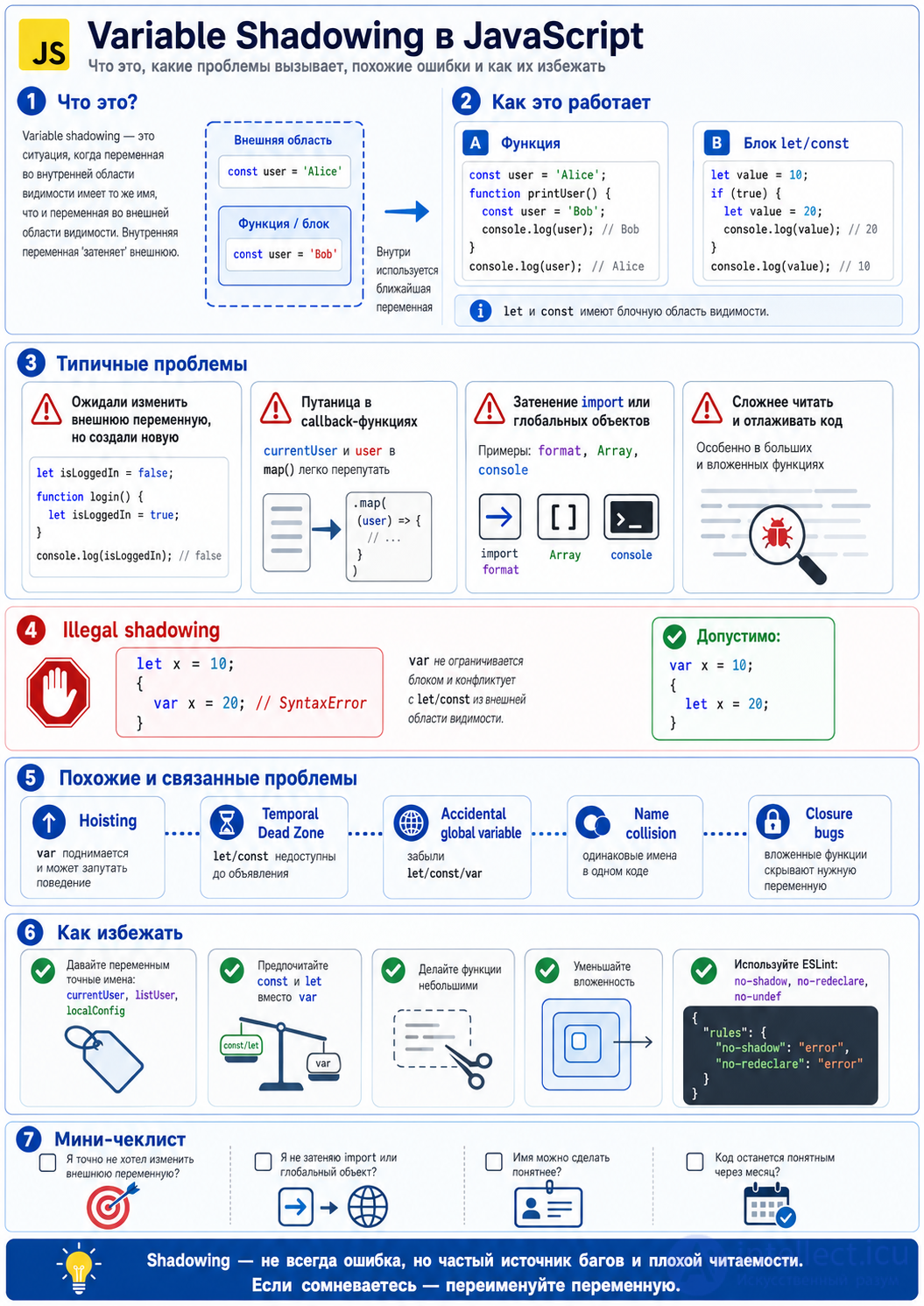
To understand shadowing, you need to keep scope in mind.
var has function scope:
var x = 1;

function test() {
  var x = 2;
  console.log(x);
}

test(); // 2
console.log(x); // 1
let and const have block scope:
let value = 10;

if (true) {
  let value = 20;
  console.log(value); // 20
}

console.log(value); // 10
A block is usually { ... }.
let count = 5;

function increment() {
  let count = 0;
  count++;
  console.log(count);
}

increment(); // 1
console.log(count); // 5
This can be a bug if the developer meant to change the outer count but accidentally created a new one.
The correct approach when you do need to modify the outer variable:
let count = 5;

function increment() {
  count++;
}

increment();
console.log(count); // 6
const status = "idle";

{
  const status = "loading";
  console.log(status); // loading
}

console.log(status); // idle
This is valid and sometimes useful, but it can hurt readability. Shadowing function parameters
const id = 100;

function getUser(id) {
  console.log(id);
}

getUser(42); // 42
The id parameter shadows the outer id.
This is usually fine, but if there is also an important id in the outer scope, the code can become confusing.
A common mistake:
let isLoggedIn = false;

function login() {
  let isLoggedIn = true;
}

login();

console.log(isLoggedIn); // false
The developer may have expected true, but a new variable was created inside the function.
The fix:
let isLoggedIn = false;

function login() {
  isLoggedIn = true;
}

login();

console.log(isLoggedIn); // true
var x = 1;

if (true) {
  var x = 2;
}

console.log(x); // 2
There is no block scope here, because var is scoped to the function, not the block.
With let the behaviour is different:
let x = 1;

if (true) {
  let x = 2;
}

console.log(x); // 1
That is why in modern JavaScript it is almost always better to use let and const rather than var.
In JavaScript there are cases where shadowing is not allowed.
For example:
let x = 10;

{
  var x = 20; // SyntaxError
}
Why the error? Because var is not confined to the block and effectively tries to declare x in the same or a conflicting scope where let already exists.
But this code is valid:
var x = 10;

{
  let x = 20;
  console.log(x); // 20
}

console.log(x); // 10
let and const have a Temporal Dead Zone — the period from the start of the scope to the actual declaration of the variable.
Example:
let name = "Alice";

{
  console.log(name); // ReferenceError
  let name = "Bob";
}
It might seem that console.log(name) should pick up the outer name, but it does not. A local variable name already exists inside the block; it is simply not accessible until the declaration line.
The correct way:
let name = "Alice";

{
  console.log(name); // Alice
}
or:
let name = "Alice";

{
  let localName = "Bob";
  console.log(localName); // Bob
}
let i = 100;

for (let i = 0; i < 3; i++) {
  console.log(i);
}

console.log(i);
Result:
0
1
2
100
This is normal and often acceptable shadowing. But in complex code, identical names can make it hard to tell which i is meant.
const user = { name: "Alice" };

users.map(user => {
  console.log(user.name);
});
Here the callback's user parameter shadows the outer user.
It is better to give it a more precise name:
const currentUser = { name: "Alice" };

users.map(listUser => {
  console.log(listUser.name);
});
This matters especially in React, Node.js and when working with arrays.
const error = "Global error";

try {
  throw new Error("Local error");
} catch (error) {
  console.log(error.message); // Local error
}

console.log(error); // Global error
The catch (error) parameter shadows the outer error.
Better:
const globalError = "Global error";

try {
  throw new Error("Local error");
} catch (caughtError) {
  console.log(caughtError.message);
}
import { format } from "./utils";

function render() {
  const format = "short";
  console.log(format);
}
Here the local variable format shadows the imported format function. This can lead to bugs:
import { format } from "./utils";

function render() {
  const format = "short";

  return format(new Date()); // TypeError: format is not a function
}
Better:
import { format } from "./utils";

function render() {
  const dateFormat = "short";

  return format(new Date(), dateFormat);
}
Naming variables after built-in objects is very bad practice:
const Array = [1, 2, 3];

const items = new Array(5); // TypeError
Or:
const console = "debug";

console.log("Hello"); // TypeError
It is also better to avoid these names:
Object
Array
String
Number
Boolean
Promise
Date
Math
JSON
console
window
document
undefined
NaN
Infinity
setTimeout
var is hoisted to the top of the function:
console.log(x); // undefined
var x = 10;
In effect, JavaScript treats this roughly as:
var x;
console.log(x);
x = 10;
With let and const it is different:
console.log(x); // ReferenceError
let x = 10;
The link to shadowing: because of hoisting and identical names you can end up with unexpected behaviour.
If you forget let, const or var, you can accidentally create a global variable:
function test() {
  value = 123;
}

test();

console.log(value); // 123 in non-strict mode
The solution:
"use strict";

function test() {
  const value = 123;
}
And always use let / const.
Sometimes the problem is the opposite: the developer thinks a new variable is being created, but the outer one is actually being changed.
let config = { theme: "light" };

function setup() {
  config.theme = "dark";
}

setup();

console.log(config.theme); // dark
This is not shadowing, because there is no new config variable. It is a mutation of the object through its reference.
If you need an independent copy:
let config = { theme: "light" };

function setup() {
  const localConfig = { ...config, theme: "dark" };
  console.log(localConfig.theme); // dark
}

console.log(config.theme); // light
A name collision is a broader problem, where different entities end up with the same name.
function user() {
  // ...
}

const user = {
  name: "Alice"
}; // SyntaxError within the same scope
The solution is clear names:
function createUser() {
  // ...
}

const currentUser = {
  name: "Alice"
};
Shadowing can make closures confusing:
let value = "global";

function outer() {
  let value = "outer";

  return function inner() {
    let value = "inner";
    console.log(value);
  };
}

outer()(); // inner
If you need to reach the outer value, the local value inside inner gets in the way.
The fix:
let value = "global";

function outer() {
  let outerValue = "outer";

  return function inner() {
    console.log(outerValue);
  };
}

outer()(); // outer
Shadowing is not always a mistake. Sometimes it is perfectly fine.
For example, in a small scope:
function normalize(user) {
  return {
    ...user,
    name: user.name.trim()
  };
}
Or in a callback:
const numbers = [1, 2, 3];

const doubled = numbers.map(number => number * 2);
If the name is obvious and the scope is small, it is fine.
Shadowing is worth avoiding if:
A bad example:
const data = await fetchUsers();

function process() {
  const data = getLocalData();

  return data.map(data => {
    return data.value;
  });
}
Better:
const usersResponse = await fetchUsers();

function process() {
  const localUsers = getLocalData();

  return localUsers.map(user => {
    return user.value;
  });
}
A common problem:
function UserCard({ user }) {
  const [selectedUser, setSelectedUser] = useState(null);

  return users.map(user => (
Here the user from map shadows the user from props.
Better:
function UserCard({ user: currentUser }) {
  const [selectedUser, setSelectedUser] = useState(null);

  return users.map(listUser => (
let result;

async function load() {
  const result = await fetchData();
}

await load();

console.log(result); // undefined
A local result was created inside the function, and the outer one was left unchanged.
The fix:
let result;

async function load() {
  result = await fetchData();
}

await load();

console.log(result);
But it is even better to return the value:
async function load() {
  return await fetchData();
}

const result = await load();
Bad:
const data = getData();

function save(data) {
  // ...
}
Better:
const usersData = getData();

function save(formData) {
  // ...
}
Bad:
function handle(user) {
  if (user.active) {
    users.forEach(user => {
      if (user.role === "admin") {
        console.log(user);
      }
    });
  }
}
Better:
function handle(currentUser) {
  if (!currentUser.active) return;

  users.forEach(teamUser => {
    if (teamUser.role === "admin") {
      console.log(teamUser);
    }
  });
}
Bad:
var value = 1;

if (true) {
  var value = 2;
}
Better:
let value = 1;

if (true) {
  const localValue = 2;
}
A useful rule set:
{
  "rules": {
    "no-shadow": "error",
    "no-redeclare": "error",
    "no-undef": "error"
  }
}
For TypeScript:
{
  "rules": {
    "@typescript-eslint/no-shadow": "error"
  }
}
The smaller the function, the lower the risk of mixing up variables.
Bad:
function process(data) {
  // 100 lines of code
}
Better:
function normalizeUsers(users) {
  return users.map(normalizeUser);
}

function normalizeUser(user) {
  return {
    ...user,
    name: user.name.trim()
  };
}
A good guideline:
Shadowing is acceptable if the scope is small and the name is obvious.
Shadowing is dangerous if the variable from the outer scope is also needed or if the code becomes ambiguous.
Before keeping the same name, ask yourself:
Bad:
const user = getCurrentUser();

function render() {
  users.map(user => {
    console.log(user.name);
  });
}
Good:
const currentUser = getCurrentUser();

function render() {
  users.map(listUser => {
    console.log(listUser.name);
  });
}
In summary: variable shadowing is not always a bug, but it is a frequent source of hidden errors and poor readability. It is better to avoid identical names in adjacent and nested scopes, especially in large functions, callbacks, React components, async code and when working with imports.

Comments