Bloated code — this is code that contains redundant, unnecessary or poorly written elements that make it harder to read, maintain and execute. Code bloat is often the result of a lack of optimization, developer inexperience or a drive toward excessive generality. In computer programming, code bloat is the production of program code ( source code or machine code ) that is perceived as unnecessarily long, slow or otherwise wasteful. Code bloat can be caused by inadequacies in the programming language in which the code is written, in the compiler used to compile it, or in the programmer writing it. Thus, while code bloat usually refers to the size of the source code (produced by the programmer), it can also be used to refer to the size of the generated code or even the size of the binary file .
Signs of bloated code
-
Code Duplication:
- The same fragments appear in different places.
- Example:
csharp
int CalculateArea(int length, int width)
{
return length * width;
}

int CalculateVolume(int length, int width, int height)
{
return length * width * height;
}
Instead, the shared logic can be factored out.
-
Redundant comments:
-
Complex constructs:
-
Massive or superfluous classes and methods:
- Classes and methods that perform too many operations or contain too many lines of code.
- Methods with a large number of parameters.
-
Unused code:
-
Excessive generality:
- Adding unnecessary parameters and features "for the future" that are never used.
-
Excessive inheritance or a complex hierarchy:
- Inheriting classes where simple composition would do.
-
Hardcoding:
- Using numbers or strings directly in the code instead of constants or configuration files.
Examples of bloated code
Bloated:
csharp

public void PrintMessage(string message)
{
    if (!string.IsNullOrEmpty(message))
     {
      Console.WriteLine(message);
      }  else {
      Console.WriteLine("No message provided.");
    }
}
Optimized:
csharp

public void PrintMessage(string message)
{
  Console.WriteLine(string.IsNullOrEmpty(message) ? "No message provided." : message);
}
Code bloat caused by superfluous classes — this is a situation where a project contains an excessive number of classes that are either unused, duplicate the functionality of other classes, or perform such narrow tasks that they become pointless. This degrades readability, complicates maintenance and increases the likelihood of errors.
Signs of code bloat from superfluous classes
-
Excessive fragmentation of logic:
- Logic that could be implemented in a single class is split across many small, poorly related classes.
- Example: the classes UserHelper, UserValidator, UserManager, which could be merged into one.
-
Duplicated functionality:
- Several classes perform similar tasks with minimal differences.
- Example: FileReader1, FileReader2, where the difference is only in a single method.
-
No actual usage:
- Classes are created "just in case" but have no real calls or applications.
- Example: TempLogger or BackupHelper, which nobody uses.
-
Poor naming:
- Classes with uninformative or duplicated names, for example, HandlerHandler, ManagerManager.
-
Complex inheritance hierarchies:
- A deep inheritance chain in which most classes exist only to pass data along or call a single method.
Examples of code bloat from superfluous classes
Example 1: Excessive fragmentation

Optimization:
csharp
public class UserService
{
// Includes validation, helper methods and management
}
Example 2: A superfluous inheritance chain
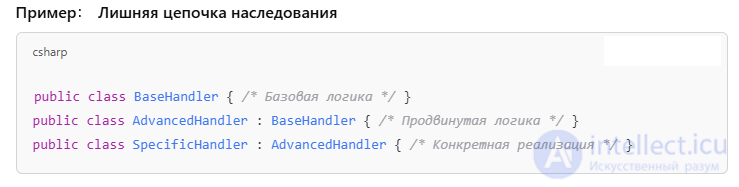
Optimization:
csharp
public class Handler
 {
// Combines the basic and advanced logic
}
Causes of bloated code
- Developer inexperience.
- Lack of relevant education or experience, a non-technical mindset
- Lack of critical, systematic and holistic thinking, knowledge and skills
- Development speed at the expense of quality.
- Lack of code review.
- Attempts to accommodate every possible use case.
- Outdated libraries and approaches.
Causes of code bloat from superfluous classes
- Over-engineering:
- The urge to anticipate every possible use case in advance.
- Lack of code review:
- Nobody checks whether adding new classes is justified.
- Developer inexperience:
- A desire to follow OOP principles without understanding when they should be applied.
- Imitating complex architectures:
- Attempting to copy complex design patterns that do not suit the task.
Consequences of bloated code
- Difficulty in maintenance and modification.
- Increased time to develop new features.
- Loss of performance.
- Increased likelihood of errors.
Consequences of code bloat from superfluous classes
- Difficulty in understanding:
- New developers find it hard to make sense of the abundance of classes and their purposes.
- Increased development time:
- Every change requires analyzing a multitude of classes.
- Reduced performance:
- Redundant links and calls can slow down program execution.
- Increased project size:
- The codebase becomes bulky and complicated.
How to fight bloated code
- Apply the SOLID and DRY (Don't Repeat Yourself) principles.
- Refactor the code (simplify methods, remove unused code), turning a frequently used code sequence into a subroutine and calling that subroutine from several places rather than copying and pasting the code into each of those places ( copy-and-paste programming ).
- Use code review.
- Break complex classes and methods down into smaller ones.
- Do not use superfluous classes
- Automate code quality checks:
- Use a static analyzer (for example, SonarQube, ReSharper).
- Write unit tests.
- They help reveal unnecessary dependencies and simplify the code.
- Reuse already written subroutines (possibly with additional parameters) rather than rewriting them from scratch as a new procedure.
- Combine program analysis for detecting bloated code with program transformation for removing it.
How to avoid it
- Assessing the need:
- Before creating a new class, evaluate whether you can do without it.
- The YAGNI principle (You Aren't Gonna Need It):
- Do not add what is not being used right now.
- Refactoring:
- Review the project regularly, merging or removing unnecessary classes.
- Use composition instead of inheritance:
- Instead of complex hierarchies, use aggregation and composition.
Code density of different languages
The difference in code density between various computer languages is so great that it often takes less memory to store a program written in a «compact» language (for example, a domain-specific programming language , Microsoft P-Code or threaded code ) together with an interpreter for that compact language (written in machine code) than to store a program written directly in machine code .
Conclusions
Bloated code — this is a problem that can be solved with discipline, experience and optimization tools. Regular refactoring and attention to code quality — these are the best ways to avoid this problem. Superfluous classes — this is a common problem in projects striving for a "perfect" design. The main thing — is to find a balance between modularity and simplicity.
See also
- [[b9236]]
- [[b11852]]
- [[b9153]]
- [[b7888]]
- [[b12796]]
- [[b13329]]
- [[b12795]]
- Dead code elimination
- Minimalism (computing)
- Muntzing
- Polymorphism (computer science)
- Software optimization
- Software bloat
- Lightweight software


Comments