
Lecture
A user story is a way of describing the requirements for a system under development, phrased as one or more sentences in the everyday or business language of the user. User stories are used by agile software development methodologies to specify requirements (together with acceptance tests). Each user story is limited in size and complexity. A story is often written on a small paper card. This ensures that it does not grow too large. In Extreme Programming, user stories are written by the users (customers) of the system. In the SCRUM methodology, they are reviewed by the user acting in the role of «Product Owner». For customers (users), user stories are the primary means of influencing software development.
In software development and product management, a user story is an informal, natural-language description of the features of a software system. Stories are written from the perspective of the end user or system user and can be recorded on cards, sticky notes, or digitally in dedicated management software. Depending on the product, user stories may be written by various stakeholders, such as the client, the user, a manager, or the development team.
User stories are a type of boundary object. They facilitate sensemaking and communication, and can help software development teams document their understanding of the system and its context.
User stories are a quick way to document customer requirements without having to produce extensive formal documents and then spend resources maintaining them. The purpose of user stories is to be able to respond promptly and without overhead to rapidly changing real-world requirements.
A user story remains an informal definition of a requirement as long as no acceptance testing procedure exists. Before a user story is implemented, the customer must define the corresponding acceptance procedure to ensure that the goals of the user story have been met.
User stories are a methodology for describing requirements in software development, first proposed as part of the Agile approach to project management and development. They are brief but informative descriptions of functional requirements, focused on user needs. User stories typically contain the following elements:
Role: who will use the feature, or which role it affects (for example, "user", "administrator", "guest", and so on).
Action: what the user or role intends to do with the system or feature (for example, "view", "create", "edit", and so on).
Goal: why the user or role wants to perform this action (for example, "view the product list", "create a new task", "edit a user profile", and so on).
Benefit: what benefit the user or role gains from completing this task or action (for example, "quick access to the information needed", "increased productivity", and so on).
A User Story (US) is a short statement of what we are going to build in the system that will add value to the user experience (solve the user's problem).
User stories are phrased using the following template:
AS a persona/user of the system
I WANT a desire/need/capability
SO THAT I gain value/solve a problem
However, the text of a user story alone is not always enough. Therefore, so that the developer understands what needs to be built and the tester can verify the result, acceptance criteria are written in addition to the User Story. (See below for details.)
User stories are written by or for users or customers in order to influence the functionality of the system being developed. On some teams, the product manager (or the product owner in Scrum) is primarily responsible for formulating user stories and organizing them into the product backlog. On other teams, anyone can write a user story. User stories can be developed through discussion with stakeholders, based on personas, or simply invented.
User stories may follow one of several formats or templates.
The most common is the Connextra template, shown below. Mike Cohn suggested that the «so that» clause is optional, although still often useful.
As a <role> I can <capability>, so that <receive benefit>
As a I can , so that
Chris Matts suggested that «hunting the value» is the first step to successful software delivery, and proposed the following alternative:
In order to <receive benefit> as a <role>, I can <goal/desire>
In order to as a , I can
Another template, based on the «Five Ws», specifies:
As <who> <when> <where>, I want <what> because <why>
As , I want because
A template commonly used to improve security is called an «Evil User Story» or «User Abuse Story», and is used as a way to think like a hacker in order to consider scenarios that could arise during a cyberattack. These stories are written from the perspective of an attacker trying to compromise or damage the application, rather than the typical personas found in a user story:
As a disgruntled employee, I want to wipe out the user database in order to hurt the company.
As a disgruntled employee, I want to wipe out the user database to hurt the company
In Extreme Programming (XP), user stories are created jointly by the developers and a customer representative. The customer is responsible for formulating the story. The developer may use a series of questions to prompt the customer and to establish the need for certain specific features. At the same time, the developer must be careful not to dominate the process of generating the idea.
Once the customer has created a story, it is written on a small card (for example, 8x13 cm) with a title and the description the customer formulated. If the developer and the customer find that the story does not satisfy them (too big, too complex, too vague), it is rewritten until both parties are satisfied. However, Extreme Programming emphasizes that user stories should not be finalized at the moment they are written down, since requirements tend to change over the course of development.
An example of a user story:
As a user, I want to view the product list,

so that it is convenient for me to choose and buy the products I need online.
Screening quiz (epic story)
As an HR manager, I want to create a screening quiz so that I can decide whether to refer potential candidates to the hiring manager.
Quiz review
As a manager, I want to review my existing quizzes so that I can remember what I have and decide whether I can simply reuse or update an existing quiz for the position I need now.
Limited backup
As a user, I can specify folders that do not need to be backed up, so that my backup drive is not filled with things I do not need to save.
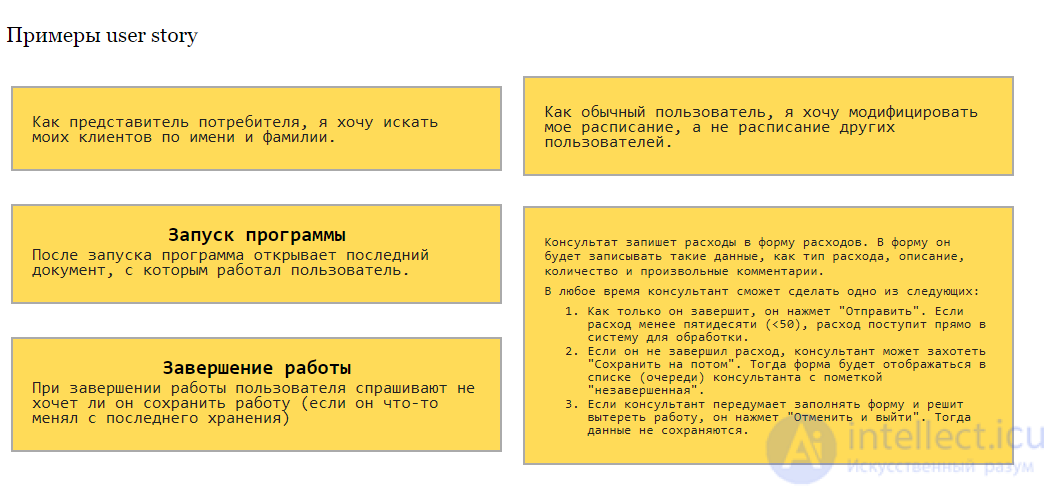
In the XP methodology, user stories are the outcome of planning and define what must be implemented in a software project. User stories are prioritized by the customer according to their importance to the system, broken down into a series of tasks, and estimated by the developers.
Immediately before implementation, developers may discuss the story with the customer. Stories can be hard to understand, may require specific knowledge, or the requirements may have changed since the story was written.
At some point, one or more acceptance tests must be attached to every user story. This allows the developer to know when the user story is finished and lets the customer verify it. Without precise statements of requirements, lengthy and unproductive disagreements may arise at the moment the product is delivered.
Mike Cohn defines acceptance criteria as «notes about what the story must do for the product owner to accept it as complete». They define the boundaries of a user story and are used to confirm that the story is finished and works as intended.
The appropriate amount of information to include in acceptance criteria depends on the team, the program, and the project. Some may include «precondition criteria», such as «the user is already logged in and has already edited their information once». Some may write acceptance criteria in the typical agile format, «Given-When-Then». Others may simply use bullet points taken from the original requirements received from customers or stakeholders. For a story to be considered done or complete, all acceptance criteria must be met.
Acceptance Criteria (AC) are structured, detailed statements of the requirements for the system being built, which a User Story must satisfy for the work on it to be considered complete from the point of view of the client / product owner.
Ideal acceptance criteria are:
In addition, all ACs together with the US must satisfy the INVEST criteria:
Now for the rules that help me write acceptance criteria. I have formulated them for myself as follows:
Use an anchor criterion
Add structure
Write and cut
Remember the INVEST rules and what makes good ACs
Reread it yourself and give it to a colleague
Use practical tricks
Let us go through each rule using real working examples.
Let us go through each rule using real working examples.
Setting theory aside, a US + AC is much like an article that opens with a brief summary, a short outline of what you want to share with the reader. Any consumer of your document needs to understand unambiguously the gist of the functionality being described. That is precisely what the anchor criterion is.
Let us examine the importance of applying this rule using the following
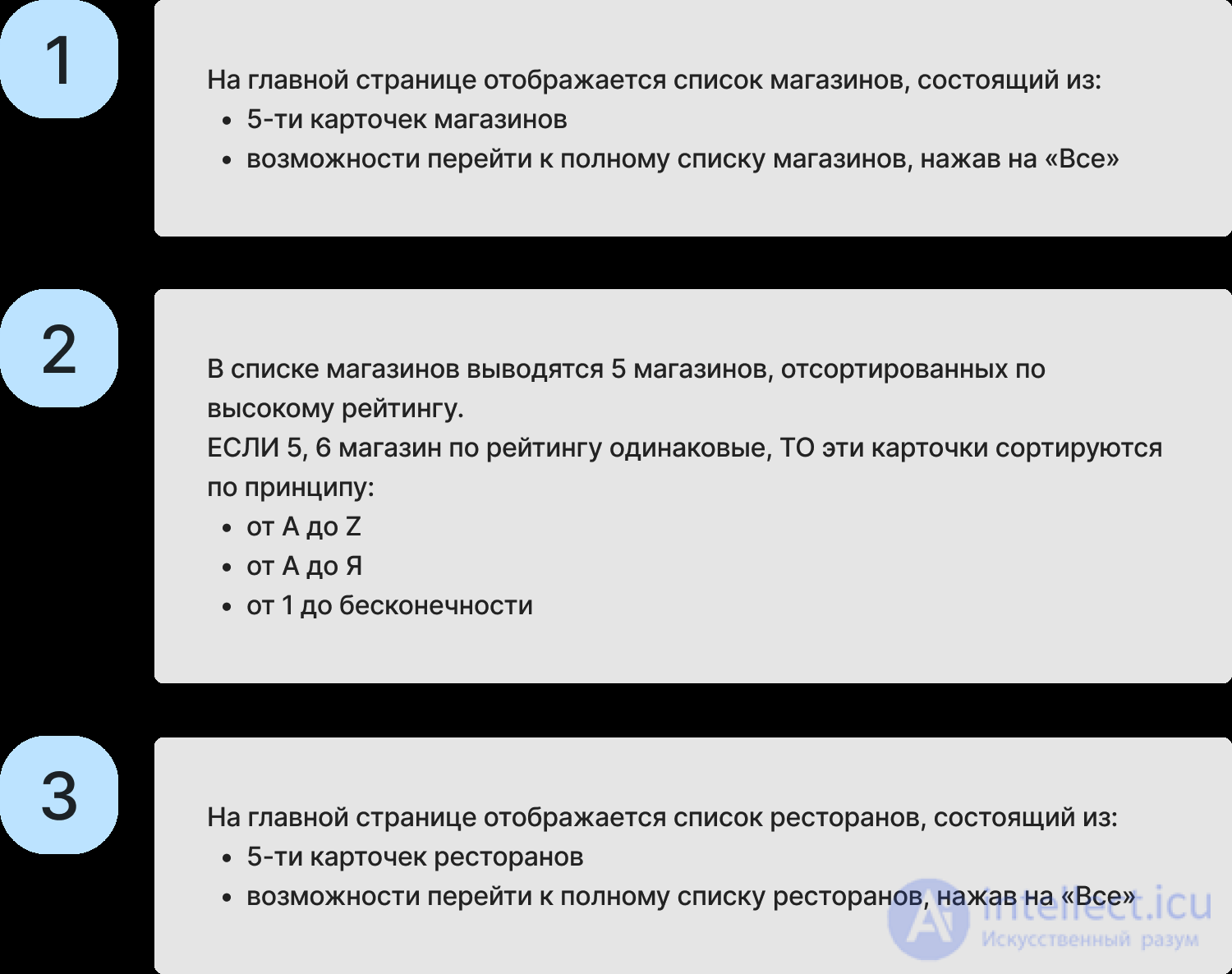
User Story, which describes the functionality for displaying a list of available restaurants and shops in a food delivery mobile app:

Here is what acceptance criteria look like without an anchor criterion:
Now let us look at acceptance criteria that do have an anchor criterion:
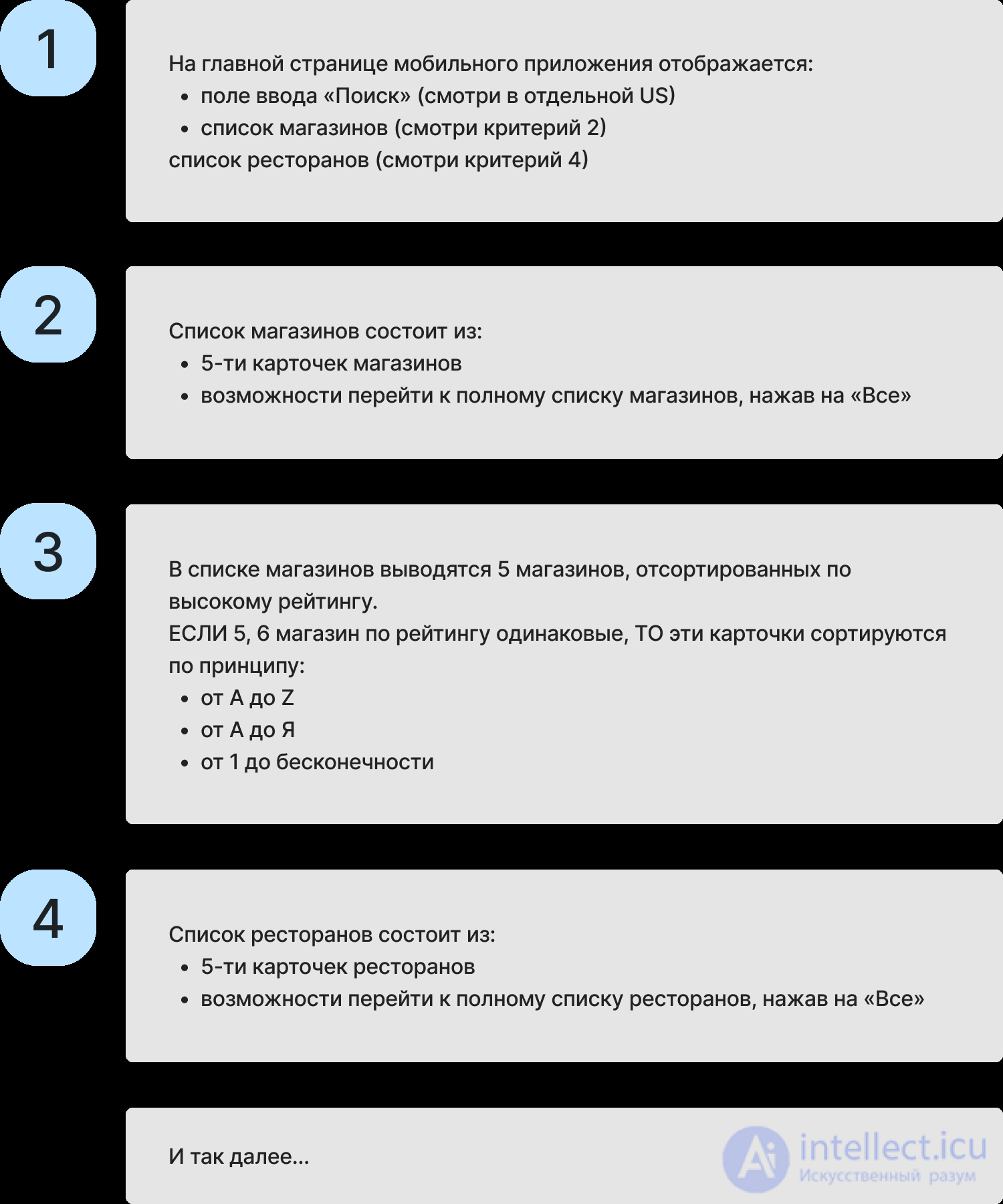
As we can see, the anchor criterion helps us achieve clarity and precision. We immediately understand that the home page has functionality for displaying a list of shops and restaurants, and that the user also has a search capability that reduces the time spent choosing items to buy. Yes, that is a different User Story, but we indicate that it exists, because this functionality directly helps the user work with the list of restaurants/shops.
We must always understand who uses our document and how. On our team, the tester uses the US + AC to write test cases, and the developer uses them to write the code for the upcoming feature, as well as for the Definition Of Done criteria after the code is written.
Ignoring structure in your writing can lead to mistakes in test cases and bugs in the resulting functionality.
Let us look at an example of acceptance criteria written without structure and with it. The User Story describes the onboarding functionality (usage instructions) for a user in the «Customer Profile» mobile app.
User Story:

Here is what acceptance criteria look like without structure:
The user has logged in to the mobile app for the first time. After that, the «Onboarding» is displayed. The onboarding consists of several pages, each of which consists of: a main information block and onboarding navigation buttons.
The main information block on page 1 contains information about managing the profile; on page 2, information about the option to connect services; on page 3, information about payment methods; on page 4, information about contacting support. For a detailed description of the main information on all pages, see the Mockups
navigation buttons: pages 1, 2 and 3 display a «Next» button, which opens the following page when tapped. Pages 2, 3 and 4 display a «Back» button, which opens the previous page when tapped. Page 4 displays a «Done» button, which opens the Home page of the mobile app when tapped. If the user is not logging in to the mobile app for the first time, the onboarding does not open and the home page of the mobile app opens straight away.
Here is what structured acceptance criteria look like:
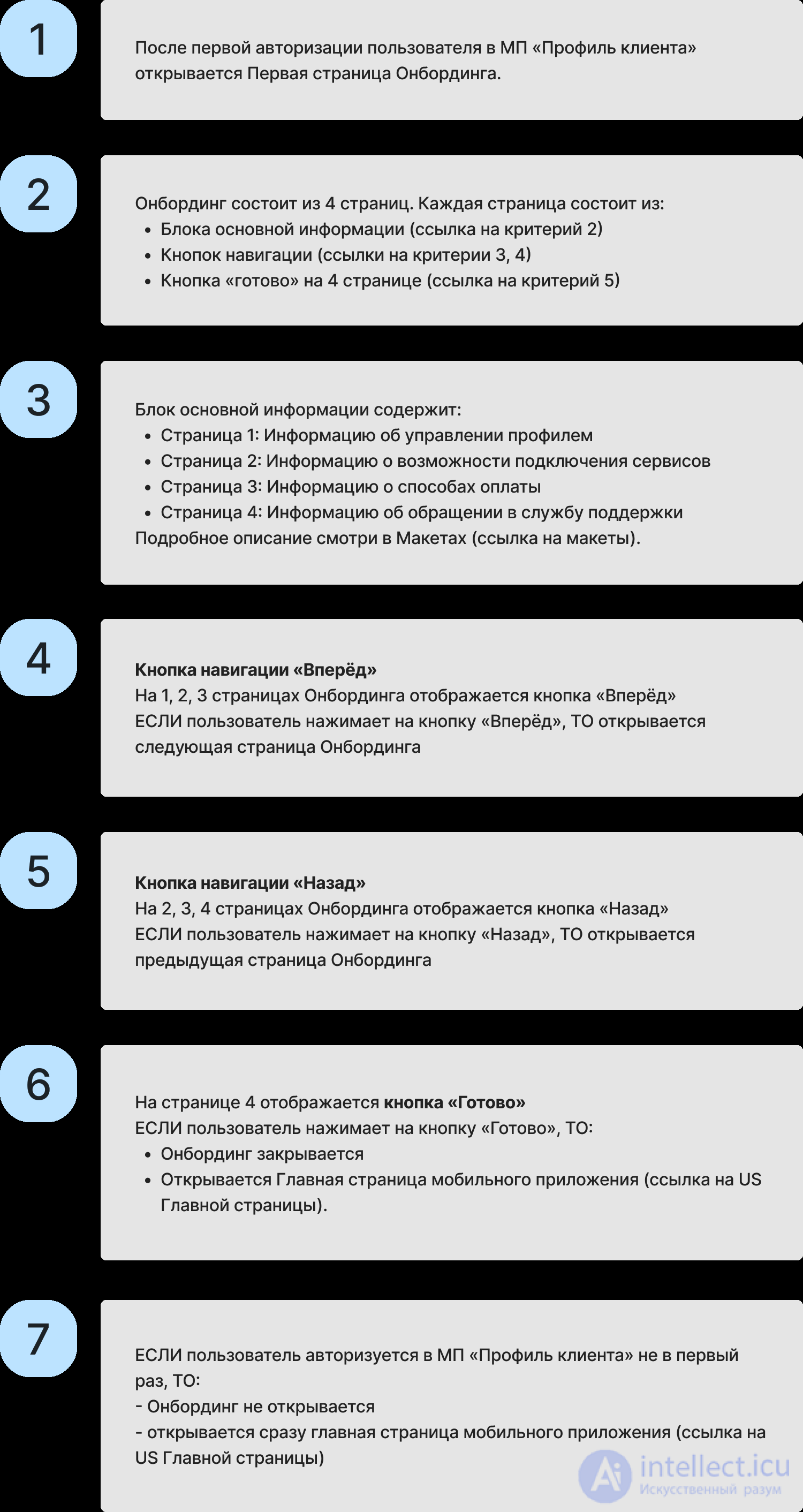
You will agree that the second version is far more pleasant to read and understand. Structuring acceptance criteria as a table and writing the text of each criterion as a numbered list helps the reader avoid confusion. The tester, in turn, will find it easy to link the first acceptance criterion to the first test case, and the developer to link it to the code. Structure also helps the authors avoid getting lost in their own document, since it clearly shows which criteria have already been described, what is missing, and whether any logic has been overlooked.
It is advisable to arrange the criteria in the order of the main usage scenario of the functionality, that is, not to write about the buttons first and then about the initial display, otherwise it will not be clear what the buttons relate to. In addition, you can turn each criterion into a hyperlink, which makes it convenient to reference it in subsequent documents.
If you have not yet read the book «Write and Cut» by Maxim Ilyahov, I recommend that you do.
Here is an example we went through with the students at our School of Business Analysis.
User Story:
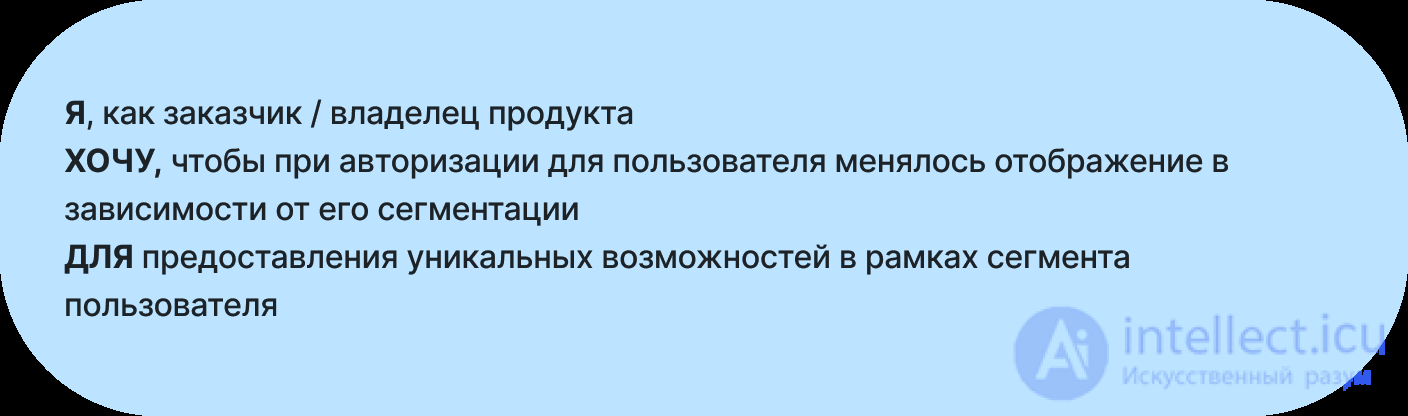
One of the criteria looked like this:
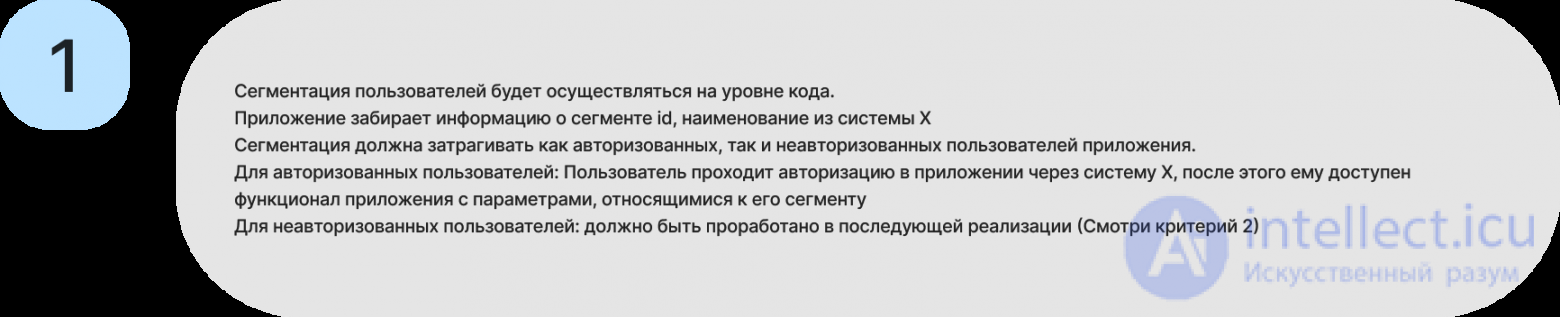
You will agree that reading this criterion leaves ambiguity and confusion, will you not? And it also contains a lot of filler. For instance, what did the author mean by the sentence «User segmentation will be implemented at the code level»? I can only guess that they meant that the segmentation would be imported from another system, which is what they say in the second sentence. In other words, the first sentence is meaningless.
And the sentences that follow contain several criteria at once, which are quite hard to tease apart when read in this form.
Here is how this criterion could be rewritten:
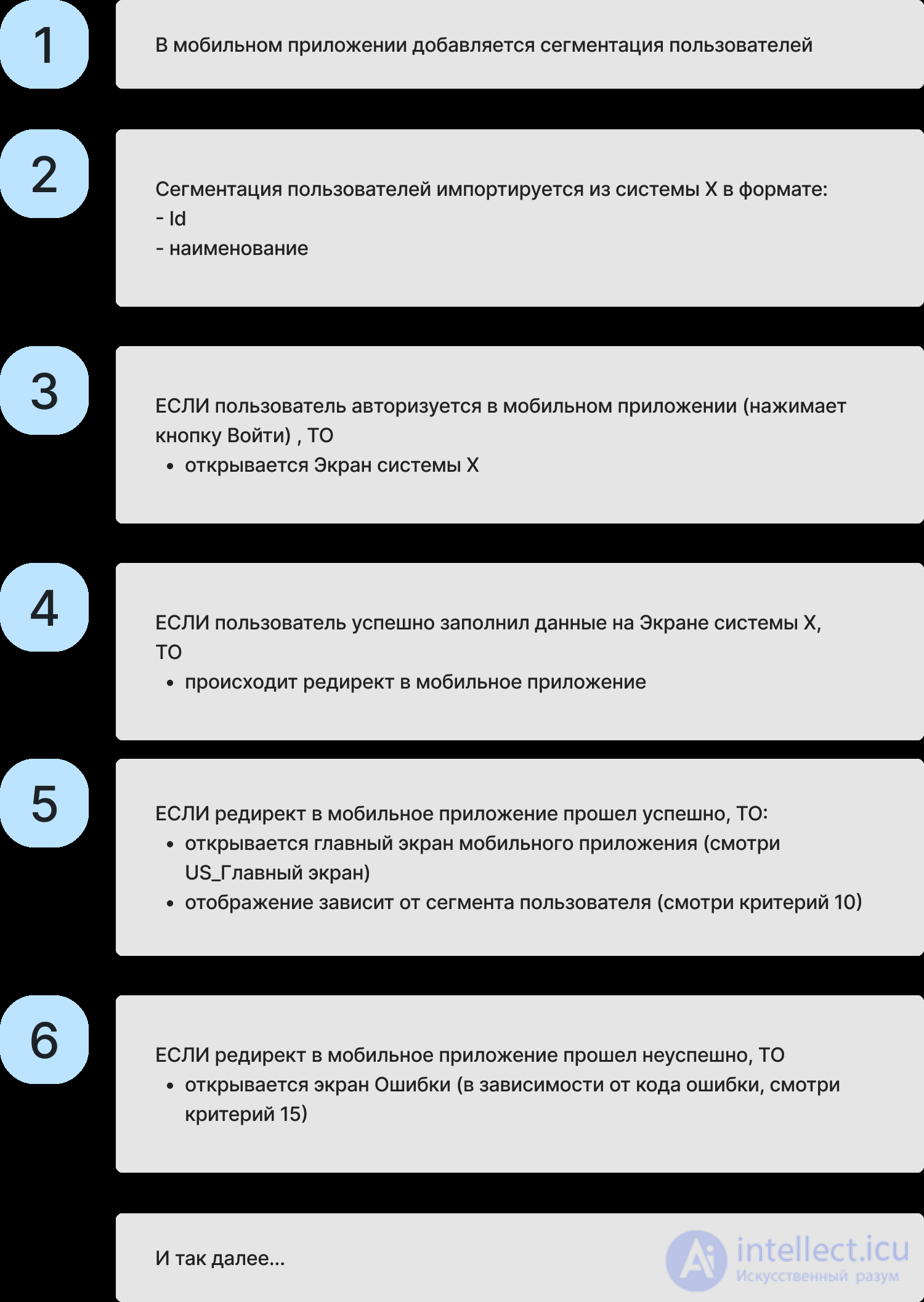
Clearly, the fewer the words, the more useful and comprehensible the information we get, and the easier it is for any consumer of the document to process.
I will not give examples here. The rule simply amounts to this: after writing all the criteria, you need to reread the whole text to check that INVEST is satisfied (I discussed it at the beginning of the article).
Yes, it often happens that one of the criteria is not met (usually independence from other USs). But it is important to discuss this with the team and reach a shared decision: whether or not to develop the task given these risks.
I also discussed the criteria for good ACs at the very beginning of the article (binary, complete, verifiable, unambiguous, consistent).
As for the instructions, just as with the INVEST criteria, I go through all the acceptance criteria and check each one against every «criterion of a good AC».
Share the document with your colleagues. On my team, before handing the document to the developers, I ask the product owner, the tester and the systems analyst to sanity-check it. You are part of a team. And responsibility for the outcome lies with all of its members. So do not be afraid to share your work and to accept comments and remarks from colleagues. Remember that accepting feedback is a step forward in developing your own competence, as well as in developing your project/product. And, quite simply, an outside opinion helps you avoid missing anything and be understood correctly.
The last point I wanted to share is practical tricks. The following writing templates can help you put acceptance criteria together more easily:
If you need to describe WHAT happens in the system as a result of some event, use the principle: IF an event has occurred (if the user tapped the button), THEN we get a result (THEN the system saves the data in the system).
Alternatively, instead of IF/THEN you can describe the event and highlight the result with the phrase «AS A RESULT». These constructions will help you avoid cramming several criteria into one:
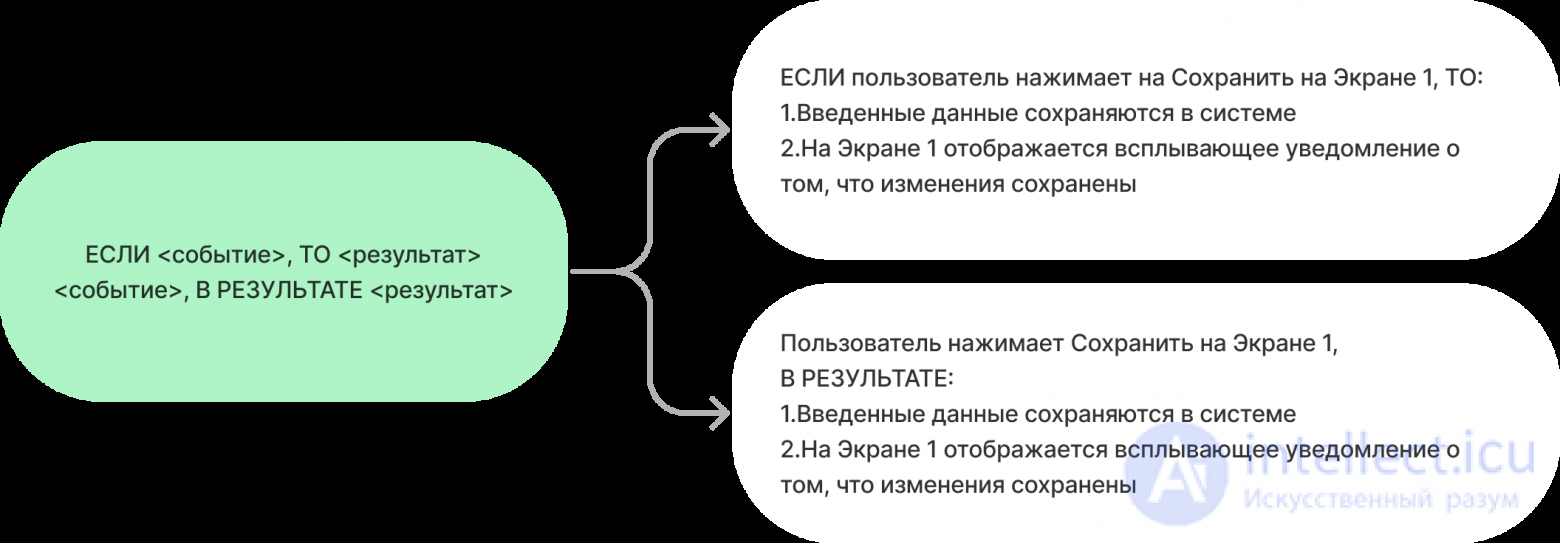
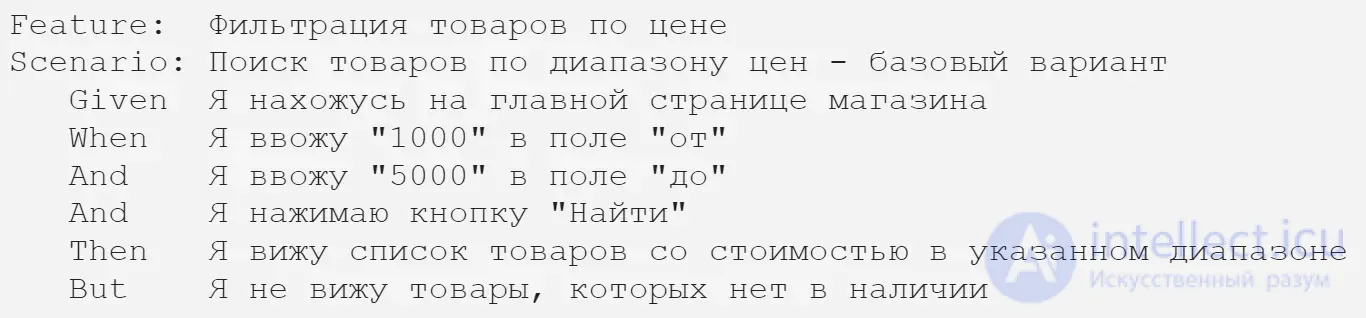
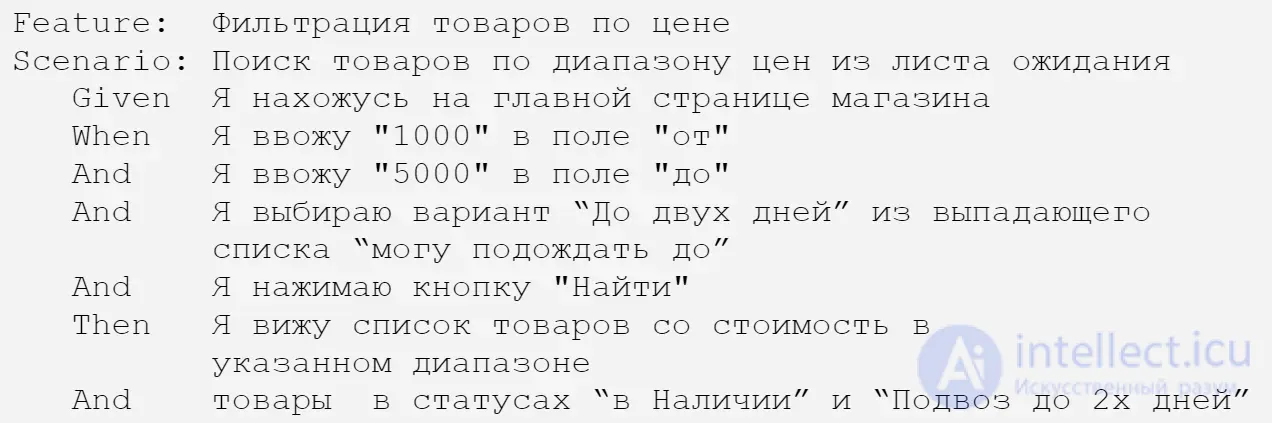
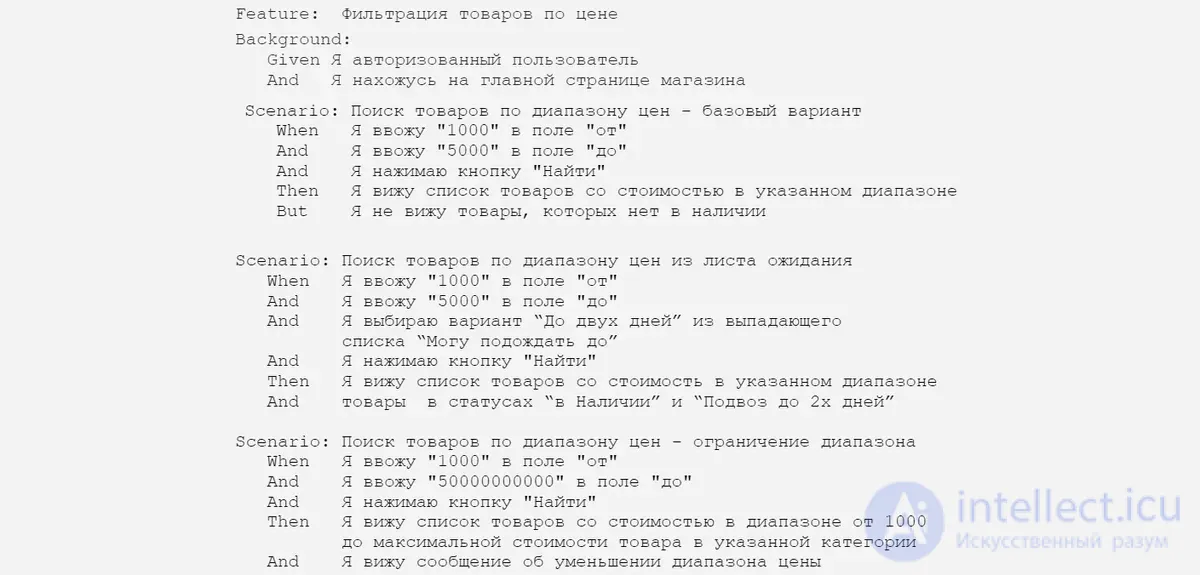
The well-known Given-When-Then description format (per Gherkin). It resembles the IF/THEN format, except that here the state of the system at the initial moment is also spelled out.
In the GIVEN block we write the state of the system at the initial moment, in the WHEN block the user's actions or the event, and in THEN the result:

If you need to describe attributes and list what something consists of, for example some menu, then state that the screen displays the following elements and list each of them as a separate item:

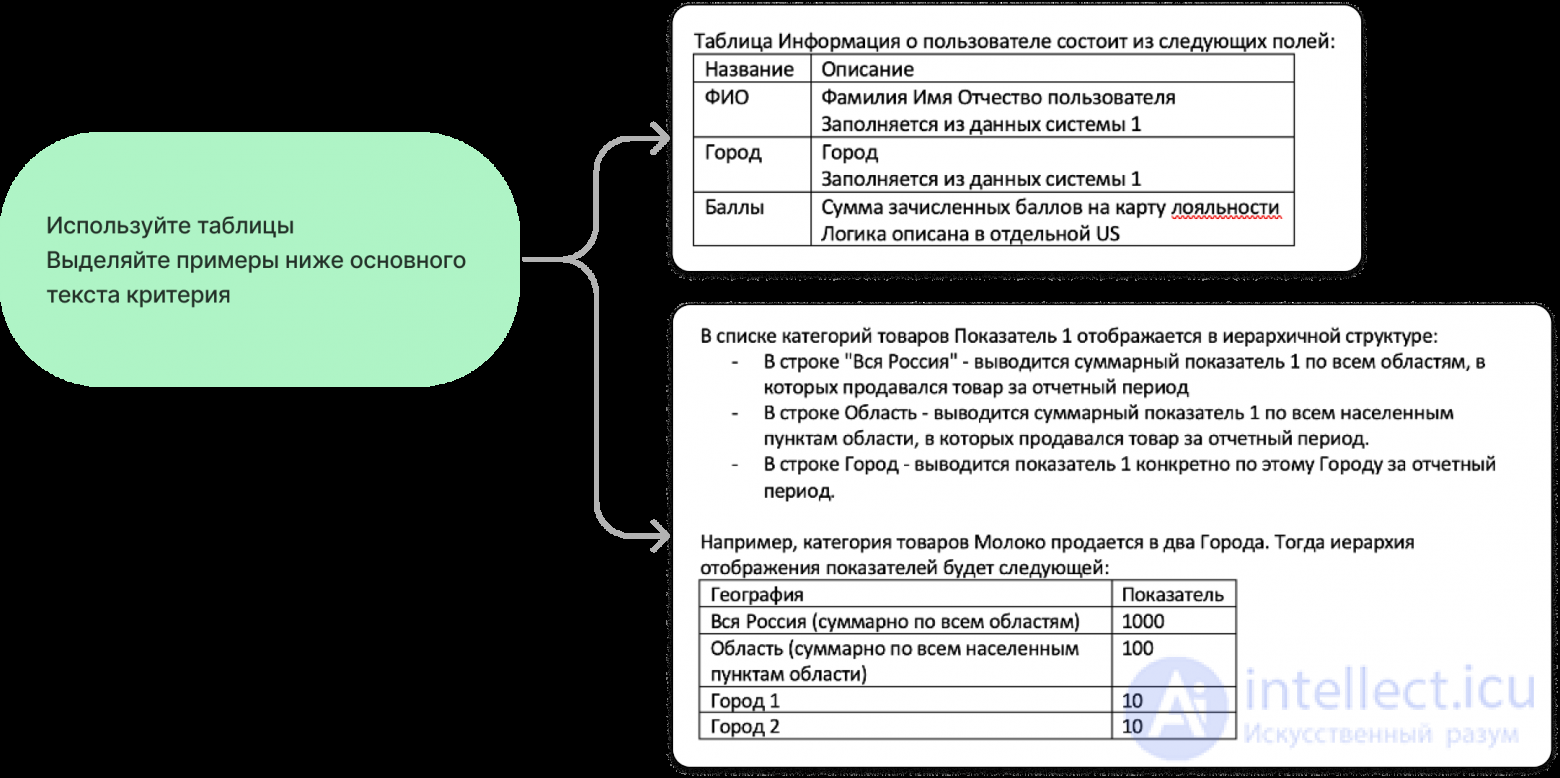
If a criterion is large, use nested tables to describe it and place examples specific to that criterion just below the main text of the acceptance criterion:
Gherkin is a scenario-oriented language that is easy for business people to read and is used to describe software functionality. Gherkin describes concrete usage scenarios for a product.
It is widely used in software development for:


There is no compelling evidence that using user stories increases software success or developer productivity. However, user stories facilitate sensemaking without unnecessary structuring of problems, which is associated with success.
XP and other agile methodologies favor face-to-face communication over comprehensive documentation, and rapid adaptation to change over fixating on the problem. This is achieved as follows:
Advantages of using user stories:
User focus: user stories put the emphasis on users' needs and values, which helps create a more useful and satisfying product.
Simplicity and clarity: they are a simple, clear way of describing requirements, which simplifies communication between developers, customers and other project participants.
Iterativeness: user stories make it possible to start development with the most important and valuable features, gradually adding further requirements.
Prioritization: stories can easily be prioritized according to their significance and importance to users.
Testing: they can serve as the basis for creating test cases and verifying that requirements are met.
The limitations of user stories include:
Although user stories and use case scenarios serve the single purpose of documenting user requirements in terms of the interaction between the user and the system, there are differences between them.
User stories are a small and easy-to-work-with representation of information. They are phrased in the everyday language of the user and contain few details, thus remaining open to interpretation. They help the reader understand what the system should do.
Use case scenarios, unlike user stories, describe a process and its steps in detail and can be expressed in terms of a formal model. A scenario is self-contained. It provides all the information and detail needed for comprehension. A scenario is described as «a generalized description of a set of interactions between the system and one or more agents, where an agent is a user or another system».
It is important to note that user stories are one of the tools of Agile development, and their effective use requires close collaboration between the customer and the development team, as well as continuous updating and refinement of requirements as the project evolves.
In many contexts user stories are used and also summarized into groups for ontological, semantic and organizational reasons. An initiative is also referred to as a Program in certain scaled agile frameworks. The various uses depend on the point of view, for example either the view from the user's perspective as product owner with regard to features, or from the company's perspective with regard to organizing tasks.
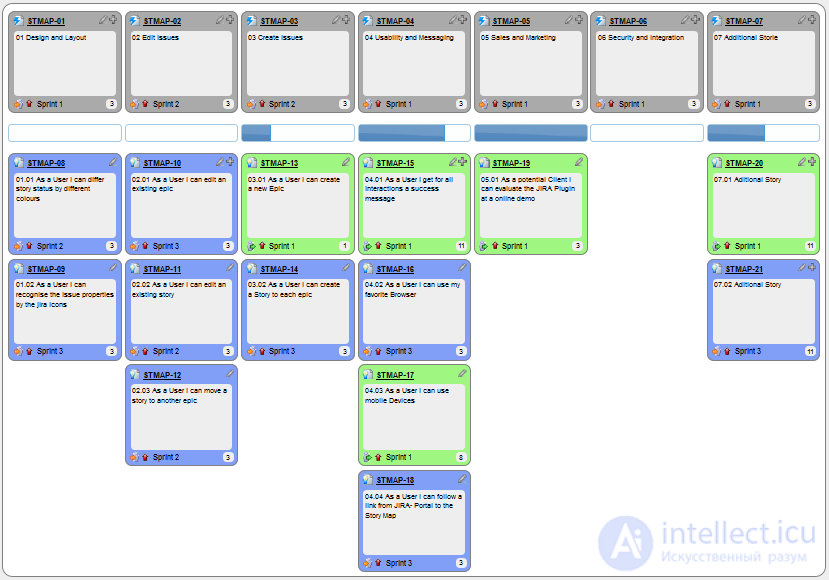
A story map in action, with epics at the top for structuring the stories
While some suggest using «epic» and «theme» as labels for any conceivable kind of grouping of user stories, organizational management tends to use them for strongly structuring and consolidating workloads. For instance, Jira appears to use a hierarchically organized backlog in which the first level of tasks is called a «user story», the second level «epics» (groupings of user stories) and the third level «initiatives» (groupings of epics). However, initiatives are not always present in product management practice and simply add another level of granularity. Jira also has «themes» (for tracking purposes), which allow cross-linking and grouping of items from different parts of the fixed hierarchy. [
In this usage Jira changes the meaning of themes toward an organizational perspective: for example, how much time we spent developing the theme «xyz». But there is another definition of themes: a set of stories, epics, features and so on for a user that forms an overall semantic unit or goal. There is probably no universal definition, since different approaches exist for different styles of product design and development. In this sense, some also suggest not using any rigid groups and hierarchies at all.
Several epics or many very large stories that are closely related are summarized as themes. A common explanation of epics is also: so much work that it requires many sprints, or, in scaled frameworks, a Release Train or Solution Train.
Several themes, epics or stories grouped hierarchically.
Several themes or stories grouped by ontological and/or semantic relationships.
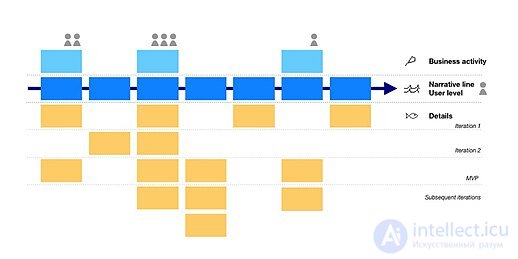
User story mapping
A story map organizes user stories according to a narrative flow that presents the big picture of the product. The technique was developed by Jeff Patton between 2005 and 2014 to eliminate the risk of projects being overwhelmed by highly detailed user stories that distract from delivering the product's core goals.
User story mapping uses workshops with users to identify the core business activities. Each of these core activities may involve several types of users or personas.
A horizontal end-to-end narrative line is then drawn by identifying the main tasks of an individual user involved in these business activities. The line is maintained throughout the project. More detailed user stories are gathered and collected as usual, following the user story practice. But each new user story is either inserted into the narrative flow or linked vertically to the core tasks.
The horizontal axis corresponds to the coverage of the product's goals, while the vertical axis corresponds to the needs of individual users.
This makes it possible to describe even large systems without losing the big picture.
Story maps can easily provide a two-dimensional graphical visualization of the product backlog: at the top of the map are the headings under which stories are grouped, usually called «epics» (large, coarse-grained user stories), «themes» (collections of related user stories) or «activities». They are identified by focusing on the user's workflow, or «the order in which you would explain the behavior of the system». Vertically, beneath the epics, the actual story cards are distributed and ordered by priority. The first horizontal row represents the «walking skeleton», and below it comes increasing sophistication.
A user journey map is intended to show the big picture, but for a single category of user. Its narrative line focuses on the chronology of the phases and actions that a single user must perform to achieve their goals.
This makes it possible to depict the user experience beyond a set of user stories. Based on user feedback, positive and negative emotions can be identified along the entire journey. Friction points or unmet needs can be marked on the map. This technique is used to improve product design by making it possible to involve users through participatory approaches.
A use case is described as «a generalized description of a set of interactions between the system and one or more actors, where an actor is either a user or another system». Although user stories and use cases have some similarities, there are also several differences between them.
| User Stories | Use Cases | |
|---|---|---|
| Similarities |
|
|
| Differences |
|
|
| Template | As a <type of user>, I can <some goal>, so that <some reason>. |
|
Kent Beck, Alistair Cockburn, Martin Fowler and others discussed this topic further within the subject of extreme programming
Although both user stories and use cases serve to capture specific user requirements in terms of the interaction between the user and the system, there is a significant difference between them:
| User stories (User Stories ) | Use cases |
|---|---|
|
|

Comments