
Lecture
Vibe coding is a development style in which the programmer doesn’t write all the code by hand, but instead describes to an AI what needs to be done, for example:
“Build a payment form, add validation, show an error if the payment fails”
And the AI generates the code. This approach is therefore a particular kind of prompt-oriented software development style.
The developer then runs it, looks at the result, copies the errors back into the AI and asks it to fix them.
The English word vibe means “atmosphere”, “feeling”, “mood”. So vibe coding can literally be read as:
“coding by feel / by vibe”
The name arose because the person doesn’t really write code in the classic way, but rather “senses” what they want to get and tells the AI:
Build a form.
Reduce the padding.
Add a button.
Fix the error.
Make it look nice.
The AI writes the code, and the person looks at the result and says: “not like that”, “better”, “redo it”, “here’s the error”.
In other words, the idea behind the name is: not strict manual engineering, but steering development through intent, result and corrections.
The term vibe coding was publicly introduced by Andrej Karpathy — a well-known AI researcher, OpenAI co-founder and former Director of AI at Tesla. Cloudflare states outright that the term was introduced by Karpathy in a post on X in February 2025.
Karpathy’s original post began roughly like this:
“There’s a new kind of coding I call ‘vibe coding’...” February 3, 2025
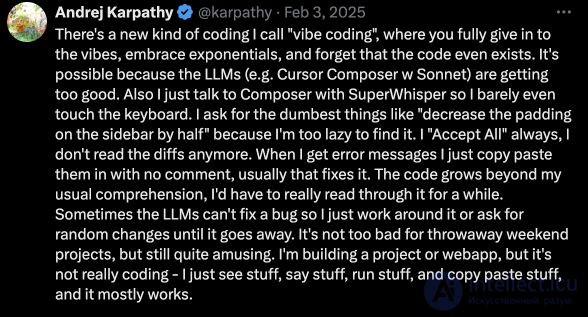
He described a mode in which the developer “gives in to the vibes”, barely touches the keyboard, accepts the AI’s changes, copies errors back into the AI and doesn’t always read the diff. Simon Willison quotes this post and stresses that in its original sense vibe coding is not just any AI-assisted coding, but specifically the mode in which the human doesn’t read the code closely.
The term itself spread out of the English-speaking AI/tech community, primarily the US / Silicon Valley context. Karpathy worked at OpenAI and Tesla, and the post itself was published in English on X and quickly circulated among developers using Cursor, Claude, ChatGPT, Copilot and similar tools.
But it’s important to note: the approach itself existed earlier, simply without this name. As early as 2023–2024 people were writing code via ChatGPT, GitHub Copilot, Cursor, Replit and other AI tools. Karpathy didn’t “invent” the practice itself, he gave it a catchy name. Cloudflare also notes that many developers were already experimenting with a similar AI-assisted approach after ChatGPT and Copilot appeared.
Because it very precisely captured a new style of work:
Before:
the human writes code → runs it → debugs it

Now, in vibe coding:
the human describes the desired result → the AI writes the code → the human looks at the result → asks for fixes
And especially because Karpathy described it not as a “serious methodology”, but almost as a tongue-in-cheek observation: for quick, throwaway/weekend projects it’s fun and effective, but for serious production code it’s dangerous without review.
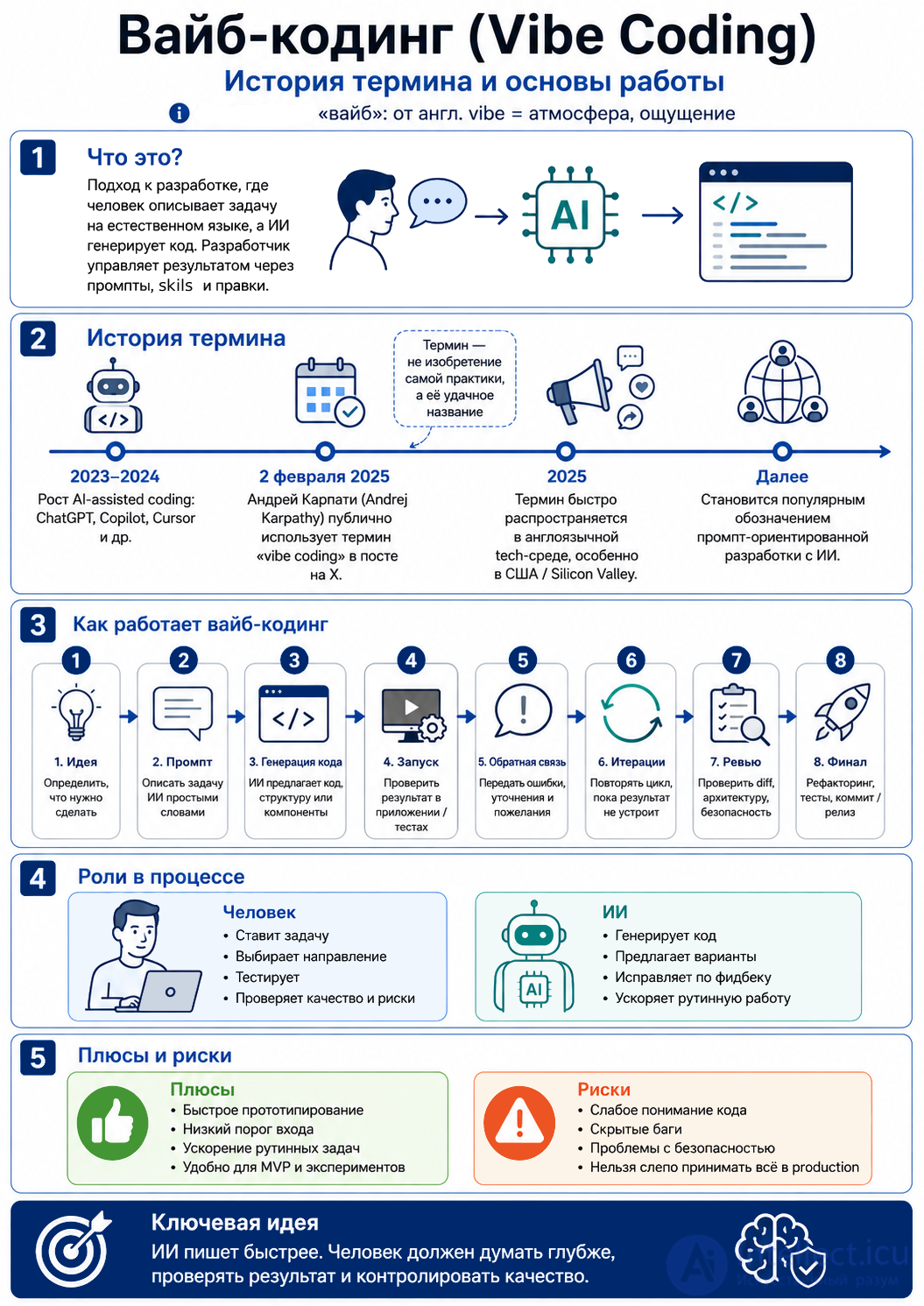
Simplified, it looks like this:
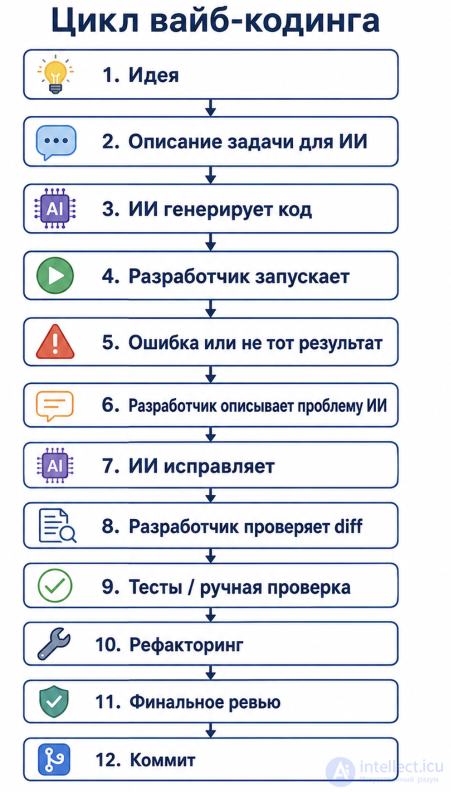
The task: build a page where the administrator can:
Build a simple admin panel for managing articles in Laravel.

Requirements:
1. An Article model.
2. A migration with the fields: title, slug, content, status, published_at.
3. A CRUD controller ArticleController.
4. Blade pages:
   - the article list;
   - a creation form;
   - an edit form.
5. Search by title.
6. Field validation.
7. The status can be draft or published.
8. On publishing, fill in published_at.
The AI generates the migration, model, controller, routes and Blade templates.
For example:
php artisan migrate
php artisan serve
They open:
/admin/articles
And see that the article list works, but, for instance, the slug field isn’t generated automatically.
Add automatic slug generation from title.
If the slug already exists, append -2, -3 and so on to the end.
Do this in the Article model via creating/updating events.
The AI proposes this code:
class ... {
   protected static function booted()
   {
     static::saving(function ($article) {
        if (!$article->slug && $article->title) {
            $baseSlug = Str::slug($article->title);
            $slug = $baseSlug;
            $counter = 2;

            while (static::where('slug', $slug)
                ->where('id', '!=', $article->id)
                ->exists()) {
                $slug = $baseSlug . '-' . $counter;
                $counter++;
            }

            $article->slug = $slug;
        }
    });
  }
...
}
Checking manually:
Create an article "My first article"
Create another article "My first article"
Check the slug:
- my-first-article
- my-first-article-2
If something works incorrectly — they copy the error to the AI.
Add to the article list:
1. A filter by status draft / published.
2. Sorting by creation date.
3. A "Publish" button.
4. An "Unpublish" button.
The AI extends the controller and the Blade templates.
Add protection:
1. Access only for an authenticated administrator.
2. Use the ArticlePolicy policy.
3. Add @can in Blade.
4. Add the auth middleware.
At this stage the human must check that the AI hasn’t created “pseudo-protection”, but has actually wired up the middleware, the policy and the permission checks.
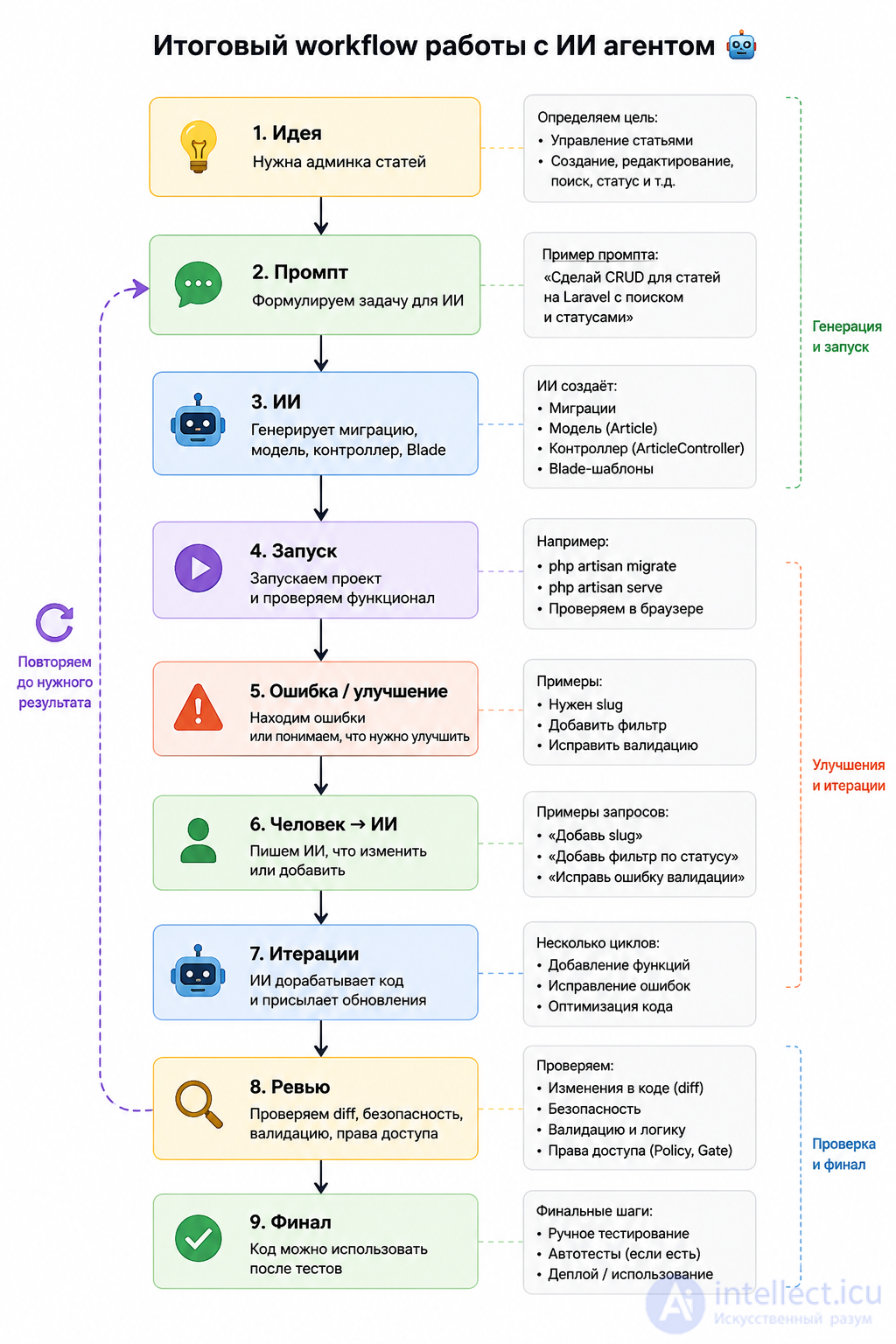
Because the task is clear and practical:
"I want an admin panel for articles"
And from there the developer gradually “guides” the AI:
That is, the human doesn’t write everything by hand from scratch, but manages the process by describing the result.
Human:
Build a Laravel CRUD for articles.

AI agent:
Here are the migration, model, controller, routes and Blade templates.

Human:
Add search by title and a filter by status.

AI agent:
Here is the updated index() and the filter form.

Human:
Now add a Policy so that only an admin can delete articles.

AI agent:
Here is ArticlePolicy and the changes in Blade.

Human:
Explain which files were changed and why.

AI agent:
Changed: routes, controller, policy, views...
The main idea:
Vibe coding is when you don’t simply ask “write the code”,
but iteratively steer development through prompts, checks and refinements.
The AI writes faster. The human thinks deeper.
The bad mode:
The AI wrote it → I pasted it straight in → seems to work → shipped it to production.
The good mode:
The AI wrote it → I reviewed the diff → ran it → tested it → understood the code → removed the risky parts → and only then used it.
For simple prototypes you can “vibe” freely. For payments, authentication, security and production code it’s better to use controlled vibe coding: the AI generates, but you must check the architecture, the errors, the security and the component’s lifecycle.
1. What does the term «vibe coding» mean?
Hint: vibe coding is about development through prompts and AI code generation.
2. What is the correct spelling of the term?
Hint: the word comes from the English vibe — atmosphere, feeling.
3. Who popularized the term vibe coding?
Hint: the term is associated with Andrej Karpathy’s post on X in 2025.
4. What is usually the first step in vibe coding?
Hint: first the human formulates what they need from the AI.
5. What does the AI do in the vibe coding process?
Hint: the AI receives a prompt and proposes code, structure or fixes.
6. What should the developer do after receiving code from the AI?
Hint: the human controls quality, reviews the diff, the tests and the possible risks.
7. What is the main risk of vibe coding?
Hint: the code may look functional but contain hidden bugs or security problems.
8. Which tasks is vibe coding especially convenient for?
Hint: vibe coding is well suited to quick experiments, drafts and prototypes.
9. What is a prompt in the context of vibe coding?
Hint: a prompt is the text with which the human explains to the AI what needs to be done.
10. Which approach is safer for production code?
Hint: for production it’s important not just to generate code, but to do reviews, testing and quality control.

Comments