
Lecture
Compatibility — the ability of different objects — hardware or software components — to interact with one another. With respect to computers, we can distinguish hardware (technical), software, and data compatibility:
When devices exhibit hardware, data, and software compatibility without restrictions for end users, these devices are said to be fully compatible.
Program compatibility refers to the ability of programs to interact with one another, possibly within the framework of a larger software system.
Compatibility is the ease of combining one piece of software with another.
Compatibility matters because software products are not developed in a vacuum: they need to interact with one another.
Yet problems arise all too often, because different components hold conflicting assumptions about the rest of the world. The simplest example is the wide variety of incompatible file formats, which means, for instance, that one program cannot directly use the output of another program.
The key to compatibility lies in uniformity of design and in standard conventions for communication between software systems. These approaches include the use of:
As software products and technologies evolve, an important issue becomes the compatibility of different versions of the same product. This is precisely why software development methodology is always accompanied by discussions of versioning and dependency management.
Compatibility mode is a software mechanism in which software either emulates an older version of the software or mimics another operating system in order to allow older or incompatible software or files to be compatible with new computer hardware or software. Examples of software that uses this mode are operating systems and Internet Explorer.
Compatibility mode in an operating system is a software mechanism in which the computer's operating system emulates an older processor, operating system, and/or hardware platform in order to allow older software to be compatible with new computer hardware or software.
This differs from a full-fledged emulator in that an emulator typically creates a virtual hardware architecture on the host system rather than simply translating the old system's function calls into calls that the host system can understand.
Examples include Classic mode in Mac OS X and the Windows 2000 / Windows XP / Windows Vista / Windows 7 compatibility mode, which allow applications developed for older versions of the operating system to run. Other examples include Wine for running Windows programs on Linux / OS X and Mono for running .NET programs on various Unix-like systems.
«Compatibility View» is a feature of the compatibility mode in the Internet Explorer web browser version 8 and above. When this mode is active, in compatibility mode IE displays a web page in «Quirks» mode, as if it were being viewed in IE7. When Compatibility View is not activated, IE is said to run in native mode. In IE11, the user can enable compatibility mode for a website by clicking the Gears icon and clicking Compatibility View settings.
Microsoft promoted Internet Explorer 8 as adhering more strictly to the W3C web standards it describes than Internet Explorer 7. As a result, as with every previous version of IE, some percentage of web pages coded to conform to the behavior of older versions would break in IE8. This would be a repeat of the situation with IE7, which, in fixing bugs in IE6, broke pages that used IE6-specific hacks to work around its noncompliance. This was especially a problem for standalone HTML documents that may not be updated (for example, stored on read-only media such as a CD-ROM or DVD-ROM).
To avoid this situation, IE8 implemented a form of version targeting, in which a page could be authored for a specific version of the browser using an X-UA-Compatible declaration as a meta element or in HTTP headers.
To maintain backward compatibility, sites can use IE7-like content handling by inserting a specially crafted meta element into the web page, which triggers compatibility mode in the browser, using:
<meta http-equiv="X-UA-Compatible" content="IE=EmulateIE7" />
A newer version of the browser than the page was coded for will emulate the behavior of the older version, so that the assumptions the page makes about browser behavior hold true.
Microsoft proposed that a page with a doctype that triggers standards mode (or almost-standards mode) in IE7 would by default trigger IE7-like behavior, called «standards mode» (now called «strict mode») in IE8 and future versions of IE. IE8's new features make it possible to trigger what Microsoft has called «IE8 standards mode» (now called «standards mode»). Doctypes that trigger quirks mode in IE7 will continue to do so in IE8.
Peter Bright of Ars Technica argued that the idea of using a meta tag to select a specific rendering mode is fundamentally unsuited to standards-based development, but framed this issue as one of idealism versus pragmatism in web development, noting that not all of the web is maintained and that «requiring web developers to update sites so that they continue to work properly in any future version of the browser is probably too much to ask».
The result of IE 8 Beta 1 was that it could render in three modes: «Quirks», «Strict», and «Standards». When there is an old DOCTYPE or when there is no DOCTYPE, IE renders it like IE5 (quirks mode). If a web page includes the special meta element or the corresponding HTTP header, IE8 will render that page the same way as IE7 (strict mode). Otherwise, IE8 renders pages with its own engine (standards mode). Users can switch between the three modes with a few clicks. The release of Internet Explorer 8 Beta 1 revealed that many websites did not work in this new standards mode.
Microsoft maintains a list of websites that have been reported to have problems in IE8's standards mode, called the compatibility list. When a user enables this list, IE8 will render the sites on the list using Compatibility View mode. The list is periodically updated to add newly reported problem websites, as well as to remove websites whose owners have requested removal. The Internet Explorer team also checks the websites on the list for compatibility issues and removes those where none were found.
Backward compatibility — the presence in a new version of a computer program or computer hardware of an interface present in the old version, as a result of which other programs (or a person) can continue to work with the new version without significant reworking (or retraining). Full backward compatibility means that when an old version of a component is replaced with a new one, the functioning of the system as a whole is not disrupted.
Backward compatibility is one of the most important priorities in the computer industry. Ensuring backward compatibility allows users, when moving to a new version, to partially or fully preserve the value of the work they invested in adapting to previous versions of the software or hardware.
At the same time, ensuring backward compatibility also has drawbacks, holding back the advancement of technology. For instance, modern computers «inherit» a great deal from their previous generations, which cannot be discarded because of compatibility. This preserves the earlier investments of manufacturers and consumers, but at the same time it prevents more advanced features from being implemented and increases the likelihood of errors.
Backward compatibility (sometimes backwards compatibility) is a property of a system, product, or technology that provides the ability to interoperate with an older, legacy system or with input designed for such a system, especially in the fields of telecommunications and computing. Backward compatibility is sometimes also called downward compatibility.
Modifying a system in a way that does not allow backward compatibility is sometimes called «breaking» backward compatibility.
A complementary concept is forward compatibility. A design with forward compatibility usually has a plan for compatibility with future standards and products.
In programming jargon, the concept is sometimes referred to as hysterical reasons or hysterical raisins, homophones of «historical reasons».
Backward compatibility as applied to hardware means the ability of newer types of equipment to emulate the operation of their predecessors. For example, some Intel microprocessors still support the entire instruction set used in the very first members of this line.
A simple example of backward and forward compatibility is the introduction of FM radio in stereo. Initially, FM radio was monophonic, with only one audio channel represented by a single signal. With the introduction of two-channel stereo FM radio, many listeners had only monophonic FM receivers. Forward compatibility for mono receivers with stereo signals was achieved by sending the sum of the left and right audio channels in one signal and the difference in another signal. This allows monophonic FM receivers to receive and decode the sum signal while ignoring the difference signal, which is only needed to separate the audio channels. Stereophonic FM receivers can receive a mono signal and decode it without needing the second signal, and they can split the sum signal into left and right channels if both the sum and difference signals are received. Without the requirement of backward compatibility, a simpler method could have been chosen.
Full backward compatibility is especially important in computer instruction set architectures, one of the most successful of which is the x86 family of microprocessors. Their full backward compatibility spans back to the 16-bit Intel 8086 / 8088 processors, introduced in 1978. (The 8086/8088, in turn, were designed for easy machine translatability of programs written for its predecessor, although they were not instruction-compatible with the 8-bit Intel 8080 processor from 1974. However, the Zilog Z80 was fully backward compatible with the Intel 8080.) Fully backward compatible processors can process the same binary executable program instructions as their predecessors, allowing a newer processor to be used without the need to purchase new applications or operating systems. Likewise, the success of the Wi-Fi digital communication standard is attributed to its broad forward and backward compatibility; it became more popular than other standards that were not backward compatible.
Backward compatibility as applied to software means the ability of later versions of a program to work with files created by an earlier version of the same program or by a program implementing the same algorithms as the earlier version. For example, Microsoft Office includes support for a whole range of formats that are hardly used anymore.
Backward compatibility of a compiler may refer to the ability of a compiler for a newer version of a language to accept programs or data that worked in a previous version.
A data format is considered backward compatible with its predecessor if every message or file valid in the old format is still valid, retaining its meaning in the new format.
The main disadvantage of backward compatibility is the increased complexity of the hardware or software. In the case of software, this most often leads to an increase in the size of the software product, while in the case of hardware, it leads to a more complex architecture, that is, the structure of the corresponding hardware component. Ultimately, all of this leads to increased production and support costs (often, after a change in the underlying technology, it becomes impossible to find support specialists who are sufficiently proficient in both technologies).
Meanwhile, the absence of backward compatibility causes a number of inconveniences. For example, in the Windows 2000/XP operating systems, the MS-DOS emulator does not have full backward compatibility with the real MS-DOS operating system, unlike Windows 9x (which includes not an emulator, but «real» MS-DOS, launched before Windows and used to run DOS applications). As a result, in many cases enterprises are forced to use earlier versions of this operating system, or to install full-fledged MS-DOS on virtual computers, because the software they use requires a full MS-DOS operating system rather than one with reduced capabilities.
The Linux kernel employs an effective mechanism that satisfies both of these conflicting requirements. Support (drivers) for obsolete devices is gradually moved out of the core code into dynamically loadable modules. This, on the one hand, makes it possible to have the most modern kernel, which is at the same time small and not burdened with «vestiges». On the other hand, support for, say, an IDE or even an MFM disk is possible thanks to loadable modules. Moreover, this happens without virtualization, which means that all previously written software remains fully functional.
A company has several incentives to implement backward compatibility. Backward compatibility can be used to preserve older software that would otherwise be lost if the manufacturer decided to discontinue support for older hardware. Classic video games are a common example used when discussing the value of supporting old software. The cultural impact of video games is a large part of their continued success, and some believe that ignoring backward compatibility could lead to the disappearance of these titles. Backward compatibility also serves as an added benefit for new hardware, since the existing player base can upgrade more readily to subsequent console generations. It also helps make up for a shortage of content during the early launch of new systems, since users can make use of the large game library of the previous console while developers gradually transition to the new hardware.
One example of this is the Sony PlayStation 2 (PS2), which was backward compatible with games for its predecessor, the PlayStation (PS1). Although the selection of PS2 games available at launch was small, console sales were nonetheless high in 2000-2001 thanks to the large game library for the previous PS1 version. This bought time for the PS2 to grow a large installed base and for developers to release more quality games for the PS2 in the crucial holiday season of 2001.
In addition, even though Microsoft did not include it at launch, it gradually added backward compatibility for some games on the Xbox One over several years into its product's life cycle. [10] Players have spent more than a billion hours on backward-compatible games, and there are rumors that the next-generation console, such as the Xbox Series X, will also support this feature. Much of the success and implementation of this feature lies in the fact that the hardware in next-generation consoles is both powerful and similar enough to legacy systems that the older versions can be broken down and reconfigured to run on the Xbox One. [11] The backward compatibility program supports not only the previous-generation Xbox 360, but also versions from the original Xbox system. [11] Some titles even receive minor visual improvements and additional levels for free to the user. This program has proven incredibly popular among Xbox players and runs counter to the recent trend of studio-created remasters of classic games, creating what some consider an important shift in console manufacturer strategies.
The literal cost of supporting old software is considered a major drawback of using backward compatibility. The associated costs of backward compatibility represent a higher specification if hardware is required to support legacy systems; increased product complexity, which can lead to a longer time to market, technological interference, and slowed innovation; and increased user expectations in terms of compatibility. Because of this, several game consoles have chosen to abandon backward compatibility near the end of a console generation in order to reduce costs and briefly revive sales before newer hardware appears. [12]
A notable example is the Sony PlayStation 3, [13] as the first iteration of the PS3 was costly to produce because of the inclusion of the Emotion Engine from the previous PS2 to run PS2 games, [14] since the PS3 architecture was completely different from the PS2. Subsequent revisions of the PS3 hardware removed the Emotion Engine mechanism, as it saved on production costs by eliminating the ability to run PS2 games, [14] since Sony found that backward compatibility was not a major advantage for the PS3, unlike the PS2. [14] The PS3's main competitor, the Microsoft Xbox 360, took a different approach to backward compatibility, using software emulation to run games from the first Xbox, [15] instead of including legacy hardware from the original Xbox, which was very different from the Xbox 360; however, Microsoft stopped releasing emulation profiles after 2007.
However, given the current decline in physical game sales and the rise of digital stores and downloads, some believe that backward compatibility will soon be as obsolete as the legacy consoles it supports. [12] Many game studios are revisiting and re-releasing their most popular games, improving graphics quality and adding new content. These remasters have found success by appealing both to nostalgic players who remember enjoying the original versions when they were younger, and to newcomers who may not have had the original system on which they were released. For most consumers, digital remasters are more appealing than holding on to bulky cartridges and outdated hardware. For console manufacturers, digital re-releases of classic games are a big advantage. Not only does this eliminate the financial drawbacks of supporting legacy hardware, but it also shifts all the costs of updating the software onto developers. The manufacturer gets a new addition to its system with strong name recognition,
Forward compatibility or upward compatibility is a design characteristic that allows a system to accept input intended for a later version of itself. This concept can be applied to all systems, electrical interfaces, telecommunications signals, data transmission protocols, file formats, and programming languages. A standard supports forward compatibility if a product that conforms to earlier versions can «gracefully» process input intended for later versions of the standard, ignoring the new parts it does not understand.
The goal of forward compatibility technology is for old devices to recognize when data has been generated for new devices.
Forward compatibility for an older system usually means backward compatibility for the new system, that is, the ability to process data from the old system; the new system is usually fully compatible with the old one, thanks to the ability to process and generate data in the format of the older system.
Forward compatibility is not the same as extensibility. A forward-compatible design can process at least some data from a future version of itself. An extensible design makes updating easier. An example of both design ideas can be found in web browsers. At any given point in time, the current browser is forward compatible if it correctly accepts a newer version of HTML. Meanwhile, how easily the browser's code can be updated to handle newer HTML determines how extensible it is.
The basics of the concept:
We try to anticipate the future needs of the code we are writing now, and to write it flexibly enough that we do not have to worry about backward compatibility later.
Now that is a noble goal… Impractical?
Well, not exactly. We do not need the code to work perfectly — we need it to do its job. It is better for us to make a mistake and do it wrong at first, and have an easier time in the future, than to imagine from the outset that this code will solve every necessary task and meet every future need.
The introduction of FM stereo broadcasting or color television provided forward compatibility, since monophonic FM radio receivers and black-and-white televisions could still receive the signal from the new transmitter. It also provided backward compatibility, since new receivers can receive monophonic or black-and-white signals generated by old transmitters.
HTML is designed to treat all tags the same way (as inert, unstyled inline elements), unless their appearance or behavior is overridden; either by the browser's default settings, or by scripts or styles included on the page. This makes most new features degrade gracefully in old browsers. One case where this did not work properly was script and style blocks, whose content is meant to be interpreted by the browser rather than being part of the page. Such cases were handled by placing the content in comment blocks.
Since no mandatory update of computers or web browsers is required, many web developers use an approach of graceful degradation or progressive enhancement (often using unobtrusive JavaScript), trying to build newly created websites that will be used by people who have disabled JavaScript or who have old computers or old web browsers or a slow connection, while still taking advantage of faster hardware and better JavaScript support in more modern web browsers when they are available.
Each of the three most common 12-centimeter optical media formats (CD, DVD, and Blu-ray) was first released as read-only years before writable forms became available. Within each format there is forward and backward compatibility, since most old read-only discs and players can read (but not write) writable media in the same format, while read/write discs can read (but not write) old read-only media. There is no forward compatibility between formats; a CD player, for example, cannot read a DVD (a newer format), not even the audio tracks. Backward compatibility can be provided for better competitiveness (for example, a DVD player playing an audio CD), but it is not inherent to the standards.
Some products are not intended for forward compatibility, which is referred to as NUC (not upward compatible). In some cases this may be intentional on the part of developers as a form of vendor lock-in or software regression.
For example, a cubicle manufacturer is considering changing their design. One designer promotes changing the footprint from 4 feet to 1.2 meters. The sales manager immediately calls out «NUC», and the problem is clear: if the footprint changes, and existing customers are considering buying more from the manufacturer, they would have to fit a different-sized unit into an office designed for a 4-foot square cell.
Planned obsolescence is a type of upward compatibility, but instead of adopting a policy of backward compatibility, companies apply a commercial policy of backward incompatibility, so that new applications require new devices.
When I was designing the password API, this was exactly the approach used. That is why there is an $options parameter, instead of $cost and $salt. I tried to anticipate future changes and adapted the API accordingly. Did I do it well? We will be able to answer that question in the future. But I think it turned out much better than if I had followed the ideology of backward compatibility (under which I could do whatever I wanted and however I saw fit).
function password_hash($password, $algo, array $options = array())
Computer hardware or software is considered bug compatible if it accurately replicates even an undesirable feature of a previous version. The phrase appears in the Jargon File.
One aspect of ensuring backward compatibility with an old system is that client programs of such systems often depend not only on their specified interfaces, but also on bugs and unintended behavior. This too must be preserved by the new replacement. In addition to significantly higher complexity that must be maintained over the natural evolution of the code or interface, it can sometimes cause performance or security problems, and inconsistencies in interface behavior can sometimes lead to new bugs in the software that uses it, creating hard-to-resolve, multidirectional cross-dependencies between different parts of the code.
Examples can be found in MS-DOS / PC DOS; when running on 286 or later processors, the resident executable loader contains code specifically designed to detect and correct some common applications and stub loaders (such as programs associated with older versions of Microsoft EXEPACK or the Rational Systems 386 DOS extenders) by patching the loaded program image before it is executed, or where DOS patches Windows (WINA20.386). During the development of DR-DOS, it also had to be modified not only to emulate many undocumented features of MS-DOS and PC DOS, but also the actual bugs in the kernel and some drivers, so that certain other drivers and applications would work on DR-DOS when they had been tested only on particular versions of MS-DOS.
Windows, which has traditionally emulated many old system bugs to allow old low-level programs to run, is another example. As a result, Wine, which allows many Windows applications to run on other platforms, must also maintain bug compatibility with Windows.
During the development of its IBM PC compatible, Compaq engineers discovered that Microsoft Flight Simulator would not run because of what subLOGIC's Bruce Artwick described as «a bug in one of Intel's chips», forcing them to make their computer bug compatible with the IBM PC. Another hardware example can be found in the design of the IBM Personal Computer / AT's A20 address line to emulate the behavior of older processors.
Microsoft Excel has always had an intentional leap year bug, which incorrectly treats February 29, 1900 as a valid date to ensure backward compatibility with Lotus 1-2-3.
Software regression is a software bug that makes a feature stop working as intended after a certain event (for example, a system upgrade, a system patch, or a change in daylight saving time). A software performance regression is a situation where a program still works correctly but performs more slowly or uses more memory or resources than before.
Regressions are often caused by enclosed bug fixes included in software patches. One approach to avoiding this kind of problem is regression testing. A properly designed test plan aims to prevent this possibility before any software is released. Automated testing and well-written test cases can reduce the likelihood of regression.
A software regression can be one of three types:
One of the most striking examples of backward compatibility being deliberately forgotten is the appearance of the USB 3.1 Type C (USB-C) connector. For many years we knew no problems: any gadget with a micro- or miniUSB connector could be plugged into any corresponding USB port. But the USB-IF consortium created the Type C connector, which is completely incompatible mechanically with any of the hundreds of millions, if not billions, of smartphones, cables, chargers, and other gadgets.
Another problem is that not every USB-C cable, port, device, and power supply is compatible with one another: some cables with USB-C on both ends can transfer only 5 Gbit/s, others are compatible with 10 Gbit/s, and there are those that cannot be used for power.
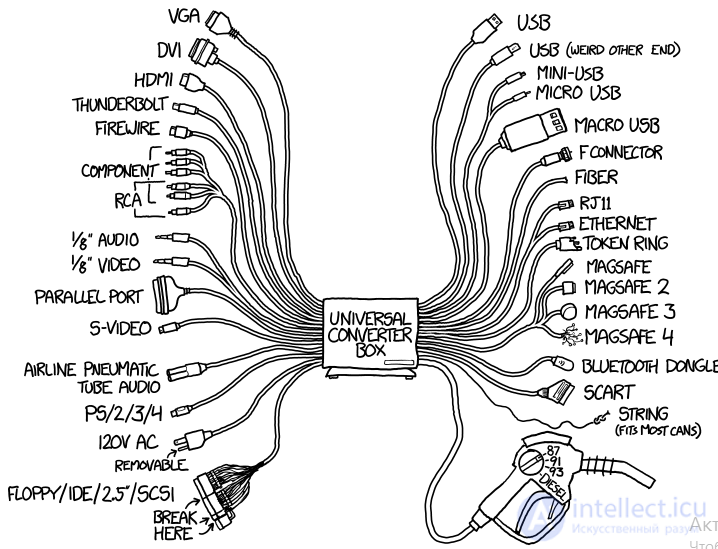
The situation is familiar to those who once built their own computers or upgraded them. Over the past 20–30 years, we have watched many generations of buses and ports come and go, almost none of which were backward compatible with the previous ones. Literally all the connectors on the motherboard have changed, and more than once: processor sockets, video card and RAM buses, connectors for connecting drives and peripherals.
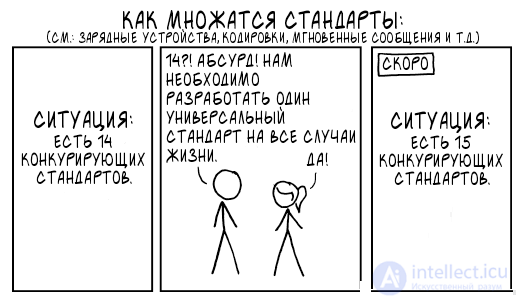
The unhealthy leapfrogging in the world of processors continues to this day: perfectly capable models that could run and run cannot be installed on new motherboards a few years later. Manufacturers find it hard to resist the temptation to regularly render users' hardware stockpiles useless, forcing them to spend money on new models. The absence of backward compatibility is no comfort when a processor bought three years ago has to be replaced with practically the same one, because the motherboard has died.
A universal connector designed to transfer both data and power is capable of becoming the only port on a device — and this is the undeniable plus of USB Type-C. One can come to terms with the absence of backward compatibility in gadgets, and even note some pluses (higher data transfer speed and different power parameters), but in the software realm the incompatibility of new versions with old ones is felt more painfully. This is especially true of enterprise products, whose cost and impact on business processes are too great.
In the PC ecosystem, games have been backward compatible for decades. Utilities like DOSBox allow us to play even the earliest PC releases. The compatibility factor, in which moving to a new version of a system is very likely not to cause problems, seems to have played a role in Windows' current dominance. Yes, as a result, 32-bit versions of Windows supported running 16-bit Windows software and some MS-DOS software (and in 64-bit versions, correspondingly, 32-bit programs run), but Microsoft ended up with an enormous, heavy platform that even has bug compatibility.
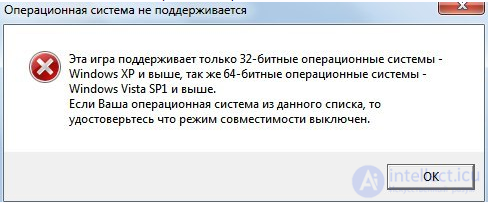
And how are things with consoles?
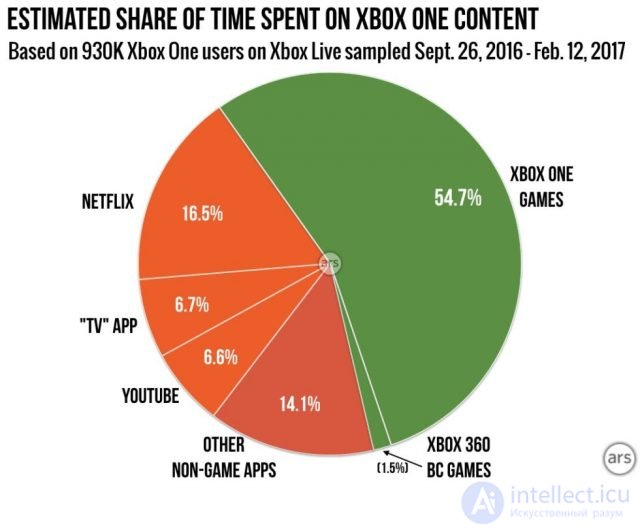
An Ars Technica report showed how Xbox One and Xbox 360 users use their devices. Interestingly, the data from the report on Microsoft's console aligns with the opinion of Sony, which does not regard backward compatibility in the PlayStation 4 as something important. According to Jim Ryan, head of Sony Interactive Entertainment Europe, this feature is talked about more than it is actually used. Although Sony did indeed provide the ability to download PS1 and PS2 games on the PS4.
Some sites conducted their own surveys ahead of the release of the Xbox One and PS4 — at the time it was noted that many players stated a desire for backward compatibility. Microsoft drew a lot of attention to backward compatibility with the Xbox One. The feature was generally well implemented, but it does not particularly attract gamers now.
The Nintendo DS and Wii lineups also have many examples of backward compatibility.
Game developers met the companies' efforts with more enthusiasm — there is no longer a need to learn the architecture from scratch to take advantage of new console hardware. Backward compatibility makes it relatively easy to support releases for all devices built on a common architecture.
Every popular programming language has a clear evolution, most of its life marked by version: you have Java 5, 8, etc., PHP 5.1, 5.2, 7.3, etc. Each new version fixes bugs and adds features, but if a language (or platform) has fundamental flaws, then developers either avoid them (if they can) or learn to live with them.
Language developers receive a lot of feedback from programmers who use one language or another in their work. It seems that one day a version of the language will come out in which all the problems disappear. But that does not happen. Why is that? One reason — backward compatibility.
The popular PHP has flaws, and those who have worked with it for a long time know perfectly well how to get around all the language's traps and pitfalls. Now suppose that in a new version of the language all the downsides were fixed, but backward compatibility was lost. As a result, the developer spends time updating the code to the current version of PHP. The very time that could have been spent fulfilling client requests or implementing new features.
Given these problems, the motive of those who do not want to move to a new version of PHP, even if it is better, clearer, safer, and so on, is understandable. You may say that this is a hypothetical example. Perhaps… But there are still programmers in the world who work in COBOL to this day! The language appeared in 1958. By 1997, about 240 billion lines of COBOL code were actively in use, and code in this language processed about 90% of the world's financial transactions and 75% of commercial transactions. The most interesting thing — is the language's amazing compatibility: the COBOL that was used in the 60s can also run on modern hardware.
There are products that fundamentally cannot break backward compatibility, because doing so would put an end to them. For example, Java: the main area of application of this language — is business applications, an astronomical amount of code has been written around the world, including in huge enterprise codebases. Code written 20 years ago still works. And if tomorrow a version of Java came out in which the developers piled on fantastic features but without backward compatibility, then no one would invest very large sums of money in developing serious — and expensive — applications anymore. So Oracle would have to either carry the burden of old versions for the rest of its life, or open the way to innovations, but in doing so lose a large share of clients. The corporation itself would not agree to a third option — maintaining two branches of Java simultaneously, with full-fledged support and development.
At one time, the developers of Python broke backward compatibility, thereby angering a lot of users. Most programmers did not consider Python 2.x «buggy» or as containing «fundamental flaws». They did not have the kind of complaints that arise among PHP developers.
Today the language community is split into two camps, with the mass of ready-made libraries for the second version keeping many from migrating to the third, even though the latter brought a number of strong improvements to the language. As a result, the opinion took hold that «Python 3 is the worst thing that could have happened to the Python community».
The problem has a flip side as well — Python 3 was released in December 2008, but support for the language in the Django framework did not appear until five years later.
Although there is no 100% compatibility between C and C++, even C++ has backward compatibility with very early features of the language (including some features inherited directly from C).
Often, to achieve backward compatibility, deprecation and one-time converters of data and data structures are used in order to bring them up to date.
Deprecation (literally «disapproval», a declaration that a feature is discouraged or obsolete) — in programming, an indication that the use of some part of a program, procedure, or programming language is discouraged. Most often, some method standard for the given programming language or code documentation system is used to indicate this, for example a service label (tag), a special language construct, and so on. In the community of computer program and documentation developers, the term deprecation can denote a particular stage in the software life cycle, the replacement of obsolete parts with new ones.
A part of a program or a method marked as deprecated is questionable, and its further use is unjustified. This part works in the current version of the software, but may produce an error message as a warning. This serves to warn the user that this part of the code may be removed in future releases of the program.
The main reason for declaring part of the code (functions, methods, classes) as deprecated is the desire to improve the code and, at the same time, to gradually get rid of outdated approaches over time. Leaving old code alongside new code would lead to an unjustified bloating of the software product, which would complicate its support, study, and use. At the same time, simply removing obsolete parts of the code is undesirable, since this would break backward compatibility for users of the software.
When marking code as deprecated, a recommended replacement is usually indicated, for example a new component with a different programming interface but essentially the same functionality. But sometimes a part of the code is declared deprecated without any replacement at all. This usually happens when bugs are discovered that are fundamentally unfixable while retaining the approach used.
When parts of a program depend on a part marked as deprecated, the programmer should rewrite the code to eliminate the use of the part scheduled for removal. It is also recommended to rewrite the code of existing programs, especially if they already depend on the version in which the functionality recommended as a replacement appeared.
Sometimes a problem arises simply because we are unable to predict the future. In 1981, the «Internet» was enough for anyone and everyone — the first widely used version of the IPv4 protocol was described, using 32-bit addresses, limiting the address space to 4,294,967,296 possible unique addresses.
4.3 billion IPv4 addresses looked more than sufficient for ARPANet. IPv6 appeared in 1998 (described in RFC2460), but the protocol did not gain popularity. It took more than ten years for the problem of the limited number of addresses to receive attention. And it was then that it became clear that the gigantic base of developed and installed IPv4 software and hardware required maintaining backward compatibility of IPv6 with IPv4.
«Suddenly» it was discovered that IPv6 had been developed without full compatibility with the previous version — a node supporting only IPv6 cannot connect to a node operating only over IPv4. The transition from IPv4 to IPv6 required a «dual-stack» phase, during which a host computer would interact with both protocol stacks simultaneously, using the IPv6 protocol stack to interact with other IPv6 host computers, and the IPv4 protocol stack to interact with other IPv4 host computers.
Some switches, routers, and security devices also turned out to be incompatible with IPv6. Thus, the process of transitioning to IPv6 encountered many problems, which are proposed to be solved in different ways. None of the existing solutions can be called ideal, but each of them will find its own use.
When you start wondering whether the new version needs to maintain compatibility (c)
In software, backward compatibility, as a rule, implies a strong increase in the size of files and of the entire application, but the most important thing is not that. Backward compatibility usually requires carrying historical baggage along, which in interpreted languages often leads to noticeable losses in performance.
With backward compatibility, the codebase becomes bloated, the application's architecture becomes more complex, and upgrading applications becomes more difficult. A desire arises to cast off the old and write compact, lightweight code that uses the most modern developments.
For example, the new version of Skype can no longer establish voice and video connections with versions for Windows XP. And, of course, some users want to ignore the new release, preferring to stay on the old but familiar one.
Yes, backward compatibility today is considered one of the most important conditions in developing software products. It allows users to move to new products as painlessly — and therefore comfortably — as possible. Game console manufacturers, for example, find it important to ensure backward compatibility of new games with old gadgets, in order to maximize the audience of potential buyers. But at the same time, it is harder for developers to achieve a new level of realism in graphics and physics, which, ironically, may reduce the system's appeal to gamers.
We ourselves periodically encounter similar questions. When writing the Hotbox cloud solution for «hot» data storage, we could have created everything entirely from «scratch» or use the existing developments in Mail.Ru's Mail and Cloud. Writing from scratch makes it possible to get rid of all the accumulated technical debt at once, but it takes a long time. The downside of using the current developments is that we remain on the Perl language, for which it is hard to find new developers due to its not being very popular. But the pluses of this decision substantially outweigh: in this language we have enormous expertise and tools honed over the years. Since it was critical to release the product on time — we decided to settle on using Perl.
The result was a product that, at the moment, fully satisfies us. In this case, «backward compatibility» extended beyond just one service — we made compatibility not only with the developments in other projects, but also with our own experience. Realizing this fact leads to a simple thought: a new language, a new version of a program, or a new gadget is not always the universal solution to the task before you.

Comments