
Lecture
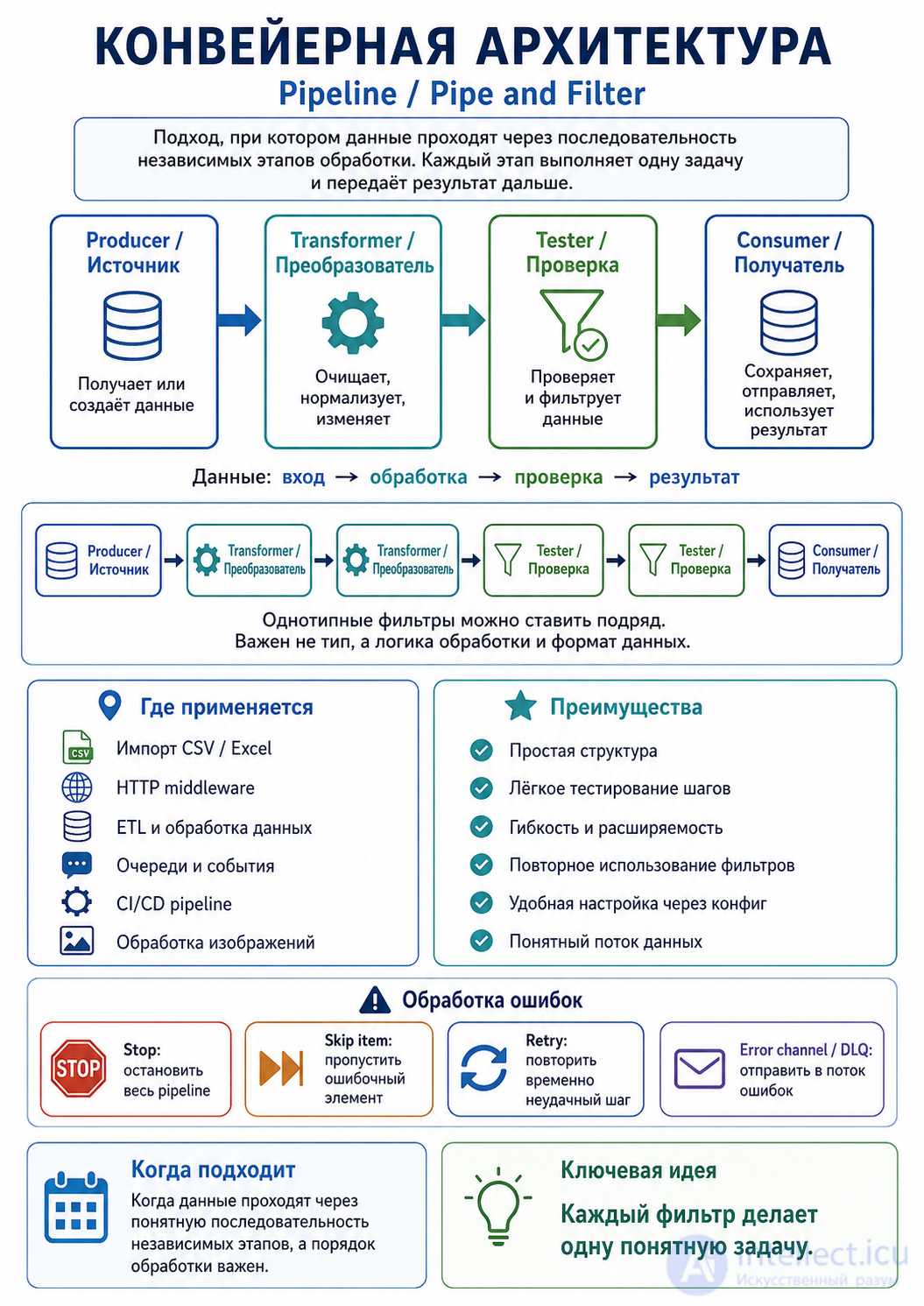
Pipeline architecture — is a way of building a program in which data passes through a chain of independent handlers.
It is often called:
The main idea:
Input data → step 1 → step 2 → step 3 → result
Each step performs one specific operation and passes the result on.
Imagine a factory assembly line:
Raw materials → Cleaning → Processing → Quality check → Packaging
Programming uses a similar scheme:
Raw data → Cleaning → Transformation → Validation → Saving
For example, importing users from a CSV:
CSV file
   ↓
Read the file
   ↓
Parse the CSV
   ↓
Trim whitespace
   ↓
Normalize email
   ↓
Check required fields
   ↓
Save to the database
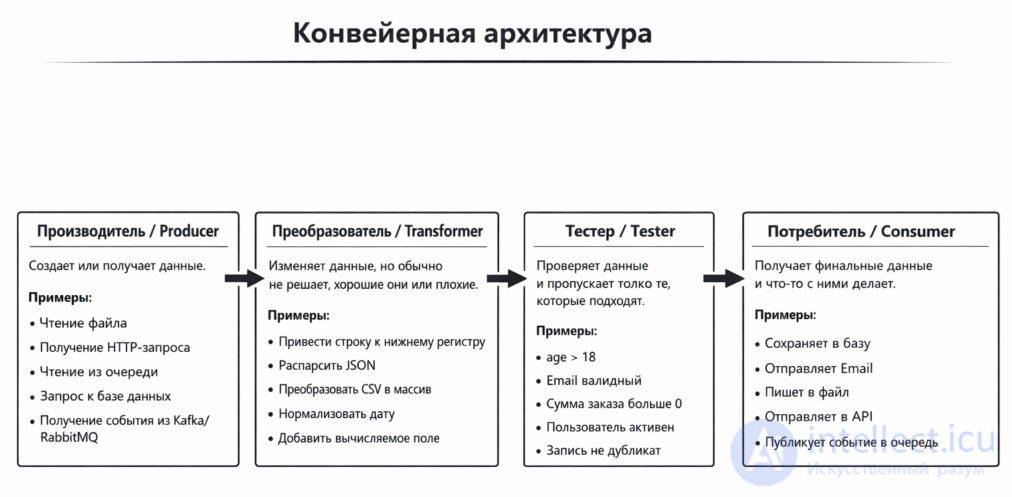
This architecture usually distinguishes several roles.
Creates or obtains data.
Examples:
- reads a file
- accepts an HTTP request
- receives a message from a queue
- reads data from a database
- fetches data from an external API
Example:
ReadCsvFile
Modifies the data.
Examples:
- trimming strings
- converting email to lowercase
- converting JSON into an array
- normalizing a phone number
- adding a computed field
Example:
NormalizeEmail
Checks the data and decides whether it passes further or not.
Examples:
- is the email valid?
- is the name field filled in?
- is age greater than 18?
- is the record not a duplicate?
Example:
ValidateEmail
Receives the final result and does something with it.
Examples:
- saves to a database
- sends an email
- writes a log
- sends data to a queue
- returns an HTTP response
Example:
SaveToDatabase
But this is not a hard rule.
You can have many transformers:
Producer → Transformer → Transformer → Transformer → Consumer
You can have many checks:
Producer → Tester → Tester → Tester → Consumer
You can even build a pipeline out of the middle alone:
Normalize → Validate → Format
An example of a case with several Producers — sometimes a pipeline gathers data from several sources:
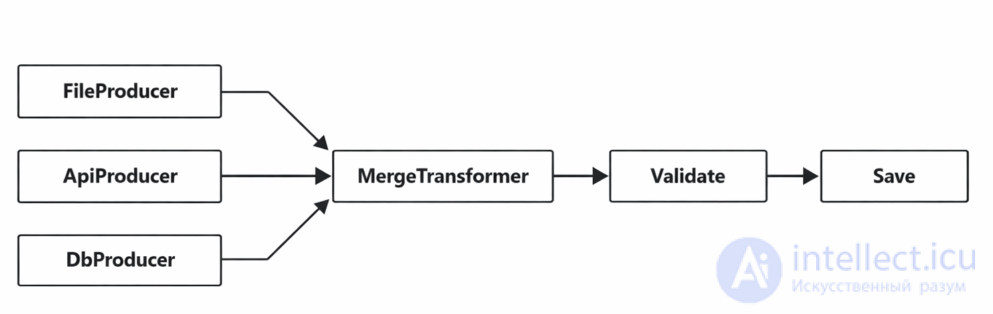
But this is no longer a simple linear pipeline — it is a branching pipeline / pipeline graph.
An example of a case with several Consumers. For instance, after processing the data you can:
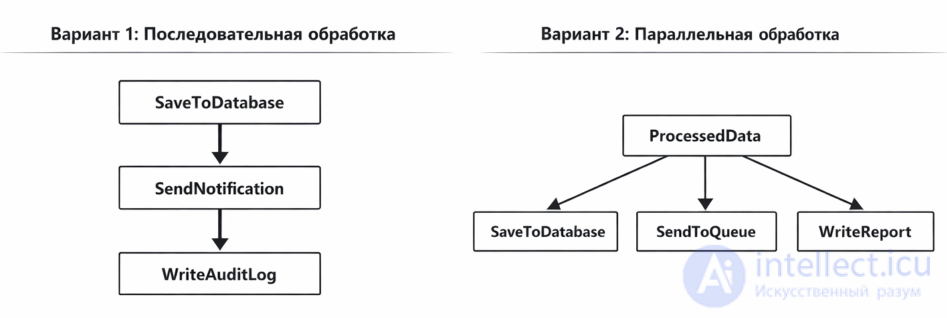
Sequentially or in parallel
Suppose we have an array of users:
$users = [
    ['name' => ' Ivan ', 'email' => ' IVAN@EXAMPLE.COM '],
    ['name' => '', 'email' => 'wrong-email'],
    ['name' => ' Anna ', 'email' => ' ANNA@EXAMPLE.COM '],
];
Let's create several filters.
interface PipelineStep
{
    public function handle(array $items): array;
}
class TrimFields implements PipelineStep
{
    public function handle(array $items): array
    {
        return array_map(function ($item) {
            $item['name'] = trim($item['name']);
            $item['email'] = trim($item['email']);

            return $item;
        }, $items);
    }
}
class NormalizeEmail implements PipelineStep
{
    public function handle(array $items): array
    {
        return array_map(function ($item) {
            $item['email'] = strtolower($item['email']);

            return $item;
        }, $items);
    }
}
class ValidateUsers implements PipelineStep
{
    public function handle(array $items): array
    {
        return array_filter($items, function ($item) {
            return $item['name'] !== ''
                && filter_var($item['email'], FILTER_VALIDATE_EMAIL);
        });
    }
}
class Pipeline
{
    private array $steps;

    public function __construct(array $steps)
    {
        $this->steps = $steps;
    }

    public function run(array $input): array
    {
        $data = $input;

        foreach ($this->steps as $step) {
            $data = $step->handle($data);
        }

        return $data;
    }
}
$pipeline = new Pipeline([
    new TrimFields(),
    new NormalizeEmail(),
    new ValidateUsers(),
]);

$result = $pipeline->run($users);

print_r($result);
The result will look roughly like this:
[
    ['name' => 'Ivan', 'email' => 'ivan@example.com'],
    ['name' => 'Anna', 'email' => 'anna@example.com'],
]
The user with an empty name and an invalid email was filtered out.
const producer = () => [1, 2, 3, 4, 5];

const transformer = (items) => items.map(x => x * 2);

const tester = (items) => items.filter(x => x > 5);

const consumer = (items) => {
  console.log(items);
};

const data = producer();
const transformed = transformer(data);
const tested = tester(transformed);
consumer(tested);
Result:
[6, 8, 10]
So the flow looks like this:
Producer → Transformer → Tester → Consumer
A pipeline can be described not only in code, but also through configuration.
For example:
pipeline:
  - TrimFields
  - NormalizeEmail
  - ValidateUsers
  - SaveUsersToDatabase
And the code will read the config and run the required classes.
This approach is convenient when you often need to change the order of the steps without modifying the main code.
In a pipeline architecture, errors can be handled in different ways.
ReadFile → ParseCsv → Normalize → Save
              ↑
             error
If the CSV is corrupted, there is no point in going further.
try {
    $result = $pipeline->run($input);
} catch (Throwable $e) {
    echo "Pipeline failed: " . $e->getMessage();
}
Sometimes a pipeline should fail immediately.
For example:
- a required config is missing
- an invalid API key
- no database connection
- the structure of the input data is broken
This is called fail fast.
That is, the system does not try to «somehow carry on», but reports right away:
Pipeline cannot continue
For example, one CSV row is bad but the rest are fine.
1000 rows → 980 processed → 20 errors saved to a report
Valid data   → SaveToDatabase
Invalid data → ErrorReport
This approach is often used in imports, ETL and queues.
If the error is temporary:
you can try repeating the step several times.
In queue-based systems such as RabbitMQ, Kafka or AWS SQS, faulty messages are often sent to a Dead Letter Queue.
That is, the message is not deleted forever but moved to a special error queue.
This is needed so that later you can:
- look into the cause of the error- fix the data- re-run the processing- find the bug in the codeIn real-world architectures, an error-handling strategy is often defined for each step.
For example:
pipeline:
  - step: CsvParser
    on_error: stop

  - step: UserNormalizer
    on_error: skip_item

  - step: EmailValidator
    on_error: send_to_error_channel

  - step: DatabaseSaver
    on_error: retry_then_stop
That is:
CsvParser failed → stop the pipeline
UserNormalizer failed on one row → skip the row
EmailValidator found an error → send it to the error list
DatabaseSaver failed → retry 3 times, then stop
In a pipeline architecture, error handling is usually built around one of these options:
1. Stop the entire pipeline
2. Skip the faulty item
3. Send the error to a separate error channel
4. Retry the step several times
5. Send the message to a Dead Letter Queue
6. Return a Result object instead of an exception
7. Handle the error centrally in the PipelineRunner
The most practical option:
Critical errors → stop the pipeline.
Errors in individual records → send to the error channel.
Temporary errors → retry.
Unrecoverable messages → dead letter queue.
In other words, the pipeline architecture does not require a single universal approach. It usually defines an error-handling policy for each filter in advance.
It comes up very often.
In Laravel, Express.js, Symfony and other frameworks, a request passes through a chain of middleware:
Request
   ↓
CheckMaintenanceMode
   ↓
StartSession
   ↓
Authenticate
   ↓
CheckPermissions
   ↓
Controller
   ↓
Response
This also resembles a pipeline.
Commit
   ↓
Install dependencies
   ↓
Run tests
   ↓
Build application
   ↓
Deploy
Each step receives the result of the previous one and either continues execution or halts the process.
Original image
   ↓
Resize
   ↓
Compress
   ↓
Add watermark
   ↓
Save
Each step is responsible for a single task.
Each filter can be tested separately.
You can easily add a new step:
NormalizePhone
And get:
TrimFields → NormalizeEmail → NormalizePhone → ValidateUsers
A single filter can be used in different pipelines.
For example:
NormalizeEmail
can be used in user registration, in CSV import, and in profile updates.
You can change the order of the steps through a config:
pipeline:
  - TrimFields
  - NormalizeEmail
  - ValidateUsers
If there are a great many steps, it is difficult to tell exactly where the data changed.
Step1 → Step2 → Step3 → Step4 → Step5 → Step6 → Step7...
Solution:
If every step creates new objects or copies large arrays, performance may degrade.
If the logic branches heavily:
if A → B → C
if D → E → F
if G → H → I
then a simple linear pipeline can become awkward.
In that case it is better to use:
- workflow engine
- state machine
- event-driven architecture
- orchestration service
If you create too many tiny steps, the code can become fragmented.
Bad:
Sometimes it is better to merge closely related operations:
The pipeline architecture resembles Chain of Responsibility, but there is a difference.
Each step usually processes the data and passes it on.
A → B → C → D
Each handler can decide whether to handle the request or pass it on.
A did not handle it → B did not handle it → C handled it → stop
Chain of Responsibility example:
Support Level 1 → Support Level 2 → Support Level 3
Pipeline example:
Parse → Normalize → Validate → Save
The pipeline architecture is a good fit when:
Examples of well-suited tasks:
It is better not to use a simple pipeline if:
For example, for a complex order lifecycle it may be better to use:
State Machine
And for interaction between many services:
Saga / Orchestration / Event-driven architecture
Laravel has a built-in Pipeline.
The idea is roughly this:
use Illuminate\Pipeline\Pipeline;

$result = app(Pipeline::class)
    ->send($userData)
    ->through([
        TrimFields::class,
        NormalizeEmail::class,
        ValidateUser::class,
    ])
    ->thenReturn();
Each class can have a handle method:
class NormalizeEmail
{
    public function handle(array $data, Closure $next)
    {
        $data['email'] = strtolower(trim($data['email']));

        return $next($data);
    }
}
This is a ready-made example of the pipeline approach in a real framework.
Pipeline architecture — is an approach in which data passes through a sequence of independent steps.
Data source → processing → validation → result
The most important points:
Very briefly:
Pipeline = data travels along a chain of handlers.
Each handler does something and passes the result on.

Comments