
Lecture
Это окончание невероятной информации про компьютерная программа.
...
execution is performed.
The levels of cohesion, from worst to best, are:
function read_sales_record_print_next_line_convert_to_float(). In practice, coincidental cohesion arises when management imposes foolish rules. For example: «Every module will have between 35 and 50 executable statements». function perform_arithmetic( perform_addition, a, b ).function initialize_variables_and_open_files(). Another example is stage_one(), stage_two(), ...function read_part_number_update_employee_record().function read_part_number_update_sales_record().The levels of coupling, from worst to best, are:
perform_arithmetic( perform_addition, a, b ). Instead, control should be exercised through the composition of the returned object.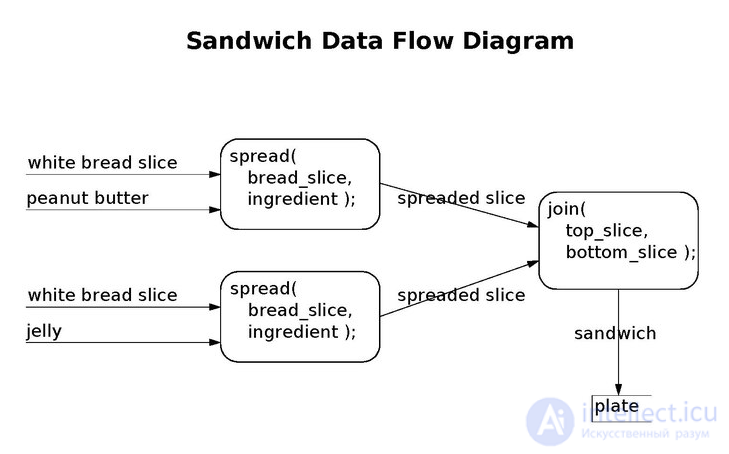
An example of a function-level data flow diagram
Data flow analysis is a design method used to achieve modules with functional cohesion and data coupling. The input to the method is a data flow diagram. A data flow diagram is a set of ovals representing modules. Each module's name is displayed inside its oval. Modules may be at the executable level or the function level.
The diagram also has arrows connecting modules to one another. Arrows pointing into modules represent a set of inputs. Each module should have only one arrow pointing out of it, to represent its single output object. (Optionally, an additional exception arrow points out.) A chain of ovals will display the entire algorithm. Input modules should begin the diagram. Input modules should connect to transform modules. Transform modules should connect to output modules.
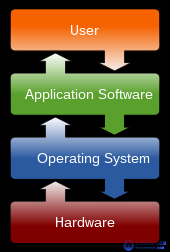
A diagram showing how the user interacts with application software. The application software interacts with the operating system, which interacts with the hardware.
Computer programs can be classified by functional criteria. The main functional categories are application software and system software. System software includes the operating system, which couples the computer's hardware with the application software. The purpose of the operating system is to create an environment in which application software executes conveniently and efficiently. Both application and system software run utility programs. At the hardware level, a microcode program controls the circuitry of the central processing unit.
Application software is the key to unlocking the potential of a computer system. Enterprise software brings together accounting, personnel, customer, and vendor applications. Examples include enterprise resource planning, customer relationship management, and supply chain management software.
Enterprise applications may be developed in-house as one-of-a-kind proprietary software. Alternatively, they can be purchased as off-the-shelf software. Purchased software can be modified to provide custom software. If an application is customized, then either the company's own resources are used or the work is outsourced. Outsourced software development may be carried out by the original software vendor or by a third-party developer.
The potential advantages of in-house software are functionality and the ability to develop reports that match specifications exactly. Management can also take part in the development process and maintain a certain level of control. Management may decide to counter a competitor's new initiative or to implement a customer or supplier requirement. A merger or acquisition may require changes to enterprise software. The potential drawbacks of in-house software are the significant investment of time and resources. In addition, there may be risks related to features and performance.
The potential advantages of off-the-shelf software are that the initial cost can be determined, the basic needs should be met, and its performance and reliability have a track record. The potential drawbacks of off-the-shelf software are that it may have unnecessary features that confuse end users, it may lack features the enterprise needs, and its data flow may not match the enterprise's workflows.
One approach to obtaining a specialized enterprise application cost-effectively is through an application service provider. Specialized companies provide the hardware, the custom software, and end-user support. They can accelerate the development of new applications because they have skilled information systems staff. The biggest advantage is that it frees internal resources from staffing and managing complex computer projects. Many application service providers target small, fast-growing companies with limited information systems resources. Larger companies with large systems, on the other hand, are more likely to have their own technical infrastructure. One risk is having to entrust confidential information to an outside organization. Another risk is having to trust the reliability of the provider's infrastructure. [
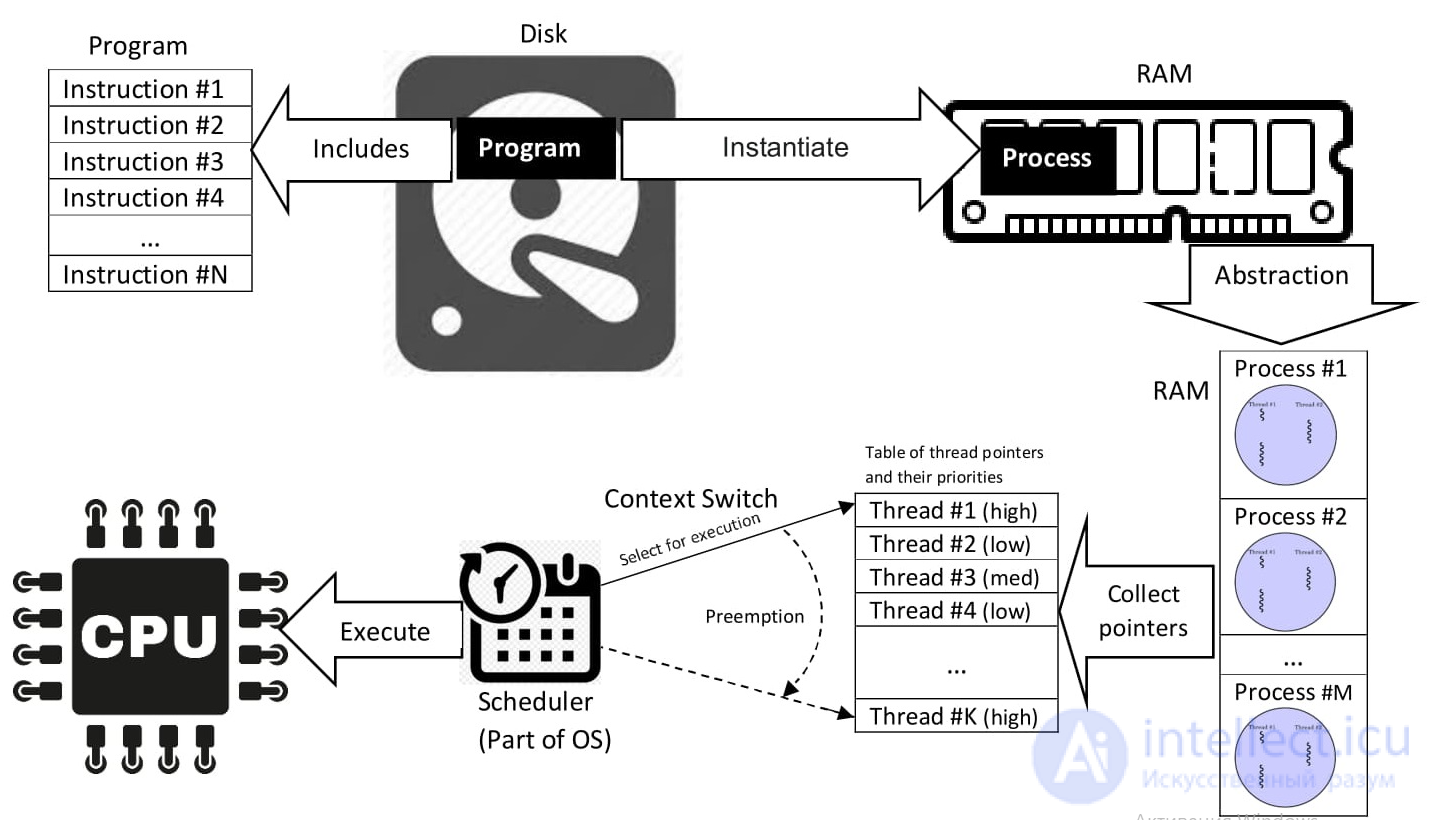
Program, process, and thread scheduling, preemption, context switching
An operating system is low-level software that supports a computer's basic functions, such as process scheduling and controlling peripheral devices.
In the 1950s, a programmer, who was also the operator, wrote a program and ran it. After execution finished, the output could be printed or written to paper tape or cards for later processing. More often than not, the program did not work. The programmer then looked at the console lights and fiddled with the console switches. If less lucky, a memory dump was printed for further study. In the 1960s, programmers reduced the amount of time wasted by automating the operator's job. A program called an operating system was kept in the computer at all times.
The term «operating system» can refer to two levels of software. The operating system may refer to the kernel program, which manages processes, memory, and devices. In a broader sense, the operating system may refer to the entire package of central software. The package includes the kernel program, a command-line interpreter, a graphical user interface, utility programs, and an editor.
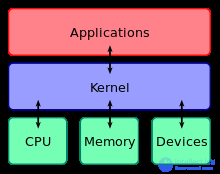
The kernel connects application software to the computer's hardware.
The kernel's primary purpose is to manage the computer's limited resources:
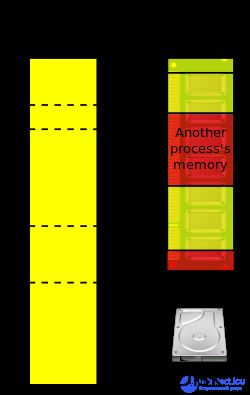
Physical memory is scattered across RAM and the hard disk. Virtual memory appears as one contiguous block.
Originally, operating systems were programmed in assembly language; however, modern operating systems are usually written in higher-level languages such as C, Objective-C, and Swift.
A utility program is intended to assist with system administration and software execution. Operating systems run hardware utility programs that check the state of disks, memory, speakers, and printers. A utility can optimize the placement of a file on a crowded disk. System utilities monitor hardware and network performance. When a metric falls outside the acceptable range, an alert is triggered.
Utility programs include compression programs, so that data files are stored in less disk space. Compressed programs also save time when transferring data files over a network. Utility programs can sort and merge data sets. Utility programs detect computer viruses.

NOT gate

NAND gate

NOR gate

AND gate

OR gate
A microcode program is a lower-level interpreter that controls the data path of software-driven computers. (Advances in hardware have migrated these operations into hardware execution circuits.) Microcode instructions allow the programmer to more easily implement the digital logic level — the computer's actual hardware. The digital logic level is the boundary between computer science and computer engineering.
A logic gate is a tiny transistor that can return one of two signals: on or off.
These five gates form the building blocks of binary algebra — the computer's digital logic functions.
Microcode instructions are mnemonics that programmers can use to execute digital logic functions instead of forming them in binary algebra. They are stored in the central processing unit's (CPU) control store. These hardware-level instructions move data throughout the data path.
The microinstruction cycle begins when the microsequencer uses its microprogram counter to fetch the next machine instruction from random-access memory. The next step is to decode the machine instruction by selecting the appropriate output line of the hardware module. [147] The final step is to execute the instruction using the hardware module's set of gates.
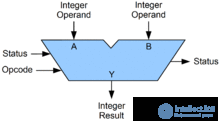
Symbolic representation of an ALU
Instructions that perform arithmetic are passed through the arithmetic logic unit (ALU). [148] The ALU has circuits for performing elementary operations of addition, shifting, and comparison of integers. By combining and channeling elementary operations through the ALU, the CPU performs complex arithmetic.
Microcode instructions move data between the CPU and the memory controller. The memory controller's microcode instructions operate two registers. The memory address register is used to access the address of each memory cell. The memory data register is used to set and read the contents of each cell. [149]
Microcode instructions move data between the CPU and a number of computer buses. The disk controller bus writes to and reads from hard disks. Data is also transferred between the CPU and other functional units over the Peripheral Component Interconnect Express bus. [150]
Часть 1 The Computer Program: Its Characteristics and Ways to Describe It
Часть 2 Functional categories - The Computer Program: Its Characteristics and Ways

Comments