
Lecture 99 min.
Это продолжение увлекательной статьи про идеальный код.
...
the first letter of each new word is capitalized.
If you mix these techniques, then sooner or later you can end up in an awkward situation. If you're working on a project that uses one of these techniques, then you need to follow its lead. It can also depend on the programming language. For example, most Java developers use camelCase, while PHP developers prefer underscores.
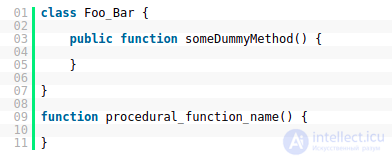
But even here, there's no getting by without a hybrid. Some developers use underscores when naming classes and methods (outside of classes), and use camelCase in the other cases:
DRY (Don’t Repeat Yourself). Also known as DIE: Duplication Is Evil.
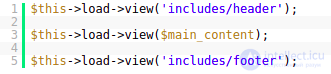
The main goal of any system, whether it's a web application or something else, is to automate repetitive tasks. This principle should be followed always and everywhere, especially if you're a developer. The same piece of code should not be repeated over and over again.
For example, most web applications consist of one or more pages. Understandably, these pages will contain identical elements. The header and footer are the most obvious examples. You'll be surprised, but many people still duplicate these elements on every page.
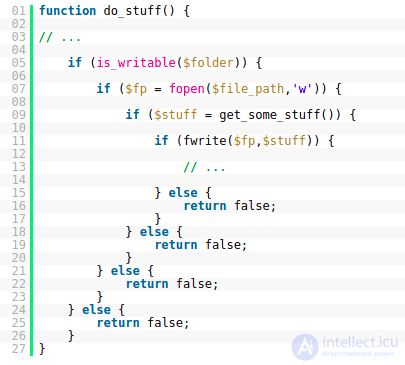
Code readability drops sharply if you have deep nesting.
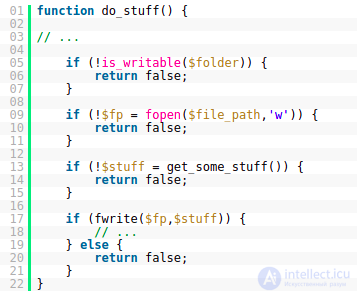
To fix the situation, you should rethink how your code works and optimize it:
Everyone knows that reading becomes much more pleasant when text is broken into columns. This is the main reason our newspapers look the way they do:

A similar technique can be applied to our code:
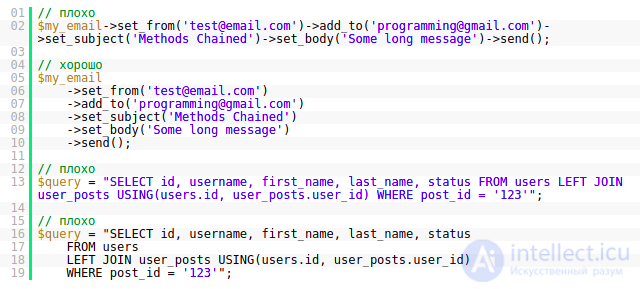
Most developers stick to a limit of 80 and 120 characters.
Technically, you can put all of your application's code in a single file :) But what will you do when you need to change or add something.
I remember my first projects, in which I included files. However, my organization was very poor. I would create an “inc” folder in which I placed several files: db.php and functions.php. As I wrote the application, this folder swelled and swelled, and in the end it was hard to understand what was where.
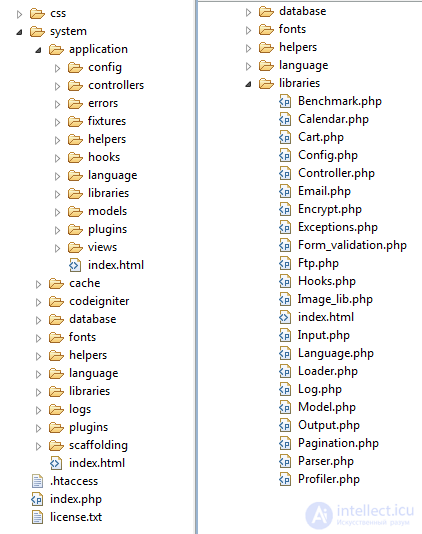
To solve this problem, it's better to use various kinds of frameworks, or at least stick to their structure. This is what a CodeIgniter project looks like:
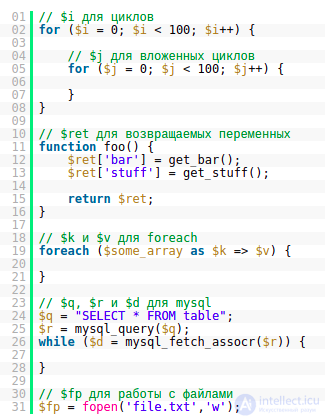
In general, variable names should be fully meaningful — that's the ideal case. For temporary variables you can make an exception.
Let's look at a few examples:
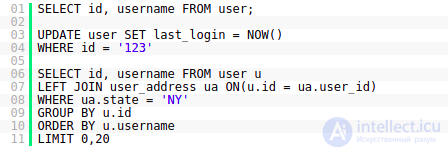
Most web applications interact with databases. If you write SQL queries yourself, then they too need to be formatted accordingly... There's nothing complicated here. Just write keywords in uppercase.
This is another principle that will help you write more understandable programs. It consists of preparing data in one place (say, models), and interacting with it in another.
When PHP was just starting out, it was more like a templating system. Projects in this language contained mixed HTML and PHP code. Now everything has changed, and everyone should move on to a new level of writing applications.
You can either develop some special style of your own, or make use of today's most popular tools.
Popular PHP Frameworks:
Templating Systems:
Popular CMSs
If you don't want to use a templating system, then you'll most likely have to develop your own style of embedding PHP code in HTML.
And here's an example:
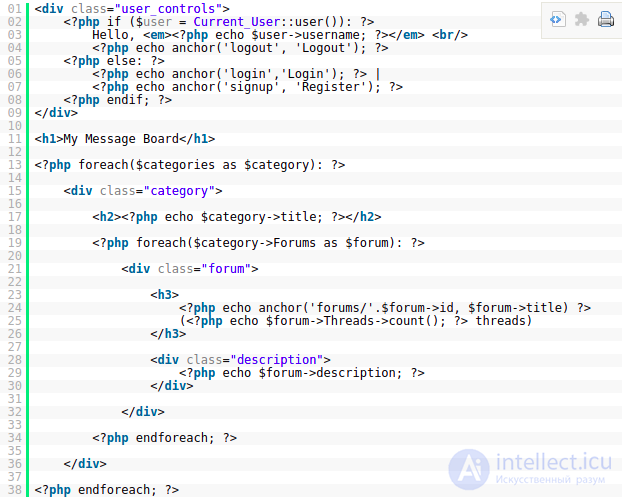
This technique will let you avoid extra braces. Such code also fits nicely into the HTML context.
Object-oriented programming will help you stick to a more or less clear structure, but that doesn't mean you have to abandon procedural principles of writing applications.
Objects are great for representing data. Example:
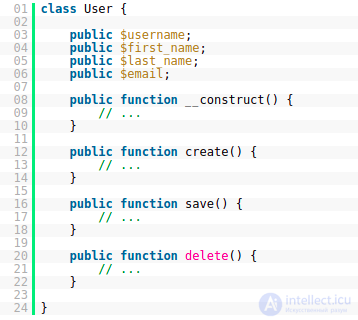
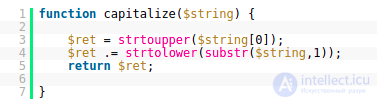
Procedural methods have their own specific usefulness.
15. Read Open Source Code
Open Source projects are usually written by a large number of developers. From this point of view, studying the code written in such projects can help you gain experience. So don't grudge the time for it.
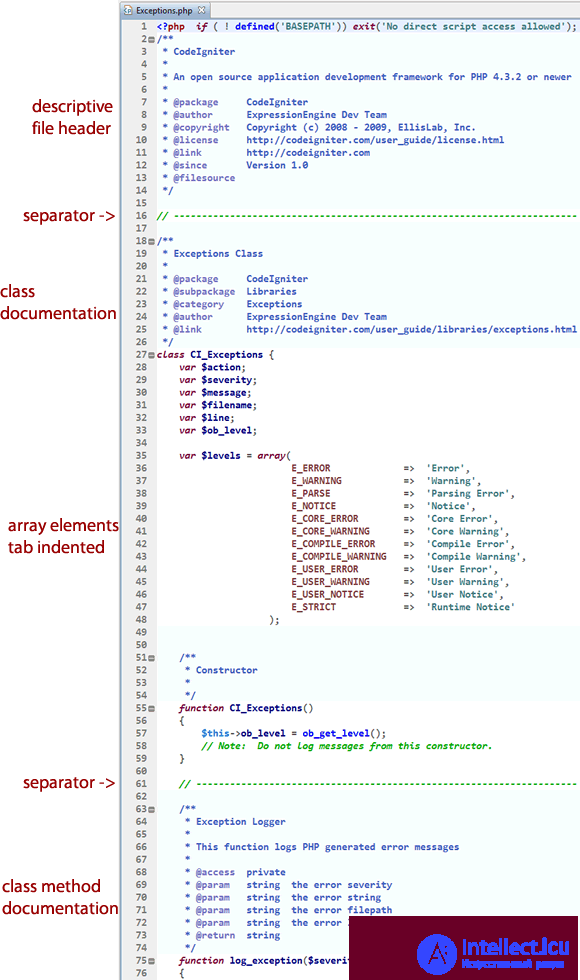
Refactoring is changing code without losing functionality. It can also be used to improve readability. There's no place here for fixing bugs or adding functionality. You just change the structure of your code a little.
Software engineering principles from Robert Martin's book « Clean Code» , adapted for JavaScript. This is not a style guide. It is a guide to producing readable, reusable, and refactorable software in JavaScript.
Not every principle set out in this document has to be strictly followed, and even fewer of them will be universally agreed upon. These are guidelines and nothing more, but they have been systematized over many years of collective experience by the authors of « Clean Code» .
Our craft of software engineering is just over 50 years old, and we are still learning a great deal. When software architecture is as old as architecture itself, maybe then we will have to follow stricter rules. For now, let these guidelines serve as a touchstone for assessing the quality of the JavaScript code that you and your team produce.
One more thing: knowing this won't immediately make you a better software developer, and working with these principles for many years doesn't mean you won't make mistakes. Every piece of code starts out as a first draft, like wet clay that takes its final shape. In the end, we iron out the flaws when we review it with our colleagues. Don't beat yourself up over first drafts that need improving. Instead, beat up the code!
Bad:
const yyyymmdstr = moment ( ) . format ( «YYYY / MM / DD» ) ;
Good:
const currentDate = moment ( ) . format ( «YYYY / MM / DD» ) ;
 Back to top
Bad:
getUserInfo ( ) ;
getClientData ( ) ;
getCustomerRecord ( ) ;
Good:
getUser ( ) ;
Back to top
We will read more code than we will ever write. It's important that the code we write is readable and searchable. By not naming the variables that ultimately carry meaning for understanding our program, we hurt our readers. Make your names searchable. Tools like buddy.js and ESLint can help identify unnamed constants.
Bad:
// What the heck is 86400000?
setTimeout ( blastOff ,  86400000 ) ;
Good:
// Declare them as named constants with a capital letter.
const  MILLISECONDS_PER_DAY  =  60  *  60  *  24  *  1000 ;  // 86400000;

setTimeout ( blastOff ,  MILLISECONDS_PER_DAY ) ;
Back to top
Bad:
const  address  =  "One Infinite Loop, Cupertino 95014" ;
const  cityZipCodeRegex  =  / ^ [ ^, \\ ] + [ , \\ \ s ] + ( . + ? ) \ s * ( \ d { 5 } ) ? $ / ;
saveCityZipCode (
  address . match ( cityZipCodeRegex ) [ 1 ] ,
  address .match ( cityZipCodeRegex ) [ 2 ]
) ;
Good:
const  address  =  "One Infinite Loop, Cupertino 95014" ;
const  cityZipCodeRegex  =  / ^ [ ^, \\ ] + [ , \\ \ s ] + ( . + ? ) \ s * ( \ d { 5 } ) ? $ / ;
const  [ _ ,  city ,  zipCode ]  =  address . match ( cityZipCodeRegex ) ||    ;
saveCityZipCode ( city ,  zipCode ) ;
Back to top
Explicit is better than implicit.
Bad:
const  location  =  [ "Austin" ,  "New York" ,  "San Francisco" ] ;
locations . forEach ( l  =>  {
  doStuff ( ) ;
  doSomeOtherStuff ( ) ;
  // ...
  // ...
  // ...
  // Wait, what is `l` for again?
  dispatch ( l ) ;
} ) ;
Good:
const  location  =  [ "Austin" ,  "New York" ,  "San Francisco" ] ;
locations . forEach ( location  =>  {
  doStuff ( ) ;
  doSomeOtherStuff ( ) ;
  // ...
  // ...
  // ...
  dispatch ( location ) ;
} ) ;
Back to top
If your class/object name tells you something, don't repeat it in the variable name.
Bad:
const  Car  =  {
  carMake : "Honda" ,
  carModel : "Accord" ,
  carColor : "Blue"
} ;

function  paintCar ( car ,  color )  {
  car . carColor  =  color ;
}
Good:
const  Car  =  {
  make : "Honda" ,
  model : "Accord" ,
  color : "Blue"
} ;

function  paintCar ( car ,  color )  {
  car . color  =  color ;
}
Back to top
Default arguments are often cleaner than short-circuiting. Keep in mind that if you use them, your function will only provide default values for undefined arguments. Other «falsy» values, such as '', "", false, null, 0, and NaN, will not be replaced with default values.
Bad:
function  createMicrobrewery ( name )  {
  const  breweryName  =  name  ||  "Hipster Brew Co." ;
  // ...
}
Good:
function  createMicrobrewery ( name  =  "Hipster Brew Co." )  {
  // ...
}
Back to top
Limiting the number of function parameters is incredibly important because it makes testing your function easier. Having more than three leads to a combinatorial explosion, where you have to test tons of different cases with each individual argument.
One or two arguments is the ideal case, and three should be avoided if possible. Anything more than that should be consolidated. Usually, if you have more than two arguments, your function is trying to do too much. In the cases where it isn't, most of the time a higher-level object will suffice as an argument.
Since JavaScript lets you create objects on the fly, without a lot of class boilerplate, you can use an object if you need a lot of arguments.
To make it obvious which properties the function expects, you can use the ES2015/ES6 destructuring syntax. This has several advantages:
Bad:
function  createMenu ( title ,  body ,  buttonText ,  cancellable )  {
  // ...
}

createMenu ( "Foo" ,  "Bar" ,  "Baz" ,  true ) ;
Good:
function  createMenu ( { title , body , buttonText , cancellable } )  {
  // ...
}

createMenu ( {
  title : "Foo" ,
  body : "Bar" ,
  buttonText : "Baz" ,
  cancellable : true
} ) ;
Back to top
This is by far the most important rule in software development. When functions do more than one thing, they are harder to compose, test, and reason about. When you can isolate a function to a single action, it can be easily refactored, and your code will read much cleaner. If you take nothing else away from this guide but this, you'll be ahead of many developers.
Bad:
function  emailClients ( clients )  {
  clients . forEach ( client  =>  {
    const  clientRecord  =  db . lookup ( client ) ;
    if  ( clientRecord . isActive ( ) )  {
      email ( client ) ;
    }
  } ) ;
}
Good:
function  emailActiveClients ( clients )  {
  clients . filter ( isActiveClient ) . forEach ( email ) ;
}

function  isActiveClient ( client )  {
  const  clientRecord  =  db . lookup ( client ) ;
  return  clientRecord . isActive ( ) ;
}
Back to top
Bad:
function  addToDate ( number ,  month )  {
  // ...
}

const  date  =  new  date ( ) ;

// It's hard to tell from the function name what is being added
addToDate ( date ,  1 ) ;
Good:
function  addMonthToDate ( month ,  number )  {
  // ...
}

const  date  =  new  date ( ) ;
addMonthToDate ( 1 ,  date ) ;
Back to top
When you have more than one level of abstraction, your function is usually doing too much. Splitting up functions leads to reusability and easier testing.
Bad:
function  parseBetterJSAlternative ( code )  {
  const  REGEXES  =  [
    // ...
  ] ;

   statements  const =  code . split ( "" ) ;
  const  tokens  =    ;
  regexes . forEach ( REGEX  =>  {
    statements . forEach ( statement  =>  {
      // ...
    } ) ;
  } ) ;

  const  ast  =    ;
  tokens . forEach ( token  =>  {
    // lex ...
  } ) ;

  ast . forEach ( node  =>  {
    // parse ...
  } ) ;
}
Good:
function  parseBetterJSAlternative ( code )  {
  const  tokens  =  tokenize ( code ) ;
  const  syntaxTree  =  parse ( tokens ) ;
  syntaxTree . forEach ( node  =>  {
    // parse ...
  } ) ;
}

function  tokenize ( code )  {
  const  REGEXES  =  [
    // ...
  ] ;

   statements  const =  code . split ( "" ) ;
  const  tokens  =    ;
  regexes . forEach ( REGEX  =>  {
    statements . forEach ( statement  =>  {
      tokens . push ( / * ... * / ) ;
    } ) ;
  } ) ;

  return  tokens ;
}

function  parse ( tokens )  {
  const  syntaxTree  =    ;
  tokens . forEach ( token  =>  {
    syntaxTree . push ( / * ... * / ) ;
  } ) ;

  return  syntaxTree ;
}
Back to top
Do your best to avoid duplicate code. Duplicate code is bad because it means there is more than one place to change something if you need to change some logic.
Imagine you run a restaurant and you keep track of your inventory: all your tomatoes, onions, garlic, spices, and so on. If you have only one list, there's only one place to update!
Often you have duplicate code because you have two or more slightly different things that have a lot in common, but their differences force you to have two or more separate functions that do many of the same things. Removing duplicate code means creating an abstraction that can handle this set of different things with just one function/module/class.
Getting the abstraction right is crucial, which is why you should follow the SOLID principles laid out in the « Classes » section. Bad abstractions can be worse than duplicated code, so be careful! That said, if you can make a good abstraction, do it! Don't repeat yourself, or you'll find yourself updating multiple places any time you want to change one thing.
Bad:
function  showDeveloperList ( developers )  {
  developers . forEach ( developer  =>  {
    const  expectedSalary  =  developer . calculateExpectedSalary ( ) ;
    const  experience  =  developer . getExperience ( ) ;
    const  githubLink  =  developer . getGithubLink ( ) ;
    const  data  =  {
      expectedSalary ,
      experience ,
      githubLink
    } ;

    render ( data ) ;
  } ) ;
}

function  showManagerList ( managers )  {
  managers . forEach ( manager  =>  {
    const  expectedSalary  =  manager . calculateExpectedSalary ( ) ;
    const  experience  =  manager . getExperience ( ) ;
    const  portfolio  =  manager . getMBAProjects ( ) ;
    const  data  =  {
      expectedSalary ,
      experience,
      portfolio
    } ;

    render ( data ) ;
  } ) ;
}
Good:
function  showEmployeeList ( employees )  {
  employees . forEach ( employee  =>  {
    const  expectedSalary  =  employee . calculateExpectedSalary ( ) ;
    const  experience  =  employee . getExperience ( ) ;

    const  data  =  {
      expectedSalary ,
      experience
    } ;

    switch  ( employee . type )  {
      case  "manager" :
         data . portfolio  =  employee . getMBAProjects ( ) ;
        break ;
      case  «developer» :
         data . githubLink  =  employee . getGithubLink ( ) ;
        break ;
    }

    render ( data ) ;
  } ) ;
}
Back to top
Bad:
const  menuConfig  =  {
  title : null ,
  body : "Bar" ,
  buttonText : null ,
  cancellable : true
} ;

function  createMenu ( config )  {
  config . title  =  config . title  ||  «Foo» ;
  config . body  =  config . body  ||  «Bar» ;
  config . buttonText  =  config . buttonText  ||  «Baz» ;
  config . cancellable  =
    config . cancellable  ! ==  undefined ? config . cancellable :true ;
}

createMenu ( menuConfig ) ;
Good:
const  menuConfig  =  {
  title : "Order" ,
  // The user did not include the 'body' key
  buttonText : "Send" ,
  cancellable : true
} ;

function  createMenu ( config )  {
  let  finalConfig  =  Object . assign (
    {
      title : "Foo" ,
      body : "Bar" ,
      buttonText : "Baz" ,
       cancellable : true
    } ,
    config
  ) ;
  return  finalConfig
  // config now equals: {title: "Order", body: "Bar", buttonText: "Send", cancellable: true}
  // ...
}

createMenu ( menuConfig ) ;
Back to top
Flags tell your user that this function does more than one thing. Functions should do one thing. Split your functions apart if they follow different code paths based on a boolean.
Bad:
function  createFile ( name ,  temp )  {
  if  ( temp )  {
    fs . create ( `./temp/ $ { name } ` ) ;
  }  else  {
    fs . create ( name ) ;
  }
}
Good:
function  createFile ( name )  {
  fs . create ( name ) ;
}

function  createTempFile ( name )  {
  createFile ( `./temp/ $ { name } ` ) ;
}
Back to top
A function produces a side effect if it does anything other than take a value and return another value or values. A side effect might be writing to a file, changing some global variable, or accidentally wiring all your money to a stranger.
Now, you really do need to have side effects in a program sometimes. As in the previous example, you may need to write to a file. What you want to do is centralize where you do it. Don't have several functions and classes that write to a particular file. There is one service that does it. One single one.
The main thing is to avoid common pitfalls, such as sharing state between objects without any structure, using mutable data types that can be written to by anything, and not centralizing where your side effects occur. If you can do this, you'll be happier than the vast majority of other programmers.
Bad:
// Global variable referenced by the following function.
// If we had another function that used this name, now it would be an array and it could break it.
let  name  =  "Ryan McDermott" ;

function  splitIntoFirstAndLastName ( )  {
  name  =  name . split ( "" ) ;
}

splitIntoFirstAndLastName ( ) ;

console . log ( name ) ;  // ['Ryan', 'McDermott'];
Good:
function  splitIntoFirstAndLastName ( name )  {
  return  name . split ( "" ) ;
}

const  name  =  "Ryan McDermott" ;
const  newName  =  splitIntoFirstAndLastName ( name ) ;

console . log ( name ) ;  // 'Ryan McDermott';
console . log ( newName ) ;  // ['Ryan', 'McDermott'];
Back to top
In JavaScript, some values are unchangeable (immutable), and some are changeable (mutable). Objects and arrays are two kinds of mutable values, so it's important to handle them carefully when they are passed as function parameters. A JavaScript function can change an object's properties or alter the contents of an array, which can easily cause bugs elsewhere.
Suppose there is a function that takes an array parameter representing a shopping cart. If the function makes a change to this shopping-cart array — for example, by adding an item to buy — then any other function using that same cart array will be affected by that addition. This might be great, but it can also be bad. Let's imagine a bad situation:
The user clicks the «Buy» button, which calls a purchase function that spawns a network request and sends the cart array to the server. Because of a poor network connection, the purchase function has to keep retrying the request. And what if, in the meantime, the user accidentally clicks the «Add to Cart» button on an item they don't actually want, before the network request starts? If that happens and the network request begins, then the purchase function will send the accidentally added item, because the cart array was modified.
A great solution would be for the addItemToCart function to always clone the cart, edit it, and return the clone. This guarantees that changes won't affect functions that are still using the old cart.
There are two caveats to mention about this approach:
There may be cases where you really do want to modify the input object, but when you adopt this programming practice, you'll find that such cases are quite rare. Most things can be refactored so that there are no side effects!
Cloning large objects can be very expensive in terms of performance. Fortunately, in practice this isn't a big problem, because there are great libraries that let you use this programming approach quickly and without being as memory-intensive as it would be to manually clone objects and arrays.
Bad:
const  addItemToCart  =  ( cart ,  item )  =>  {
  cart . push ( { item ,  date : Date . now ( )  } ) ;
} ;
Good:
const  addItemToCart  =  ( cart ,  item )  =>  {
  return  [ ... cart ,  { item ,  date : Date . now ( )  } ] ;
} ;
Back to top
Polluting globals is a bad practice in JavaScript, because you could clash with another library, and the user of your API would be none the wiser until they get an exception in production. Let's think about an example: what if you want to extend JavaScript's native Array method to have a diff method that could show the difference between two arrays? You could write your new function on Array.prototype, but it could conflict with another library trying to do the same thing. What if that other library was just using diff to find the difference between the first and last elements of an array? This is why it would be much better to just use ES2015/ES6 classes and simply extend the Array global.
Bad:
Array . prototype . diff  =  function  diff ( compareArray )  {
  const  hash  =  new  Set ( compareArray ) ;
  return  this . filter ( elem  =>  ! hash . has ( elem ) ) ;
} ;
Good:
class  SuperArray  extends  Array  {
  diff ( comparisonArray )  {
    const  hash  =  new  Set ( comparisonArray ) ;
    return  this . filter ( elem  =>  ! hash . has ( elem ) ) ;
  }
}
Back to top
JavaScript isn't a functional language the way Haskell is, but it has a functional flavor. Functional languages can be cleaner and easier to test. Favor this style of programming when you can.
Bad:
const  programmerOutput  =  [
  {
    name : "Uncle Bobby" ,
    linesOfCode : 500
  } ,
  {
    name : "Suzie Q" ,
    linesOfCode : 1500
  } ,
  {
    name : "Jimmy Gosling" ,
    linesOfCode : 150
  } ,
  {
    name : "Gracie Hopper» ,
    linesOfCode : 1000
  }
] ;

let  totalOutput  =  0 ;

for  ( let  i  =  0 ;  i  <  programmerOutput . length ;  i ++ )  {
  totalOutput  + =  programmerOutput [ i ] . linesOfCode ;
}
Good:
const  programmerOutput  =  [
  {
    name : "Uncle Bobby" ,
    linesOfCode : 500
  } ,
  {
    name : "Suzie Q" ,
    linesOfCode : 1500
  } ,
  {
    name : "Jimmy Gosling" ,
    linesOfCode : 150
  } ,
  {
    name : "Gracie Hopper» ,
    linesOfCode : 1000
  }
] ;

const  totalOutput  =  programmerOutput . reduce (
  ( totalLines ,  output )  =>  totalLines  +  output . linesOfCode ,
  0
) ;
Back to top
Bad:
if  ( fsm . state  ===  "fetching"  &&  isEmpty ( listNode ) )  {
  // ...
}
Good:
function  shouldShowSpinner ( fsm ,  listNode )  {
  return  fsm . state  ===  "fetching"  &&  isEmpty ( listNode ) ;
}

if  ( shouldShowSpinner ( fsmInstance ,  listNodeInstance ) )  {
  // ...
}
Back to top
Bad:
function  isDOMNodeNotPresent ( node )  {
  // ...
}

if  ( ! isDOMNodeNotPresent ( node ) )  {
  // ...
}
Good:
function  isDOMNodePresent ( node )  {
  // ...
}

if  ( isDOMNodePresent ( node ) )  {
  // ...
}
Back to top
This seems like an impossible task. Hearing it for the first time, most people ask: «How can I do anything without an if statement?» The answer is that you can use polymorphism to achieve the same task in many cases. The second question is usually: «Well, that's great, but why would I want to do that?» The answer is a previous clean-code concept we've learned: a function should do only one thing. When you have classes and functions with if statements, you're telling your user that your function does more than one thing. Remember, just do one thing.
Bad:
class  Airplane  {
  // ...
  getCruisingAltitude ( )  {
    switch  ( this . type )  {
      case  "777" :
         return  this . getMaxAltitude ( )  -  this . getPassengerCount ( ) ;
      case  "Air Force One" :
         return  this . getMaxAltitude ( ) ;
      case  «Cessna» :
         return  this . getMaxAltitude( )  -  this . getFuelExpenditure ( ) ;
    }
  }
}
Good:
class  Airplane  {
  // ...
}

class  Boeing777  extends  Airplane  {
  // ...
  getCruisingAltitude ( )  {
    return  this . getMaxAltitude ( )  -  this . getPassengerCount ( ) ;
  }
}

class  AirForceOne  extends  Airplane  {
  // ...
  getCruisingAltitude ( )  {
    return  this . getMaxAltitude ( ) ;
  }
}

class  Cessna  extends  Airplane  {
  // ...
  getCruisingAltitude ( )  {
    return  this . getMaxAltitude ( )  -  this . getFuelExpenditure ( ) ;
  }
}
Back to top
JavaScript is untyped, which means your functions can accept arguments of any type. Sometimes this freedom bites you, and it becomes tempting to do type-checking in your functions. There are many ways to avoid this. The first thing to consider is consistent APIs.
Bad:
function  travelToTexas ( vehicle )  {
  if  ( vehicle  InstanceOf  Bicycle )  {
    vehicle . pedal ( this . currentLocation ,  new  Location ( "texas" ) ) ;
  }  else  if  ( vehicle  InstanceOf  vehicle )  {
    vehicle . drive ( this . currentLocation ,  new  Location ( "texas" ));
  }
}
Good:
function  travelToTexas ( vehicle )  {
  vehicle . move ( this . currentLocation ,  new  Location ( "Texas" ) ) ;
}
Back to top
If you're working with basic primitive values like strings and integers, and can't use polymorphism but still feel the need for type-checking, you should consider using TypeScript. It's an excellent alternative to plain JavaScript, since it gives you static typing on top of the standard JavaScript syntax. The problem with manual type-checking in plain JavaScript is that doing it properly requires so much extra verbiage that the fake «type safety» you get doesn't make up for the loss of readability. Keep your JavaScript clean, write good tests, and do good code reviews. Otherwise, do all of that, but with TypeScript (which, as I said, is an excellent alternative!).
Bad:
function  comb ( val1 ,  val2 )  {
  if  (
    ( typeof  val1  ===  "number"  &&  typeof  val2  ===  "number" )  ||
    ( typeof  val1  ===  "string"  &&  typeof  val2  ===  "string" )
  )  {
    return  val1  +  val2 ;
  }

  throw  new  Error ( «Must be of type String or Number» ) ;
}
Good:
function  combine ( val1 ,  val2 )  {
  return  val1  +  val2 ;
}
Back to top
Modern browsers do a lot of optimization under the hood at runtime. Often, if you optimize, you're just wasting your time. There are good resources for seeing where optimization is lacking. In the meantime, target those until they're fixed, if possible.
Bad:
// On old browsers, each iteration with an uncached `list.length` would be costly
// because of recomputing `list.length`. On modern browsers this is optimized.
for  ( let  i  =  0 ,  len  =  list . length ;  i  <  len ;  i ++ )  {
  // ...
}
Good:
for  ( let  i  =  0 ;  i  <  list . length ;  i ++ )  {
  // ...
}
Back to top
Dead code is as bad as duplicated code. There's no reason to keep it in your codebase. If it isn't called, get rid of it! It will still be safe in your version history if you still need it.
Bad:
function  oldRequestModule ( url )  {
  // ...
}

function  newRequestModule ( url )  {
  // ...
}

const  req  =  newRequestModule ;
inventoryTracker ( "apples" ,  req ,  "www.inventory-awesome.io" ) ;
Good:
function  newRequestModule ( url )  {
  // ...
}

const  req  =  newRequestModule ;
inventoryTracker ( "apples" ,  req ,  "www.inventory-awesome.io" ) ;
Back to top
Using getter and setter methods to access data on objects can be better than simply looking up an object's property. "Why?" you might ask. Well, here's a disorganized list of reasons why:
set.Bad:
function  makeBankAccount ( )  {
  // ...

  return  {
    balance : 0
    // ...
  } ;
}

const  account  =  makeBankAccount ( ) ;
account . balance  =  100 ;
Good:
function  makeBankAccount ( )  {
  // this is private
  let  balance  =  0 ;

  // "getter", exposed through the returned object below
  function  getBalance ( )  {
    return  balance ;
  }

  // "setter", exposed through the returned object below
  function  setBalance ( amount )  {
    // ... validate before updating the balance
    balance  =  amount ;
  }

  return  {
    // ...
    getBalance ,
    setBalance
  } ;
}

const  account  =  makeBankAccount ( ) ;
account . setBalance ( 100 ) ;
Back to top
This can be achieved through closures (for ES5 and below).
Bad:
const  Employee  =  function ( name )  {
  this . name  =  name ;
} ;

Employee . prototype . getName  =  function  getName ( )  {
  return  this . name ;
} ;

const  employee  =  new  Employee ( "John Doe" ) ;
console . log ( `Employee name: $ { employee . getName ( ) } ` ) ;  // Employee name: John Doe
delete  employee . name ;
console . log ( `Employee name: $ { employee . getName ( ) } ` ) ;  // Employee name: undefined
Good:
function  makeEmployee ( name )  {
  return  {
    getName ( )  {
      return  name ;
    }
  } ;
}

const  employee  =  makeEmployee ( "John Doe" ) ;
console . log ( `Employee name: $ { employee . getName ( ) } ` ) ;  // Employee name: John Doe
delete  employee . name ;
console . log ( `Employee name: $ { employee . getName ( ) } ` ) ;  // Employee name: John Doe
Back to top
With classic ES5 classes, it's very hard to get readable class definitions, inheritance, construction, and methods. If you need inheritance (and keep in mind that you may not), then prefer ES2015/ES6 classes. However, prefer small functions over classes until you find that you need larger, more complex objects.
Bad:
const  Animal  =  function ( age )  {
  if  ( ! ( this  instanceof  Animal ) )  {
    throw  new  Error ( "Instantiate an Animal with` new` " ) ;
  }

  this . age  =  age ;
} ;

Animal . prototype . move  =  function  move ( )  { } ;

const  Mammal  =  function ( age ,  furColor )  {
  if  ( ! ( this  instanceof  Mammal ) )  {
    throw  new  Error ( "Instantiate a Mammal with` new` " ) ;
  }

  Animal . call ( this ,  age ) ;
  this . furColor  =  furColor ;
} ;

Mammal . prototype  =  Object . create ( Animal . prototype ) ;
Mammal . prototype . constructor  =  Mammal ;
Mammal . prototype . liveBirth  =  function  liveBirth ( )  { } ;

const  Human  =  function ( age ,  furColor ,  languageSpoken )  {
  if  ( ! ( this  instanceof  Human ) )  {
    throw  new  Error
продолжение следует...
Часть 1 Perfect Code in PHP and JavaScript
Часть 2 6. The DRY principle - Perfect Code in PHP and
Часть 3 SOLID - Perfect Code in PHP and JavaScript

Comments