
Lecture
Digital obsolescence is the risk of losing data due to the inability to access digital assets, caused by the repeated replacement of the hardware or software needed to retrieve information with newer devices and systems, resulting in increasingly incompatible formats. Although the threat of a possible «digital dark age» (in which large volumes of important cultural and intellectual information stored in archaic formats would be irretrievably lost) initially attracted little concern before the 1990s, modern efforts to preserve digital information in the fields of information science and archiving have implemented protocols and strategies such as data migration and technical auditing, while the restoration and emulation of obsolete hardware and software aim to address digital obsolescence in order to limit the potential damage to long-term access to information.
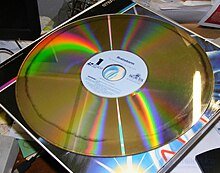
A LaserDisc video of the 1983 film "Brainstorm" showing signs of disc rot in the form of a dark ring. Many early discs were poorly manufactured, leading to oxidation between the layers: the affected areas of the surface became unreadable by the playback hardware.
A false sense of security persists regarding digital documents: because an endless number of identical copies can be made from the source files, many users assume their documents have a practically unlimited shelf life. In reality, the media used to store and access digital information present unique preservation challenges compared with many of the physical formats traditionally used in archives and libraries. For example, paper materials and printed media transferred onto film-based microforms can remain accessible for centuries if created and maintained under ideal conditions, compared with the decades of physical stability offered by magnetic tape, disks, or optical formats. Thus, digital media present more pressing preservation problems than the gradual change of written or spoken language that occurs with the printed word.
Little professional thought in the library and archival field was devoted to the topic of digital technology obsolescence as computerized systems became increasingly widespread and commonplace, but the 1990s saw a great deal of discussion begin to emerge. Nevertheless, few alternatives were proposed as real substitutes for the standard method of continuously transferring data onto ever-newer storage media, a practice that has been used since magnetic tape began replacing paper punch cards as a practical data store in the 1960s and 1970s. These basic migration methods persist even in the modern era of hard disk drives and solid-state drives, since research has shown that many digital storage media often last significantly less time in the field than manufacturer claims or laboratory tests suggest, giving rise to the wry observation that «digital documents last forever — or five years, whichever comes first».
The causes of digital obsolescence are not always purely technical. Capitalist accumulation and consumerism have been cited as key drivers of digital obsolescence in society, with newly introduced products often valued more highly than older ones. The preservation of digital data depends on ongoing maintenance and use of hardware and software formats, which can be hindered by the threat of obsolescence. In the realm of hardware and software access, there are four types of digital obsolescence:
Because most digital information depends on two factors for storage and retrieval, it is important to separately classify how digital obsolescence affects the preservation of digital data through both hardware and software.
In the archival and library fields, hardware issues are twofold: in addition to the physical storage medium itself, such as magnetic tape, an optical disc, or solid-state computer memory, a separate electronic device is often required to access the information. And while proper storage can help mitigate some environmental vulnerabilities of storage formats (including dust, humidity, radiation, and temperature) and extend their lifespan by decades, other unavoidable threat factors exist. Magnetic tape and floppy disks are vulnerable both to the breakdown of the adhesive holding the magnetic data layer to the substrate and to demagnetization of the data layer, commonly known as «bit rot»; optical discs are especially prone to physical damage of the readable surface and to oxidation occurring between improperly sealed outer layers, a process called «disc rot» or, inaccurately, «laser rot» (particularly with respect to LaserDiscs). Older forms of floating-gate MOSFET-based read-only memory, such as (some) cartridges and (most) memory cards, face their own form of bit rot, in which the charges representing individual bits of binary information dissipate beyond a certain level (so-called «bit flipping»), rendering the data unreadable. [
The functionality of the playback or recording device for the relevant format has its own vulnerabilities. Cassette decks and disk drives rely on the functionality of precision-manufactured moving parts, which are prone to damage from repeated physical strain and foreign materials such as dust and dirt. Regular maintenance, calibration, and cleaning can help extend the service life of many devices, but broken or failed parts will require repair or replacement: finding spare parts becomes increasingly difficult and expensive as supplies for older machines grow scarce and the technical skills required grow more specialized. This is a problem because newer machines and storage formats use fewer electromechanical parts and more integrated circuits and other complex components. [12]
Just ten years after the "Viking" program of the 1970s, NASA staff discovered that much of the mission's data stored on magnetic tapes, including more than 3,000 raw images of the Martian surface transmitted by the two Viking probes, had become inaccessible due to a variety of factors. [15] Although the agency had illegible notes written by long-departed or deceased programmers, the computer hardware and source code needed for the decoding software to function properly had been replaced and discarded. The information was ultimately recovered after more than a year of reverse-engineering how the raw data had been encoded on the tapes, a process that involved consulting the original engineers of the Viking landers' cameras and image-processing equipment. [15] NASA faced similar problems when attempting to recover and process images from the 1960s Lunar Orbiter missions. In 1990, after a year-long search that turned up a compatible tape reader at a U.S. Air Force base, engineers at the Jet Propulsion Laboratory acknowledged that the missing part might have to be rebuilt in-house if a replacement could not be found in computer warehouses. [15]

The video game Spacewar! developed in 1962 for the PDP-1 minicomputer.
Over the last several decades, a number of different, once-industry-standard file formats and application platforms for data, images, and text have repeatedly been replaced and displaced by newer versions of software formats and applications, often with increasing degrees of incompatibility both between each other and within their own product lines. Such incompatibility now often extends to which version of the operating system is installed on a system (for example, cases where Microsoft Works prior to version 4.5 could not run on Windows 2000 and later versions). One example of a developer reversing planned obsolescence occurred in 2008, when Microsoft abandoned its intention to drop support for a number of older file formats in its Office suite of services following strong public backlash.
Systemic software obsolescence can be illustrated by the history of the WordStar word processor. A popular WYSIWYG document-editing option on the CP/M and MS-DOS operating systems in the 1980s, a delayed port to Windows 1.0 caused WordStar to lose significant market share to competitors WordPerfect and Microsoft Word by 1991. Development of the Windows version subsequently stopped in 1994, and WordStar 7 for MS-DOS was last updated in 1999. [19] Over time, every version of WordStar grew increasingly incompatible with versions of Windows after 3.1, to the frustration of long-time devoted users, including authors William F. Buckley Jr. and Anne Rice.
Digital obsolescence has a notable impact on the preservation of video game history, since many older games and pieces of hardware were regarded by players as ephemeral products due to the continuous cycle of computer hardware upgrades and home console generations. Such cycles are often the result of both systemic and technical obsolescence. Some of the oldest computer games, such as the 1962 Spacewar! for the commercial PDP-1 minicomputer, were developed for hardware platforms so obsolete that they practically no longer exist today. Many older games from the 1960s and 1970s, created for the mainframes and microcomputers of the time, can today only be played through software emulation. Although video games and other software applications may be left unsupported by their parent developers or publishing companies, copyright issues related to software present a very significant obstacle to digital preservation.
One striking example of software copyright problems arose during preservation efforts for the BBC Domesday Project, a 1986 British multimedia data-collection survey marking the 900th anniversary of the original Domesday Book. While the project's specially built LaserDisc reader led to problems preserving its own hardware, the combination of one million individual copyrights held by participating citizens, in addition to corporate claims on specialized computer equipment, means that public efforts to digitally preserve the data may be stalled until 2090.
Organizations holding digital archives must assess their records to identify file corruption and reduce risks associated with file format obsolescence. Such assessments can be carried out using internal file format action plans, which list the types of digital files held in the archive's collections and evaluate the actions taken to ensure their continued availability.
One emerging strategic direction for combating digital obsolescence is the adoption of open-source software, owing to the availability, transparency, and potential adaptability of source code within modern hardware environments. For example, the Apache Software Foundation's OpenOffice application supports access to a number of legacy word processor formats, including Microsoft Word version 6, and basic support for WordPerfect version 4. This stands in contrast to the criticism directed at Microsoft's proposed Open XML format by the open-source community over non-disclosure agreements and translator requirements.
The standard digital preservation strategies used by information institutions are often interrelated or otherwise connected in function or purpose. Bitstream copying (or data backup) is a foundational operation that is often carried out ahead of many other practices and facilitates the creation of redundancy across multiple storage locations: refreshing is the transport of unaltered data, often between identical or functionally similar storage formats, whereas migration converts the format or encoding of digital information, allowing it to be moved between different operating systems and generations of hardware. Normalization reduces the organizational complexity of archival institutions by reducing the number of similar file types through conversion, while encapsulation combines digital information with its associated metadata to ensure the information's continued accessibility. Digital archives use canonicalization to ensure that key aspects of documents are preserved through the conversion process, while reliance on standards established by regional archival institutions supports organization across a broader field. Technology preservation (also called computer museums) and digital archaeology respectively involve institutions maintaining ownership of or access to obsolete hardware and software platforms, and the rescue methods used to recover digital information from damaged or obsolete media and devices. Once recovered, some data, such as documentation, can be converted into analog backups in the form of physically accessible copies, while executable code can be run through emulation platforms on modern hardware and software environments designed to imitate obsolete computer systems.
In his 1999 paper, Jeff Rothenberg criticized many contemporary preservation procedures and how they incorrectly treat the obsolescence of digital information as the most serious long-term digital storage problem. Rothenberg disapproved of the use of printed copies, arguing that printing digital documents strips them of their inherent "digital" qualities, including machine readability and dynamic user features. Computer museums were also cited as an inadequate practice. There are practical limitations related to the limited number of places where obsolete hardware can be permanently maintained, which realistically limits the possibility of fully accessing obsolete digital documents: moreover, most older data rarely exists in encoding formats able to fully leverage the original hardware or software environment. Two digital storage processes were especially criticized: the adoption of relational database (RDB) standards and excessive reliance on migration. Although RDBs and the particulars of their database management systems (RDBMS) were created for standardization, they often unintentionally fostered tribalistic practices among regional institutions, creating incompatibility between RDB new software environments. Emulation, in which digital data is maintained through the encapsulation of metadata, documentation, software, and specifications of the emulation environment, was considered the most ideal preservation practice under conditions of digital obsolescence.
In 2009, the National Archives of the United Kingdom published the second edition of its Information Assurance Maturity Model (IAMM), which presents an overview of digital obsolescence risk management for institutions and enterprises. After instructing senior information risk owners on the baseline requirements defining both the potential risk of digital obsolescence and the actions to mitigate it, the guidance addresses a multi-stage process for maintaining the digital continuity of archival information. Such steps cover the full range: from ensuring accountability for information continuity and confirming the extent of content metadata, to ensuring the discoverability of critical information through institutional use and ensuring that system migration does not affect information availability, to guaranteeing IT support and ensuring compliance with contingency action plans for information survivability amid organizational change.
In 2014, the National Digital Stewardship Alliance recommended developing file format action plans, stating that «it is important to move from more abstract considerations of file format obsolescence toward developing actionable strategies for monitoring and analyzing information about the heterogeneous digital files that organizations manage». Other important resources supporting such assessments include the Library of Congress's "Sustainability of Digital Formats" page and the UK National Archives' PRONOM online file format registry.
CERN launched its "Digital Memory" project in 2016, seeking to preserve decades of the organization's media output through standardized initiatives. CERN determined that its solution would require ongoing access to metadata, the earliest possible adoption of an Open Archival Information System (OAIS) archive to reduce costs, and the advance completion of an archiving plan for any new system. Using OAIS, CERN developed a Trusted Digital Repository (TDR) certification under the ISO 16363 standard and deployed E-Ternity as a prototype of its compliant digital archive model.
On January 1, 2021, Adobe ended support for and blocked the running of content in its Flash Player, in response to advances in open web standards. This action followed an announcement made in July 2017, despite affecting the user experience of millions of websites to varying degrees. Since January 2018, Flashpoint Archive has been one of several projects preserving Adobe Flash Player content, having preserved more than 160,000 animations and games. [33]


Comments