
Lecture
MySQL table migration is a well-known problem, and it has been solved since 2009 with the help of online schema change tools. Fast-growing products often require changes to the database structure. Adding / changing / removing columns and indexes, etc., locks operations under MySQL's default behavior. We carry out such schema changes several times a day and want to minimize the impact on the user.
Before illustrating gh-ost, let's review existing solutions and the reasons why it's worth using a new tool.
If your project has tables whose size runs into gigabytes, and changing the structure of such a table forces you to stop all services for several hours — this article is for you.
The MySQL world already has several technologies that help deal with this problem: online DDL, pt-online-schema-change, gh-ost, JSON fields. Replication and synchronous clusters (InnoDB Cluster, Galera) allow you to work with differences in schemas across nodes and update the cluster gradually, node by node.
Let's look at the simplest way to work around the slowdowns caused by running ALTER TABLE on a heavily loaded MySQL server, based on triggers.
Given: a table with several tens of gigabytes of data. Task — change the table structure.
I'll get ahead of myself right away: this method only works on transactional tables. If you have a MyISAM table with tens of gigabytes, then it's like that old joke — «sort out your own problems». The example will be given for an InnoDB table.
Suppose our table structure is as follows:
CREATE TABLE `users` (
  `id` int(11) NOT NULL AUTO_INCREMENT,
  `email` varchar(40) NOT NULL DEFAULT '',
  `password` char(32) NOT NULL DEFAULT '',
  `date` int(11) NOT NULL DEFAULT '0',
  PRIMARY KEY (`id`)
) ENGINE=InnoDB DEFAULT CHARSET=utf8
We want to add a time_avtivity field to this table.
What options do we have.
ALTER TABLE `users` ADD COLUMN `time_avtivity` int(11) NOT NULL DEFAULT 0;
This option works fine on small projects where the table size rarely exceeds tens of thousands of records. This option doesn't work for us because the ALTER will run too long, and the entire time the table will be locked for both writes and reads. Accordingly, the service would need to be stopped for that time.
You could just not touch the table at all and instead make a separate `users_activity`:
CREATE TABLE `users_lastvisits` (
  `user_id` int(11) NOT NULL,
  `time_avtivity` int(11) NOT NULL DEFAULT '0',
  PRIMARY KEY (`user_id`)
) ENGINE=InnoDB DEFAULT CHARSET=utf8;
Now, in every query that needs time_avtivity, you can do a JOIN with the last_login table. It will, of course, work more slowly, and adding JOIN to queries costs extra time too, but overall this is sometimes sufficient, and you can stop right here.
You could set up master-slave replication, run ALTER on the slave server, and then swap them. Honestly, I've never done this myself — it might be simpler than the following method, but it's not always possible to set up replication.
We create a new table with the final structure, set up triggers on the first table that will log all changes, and simultaneously start streaming data from the first table into the second; at the end we «flush in» the changed data and rename the tables.
So, let's prepare 2 tables — the first with the desired structure, the second for logging changes.
CREATE TABLE `_users` (
  `id` int(11) NOT NULL AUTO_INCREMENT,
  `email` varchar(40) NOT NULL DEFAULT '',
  `password_hash` char(32) NOT NULL DEFAULT '',
  `registration_date` int(11) NOT NULL DEFAULT '0',
  `lastvisit` int(11) NOT NULL DEFAULT 0,
  PRIMARY KEY (`id`)
) ENGINE=InnoDB DEFAULT CHARSET=utf8;

CREATE TABLE `users_updated_rows` (
  `id` int(11) NOT NULL AUTO_INCREMENT,
  `row_id` int(11) NOT NULL DEFAULT '0',
  `action` enum('updated','deleted') NOT NULL DEFAULT 'updated',
  PRIMARY KEY (`id`)
) ENGINE=InnoDB DEFAULT CHARSET=utf8;
Let's set up the triggers:
DELIMITER ;;

CREATE TRIGGER users_after_delete AFTER DELETE ON users FOR EACH ROW
BEGIN
  INSERT INTO users_updated_rows VALUES (0, OLD.id, 'deleted');
END;;

CREATE TRIGGER users_after_insert AFTER INSERT ON users FOR EACH ROW
BEGIN
  INSERT INTO users_updated_rows VALUES (0, NEW.id, 'updated');
END;;

CREATE TRIGGER users_after_update AFTER UPDATE ON users FOR EACH ROW
BEGIN
  IF (OLD.id != NEW.id) THEN
    INSERT INTO users_updated_rows VALUES (0, OLD.id, 'deleted');
  END IF;
  INSERT INTO users_updated_rows VALUES (0, NEW.id, 'updated');
END;;

DELIMITER ;
Now we start the data transfer. To do this you need to open 2 connections to the database. In one, the actual transfer will run; in the other you'll need to briefly lock the table against writes.
mysql> LOCK TABLES users WRITE;
Query OK, 0 rows affected (0.00 sec)

mysql> -- triggers should already be in place
mysql> TRUNCATE users_updated_rows;
Query OK, 0 rows affected (0.17 sec)

mysql> -- in another console start the transfer
mysql> INSERT INTO _users SELECT id, email, password_hash, registration_date, 0 FROM users;

mysql> -- back in the first console
mysql> UNLOCK TABLES;
That's it, now while the table is being transferred we have time to think about how we'll merge in the data that has changed since the transfer began. There's really nothing complicated here — I won't give the script, you just need to take one record at a time from the users_updated_rows table in the order they were added (sort by primary key) and update or delete it in the _users table;
So, the table transfer has finished, and we need to merge in the remaining data. We run the script. The script must run continuously and update all the records being added to the log; once it has transferred all the data, the tables need to be renamed:
mysql> TRUNCATE users_updated_rows;
Query OK, 0 rows affected (0.16 sec)
mysql> RENAME TABLE users TO __users, _users TO users;
Query OK, 0 rows affected (0.11 sec)
It's worth noting that at this moment a small amount of data loss is possible, since the queries are not executed atomically. If this is critical, it's better to disable the service for a while so there are no write queries. You could, for example, revoke write privileges from the user and run the commands under a different user.
If everything is done correctly, no data will be lost and there will be virtually no interruption to the service. Which is exactly what we wanted. The same method can be used to transfer data to another server — only the transfer method changes. Instead of
mysql> INSERT INTO _users SELECT id, email, password_hash, registration_date, 0 FROM users;
the data must be transferred via mysqldump:
$ mysqldump -h host1 db users --single-transaction -ecQ | pv | mysql -h host2
This way, without stopping the services, you can copy a table of tens of GB and hundreds of millions of rows to another server in about half a day.
Today, changing a schema online has become possible with the following three main options:
pt-online-schema-change and OSC from Facebook; also found are the LHM and the original oak-online-alter-table tools.Other options include continuously updating the schema with a Galera cluster and other storage engines besides InnoDB. At GitHub we use a common master-replica architecture and the reliable InnoDB engine.
Why did we decide to move to a new solution instead of using any of the above? All existing solutions are limited in their own way, and below is a very brief and generalized breakdown of some of their drawbacks. We'll look in more detail at the drawbacks of trigger-based online schema change tools.
alter, which causes replication lag. Trying to run it individually on each replica leads to the significant management overhead mentioned above. The DDL is not interruptible; stopping it halfway leads to a long rollback or to data dictionary corruption. It doesn't «play nice»; it cannot throttle or pause under high load. It is a commitment to carry out an operation that can exhaust your resources.pt-online-schema-change for many years now. However, as volume and traffic grow, we run into more and more problems, and many migrations are treated as «risky operations». Some migrations can only be run during off-peak hours or on weekends; others consistently cause MySQL to fail.triggers to perform the migration, and that's where several problems arise.All online schema change tools work in a similar way: they create a ghost table modeled on your original table, migrate that table while it's empty, slowly and gradually copy data from the original table into the ghost table, while simultaneously propagating ongoing changes (any INSERT, DELETE, UPDATE applied to your table ) to the ghost table. Once the tool is confident the tables are in sync, it replaces the original table with the ghost table.
Tools like pt-online-schema-change, LHM, and oak-online-alter-table use a synchronous approach, in which every change to the table is propagated immediately, within the same transaction, as a mirrored change on the ghost table. Facebook's tool uses an asynchronous approach, writing changes to a change-log table, then later replaying and applying those changes to the ghost table. All of these tools use triggers to detect ongoing changes to your table.
Triggers are stored routines that get invoked on each row operation — INSERT, DELETE, UPDATE — on the table . A trigger can contain a set of queries, and these queries execute in the same transaction space as the query driving the table. This ensures atomicity of both the original table operation and the operations invoked by the trigger.
The use of triggers in general, and trigger-based migration in particular, suffers from the following issues:
gh-ost stands for GitHub's Online Schema Transmogrifier / Transfigurator / Transformer / Thingy
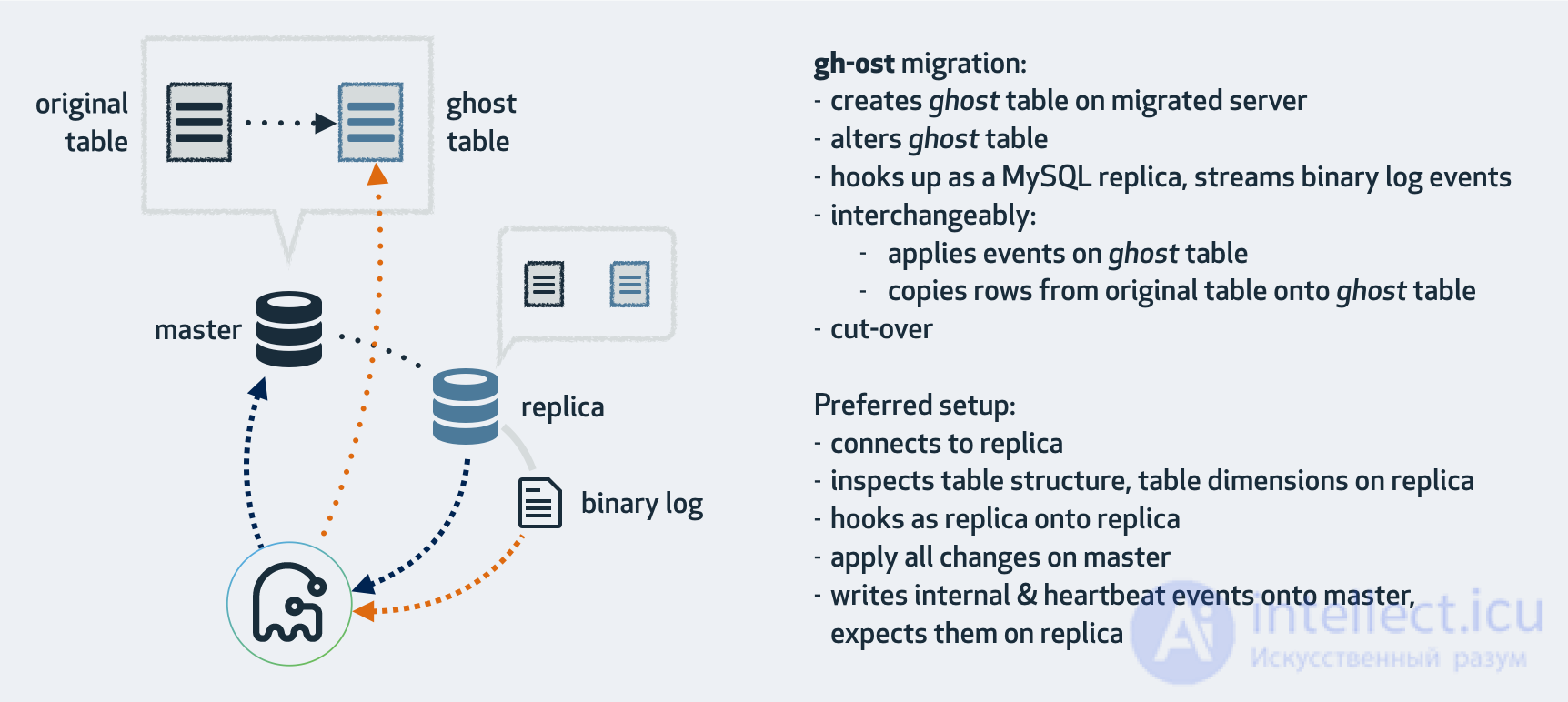
gh-ost is:
gh-ost does not use triggers. It intercepts changes to the table data by tailing the binary logs. It therefore operates asynchronously, applying changes to the ghost table some time after they were committed.
gh-ost expects binary logs in RBR (row-based replication) format; however, this doesn't mean you can't use it to migrate a master running with SBR (statement-based replication). In fact, that's exactly what we do. gh-ost happily reads the binary logs from a replica that translates SBR into RBR, and happily reconfigures the replica to do so.
By not using triggers, gh-ost decouples the migration workload from the general master workload. It doesn't factor into the concurrency and lock contention of queries running against the migrated table. Changes applied by such queries are simplified and serialized in the binary log, where gh-ost picks them up to apply on the gh-ost table. In fact, gh-ost also serializes row-copy writes together with the binary log event writes. Thus, the master observes only a single connection that sequentially writes to the ghost table. This isn't very different from ETL.
Since all writes are controlled by gh-ost, and since reading the binary logs is primarily an asynchronous operation, gh-ost can pause all writes to the master while throttling. Throttling implies no row copying on the master and no row updates. gh-ost creates an internal tracking table and continues writing heartbeat events to it even while throttling, in negligible volumes.
gh-ost takes this a step further and offers several throttling controls:
pt-online-schema-change, you can set threshold values for MySQL metrics such as Threads_running=30gh-ost has a built-in heartbeat mechanism that it uses to check replication lag; you can specify control replicas, or gh-ost will by default implicitly use the replica you connect it to.SELECT HOUR(NOW()) BETWEEN 8 and 17.
All of the above metrics can be changed dynamically, even during the migration.
gh-ost will start throttling. Remove the file, and it resumes.gh-ost's network interface (see below) and give it a command to start throttling.With existing tools, when a migration causes high load, a database administrator can reconfigure, say, a smaller chunk-size, then stop and restart the migration from the very beginning. We consider this wasteful.
gh-ost listens for requests via a unix socket file and (configurably) via TCP. You can give gh-ost instructions even during the migration. You can, for example:
echo throttle | socat - /tmp/gh-ost.sock to start throttling. Likewise you can no-throttlechunk-size=1500, max-lag-millis=2000, max-load=Thread_running=30 are examples of the instructions gh-ost accepts to change its behavior.The same interface can also be used to ask gh-ost about its status. gh-ost is happy to report on current progress, key configuration parameters, the identifiers of the servers involved, and much more. Because this information is available over the network, it provides excellent visibility into the ongoing operation, which otherwise today you could only get by using a shared screen or additional log files.
Since the binary log content is decoupled from the master's workload, applying the migration to a replica more closely resembles a genuine master migration (though not entirely yet, and further work is on the roadmap).
gh-ost ships with built-in testing support via --test-on-replica: it lets you run the migration on a replica so that, at the end of the migration, gh-ost stops the replica, swaps the tables, undoes the swap, and leaves you with both tables in place and replication stopped in sync. This lets you examine and compare the two tables at your leisure.
Here is how we test gh-ost in production at GitHub: we have several dedicated production replicas; they don't serve traffic, and instead run a continuous migration test against all tables. Each of our production tables, ranging in size from empty to several hundred GB, is migrated using a trivial statement that doesn't actually change its structure (engine=innodb). Each such migration ends with replication stopped. We take a full checksum of all the table's data, both from the original table and from the ghost table, and expect them to be identical. We then resume replication and move on to the next table. Each of our production tables is known to have passed several successful migrations via gh-ost on a replica.
All of the above, and much more, was done to earn trust in gh-ost. After all, this is a new tool in an environment where the same tool has been used for years.
gh-ost on replicas; we ran thousands of successful migrations before ever trying it on masters. You can do the same. Migrate your replicas and make sure the data isn't corrupted. We want you to do this!gh-ost runs, if you suspect the load on the master is increasing, go ahead and trigger throttling. Touch the file. echo throttle. Watch the load on your master return to normal. Just knowing that you can do this will bring you peace of mind.2:00am? Are you worried about the final cut-over, when the tables get swapped, and you want to be present? You can tell gh-ost to postpone the cut-over using a flag file. gh-ost will finish the row copy but won't swap the tables. Instead, it will keep applying ongoing changes, keeping the ghost table in sync. When you come into the office the next day, remove the flag file or echo unpostpone into gh-ost, and the cut will be made. We don't like our software forcing us to babysit its behavior. Instead, it should free us up to go do what people do.--exact-rowcount will make you smile. Pay the upfront cost of a long SELECT COUNT(*) on your table . gh-ost will get an exact estimate of the amount of work it needs to do. It will heuristically update this estimate as the migration progresses. While the ETA time can always change, the progress percentage becomes accurate. If, like us, you've ever been bitten by a migration that said you were at 99% and then stalled for an hour, making you bite your nails, you'll appreciate the change.gh-ost works by connecting to potentially several servers, as well as connecting as a replica to stream binary log events directly from one of those servers. There are various operating modes that depend on your setup, configuration, and where you want to run the migration.
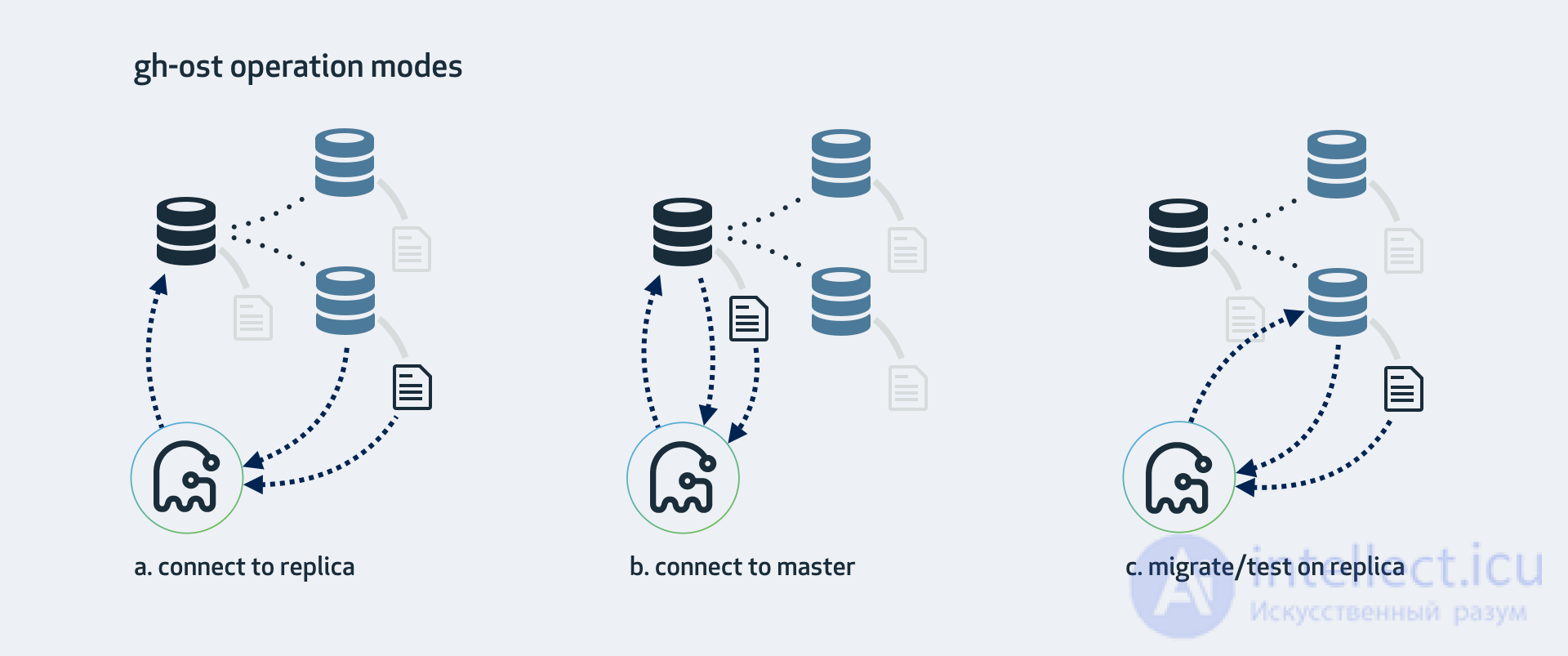
This is the mode gh-ost expects by default. gh-ost examines the replica, crawls up to find the master of the topology, and connects to it as well. The migration will:
If your master runs with SBR, this is the mode you can work with. The replica must be configured with binary logs enabled (log_bin, log_slave_updates) and must have binlog_format=ROW (gh-ost can apply the latter for you).
However, even with RBR, we suggest this is the operating mode with the least interference on the master.
If you have no replicas, or don't want to use them, you can still work directly with the master. gh-ost will perform all operations directly on the master. You can still ask it to take replication lag into account.
--allow-on-master.This will perform the migration on a replica. gh-ost will briefly connect to the master, but after that will perform all operations against the replica, without changing anything on the master.
Throughout the operation, gh-ost will throttle so as to keep the replica up to date.
--migrate-on-replica tells gh-ost that it should migrate the table directly on the replica. It will perform the cut-over phase even while replication is running.--test-on-replica indicates that the migration is for testing purposes only. Before the cut-over happens, replication is stopped. The tables are swapped, and then swapped back: the original table returns to its original place.ALTER TABLE and generated columns
ALTER TABLE examples
ALTER TABLE tbl_name
    [alter_option [, alter_option] ...]
    [partition_options]

alter_option: {
    table_options
  | ADD [COLUMN] col_name column_definition
        [FIRST | AFTER col_name]
  | ADD [COLUMN] (col_name column_definition,...)
  | ADD {INDEX | KEY} [index_name]
        [index_type] (key_part,...) [index_option] ...
  | ADD {FULLTEXT | SPATIAL} [INDEX | KEY] [index_name]
        (key_part,...) [index_option] ...
  | ADD [CONSTRAINT [symbol]] PRIMARY KEY
        [index_type] (key_part,...)
        [index_option] ...
  | ADD [CONSTRAINT [symbol]] UNIQUE [INDEX | KEY]
        [index_name] [index_type] (key_part,...)
        [index_option] ...
  | ADD [CONSTRAINT [symbol]] FOREIGN KEY
        [index_name] (col_name,...)
        reference_definition
  | ADD CHECK (expr)
  | ALGORITHM [=] {DEFAULT | INPLACE | COPY}
  | ALTER [COLUMN] col_name {
        SET DEFAULT {literal | (expr)}
      | DROP DEFAULT
    }
  | CHANGE [COLUMN] old_col_name new_col_name column_definition
        [FIRST | AFTER col_name]
  | [DEFAULT] CHARACTER SET [=] charset_name [COLLATE [=] collation_name]

  | CONVERT TO CHARACTER SET charset_name [COLLATE collation_name]
  | {DISABLE | ENABLE} KEYS
  | {DISCARD | IMPORT} TABLESPACE
  | DROP [COLUMN] col_name
  | DROP {INDEX | KEY} index_name
  | DROP PRIMARY KEY
  | DROP FOREIGN KEY fk_symbol
  | FORCE
  | LOCK [=] {DEFAULT | NONE | SHARED | EXCLUSIVE}
  | MODIFY [COLUMN] col_name column_definition
        [FIRST | AFTER col_name]
  | ORDER BY col_name [, col_name] ...
  | RENAME {INDEX | KEY} old_index_name TO new_index_name
  | RENAME [TO | AS] new_tbl_name
  | {WITHOUT | WITH} VALIDATION
}

partition_options:
    partition_option [partition_option] ...

partition_option: {
    ADD PARTITION (partition_definition)
  |
продолжение следует...
Часть 1 Problems with slow ALTER TABLE in MySQL and possible solutions
Часть 2 Table options - Problems with slow ALTER TABLE in MySQL
Часть 3 Primary Keys and Indexes - Problems with slow ALTER TABLE

Comments