Here I list and explain some of the most common myths and misconceptions.
Myth 1 - Indexes Can Degenerate
The most common myth is that an index can degenerate over time and must be rebuilt regularly. First of all, the database always keeps the tree balanced. It is impossible for a particular fragment of the index to grow deeper and deeper until traversing the tree becomes slow. It can happen that the index becomes larger than necessary. If there are many UPDATE or DELETE statements, space usage can become suboptimal. However, even if the index is larger than required, it is very unlikely that the index depth will grow because of this. As explained in «The Search Tree (B-Tree) Makes the Index Fast», the number of entries in the index usually needs to increase a hundredfold to increase the index depth by one level.
Rebuilding an index can reduce the number of leaf nodes by roughly 20–30%. Most likely, you can expect this 20%-30% reduction to matter only for very expensive operations, such as a FULL INDEX SCAN. A typical INDEX UNIQUE SCAN gains 0%-2% from an index rebuild, since the index depth is not reduced by rebuilding.
Myth 2 - The Most Selective Column Goes First in a Composite Index
Whenever a composite index is created, the order of the columns must be chosen wisely. This topic is covered in the article «Composite Index».
However, there is a myth that you should always put the most selective column in the first position; this is simply wrong.
Important
The most important consideration when defining a concatenated index is choosing the column order so that it can be used as often as possible.
Beyond that, there are even reasons to put the least selective column first. The Oracle database can, for example, use an INDEX SKIP SCAN in that case. But that is a secondary feature. The most important factor... hmm, have I already said that before?
The true core of the myth is related to indexing independent range conditions - this is the only case where selectivity should influence index design.
This myth is extremely persistent in the SQL Server world and appears even in the official documentation. The reason is that SQL Server only keeps a histogram for the first column of the index. But that means the recommendation should really read as «put unevenly distributed columns first», because histograms are not very useful for evenly distributed columns anyway.
I am not the first to fight this myth. Here are a few more references debunking it:
Don't automatically put the most selective term first in a composite index.
- Guy Harrison in «Oracle Performance Survival Guide»
One of the often-cited fables about indexes was the directive to «put the most selective column first». This was never a sensible rule of thumb (except perhaps before version 6.0).
- Jonathan Lewis in «Oracle Scratchpad»
It's pointless to place the most selective index column on the left if very few queries filter on it. Queries that don't filter on it, but do filter on other index columns, will have to scan, and scanning is expensive.
- Gail Shaw in «SQL (Server) in the Wild»
Myth 3 - Oracle Database Cannot Index NULL
The origin of this myth is quite easy to understand once you look at the correctly stated fact:
The Oracle database does not include a row in the index if all indexed columns are NULL.
The difference between the myth and reality is small - the myth seems to be a sloppy form of the truth.
The fact is that NULL can be indexed by adding another non-nullable column to the index:

Myth 4 - Dynamic SQL Is Slow
The true core of the «Dynamic SQL is Slow» myth is quite simple; dynamic SQL can be slow - if it's done wrong.
The problem is that dynamic SQL is often used for the wrong reason, sometimes without even knowing it. To clear up the confusion, I will use the following terms as explained:
Embedded SQL
Embedding SQL directly into program source code is very common in procedural database languages such as Oracle PL/SQL or Microsoft Transact-SQL. It is also possible to embed SQL in other languages, such as C.
The advantage of embedded SQL is smooth integration with the corresponding programming language. However, embedded SQL is compiled into the program. It cannot change at runtime - it is static.
Dynamic SQL
Dynamic SQL is handled in the application as a string. The application can modify the SQL string at runtime before passing it to the database layer. In fact, this is the most common way of accessing databases.
Static SQL
I use the term static SQL to describe SQL statements that do not change at runtime. It doesn't matter whether it is embedded SQL, which cannot change at runtime, or dynamic SQL, which could change but doesn't.
The point of these definitions is that a statement can be dynamic and static SQL at the same time. In other words, there are different levels of dynamic SQL. Consider the following example:
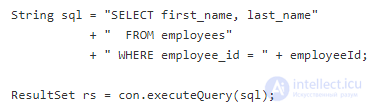
Is this dynamic SQL? According to the definition above, it is. The SQL statement is prepared as a string and passed to the database layer. But is it also static SQL? Assuming the value of the employeeId variable changes, this is not static SQL, because the SQL string changes at runtime. This is an example of dynamic SQL that really does hurt performance. The problem is not that it's dynamic SQL, but that it doesn't use bind variables. SQL bind variables - such as a question mark ? or :name - are placeholders for values that change at runtime. This means the example can be converted into static SQL by using a bind variable instead of the actual value of the employeeId variable.
Important
It is not the use of bind parameters that is being abused by dynamic SQL.
Bind parameters are very important for both security and performance.
A reasonable use of dynamic SQL is to change the structure of the statement at runtime. This is something that cannot be done with bind parameters. For example, a conditional where clause:
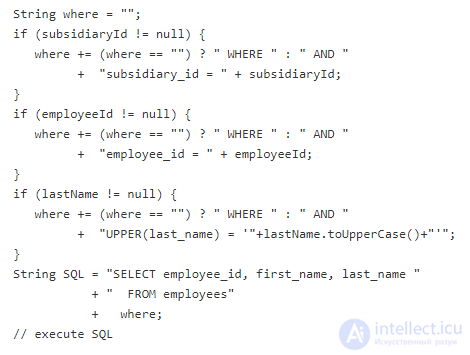
The code builds an SQL statement to fetch employees based on any combination of three filter criteria. Although this is quite inconvenient, the resulting SQL can be executed using the best available index. Nevertheless, this approach is problematic because of the possible SQL injection vulnerability and the large optimization overhead: the database must rebuild the execution plan every time, because the search conditions - which can be different every time - prevent caching. «Parameterized Queries» explains the optimization overhead in detail. Again, dynamic SQL is not the problem, but not using bind parameters is.
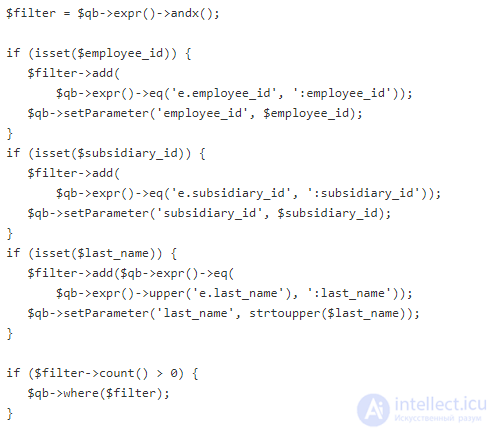
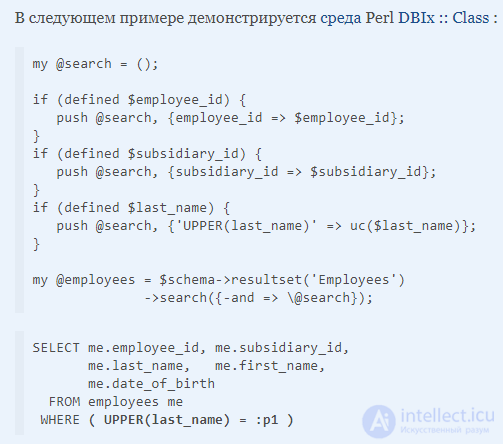
The example that dynamically builds a where clause and uses bind parameters is omitted, because it is even more inconvenient than the example above. However, most ORM frameworks offer a reasonably convenient way of dynamically building SQL using bind parameters. The following overview shows a few examples:
PHP
The following example demonstrates the PHP Doctrine framework:
Perl
Java
The following example demonstrates the Hibernate Criteria classes:
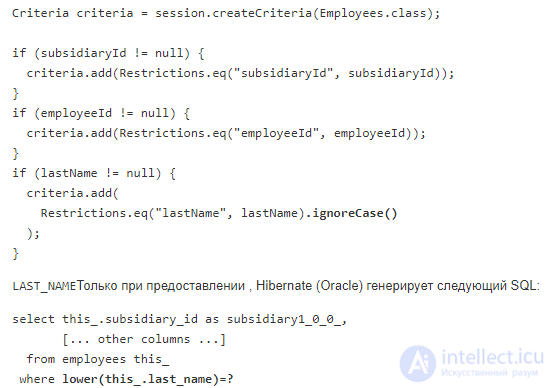
Note that a bind parameter is used along with the LOWER function to implement the ignoreCase() feature. The same applies to the ilike restriction. This is a very important fact for function-based indexing.
The Java Persistence API (JPA) has similar functionality:
However, it is less direct and does not support a native case-insensitive search, which is probably a good thing):
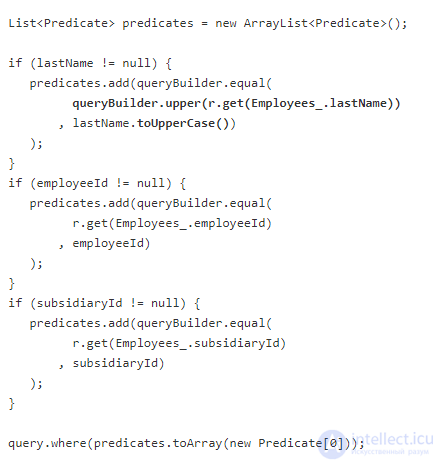
As you can see, the example is less straightforward in favor of compile-time type safety. Another difference is that JPA does not support native case-insensitive operators - explicit case conversion is required. It's probably good to know about and control this. Just as a note; the native Hibernate API also supports explicit case conversion.
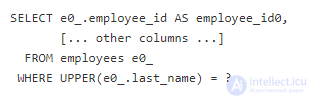
Doctrine generates the following SQL query for searching by last name (MySQL):
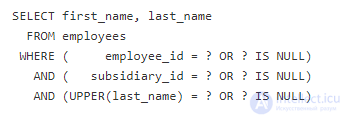
Using dynamic SQL with bind parameters allows the optimizer to choose the best execution plan for the specific combination of where clauses. This will give better performance than constructs like those described in «Smart Logic»:
The reason dynamic SQL runs slowly very often lies not in the use of bind parameters, but in using dynamic SQL for the wrong reason.
However, there are some - I'd say rare - cases where dynamic SQL can be slower than the «smart logic» described above. This is when very cheap (fast) SQL statements are executed with very high frequency. But first, two more terms need to be explained:
Hard Parsing
Hard parsing is building an execution plan from an SQL statement. This is a significant effort; checking all parts of the SQL; taking all metrics into account; considering all join options and so on. Hard parsing is very resource-intensive.
Soft Parsing
Soft parsing is searching for, finding, and using a cached execution plan. Some minor checks are performed, such as access rights, but the execution plan can be reused as-is. This is a fairly fast operation.
The cache key is essentially the literal SQL string - usually its hash. If there is no exact match, hard parsing is triggered. That's why embedded literals - unlike bind parameters - cause hard parsing whenever the exact same search conditions aren't reused. But even then, there is a good chance that the previous execution plan has already expired from the cache, because new ones keep appearing again and again.
However, there is a way to execute a statement without any parsing at all - not even soft parsing. The trick is to keep the parsed statement open, for example, as in the following Java pseudocode:
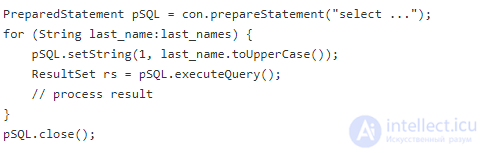
Note that the PreparedStatement is opened and closed only once, but can be executed many times. This means there is only one parsing operation - during preparation - but none inside the loop.
The mistake is that converting the statement into dynamic SQL moves the prepareStatement call into the loop, triggering soft parsing on every execution. The parsing overhead, which can also include network latency, can outweigh the savings from a better execution plan when the statement is executed frequently and is fast anyway. This is especially true if the actual execution plan doesn't change for different where clauses - for example, because the where clause always contains one well-indexed condition.
Even though the «prepare before the loop» trick is rarely used explicitly, it is very common in stored procedures, but implicitly. Languages like PL/SQL - with genuine static SQL - prepare the SQL when the procedure is compiled, or at most once per execution. Changing this to dynamic SQL can easily kill performance.
Myth 5: Select * Is Bad
This is one of the most persistent myths I've seen in this field. It has existed for decades. If a myth has existed for that long, there must be a grain of truth in it. So what could be wrong with select *? Let's take a closer look.
We all know that selecting «*» is just shorthand for selecting all columns. You wouldn't believe it, but for many that makes a big difference. So let's first rephrase the question using this «insight»:
Why is it bad to select all columns?
Actually, there are several very good reasons not to select all columns if you don't need them. And they all come down to performance. What's surprising, however, is that the performance impact can be enormous.
Up to 100 times slower by preventing an index-only scan
Generally speaking, the fewer columns you query, the less data needs to be loaded from disk while processing your query. However, this relationship is not linear.
Quite often, selecting from a table involves two steps: (1) using an index to find the address where the selected rows are stored; (2) loading the selected rows from the table. Now imagine you only select columns that are present in the index. Why should the database still perform the second step? In fact, most databases don't. They can process your query using only the information stored in the index - hence an index-only scan.
But why should an index-only scan be 100 times faster? Simply put: in an ideal index, the selected rows are stored right next to each other. It's not uncommon for each index page to contain about 100 rows - a rough figure; it depends on the size of the indexed columns. Still, this means a single I/O operation can retrieve 100 rows. Table data, on the other hand, is not organized this way (with exceptions). Here, a page quite often contains only one of the selected rows along with many other rows that are of no interest to the particular query. So the reason an index-only scan can be 100 times faster is that accessing the index can easily deliver 100 rows per I/O, whereas accessing the table typically retrieves only a few rows per I/O.
If you select even one column that is not in the index, the database cannot perform an index-only scan. If you select all columns, ... well, I think you know the answer.
In addition, some databases store large objects in a separate location (for example, LOBs in Oracle). Accessing them also causes additional I/O.
Up to 5 times slower by increasing server memory usage
Although databases avoid keeping the result in the server's main memory - instead delivering each row after loading it and forgetting about it again - sometimes this is unavoidable. When sorting, for example, all rows - and all selected columns - need to be in memory to do the work. Again, the more columns you select, the more memory the database needs. In the worst case, the database may need to perform an external sort on disk.
Nevertheless, most databases are very well tuned for this kind of load. Although I've quite often observed a sort speed up by a factor of two - simply by removing a few unused columns - I can't recall ever seeing a factor greater than five. However, it's not just sorting; hash joins are also quite sensitive to memory bloat. Don't know what that is? Please read this article.
These are just the two main problems from the database's point of view. Remember that the client also needs to process the data, which can seriously affect garbage collection.
Now that we've developed a general understanding of why selecting everything is bad for performance, you might ask why this is listed as a myth. It's because many people think that the star itself is bad. Moreover, they believe they aren't committing this crime because their ORM lists all the columns by name anyway. In fact, the crime is selecting all columns without thinking about it - and most ORMs happily commit this crime on behalf of their users.
The real reason select * is bad - and hence the reason the myth is so persistent - is that the star is simply used as an allegory for «selecting everything without thinking about it». That is bad. But if you need a catchier phrase to remember the truth behind this myth, take this one:
Is the star itself bad too?
Besides the performance issues mentioned above, which are not caused by the star (asterisk) itself, the star itself can cause other problems. For example, with software that expects columns in a certain order when a column is added or removed. Still, in my experience, I'd say these problems are fairly well understood in practice and are usually easy to detect (the software stops working) and fix.
The focus of this article is on very subtle issues that are hard to understand, hard to find, and often even hard to fix (for example, when using ORM tools). The main goal of this article is not to get people worried about the star itself. Once people start explicitly naming the columns they need to get the performance benefit described above, the problems caused by the star itself also disappear.
Myth 6: Database A Is Faster and Better Than Database B
You shouldn't choose a database based on hearsay, since everything comes down not to the database's name but to its storage engine and the algorithms it uses
and there aren't that many of them, and almost all modern databases use them, namely
- B-tree – O(log n), used for indexes in almost all DBs
- Hash – O(1)–O(n), used for indexes in almost all DBs
- Log-structured merge-tree – O(log n), used for indexes in Cassandra
- K-D tree – O(log n)–O(n), used for indexes in Postgres/graph DBs
- Boyer–Moore string search algorithm – O(n)
- Brute force
Myth 7: Time-Tested or, Conversely, New Means It's a Fast Database
If a database is time-tested, or conversely new, that supposedly means it's fast
The basic search algorithms haven't changed for decades
1961 – QuickSort
1968 – Binary Tree
1972 – B-Tree
Nothing new has been invented!! So besides marketing, there's nothing behind claims for new databases, or conversely for old ones.
Myth 8: If a DBMS Stores Data in Memory, It Must Be Fast
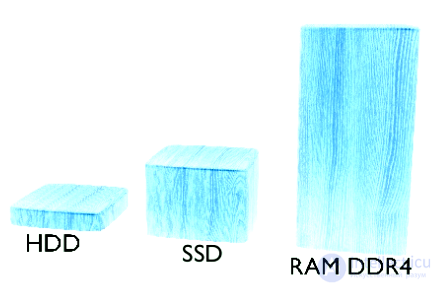
This statement is partly true, but in reality -
Everything comes down to resource constraints:
For memory - its size
For the CPU - the number of operations per second - scheduled by the OS, depends on load average
RAM speed - fragmentation
Disk speed - fragmentation, latency, depends on type and load average
multithreading, the data architecture used by the programmer themselves, and other factors
The significant performance gain from in-memory storage in databases comes from the fact that you remove an entire dimension (layer) when working with data
Myth 9: The More Hardware, the Faster the DB Will Be
In reality, we again run into physical limitations:
Hardware and everything related to it
- The clock speed of a single CPU core has an upper limit
- Memory speed is limited by its type
- Disk speed is limited by its type
Let's imagine that accessing one unit takes 1ms
fetching 1000 records will take 1s, that's normal
100K – 100 seconds, that's slow
1M – ~15 minutes!
So there is a clear dependency on how the DBMS is used, not just on the hardware being used.
Myth 10: A Distributed DB Means a Fast One
Performance drops in distributed databases happen
because a new, unreliable dimension (a sharding layer) is added when working with data.
Which brings with it a number of problems
- Consistency or availability
- Split-brain scenarios
- Conflict resolution/merging (optimistic replication)
- Quorum-based reads/writes
- Manual/auto sharding configuration, etc.
Particularly with replication
- Conflicts will occur
- The only question is
- 1. When they need to be resolved
- 2. Who will resolve them
For example
- Amazon Dynamo resolves them at read time and hands this off to the application
- Whereas Apache CouchDB resolves them at write time with last-write-wins plus a deferred conflict resolution mechanism
What Is Actually Needed for Database Optimization?
How is the read problem solved?
- Building the index on write (Postgres, Redis with stored procedures)
- Stale results
- Asynchronous index creation/precomputation (a stale variant with an external indexer)
- Sharding, querying multiple shard nodes
How is the write problem solved?
- Controlling the fsync system call for the DB process
- Deferred index creation until the first read (CouchDB)
- Deferred index creation until commit (explicit or on timeout, Solr)
Optimization at the client (application) level
How is the read problem solved at the application level?
- Read on writes (SQLAlchemy)
- Caching DB responses
- Asynchronous DB queries
- Asynchronous caching
The read problem is mostly related to the internal organization of the application's data structures and the numerous layers along the path between the raw request and the raw response
How is the write problem solved at the application level?
- Read on writes (SQLAlchemy)
- Pub/sub and asynchronous writes/queues
- Direct write to the DB with deferred/asynchronous index creation (CouchDB)
See also
- Indexes, indexing
- Query optimization
- EXPLAIN SQL
- NoSQL
- relational databases
- data warehouses
- [[b9343]]
See also


Comments