
Lecture
Application developers spend a lot of time comparing several operational databases in order to choose the one best suited to the expected workload. Requirements can include simplified data modeling, transactional guarantees, read/write performance, horizontal scalability, and fault tolerance. Traditionally, the choice starts with the database category, SQL or NoSQL, since each category offers a distinct set of trade-offs. High performance in terms of low latency and high throughput is usually treated as a non-negotiable requirement, and is therefore a must-have for any database in the comparison.
The goal of this article is to help application developers make the right choice between SQL and NoSQL in the context of application data modeling. We will look at one SQL database, namely PostgreSQL, and two NoSQL databases – Cassandra and MongoDB – to cover the fundamentals of database design, such as creating tables, populating them, reading data from a table, and deleting it. In the next article we will definitely cover indexes, transactions, JOINs, TTL directives, and JSON-based database design.
What is the difference between SQL and NoSQL?
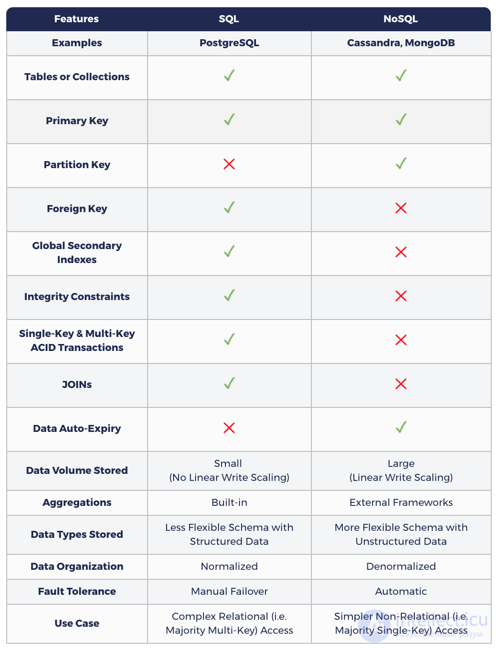
SQL databases increase application flexibility thanks to ACID transactional guarantees, as well as their ability to query data in unexpected ways using JOINs on top of existing normalized relational database models.
Given their monolithic/single-node architecture and their use of a master-slave replication model for redundancy, traditional SQL databases lack two important features – linear write scalability (i.e., automatic sharding across multiple nodes) and automatic/zero data loss. This means the volume of incoming data cannot exceed the maximum write throughput of a single node. In addition, some amount of temporary data loss must be accounted for during failover (in a shared-nothing architecture). Here it's important to keep in mind that recent commits may not yet have been reflected in the slave copy. Zero-downtime upgrades are also hard to achieve in SQL databases.
NoSQL databases are, by nature, typically distributed – that is, data is partitioned and distributed across multiple nodes. They require denormalization. This means that ingested data also has to be copied several times to serve the specific queries you send. The overall goal is to achieve high performance by reducing the number of shards accessed at read time. This leads to the well-known statement that NoSQL requires you to model your queries, while SQL requires you to model your data.
NoSQL focuses on achieving high performance in a distributed cluster, and this is the primary justification for a number of database design trade-offs, which include giving up ACID transactions, JOINs, and consistent global secondary indexes.
There is a view that, although NoSQL databases provide linear write scalability and high fault tolerance, the loss of transactional guarantees makes them unsuitable for mission-critical data.
The following table shows how data modeling in NoSQL differs from SQL.
SQL and NoSQL: why do you need both?
Real-world applications with large numbers of users, such as Amazon.com, Netflix, Uber, and Airbnb, perform a wide variety of complex tasks. For example, an e-commerce application like Amazon.com needs to store lightweight, highly critical data, such as information about users, products, orders, and invoices, alongside heavy but less sensitive data, such as product reviews, support messages, user activity, feedback, and user recommendations. Naturally, these applications rely on at least one SQL database alongside at least one NoSQL database. In cross-regional and global systems, a NoSQL database acts as a geo-distributed cache for data stored in the source of truth – an SQL database running in some single region.
How does YugaByte DB combine SQL and NoSQL?
Built on a log-structured hybrid storage engine, auto-sharding, sharded distributed consensus replication, and distributed ACID transactions (inspired by Google Spanner), YugaByte DB is the world's first open-source database that is simultaneously compatible with NoSQL (Cassandra & Redis) and SQL (PostgreSQL). As shown in the table below, YCQL, YugaByte DB's Cassandra-compatible API, adds the concepts of single- and multi-key ACID transactions and global secondary indexes to the NoSQL API, thereby ushering in the era of transactional NoSQL databases. In addition, YSQL, YugaByte DB's PostgreSQL-compatible API, adds the concepts of linear write scalability and automatic failover to the SQL API, bringing distributed SQL databases to the world. Because the YugaByte DB database is inherently transactional, the NoSQL API can now be used in the context of mission-critical data.
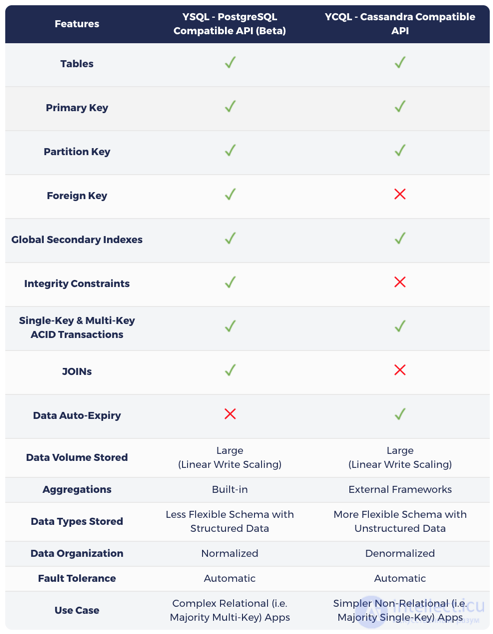
As previously stated in the article «Introducing YSQL: A PostgreSQL Compatible Distributed SQL API for YugaByte DB», the choice between SQL or NoSQL in YugaByte DB depends entirely on the characteristics of the primary workload:
The data modeling lab in the following section is built on the PostgreSQL- and Cassandra-compatible APIs of YugaByte DB rather than on the original databases. This approach emphasizes the simplicity of interacting with two different APIs (on two different ports) of the same database cluster, as opposed to using two fully independent clusters of two different databases.
In the following sections, we will walk through the data modeling lab to illustrate the differences and some of the common features of the databases under discussion.
Data modeling lab
Installing the databases
Given the emphasis on data model design (rather than on complex deployment architectures), we will install the databases in Docker containers on a local machine, and then interact with them using their respective command-line shells.
YugaByte DB, compatible with PostgreSQL & Cassandra
mkdir ~/yugabyte && cd ~/yugabyte
wget https://downloads.yugabyte.com/yb-docker-ctl && chmod +x yb-docker-ctl
docker pull yugabytedb/yugabyte
./yb-docker-ctl create --enable_postgres
MongoDB
docker run --name my-mongo -d mongo:latest
Command-line access
Let's connect to the databases using the command-line shell for the corresponding APIs.
PostgreSQL
psql — is the command-line shell for interacting with PostgreSQL. For ease of use, YugaByte DB ships with psql right in the bin folder.
docker exec -it yb-postgres-n1 /home/yugabyte/postgres/bin/psql -p 5433 -U postgres
Cassandra
cqlsh — is the command-line shell for interacting with Cassandra and its compatible databases via CQL (the Cassandra Query Language). For convenience, YugaByte DB ships with cqlsh in the bin directory.
Note that CQL was inspired by SQL and has similar concepts of tables, rows, columns, and indexes. However, as a NoSQL language, it adds a certain set of restrictions, most of which we will also cover in other articles.
docker exec -it yb-tserver-n1 /home/yugabyte/bin/cqlsh
MongoDB
mongo – is the command-line shell for interacting with MongoDB. It can be found in the bin directory of the MongoDB installation.
docker exec -it my-mongo bash
cd bin
mongo
Creating a table
Now we can interact with the database to perform various operations from the command line. Let's start by creating a table that stores information about songs written by various artists. These songs may be part of an album. There are also optional attributes for a song – release year, price, genre, and rating. We need to account for additional attributes that may be needed in the future, via a «tags» field. It can store semi-structured data as key-value pairs.
PostgreSQL
CREATE TABLE Music (
    Artist VARCHAR(20) NOT NULL,
    SongTitle VARCHAR(30) NOT NULL,
    AlbumTitle VARCHAR(25),
    Year INT,
    Price FLOAT,
    Genre VARCHAR(10),
    CriticRating FLOAT,
    Tags TEXT,
    PRIMARY KEY(Artist, SongTitle)
);
Cassandra
Creating a table in Cassandra is very similar to PostgreSQL. One of the main differences is the lack of integrity constraints (such as NOT NULL), but this falls under the responsibility of the application rather than the NoSQL database. The primary key consists of a partition key (the Artist column in the example below) and a set of clustering columns (the SongTitle column in the example below). The partition key determines which partition/shard a row is placed into, while the clustering columns specify how the data should be organized within the current shard.
CREATE KEYSPACE myapp;
USE myapp;
CREATE TABLE Music (
    Artist TEXT,
    SongTitle TEXT,
    AlbumTitle TEXT,
    Year INT,
    Price FLOAT,
    Genre TEXT,
    CriticRating FLOAT,
    Tags TEXT,
    PRIMARY KEY(Artist, SongTitle)
);
MongoDB
MongoDB organizes data into databases (Database) (similar to Keyspace in Cassandra), which contain collections (Collections) (similar to tables), which in turn hold documents (Documents) (similar to rows in a table). MongoDB in principle does not require an upfront schema definition. The «use database» command shown below creates a database instance the first time it is called and switches the context to the newly created database. Even collections don't need to be created explicitly – they are created automatically simply when the first document is added to a new collection. Note that MongoDB uses the test database by default, so any collection-level operation without a specific database specified will run against it by default.
use myNewDatabase;
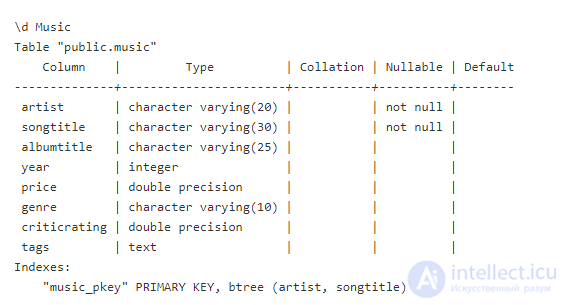
Getting information about a PostgreSQL table
Cassandra
DESCRIBE TABLE MUSIC;
CREATE TABLE myapp.music (
    artist text,
    songtitle text,
    albumtitle text,
    year int,
    price float,
    genre text,
    tags text,
    PRIMARY KEY (artist, songtitle)
) WITH CLUSTERING ORDER BY (songtitle ASC)
    AND default_time_to_live = 0
    AND transactions = {'enabled': 'false'};
MongoDB
use myNewDatabase;
show collections;
Inserting data into the table PostgreSQL
INSERT INTO Music
    (Artist, SongTitle, AlbumTitle,
    Year, Price, Genre, CriticRating,
    Tags)
VALUES(
    'No One You Know', 'Call Me Today', 'Somewhat Famous',
    2015, 2.14, 'Country', 7.8,
    '{"Composers": ["Smith", "Jones", "Davis"],"LengthInSeconds": 214}'
);
INSERT INTO Music
    (Artist, SongTitle, AlbumTitle,
    Price, Genre, CriticRating)
VALUES(
    'No One You Know', 'My Dog Spot', 'Hey Now',
    1.98, 'Country', 8.4
);
INSERT INTO Music
    (Artist, SongTitle, AlbumTitle,
    Price, Genre)
VALUES(
    'The Acme Band', 'Look Out, World', 'The Buck Starts Here',
    0.99, 'Rock'
);
INSERT INTO Music
    (Artist, SongTitle, AlbumTitle,
    Price, Genre,
    Tags)
VALUES(
    'The Acme Band', 'Still In Love', 'The Buck Starts Here',
    2.47, 'Rock',
    '{"radioStationsPlaying": ["KHCR", "KBQX", "WTNR", "WJJH"], "tourDates": { "Seattle": "20150625", "Cleveland": "20150630"}, "rotation": Heavy}'
);
Cassandra
Overall, the INSERT statement in Cassandra looks very similar to the equivalent in PostgreSQL. However, there is one big difference in semantics. In Cassandra, INSERT is actually an UPSERT operation, where the most recent values are added to the row if the row already exists.
Data entry works the same as PostgreSQL INSERT above
MongoDB
Even though MongoDB is a NoSQL database like Cassandra, its data insertion operation has nothing in common with Cassandra's semantic behavior. In MongoDB, insert() has no UPSERT capabilities, which makes it similar to PostgreSQL. Adding data by default without an _id specified will result in a new document being added to the collection.
db.music.insert( {

artist: "No One You Know",

songTitle: "Call Me Today",

albumTitle: "Somewhat Famous",

year: 2015,

price: 2.14,

genre: "Country",

tags: {

Composers: ["Smith", "Jones", "Davis"],

LengthInSeconds: 214

}

}

);

db.music.insert( {

artist: "No One You Know",

songTitle: "My Dog Spot",

albumTitle: "Hey Now",

price: 1.98,

genre: "Country",

criticRating: 8.4

}

);

db.music.insert( {

artist: "The Acme Band",

songTitle: "Look Out, World",

albumTitle:"The Buck Starts Here",

price: 0.99,

genre: "Rock"

}

);

db.music.insert( {

artist: "The Acme Band",

songTitle: "Still In Love",

albumTitle:"The Buck Starts Here",

price: 2.47,

genre: "Rock",

tags: {

radioStationsPlaying:["KHCR", "KBQX", "WTNR", "WJJH"],

tourDates: {

Seattle: "20150625",

Cleveland: "20150630"

},

rotation: "Heavy"

}

}

);
Querying a table
Perhaps the most significant difference between SQL and NoSQL in terms of composing queries lies in how the FROM and WHERE clauses are used. SQL lets you select multiple tables after the FROM clause, and the WHERE clause can be arbitrarily complex (including JOIN operations between tables). NoSQL, however, tends to impose a strict restriction on FROM, working with only one specified table, and the WHERE clause must always specify the primary key. This is due to NoSQL's drive for higher performance, which we discussed earlier. This drive leads to minimizing any cross-table and cross-key interaction as much as possible. It can cause significant latency in inter-node communication when answering a query, and therefore it is best avoided altogether. For example, Cassandra requires that queries be restricted to certain operators (only =, IN, <, >, =>, <= are allowed) on partition keys, except when querying a secondary index (where only the = operator is allowed).
PostgreSQL
Below are three example queries that can easily be executed by an SQL database.
SELECT * FROM Music
WHERE Artist='No One You Know';
SELECT * FROM Music
WHERE Artist='No One You Know' AND SongTitle LIKE 'Call%';
SELECT * FROM Music
WHERE Artist='No One You Know' AND SongTitle LIKE '%Today%'
AND Price > 1.00;
Cassandra
Of the PostgreSQL queries listed above, only the first will work in Cassandra unmodified, since the LIKE operator cannot be applied to clustering columns such as SongTitle. In this case only the = and IN operators are allowed.
SELECT * FROM Music
WHERE Artist='No One You Know';
SELECT * FROM Music
WHERE Artist='No One You Know' AND SongTitle IN ('Call Me Today', 'My Dog Spot')
AND Price > 1.00;
MongoDB
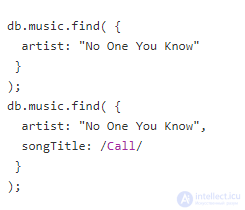
As shown in the previous examples, the primary method for composing queries in MongoDB is db.collection.find(). This method explicitly includes the collection name (music in the example below), so querying across multiple collections is not allowed.
Reading all rows of a table
Reading all rows is simply a special case of the query pattern we looked at earlier.
PostgreSQL
SELECT *
FROM Music;
Cassandra
Same as the PostgreSQL example above.
MongoDB
db.music.find( {} );
Editing data in a table
PostgreSQL
PostgreSQL provides the UPDATE statement to modify data. It has no UPSERT capabilities, so executing this statement will fail if the row no longer exists in the database.
UPDATE Music
SET Genre = 'Disco'
WHERE Artist = 'The Acme Band' AND SongTitle = 'Still In Love';
Cassandra
Cassandra has an UPDATE statement similar to PostgreSQL. UPDATE has the same UPSERT semantics as INSERT.
Same as the PostgreSQL example above.
MongoDB
The update() operation in MongoDB can fully update an existing document or update only specific fields. By default, it updates only one document, with UPSERT semantics disabled. Updating multiple documents and UPSERT-like behavior can be enabled by setting additional flags on the operation. For example, below is an update of the genre for a specific artist based on one of their songs.
db.music.update(
  {"artist": "The Acme Band"},
  {
    $set: {
      "genre": "Disco"
    }
  },
  {"multi": true, "upsert": true}
);
Deleting data from a table
PostgreSQL
DELETE FROM Music
WHERE Artist = 'The Acme Band' AND SongTitle = 'Look Out, World';
Cassandra
Same as the PostgreSQL example above.
MongoDB
MongoDB has two types of operations for deleting documents — deleteOne()/deleteMany() and remove(). Both types delete documents, but return different results.
db.music.deleteMany( {
        artist: "The Acme Band"
    }
);
Dropping a table
PostgreSQL
DROP TABLE Music;
Cassandra
Same as the PostgreSQL example above.
MongoDB
db.music.drop();
Conclusion
The debate about choosing between SQL and NoSQL has been going on for a long time. There are two sides to this debate: the database core architecture (monolithic, transactional SQL versus distributed, non-transactional NoSQL) and the approach to database design (modeling your data in SQL versus modeling your queries in NoSQL).
With a distributed transactional database such as YugaByte DB, the debate over database architecture can easily be resolved. As data volumes grow beyond what can be written to a single node, a fully distributed architecture that supports linear write scalability with automatic sharding/rebalancing becomes a necessity.
Furthermore, as stated in one Google Cloud article, transactional, strongly consistent architectures are now more widely used to provide better development flexibility than non-transactional, eventually consistent architectures.
Coming back to the discussion of database design, it's fair to say that both design approaches (SQL and NoSQL) are necessary for any complex real-world application. The SQL «model your data» approach makes it easier for developers to meet changing business requirements, while the NoSQL «model your queries» approach allows the same developers to operate on large data volumes with low latency and high throughput. That is precisely why YugaByte DB provides SQL and NoSQL APIs on a common core, rather than advocating for one approach over the other. Furthermore, by providing compatibility with popular database languages, including PostgreSQL and Cassandra, YugaByte DB ensures that developers won't have to learn a different language to work with a distributed, strongly consistent database core.

Comments