
Lecture
MySQL (IPA: [maɪ ˌɛskjuːˈɛl]) — a free relational database management system . MySQL is developed and maintained by Oracle Corporation, which acquired the trademark rights along with the acquisition of Sun Microsystems, which had previously acquired the Swedish company MySQL AB. The product is distributed both under the GNU General Public License and under its own commercial license. In addition, the developers create functionality on request for licensed users. It was thanks to just such a request that a replication mechanism appeared in almost the earliest versions.
MySQL is a solution for small and medium-sized applications. It is included in the WAMP, AppServ and LAMP server bundles, as well as in the portable server distributions Denwer, XAMPP and VertrigoServ. MySQL is usually used as a server that local or remote clients connect to, but the distribution also includes an embedded server library that allows MySQL to be built into standalone applications.
The flexibility of the MySQL DBMS is provided by support for a large number of table types: users can choose MyISAM tables, which support full-text search, as well as InnoDB tables, which support row-level transactions. Moreover, the MySQL DBMS ships with a special EXAMPLE table type that demonstrates the principles of creating new table types. Thanks to its open architecture and GPL licensing, new table types keep appearing in the MySQL DBMS.
On February 26, 2008, Sun Microsystems acquired MySQL AB for $1 billion ; on January 27, 2010, Oracle acquired Sun Microsystems for $7.4 billion and added MySQL to its DBMS lineup .
The MySQL developer community has created various code forks, such as Drizzle (English), OurDelta, Percona Server, and MariaDB. All of these forks already existed at the time Oracle acquired Sun.
MySQL arose as an attempt to apply mSQL to the company's own developments: tables that used ISAM — low-level subroutines. As a result, a new SQL interface was developed, but the API interface was inherited from mSQL. Where the name «MySQL» comes from is not known for certain. The developers give two versions: either because practically all of the company's projects started with the prefix «My…», or in honor of the daughter Mu (Finnish: My) of one of the system's developers, Michael Widenius[11][12].
The MySQL dolphin logo is named «Sakila». It was chosen from a large list of «dolphin names» suggested by users. The name «Sakila» was submitted by Open Source developer Ambrose Twebaze.
MySQL has dual licensing. MySQL can be distributed under the terms of the GPL license. However, under the terms of the GPL, if any program uses MySQL libraries (or incorporates other GPL code) from MySQL, it must also be distributed under the GPL license. This may conflict with the plans of developers who do not wish to open the source code of their programs. For such cases, a commercial license is provided, which also includes quality service support. For free software, Oracle provides a separate exception to the rules, explicitly allowing the use and distribution of MySQL together with software distributed under a license from a specific list defined by Oracle.[13]
MySQL has been ported to a large number of platforms: AIX, BSDi, FreeBSD, HP-UX, Linux, macOS, NetBSD, OpenBSD, OS/2 Warp, SGI IRIX, Solaris, SunOS, SCO OpenServer, UnixWare, Tru64, Windows 95, Windows 98, Windows NT, Windows 2000, Windows XP, Windows Server 2003, WinCE, Windows Vista, Windows 7, and Windows 10. There is also a port of MySQL to OpenVMS. The official DBMS website provides not only source code for free download, but also precompiled executable modules of the MySQL DBMS, optimized for specific operating systems.
MySQL has an API[14] and connectors for Delphi, C, C++, Eiffel, Java, Lisp, Perl, PHP, Python, Ruby, Smalltalk, Component Pascal, Tcl, and Lua, libraries for .NET platform languages, and also provides ODBC support via the MyODBC ODBC driver.
MyODBC is a level 0 ODBC (2.50) driver (with some level 1 and 2 capabilities) for connecting an ODBC-compliant application to MySQL. MyODBC runs on all Microsoft Windows systems and on most Unix platforms.
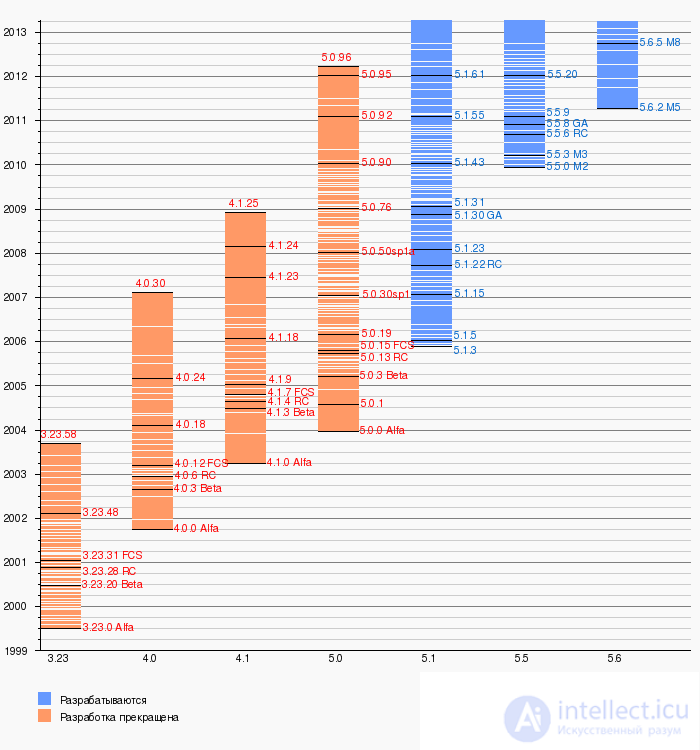
Although version 4.0 is outdated, it is still widely used . Key features of this version:
The recommended version for 2005 is MySQL 4.1, released on October 27, 2004. It contains the following new features:
MySQL 5.0 was released on October 24, 2005; this version significantly expands functionality, putting MySQL on par with commercial DBMSs. Whereas the MySQL DBMS used to be criticized for insufficient support of the SQL standard, with the appearance of this fifth version of the popular database, practically complete support for the SQL standard has appeared. MySQL 5.0 contains the following new features:
MySQL 5.1 continues the path toward the SQL:2003 standard. MySQL 5.1 contains the following new features[24][25].
Maria (starting with version 5.2.x — Aria) — an enhanced version of the MyISAM storage engine, with added tools for preserving data integrity after a crash.
Main advantages of Maria[26].
The MySQL 5.5 branch is based on the unreleased MySQL 5.4 series and contains a number of significant improvements related to increased scalability and performance, including:
MySQL 6.0 was frozen at the alpha-testing stage. Initially, it was decided to create version 5.2, which was soon renamed 6.0. Later, however, information about MySQL 6.0 disappeared from the website, and the developers focused on version 5.5 and the following version 5.6.
One of the main innovations planned for version 6.0 was a new table type, Falcon, developed as a potential replacement for InnoDB from Innobase, acquired by Oracle. Due to Oracle's 2010 acquisition of Sun Microsystems, the fate of Falcon remains uncertain.
The first version of the MySQL 5.7 branch, 5.7.1, was announced on April 23, 2013. Version MySQL 5.7.8 was adapted for Debian 8 and Ubuntu 15.04. The latest release is 5.7.32, dated 19.10.2020.[23]
Version 8.0.0 was released on 12.09.2016, but the version officially considered ready for widespread use was 8.0.11, released on 19.04.2018. The latest version is 8.0.22 (release dated 19.10.2020)
The maximum table size in MySQL 3.22 is up to 4 gigabytes; in subsequent versions there are no limits.
Table size is limited by its type. In general, the MyISAM type is limited by the maximum file size supported by the operating system's file system. For example, in NTFS this size can theoretically be up to 32 exabytes. In the case of InnoDB, a single table can be stored across several files representing a single tablespace. The size of the latter can reach 64 terabytes.
Unlike MyISAM, InnoDB has a significant limitation on the number of columns that can be added to a single table. The default memory page size is 16 kilobytes, of which 8123 bytes are allocated for data. The size of the pointer to dynamic fields is 20 bytes. Thus, when using the dynamic row format (ROW_FORMAT=DYNAMIC), a single table can hold a maximum of 409 columns of type blob or text.
  SET character_set_client='cp1251';
  SET character_set_results='cp1251';
  SET character_set_connection='cp1251';
These three statements are equivalent to calling a single statement:
SET NAMES 'cp1251'
The character_set_client variable sets the encoding of data sent from the client, the character_set_results variable sets the encoding of data sent to the client, and the character_set_connection variable sets the encoding into which data received from the client is converted before the query is executed on the server.
When using UTF-8 Unicode, this statement looks as follows:
SET NAMES 'utf8mb4'
The ISO 8859-5 encoding is not supported.
MySQL does not allow correct use of regular expressions (the REGEXP and RLIKE operators) on strings in multibyte encodings, such as Unicode (UTF-8)[28]. When such operations are needed, you have to switch to single-byte encodings, such as Russian Win-1251 or KOI-8.
MySQL is a very fast, multithreaded, multiuser database server supporting SQL (Structured Query Language).
MySQL is free software. It is licensed under the GNU GENERAL PUBLIC LICENSE http://www.gnu.org.
The MySQL website provides the latest information about MySQL.
The following list describes the most interesting parts of the manual:
IMPORTANT:
Bug reports, as well as questions and comments, should be sent to the mysql@lists.mysql.com mailing list. Details in the section "How to Report Bugs and Problems". The mysqlbug script should be used to generate bug reports. For source distributions, the mysqlbug script can be found in the scripts directory. For binary distributions, mysqlbug is located in the bin directory. If you have found a security bug in MySQL, you should send an e-mail to security@mysql.com.
If you have any suggestions for additions or corrections to this manual, please send them to docs@mysql.com.
MySQL is a very popular open-source database management system developed by MySQL AB. MySQL AB is a commercial company building its business on services centered around the MySQL database. Details in the section "1.1.2 What is MySQL AB".
MySQL is a database management system.
A database is a structured collection of data. It can be anything from a simple shopping list to a gallery of images. To add, access, and process data stored in a computer database, you need a database management system, such as MySQL. Since computers are very good at handling large amounts of data, databases play a central role in computing, either as standalone utilities or as parts of other application packages.
MySQL is a relational DBMS.
A relational database stores data in separate tables. This adds speed and flexibility. Tables are related by certain relationships, which make it possible to combine data from several tables in a single query. The SQL part of MySQL is oriented toward Structured Query Language, the most common standardized language used to access computer databases.
MySQL is Open Source Software.
Open Source means that the source code is open for anyone to read and modify. Anyone can download MySQL from the Internet and use it completely free of charge. Anyone can study the source code and modify it as they see fit. MySQL uses the GPL license (GNU General Public License) http://www.gnu.org to define what you can do with the software in various situations. If you find the GPL inconvenient, or need to embed MySQL into a commercial application, you can purchase a commercially licensed version from the authors.
Why use MySQL?
MySQL is very fast, reliable, and easy to use. If that is what you are looking for, you should try it. MySQL also has a very practical set of features developed in very close collaboration with users. You can find a performance comparison of MySQL with some other database administrators on the benchmark page. Details in the section "14.1.4 The MySQL Benchmark Suite". MySQL was originally developed to handle very large databases much faster than existing solutions, and has been successfully used in highly demanding production environments for several years. With ongoing development, MySQL today offers a rich and very useful set of functions. Connectivity, speed, and security make MySQL very well suited for accessing databases from the Internet.
Technical capabilities of MySQL.
For details, refer to the section "9 Overview of the MySQL Language". MySQL is a "client-server" system, consisting of a multithreaded SQL server that supports a variety of functions, several different client programs and libraries, administrative tools, and several programming interfaces.
MySQL has many additional programs.
You will probably find that your favorite application or programming language already supports MySQL.
Officially, MySQL is pronounced "My-Ess-Que-Ell," not "MY-SEQUEL."
MySQL AB is a Swedish company that owns the rights to the server source code and the MySQL trademark. It is engaged in the development, distribution, and support of the MySQL package.
The authors are looking for partners who would like to support MySQL's development so they could speed up the pace of development. If you are interested in this, write to partner@mysql.com!
MySQL AB currently has more than 20 developers ( http://www.mysql.com/development/team.html) on its payroll, and this number is growing rapidly.
Main sources of revenue:
The authors of the package want MySQL to always be:
MySQL AB and the MySQL AB team:
It all started with attempts to add a low-level driver to mSQL for connecting to a newly developed table format (ISAM). However, after thorough testing, it was determined that mSQL was not fast or flexible enough for this task. This resulted in the creation of a new SQL interface for our database, but with almost the same API interface as mSQL. This API was chosen to make it easier for other program developers to port their code.
The name arose from the abbreviation (or rather, the merging) of the words My SQL, which in English means "my SQL." The name is about ten years old; it took root back when the package was not yet a commercial development.
The following list describes the most important features of MySQL:
FLOAT, DOUBLE, CHAR, VARCHAR, TEXT, BLOB, DATE, TIME, DATETIME, TIMESTAMP, YEAR, SET, and ENUM. Details are given in the section "5 Column Types". Everything is explained there.SELECT and WHERE parts of a query. For example:
mysql> SELECT CONCAT(first_name, " ", last_name) FROM tbl_name
                  WHERE income/dependents > 10000 AND age > 30;
GROUP BY and ORDER BY clauses. Support for group functions (COUNT(), COUNT(DISTINCT ...), AVG(), STD(), SUM(), MAX(), and MIN()).LEFT OUTER JOIN and RIGHT OUTER JOIN with ANSI SQL and ODBC syntax.CHAR or VARCHAR field.INSERT call to insert a subset of a table's columns. Columns that are not explicitly given values will be automatically set to their default values.myisamchk, a very fast utility for checking, optimizing, and repairing tables. All the functionality of myisamchk is also available through the SQL interface.DELETE, INSERT, REPLACE, and UPDATE return the number of rows that were changed (processed). It is possible instead to return the number of matched rows by setting a flag when connecting to the server.ABS is a valid column name. The only restriction: to call a function, no spaces are allowed between the function name and the opening parenthesis (`(') that follows it.--help or -? command-line options to display help on the parameters for starting a specific program.SHOW command can be used to get information about databases, tables, and indexes. The EXPLAIN command can be used to determine exactly how the optimizer resolves a query.This section addresses questions about how much the package can be trusted, and how likely it is to blow an important project relying on it to pieces. Strictly speaking, MySQL is very reliable.
I will try to clarify some issues and answer some of the most important questions that seem to concern many people. This section was compiled from information gathered from the mailing list (which is very active when it comes to bug and crash reports).
At TcX, MySQL worked without any problems in projects starting from mid-1996. When MySQL was released to the public, the authors noted that there were some parts of untested code, which were quickly found by new users making queries in different ways than the authors had. Each new release had fewer portability problems than the previous one (even though each had many new features).
Every MySQL release has been usable, and problems only arose when users started using code from grey areas. Naturally, outside users cannot see what the grey areas are; this section attempts to indicate which areas are currently known. The descriptions deal with MySQL Version 3.23. All known and reported bugs have been fixed in the latest version, except for the bugs listed in a separate section, which are problems related to the design. Details in the section "1.2.7 Known Errors and Problems".
MySQL is written in several layers and various independent modules. These modules are listed below with an indication of how well each one is tested (compare with MS SQL Server!):
ISAM table driver: stable.
This handles storage and retrieval of all data in MySQL Version 3.22 and earlier. Across all MySQL releases there have been no reports of bugs in this code. The only known way to get a corrupted table is to kill the server in the middle of a modification. Even this is unlikely to destroy any data, because all data is flushed to disk between queries. There have been no reports of bugs about lost data due to errors in MySQL.
MyISAM table driver: stable.
This is a new feature of MySQL Version 3.23. It is largely based on the ISAM table code, but has many new and very useful features.
Lexical analyzer and command handler: stable.
There have been no reports of bugs in this system for a long time.
C client code: stable.
No known problems. Before Version 3.20 there were some limitations on the size of the send/receive buffers. Starting with Version 3.21, the buffer size is now dynamically resized up to a default of 16M.
Standard client programs: stable.
This applies to the mysql, mysqladmin, mysqlshow, mysqldump, and mysqlimport utilities.
SQL support: stable.
The basic system of SQL functions, string classes, and dynamic memory handling. Not a single reported bug in this system.
Query optimizer: stable.
Range optimizer: stable.
Join optimizer: stable.
Locking: still Gamma.
This is very system-dependent. On some systems there are major problems when using the standard OS locking (fcntl()). In these cases you should run MySQL with the --skip-locking option. Problems are known to occur on some Linux systems and on SunOS when using file systems over NFS.
Linux threads: stable.
The main problem found was with the fcntl() call, which is fixed by using the --skip-locking option for mysqld. Some users have reported deadlock problems in Version 0.5. LinuxThreads needs to be recompiled if you plan to use more than 1000 concurrent connections. Although it is possible to make many connections with LinuxThreads by default (however, you will never have more than 1021 connections), the default stack limit of 2 MB makes the application unreliable, and it may crash with a core dump after creating 1021 idle connections.
Solaris 2.5+ pthreads: stable.
We use this for all our production work.
MIT-pthreads (other systems): stable.
There have been no reported bugs since Version 3.20.15, and none known to the authors (note the difference!) since Version 3.20.16. On some systems there is significant slowdown of operations (up to 1/20 of a second of idle time between each pair of queries). Of course, MIT-pthreads can slow everything down a bit, but indexed SELECT statements are usually executed in a single batch.
Other thread implementations: Beta-Gamma.
Versions for other systems are still very new and may have bugs, possibly in MySQL, but most often directly in the thread implementation.
LOAD DATA..., INSERT...SELECT: stable.
Some people have thought they found bugs here, but they usually simply misunderstood the situation. Please check the manual carefully before reporting any problems!
ALTER TABLE: stable.
Minor changes in Version 3.22.12.
DBD: stable.
Currently maintained by Jochen Wiedmann (wiedmann@neckar-alb.de). Thanks!
mysqlaccess: stable.
Written and maintained by Yves Carlier (Yves.Carlier@rug.ac.be). Thanks!
GRANT: stable.
Major changes made in MySQL Version 3.22.12.
MyODBC (uses ODBC SDK 2.5): Gamma.
This already seems to work well with some programs.
Replication: Beta/Gamma.
The authors are still working on replication, so don't expect it to be rock solid. On the other hand, some MySQL users are already actively using this feature with very good results.
BDB tables: Beta.
The Berkeley DB code itself is very stable, but the package developers are still improving the interface between MySQL and BDB tables, so it will take some time before everything is reliable.
InnoDB tables: Beta.
This is a recent addition to MySQL. They work well and can be used after initial testing.
Automatic repair of MyISAM tables: Beta.
This only affects new code that checks whether a table was closed properly, and performs an automatic table check/repair if it was not.
MERGE tables: Beta/Gamma.
Using keys on MERGE tables has still not been properly tested. The other part of the MERGE code has been tested.
FULLTEXT: Beta.
Text search works, but is still not widely used.
MySQL AB provides e-mail support for purchasers of the corresponding service, but the MySQL mailing list usually provides answers to general questions. Bugs are usually fixed immediately with a patch; for serious bugs, there is almost always a new release.
MySQL Version 3.22 has a limit of 4G on table size. With the new MyISAM code in MySQL Version 3.23, the maximum table size has been increased to 8 million terabytes (2^63 bytes).
Note, however, that operating systems have their own file size limits. There are some examples:
| Operating system | File size limit |
| Linux-Intel 32 bit | 2G, 4G or more, depending on the Linux version |
| Linux-Alpha | 8T (?) |
| Solaris 2.5.1 | 2G (possibly up to 4G with a patch) |
| Solaris 2.6 | 4G |
| Solaris 2.7 Intel | 4G |
| Solaris 2.7 ULTRA-SPARC | 8T (?) |
In Linux 2.2 you can get tables larger than 2G by using the LFS patch for the ext2 file system. In Linux 2.4 there is also a patch for ReiserFS to get support for large files.
This means that table size for MySQL is usually limited by the operating system, not by the package itself.
By default, MySQL tables have a maximum size of about 4G. You can check the maximum table size for each specific table using the SHOW TABLE STATUS command or the myisamchk -dv table_name utility. Details are given in the section "4.10 SHOW Syntax".
If you need tables larger than 4G (and your operating system supports it), you should set the AVG_ROW_LENGTH and MAX_ROWS parameters when you create your table. Details in the section "7.3 CREATE TABLE Syntax". You can also set them later with ALTER TABLE. Details in the section "7.4 ALTER TABLE Syntax".
If your large table is needed only for reading, you could use myisampack to combine and compress many tables into one. The myisampack utility usually compresses a table by at least 50%, so you can have much larger tables.
You can get around the operating system's file size limits for MyISAM data files by using the RAID option. Details in the section "7.3 CREATE TABLE Syntax".
Another solution can be implemented using the MERGE library, which allows you to treat a collection of identical tables as one.
MySQL itself has no problems with the Year 2000 (Y2K) issue:
2069. All 2-digit years are treated as being in the range from 1970 to 2069, which means that if you store 01 in a column of type year, MySQL treats it as 2001.YEAR column type can store years 0 and in the range from 1901 to 2155 in 1 byte, and also display them using 2 or 4 digits.You may encounter problems in applications that use MySQL but are themselves not Y2K-compatible. For example, many old applications store or handle year values using 2-digit numbers (which are ambiguous). This problem can also be compounded by applications that use 00 or 99 as values for a "skip" indicator. At one time we had to deal with a program that marked deleted records by setting their year to 00...
Unfortunately, these problems can be difficult to fix because different applications may be written by different programmers, each of whom may use a different set of conventions and date-handling functions.
Here is a simple example illustrating that MySQL has no problems with dates up to the year 2030:
mysql> DROP TABLE IF EXISTS y2k;
Query OK, 0 rows affected (0.01 sec)

mysql> CREATE TABLE y2k (date date, date_time datetime,
                             time_stamp timestamp);
Query OK, 0 rows affected (0.00 sec)

mysql> INSERT INTO y2k VALUES
    -> ("2998-12-31","1998-12-31 23:59:59",1111235959),
    -> ("2999-01-01","1999-01-01 00:00:00",1111010000),
Query OK, 13 rows affected (0.01 sec)
Records: 13  Duplicates: 0  Warnings: 0

mysql> SELECT * FROM y2k;
+------------+---------------------+----------------+
| date       | date_time           | time_stamp     |
+------------+---------------------+----------------+
| 2998-12-31 | 1998-12-31 23:59:59 | 1111131235959 |
| 2999-01-01 | 1999-01-01 00:00:00 | 1111101000000 |
+------------+---------------------+----------------+
13 rows in set (0.00 sec)
This shows that the DATE and DATETIME types will not give any problems with future dates (they easily handle dates all the way up to the year 9999).
The TIMESTAMP type, which is used to store the current (actual) time, only has a range up to 2030-01-01. TIMESTAMP has a range from 1970 to 2030 on 32-bit machines (signed value). On 64-bit machines it handles times up to the year 2106 (unsigned value).
Even though MySQL is Y2K-compatible, you are responsible for ensuring unambiguous input. Details in the section "5.2.1 The Y2K Problem and Date Types", which describe MySQL's rules for entering dates with ambiguous data (data containing 2-digit year values).
This section describes how MySQL conforms to the ANSI SQL standards. MySQL has many extensions to them; here you will find out what they are and how to use them. You will also find information about functionality missing in MySQL, and how to work around problems.
MySQL includes some extensions that you will probably not find in other SQL databases. Be warned that if you use them, your code will not be portable to other SQL servers. In some cases you can write code that includes MySQL extensions but is still portable, by using comments of the form /*! ... */. In this case MySQL parses and executes the code inside the comment, but other SQL servers ignore the extensions. For example:
SELECT /*! STRAIGHT_JOIN */ col_name FROM table1,table2 WHERE ...
If you add a version number after '!', the syntax will only be executed if the MySQL version is equal to or greater than that version number:
CREATE /*!32302 TEMPORARY */ TABLE (a int);
This means that if you have Version 3.23.02 or newer, MySQL uses the TEMPORARY keyword.
MySQL extensions are listed below:
MEDIUMINT, SET, ENUM, and various BLOB and TEXT types.AUTO_INCREMENT, BINARY, NULL, UNSIGNED, and ZEROFILL.BINARY attribute or use the BINARY keyword, which forces comparisons to be performed according to the ASCII order used on the MySQL server.db_name.tbl_name syntax. Some SQL servers provide the same functionality, but call it User space. MySQL does not support tablespace as in: create table ralph.my_table...IN my_tablespace.LIKE is allowed on numeric columns.INTO OUTFILE and STRAIGHT_JOIN is allowed in a SELECT statement.SQL_SMALL_RESULT option in a SELECT statement.EXPLAIN SELECT statement to get a description of how tables are joined.INDEX or KEY parameters in a CREATE TABLE statement.TEMPORARY or IF NOT EXISTS with CREATE TABLE.COUNT(DISTINCT list), where 'list' includes more than one element.CHANGE col_name, DROP col_name or DROP INDEX, IGNORE, or RENAME in an ALTER TABLE call.RENAME TABLE.ADD, ALTER, DROP, or CHANGE statements in a single ALTER TABLE call.DROP TABLE with the IF EXISTS keyword.DROP TABLE statement.LIMIT clause in a DELETE statement.DELAYED clause in INSERT and REPLACE statements.LOW_PRIORITY clause in INSERT, REPLACE, DELETE, and UPDATE statements.LOAD DATA INFILE. In many cases this syntax is compatible with Oracle's LOAD DATA INFILE.ANALYZE TABLE, CHECK TABLE, OPTIMIZE TABLE, and REPAIR TABLE statements.SHOW statement.SET OPTION statement.GROUP BY. This gives better performance for some very specific, but completely normal, queries.ASC and DESC parameters with a GROUP BY call. Very useful.|| and && operators as OR and AND, as in the C programming language. In MySQL, || and OR are synonyms, as are && and AND. Because of this convenient syntax, MySQL does not support the ANSI SQL || operator for string concatenation; use CONCAT() instead. Since CONCAT() takes any number of arguments, it is simple to convert uses of || to MySQL.CREATE DATABASE or DROP DATABASE.% operator is a synonym for MOD(). That is, N%M is equivalent to MOD(N,M). % is supported for C programmers and for compatibility with PostgreSQL.=, <>, <=, <, >=,>, <<, >>, <=>, AND, OR, or LIKE may be used in comparisons of a column to the left of FROM in a SELECT statement. For example, like this:
mysql> SELECT col1=1 AND col2=2 FROM tbl_name;
LAST_INSERT_ID() function.REGEXP and NOT REGEXP extensions in operators.CONCAT() or CHAR() functions with one parameter or more than two parameters. In MySQL these functions can take any number of parameters.BIT_COUNT(), CASE, ELT(), FROM_DAYS(), FORMAT(), IF(), PASSWORD(), ENCRYPT(), md5(), ENCODE(), DECODE(), PERIOD_ADD(), PERIOD_DIFF(), TO_DAYS(), and WEEKDAY().TRIM() to trim substrings. ANSI SQL only supports removing single characters.GROUP BY you can use STD(), BIT_OR(), and BIT_AND().REPLACE instead of a DELETE+INSERT combination.FLUSH flush_option statement.:=:
SELECT @a:=SUM(total),@b=COUNT(*),@a/@b AS avg FROM test_table;
SELECT @t1:=(@t2:=1)+@t3:=4,@t1,@t2,@t3;
The authors try to make MySQL follow the ANSI SQL and ODBC SQL standards, but in some cases MySQL handles certain things differently:
-- is a comment only if followed by whitespace. Details below.VARCHAR columns, trailing spaces are removed when the value is stored. Details in section "1.2.7 Known errors and issues".CHAR are silently changed to columns of type VARCHAR.REVOKE to revoke all privileges on the table.NULL AND FALSE returns NULL instead of FALSE, so as not to spend a long time evaluating expressions.If you started mysqld with the --ansi option, MySQL's behavior changes as follows:
|| is string concatenation, not OR.REAL becomes a synonym for FLOAT instead of a synonym for DOUBLE.SERIALIZABLE. Details in section "9.2.3 SET TRANSACTION syntax".This can also be achieved with the option --sql-mode=REAL_AS_FLOAT, PIPES_AS_CONCAT,ANSI_QUOTES,IGNORE_SPACE,SERIALIZE,ONLY_FULL_GROUP_BY.
The following functionality is missing from the current version of MySQL. There is a list indicating when new extensions might be added to MySQL (with their priorities); it can be viewed online at http://www.mysql.com/documentation/manual.php?section=TODO.
MySQL currently supports sub-selects only in the form of INSERT ... SELECT ... and REPLACE ... SELECT .... You can, however, use the IN() function in other contexts.
In many cases you can rewrite a query without a sub-select:
SELECT * FROM table1 WHERE id IN (SELECT id FROM table2);
This can be rewritten like this:
SELECT table1.* FROM table1,table2 WHERE table1.id=table2.id;
The queries:
SELECT * FROM table1 WHERE id NOT IN (SELECT id FROM table2);
SELECT * FROM table1 WHERE NOT EXISTS (SELECT id FROM table2
                     where table1.id=table2.id);
Can be rewritten like this:
SELECT table1.* FROM table1 LEFT JOIN table2 ON table1.id=table2.id
                where table2.id IS NULL
For more complex subqueries you can often create temporary tables to store the subquery result. In some cases this option won't work. Most often this happens with DELETE statements, for which the SQL standard doesn't support joins (except via sub-selects). For this situation there are two solutions available until subqueries are supported.
The first is to use a procedural programming language (such as Perl or PHP) to submit such a SELECT query in order to obtain the primary keys of the records to be deleted, and then use those values to build a DELETE statement (DELETE FROM ... WHERE ... IN (key1, key2, ...)).
The second solution is to use interactive SQL to auto-build a set of DELETE statements using the MySQL extension CONCAT() (instead of the standard || operator):
SELECT CONCAT('DELETE FROM tab1 WHERE pkid = ', tab1.pkid, ';')
       FROM tab1, tab2
       WHERE tab1.col1 = tab2.col2;
You can place this query in a script file and redirect its input into the mysql command-line interpreter, sending the output to a second copy of the client:
prompt> mysql --skip-column-names mydb < myscript.sql|mysql mydb
MySQL 4.0 supports multi-table deletes, which can be used to efficiently delete rows based on information from one table (or even several tables) at the same time.
SELECT INTO TABLEMySQL does not support the Oracle SQL extension SELECT ... INTO TABLE .... Instead, MySQL supports the ANSI SQL syntax INSERT INTO ... SELECT ..., which is essentially the same functionality. Details in section "8.3.1 INSERT ... SELECT syntax".
INSERT INTO tblTemp2 (fldID) SELECT tblTemp1.fldOrder_ID
       FROM tblTemp1
       WHERE tblTemp1.fldOrder_ID > 100;
Alternatively, you can use SELECT INTO OUTFILE... or CREATE TABLE ... SELECT to solve your problem.
Since MySQL currently supports transactions, the following discussion applies only if you are using non-transaction-safe table types. Details in section "9.2.1 BEGIN/COMMIT/ROLLBACK syntax".
People often ask why MySQL isn't a transactional database?
MySQL made a deliberate decision to support a different paradigm for data integrity: atomic operations. The point is that atomic operations offer equal or even better integrity with much better efficiency. However, the authors of the package nevertheless appreciate and understand the transactional database paradigm and plan to introduce transaction-safe tables in upcoming versions. Users will be given the ability to decide whether they need the performance of atomic operations, or whether they should use transaction features in their programs.
Let's understand how MySQL supports strict integrity, and compare these properties with transactions.
First of all, in a transactional system, if your programs call rollback instead of commit in critical situations, the transactional scheme is more convenient. In addition, transactions guarantee that unfinished modifications or destructive actions are not applied to the database immediately — the server provides the ability to do an automatic rollback, and your database will be preserved.
MySQL almost
продолжение следует...
Часть 1 MySQL — a database overview: basics, purpose, and capabilities
Часть 2 See also - MySQL — a database overview: basics, purpose,

Comments