
Lecture
Full-text search (Fr. Recherche en texte intégral) — automated search of documents, in which the search is carried out not by document names but by their content, either in full or over a substantial part of it. Many websites and application programs (for example, word-processing programs) provide full-text search capabilities. Some web search systems, such as AltaVista, use full-text search methods, while others index only a portion of the web pages reviewed by their indexing systems.
In text retrieval, full-text search refers to techniques for searching a single document stored on a computer, or a collection, in a full-text database. Full-text search is distinguished from searches based on metadata or on parts of the original texts represented in databases (for example, titles, abstracts, selected sections, or bibliographic references).
In full-text search, the search engine examines every word in each stored document, attempting to match the search criteria (for example, text supplied by the user). Full-text search methods appeared in the 1960s — for instance, IBM STAIRS from 1969 — and became common in online bibliographic databases in the 1990s. Many websites and application programs (for example, text editors) provide full-text search capabilities. Some search engines, such as the former AltaVista, use full-text search methods, while others index only a portion of the web pages reviewed by their indexing systems.
Early versions of full-text search programs involved scanning the entire content of every document in search of a given word or phrase. Using such a technology, a search took a very long time (depending on the size of the database), and on the internet it would be impractical. Modern algorithms build in advance what is called a full-text index for searching — a dictionary listing all words and indicating where they occur. With such an index in place, it is enough to search for the needed words within it, and a list of the documents in which they occur is obtained immediately.
Full-text indexes in MySQL are denoted by the type «FULLTEXT», which can be applied to columns of type «VARCHAR» and «TEXT». When bulk-inserting data into a table with «FULLTEXT» fields, the index will be built immediately, which slows things down; to avoid this effect, it is recommended to add the index to the fields only after the data has been inserted.
The search is performed using the MATCH() and AGAINST() functions:
SELECT * FROM articles WHERE MATCH (title, body) AGAINST ('поиск');
In this case, the search phrase must be written word for word (that is, «поиска», «поисковик» are not valid variants for the example above)
Result (matches found are shown in bold):
| id | title | body |
|---|---|---|
| 5 | Regular expressions | Most implementations of regular expressions provide a way to perform a search for a fragment of text … |
| 1 | Full-text search | Full-text search … |
When working with a small number of documents, a full-text search system can scan the content of the documents directly on every query. This strategy is called «sequential scanning». This is what some tools, such as grep, do when searching.
However, when the number of documents to be searched is potentially large, or the number of search queries performed is substantial, the task of full-text search is often split into two tasks: indexing and searching. In the indexing phase, the text of all documents is scanned and a search list is built (often called an index, though it would be more correct to call it a concordance). In the search phase, only the index is used to execute a specific query, not the text of the original documents.
The indexer makes an entry in the index for every term or word found in a document, and may also record its relative position within the document. Typically, the indexer ignores stop words (such as «the» and «and»), which are common and not distinctive enough to be useful for searching. Some indexers also apply a language-specific stemming to the indexed words. For example, the words «drives», «drove», and «driven» would be recorded in the index under a single conceptual word, «drive».
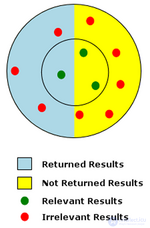
Diagram of a search with low precision and low recall
Recall, note, is the count of relevant results returned by a search, while precision is a measure of the quality of the returned results. Recall, to reiterate, is the ratio of returned relevant results to all relevant results. Precision is the ratio of the number of returned relevant results to the total number of returned results.
The diagram on the right represents a search with low precision and low recall. In the diagram, the red and green dots represent the overall population of potential search results for the given search. The red dots represent irrelevant results, and the green dots represent relevant results. Relevance is determined by how close the search results are to the center of the inner circle. Of all the possible results, those that were actually returned by the search are shown on a blue background. In the example, only 1 relevant result out of 3 possible relevant results was returned, so the recall ratio is very low — 1/3, or 33%. Precision for the example is a very low 1/4, or 25%, since only 1 of the 4 returned results was relevant.
Because of the ambiguity inherent in natural language, full-text search systems typically include options such as stop words to improve precision and stemming to increase recall. Searching against a controlled vocabulary also helps address low-precision problems by tagging documents in a way that removes ambiguity. The trade-off between precision and recall is simple: increasing precision can reduce overall recall, and increasing recall reduces precision.
Full-text search is likely to yield a large number of documents that are unrelated to the given search question. Such documents are called false positives (see Type I error). Retrieving unwanted documents is often caused by the ambiguity inherent in natural language. In the diagram example on the right, false positives are represented by the irrelevant results (red dots) that were returned by the search (on a blue background).
Clustering methods based on Bayesian algorithms can help reduce the number of false positives. For a query on «bank», clustering can be used to categorize the body of documents/data into «financial institution», «a place to sit», «a place for storage», and so on. Depending on the occurrence of words corresponding to the categories, search terms or search results can be placed into one or more categories. This technique is widely applied in the field of electronic discovery.
The shortcomings of full-text search have been addressed in two ways: by providing users with tools that let them formulate their search queries more precisely, and by developing new search algorithms that improve search precision.
The PageRank algorithm, developed by Google, gives more weight to documents that are linked to by other web pages. See the Search Engine section for further examples.

Comments