Why do we need data types at all?
1 Data correctness control
A data type guarantees that only a valid value can be put into a field.
Example:
-
the age field → only a number
-
the email field → a string
-
the is_active field → only TRUE/FALSE
without types, you could write "hello" into age
2 Memory savings
Each type takes up a different amount of memory.
Example:
the right type choice = a smaller database size
3 Performance
The DBMS optimizes operations depending on the type.
-
numbers sort faster than strings
-
indexes on INT work faster than on TEXT
-
a DATE is faster to compare than the string "2027-02-13"
correct types = fast queries
4 Ability to perform calculations
The type determines which operations can be performed:
| Type |
What you can do |
| INT |
+ − × ÷ |
| DATE |
date difference |
| BOOLEAN |
logic |
| STRING |
search and comparison |
you can't add the text "hello" + "world" as numbers
5 Indexing and search
Indexes work differently depending on the type:
-
on numbers — fast
-
on dates — fast
-
on text — harder
the type choice affects search speed
6 Security and integrity
Types protect data from errors:
-
you can't write the date "abc" into a DATE field
-
you can't write text into an INT field
-
you can't write a negative value into UNSIGNED
this reduces the number of bugs
7 Logic and meaning of the data
Types help you understand what is stored in a column:
| Type |
Meaning |
| DATE |
event date |
| DECIMAL |
money |
| BOOLEAN |
on/off |
| JSON |
flexible data |
the database becomes understandable to other developers
In other words, data types make working with databases more efficient, but how do you know which data type to choose?
What data types are there?
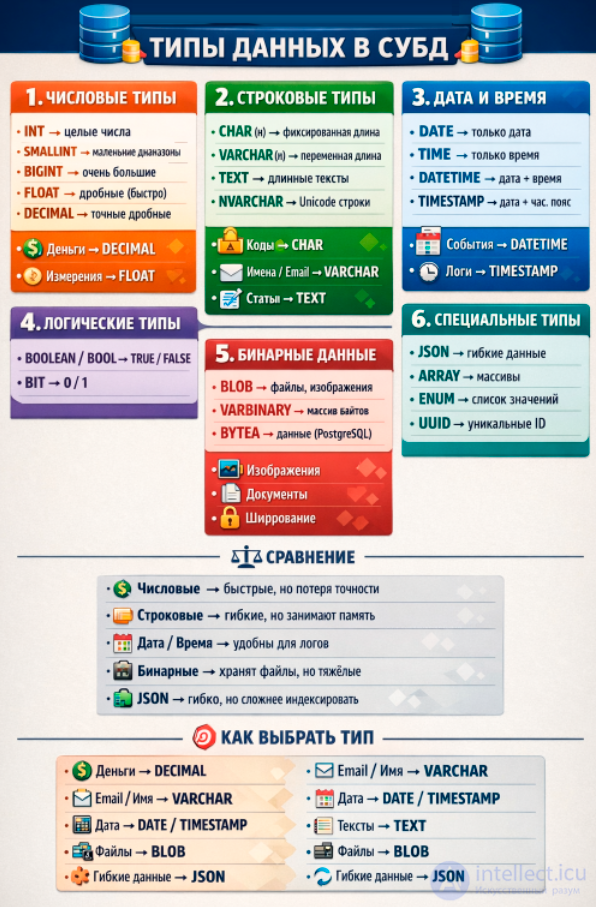
The most popular data types in SQL can loosely be divided into five main categories:
- Numeric data types
- String data types
- Date and time
- Boolean data types
- Binary data types
- Special data types
Some DBMSs also use other categories of data types, but these are typically used less often or at a more advanced level. Don't forget to check your DBMS documentation for details :) Now let's look at each category individually.
Comparison of types
| Category |
Pros |
Cons |
| Numeric |
fast calculations |
possible loss of precision |
| String |
flexibility |
takes up memory |
| Date/time |
convenient for logs |
different formats |
| Binary |
can store any files |
large size |
| JSON/ARRAY |
flexibility |
harder to index |
Numeric data types
Used to store numbers and let you perform arithmetic operations, comparisons, and other mathematical calculations with them. Numeric data types can be divided into the following main categories:
1. Integer data types
Used to store numbers without decimal fractions. They differ in value range and the amount of memory they occupy.
- TINYINT
- Value range: from -128 to 127 for signed values and from 0 to 255 for unsigned values.
- Size: 1 byte.
- Use: Often used to store small numbers, such as age.
- DBMS: MySQL, SQL Server.
- SMALLINT
- Value range: from -32,768 to 32,767 for signed values and from 0 to 65,535 for unsigned values.
- Size: 2 bytes.
- Use: Suitable for data that needs a wider range than TINYINT, but not wide enough to need INT.
- DBMS: PostgreSQL, MySQL, SQL Server.
- MEDIUMINT
- Value range: from -8,388,608 to 8,388,607 for signed values and from 0 to 16,777,215 for unsigned values.
- Size: 3 bytes.
- Use: Used in situations where you need to balance memory usage and value range.
- DBMS: MySQL.
- INT (or INTEGER)
- Value range: from -2,147,483,648 to 2,147,483,647 for signed values and from 0 to 4,294,967,295 for unsigned values.
- Size: 4 bytes.
- Use: One of the most commonly used data types, suitable for most integer values.
- DBMS: PostgreSQL, MySQL, SQL Server, SQLite.
- BIGINT
- Value range: from -9,223,372,036,854,775,808 to 9,223,372,036,854,775,807 for signed values and from 0 to 18,446,744,073,709,551,615 for unsigned values.
- Size: 8 bytes.
- Use: Used to store very large numbers, such as unique identifiers or object counts in large systems.
- DBMS: PostgreSQL, MySQL, SQL Server.
2. Fixed-precision, fixed-scale numbers
These data types are used to store numbers with decimal fractions where precision matters, for example when working with money.
- DECIMAL(p, s) or NUMERIC(p, s): A number with fixed precision and scale, where p (precision) is the total number of digits and s (scale) is the number of digits after the decimal point. For example, DECIMAL(10, 2) can store numbers with up to 10 digits, 2 of which are after the decimal point.
- Size: This data type takes up a variable number of bytes depending on the value of parameter p.
- Use: Often used in financial applications where high precision is required for calculations (for example, prices, account balances).
- DBMS: PostgreSQL, MySQL, SQL Server, SQLite.
3. Floating-point numbers
Floating-point data types are designed to store numbers that can have a wide range of values and require a certain trade-off between precision and memory usage.
- FLOAT
- Description: FLOAT represents floating-point numbers that can store values with a fractional part. Depending on the DBMS implementation, FLOAT can vary in precision and value range. In some DBMSs, FLOAT precision can be specified with a parameter p — FLOAT(p), where p indicates the number of digits in the mantissa. For example, FLOAT(7) can store up to 7 significant digits.
- REAL: In some DBMSs, FLOAT can be a synonym for REAL, which usually has fixed precision and range.
- Size: 4 or 8 bytes depending on the DBMS.
- Use: Used when you need to store numbers with a wide degree of precision, such as results of scientific calculations.
- DBMS: PostgreSQL (Real), MySQL, SQL Server, SQLite (Real), Oracle.
- DOUBLE PRECISION or simply DOUBLE
- Description: A floating-point number, similar to FLOAT, but with double the precision.
- Size: 8 bytes.
- Use: Suitable for storing numbers that require more precision than FLOAT, but with the same rounding-precision trade-off.
- DBMS: PostgreSQL, MySQL, Oracle.
String data types
String data types in SQL are designed to store text information, such as names, addresses, descriptions, and any other characters.
- CHAR(n)
- Description: The CHAR(n) data type is used to store fixed-length strings. Here n is the number of characters allocated for storing the string.
- Features: If a string is shorter than the specified length, it is automatically padded with spaces up to the given length. For example, if CHAR(5) is set and the string "SQL" is 3 characters long, it will be stored as "SQL " (with two trailing spaces).
- Use: CHAR is used to store data that always has the same length, such as country codes, postal codes, or fixed-length phone numbers.
- DBMS: PostgreSQL, MySQL, SQL Server, Oracle.
- VARCHAR(n)
- Description: The VARCHAR(n) data type is used to store variable-length strings, where n is the maximum number of characters that can be stored.
- Features: Unlike CHAR, VARCHAR stores only the actual number of characters in the string and does not pad it with spaces. For example, the string "SQL" in VARCHAR(5) will occupy exactly 3 characters, with no added spaces.
- Use: VARCHAR is widely used to store data whose length may vary, such as names, email addresses, addresses, and descriptions.
- DBMS: PostgreSQL, MySQL, SQL Server, Oracle.
- TEXT
- Description: TEXT is used to store long text data, such as articles, descriptions, comments, or large blocks of text.
- Features: Unlike CHAR and VARCHAR, the TEXT type can store strings of large length (usually up to several gigabytes). However, it may have some limitations depending on the DBMS.
- Use: Used to store large volumes of text, such as product descriptions, blog articles, user comments, etc.
- DBMS: PostgreSQL, MySQL, SQL Server, SQLite.
a comparison table of the main string field types in MySQL and their limitations:
| Type |
Max length (characters/bytes) |
Storage features |
When to use |
| CHAR(n) |
up to 255 characters |
Fixed length, always occupies n bytes (plus encoding) |
For short fixed-length strings (e.g., country codes, postal codes) |
| VARCHAR(n) |
up to 65,535 bytes (not characters!) |
Variable length, stores only the actual number of characters + 1–2 bytes of overhead |
For variable-length strings (names, descriptions). VARCHAR(266) is perfectly valid |
| TEXT |
up to 65,535 characters (≈64 KB) |
Stored separately from the main row, with only a pointer in the table |
For large texts (articles, comments) |
| MEDIUMTEXT |
up to 16,777,215 characters (≈16 MB) |
Stored separately |
For very large texts |
| LONGTEXT |
up to 4,294,967,295 characters (≈4 GB) |
Stored separately |
For gigantic texts (e.g., documents, books) |
Important points:
-
The VARCHAR limit depends on the encoding:
-
latin1 (1 byte/character) → maximum ~65,535 characters.
-
utf8mb4 (up to 4 bytes/character) → maximum ~16,383 characters.
-
The total row size in a table cannot exceed 65,535 bytes. If you have several large VARCHAR fields, they may exceed the limit.
-
For long texts, it's better to use TEXT or its extended variants.
In MySQL, the ability to index depends on the field type and its length:
| Field type |
Can it be indexed? |
Limitations and features |
| CHAR(n) |
Yes |
Fully indexable. Limit: 255 characters maximum. |
| VARCHAR(n) |
Yes |
Indexable, but there is a limit on index length. In InnoDB the maximum key length is 767 bytes (in older versions) or 3072 bytes (in newer ones). For long strings, a prefix index is often used: INDEX(col(100)). |
| TEXT |
Partially |
Cannot be indexed directly. You need to specify a prefix length: INDEX(col(100)). |
| MEDIUMTEXT |
Partially |
Same as TEXT, only with a prefix. |
| LONGTEXT |
Partially |
Indexable only via prefixes. A full index is not possible. |
Important points:
-
Regular B-Tree indexes can be created for VARCHAR and CHAR.
-
For TEXT and its variants — only prefix indexes (e.g., the first 100 characters).
-
For searching long texts, it's better to use a FULLTEXT index (supported for CHAR, VARCHAR, TEXT).
-
The index length limit depends on the encoding:
Thus:
-
for example, VARCHAR(266) can be indexed directly.
-
TEXT, MEDIUMTEXT, LONGTEXT — only via prefixes or FULLTEXT.
Date and time
Data types for storing date and time in SQL are designed for working with values such as dates, times of day, and time intervals. These data types allow operations on dates and times, such as addition, subtraction, comparison, and formatting. Let's look at the main types of such data, their features, and their uses.
Fractional second support
Many data types, such as TIME, DATETIME, and TIMESTAMP, support storing fractions of a second (microseconds), which lets you store and work with more precise timestamps. For example, the format TIMESTAMP(6) lets you store timestamps with millisecond precision.
Working with time zones
Some DBMSs support time zone handling for the TIMESTAMP WITH TIME ZONE data type, which lets you store date and time accounting for the time zone. This is useful for global applications where the time of an event needs to be recorded with respect to the time zone.
Boolean data types
Boolean data types in SQL are used to store boolean values, that is, values that can be either true (TRUE) or false (FALSE). These data types are often used in query conditions, checks, and data filtering. Although the SQL standard does not define a boolean type as a separate type, most modern DBMSs support it or an analogous construct.
Boolean type support across various DBMSs
In PostgreSQL, the BOOLEAN data type is fully supported and can take the values TRUE, FALSE, or NULL. Alternative notations: `t` or `f`, `1` or `0` (where `1` is interpreted as TRUE, and `0` as FALSE).
In MySQL, the BOOLEAN data type is an alias for TINYINT(1). A value of 0 is interpreted as FALSE, and any nonzero value as TRUE.
In SQLite, the boolean type is also represented as INTEGER, where 0 means FALSE, and 1 means TRUE.
In Microsoft SQL Server, the boolean type is represented as BIT. It can take the values 0 (FALSE), 1 (TRUE), or NULL.
Binary data types
Binary data types in SQL are designed to store data as raw bytes or bits, which makes them useful for storing images, files, cryptographic keys, and other kinds of binary data. They let you store and manage data that cannot be represented as plain text or numbers.
- DATE
- Description: DATE is a data type used to store a date in YYYY-MM-DD format (year, month, day). It stores only date information, without time.
- Example: 2024-08-15
- Use: The DATE data type is used when you only need to store a date without a time. For example, this could be a birth date, a user registration date, or the date some action was performed.
- DBMS: PostgreSQL, MySQL, SQL Server, Oracle.
- TIME
- Description: TIME is a data type used to store the time of day in HH:MM:SS format (hours, minutes, seconds). This data type can include fractions of a second (microseconds).
- Example: 14:30:00 or 14:30:00.123456 (with fractional seconds)
- Use: The TIME data type is used to store time without reference to a specific date. This can be useful for recording the start time of a workday, a meeting time, or a schedule.
- DBMS: PostgreSQL, MySQL, SQL Server.
- DATETIME
- Description: DATETIME is a data type that combines date and time. Storage format: YYYY-MM-DD HH:MM:SS. In some DBMSs it can include fractions of a second.
- Example: 2024-08-15 14:30:00
- Use: DATETIME is used when you need to store both date and time together. This could be the date and time of a transaction, record creation, or data modification.
- DBMS: MySQL, SQL Server.
- TIMESTAMP
- Description: TIMESTAMP is a data type that also stores date and time, but with time zone awareness. It updates automatically on every change to the record, which makes it useful for tracking data changes. The storage format is similar to DATETIME.
- Example: 2024-08-15 14:30:00
- Use: TIMESTAMP is used for automatic logging and tracking changes in data, for example, when you need to know the exact time of the last record update.
- DBMS: PostgreSQL, MySQL, Oracle.
- INTERVAL
- Description: INTERVAL is a data type used to store time intervals, such as the difference between two dates or timestamps. Depending on the SQL implementation, intervals can include days, months, years, hours, minutes, and seconds.
- Example: INTERVAL '2 days 3 hours'
- Use: The INTERVAL data type is used to calculate the difference between two time values, for example, to count the number of days between two dates or the time elapsed since a certain action was performed.
- DBMS: PostgreSQL, Oracle.
- BOOLEAN (BOOL)
- Description: BOOLEAN is a data type designed to store boolean values. A BOOLEAN value can be TRUE, FALSE, or NULL (undefined value). In some DBMSs, the BOOLEAN data type is abbreviated as BOOL.
- Use: Boolean data types are used to store flags or states, such as:
- Is the user active? (is_active)
- Was the task completed successfully? (is_completed)
- Was the action confirmed? (is_confirmed)
- BINARY
- Description: BINARY(n) is a data type used to store a fixed number of bytes. The value must be exactly n bytes long, and if the input value is shorter, it is padded with zeros up to the specified length.
- Example: BINARY(5) storing 101010 will store it as 10101000 (zeros are added to reach a length of 5 bytes).
- Use: BINARY is used when you need to store fixed-length binary data, such as encrypted passwords, identifiers, or hashes.
- DBMS: MySQL, SQL Server.
- VARBINARY
- Description: VARBINARY(n) is a data type used to store variable-length binary data, where n is the maximum number of bytes that can be stored. Unlike BINARY, this data type stores only the actual number of bytes, and the length can vary.
- Example: VARBINARY(5) storing 101010 will store exactly 101010, with no zeros added.
- Use: VARBINARY is used to store variable-length data, such as images, files, documents, multimedia, or any other binary data whose length may vary.
- DBMS: MySQL, SQL Server.
- BLOB (Binary Large Object)
- Description: BLOB is a data type used to store large volumes of binary data, such as images, audio and video files, documents, and other file types. Depending on the DBMS, BLOB may be split into several categories, such as TINYBLOB, BLOB, MEDIUMBLOB, and LONGBLOB, which differ in the maximum amount of data that can be stored.
- Use: BLOB is used to store large volumes of data, such as photos, audio and video recordings, documents, and other file types that cannot be stored in text or numeric fields.
- DBMS: MySQL, SQLite, Oracle.
Special types (in advanced DBMSs)
| Type |
Where available |
Purpose |
| JSON |
MySQL, PostgreSQL |
storing JSON |
| ARRAY |
PostgreSQL |
arrays |
| ENUM |
MySQL |
fixed list of values |
| UUID |
PostgreSQL |
unique identifiers |
Conclusion
The choice of data type depends on the task:
-
finance → DECIMAL
-
strings → VARCHAR
-
dates → DATE / TIMESTAMP
-
documents → TEXT
-
files → BLOB
-
flexible data → JSON


Comments