Relationships are a fairly important topic to understand when designing databases. Speaking from my own experience, once I grasped relationships, understanding database normalization came much more easily.
This article will be useful to anyone who wants to get a handle on relationships between database tables. In it, I've tried to explain, in plain language, what relationships actually are. To make the topic easier to understand, I alternate theoretical material with practical examples presented as a diagram and a query that creates the tables we need. I use Microsoft SQL Server as the DBMS and write my queries in T-SQL. The code I've written should also work on other DBMSs, since the queries are generic and don't use any T-SQL-specific constructs.
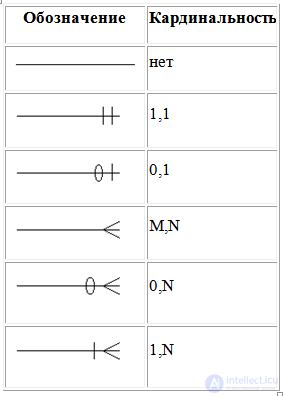
Relationships in Chen notation on an ER diagram (entity–relationship) are depicted as lines connecting entities; the shape of the line where it meets the entity determines the cardinality of the relationship:
The name of the relationship is written on the line that represents it. Example:
How are relationships organized?
Relationships are created using foreign keys.
A foreign key is an attribute or set of attributes that references the primary key or a unique key of another table. In other words, it's something like a pointer to a row in another table.
Types of relationships
Relationships are divided into:
- Many-to-many.
- One-to-many.
- with a mandatory relationship;
- with an optional relationship;
- One-to-one.
- with a mandatory relationship;
- with an optional relationship;
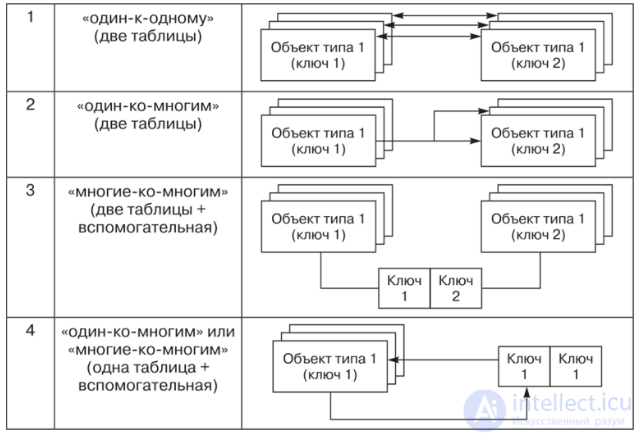
Fig. 1 Types of relationships in a database
Let's look at each of them in detail.
Many-to-many relationship
Suppose we need to build a database that stores employees of an IT company. There's a standard set of job positions. Additionally:
- An employee can hold one or more positions. For example, a given employee could be both an admin and a programmer.
- A position can "own" one or more employees. For example, admins are a certain set of employees. In other words, several employees belong to the admin group.
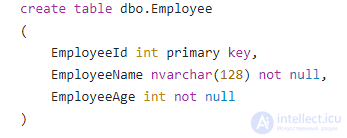
Employees are represented by the "Employee" table (id, name, age), and positions are represented by the "Position" table (id and position title). As you can see, these two tables are related to each other by a many-to-many rule: each employee corresponds to one or more positions (many positions), and each position corresponds to one or more employees (many employees).
How do you build such tables?
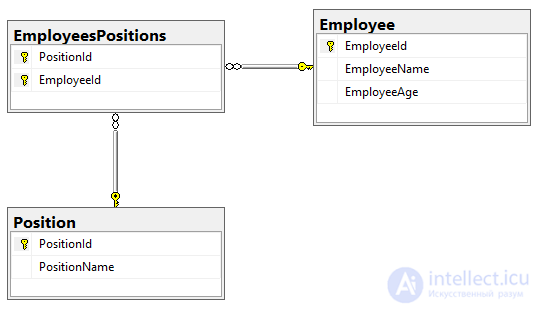
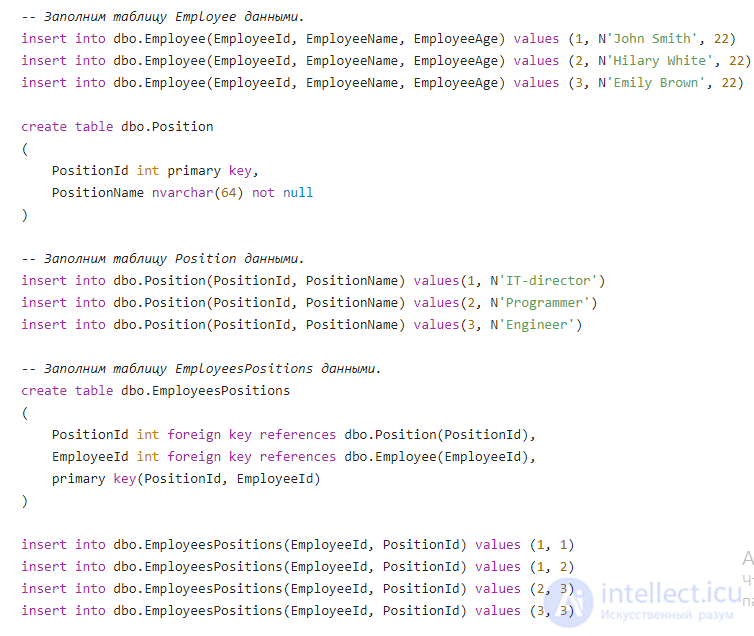
We already have two tables describing the employee and the job. Now we need to establish a many-to-many relationship between them. To implement such a relationship we need some intermediary between the "Employee" and "Position" tables. In our case, this will be a table called "EmployeesPositions" (employees and positions). This junction table links an employee and a position as follows:
On the left are the employees (their ids), on the right are the positions (their ids). Employees and positions in this table are represented by their ids.
We can look at this table from two perspectives:
- We can say that the employee with id 1 holds the position with id 1. Notice here that the employee with id 1 has two positions: 1 and 2. That is, each employee on the left corresponds to some position on the right.
- We can also say that the position with id 3 belongs to the users with id 2 and 3. That is, each role on the right belongs to some employee on the left.
Implementation
Explanation
Using a foreign key constraint, we can reference the primary key or a unique key of another table. In this example we:
- reference the PositionId attribute of the EmployeesPositions table to the PositionId attribute of the Position table;
- reference the EmployeeId attribute of the EmployeesPositions table to the EmployeeId attribute of the Employee table;
Conclusion
To implement a many-to-many relationship we need an intermediary between the two tables in question. It must store two foreign keys, the first referencing the first table and the second referencing the second table.
One-to-many relationship
This is the most common relationship between database tables. We're looking at it after the many-to-many relationship for comparison.
Suppose we need to implement a database that keeps track of user data. A user has: a first name, a last name, an age, and phone numbers. Each user can have one or more phone numbers (many phone numbers).
In this case we observe the following: a user can have many phone numbers, but we cannot say that a phone number belongs to some particular user.
In other words, a phone number belongs to only one user. And a user can own 1 or more phones (many).
As we can see, this is a one-to-many relationship.
How do you build such tables?
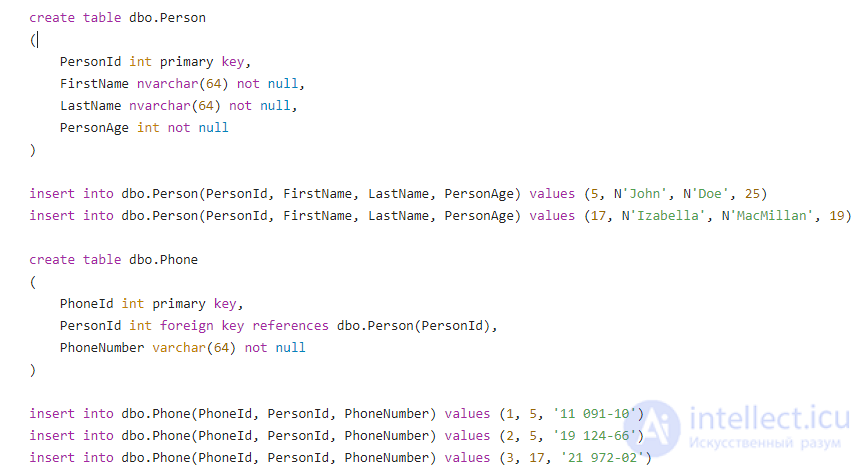
Users will be represented by a "Person" table (id, first name, last name, age), and phone numbers will be represented by a "Phone" table. It will look like this:
This table represents three phone numbers. The phone numbers with id 1 and 2 belong to the user with id 5. The number with id 3 belongs to the user with id 17.
Note. If the "Phones" table had more attributes, we would simply add them to this table.
Why don't we use a junction table here?
A junction table is only needed when we have a many-to-many relationship, for the simple reason that we can view it from both sides. Take, for example, the EmployeesPositions table we looked at earlier:
- Each employee has several positions (many).
- Each position has several employees (many).
But in our current case we cannot say that each phone number belongs to several users — a phone number can belong to only one user.
Now go back and reread the note at the end of section 5.1 — it should make more sense to you now.
Implementation
Explanation
Our Phone table stores just a single foreign key. It references a particular user (a row in the Person table). In effect, we're saying: "this user is the owner of this phone." In other words, the phone knows the id of its owner.
One-to-one relationship
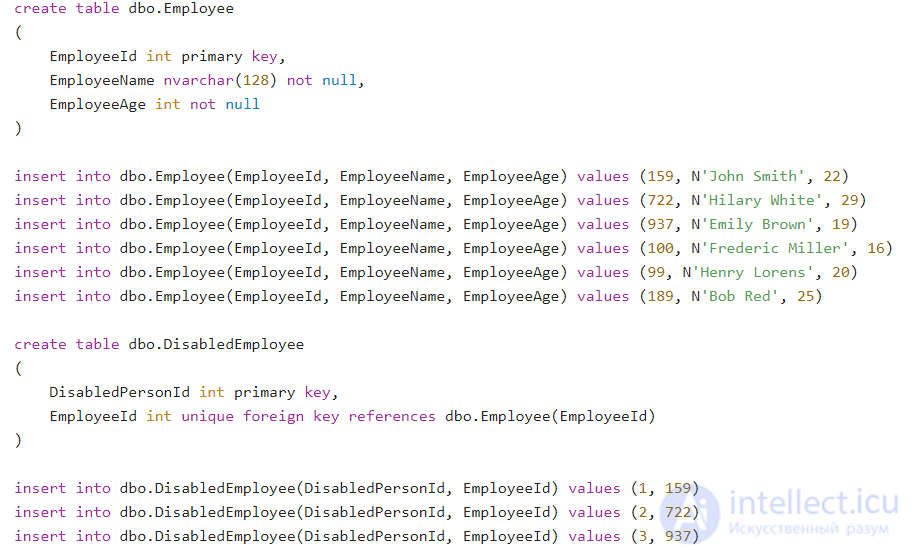
Imagine you were given a task at work to build a database to keep track of all employees for HR. Your boss assured you that the company only needed to know an employee's name, age, and phone number. You built such a database and put all 1000 of the company's employees into it. Then the boss says that, for some reason, they need to know whether an employee has a disability or not. The simplest thing that comes to mind is to add a new bool-type column to your table. But it would take too long to fill in 1000 values, and true would be entered far less often than false (say, 2% would be true).
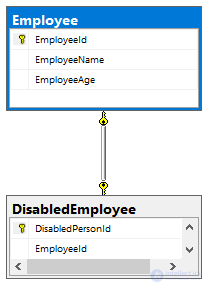
A simpler solution is to create a new table; let's call it "DisabledEmployee". It would look like this:
| DisabledPersonId |
EmployeeId |
| 1 |
159 |
| 2 |
722 |
| 3 |
937 |
But this still isn't a one-to-one relationship. The problem is that an employee could be entered into this table more than once, which gives us a one-to-many relationship: an employee could be marked as disabled several times. We need to make sure an employee can only be entered into the table once, and thus can only be marked as disabled once. To do this we need to specify that the EmployeeId column can only store unique values. We simply need to put a unique constraint on the EmloyeeId column. This constraint states that the attribute can take only unique values.
Having done this, we get a one-to-one relationship.
Note. Note that we could also have put a primary key constraint on the EmloyeeId attribute. It differs from a unique constraint only in that it cannot take null values.
Conclusion
You could say that a one-to-one relationship is a matter of splitting one table into two.
Implementation
Explanation
The DisabledEmployee table has an EmployeeId attribute, which is a foreign key. It references the EmployeeId attribute of the Employee table. In addition, this attribute has a unique constraint, meaning only unique values can be written to it. Accordingly, an employee can be entered into this table no more than once.
Mandatory and optional relationships
Relationships can be divided into mandatory and optional.
One-to-many
- One-to-many with a mandatory relationship:
Many soldiers belong to a single regiment. A single soldier belongs to only one regiment. Notice that every soldier necessarily belongs to a regiment, while a regiment cannot exist without soldiers.
- One-to-many with an optional relationship:
All people live on planet Earth. Each person lives only on Earth. At the same time, the planet could exist without humanity. Accordingly, our presence on Earth is not mandatory.
The same relationship can be viewed as either mandatory or optional. Consider this example:
One biological mother can have many children. A child has only one biological mother.
A) A woman doesn't necessarily have children of her own. Accordingly, the relationship is optional.
B) A child necessarily has exactly one biological mother – in this case, the relationship is mandatory.
One-to-one
- One-to-one with a mandatory relationship:
A citizen of a given country necessarily has exactly one passport of that country. A single passport has only one owner.
- One-to-one with an optional relationship:
A country can have only one constitution. A single constitution belongs to only one country. But a constitution is not mandatory. A country may or may not have one, as is the case, for example, with Israel and the United Kingdom.
The same relationship can be viewed as either mandatory or optional:
A person can have only one international passport. An international passport has only one owner.
A) Having an international passport is optional – a citizen may not have one at all. This is an optional relationship.
B) An international passport necessarily has exactly one owner. In this case, it is a mandatory relationship.
Many-to-many
Any many-to-many relationship is optional. For example:
A person can invest in the shares of different companies (many). The investors in a given company are certain people (many).
A) A person might not invest their money in shares at all.
B) A company's shares might not be bought by anyone.
How do you read, understand, and build ER diagrams?
Above I showed diagrams of the tables we created. But to understand them, you need to know how to "read" them. Let's work through this using the diagram from section 5.3.
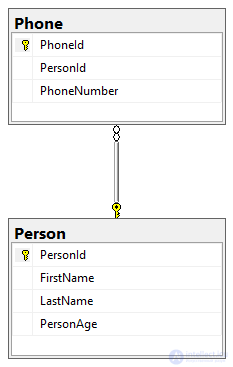 We see a one-to-many relationship. One person owns many phones.
- Next to the Person table there is a golden key. It stands for the word "one".
- Next to the Phone table there is an infinity symbol. It stands for the word "many".
Summary
- Relationships come in the following types:
- Many-to-many.
- One-to-many.
1) with a mandatory relationship;
2) with an optional relationship.
- One-to-one.
1) with a mandatory relationship;
2) with an optional relationship.
- Relationships are organized using foreign keys.
- A foreign key is an attribute or set of attributes that references the primary key or a unique key of another table. In other words, it's something like a pointer to a row in another table.
How can you apply this knowledge?
- The process of designing databases will become easier and clearer for you.
- Understanding relationships between tables will help you more easily grasp normalization, which is very important when designing a database.
- Making sense of someone else's database will be much easier.
- This will be a great plus at a job interview.
Exercises
To help you absorb the material better, I suggest solving the following exercises:
- Design a movie table: id, title, duration, director, movie genre. Note that a movie can have more than one genre, and a single genre can apply to more than one movie.
- Design a song table: id, title, duration, performer. Here, a song can have more than one performer, and a performer may have recorded more than one song.
- Implement a car table: model, manufacturer, color, price
- Design a separate manufacturer table: id, name, rating.
- Design a separate colors table: id, name.
A single car has only one manufacturer, while a manufacturer has many cars. A single car can have many colors, and a single color can apply to many cars.
- Add a table of employees subject to military service to the database from section 6.2, similar to how we designed the separate DisabledEmployee table.



Comments