To develop a Use Case, several sequential steps must be completed to help identify and describe user interaction with the system to achieve their goals. Here are the main steps:
1. Identifying actors (defining roles):
- Identify all external users (actors) who will interact with the system. These can be either people or other systems or devices.
- Questions for analysis:
- Who will use the system?
- What other systems interact with this system?
- What roles can users perform?
2. Defining the actors' goals and objectives:
- Find out what tasks or goals the actors want to achieve when interacting with the system. Each actor may have several goals.
- Questions for analysis:
- What does the actor want to get from the system?
- What actions must the actor perform to achieve their goal?
3. Formulating use cases:
- Create a separate Use Case for each of the actor's goals. Specify which actor performs the actions and what exactly happens.
- Use Case structure:
- The name of the use case.
- The actors involved in the scenario.
- The main goal or outcome of the use case.
4. Defining preconditions and postconditions:
- Determine what conditions must be met before the scenario begins (preconditions) and what the state of the system should be after it is completed (postconditions).
- Questions for analysis:
- What actions or states are necessary to start the scenario?
- What should change in the system after the scenario is completed?
5. Creating the Basic Flow:
- Describe the sequence of steps performed in the normal scenario, when everything goes according to plan and without errors. Include all actor actions and system responses.
- Questions for analysis:
- What sequence of actions does the actor perform to achieve the goal?
- How should the system respond to each action of the actor?
6. Developing Alternative and Exception Flows:
- Describe all possible deviations from the main scenario that may occur under various conditions, as well as errors and exceptional situations.
- Questions for analysis:
- What alternative actions can the actor take?
- What errors can occur during the execution of the scenario?
- How should the system respond to each of these situations?
7. Identifying variations and extensions:
- If there are additional functions or extended scenarios related to the main use case, add them in the form of extensions or nested Use Cases.
- Example: «Placing an order» may include the extension «Applying a discount» or «Checking product availability».
8. Verification and approval:
- Verify the developed Use Case with stakeholders to make sure it accurately reflects their expectations and business requirements. This is an important step for identifying possible inaccuracies or incomplete descriptions.
- Questions for analysis:
- Does the scenario fully cover all the necessary actions and goals?
- Do the stakeholders understand the described scenarios and agree with them?
9. Documenting the Use Case:
- Document all elements of the Use Case, including the name, actors, goal, preconditions and postconditions, basic flow, and alternative and exception scenarios. This will help create clear and structured documentation.
10. Analysis and refinement:
- Review the developed use cases for compliance with business requirements and technical capabilities. Make adjustments as needed, clarifying details and adding new scenarios if necessary.
Example of a simple Use Case:
Name: New user registration
-
Actor: Guest (unauthenticated user)
-
Goal: Create an account on the website
-
Precondition: The user is on the registration page.
-
Basic flow:
- The guest clicks the «Register» button.
- The system displays a form for entering data (name, email address, password).
- The guest enters the necessary data and clicks the «Create account» button.
- The system checks the correctness of the entered data and creates the account.
- The system sends a confirmation to the specified email address.
- The guest receives a message about successful registration and the need to confirm the account.
-
Alternative flow:
- 4a. If the data is entered incorrectly, the system displays an error message and prompts the user to correct the data.
-
Exception flow:
- 4b. If the email address is already registered, the system offers to log in or recover the password.
By following these steps, you can create high-quality and detailed Use Cases that will help all project participants better understand the requirements and expectations for the system.
7 — What is Scope creep (the expansion or «creep» of project boundaries) and how to avoid it?
Scope creep (the expansion or «creep» of project boundaries) — is the uncontrolled expansion of the scope of work or functionality of a project without corresponding changes to timelines, budget, and resources. This phenomenon often occurs when new tasks, functions, or changes are added to the project at any stage of its execution, which can lead to budget overruns, missed deadlines, and reduced quality of the final product.
Causes of Scope creep:
- Undefined or incomplete requirements: When project requirements are not properly documented and agreed upon, there is a high probability of new or changed requirements arising during the work.
- Lack of change control: If a project lacks a clear change management process, any proposals can be added without analyzing their impact on the project.
- Poor communication: Insufficient interaction between the project team and stakeholders can lead to misunderstandings and the addition of new tasks.
- Changing stakeholder priorities: If the priorities of customers or other stakeholders change during the project, they may request additional functions or tasks.
- Perfectionism or the desire to improve the product: The team or customer may seek to include additional functions or improvements that were not originally planned.
Ways to prevent Scope creep:
-
Clear definition of requirements and project scope:
- At the initial stage of the project, it is necessary to clearly define and document all requirements, goals, and project boundaries. The «Terms of Reference» or «Requirements Specification» (SRS) documents must be detailed and agreed upon by all project participants.
-
Requirements Management:
- Use requirements management methods and tools, such as a requirements traceability matrix, to track the compliance of all new changes with the originally established requirements and business goals.
-
Change Control Process:
- Implement a formal change management process. Any new change or addition must be formally proposed, reviewed, and approved by the project management team and stakeholders. Determine how each change will affect the project's timelines, budget, and resources.
-
Planning buffers for changes:
- Provide reserves of time and budget for possible changes. This will allow flexible response to adjustments without missing deadlines or exceeding the budget.
-
Prioritizing and agreeing on changes:
- Agree on each change with the customer and determine its priority. Make sure all project participants understand the impact of this change on the project.
-
Regular meetings and reports:
- Hold regular meetings with the team and stakeholders to discuss progress and changes. Regular reports and status updates will help control the situation and avoid surprises.
-
Using Agile methods:
- Implementing Agile methodologies (such as Scrum or Kanban) allows for more flexible response to changes, structuring them, and managing them at the level of short iterations (sprints), without exceeding the main scope of the project.
-
Team training and awareness:
- Train team members and stakeholders about the consequences of uncontrolled scope expansion. All participants must understand the importance of adhering to the established scope and follow established change management processes.
Example:
Suppose that in a website development project, an initial version of the requirements was approved, including the development of the main pages, such as the home page, contact information, and product pages. During the work, the customer proposes adding online chat functionality and a product recommendation system. If these proposals are not properly analyzed and agreed upon with the team, they could lead to Scope creep, increasing the volume of work and the project's execution time.
To prevent Scope creep, it is important to remember that any change must be carefully weighed and agreed upon. Implementing a change management system and continuously monitoring the fulfillment of requirements will help keep the project within the established boundaries.
8 . What is a BRD? How does it differ from an SRS?
BRD (Business Requirements Document) and SRS (Software Requirements Specification) — are two different types of documents used in the software development process that describe project requirements. They serve different purposes and contain different information.
What is a BRD?
BRD (Business Requirements Document) — is a document that describes the business requirements of a project. Its main purpose — is to capture what the business wants to achieve as a result of implementing the project. A BRD describes what problems or opportunities exist in the business and how the planned system or solution will help solve them.
Key elements of a BRD:
- Project goals and objectives:
- Why was the project initiated? What problems or opportunities are being addressed?
- Overview of the current situation:
- A description of the current state of the business processes related to the project.
- Scope:
- A clear definition of the project's boundaries and what is included and what is excluded.
- Business requirements:
- A description of high-level requirements and desired outcomes. For example, «Increase the number of processed orders by 30%».
- User requirements:
- Requirements for the user experience and actions, their needs, and goals.
- Key business processes:
- A description of current and future business processes that should be supported by the system.
- Success criteria:
- Metrics and key results that will be used to assess the success of the project.
- Constraints and assumptions:
- A description of all known constraints and assumptions affecting the project.
What is an SRS?
SRS (Software Requirements Specification) — is a document that details the requirements for software. It is used to describe the functional and non-functional requirements of the system and serves as the basis for developing, testing, and supporting software.
Key elements of an SRS:
- Introduction:
- A general description of the document, including its goals and scope.
- General description of the system:
- A description of the system, its main functions, and interaction with external systems.
- Functional requirements:
- A detailed description of all the functions the system must perform and the conditions for their execution.
- Non-functional requirements:
- A description of the system's characteristics, such as performance, security, scalability, usability, and other parameters.
- User and system interfaces:
- A description of the user's interaction with the system, including interfaces, screens, and sequences of actions.
- External interfaces:
- A description of the system's interactions with other systems, platforms, or equipment.
- System constraints:
- Technical, legal, or other constraints that may affect development.
Main differences between BRD and SRS:
-
Purpose and content:
- BRD: Describes what the business needs and why. Focused on business goals and problem-solving, does not detail specific technical aspects.
- SRS: Describes how the system should be implemented from a software perspective. Contains a detailed description of functional and non-functional requirements.
-
Audience:
- BRD: Aimed at business customers, stakeholders, project managers, and analysts. Used to align project goals and objectives.
- SRS: Aimed at developers, testers, and technical specialists. Used for creating and testing software.
-
Level of detail:
- BRD: Contains a high-level description of requirements, does not include detailed technical details.
- SRS: Includes detailed technical descriptions of all system functions and features.
-
Focus:
- BRD: Focuses on how the project will benefit the business and users.
- SRS: Focuses on the technical implementation of the system and describing how it should function.
Example:
- BRD:
- Business requirement: «The platform must allow users to register and manage their orders through a personal account».
- SRS:
- Functional requirement: «The system must provide a registration form that includes fields for entering first name, last name, email address, and password. After successful registration, the user must be given access to a personal account with the ability to view and edit personal data and order history».
Both documents are important for the successful implementation of a project, but they are used at different stages and by different project participants.
9. What is Gap Analysis?
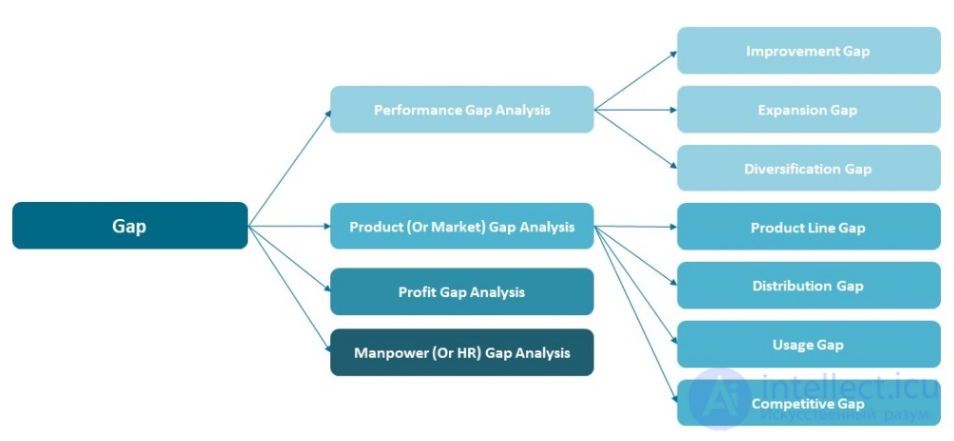
Gap Analysis — is an analytical method used to identify the difference («gap») between the current state of a system, process, or organization and the desired future state. This analysis helps determine what steps need to be taken to achieve goals, and is used for planning changes and improvements.
Goals and objectives of Gap Analysis:
- Determine the current situation: Understand how existing processes work, what functions the system performs, or what state the organization is currently in.
- Determine the target state: Determine the desired outcomes to be achieved in the future, including requirements, standards, or performance indicators.
- Identify the gap: Find the differences between the current and target state, identify gaps, discrepancies, and areas requiring change.
- Develop an action plan: Based on the identified gaps, develop a plan to eliminate problems and achieve target indicators.
Main stages of Gap Analysis:
-
Defining the current state (As-Is):
- A description of the current processes, systems, structure, or state of the organization. Data collection and analysis are used for this stage, such as performance indicators, current procedures, systems, and technologies.
-
Defining the target state (To-Be):
- Determining what the state of processes, systems, or the organization should be after implementing changes. This may include new goals, indicators, standards, or functions.
-
Gap Identification:
- Determining and documenting the difference between the current and target state. This could be a gap in skills, a lack of technology, imperfect processes, or a lack of necessary resources.
-
Analyzing the causes of the gap:
- Determining the reasons why this gap exists. These could be resource problems, management process shortcomings, technological constraints, or lack of qualification.
-
Developing a gap elimination plan (Action Plan):
- Developing an action plan that includes specific steps to eliminate the identified gaps. The plan should include priorities, timelines, responsible persons, and necessary resources.
-
Implementation and monitoring:
- Implementing the action plan and continuously monitoring progress to evaluate the effectiveness of the implemented changes and achievement of the target state.
Example of Gap Analysis:
Suppose a company wants to implement a new CRM system to improve customer service.
-
Current state (As-Is):
- An outdated system is used, in which it is impossible to track interactions with customers. Data is stored in disparate spreadsheets, which leads to a low level of customer service and customer dissatisfaction.
-
Target state (To-Be):
- A modern CRM system has been implemented, allowing tracking of the history of customer interactions, automating tasks, and providing personalized service.
-
Gap:
- There is no unified system for storing and analyzing customer data.
- Insufficient automation of customer interaction processes.
- Low level of integration between departments.
-
Causes of the gap:
- Lack of a modern CRM system.
- Lack of employee skills in using such systems.
- Lack of a strategic approach to managing customer data.
-
Action plan:
- Implementation of a new CRM system.
- Training employees to work with the system.
- Reorganizing customer interaction processes and integrating data between departments.
-
Implementation and monitoring:
- Evaluating the effectiveness of the new CRM system based on customer satisfaction indicators and request processing time.
Applications of Gap Analysis:
- In business: To identify areas for improvement in products, services, or operational processes.
- In IT: To assess the current and future state of information systems and technological infrastructure.
- In project management: To identify differences between planned and actual project results.
- In HR: To analyze gaps in employees' skills and qualifications compared to required competencies.
Gap Analysis — is a powerful tool that helps understand where an organization or system currently stands, where it needs to move, and what steps are necessary to achieve the desired results.
10. What is requirements prioritization? What methods are used to prioritize requirements?
Requirements prioritization — is the process of determining the relative importance and significance of various project requirements in order to determine which of them should be implemented first. This process helps manage limited resources and time, focus on the most critical functions, and avoid overloading the development team.
Why is requirements prioritization needed?
- Resource optimization: Limited resources, such as time, money, and specialists, can be directed to the most important tasks.
- Risk reduction: Focusing on key functions allows for faster identification and elimination of possible risks and problems.
- Managing stakeholder expectations: Ensuring the implementation of the greatest business value in the early stages of the project helps improve customer satisfaction.
- Flexibility and adaptability: When external conditions change, priorities can be quickly adapted to meet new needs or constraints.
Main methods of requirements prioritization:
-
MoSCoW Method:
- M (Must have): Critically important requirements that must be met, otherwise the project will not be considered successful.
- S (Should have): Important requirements that have high value but can be implemented later or partially if resources are insufficient.
- C (Could have): Requirements that are desirable to implement, but are not critical and can be excluded without serious damage to the project.
- W (Won’t have): Requirements that will not be implemented in the current project, but may be considered in the future.
Advantages: Simple to use, suitable for small projects or when agreeing on requirements with customers.
-
Pairwise Comparison:
- Each requirement is compared with every other requirement in terms of importance. A matrix is used for this, where requirements are ranked by degree of preference relative to each other.
- For example, if requirement A is more important than requirement B, it receives a higher value.
Advantages: Gives a clear understanding of priorities between requirements, especially in complex projects.
-
100-Point Method:
- Each stakeholder is given 100 points, which they can distribute among the requirements depending on their importance. The total score for each requirement allows its priority to be determined.
Advantages: Involves all stakeholders, takes different points of view into account, and provides a democratic approach to prioritization.
-
Cost-Benefit Analysis:
- Each requirement is assessed in terms of expected benefit (business value) and the cost of its implementation. Priority is given to requirements with high benefit and low cost.
Advantages: Helps find a balance between value and cost, allows priorities to be justified in terms of economic efficiency.
-
Kano Method:
- Requirements are classified into five categories:
- Basic Needs: Essential functions without which the system will be unusable.
- Performance Needs: Functions that directly affect user satisfaction.
- Excitement Needs: Unexpected features that pleasantly surprise users.
- Indifferent: Requirements that do not affect satisfaction.
- Reverse: Features that may cause dissatisfaction if present.
Advantages: Helps understand which requirements are really important to users and which can create a wow effect.
-
Eisenhower Prioritization Model:
- All requirements are distributed into four categories based on importance and urgency:
- Important and urgent: Completed first.
- Important but not urgent: Planned for later completion.
- Not important but urgent: Delegated or completed if time remains.
- Not important and not urgent: Dropped or left for later.
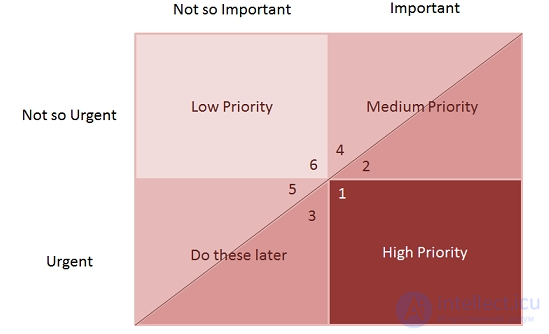
Advantages: Suitable for distributing tasks when quick priority decisions are needed.
-
Risk-Based Prioritization:
- Requirements are assessed in terms of risk to the project if they are absent or executed incorrectly. Riskier requirements receive higher priority to prevent serious consequences.
Advantages: Helps minimize risks in the early stages of the project.
Example of applying MoSCoW to a project:
Suppose you are working on developing a food delivery application. Requirements can be prioritized as follows:
- M (Must have): Ability to place and pay for orders online, delivery tracking.
- S (Should have): Ability to leave reviews and ratings, integration with a loyalty program.
- C (Could have): Multi-language support, integration with social networks.
- W (Won’t have): Support chat and functionality for organizing corporate orders (to be considered in the future).
Conclusion
The choice of prioritization method depends on the complexity of the project, the number of stakeholders, and the available resources. The main thing — is to ensure that all project participants understand the priorities and can rely on them when planning and developing.
11 — What is requirement elicitation?
Requirement elicitation — is the process of gathering, analyzing, and documenting the needs and expectations of all stakeholders in relation to a system, project, or product. The main goal of this method — is to determine what functions, characteristics, and constraints are necessary to achieve a successful project outcome.
Main goals of requirement elicitation:
- Understanding stakeholder needs: Gather information about what users and other stakeholders want and need.
- Establishing requirements: Clearly define and document the requirements that will serve as the basis for developing and testing the system.
- Reducing risk: Prevent misunderstandings and changes to requirements during development, which can lead to additional costs and delays.
- Ensuring satisfaction: Guarantee that the final product or system meets the expectations and needs of stakeholders.
Main methods of requirement elicitation:
-
Interviews:
- Conducting personal conversations or phone interviews with key stakeholders to gather information about their needs and expectations.
- Advantages: Allows for deep understanding of needs, obtaining clarifications, and building good relationships with customers.
- Disadvantages: Requires time, can be difficult to organize with a large number of stakeholders.
-
Surveys and questionnaires:
- Using structured surveys or questionnaires to gather information from a large number of stakeholders.
- Advantages: Effective for gathering information from a large number of people, allows quantitative analysis of responses.
- Disadvantages: Limited ability to clarify and detail responses, problems with interpreting data may arise.
-
Workshops:
- Organizing group meetings with participants, where requirements are discussed and defined in a collective work format.
- Advantages: Opportunity for stakeholders to discuss and agree on requirements in real time, identify needs through joint work.
- Disadvantages: Conflicts of interest may arise, effective group management is required.
-
Observation:
- Studying how users perform their tasks in the current system or process in order to identify requirements and problems.
- Advantages: Helps see real work processes and problems that may be missed during interviews.
- Disadvantages: Perception distortions and problems with interpreting observed behavior may arise.
-
Document analysis:
- Analyzing existing documents, such as reports, specifications, and user instructions, to understand current requirements and problems.
- Advantages: Allows the use of already available data and information, can help discover historical problems.
- Disadvantages: Documentation may be outdated or incomplete.
-
Prototyping:
- Creating preliminary versions of the system (prototypes) so that users can interact with them and provide feedback on requirements.
- Advantages: Allows visualization of requirements and obtaining feedback before full development begins.
- Disadvantages: False expectations about the prototype's functionality may arise.
-
Using scenarios (Use Cases):
- Describing scenarios of system usage that help understand user requirements and expectations.
- Advantages: Clearly defines how users will interact with the system.
- Disadvantages: Requires careful development, can be difficult to cover all scenarios.
-
Competitor and market analysis:
- Studying similar systems or products on the market to identify functions and features that may be useful.
- Advantages: Allows understanding of general trends and best practices in the industry.
- Disadvantages: Does not always reflect the specific needs of a particular client.
Example of the requirement elicitation process:
-
Preparation:
- Defining the goals and objectives of requirement elicitation.
- Choosing methods and tools for gathering information.
- Preparing questions and topics for discussion.
-
Gathering information:
- Conducting interviews, surveys, or workshops.
- Observing current processes or system usage.
-
Data analysis:
- Processing the collected information, identifying key requirements and problems.
- Documenting requirements and discussing them with participants.
-
Clarification and agreement:
- Holding additional meetings to clarify and agree on requirements.
- Discussing with key stakeholders to verify the correctness of the requirements.
-
Documentation:
- Creating final documentation with detailed requirements.
- Ensuring the documentation is accessible to all project participants.
Requirement elicitation — is a key stage in project management and product development, which allows understanding of exactly what needs to be implemented to satisfy the needs and expectations of all stakeholders.


Comments