
Lecture
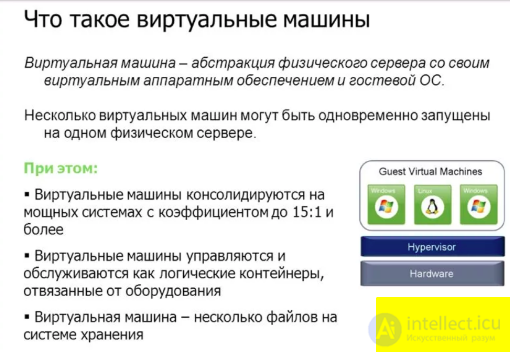
A virtual machine (VM) is software or a shell that emulates the operation of a physical machine (computer) in a virtual environment. Virtual machines are created to isolate and run applications or operating systems within them, which makes it possible to use a single physical machine to simultaneously perform several different tasks and run several different operating systems.
Main characteristics of virtual machines:
Isolation: Virtual machines are completely isolated from each other and from the host system (the physical machine). This means that applications and operating systems running inside a VM do not affect one another.
Support for different OSes: You can run different operating systems, such as Windows, Linux, macOS and others, on a single physical machine.
Portability: Virtual machines can easily be moved from one physical machine to another, which provides high portability of applications and environments.
Snapshots: Virtual machines allow you to create snapshots, which lets you save the current state of the virtual machine and restore it if needed.
Resource usage: Virtual machines share the resources of the physical machine, such as the processor, memory and storage, which makes hardware usage efficient.
A virtual machine (VM) — a software and/or hardware system that emulates a computer's hardware (the guest — guest platform) and executes programs for the guest platform on the host platform (host — the host platform), or that virtualizes some platform and creates on it environments that isolate programs and even operating systems from one another (see: sandbox); also a specification of some computing environment (for example: «the virtual machine of the C programming language»).
A virtual machine executes some machine-independent code (for example, byte-code, threaded code, p-code) or the machine code of a real processor. In addition to the processor, a VM can emulate the operation of individual hardware components as well as an entire real computer (including the BIOS, RAM, hard disk and other peripheral devices). In the latter case, operating systems can be installed on the virtual machine just as on a real computer (for example, Windows can be run in a virtual machine under Linux, or vice versa). Several virtual machines can run on a single computer (this can be used to simulate several servers on one real server in order to optimize the use of the server's resources).
The concept of a virtual machine as a set of resources that simulate the behavior of a real machine appeared in Cambridge in the late 1960s as an extension of the concept of virtual memory of the Manchester Atlas computer . Broadly speaking, within this concept a computational process is defined by the contents of the working memory space to which it has access. Provided that the specific situation in this working space matches what is expected, the process has no means of determining whether the resource presented to it is actually a physical resource of that type, or whether it is being simulated by the actions of other resources that produce equivalent changes in the contents of the process's working space.
For example, a process cannot determine whether it has exclusive use of the processor or is running in multiprogramming mode together with other processes. In a virtual machine, no process can have exclusive use of any resource, and all system resources are treated as potentially shared resources. In addition, the use of virtual machines provides decoupling between multiple users working within a single computing system, providing a certain level of data protection.
The idea of the virtual machine underlies a number of operating systems, in particular IBM VM/CMS (and its Soviet clone, SVM) and DEC VAX/VMS.
Virtual machines can be used for:
Some well-known virtual machines:
|
Programming language environments
|
Operating systems and hypervisors
|
Standalone computer emulators
|
Applications of virtual machines include testing and developing software, ensuring application isolation, creating test and virtual machine images, ensuring fault tolerance, and simplifying the management and maintenance of servers and computing resources. Virtualization also plays an important role in cloud computing

Comments