How to remove a hidden network adapter in Windows or fix the message "The IP address specified for this network adapter is already assigned to another adapter"

Practice


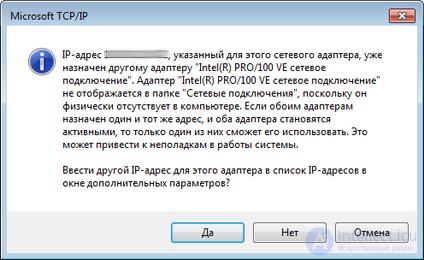
So, you replaced your network card, and now when you set a static network address you get a message like this:

The IP address XXX.XXX.XXX.XXX specified for this network adapter is already assigned to another adapter, adapter name. The adapter name is hidden from the Network Connections folder because it is either physically absent from the computer or is outdated and not working. If the same address is assigned to both devices, only one of them will be able to use it. This may cause problems with the operation of the system. Enter another IP address for this adapter in the list of IP addresses in the advanced settings window?


or

Unable to rename this connection. A connection with the specified name already exists. Enter another nameHow to remove a hidden network adapter in Windows or fix the message The IP address specified for this network adapter is already assigned to another adapter.


What to do - after all, the settings of the old network card are no longer accessible, and you can't remove its properties or rename it; Windows for some reason foolishly keeps these settings and just as foolishly won't let you simply change them.


I found one option for myself - delete the old network card from the device list. But here too a setback awaits us - Device Manager simply doesn't see it, even if you click on "View - Show hidden devices".


Solution.

1) Open the command prompt (Start - Run - CMD).

2) Enter:

C:\> set devmgr_show_nonpresent_devices=1
C:\> Start DEVMGMT.MSC


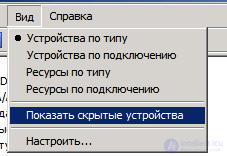
3) Device Manager will open. In it, click on "View" and then "Show hidden devices".
How to remove a hidden network adapter in Windows or fix the message The IP address specified for this network adapter is already assigned to another adapter
4) Expand the "Network adapters" list and find the greyed-out card - the disabled one.

5) Delete this device.

6) If it won't delete and complains that the device is in use during boot, then boldly change the driver of the non-existent network card to something completely unrelated and unsuitable, and then delete it.

Comments

User 03-04-2020
Спасибо!

To leave a comment

If you have any suggestion, idea, thanks or comment, feel free to write. We really value feedback and are glad to hear your opinion.
To reply

Lectures and tutorial on "Operating Systems and System Programming"

Terms: Operating Systems and System Programming